



The Pharmacy Stock Expiry Calendar in Excel is a macro-enabled workbook of 7 worksheets that turns one list of expiry-control activities into five linked calendar views – a printable year planner, a working month grid, a date-range day list, a monthly summary and the master Events table. It ships with 100 sample expiry-management events covering every month of 2026, from 06-Jan-2026 to 30-Dec-2026, across 7 pharmacy storage areas and 54 named activity types, so you can see exactly how the layout behaves before you type a row of your own. Pharmacy Stock Expiry Calendar in Excel
Read this first. This is a scheduling and record-keeping spreadsheet. It is not medical software, not pharmacy-compliance software and not a regulated system of record. It is not a batch or lot register: there is no batch-number, lot-number, per-item expiry-date, quantity, supplier or drug-code column anywhere in the file. It calculates no days-to-expiry countdown, raises no automatic near-expiry flag, sends no alerts or reminders and connects to no dispensing, ERP or wholesaler system. It carries no GDP, GMP, HIPAA, GDPR or any other regulatory certification, it has no access control, no encryption and no audit trail, and it does not replace your statutory controlled-drugs register or your destruction records. What it does is put the schedule of expiry checks, near-expiry reviews, quarantine transfers, returns windows and destruction dates on a calendar everyone can see and print. Pharmacy Stock Expiry Calendar in Excel
🔑 Key Features of the Pharmacy Stock Expiry Calendar in Excel
- 7 worksheets: Home, Annual View, Monthly View, Daily View, This Month, Events and Setting.
- One master table drives every view. The Events sheet holds 7 columns – ID, Date, Day, Event Name, Time, Location and Description – and all four calendar views read from it, so an expiry check entered once appears everywhere.
- Exactly 100 sample expiry events across a full year, from a FEFO Shelf Audit on 06-Jan-2026 to the Year-End Expired Stock Write-Off Closing on 30-Dec-2026, with entries in all twelve months (8, 8, 9, 8, 8, 9, 8, 8, 9, 8, 8 and 9 per month).
- 7 pharmacy storage areas already set up: Main Store (18 events), IPD Pharmacy (16), Quarantine Bay (16), OPD Dispensary (13), Bulk Warehouse (13), Cold Chain Room (12) and Narcotics Cabinet (12).
- A complete FEFO control cycle modelled out: First-Expiry-First-Out shelf audits, 90-day and 60-day near-expiry reviews, the 30-day quarantine transfer, the batch expiry deadline itself, the returns-to-supplier dispatch window and the supplier credit-note cut-off.
- 12 drug categories carried through the review cycle: Antibiotics, Analgesics, Paediatric Syrups, Dermatology Creams, Cardiac Drugs, Antivirals, Antidiabetics, Oncology Drugs, Ophthalmic Drops, IV Fluids, Injectables and Respiratory Inhalers.
- Controlled-substance and destruction milestones scheduled, not just stock ones: a dual-signature Controlled Substance Expiry Stock Count in the Narcotics Cabinet, Expired Stock Destruction and Documentation, Quarterly Physical Verification for Q1 and Q2, and the Financial Year-End Closing Stock and Expiry Certification.
- Seasonal checks included: a Summer Cold Chain Load Test and Vaccine Expiry Audit, a Monsoon Humidity and Packaging Integrity Check, a Festival Season Stock Rotation and Expiry Recheck and an Influenza Vaccine Batch Expiry Review.
- 9 fixed clock times – 09:30, 10:00, 10:30, 11:00, 12:00, 14:00, 15:00, 16:00 and 17:00 – so audits land in predictable slots rather than “sometime that day”.
- A 6-field pop-up entry form that captures Date, Event Name, Time, Location and Description and fills the Day field automatically from the date you pick, with a calendar picker on the date box and a clock picker on the time box.
- Add, Update and Delete controls on the Events sheet, Add New Event and Show Events buttons on the Monthly View, and an Add New Event button plus a refresh control on the Daily View.
- 5 one-click colour themes – Default, Blue, Red, Black and Orange – repaint the whole workbook from the Setting sheet. The file ships on Orange.
- Configurable calendar rules: set the year (a 2021-2051 list), the month the calendar starts with, the day the week starts on, two highlighted weekday columns and whether event days are highlighted.
- No patient, customer, prescriber or staff identifier anywhere in the file. All 100 sample rows are written around the activity, the storage area and the drug category – never a person and never an individual prescription.
- Macros required. Microsoft Excel for Windows, desktop only.
📦 What is Inside the Pharmacy Stock Expiry Calendar in Excel
Page 1: Home – Navigation
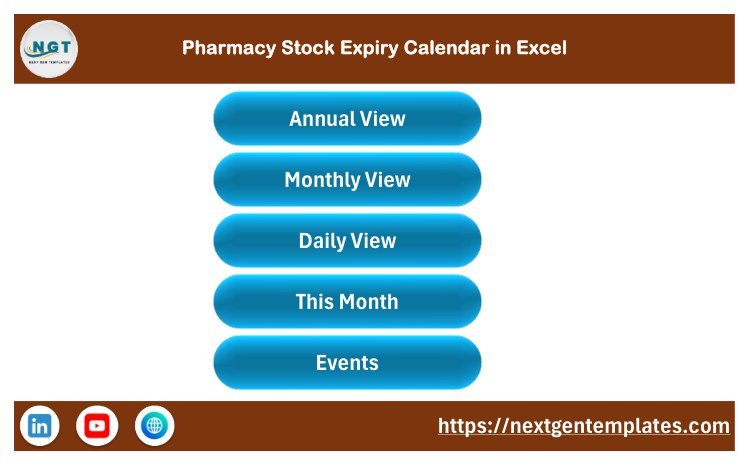
A branded landing page with five buttons – Annual View, Monthly View, Daily View, This Month and Events – so anyone at the counter can move around the workbook without knowing Excel. The footer carries the NextGenTemplates link and social icons.
Page 2: Annual View
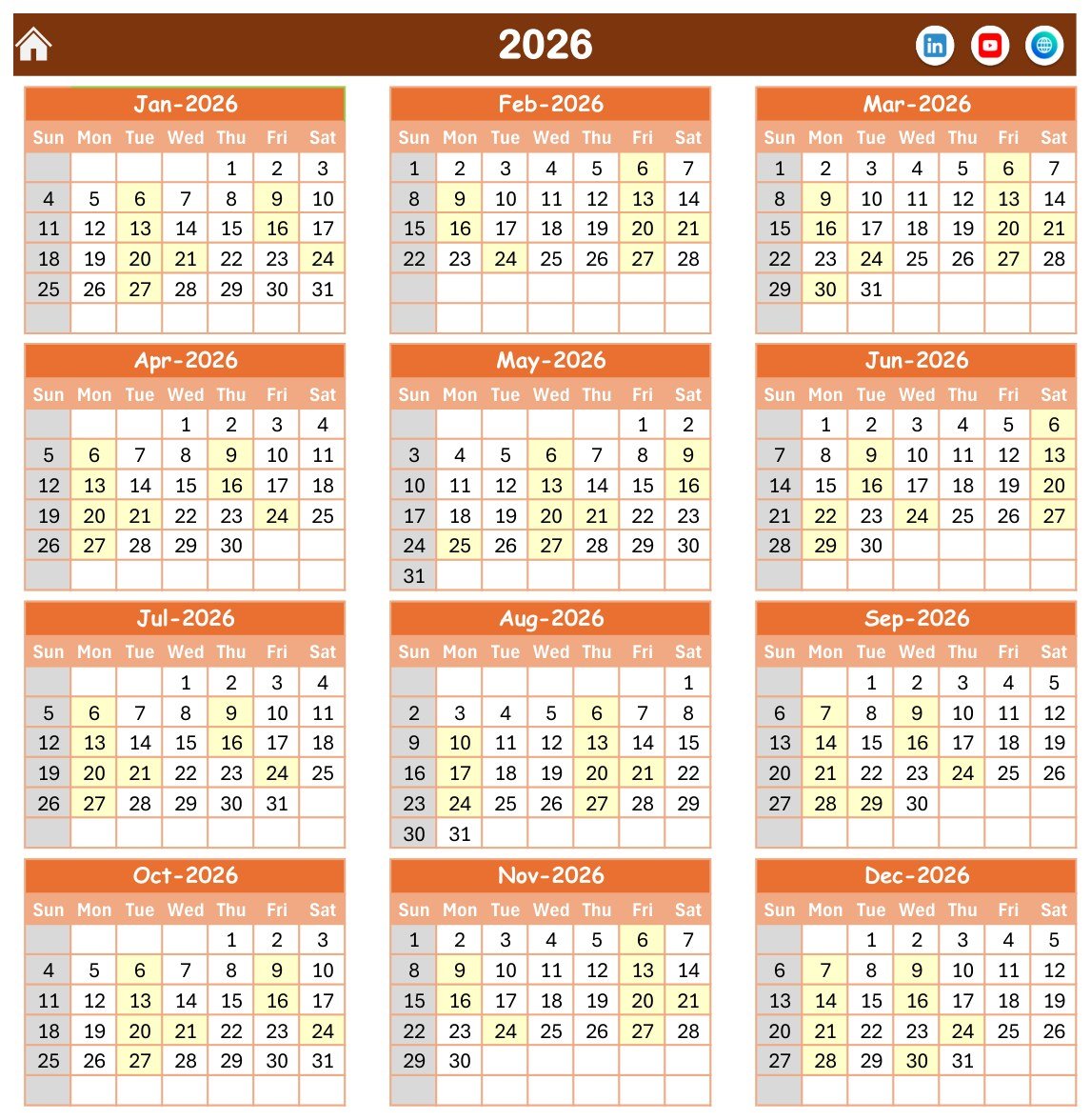
All twelve months of the chosen year on a single page in a three-across, four-down grid, with every day that carries a scheduled expiry activity shaded so the year’s coverage reads at a glance. Sundays are greyed and the two weekday columns you nominate on the Setting sheet are highlighted. This is the sheet you print for the dispensary noticeboard.
Page 3: Monthly View
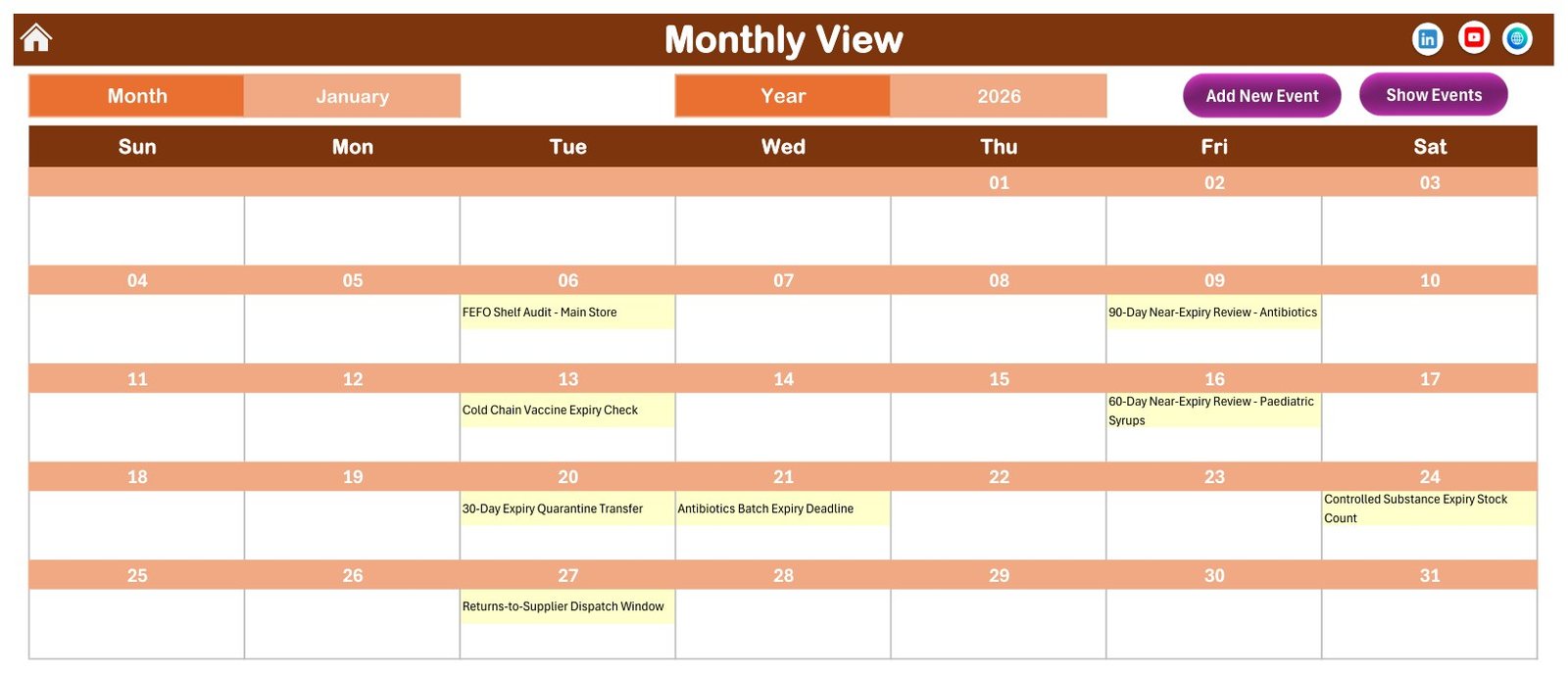
The working grid. Pick a month and a year from the two drop-downs and the month redraws with each activity printed inside its own date cell – so January 2026 shows the 06-Jan FEFO Shelf Audit in the Main Store, the 09-Jan 90-Day Near-Expiry Review for Antibiotics, the 13-Jan Cold Chain Vaccine Expiry Check, the 16-Jan 60-Day Near-Expiry Review for Paediatric Syrups, the 20-Jan 30-Day Expiry Quarantine Transfer, the 21-Jan Antibiotics Batch Expiry Deadline, the 24-Jan Controlled Substance Expiry Stock Count and the 27-Jan Returns-to-Supplier Dispatch Window. Add New Event and Show Events buttons sit above the grid.
Page 4: Daily View
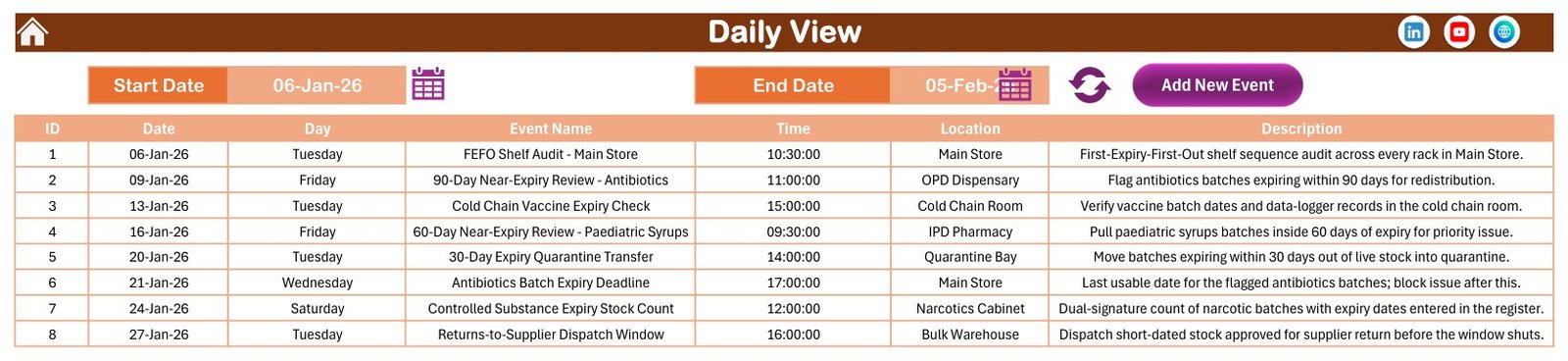
Set a Start Date and an End Date and the sheet lists every activity in that window as a clean table – ID, Date, Day, Event Name, Time, Location and Description. The sample screenshot runs 06-Jan-26 to 05-Feb-26 and returns the eight January activities in order, each with its storage area and a one-line instruction such as “Move batches expiring within 30 days out of live stock into quarantine.” This is the print-out for the day’s or the week’s stock walk.
Page 5: This Month Summary
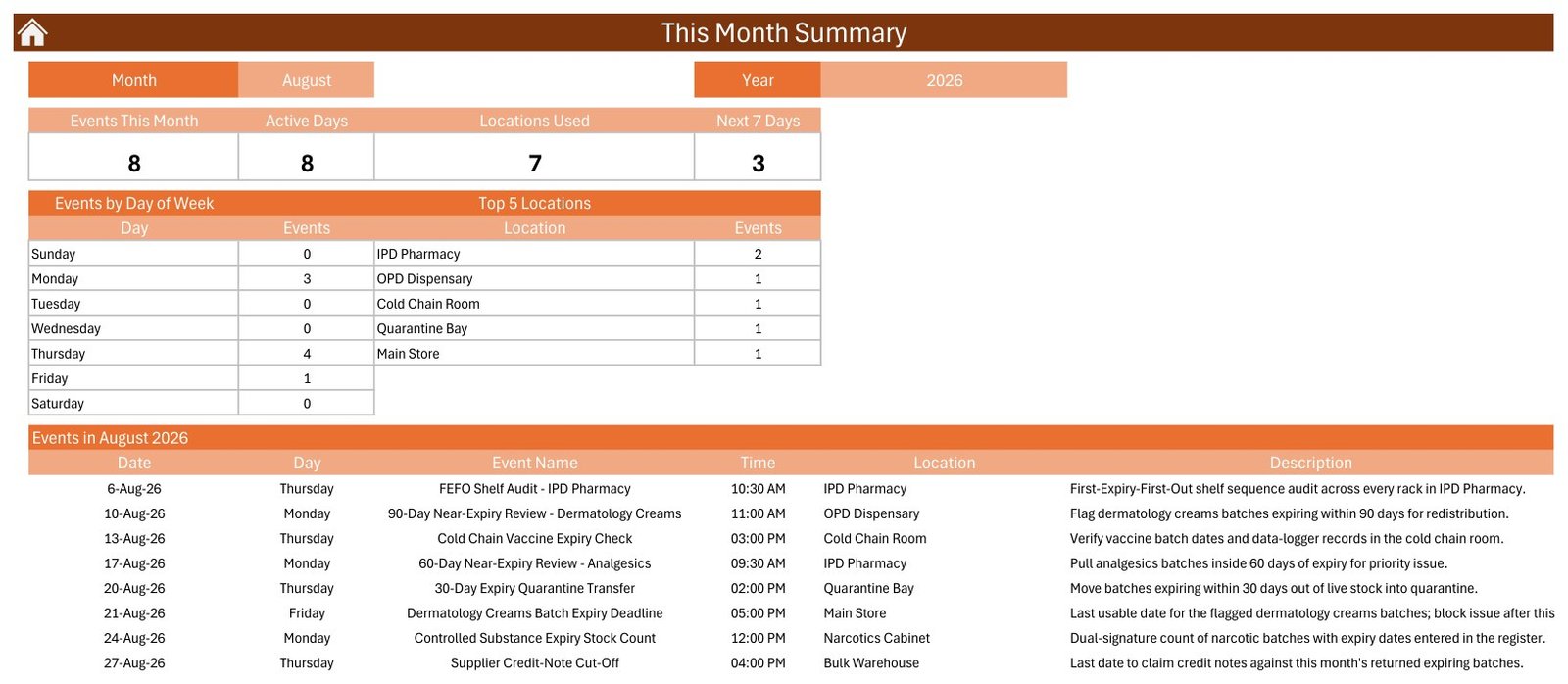
Choose a month and a year and the sheet counts four figures – Events This Month, Active Days, Locations Used and Next 7 Days – then breaks the month down by day of week and by storage area, and prints the full month list underneath. For August 2026 it reports 8 events on 8 active days across 7 locations with 3 in the next seven days, and shows the month running from the 06-Aug FEFO Shelf Audit in the IPD Pharmacy to the 27-Aug Supplier Credit-Note Cut-Off in the Bulk Warehouse.
Page 6: Events – the master table
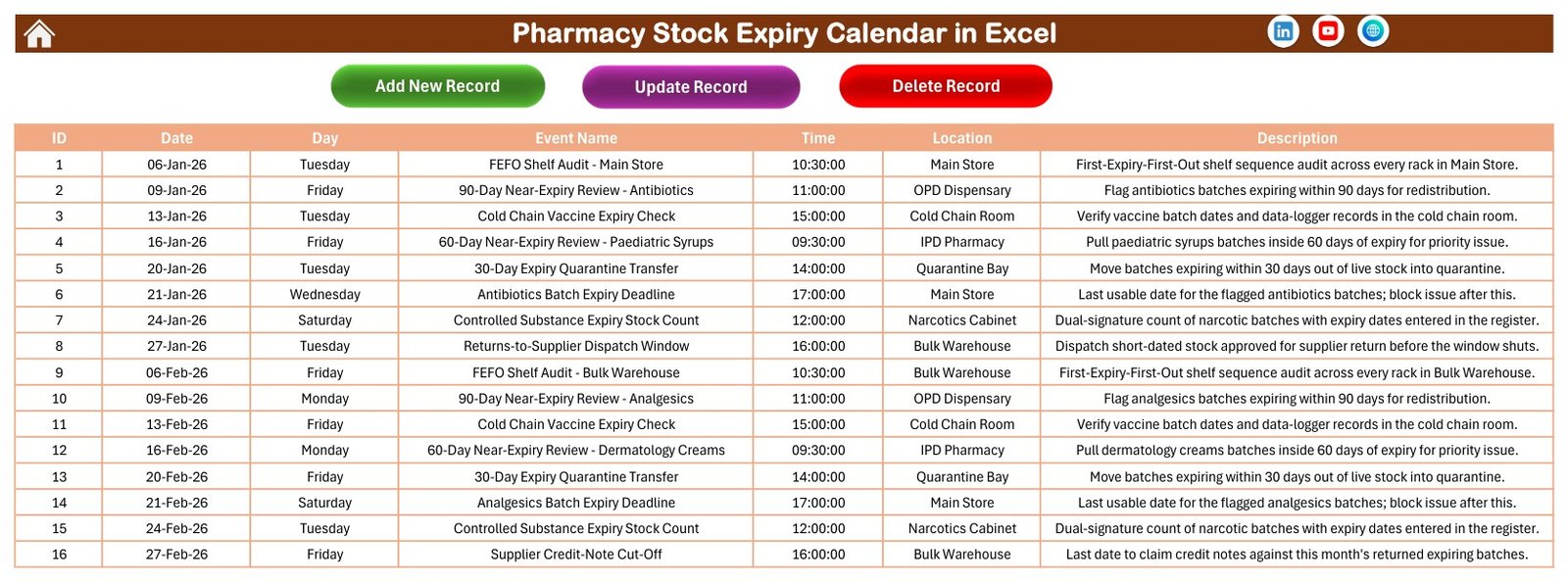
The single source everything else reads. Seven columns, one row per activity, with Add New Record, Update Record and Delete Record buttons across the top. This is where the 100 sample rows live and where you will paste or type your own schedule.
Page 7: The entry form
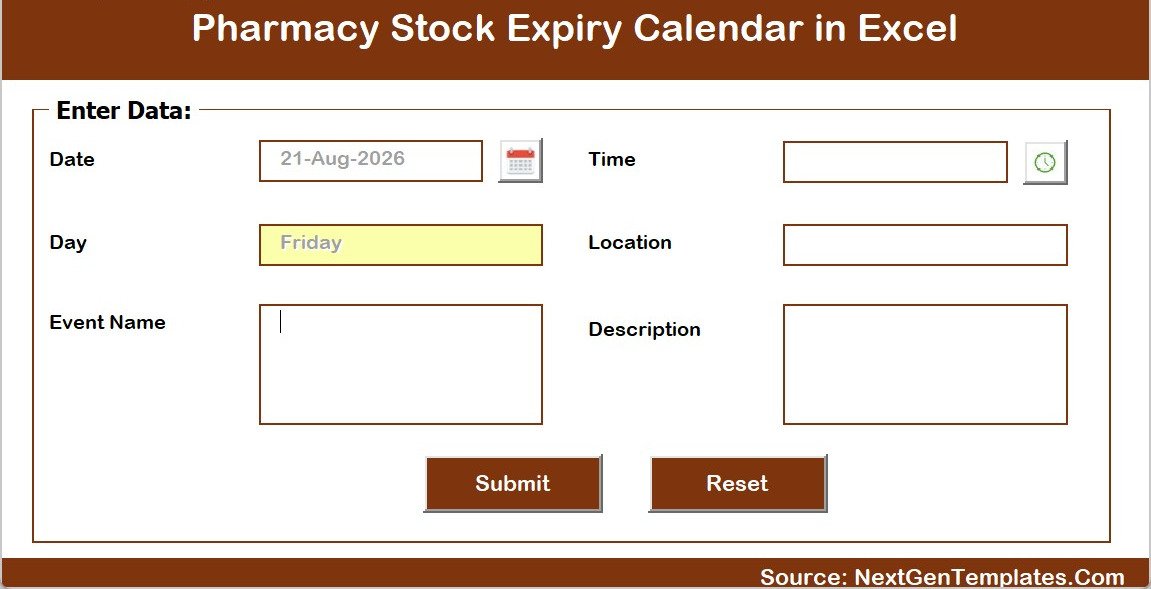
A pop-up VBA form with Date, Day, Event Name, Time, Location and Description, a calendar picker on the date box, a clock picker on the time box and Submit and Reset buttons. The Day field fills itself from the date you choose, which is what keeps the Day column trustworthy across a thousand rows. Pharmacy Stock Expiry Calendar in Excel
Sheet 8: Setting
The configuration sheet. Set the Year from a 2021-2051 list, the month the calendar starts with, the day your week starts on, the two weekday columns to highlight and whether event days are shaded. A Whole Theme picker offers Default, Blue, Red, Black and Orange and repaints the entire workbook in one click. Pharmacy Stock Expiry Calendar in Excel
📊 Pharmacy Stock Expiry Calendar in Excel vs. a Google Sheets equivalent vs. pharmacy inventory software
| Feature | Pharmacy Stock Expiry Calendar in Excel | Google Sheets equivalent | Pharmacy inventory / dispensing software |
|---|---|---|---|
| Cost | $8.99 one-time | Free to $16.99 one-time | Typically a monthly or annual licence per site, often with setup and support fees |
| Platform | Microsoft Excel for Windows, desktop, macros required | Any browser | Vendor server or cloud, usually with a counter terminal |
| Setup time | Under 10 minutes | Under 10 minutes | Days to weeks, with catalogue and stock import |
| Views included | 5 – Annual, Monthly, Daily range, This Month summary, Events table | Usually 2-3 | Stock reports and alert lists rather than a printable calendar |
| Sample data to start from | 100 expiry activities, 7 storage areas, 12 drug categories | Usually none | None – you import your own stock file |
| Batch and lot numbers, per-item expiry dates, quantities | None – this is an activity calendar, not a batch register | None | Yes, that is the core of it |
| Automatic near-expiry flags and days-to-expiry countdown | None – the workbook calculates nothing | Possible with your own formulas | Yes, usually configurable |
| Alerts, e-mails and reminders | None | Possible with scripting | Yes |
| Printable year planner for the dispensary wall | Yes – one page, all twelve months | Sometimes | Rarely |
| Real-time multi-user collaboration | No – one file at a time | Yes | Yes |
| Regulatory registers, audit trail, e-signature | None | None | Yes, and that is what you pay for |
| Year-1 cost for a single pharmacy | $8.99 total | $0-$16.99 total | Hundreds to thousands of dollars |
If your team already knows what has to be checked and when, and simply needs that plan visible, printable and in one place, this workbook sits in the sweet spot. If you need batch-level expiry data, automatic near-expiry alerts or a compliant register, you need the pharmacy system – and this template is not a substitute for it. Plenty of pharmacies run both: the system holds the batches, the calendar holds the routine.
👥 Who This Template Is For – and Who It Is Not For
A good fit for:
- Retail and community pharmacies that run FEFO shelf audits and near-expiry sweeps on a routine but keep the routine in someone’s head.
- Hospital pharmacy departments splitting work across a main store, an OPD dispensary, an IPD pharmacy, a cold chain room, a quarantine bay, a narcotics cabinet and a bulk warehouse.
- Pharmacy managers and store in-charges who need a printed year planner and a weekly walk list rather than another login.
- Clinics, nursing homes and veterinary practices with a medicine cupboard that still needs a documented check rhythm.
- Wholesalers and distributors planning returns-to-supplier windows and credit-note cut-offs around their own expiry deadlines.
- Trainers and pharmacy students who want a worked example of a full FEFO control year on one page. Pharmacy Stock Expiry Calendar in Excel
Not the right tool if you need:
- Batch-level expiry data. There is no batch number, lot number, per-item expiry date, quantity or supplier column, and no way to add one without rebuilding the views.
- Automatic near-expiry detection. “90-Day Near-Expiry Review” is a task you schedule and perform – the workbook does not scan stock or compute anything.
- Alerts or reminders. Nothing is sent. The calendar has to be opened or printed.
- A statutory register. Controlled-drugs registers, destruction records and recall documentation stay in your regulated systems and signed books.
- Live sharing across branches. It is one desktop file at a time; the Google Sheets edition below is the shareable version.
- Mac, web, iPad or Android Excel. The VBA needs Excel for Windows on the desktop.
⚙️ How to Use the Pharmacy Stock Expiry Calendar in Excel
- Unzip and open the .xlsm in Microsoft Excel for Windows, then click Enable Content. The navigation buttons, the Add/Update/Delete controls and the pop-up form are all VBA and do nothing without macros.
- Open the Setting sheet and set the Year, the month the calendar starts with, the day your week starts on and the two weekday columns you want highlighted. Pick a colour theme while you are there.
- Replace the Location list with your own storage areas – the sample file ships with seven, from Main Store to Narcotics Cabinet.
- Keep or edit the activity pattern. The 100 sample rows are a worked FEFO year: shelf audits, 90-day and 60-day near-expiry reviews by drug category, the 30-day quarantine transfer, batch expiry deadlines, the returns window and the credit-note cut-off. Adjust the categories to your formulary before you clear them.
- Clear the sample rows once you have seen how the views behave, then add your own through the pop-up form so the Day column stays correct.
- Print the Annual View for the dispensary noticeboard and use the Daily View date range to print the coming week’s stock walk.
- Check the This Month sheet at month end for activity counts, active days and which storage areas were covered.
💼 Real-World Use Cases
- A community pharmacy pins the Annual View behind the counter so every FEFO shelf audit and near-expiry review for the year is visible to the whole team.
- A hospital pharmacy store in-charge prints the Daily View for the coming fortnight and walks the Main Store, IPD Pharmacy and Quarantine Bay against it.
- A cold-chain lead schedules the vaccine expiry checks and the summer chiller load test months ahead and sees on the year planner that they never collide with the quarterly physical verification.
- A purchasing manager lines the Returns-to-Supplier Dispatch Window up against the Supplier Credit-Note Cut-Off so short-dated stock leaves before the claim window closes.
- A pharmacy owner reviews the This Month summary to see which storage area carried the most checks and which week of the month is consistently empty.
- A trainee pharmacist uses the 100 worked rows as a teaching set for what a complete expiry-control year actually contains.
❓ Frequently Asked Questions
Is this medical, pharmacy-compliance or regulatory software?
No. It is a scheduling and record-keeping spreadsheet and nothing more. It is not a regulated system of record, it makes no clinical, dispensing or safety recommendation, and it holds no GDP, GMP, HIPAA, GDPR or other certification. It has no access control, no encryption and no audit trail. Your statutory registers, destruction documentation and recall records stay where your regulator expects them.
Does it store batch numbers, expiry dates and quantities?
No. The Events table has exactly seven columns – ID, Date, Day, Event Name, Time, Location and Description – and none of them is a batch number, a lot number, a per-item expiry date, a quantity, a supplier or a drug code. This calendar schedules the checks; the batch data belongs in your pharmacy or ERP system.
Will it warn me automatically when stock is about to expire?
No. The workbook calculates nothing and sends nothing. There is no days-to-expiry countdown, no traffic light, no e-mail and no pop-up reminder. A row named “90-Day Near-Expiry Review – Antibiotics” is a task you have scheduled for that date, not a result the file worked out.
Can I store patient or prescription details in it?
No – please do not. There is no patient, customer, prescriber or prescription field, and all 100 sample rows are deliberately written around the activity, the storage area and the drug category rather than a person. With no access control, encryption or audit trail, patient-identifiable data does not belong in this file.
Do I have to enable macros, and will it work on a Mac?
Yes to macros – the file is a .xlsm and the navigation, the Add/Update/Delete controls and the pop-up entry form are all VBA. It is built for Microsoft Excel for Windows on the desktop. Excel for Mac, Excel on the web, iPad and Android are not supported.
How many sample events are included, and can I delete them?
Exactly 100, dated 06-Jan-2026 to 30-Dec-2026 across 7 storage areas and 54 named activity types. They are demonstration data modelled on a normal FEFO control year, not a recommended schedule for your pharmacy. Delete them all and the views simply come up empty, ready for your own entries. Pharmacy Stock Expiry Calendar in Excel
What happens if two activities fall on the same date?
Both live in the Events table and both appear in the Daily View and the This Month list, but the Monthly View grid shows only the first activity on that date plus a small counter for the rest. The sample file has this on two dates – 21-Sep-2026 and 21-Dec-2026 – so you can see the behaviour. Use the Daily View when a date is busy.
Why does This Month say seven locations but list only five?
The location panel is a labelled Top 5 Locations table, while the Locations Used count above it covers every storage area touched that month. When a month spans six or seven areas, the count and the list will legitimately disagree – the count is the complete figure.
Can I use it for a year other than 2026?
Yes. The Setting sheet carries a year list from 2021 to 2051. Change the year and every view redraws.
Can I change the colours to match our branding?
Yes. The Setting sheet has a Whole Theme picker with five presets – Default, Blue, Red, Black and Orange – and one click repaints the whole workbook. The file ships on Orange. Pharmacy Stock Expiry Calendar in Excel
👤 About the Author
Built by PK – Microsoft Certified Professional with 15+ years of Excel, Google Sheets and Power BI experience. Founder of NextGenTemplates, reaching 300K+ subscribers across YouTube channels. Every template is hand-built and tested before release.
🔗 Explore Related Templates Pharmacy Stock Expiry Calendar in Excel
Prefer a browser and a shareable link? The same calendar exists as the Pharmacy Stock Expiry Calendar in Google Sheets – the same views and the same 100-event structure, but multi-user and with no macros to enable. Pharmacy Stock Expiry Calendar in Excel
Other calendars on the same engine: Dental Clinic Appointment Calendar in Excel, Physiotherapy Session Calendar in Excel, Radiology Slot Booking Calendar in Excel, Patient Follow-Up Visit Calendar in Excel, Operation Theatre Booking Calendar in Excel and Nurse Duty Roster Calendar in Excel. Those schedule people, rooms and appointments; this one schedules stock-control activities. For a non-pharmacy version of the same idea there is the Product Expiration Date Calendar in Google Sheets. Pharmacy Stock Expiry Calendar in Excel
For the batch-level data this calendar deliberately leaves out, the Medicine Stock Data Entry System in Excel is the form-driven register that holds items and quantities, and the Prescription Record Data Entry System in Excel covers the dispensing side.
Once you have a few months of stock history, the analysis layer is where the value moves: the Pharmacy Dashboard in Excel, the Pharmacy Dashboard in Power BI and the Pharmacy Sales & Operations Dashboard in Google Sheets. For a full multi-user system with logins, billing and roles, see the Pharmacy Inventory and Billing Management System Web App or the Pharmacy POS Web App. Pharmacy Stock Expiry Calendar in Excel

































Reviews
There are no reviews yet.