

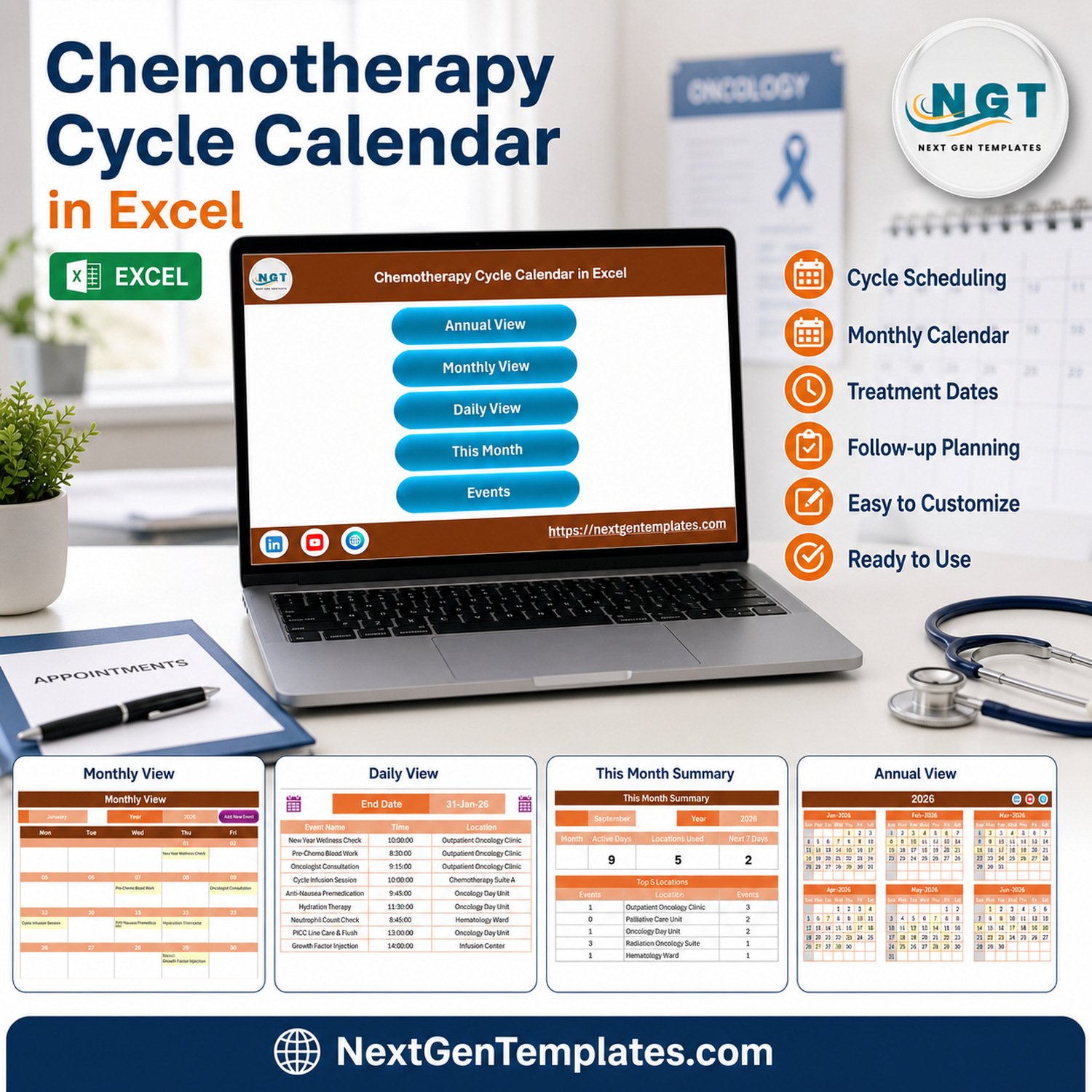

Organize a year of oncology-related administrative events in one editable workbook. The Chemotherapy Cycle Calendar in Excel includes 7 worksheets, 100 sample records, 25 sample event labels, 8 sample locations, and annual, monthly, daily, and current-month views. It is a one-time-download Excel template rather than a subscription system, and it can be adapted to an organization’s approved scheduling workflow. The workbook is for administrative planning and visibility only. It does not recommend chemotherapy timing, regimens, dosages, monitoring, or clinical decisions, and it does not replace an oncology team, EHR, scheduling system, or safety process.
Key Features of Chemotherapy Cycle Calendar in Excel
- Seven worksheet workflow: Home, Annual View, Monthly View, Daily View, This Month, Events, and Setting.
- Four planning perspectives: review the year, one selected month, a selected date range, or the current-month summary.
- 100 editable sample events: replace the demonstration content with approved operational records.
- VBA-assisted entry: use the Add New Event form and record controls after enabling macros in Excel for Windows desktop.
- Structured event fields: ID, date, day, event name, time, location, and description.
- Theme and highlight controls: adjust calendar presentation and highlight selected weekdays or event dates.
- Local, editable workbook: keep the file in an access-controlled location appropriate to your organization.

Home worksheet and navigation menu
What’s Inside This Excel Calendar
Home worksheet
The Home page provides buttons for Annual View, Monthly View, Daily View, This Month, and Events. It acts as a simple index for moving between the workbook’s planning screens.
Annual View

Annual View with all twelve months
See all 12 months on one page. The demonstration file uses 2026 and highlights event dates. Users can select the year, starting month, week-start preference, themes, and highlighted weekdays.
Monthly View

Selected-month calendar
Select a month and year to display scheduled entries within a familiar calendar grid. The buttons support adding a record or showing events for a selected date.
Daily View

Date-range event list
Choose a start and end date to review the full details stored for matching records. This is useful for operational huddles and administrative handoffs, subject to local privacy controls.
This Month summary

Current-month summary
The summary displays event count, active days, locations used, events in the next seven days, weekday distribution, top locations, and a detailed list for the selected month.
Events database and entry form

Editable Events table
The Events sheet stores the calendar records. The included sample has IDs 1 through 100, dates from 1 January to 31 December 2026, and no dedicated patient-name, medical-record-number, date-of-birth, phone, email, address, diagnosis, or dosage field. Descriptions nevertheless contain clinical-sounding demonstration text, so replace all samples with organization-approved content before operational use.

VBA-assisted event entry form
Excel Calendar vs. Google Sheets vs. Paid Oncology Software – Where This Fits
| Consideration | This Excel template | Google Sheets alternative | Paid oncology/EHR system |
|---|---|---|---|
| Cost model | One-time template purchase | Spreadsheet-based | Usually subscription or enterprise contract |
| Platform | Excel for Windows desktop | Browser and Google Drive | Vendor-managed application |
| Macros | Required for entry buttons and forms | Not applicable | Vendor workflow |
| Customization | Editable workbook fields and labels | Editable shared sheet | Configuration depends on vendor |
| Collaboration | Best with controlled file ownership | Real-time sharing | Role-based workflow may be available |
| Clinical functionality | None | None unless separately built and validated | May include clinical modules |
| Best fit | Administrative visibility and planning | Shared administrative coordination | Clinical and enterprise workflows |
Who This Template Is For – and Who It’s Not For
It can help oncology administrators, day-unit coordinators, clinic operations teams, or service managers maintain a high-level calendar of approved non-clinical milestones. It is not for deciding treatment dates, protocols, medications, dose changes, transfusions, testing, monitoring, escalation, or patient eligibility. It is not a patient record, reminder service, resource-capacity engine, billing platform, EHR, or compliance solution. Do not use it as the authoritative source for clinical care.
How to Use the Chemotherapy Cycle Calendar in Excel
- Download and unzip the package, then open the macro-enabled workbook in Excel for Windows desktop.
- Enable macros only after confirming the file came from your trusted download. Review Microsoft’s official macro-security guidance before changing Trust Center settings.
- Save a clean backup before replacing the 100 sample records.
- Define an approved administrative data policy. Avoid personal or sensitive health information unless your organization has authorized the workbook and its storage controls.
- Replace sample event names, locations, dates, times, and descriptions with validated operational information.
- Use the Annual, Monthly, Daily, and This Month views for administrative review.
- Keep clinical decisions and the authoritative schedule in the organization’s approved oncology/EHR system.
Real-World Use Cases
Oncology administration coordinator
Maintain a high-level view of approved departmental activities and review which locations appear most often during the month.
Clinic operations manager
Use the date-range list during an operations meeting while the official clinical schedule remains in the approved system.
Service improvement analyst
Replace demonstration labels with non-identifying operational milestones and use the month summary to support planning discussions.
Frequently Asked Questions
Does this calendar recommend chemotherapy cycles or treatment dates?
No. It is an administrative spreadsheet and supplies no clinical recommendation. All treatment decisions and authoritative scheduling belong with qualified clinicians and approved systems.
Does it store patient information?
The supplied Events structure has no dedicated patient-identifier fields. However, free-text descriptions can hold anything a user enters, so apply local privacy rules and avoid identifiable health information unless explicitly authorized.
Are macros required?
Yes for the VBA buttons, forms, and automation. Use Excel for Windows desktop and enable macros only for a trusted copy.
Can I change the sample events?
Yes. The 100 records are demonstration data and should be replaced with organization-approved administrative entries.
Does the workbook send reminders or integrate with an EHR?
No. It does not send alerts, synchronize with clinical systems, or replace an oncology scheduling platform.
Is this a compliance-ready system?
No compliance, privacy, or security certification is included. Suitability depends on your organization’s policies, controls, and review.
About the Author
Built by PK – Microsoft Certified Professional with 15+ years of Excel, Google Sheets, and Power BI experience. Founder of NextGenTemplates, reaching 300K+ subscribers across YouTube channels. Every template is hand-built and tested before release.
Explore Related Templates
Compare the Google Sheets edition, or explore the Ambulance Duty Calendar, Lab Sample Collection Calendar, and Home Nursing Visit Calendar. Browse more Excel calendar templates and health and safety Excel templates.
Use this Excel calendar for controlled administrative visibility, then keep every clinical decision in your approved care system.
Last updated: 10 September 2026.

































Reviews
There are no reviews yet.