

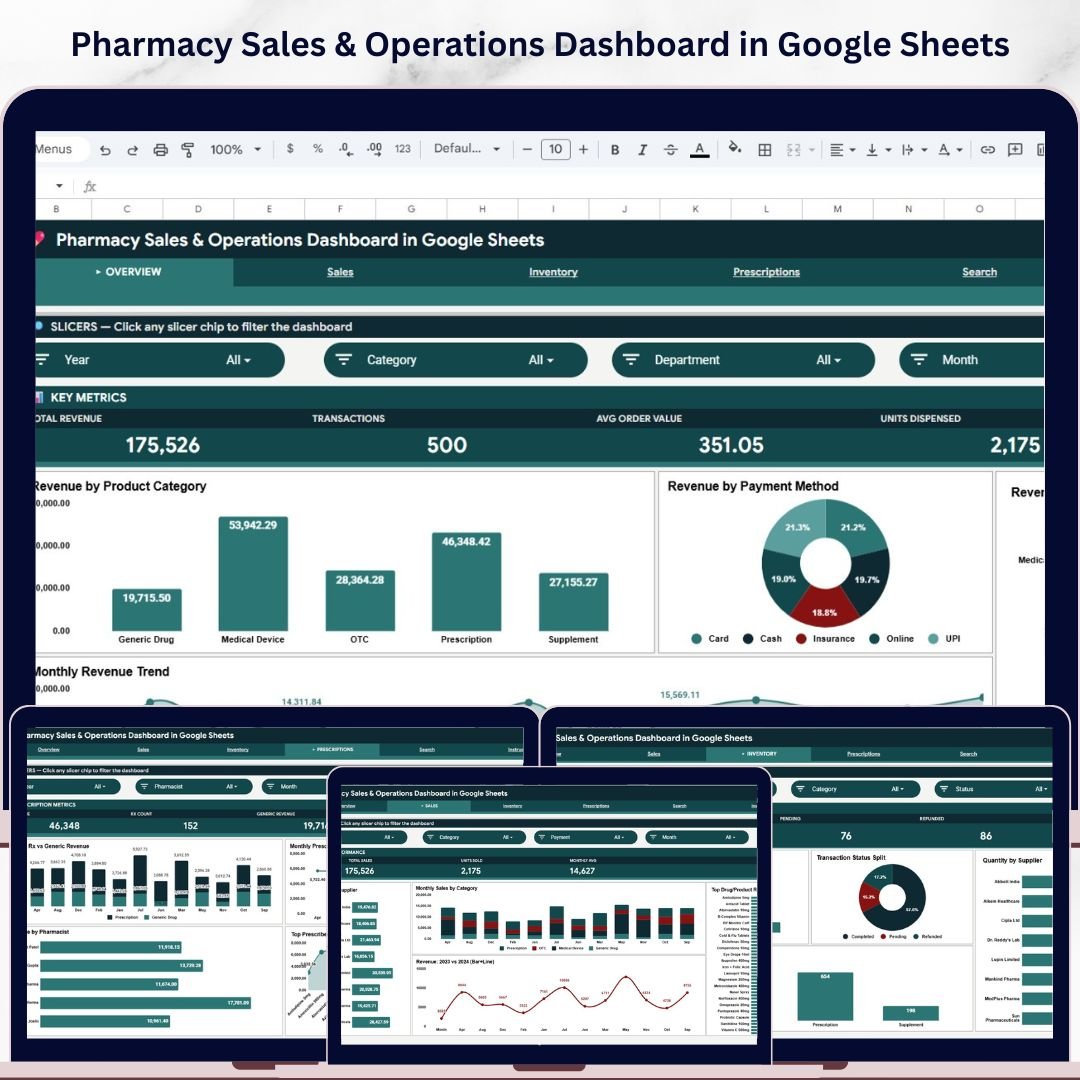
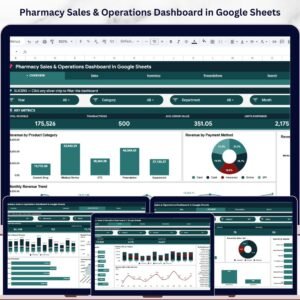
The Pharmacy Sales & Operations Dashboard in Google Sheets tracks 4 core KPIs across 6 cloud-based tabs, with 16 pre-built charts spanning Sales, Inventory, and Prescriptions analytics. Setup takes under 10 minutes — make a copy in Google Drive, paste your transaction data into the Data Sheet, and every chart, KPI card, and slicer updates automatically.Pharmacy Sales & Operations Dashboard in Google Sheets
🌍 Join 8,400+ teams in 40+ countries using NextGenTemplates to replace paid SaaS tools with one-time-purchase Excel, Google Sheets, Power BI, and HTML templates.Pharmacy Sales & Operations Dashboard in Google Sheets
✅ Instant download · One-time payment · No subscription · No per-user fees · Lifetime access
Pharmacy Sales & Operations Dashboard in Google Sheets
🔑 Key Features of Pharmacy Sales & Operations Dashboard in Google Sheets
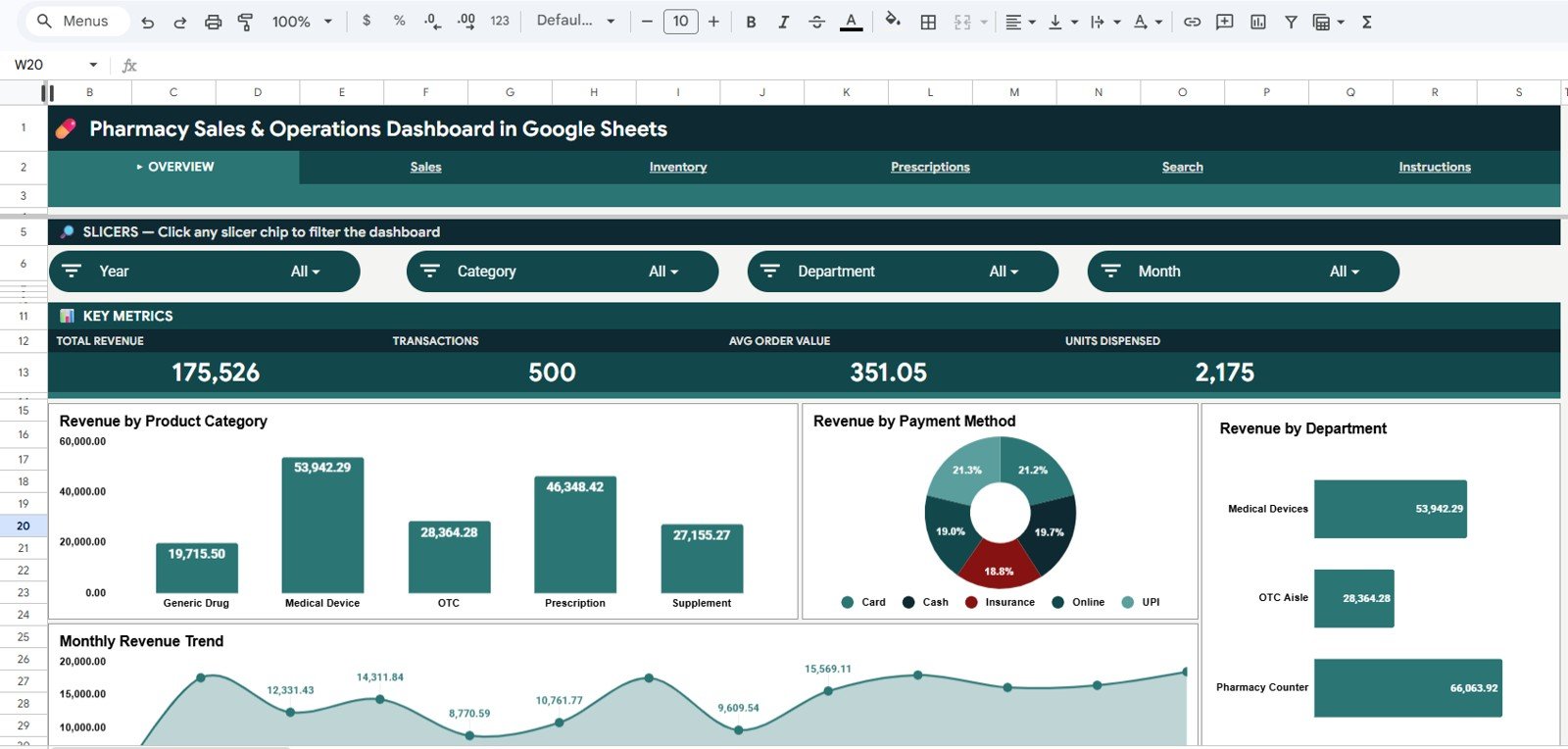
This dashboard tracks 4 high-level KPIs — Total Revenue, Transactions, Average Order Value, and Units Dispensed — across every category, supplier, department, payment method, and pharmacist on file. Independent pharmacy owners and chain managers use it to spot which drug categories drive margin, which suppliers move the most volume, and which pharmacists handle the highest prescription throughput.
🟢 4 KPI cards on the Overview tab — Total Revenue, Transactions, Avg Order Value, and Units Dispensed update in real time as new rows are added.Pharmacy Sales & Operations Dashboard in Google Sheets
🟢 16 pre-built charts covering Revenue by Product Category, Revenue by Payment Method, Revenue by Department, Monthly Revenue Trend, Revenue by Supplier, Revenue by Pharmacist, Top Drug/Product Revenue, Year-over-Year comparison, Units Dispensed by Department, Quantity by Supplier, Transaction Status Split, Monthly Rx vs Generic Revenue, and Top Prescribed Drug Revenue.
🟢 Multi-level slicers on the Overview let you filter by date range, category, department, payment method, and supplier — the entire dashboard recalculates without writing a single formula.
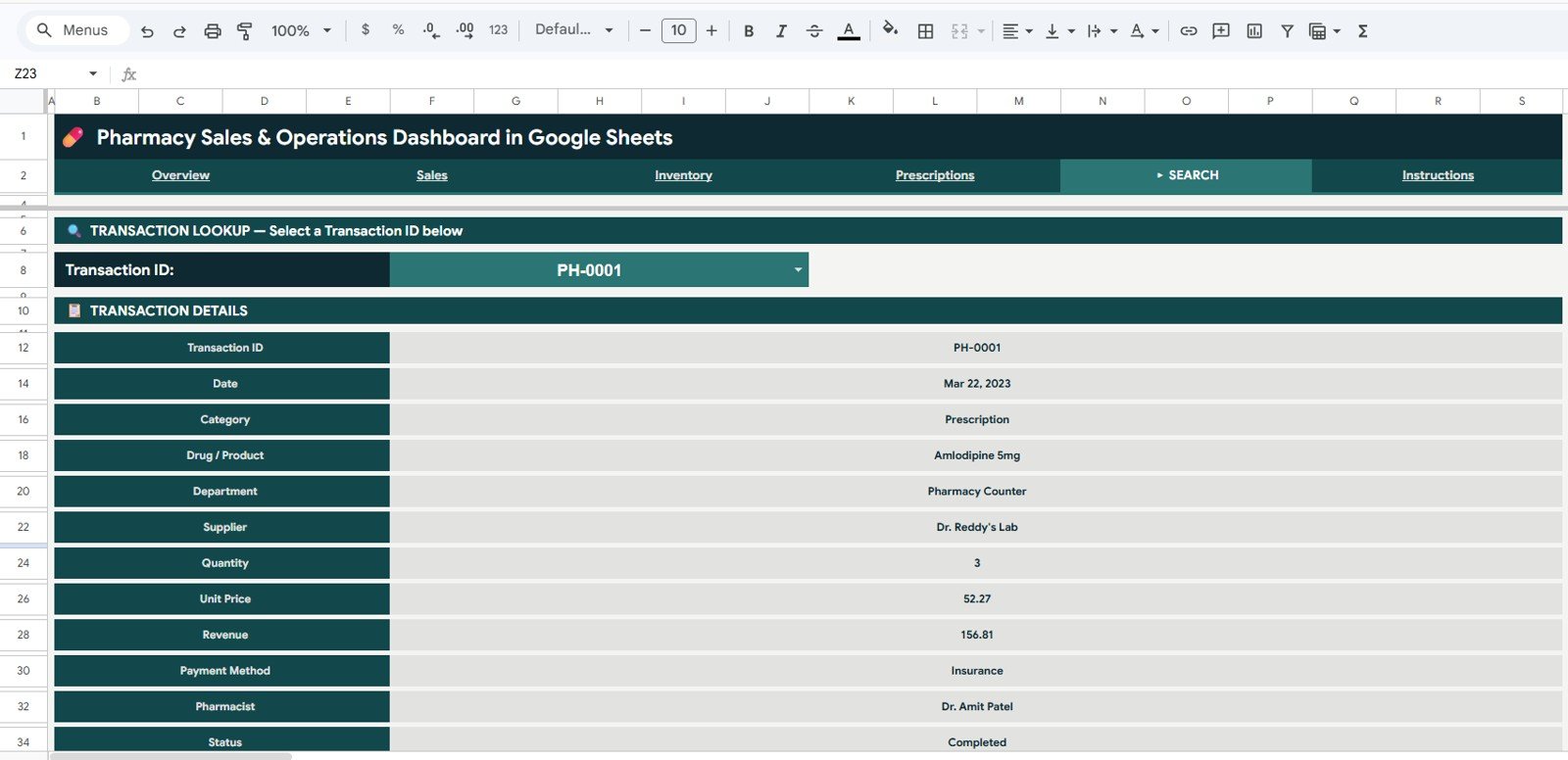
🟢 Search Sheet with Transaction ID lookup — pick any Transaction ID from the dropdown and instantly view its date, drug, supplier, pharmacist, payment method, and status.
🟢 Built natively for Google Sheets — no Excel required, no add-ons, no Apps Script setup. Works in any browser, on any laptop, tablet, or phone.
🟢 Free to share — invite up to 100 users to view or edit the same Sheet via Google Drive sharing, no per-seat license fees.
📦 What’s Inside the Pharmacy Sales & Operations Dashboard
1. Overview Page
The Overview tab shows the four headline KPI cards (Total Revenue, Transactions, Avg Order Value, Units Dispensed) followed by four analytical charts:
- Revenue by Product Category — Breaks revenue down across categories like Antibiotics, OTC, Vitamins, and Generics so you see where margin actually lives.
- Revenue by Payment Method — Splits cash, card, insurance, and digital wallet revenue so you can negotiate processor fees with real numbers.
- Revenue by Department — Shows whether Front-of-Store, Pharmacy, or Wellness departments contribute most to the day’s take.
- Monthly Revenue Trend — A 12-month time-series view that flags seasonality (cough & cold spikes, allergy season) at a glance.
 Sales Analysis Page
2. Sales Page
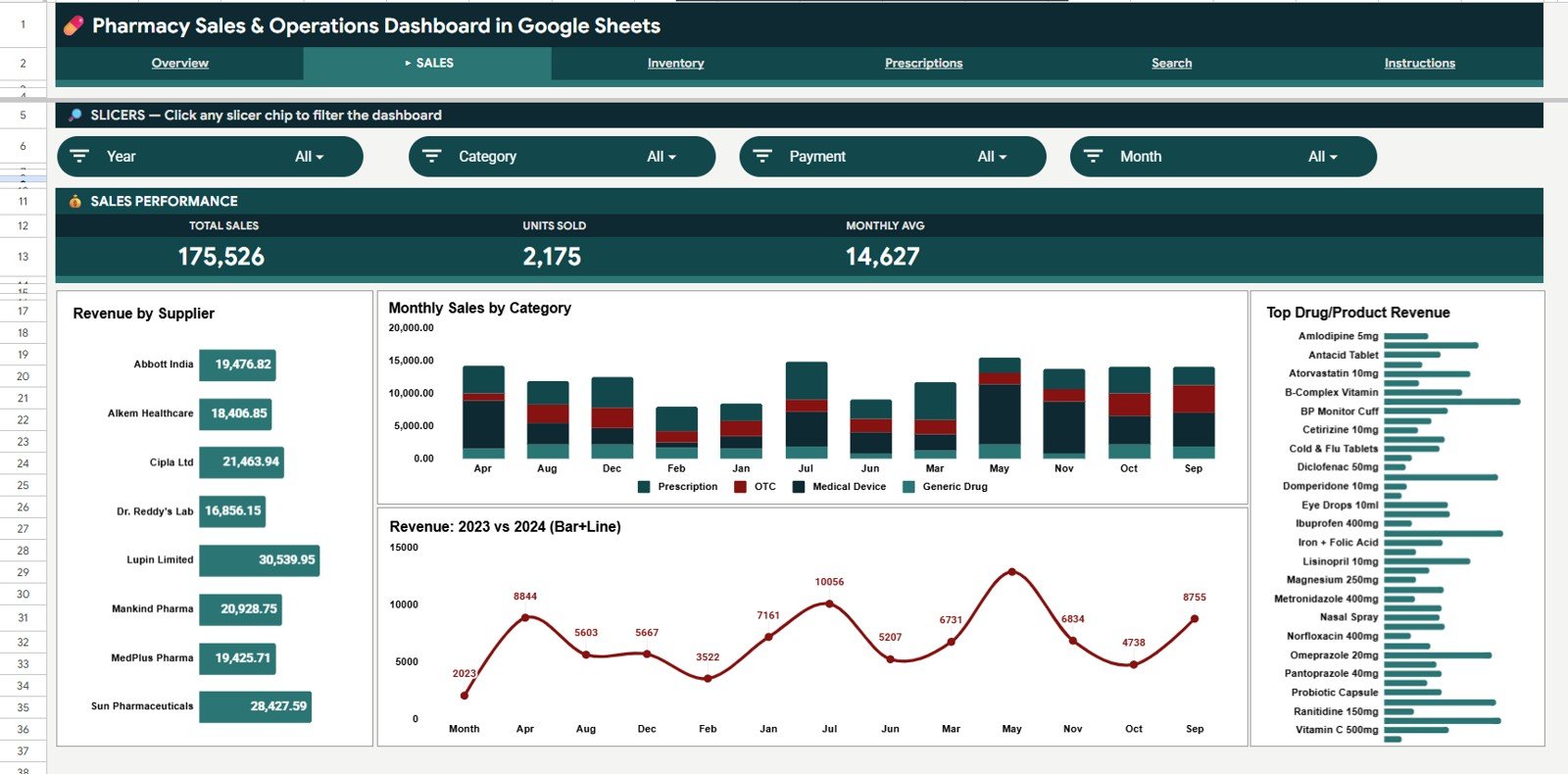
The Sales tab digs into the sell-side of the business with four supplier-and-product views:
- Revenue by Supplier — Identifies your top wholesalers so you can renegotiate volume rebates.
- Monthly Sales by Category — Stacked monthly view showing how each category trends over the year.
- Top Drug/Product Revenue — Ranks the highest-revenue SKUs so you know what never to run out of.
- Revenue 2023 vs 2024 — Year-over-year comparison to quantify growth and benchmark seasonal performance.
 Inventory Analysis Page
3. Inventory Page
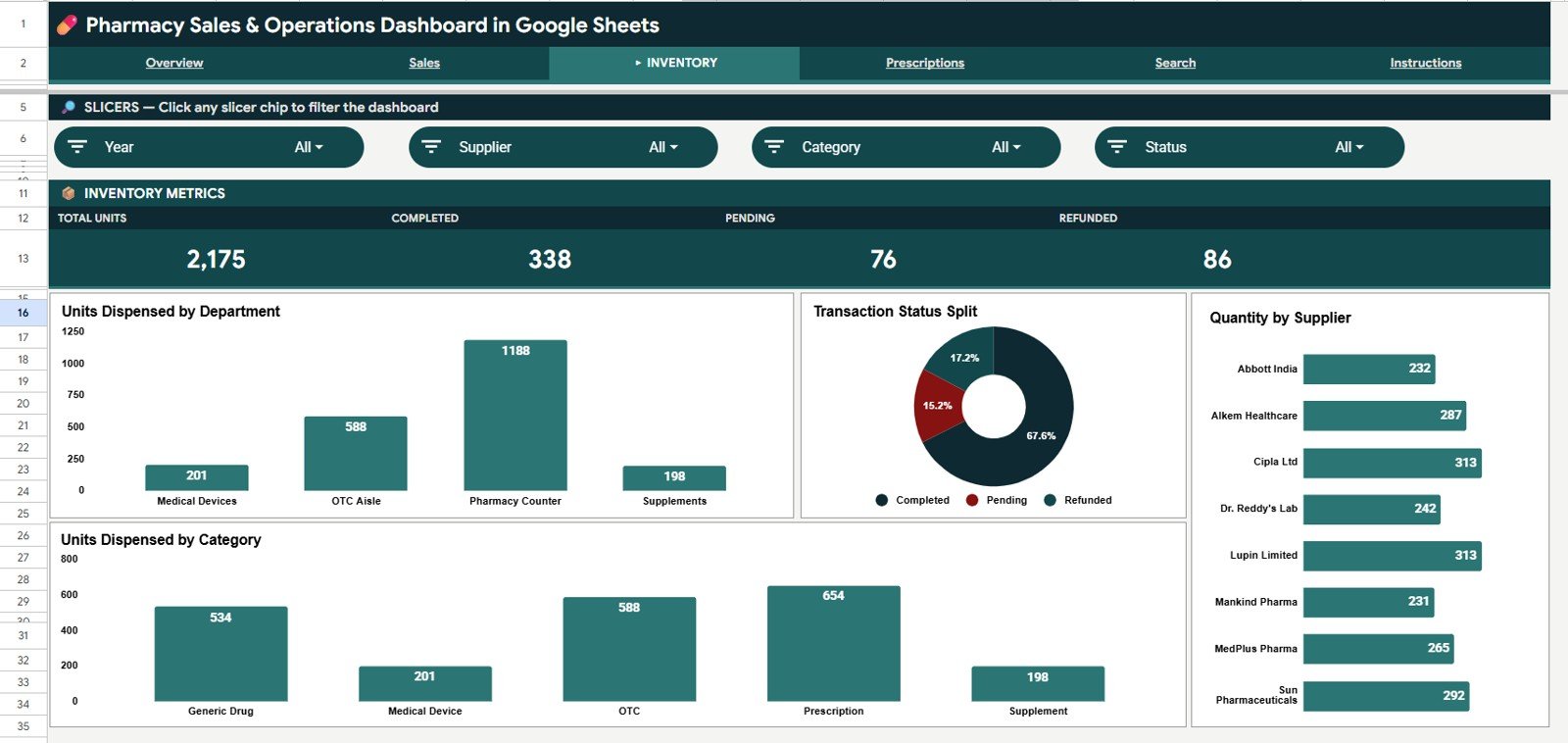
The Inventory tab focuses on physical movement rather than dollars — units, status, and quantity:
- Units Dispensed by Department — Volume by Pharmacy, Front-Store, Wellness, and other departments.
- Transaction Status Split — Completed vs Returned vs Cancelled so you can quantify your return-rate exposure.
- Quantity by Supplier — Helpful for reorder planning and supplier consolidation decisions.
- Units Dispensed by Category — Tells you which categories move the most volume even when revenue is small.
 Prescriptions Analysis Page
4. Prescriptions Page
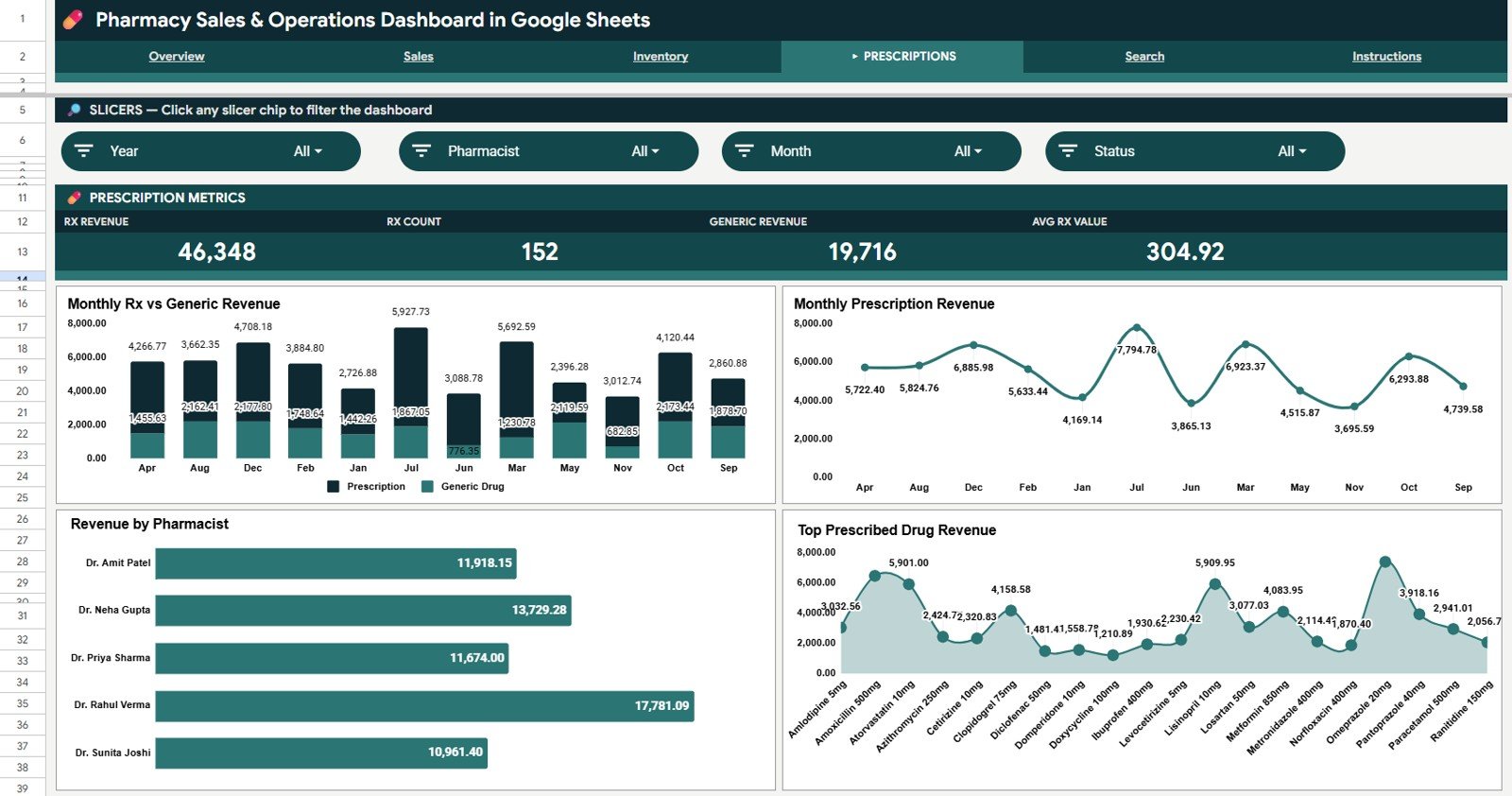
The Prescriptions tab is built for the regulated pharmacy side — the part that drives both compliance and margin:Pharmacy Sales & Operations Dashboard in Google Sheets
- Monthly Rx vs Generic Revenue — Brand vs generic mix, the single most important margin lever in pharmacy.
- Monthly Prescription Revenue — Trend line showing prescription volume month over month.
- Revenue by Pharmacist — Throughput per pharmacist for shift planning and staffing decisions.
- Top Prescribed Drug Revenue — Ranks the highest-grossing prescription SKUs.
 Search Sheet tab
5. Search Sheet
The Search Sheet is the operational lookup tool. Pick any Transaction ID from the dropdown, and the sheet instantly displays the full record: Date, Category, Drug or Product, Department, Supplier, Quantity, Unit Price, Revenue, Payment Method, Pharmacist, and Status. No more scrolling through thousands of rows when a customer asks about an old purchase or your insurance auditor needs a single transaction.Pharmacy Sales & Operations Dashboard in Google Sheets
 Data Sheet tab
6. Data Sheet
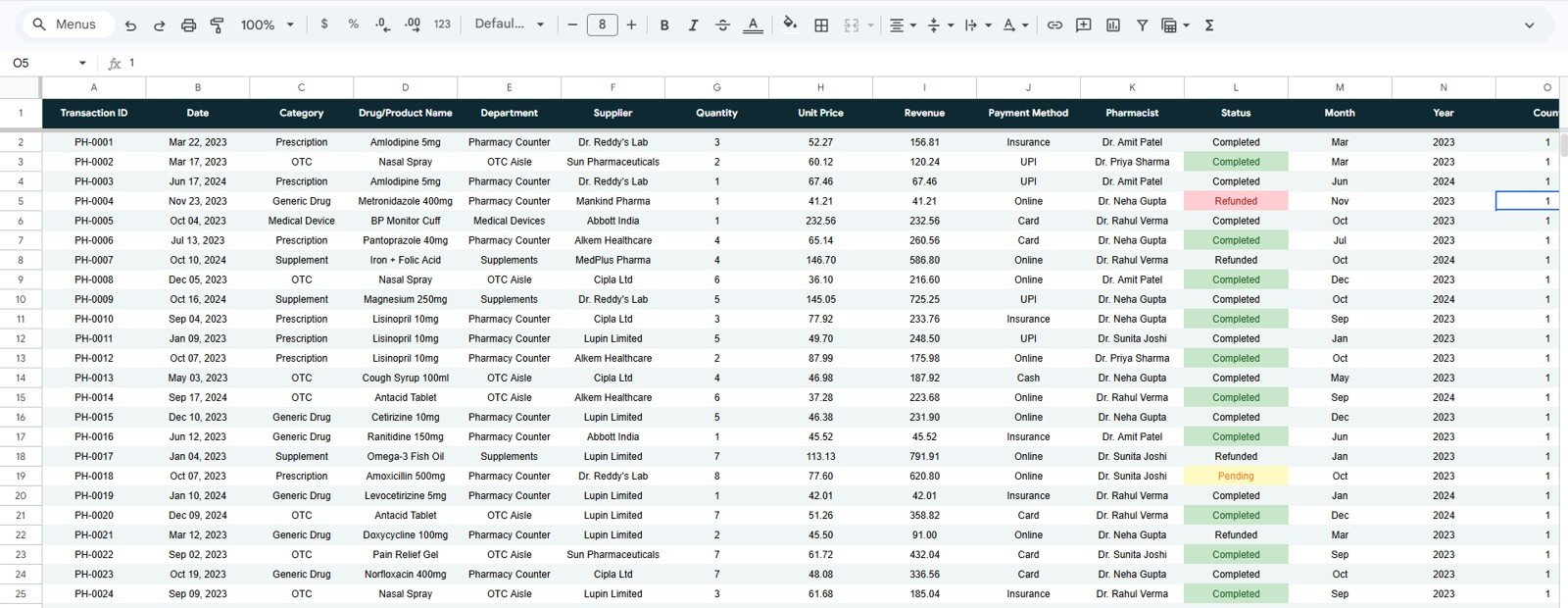
This is the input layer. Add your daily transactions in the same column structure (Date, Category, Drug, Department, Supplier, Quantity, Unit Price, Revenue, Payment Method, Pharmacist, Status) and the entire dashboard updates automatically. The sample data shows the exact format expected — just replace it with your own.Pharmacy Sales & Operations Dashboard in Google Sheets
📊 Pharmacy Sales & Operations Dashboard vs. Microsoft Excel vs. Paid Pharmacy SaaS — Where This Fits
| Feature | Pharmacy Sales & Operations Dashboard (Google Sheets) | Microsoft Excel Pharmacy Dashboard | PrimeRx / BestRx / Liberty Software |
|---|---|---|---|
| Cost | $9.99 one-time ✅ | $17.99 one-time | $199–$899 / month per location |
| Platform | Cloud-native Google Sheets ✅ | Desktop Excel only | Web + dedicated workstation |
| Setup time | Under 10 minutes ✅ | 15-20 minutes | 4-12 weeks implementation |
| Real-time multi-user collaboration | Yes — up to 100 users ✅ | Limited (OneDrive co-edit) | Yes (license per seat) |
| Mobile access | Native iOS & Android ✅ | Excel mobile app | Vendor mobile app |
| Customizable KPIs & charts | Fully editable ✅ | Fully editable | Vendor-controlled, change requests cost extra |
| Share with link | One-click Google Drive link ✅ | OneDrive share required | Vendor portal only |
| Year-1 cost at 5 users | $9.99 ✅ | $17.99 | $11,940–$53,940 |
| Vendor lock-in | None — your data, your Sheet ✅ | None | Heavy (proprietary database) |
For independent pharmacies and small chains that want sales, inventory, and prescription analytics without paying $200+ per location every month, the Pharmacy Sales & Operations Dashboard in Google Sheets sits in the sweet spot.
👥 Who This Template Is For — and Who It’s Not For
✅ This template is built for:
- Independent pharmacy owners running 1-5 locations
- Pharmacy managers tracking monthly sales and prescription volume
- Pharmacy operations consultants who need a portable client deliverable
- Pharmacy students and pharmacy administration courses needing a realistic case dataset
- Retail operators with an in-store pharmacy department wanting unified analytics
- Compounding pharmacies that need transaction-level lookups for audit prep
❌ This template is NOT for:
- Hospital inpatient pharmacies needing HL7 EMR integration and clinical decision support
- Pharmacy chains needing HIPAA-audited multi-tenant SaaS with SOC 2 Type II
- Teams that require live integration with NDC databases or PBM claims feeds (this is a manual-entry analytics layer, not a dispensing system)
- Pharmacies needing PMS/POS integration — use this alongside your dispensing system, not as a replacement
⚙️ How to Use the Pharmacy Sales & Operations Dashboard
- Open the PDF guide included in your download and click the Google Sheets copy link.
- Click “Make a Copy” in Google Drive to save your own editable version — the original stays read-only.
- Open the Data Sheet and replace the sample transactions with your own daily sales data, keeping the column order intact.
- Switch to the Overview tab — KPI cards and charts populate automatically from your data.
- Use the slicers at the top of each page to filter by date range, category, department, supplier, or payment method.
- Use the Search Sheet to look up any single transaction by Transaction ID.
- Share the Sheet with your team via Google Drive — set view-only or edit access per user.
💼 Real-World Use Cases
Maria runs an independent pharmacy in Austin with two part-time pharmacists. She uses the Pharmacy Sales & Operations Dashboard every Monday to review the prior week’s revenue by category, identify which drugs are running low, and check the Rx-vs-generic mix to keep her margin above 22% — without paying $399/month for PrimeRx Analytics.
David is the operations director for a 4-store regional pharmacy chain in Florida. He duplicates this Sheet for each location, asks his store managers to paste daily POS exports into the Data Sheet, and reviews the combined Revenue 2023 vs 2024 chart at his monthly leadership meeting to identify which stores are underperforming on prescription throughput.
Aisha is a final-year pharmacy student writing her capstone on retail pharmacy economics. She uses this dashboard with the included sample dataset to demonstrate how supplier consolidation could improve gross margin — turning what would have been a 30-page Excel exercise into a five-minute live walkthrough.
❓ Frequently Asked Questions
What KPIs does the Pharmacy Sales & Operations Dashboard track?
The Pharmacy Sales & Operations Dashboard tracks 4 headline KPIs — Total Revenue, Transactions, Average Order Value, and Units Dispensed — plus 16 pre-built charts covering revenue by category, supplier, payment method, department, pharmacist, and Rx-vs-generic mix. All metrics update automatically when you replace the sample data.
How long does it take to set up this Google Sheets pharmacy dashboard?
Setup takes under 10 minutes. You make a copy of the Sheet from the Google Drive link in your download, paste your transaction data into the Data Sheet keeping the column order intact, and the dashboard populates automatically. No formulas to write, no add-ons to install.
How does this compare to PrimeRx, BestRx, or Liberty Software?
This is an analytics and reporting layer, not a dispensing system — you keep using your dispensing software for prescription processing. The dashboard imports your transaction exports for reporting at $9.99 once instead of $200–$899 per month per location, with no implementation timeline.
Can multiple pharmacists use the dashboard at the same time?
Yes — Google Sheets supports up to 100 simultaneous editors on a single file. You can share the Pharmacy Sales & Operations Dashboard with your pharmacists, technicians, and store managers via a Google Drive link with view-only or edit access controlled per user.
Do I need Microsoft Excel to use this template?
No. The Pharmacy Sales & Operations Dashboard is built natively for Google Sheets and runs entirely in your browser. You only need a free Google account. If you prefer Excel, the Pharmacy Dashboard in Excel is available separately on NextGenTemplates.
Can I customize the categories, departments, and payment methods?
Yes. Every dropdown, category, supplier, payment method, department, and pharmacist name is fully editable in the Data Sheet. The dashboard charts and slicers will automatically reflect any new categories you add — no formulas to rewrite.
Is my pharmacy data secure in Google Sheets?
Your data lives in your own Google Drive under your Google account — NextGenTemplates never sees it. Use Google Workspace if you need Workspace HIPAA compliance via a BAA; for personal Gmail accounts, treat this as an analytics layer and keep PHI/PII out of the Drug column.
👤 About the Author
Built by PK — Microsoft Certified Professional with 15+ years of Excel, Google Sheets, and Power BI experience. Founder of NextGenTemplates, reaching 300K+ subscribers across YouTube channels (@PK-AnExcelExpert, @NextGenTemplates, @NeoTechNavigators). Every template is hand-built and tested before release.
🔗 Explore Related Templates
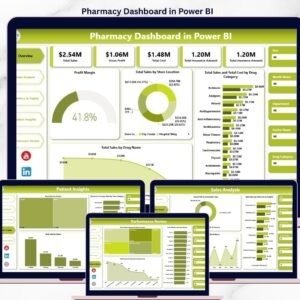
- Also available as: Pharmacy Dashboard in Excel — same metrics, native Excel format with PivotTables and slicers.
- Also available as: Pharmacy Dashboard in Power BI — for chains needing model-driven BI with Row-Level Security.
- Product Expiration Date Calendar in Google Sheets — pair this with the Pharmacy Dashboard to track drug expiry alongside sales.
- Healthcare Services Report in Excel — clinic-side companion for healthcare practices.
- Cannabis Dispensary Dashboard in Excel — adjacent retail-pharmacy vertical.
- Browse all Google Sheets Dashboards on NextGenTemplates.
📖 Click here to read the Detailed Blog Post
Watch the step-by-step video tutorial:
🎥 Visit our YouTube channel for step-by-step video tutorials
👉 YouTube.com/@NextGenTemplates





























Reviews
There are no reviews yet.