

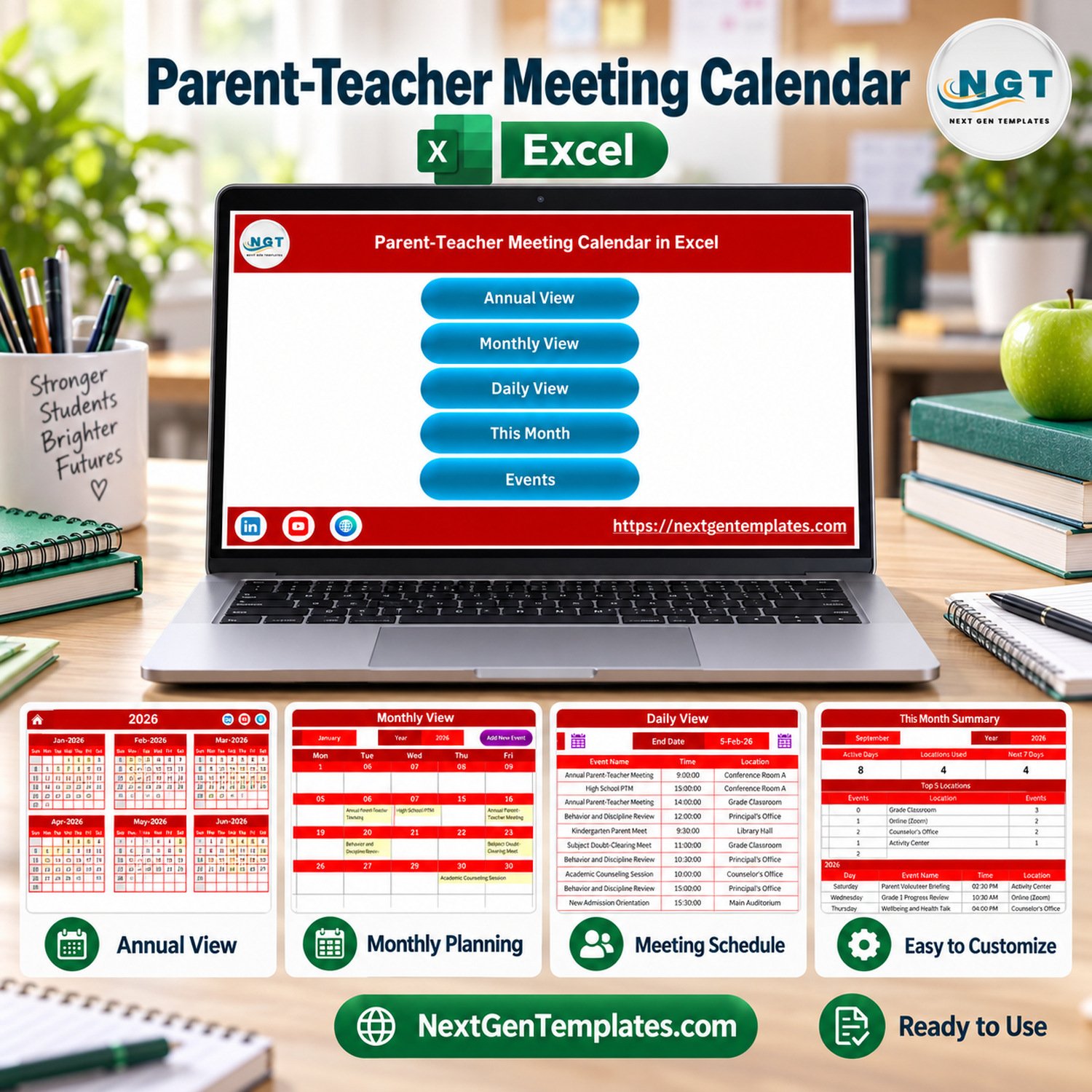

Parent-Teacher Meeting Calendar in Excel is a macro-enabled workbook for Microsoft Excel on Windows desktop, built for schools that need an orderly way to schedule parent meetings, open house days, review sessions and staff follow-ups without paying a monthly subscription. It is an administrative scheduling file and nothing more: seven sheets, a 100-row sample event register, annual, monthly and daily views, and five colour themes. The ZIP download contains the tested .xlsm workbook and an Excel Calendar user manual.
What the Parent-Teacher Meeting Calendar in Excel Does and Does Not Do
This is an Excel calendar template for administrative scheduling only. Read this list before you buy, because it is the honest boundary of the product.
- It does not send invitations, reminders, emails, SMS or notifications to parents, guardians or staff. Nothing leaves the workbook.
- It integrates with nothing. There is no connection to any school management system, student information system, booking platform, Outlook, Google Calendar or any other calendar service.
- It is not a student record, a report card, an attendance register, or any assessment of a child. It records meeting slots, not pupils.
- It gives no educational, safeguarding, pastoral or legal advice. How your school runs its meetings is your school’s decision.
- One sample location reads “Online (Zoom)”. That is simply text typed into a Location cell. The workbook does not create, join or manage any online meeting.
Key Features of the Parent-Teacher Meeting Calendar in Excel
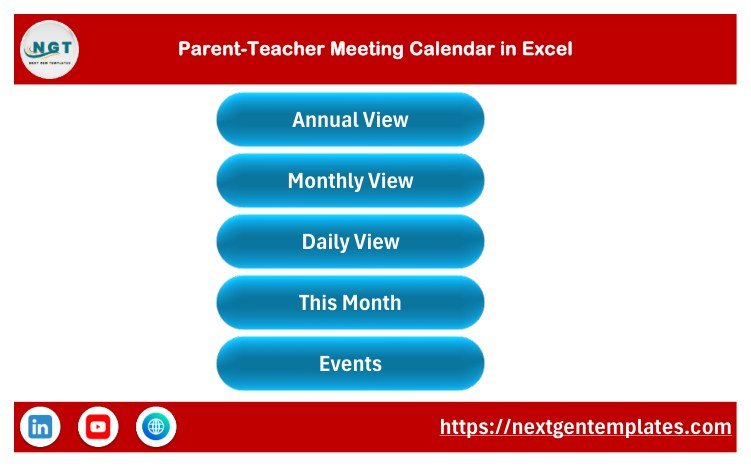
- Seven sheets: Home, Annual View, Monthly View, Daily View, This Month, Events and Setting.
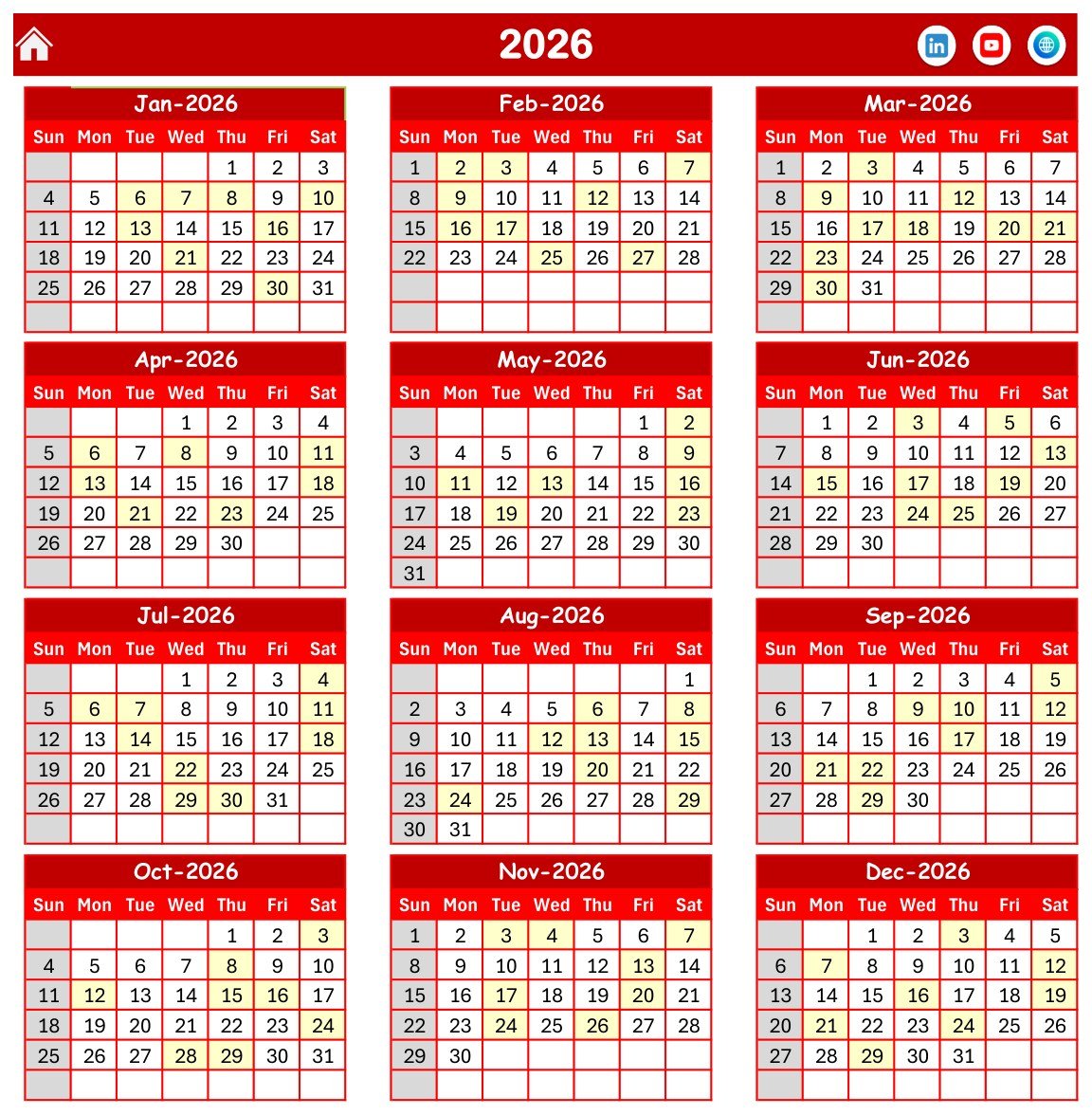
- Annual View prints all twelve months of the chosen year on one screen, with event days tinted and your chosen rest days shaded.
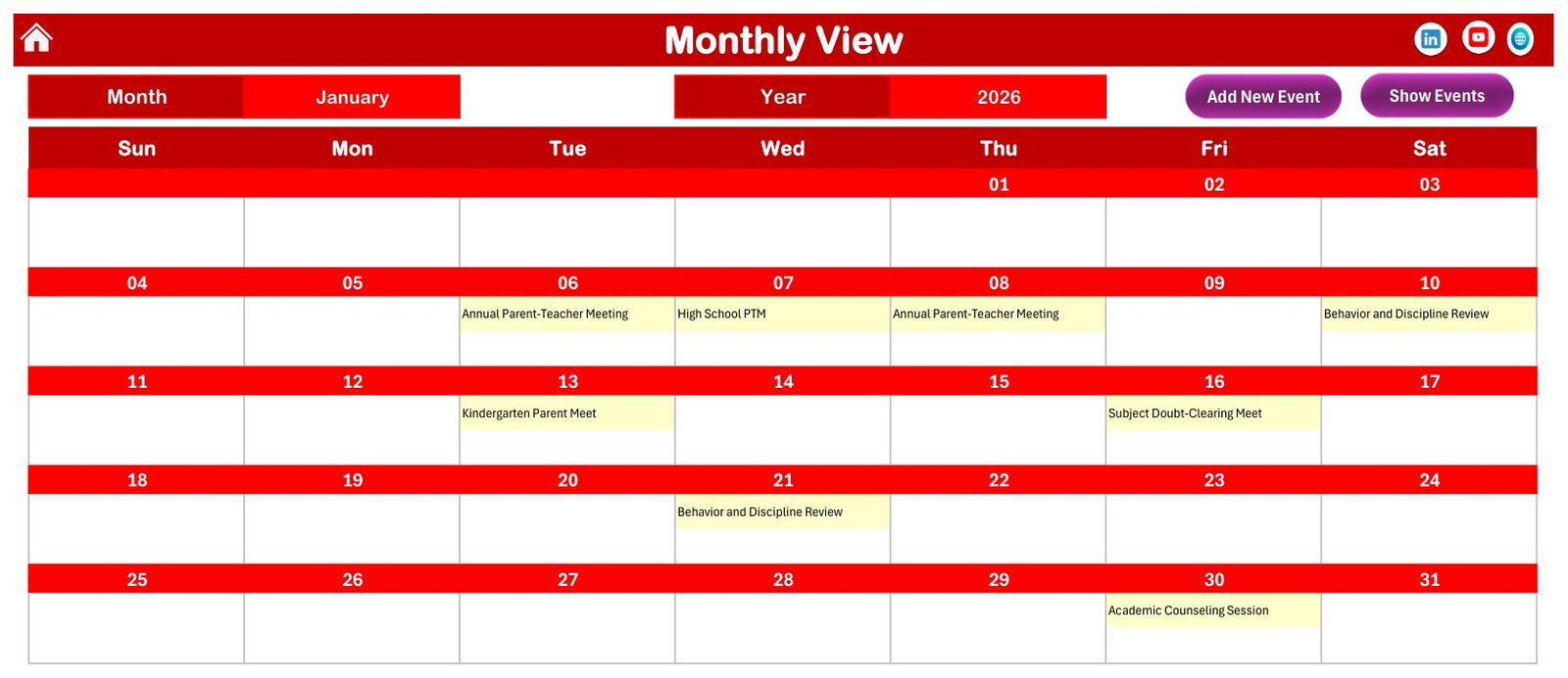
- Monthly View shows one month with the event name written into the day cell. Where a date carries more than one event the cell adds a “+N more” cue, because only the first event name is shown inline.
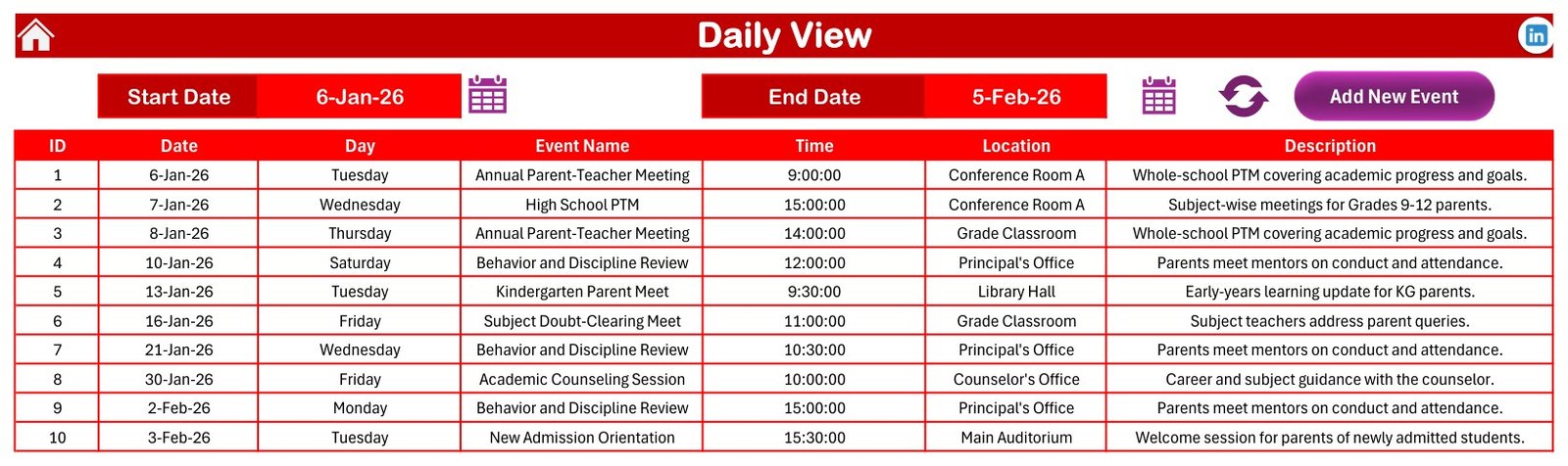
- Daily View lists every event between a Start Date and an End Date you pick, with ID, date, weekday, event name, time, location and description.
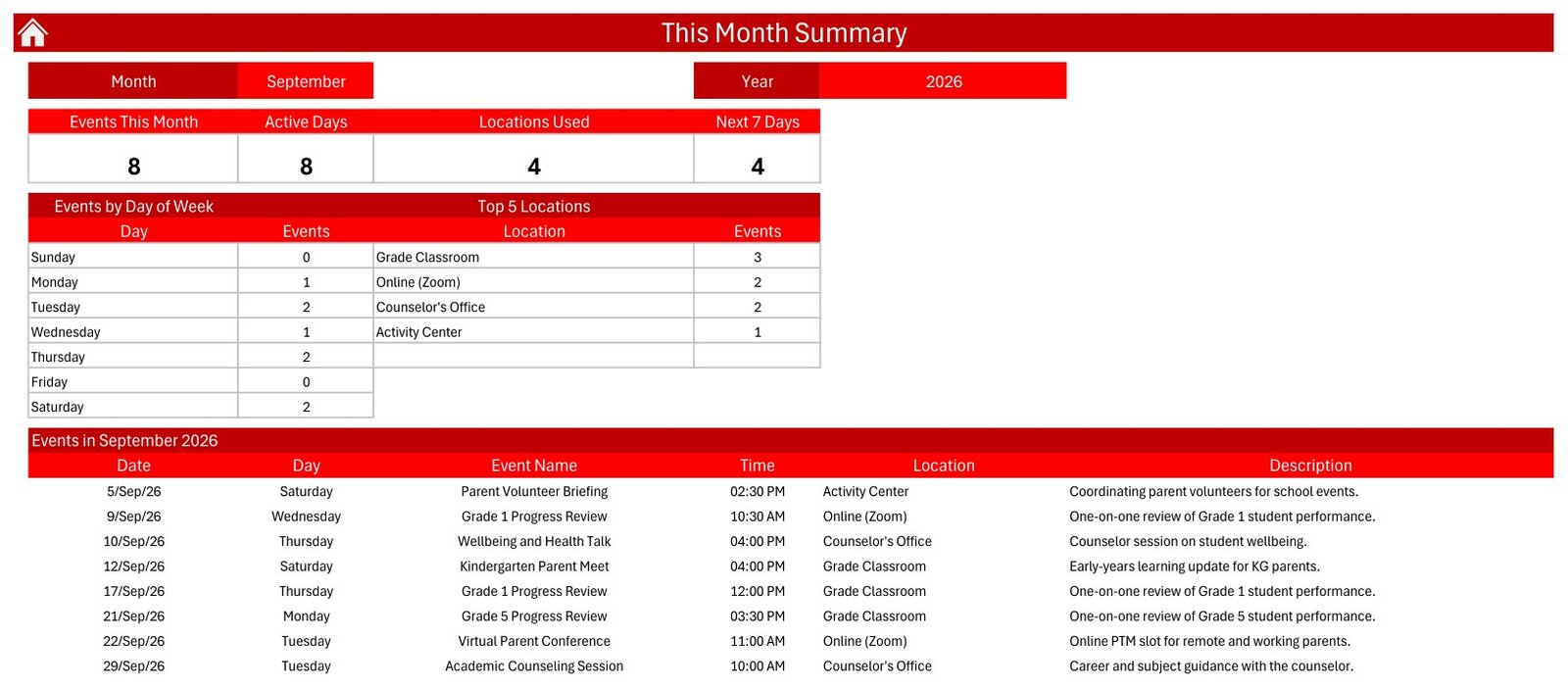
- This Month is a summary page: events this month, active days, locations used, next 7 days, plus a day-of-week breakdown and a locations breakdown.
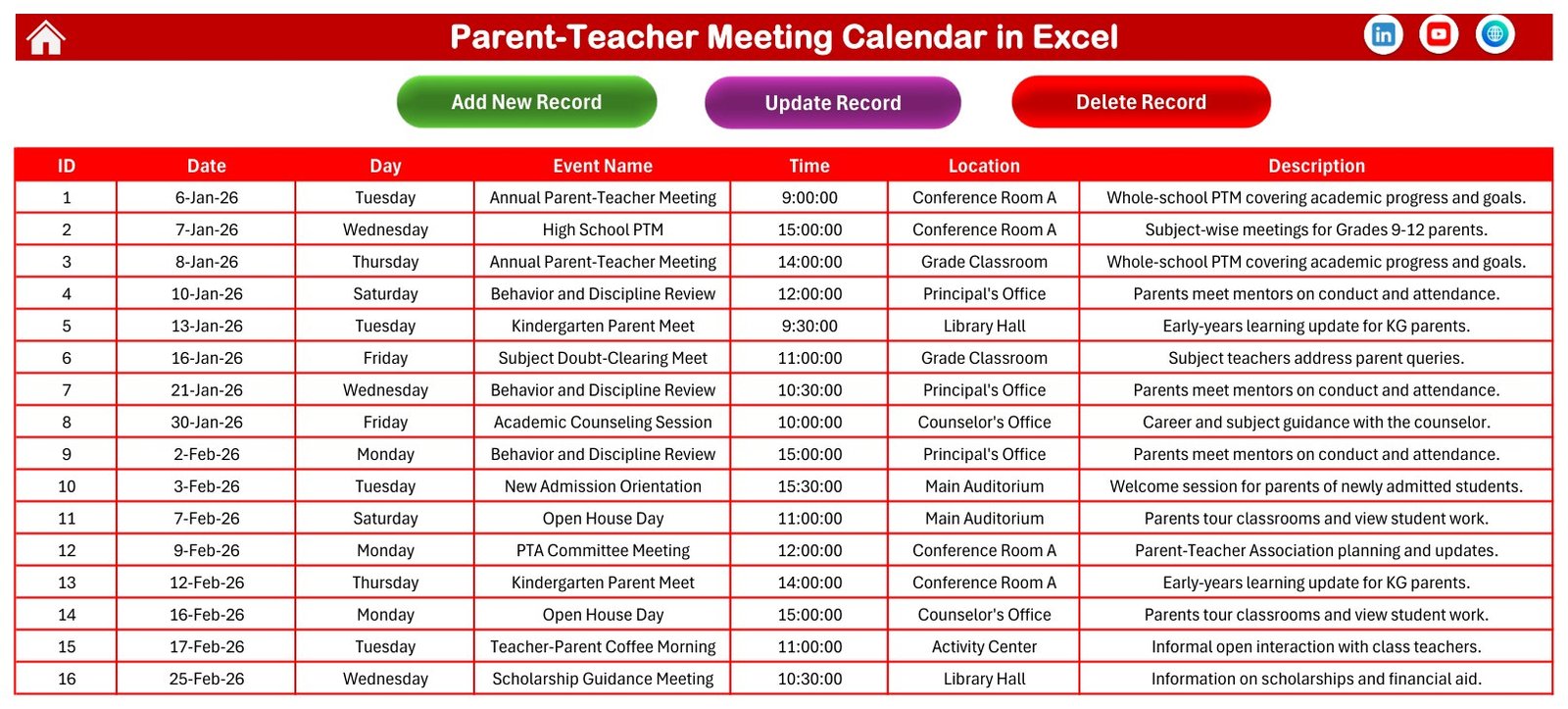
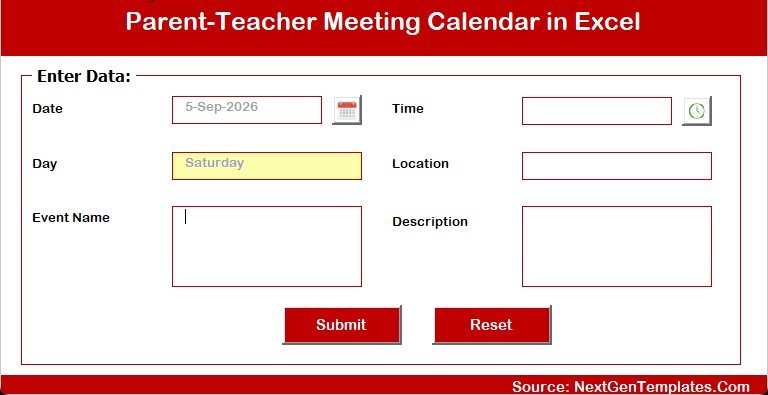
- Events is the source register, driven by Add New Record, Update Record and Delete Record buttons and a data-entry form with Date, Day, Time, Location, Event Name and Description.
- Setting controls the year (a 2021 to 2051 list), the starting month, the first day of the week, two highlight days, event highlighting on or off, and the colour theme.
- Five colour themes: Default, Blue, Red, Black and Orange. The shipped file is set to Red.
What Is Inside the Download
The ZIP contains the macro-enabled .xlsm workbook and the Excel Calendar user manual PDF. The workbook ships with 100 sample event rows, all dated inside calendar year 2026, spread eight or nine to a month across all twelve months, using 24 event names, 8 locations and start times between 09:00 and 16:00.
Every one of those 100 rows is demo data. The names, times, locations and descriptions are invented examples so the views have something to render. Delete them and enter your own schedule.
Data Protection Is Your Responsibility
The moment you replace the sample rows with real names, you are handling personal data about children and the adults around them. A note typed into the Description column about a pupil’s progress or behaviour is personal data too, and in most jurisdictions it is treated as sensitive.
This workbook provides no encryption, no access control, no audit trail and no retention policy. Choosing a lawful basis for holding that data, storing the file securely, deciding who may open it, and deleting it when it is no longer needed are entirely the buyer’s responsibility. If your school has a data protection officer, show them the file before you populate it. Many schools choose to record only a meeting slot and a class code, and to keep the substance of any conversation in their proper pupil-record system instead.
Compared With a Shared Cloud Calendar and With School SaaS
| Need | This Excel workbook | Shared cloud calendar | Paid school SaaS |
|---|---|---|---|
| Cost | One-time purchase | Free or bundled with a workspace plan | Recurring subscription |
| Platform | Microsoft Excel desktop for Windows | Browser and mobile | Browser and app |
| Works offline | Yes, it is a local file | Limited | Usually limited |
| Macro-driven add, update and delete form | Included | Not applicable | Varies |
| Sends reminders or invitations | No | Yes | Yes |
| Parent-facing booking | No | Limited | Often included |
| Simultaneous multi-user editing | No | Yes | Yes |
| You can restructure the layout yourself | Yes, it is an ordinary workbook | No | Usually restricted |
Who This Template Is For and Who It Is Not For
It suits principals, academic coordinators, class teachers, administrative assistants and front-office teams who currently keep meeting slots on paper or in a loose spreadsheet, plus small tuition centres and training providers who want a structured event register in Excel.
It is not for anyone who needs automated reminders, parent self-booking, multi-user concurrent editing, a mobile app, integration with a student information system, or a workbook that runs in Excel for the web. Mac is not claimed: the file relies on VBA and has not been verified on Excel for Mac.
How to Use the Parent-Teacher Meeting Calendar in Excel
- Download and unzip the file.
- Open the
.xlsmworkbook in Microsoft Excel for Windows desktop. - Enable macros when Excel prompts you. Every button and the data-entry form depends on macros; with macros disabled you get a static grid.
- On the Setting sheet choose the year, the starting month, the first day of the week, your highlight days and a colour theme.
- On the Events sheet, delete the 100 demo rows before you enter anything real.
- Add your own meetings with Add New Record, then review them in Annual, Monthly, Daily or This Month view.
Real-World Use Cases
Academic coordinator: blocks out the term’s parent-meeting windows in Annual View so they do not collide with exam weeks or staff training days.
Front-office team: sets Daily View to tomorrow’s date and prints the list of scheduled slots, with room and start time, for the reception desk.
Class teacher: records the slot, the room and a neutral administrative note such as “rescheduled at parent’s request”, and checks Monthly View before offering a new time.
Honest Notes About This Build
We opened the workbook and checked it rather than trusting the screenshots. All 100 sample rows carry valid 2026 dates, every weekday label matches its date, the IDs run 1 to 100 with no gaps, and the This Month summary reconciles: its day-of-week counts and its location counts both total the eight events it reports for September 2026.
Two things are worth knowing in advance. First, This Month and Daily View are macro-refreshed snapshots rather than live formulas, so a row typed straight into the Events sheet by hand will not appear on them until you refresh through the workbook’s buttons. Monthly View, by contrast, is formula-driven and updates immediately. Second, the “Top 5 Locations” heading on This Month is a fixed label; it lists however many locations were actually used, which is four in the shipped September sample, not always five.
Related Templates in This Family
A Google Sheets edition, Parent-Teacher Meeting Calendar in Google Sheets (product ID 94829), is being prepared and is not published yet, so it is named here rather than linked. It is a genuinely different build rather than a port: it uses 16 event types and 29 locations where this Excel edition uses 24 event types and 8 locations. School Fee Due Calendar in Excel (product ID 95083) is also being prepared. Published Excel calendars are listed under Excel Calendar templates and Education templates for Excel.
Frequently Asked Questions
Does this send meeting invitations or reminders?
No. This workbook sends nothing at all: no invitations, no reminders, no email, no SMS, no push notifications. It does not sync with Outlook, Google Calendar or any booking platform. It is an offline planning file, and inviting parents remains a manual step for your office.
Does it require macros?
Yes. This is a macro-enabled .xlsm workbook and the buttons and entry form need macros enabled in Excel for Windows desktop. Microsoft explains the options in its guidance on enabling or disabling macros.
Will it work in Excel for the web, or on a Mac?
Excel for the web does not run VBA, so the buttons and the form will not work there. Mac support is not claimed; this build has been verified on Microsoft Excel for Windows desktop only.
Are the sample events real?
No. All 100 rows are demo data invented to populate the views. No real school, pupil, parent or member of staff is represented. Clear them before you add your own schedule.
Can I put pupils’ and parents’ names in it?
Technically yes, the columns are free text. But doing so makes you the controller of personal data about children, and this file offers no security, access control or retention features to help you. Check your school’s data protection policy first, and consider recording only a slot and a class code.
Is it a student record or a report card?
No. It schedules meetings. It does not grade, rank, assess or track any child, and it should not be used as evidence of a pupil’s progress or conduct.
Can several staff edit it at once?
No. Treat it as a single-owner file. For concurrent editing you want a cloud scheduling system.
What exactly is in the ZIP?
Two files: the macro-enabled Excel workbook and the Excel Calendar user manual in PDF form.
About the Author
Built by PK – Microsoft Certified Professional with 15+ years of Excel, Google Sheets and Power BI experience. Founder of NextGenTemplates, reaching 300K+ subscribers across YouTube channels. Every template is hand-built and tested before release.
Last updated: September 12, 2026.
Watch the demo video:
Compatibility and Requirements
- Works in Microsoft Excel desktop for Windows with macros enabled. It does not run in Excel for the web, Google Sheets or mobile apps.
- Microsoft explains the macro settings in Enable or disable macros in Microsoft 365 files.
Related Meeting and Calendar Templates
- The Parent-Teacher Meeting Checklist in Excel: a checklist to prepare each meeting
- Parent-Teacher Meeting Calendar in Google Sheets: the same topic in Google Sheets
- Board Meetings Calendar in Excel: a meeting calendar for board schedules
- Corporate Meetings Calendar in Excel: a meeting calendar for company schedules
- Printable Holiday and Event Calendar in Excel: a free calendar for holidays and events
Browse all Excel calendar templates and Excel education templates.


































Reviews
There are no reviews yet.