



The Sports Day Practice Calendar in Excel is a macro-enabled workbook for PE teachers, sports coordinators and club coaches who want every practice, rehearsal and drill of the season on one printable schedule. It ships with 100 sample sessions dated 4 January to 29 December 2026 (eight or nine in every month) across 36 activity types, 8 venues and 9 start times from 06:30 to 15:00. That is seven sheets and four linked calendar views, all reading one event table. $8.99, currently $4.99, paid once.
✅ Instant download · One-time payment · No subscription · No per-user fees
Before writing this page we checked the shipped file row by row. It has 100 records with IDs 1 to 100 and no gaps, and we recomputed the weekday of every date: zero mismatches. The workbook needs Microsoft Excel for Windows (desktop) with macros enabled. Excel for the web and the iPad and phone apps cannot run the VBA behind the buttons and the entry form.
🔑 Key Features of the Sports Day Practice Calendar in Excel
- 📅 Four views, one table. Annual View, Monthly View, Daily View and This Month all read the Events sheet, so a session you enter once appears in every view.
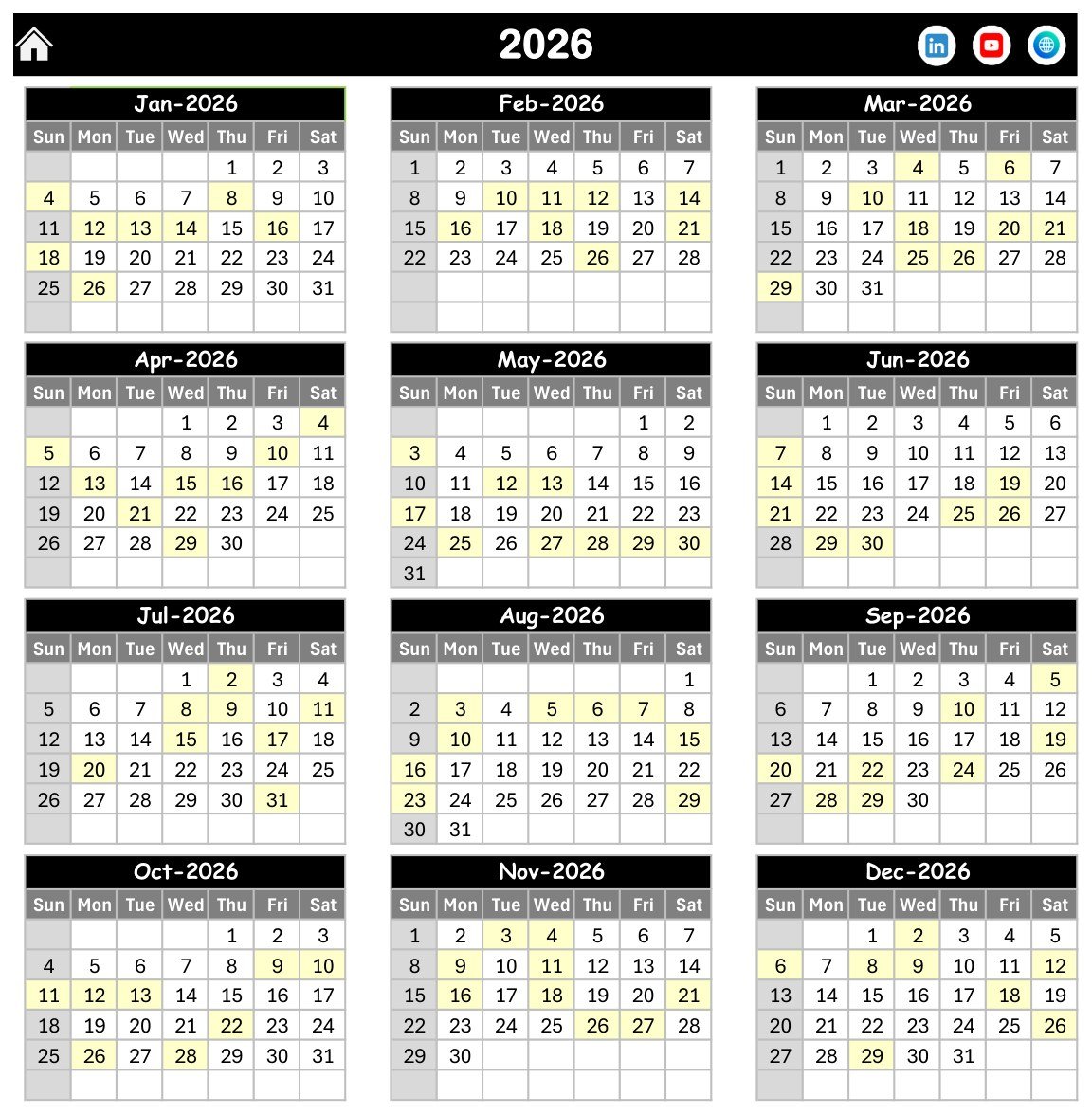
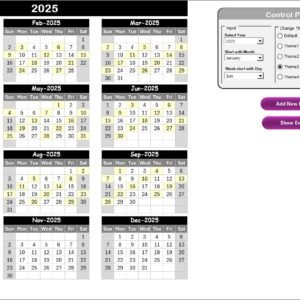
- 🗓️ Full-year Annual View. Twelve month grids for the chosen year, laid out three across, with practice dates shaded and your chosen weekday highlighted. The print area is pre-set to a single page.
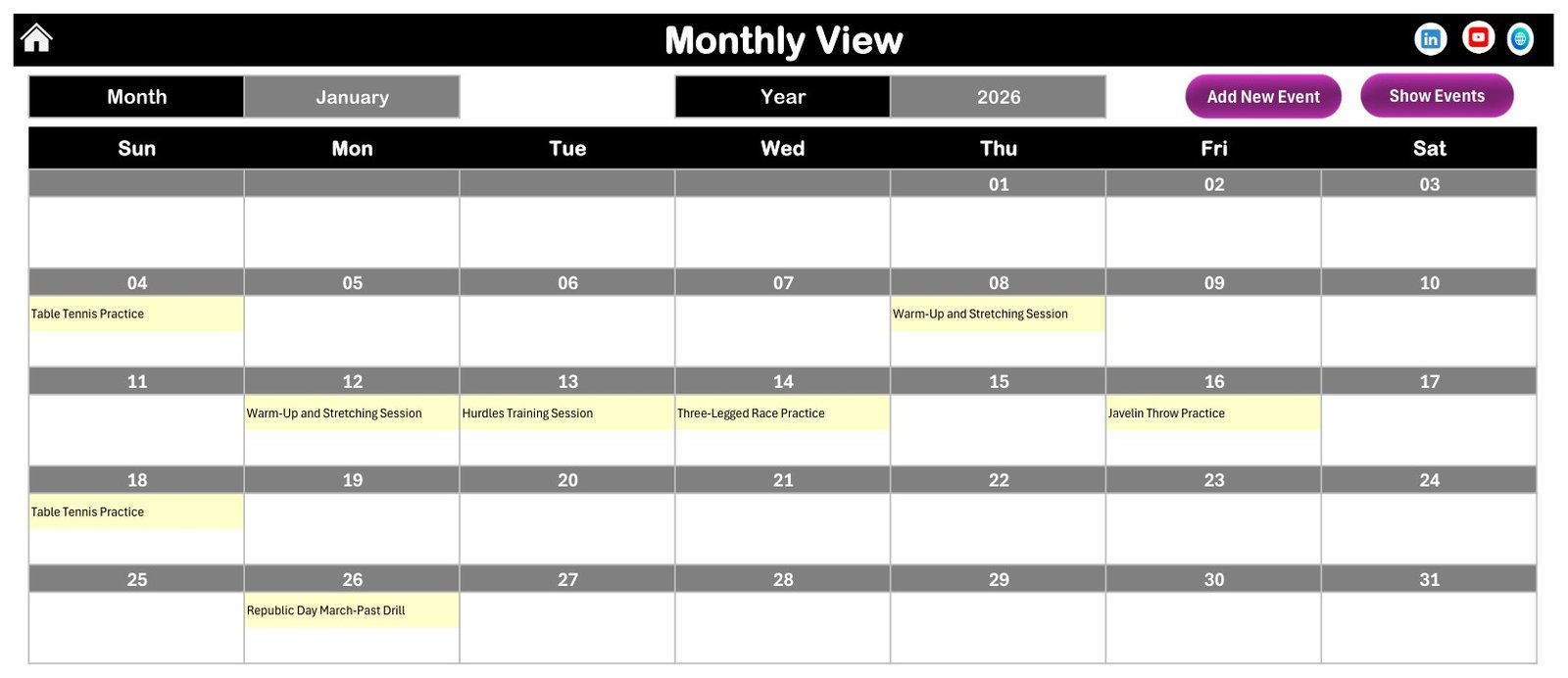
- 📆 Monthly View with month and year pickers. A Sunday-to-Saturday grid shows the session name inside each date. A counter adds “N more” when a day holds several sessions, and there are Add New Event and Show Events buttons.
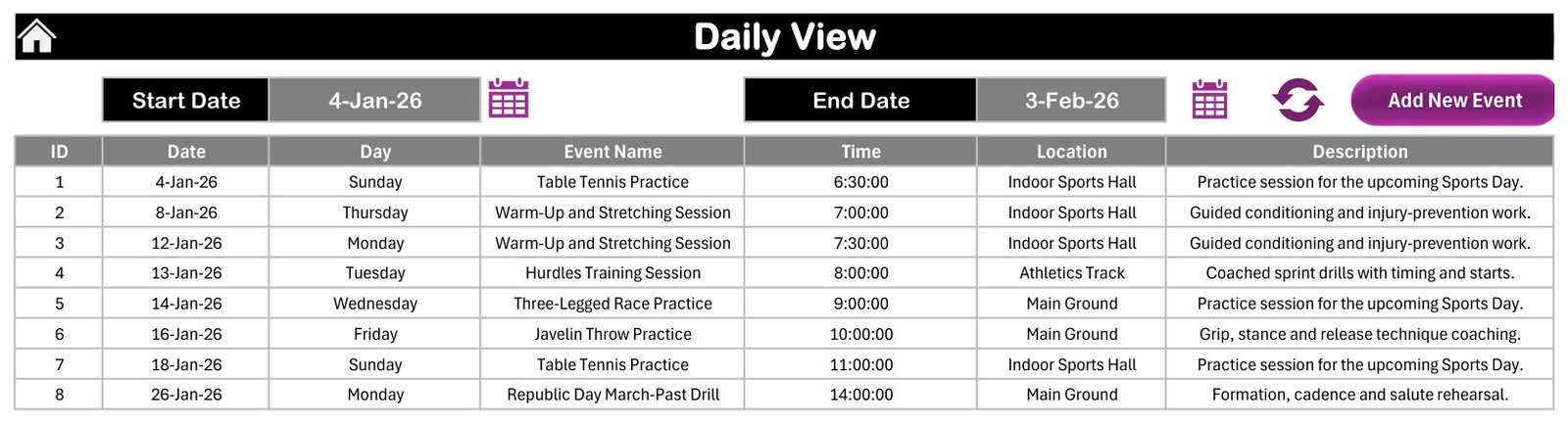
- 📋 Daily View for any date range. Pick a start and end date, click refresh, and the list rebuilds with ID, Date, Day, Event Name, Time, Location and Description. As shipped it covers 4 Jan to 3 Feb 2026 and lists 8 sessions.
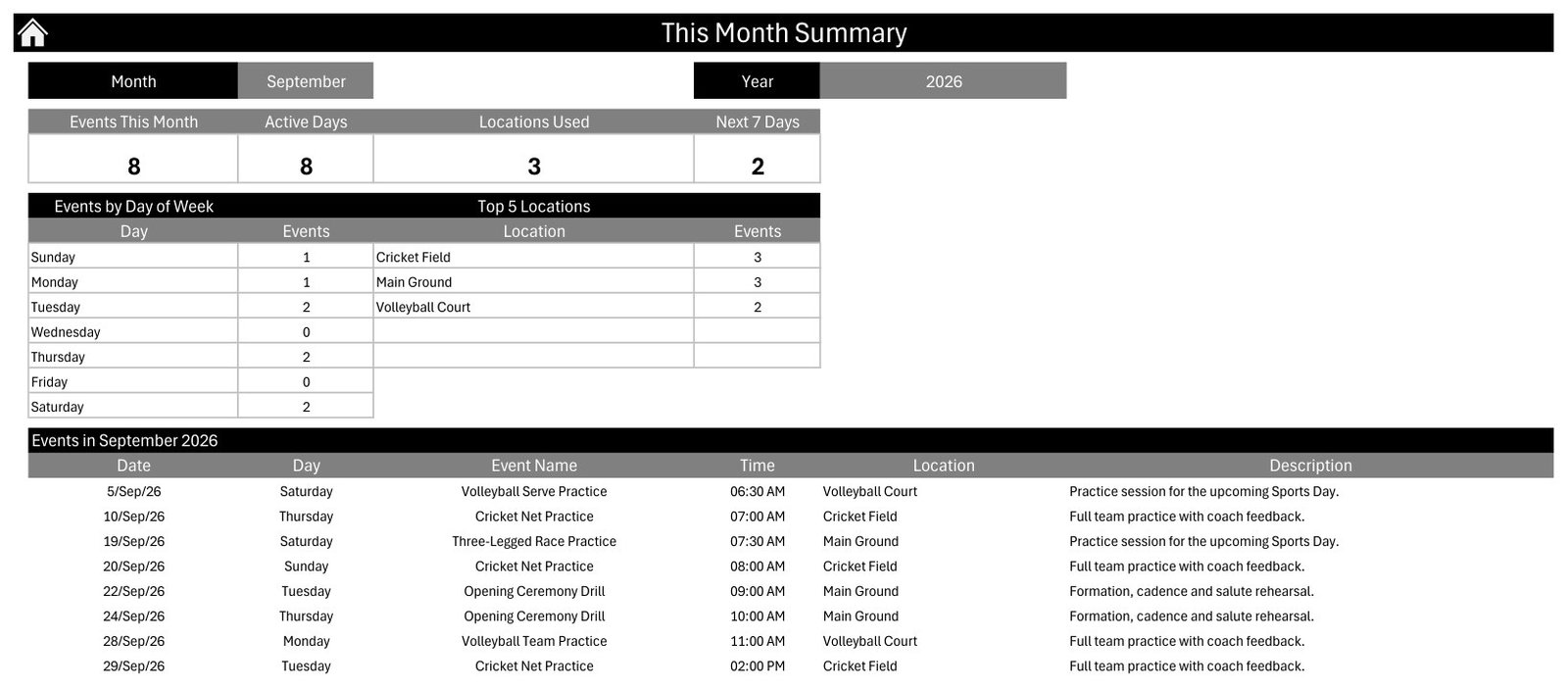
- 📊 This Month summary. Four counters (Events This Month, Active Days, Locations Used, Next 7 Days), an Events by Day of Week table, a Top 5 Locations table and the month’s full session list.
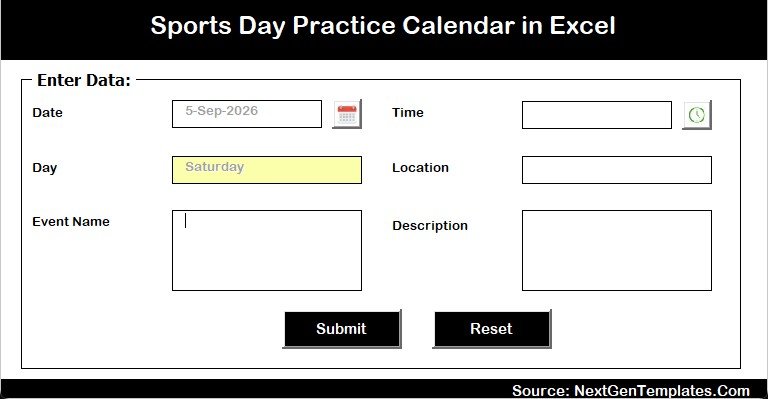
- ✍️ Add, update and delete by button. The entry form has Date with a calendar picker, Day filled in for you, Time with a clock picker, Location, Event Name and Description, plus Submit and Reset.
- ⚙️ Setting sheet. Year, start month, week-start day, two highlight weekdays, an event-highlight switch and five colour themes: Default, Blue, Red, Black and Orange. The file ships on Black with Sundays highlighted.
📦 What’s Inside the Download
One ZIP holding two files: the workbook Sports Day Practice Calendar in Excel.xlsm (196 KB) and Excel Calendar - User Manual.pdf. The seven sheets are Home, Annual View, Monthly View, Daily View, This Month, Events and Setting.
Worth knowing: Annual View and Monthly View are formula-driven and redraw as soon as you change the year or month. Daily View and This Month contain no formulas. Macros write them, so they refresh when you run them, not on their own.
Home
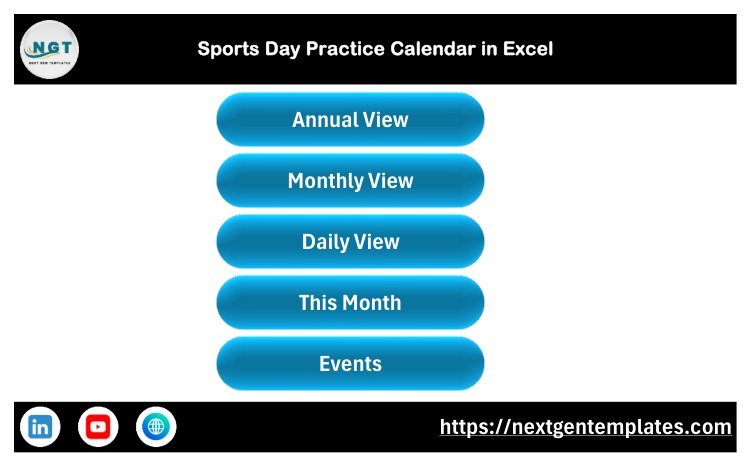
The landing sheet with five navigation buttons: Annual View, Monthly View, Daily View, This Month and Events.
Annual View
All twelve months of 2026 on one page. Every date with a session is shaded, for example 4, 8, 12, 13, 14, 16, 18 and 26 January.
Monthly View
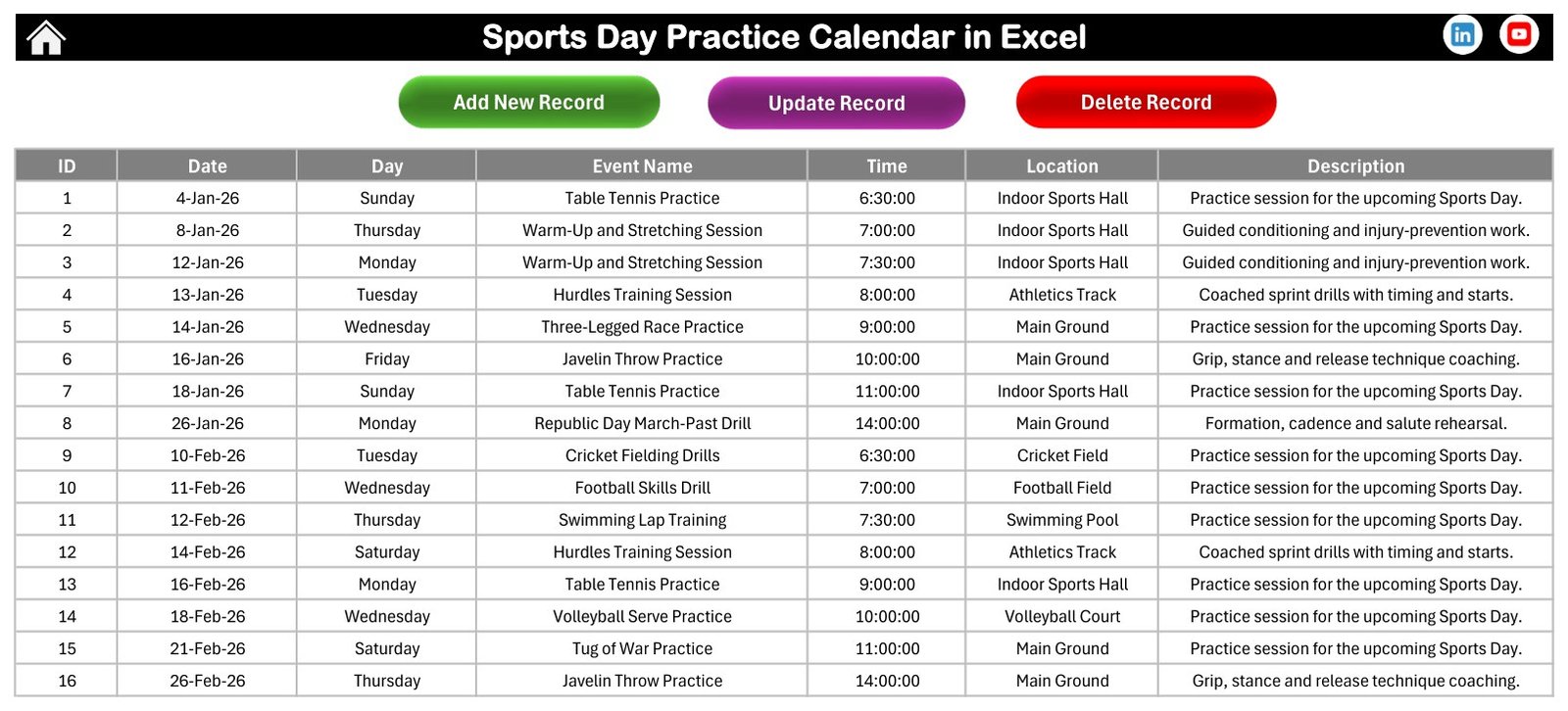
January 2026 holds eight sessions, from Table Tennis Practice on Sunday 4 January to the Republic Day March-Past Drill on Monday 26 January.
Daily View
A date-range list with ID, date, day, session, time, venue and description. It is the sheet to print for a week of practice.
This Month
September 2026 shows 8 sessions on 8 active days at 3 venues: Cricket Field (3), Main Ground (3) and Volleyball Court (2).
Events Table and Entry Form
The master table has Add New Record, Update Record and Delete Record buttons. New sessions go in through the form rather than by typing into cells.
The Sample Season
The 100 rows build towards the Annual Sports Day Full Dress Rehearsal on 12 December and the Final Event on 18 December 2026. They cover:
- 🏃 Track: 100m Sprint Practice, 200m Sprint Drills, 400m Endurance Run, Hurdles Training and Relay Baton Exchange Practice.
- 🥇 Field events: Long Jump, Shot Put, Javelin and Discus.
- 🏏 Team games: cricket nets and fielding, football, volleyball, basketball, kabaddi and kho-kho.
- 🎉 Fun races: Three-Legged Race, Sack Race and Tug of War.
- 🎺 Ceremony and marching drills: Opening Ceremony and March-Past rehearsals.
Dated one-offs include an International Yoga Day Session (21 June) and a National Sports Day Fitness Drive (29 August). The venues are Main Ground (42 sessions), Athletics Track (15), Indoor Sports Hall (15), Cricket Field (11), Volleyball Court (7), Football Field (5), Swimming Pool (3) and Basketball Court (2).
No child is named anywhere in the file. The sample data is fictional and holds only session names, dates, times, venues and one-line descriptions. There is no student, parent, coach or staff name, no class or house, and no medical note, consent record or emergency contact. This is a scheduling calendar, not a student information system or a safeguarding tool, and it makes no data-protection or compliance claim. If you add names or other personal details, you are responsible for how that data is stored and shared.
📊 How It Compares with Google Sheets and Team-Scheduling Apps
| Feature | This Excel practice calendar | DIY Google Sheets calendar | Team-scheduling apps (TeamSnap, SportsEngine) |
|---|---|---|---|
| Cost | ✅ $4.99 one-time (sale) | Free, plus hours of build time | Recurring subscription |
| Platform | Excel for Windows desktop (.xlsm) | Any browser | Web and mobile apps |
| Setup time | ✅ Minutes: set the year, clear the sample rows | Build formulas and views yourself | Create accounts and rosters |
| Works offline | ✅ Yes | Limited | No |
| Real-time team collaboration | No, one editor at a time | ✅ Yes | ✅ Yes |
| Mobile access | No, macros need desktop Excel | ✅ Yes | ✅ Yes |
| Reminders and notifications | No | Only via Google Calendar | ✅ Usually built in |
| Customisable fields and layout | ✅ Full: sheets and VBA are editable | ✅ Full | Vendor fields only |
| One-page printable annual calendar | ✅ Print area pre-set | Manual setup | Varies |
| Year-1 cost at 5 coaches | ✅ $4.99 in total | $0 plus build time | Per-team or per-user fees |
For a school or club that wants a printable practice schedule without a subscription, and can manage without phone reminders, this workbook fits well.
👥 Who This Template Is For, and Who It’s Not For
✅ Built for:
- PE teachers and sports coordinators preparing one annual sports day
- Academy and club coaches running a season of fixed sessions at a handful of venues
- Event committees that want a one-page annual schedule to print for the staff room
❌ Not for:
- Teams that need live collaboration, phone reminders or parent messaging
- Anyone on a Mac, Chromebook, iPad or Excel for the web
- Schools that need attendance, heats, results or house points, because there are no fields for them
- Anyone looking to store student records, medical details or consent information
⚙️ How to Use the Calendar
- Unzip, open the .xlsm in Excel for Windows and click Enable Content.
- On Setting, choose the year, start month, week-start day and colour theme.
- On Events, delete or overwrite the 100 sample rows.
- Click Add New Record, fill in date, time, session, venue and description, then Submit. The day fills itself.
- Check any month in Monthly View, and set a range in Daily View for a printable week.
- Print Annual View for the noticeboard.
💼 Real-World Use Cases
A head of PE at a secondary school lays out ten weeks of track, field and march-past rehearsals before the December sports day, then prints the Annual View for the staff room so class teachers know which afternoons the Main Ground is booked.
A cricket and athletics academy coach enters net sessions, sprint drills and endurance runs for each term. On Monday mornings they print the week’s Daily View for assistant coaches, and they use This Month to see which venue is carrying the load.
❓ Frequently Asked Questions
Does it work on a Mac or in Excel for the web?
No. The Sports Day Practice Calendar in Excel relies on VBA macros for its buttons, entry form, Daily View and This Month summary. Use Microsoft Excel for Windows desktop and enable macros; it has not been tested on Excel for Mac. The formula-driven Annual and Monthly views may open elsewhere, but adding and refreshing sessions will not work.
Does the sample data contain student names?
No. All 100 sample rows are fictional and list only a session, date, time, venue and short description. The file has no fields for student, parent or staff details, medical notes or consent. If you add personal data, you are responsible for storing and sharing it appropriately.
Can two sessions share the same date?
Yes. Each session is its own row. Monthly View shows the first session name in the date cell and a “more” counter for the rest, while Daily View and This Month list every session. The sample data has one session per day, so the counter does not appear out of the box.
Does it send reminders?
No. There are no email, phone or calendar notifications, and there is no end-time or duration field, only a start time. It is a planning and printing tool. Pair it with your school calendar or messaging app if you need alerts.
How long does setup take?
About ten minutes. Set the year and week-start day on Setting, clear the sample rows, and add your own sessions through the form. The Annual and Monthly views update immediately. Refresh Daily View after adding sessions.
👤 About the Author
Built by PK, a Microsoft Certified Professional with 15+ years of Excel, Google Sheets and Power BI experience and the founder of NextGenTemplates. His YouTube channels (@PKAnExcelExpert, @NextGenTemplates, @NeoTechNavigators) reach 300K+ subscribers. Every template is hand-built and tested before release.
🔗 Explore Related Templates
- 📈 Sports Team Dashboard in Excel: analyse match and player performance once the season is under way.
- 🎯 Sports KPI Scorecard in Excel: monthly targets and traffic lights for a sports programme.
- 📝 Sports Event Data Entry System in Excel: log entries and participation for each event.
- 🏫 Education Planning Calendar in Excel and Class Schedule Data Entry System in Excel: the academic side of the school year.
Browse every Excel calendar template.
📖 Click here to read the Detailed Blog Post
🎥 Visit our YouTube channel for step-by-step video tutorials
👉 YouTube.com/@NextGenTemplates
📅 Last updated: September 2026
Watch the demo video:
Compatibility and Requirements
- Works in Microsoft Excel for Windows (desktop) with macros enabled. The buttons, entry form, Daily View and This Month summary run on VBA, so they do not work in Excel for the web, Google Sheets or the phone and iPad apps. Microsoft explains how to enable or disable macros in Microsoft 365 files.
- The download is one ZIP with the .xlsm workbook and a PDF user manual.
































Reviews
There are no reviews yet.