


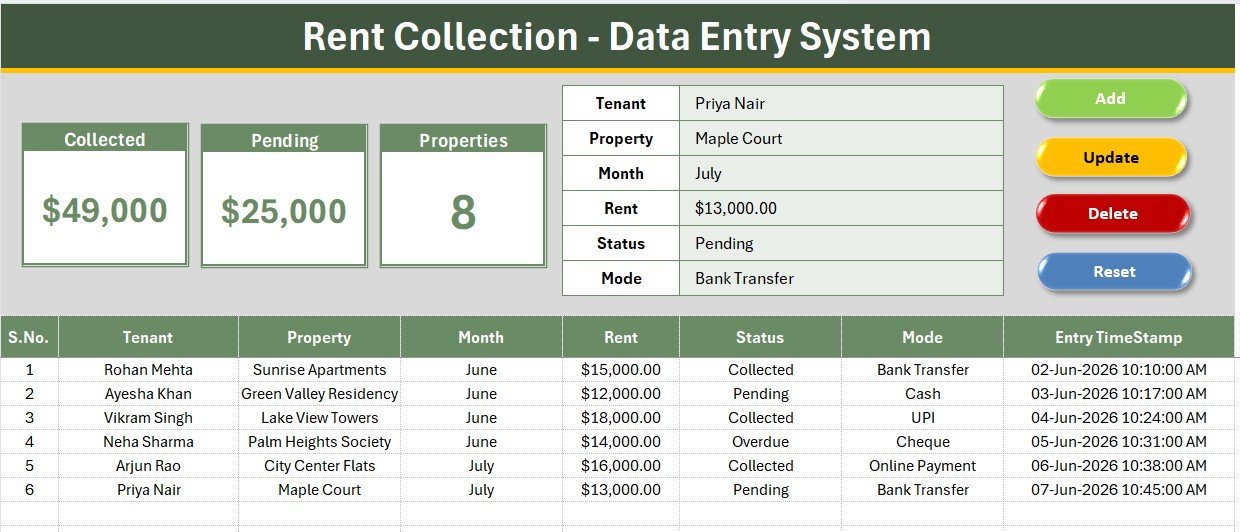
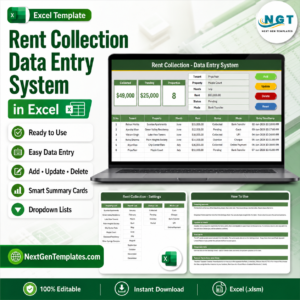
The Rent Collection Data Entry System in Excel logs 6 fields per payment — Tenant, Property, Month, Rent, Status, and Mode — and rolls them into three live KPI cards: Collected, Pending, and Properties. The sample workbook ships with 6 payment records across 8 registered properties, showing $49,000 Collected and $25,000 Pending, so the totals work immediately.
🌍 Join 8,400+ teams in 40+ countries using NextGenTemplates to replace paid SaaS tools with one-time-purchase Excel, Google Sheets, Power BI, and HTML templates.
✅ Instant download · One-time payment · No subscription · No per-user fees · Lifetime access
🔑 Key Features of Rent Collection Data Entry System in Excel
🔹 Status-linked KPI math – The Collected and Pending cards are SUMIF formulas keyed to the Status dropdown, so every payment you log as “Collected” or “Pending” updates the totals in real time — no manual recalculation.
🔹 Live Properties count – The Properties card counts directly from your managed-property list on the Setting sheet, giving you an at-a-glance count of how many buildings or units you’re tracking.
🔹 Dropdown-validated data entry – Property, Month, Status, and Mode are all wired to named-range dropdown lists, so every entry stays clean and typo-free across hundreds of rows.
🔹 One-click VBA buttons – Add, Update, Delete, and Reset macros run from four colour-coded button cells, so a non-technical staff member can log a payment in under 10 seconds.
🔹 Auto S.No and timestamp – Every row gets an automatic serial number and an Entry TimeStamp column, giving you a clean audit trail of when each payment was recorded.
📦 What’s Inside the Rent Collection Data Entry System in Excel
Data Entry Dashboard
This is the main working sheet: three KPI cards (Collected, Pending, Properties) sit above a tinted input form and a records table with S.No, Tenant, Property, Month, Rent, Status, Mode, and Entry TimeStamp columns.
Setting Sheet
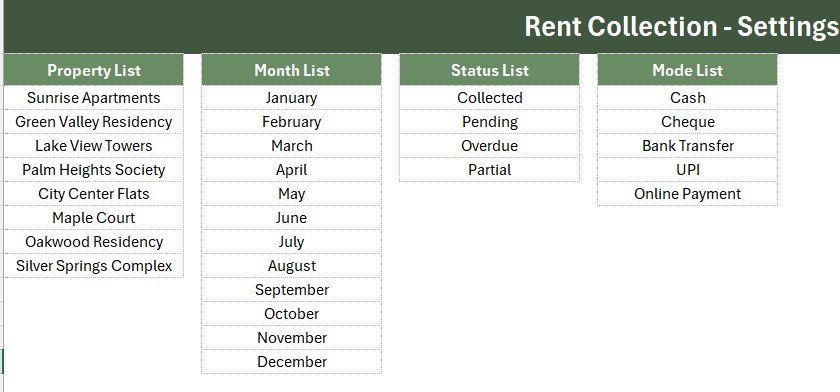
Holds the master dropdown lists — Property, Month, Status, and Mode — plus a duplicate set of the KPI cards you can copy as a linked picture onto a dashboard or summary sheet.
Instructions Sheet
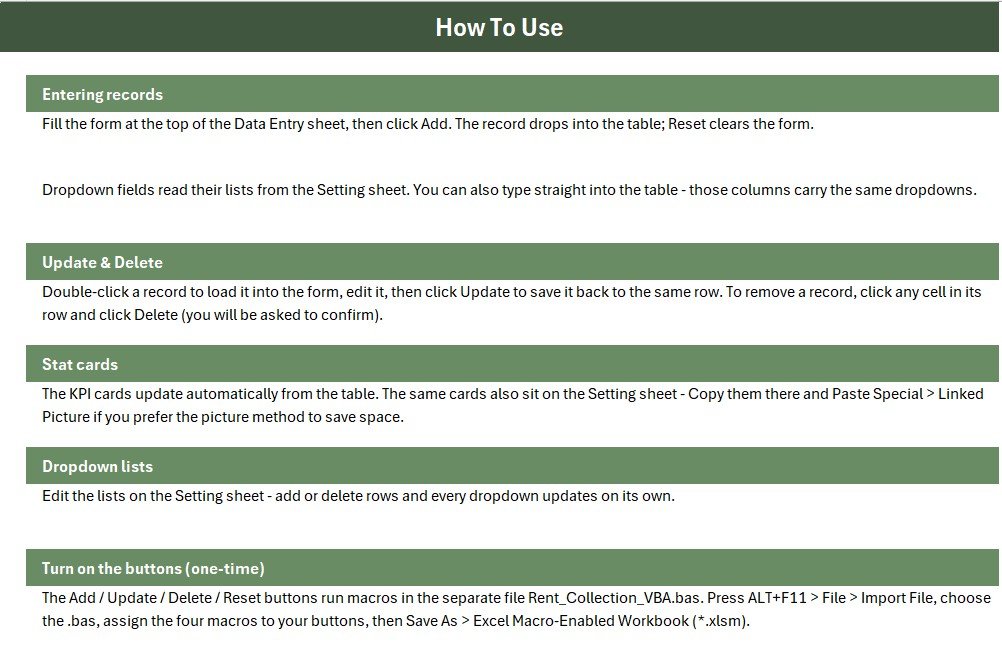
A step-by-step guide for importing the VBA module, wiring the four buttons to their macros, and saving the file as a macro-enabled workbook — no coding experience required.
📊 Rent Collection Data Entry System in Excel vs. Google Sheets Rent Tracker vs. Paid Property Management SaaS — Where This Fits
| Feature | Rent Collection Data Entry System | Google Sheets Rent Tracker | Buildium / AppFolio |
|---|---|---|---|
| Cost | $5.99 one-time | Free-$10 one-time | $50-$400+ / month |
| Platform | Microsoft Excel | Google Sheets (browser) | Cloud SaaS |
| Setup time | Under 10 minutes | Under 10 minutes | Days-weeks onboarding |
| Real-time team collaboration | Single-file, shared drive | ✅ Native | ✅ Native |
| Mobile access | Excel mobile app | ✅ Browser-based | ✅ Dedicated app |
| Customizable fields | ✅ Full VBA control | Formula-based only | Limited to plan tier |
| Share with link | File share / email | ✅ One click | ✅ Tenant portal |
| Year-1 cost at 5 users | $5.99 total | $0-$50 | $600-$4,800+ |
| Status-based Collected/Pending totals | ✅ Built-in | Manual formula setup | ✅ Built-in |
For landlords and small property managers who want automatic Collected/Pending totals without paying a monthly SaaS fee, the Rent Collection Data Entry System in Excel sits in the sweet spot.
👥 Who This Template Is For — and Who It’s Not For
✅ This template is built for:
- Independent landlords managing 3-20 rental units or properties
- Small property management offices tracking rent by hand or in a plain spreadsheet
- Accountants and bookkeepers who need a quick monthly rent-roll record for clients
❌ This template is NOT for:
- Large property management firms needing tenant portals, online rent payment, or automated late fees
- Teams needing real-time multi-user cloud editing (consider the Google Sheets equivalent instead)
⚙️ How to Use the Rent Collection Data Entry System in Excel
- Open the workbook and press ALT+F11, then File → Import File and choose the included .bas VBA module.
- Add four Form-Control buttons over the Add/Delete/Update/Reset cells and assign each macro.
- Save As → Excel Macro-Enabled Workbook (.xlsm) to keep the buttons working.
- Replace the property list on the Setting sheet with your own buildings or units.
- Log each rent payment through the form — the Collected, Pending, and Properties cards update instantly.
💼 Real-World Use Cases
Priya manages 8 rental flats across two neighborhoods on the side. She uses the Rent Collection Data Entry System to log each tenant’s monthly rent status in under a minute and pulls up the Pending total before making her collection calls — without paying for a property-management subscription.
Arjun runs a small bookkeeping practice for three landlord clients. He keeps one workbook per client, using the Status dropdown to separate Collected from Overdue rent, and exports the records table each month for his clients’ own accounting.
❓ Frequently Asked Questions
What does the Rent Collection Data Entry System in Excel track?
It tracks 6 fields per payment — Tenant, Property, Month, Rent, Status, and Mode — and rolls them into 3 live KPI cards: Collected, Pending, and Properties.
How does this compare to Buildium or AppFolio?
Buildium and AppFolio charge $50-$400+ per month with tenant portals included. This template costs $5.99 once for manual rent tracking, no recurring fee.
How long does setup take?
Under 10 minutes. Import the VBA module, assign the four buttons, save as .xlsm, and start logging payments against your own property list.
Can I add more properties or tenants?
Yes. Add property names to the Property list on the Setting sheet and the dropdown and the Properties KPI card update automatically.
Does this work without enabling macros?
You can view the records table without macros, but Add/Update/Delete/Reset require macros enabled.
Is this a one-time purchase?
Yes. The Rent Collection Data Entry System in Excel is a one-time payment with lifetime access — no subscription or per-user fee.
👤 About the Author
Built by PK — Microsoft Certified Professional with 15+ years of Excel, Google Sheets, and Power BI experience. Founder of NextGenTemplates, reaching 300K+ subscribers across YouTube channels (@PK-AnExcelExpert, @NextGenTemplates, @NeoTechNavigators). Every template is hand-built and tested before release.
🔗 Explore Related Templates
💎 Save 66% — Get this alongside 6 more property templates in the Real Estate & Property Bundle →
- Lead Tracker Data Entry System in Excel — the same VBA data-entry pattern for sales pipelines
- Service Booking Data Entry System in Excel — for service-based businesses managing appointments
- Real Estate Investment Trusts (REITs) KPI Dashboard in Excel — for portfolio-level reporting
📖 Click here to read the Detailed Blog Post
🎥 Visit our YouTube channel for step-by-step video tutorials
👉 YouTube.com/@NextGenTemplates






























Reviews
There are no reviews yet.