

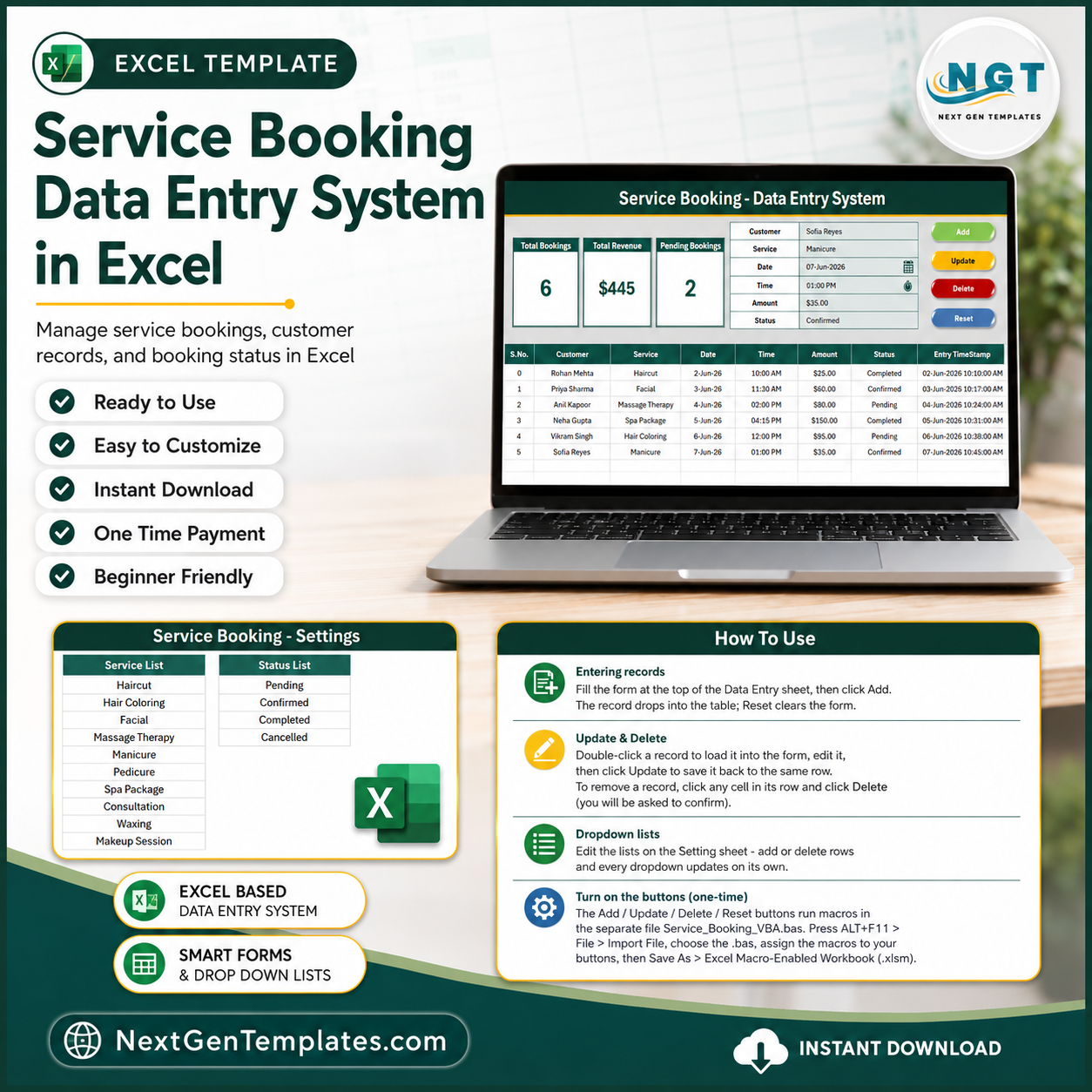
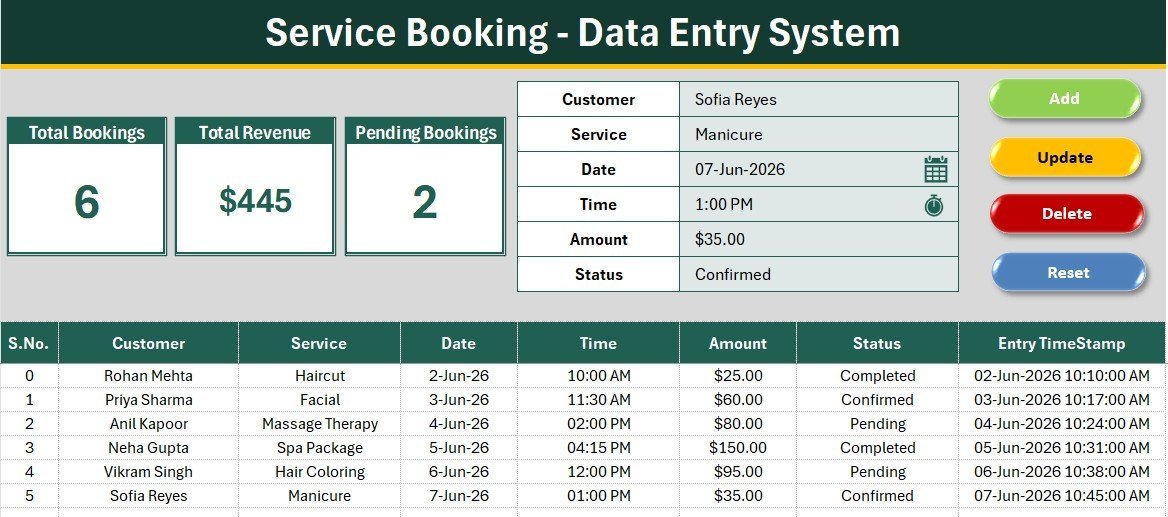
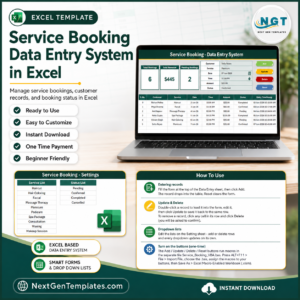
The Service Booking Data Entry System in Excel logs every appointment across six fields — Customer, Service, Date, Time, Amount, and Status — and refreshes three live KPI cards (Total Bookings, Total Revenue, Pending Bookings) the moment you add a record. Setup takes under 5 minutes: enable macros, set your Service and Status options, and start booking.
🌍 Join 8,400+ teams in 40+ countries using NextGenTemplates to replace paid SaaS tools with one-time-purchase Excel, Google Sheets, Power BI, and HTML templates.
✅ Instant download · One-time payment · No subscription · No per-user fees · Lifetime access
🔑 Key Features of the Service Booking Data Entry System in Excel
This Excel service booking form captures six fields per appointment and runs four VBA actions — Add, Update, Delete, and Reset — from single-click buttons, so your front desk never edits a formula or a raw row.
- 💙 Six-field booking form: Customer, Service, Date, Time, Amount, and Status sit in one entry panel with bold labels and tinted input lines for fast, error-free typing.
- 📊 Three live KPI cards: Total Bookings counts every record, Total Revenue sums the Amount column, and Pending Bookings counts rows where Status is Pending — all recalculated the instant you add or edit a booking.
- 🖱️ Four one-click VBA buttons: Add writes a new booking, Update edits the selected row, Delete removes it, and Reset clears the form for the next customer.
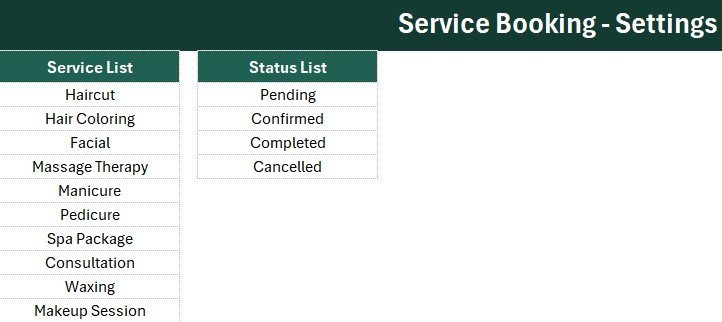
- 🔽 Dropdown-controlled data: Service (Haircut, Facial, Massage Therapy, Spa Package, and more) and Status (Pending, Confirmed, Completed, Cancelled) are wired to the Setting sheet so every entry stays consistent.
- 🔢 Auto numbering and timestamp: each booking gets an automatic S.No and an Entry TimeStamp, giving you a clean audit trail without extra typing.
📦 What’s Inside the Service Booking Data Entry System
The workbook ships with four ready-to-use sheets, all built in the deep-teal NextGenTemplates house style with the Aptos Narrow font.
Data Entry Dashboard
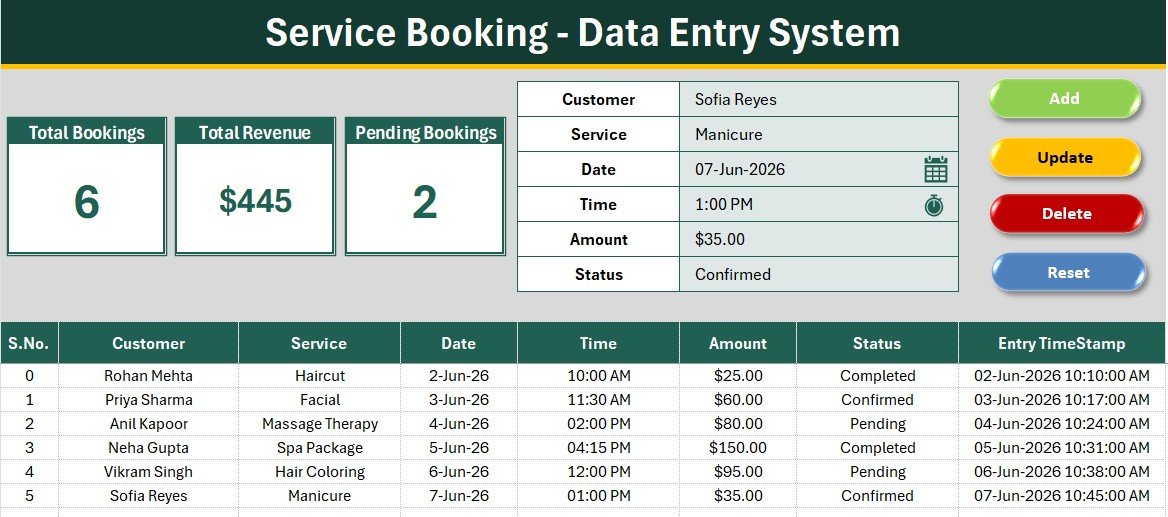
The main screen holds the three KPI cards, the six-field booking form, the four coloured action buttons, and the records table with auto S.No, currency-formatted Amount, and an Entry TimeStamp column.
Booking Form and Action Buttons
Type a booking once, then Add, Update, Delete, or Reset with a single click. New rows drop straight into the records table below, numbered and time-stamped automatically.
Setting Sheet
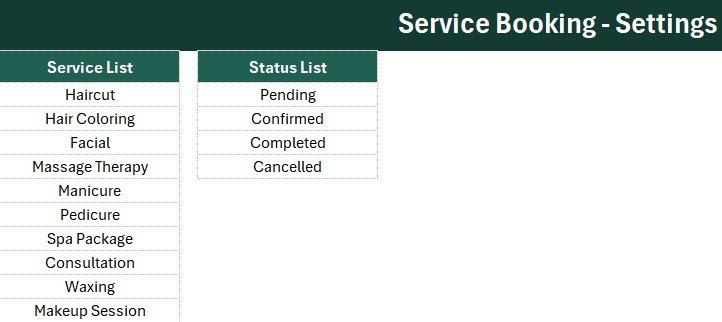
Edit the Service and Status dropdown lists here and every entry field updates automatically. The KPI stat cards are duplicated on this sheet, ready to Copy then Paste Special as a Linked Picture onto any report.
Instructions and Get More Templates
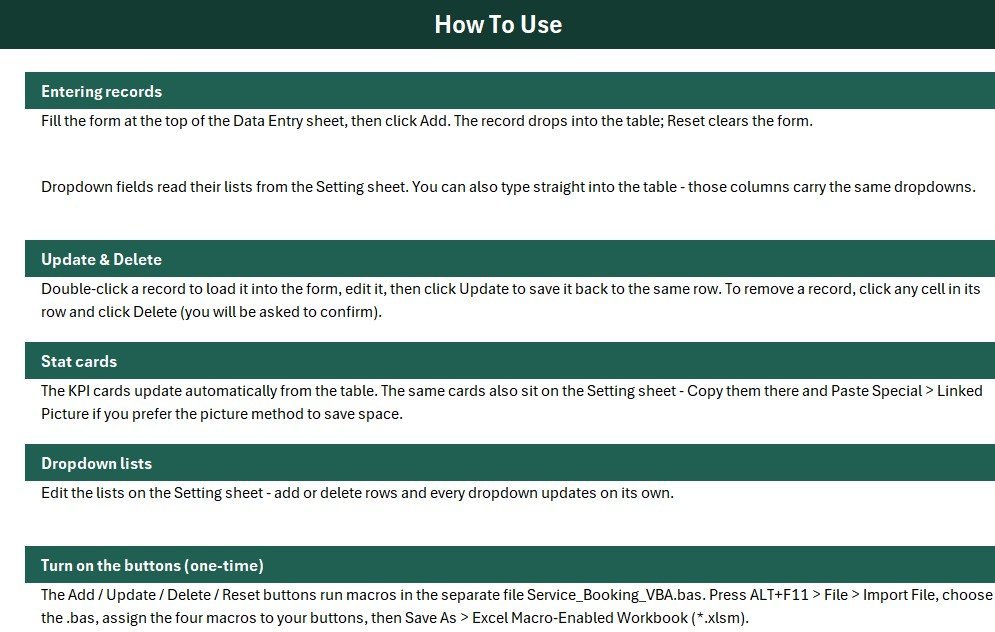
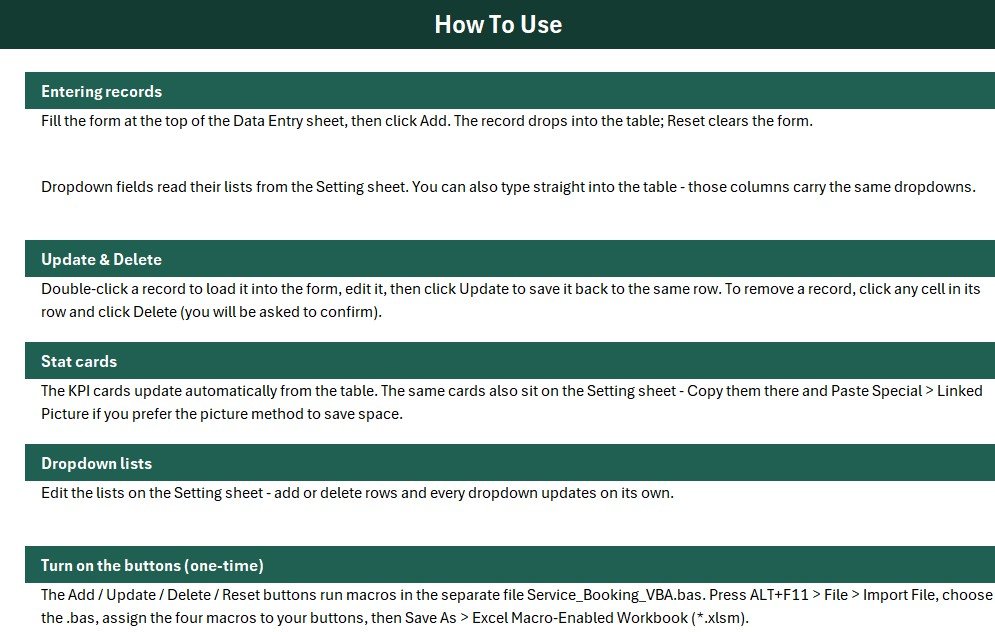
A one-page activation guide walks you through importing the VBA module and assigning the four macros, while the Get More Templates sheet links back to the full Excel VBA Tools catalogue.
📊 Service Booking Data Entry System vs. Google Sheets vs. Booking SaaS — Where This Fits
| Feature | Service Booking Data Entry System (Excel) | Google Sheets Booking Sheet | Booking SaaS (Calendly / Acuity / Square) |
|---|---|---|---|
| Cost | $5.99 one-time | Free but manual to build | $10–$50 / user / month |
| Platform | Microsoft Excel (offline) | Google Sheets (online) | Cloud only |
| Setup time | Under 5 minutes ✅ | Hours to build formulas | Account + integrations |
| One-click Add / Update / Delete | ✅ VBA buttons | Manual or scripting | ✅ in-app |
| Works fully offline | ✅ | ❌ needs internet | ❌ |
| Data stays on your computer | ✅ | Partial (Google cloud) | ❌ vendor cloud |
| Per-user fees | ✅ None | None | ❌ charged per seat |
| Year-1 cost at 5 users | $5.99 total ✅ | $0 (build it yourself) | $600–$3,000 |
For salons, clinics, and service desks that want a private, one-time-purchase booking log without monthly per-seat fees, the Service Booking Data Entry System in Excel sits in the sweet spot.
👥 Who This Template Is For — and Who It’s Not For
✅ This template is built for:
- Salons, spas, barbershops, and wellness studios logging daily appointments and revenue
- Solo practitioners and small clinics tracking bookings without paying for a full CRM
- Any service business that wants a simple offline record of who booked what, when, and for how much
❌ This template is NOT for:
- Multi-location chains needing real-time online booking with automated customer reminders
- Teams that require role-based logins, SOC 2 compliance, or live calendar sync across staff
- Businesses that want customers to self-book from a website — this is an internal entry log, not a public booking page
⚙️ How to Use the Service Booking Data Entry System
- Unzip and open the workbook in Microsoft Excel, then enable macros when prompted.
- Open the Setting sheet and edit the Service and Status dropdown lists to match your business.
- Fill the booking form — Customer, Service, Date, Time, Amount, Status — and click Add.
- Select any row and click Update to edit it or Delete to remove it; click Reset to clear the form.
- Watch the Total Bookings, Total Revenue, and Pending Bookings cards update automatically.
💼 Real-World Use Cases
Meera runs a two-chair salon. She logs every walk-in and appointment into the Service Booking Data Entry System, sets Status to Confirmed or Completed, and checks her Total Revenue card at close each day — without paying a monthly booking-app fee.
Daniel manages a small physiotherapy clinic. He uses the Pending Bookings card to see which sessions still need confirmation and updates each row as patients pay, keeping a clean offline record of appointments and amounts.
Aisha runs a mobile spa service. Between visits she adds bookings on her laptop, edits the Service and Status dropdowns to reflect her packages, and exports the records table when her accountant needs a monthly summary.
❓ Frequently Asked Questions
What fields does the Service Booking Data Entry System track?
The Service Booking Data Entry System tracks six fields per booking: Customer, Service, Date, Time, Amount, and Status. Service and Status use editable dropdowns, and every record is auto-numbered with an Entry TimeStamp.
Do I need to know VBA or Excel formulas to use it?
No. The Service Booking Data Entry System runs on four ready-made VBA buttons — Add, Update, Delete, and Reset. You just enable macros once, then click buttons; no formula editing is required.
How do the KPI cards calculate Bookings, Revenue, and Pending?
Total Bookings counts every record, Total Revenue sums the Amount column, and Pending Bookings counts rows where Status equals Pending. All three cards recalculate instantly whenever you add, update, or delete a booking.
Can I change the Service and Status options?
Yes. Open the Setting sheet and edit the Service and Status lists. The form dropdowns are linked to those lists, so your changes appear in the entry fields automatically.
How does this compare to booking SaaS like Calendly or Acuity?
Booking SaaS tools charge $10–$50 per user each month and store your data in their cloud. The Service Booking Data Entry System is a $5.99 one-time purchase that works offline and keeps every booking on your own computer.
How long does setup take?
Under 5 minutes. Enable macros, edit the Service and Status dropdowns on the Setting sheet, and you are ready to log your first booking.
Does it work offline and on older Excel versions?
Yes. The Service Booking Data Entry System is a standard macro-enabled Excel workbook that runs fully offline on Excel 2016 and later on Windows. Enable macros to use the Add, Update, Delete, and Reset buttons.
👤 About the Author
Built by PK — Microsoft Certified Professional with 15+ years of Excel, Google Sheets, and Power BI experience. Founder of NextGenTemplates, reaching 300K+ subscribers across YouTube channels (@PK-AnExcelExpert, @NextGenTemplates, @NeoTechNavigators). Every template is hand-built and tested before release.
🔗 Explore Related Templates
- Project Time Log Data Entry System in Excel — log billable hours with the same one-click Add/Update/Delete form.
- Client Invoice Tracker Data Entry System in Excel — pair your bookings with an invoice log for full front-office coverage.
- Luxury Spa KPI Dashboard in Excel — turn booking data into a full salon/spa performance dashboard.
- Multispecialty Clinic Management System in Excel — scale up from a booking log to a complete clinic system.
Browse more in Excel VBA Tools and MS Excel Templates.
📖 Click here to read the detailed blog post
🎥 Visit our YouTube channel for step-by-step video tutorials
👉 YouTube.com/@NextGenTemplates
📅 Last updated: July 2026









Reviews
There are no reviews yet.