

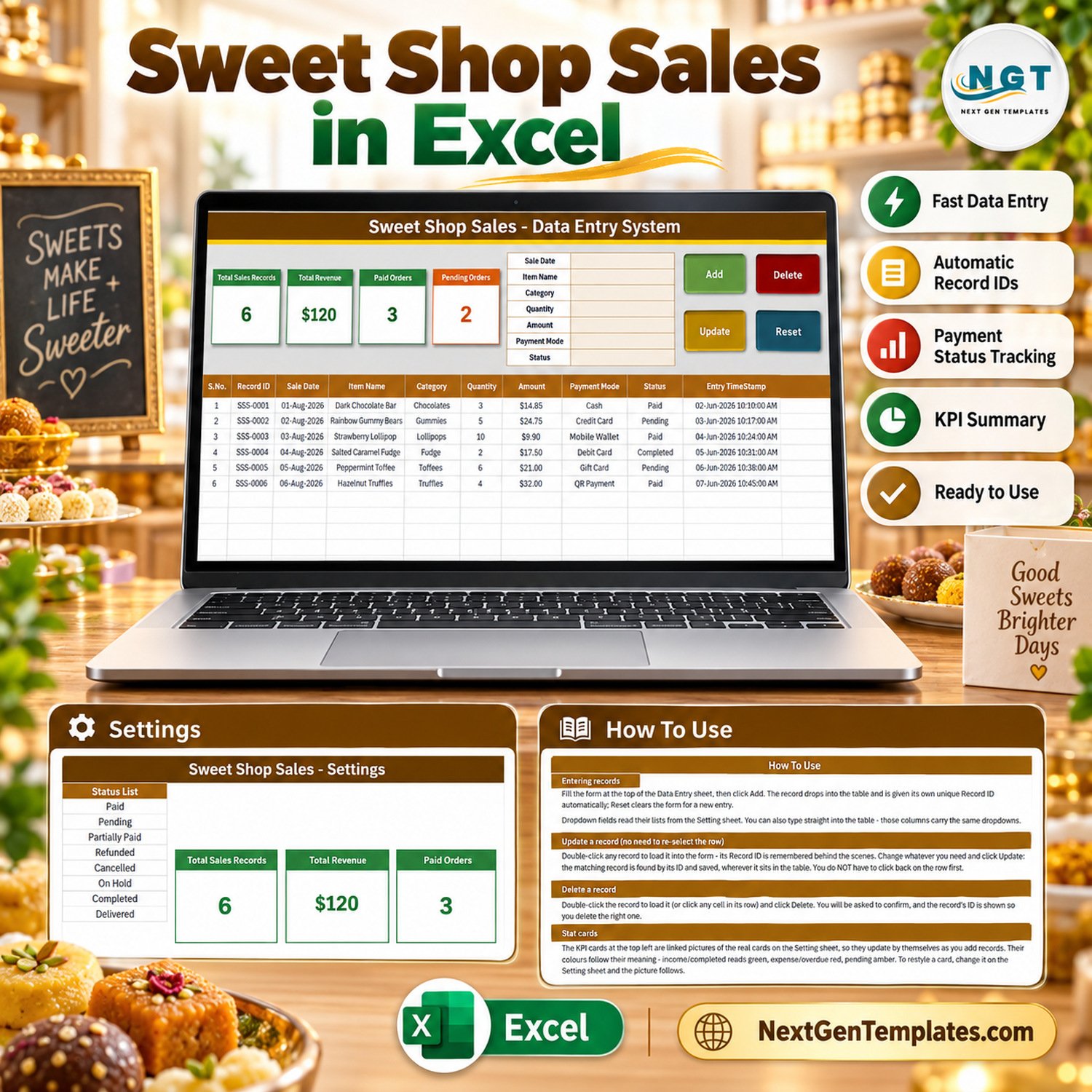

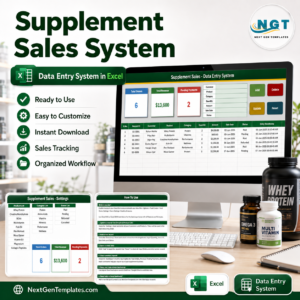
The Sweet Shop Sales Data Entry System in Excel is a macro-enabled workbook for logging every sale a sweet shop, candy store or chocolate counter makes. It gives you a 7-field entry form, 4 live VBA buttons, 4 self-updating stat cards and 3 editable dropdown lists holding 29 ready values – 12 sweet categories, 9 payment modes and 8 order statuses. Fill the form, click Add, and the sale drops into the records table with its own Record ID and timestamp.
It is a sales register, not a point-of-sale system, not a billing or GST/VAT invoicing tool, not inventory software and not accounting software. It answers the questions a confectionery owner asks at closing time – how many sales were logged, what they add up to, and how many orders are still pending – without adding up a counter notebook by hand.
✅ Instant download · One-time payment · No subscription · No per-user fees · Fully unlocked and editable
🔑 Key Features of the Sweet Shop Sales Data Entry System in Excel
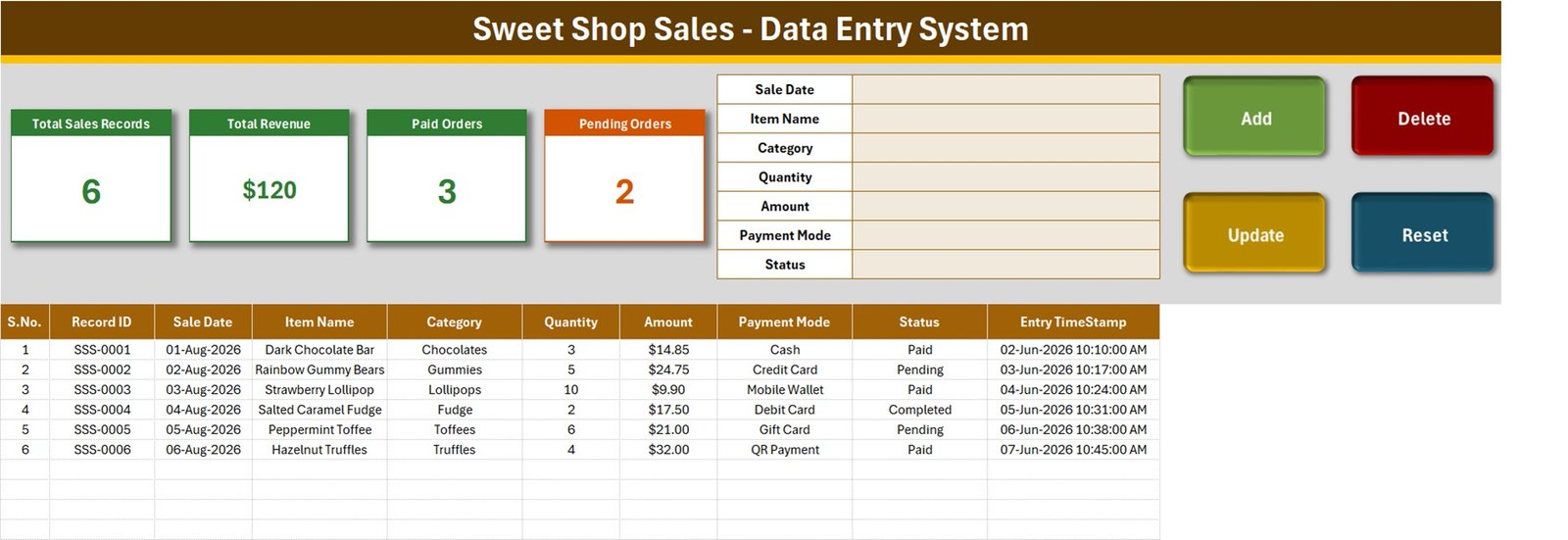
- 🧾 A seven-field entry form – Sale Date, Item Name, Category, Quantity, Amount, Payment Mode and Status – placed beside the stat cards on the Data Entry sheet, so one screen covers entry and review.
- 🔘 Four live VBA buttons. Add saves the form as a new record, Update rewrites the record you loaded, Delete removes a record after a confirmation that shows its Record ID, and Reset clears the form without touching the table.
- 🔢 Automatic Record IDs in the SSS-0001 series plus an Entry TimeStamp on every saved sale. IDs keep counting up after deletions, so a number is never reused.
- 🖱️ Double-click editing. Double-click any row and it loads back into the form. The workbook remembers the Record ID, so Update finds that record wherever it now sits in the table.
- 🍬 Sweet shop categories built in: Chocolates, Gummies, Hard Candy, Lollipops, Toffees, Fudge, Marshmallows, Caramels, Licorice, Jellybeans, Truffles and Mints.
- 📊 Four stat cards – Total Sales Records, Total Revenue, Paid Orders and Pending Orders – that recalculate from the table as you add records, with no refresh button and no pivot table to rebuild.
- 🧪 Six fictional sample sales (SSS-0001 to SSS-0006) already loaded, from a Dark Chocolate Bar to Hazelnut Truffles, so you can watch every button work before you clear them out.
📦 What’s Inside the Workbook
Four sheets make up the whole product: Data Entry, Setting, Instructions (a How To Use page) and Get More Templates.
Sheet 1: Data Entry
This is the working screen. It shows the Total Sales Records, Total Revenue, Paid Orders and Pending Orders cards, the seven-field form, the Add, Delete, Update and Reset buttons, and a ten-column records table: S.No., Record ID, Sale Date, Item Name, Category, Quantity, Amount, Payment Mode, Status and Entry TimeStamp. On the sample data the cards read 6, $120, 3 and 2.
Sheet 2: Setting
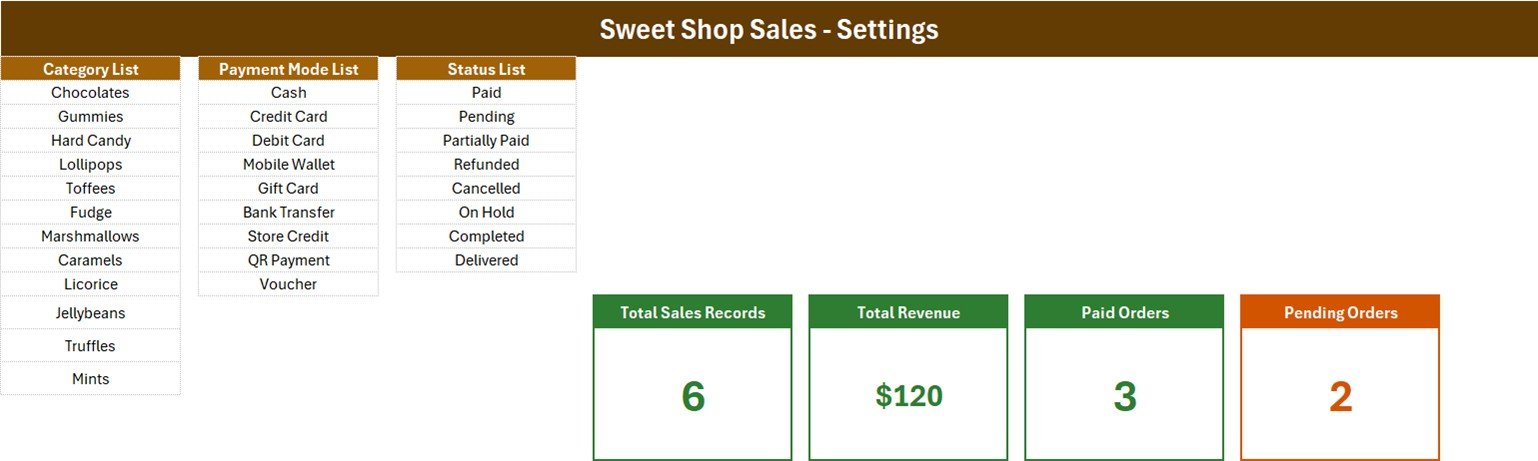
This sheet holds the three dropdown lists and the real stat-card formulas. The lists ship with these values, all editable:
- 🍫 Category List (12): Chocolates, Gummies, Hard Candy, Lollipops, Toffees, Fudge, Marshmallows, Caramels, Licorice, Jellybeans, Truffles, Mints.
- 💳 Payment Mode List (9): Cash, Credit Card, Debit Card, Mobile Wallet, Gift Card, Bank Transfer, Store Credit, QR Payment, Voucher.
- 📌 Status List (8): Paid, Pending, Partially Paid, Refunded, Cancelled, On Hold, Completed, Delivered.
Sheet 3: How To Use
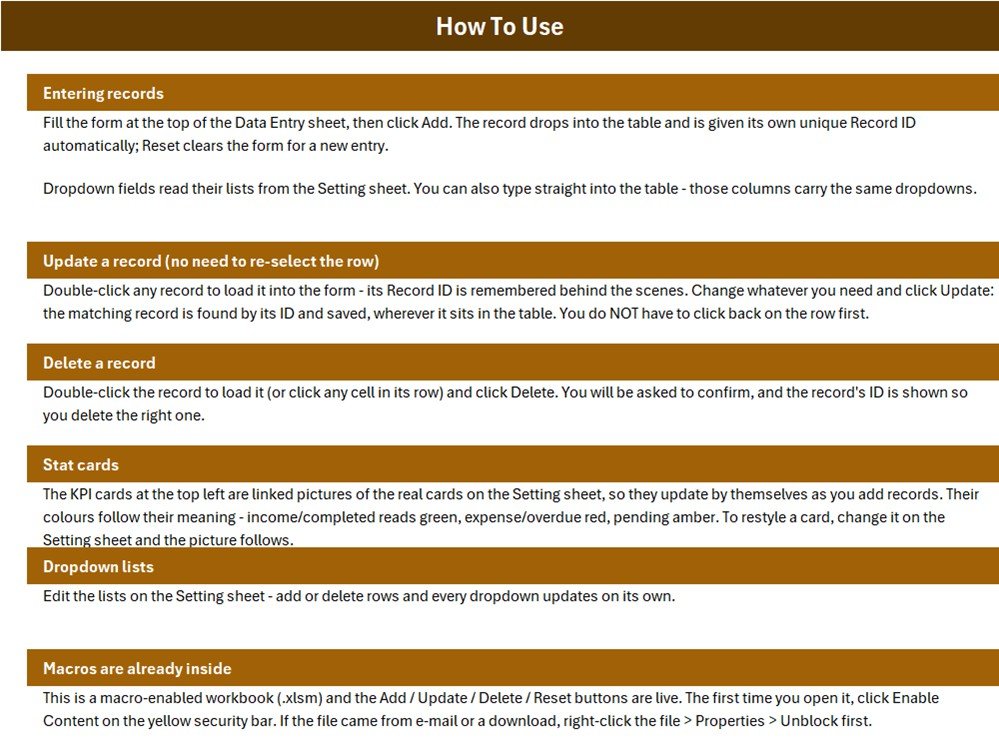
This page explains entering records, updating without re-selecting the row, deleting, how the stat cards work, editing the dropdown lists and enabling macros on first open.
📐 What the Four Stat Cards Actually Count
These are the real formulas from the Setting sheet, read out of the workbook. Read them once and the cards will never surprise you:
- 🔹 Total Sales Records =
COUNTA('Data Entry'!$C$15:$C$1048576)– a count of the Sale Date column. The Add button refuses a blank Sale Date and writes today’s date if the entry is not a valid date, so every saved sale is counted. Only a row typed straight into the table with no date is missed. - 🔹 Total Revenue =
SUM('Data Entry'!$G$15:$G$1048576)– every Amount whatever the status, so Pending, Refunded and Cancelled rows are included. The six samples total $120.00, but only $56.75 of that is marked Paid and $45.75 is still Pending. Treat it as value logged, not cash collected. - 🔹 Paid Orders =
COUNTIF('Data Entry'!$I$15:$I$1048576,"Paid"). - 🔹 Pending Orders =
COUNTIF('Data Entry'!$I$15:$I$1048576,"Pending").
Only two of the eight statuses have a card. Partially Paid, Refunded, Cancelled, On Hold, Completed and Delivered are not counted by either card, so on the sample data Paid plus Pending is 3 + 2 against 6 records – the Completed Salted Caramel Fudge sale SSS-0004 is in neither. One-line fix: add a card such as =COUNTIF('Data Entry'!$I$15:$I$1048576,"Refunded") for each status you want to watch.
Revenue fix in one cell. For money from settled sales only, replace Setting!I13 with =SUM(SUMIFS('Data Entry'!$G$15:$G$1048576,'Data Entry'!$I$15:$I$1048576,{"Paid","Completed","Delivered"})). Microsoft documents the function in its SUMIFS reference.
Amount is typed, not calculated. The form has a Quantity field but no Unit Price field, and the Add macro copies Amount exactly as typed, so Quantity x price is never checked. Enter the line total yourself. One-line fix: add a Unit Price column (for example K) and set Amount to =F15*K15 down the table.
📊 This Excel Workbook vs. a Google Sheets Log vs. Retail POS Software
| Feature | Sweet Shop Sales Data Entry System in Excel | Home-made Google Sheets log | Retail POS software (Square, Lightspeed) |
|---|---|---|---|
| Cost | ✅ $6.99 one-time (regular $11.99) | Free, but you build it yourself | Monthly subscription plus card hardware |
| Platform | Excel for Windows desktop | Any browser | Vendor app, tablet or browser |
| Setup time | ✅ About 10 minutes – edit three lists | Hours to design form, lists and formulas | Days of onboarding and product import |
| Entry form with Add / Update / Delete | ✅ Built in, VBA | No – typing straight into rows | ✅ Yes |
| Real-time team collaboration | No – one file on one PC | ✅ Yes | ✅ Yes |
| Mobile access | No | ✅ Yes | ✅ Yes |
| Customizable lists and fields | ✅ Fully unlocked | ✅ Yes | Limited to vendor settings |
| Receipts, tax invoices, stock control | No | No | ✅ Usually included |
| Year-1 cost at 5 users | ✅ One purchase per user licence, no renewal | Free | Subscription x 12 months |
For a small sweet counter that wants a tidy, filterable sales register without paying for POS software it will not fully use, this workbook sits in the sweet spot.
👥 Who This Template Is For – and Who It’s Not For
✅ Built for:
- Independent sweet shops, candy stores and chocolate boutiques keeping a daily sales register
- Market stalls, festival pop-ups and kiosk counters that want each sale and its payment mode on record
- Owners who want pending and paid orders visible at a glance, for example gift-box orders taken ahead of a holiday
❌ NOT for:
- Shops that need a till, printed receipts, GST/VAT invoices, stock deduction or accounting – this is not a POS, billing, inventory or accounting system
- Businesses looking for food-safety, hygiene, batch or expiry records – the workbook has no such fields and makes no food-safety or FSSAI claim
- Anyone working on a Mac, in Excel for the web or in Google Sheets, where the VBA buttons do not run
⚙️ How to Use the Sweet Shop Sales Data Entry System
- Unzip the download and open
Sweet_Shop_Sales_System.xlsmin Excel for Windows. Click Enable Content; if Excel still blocks it, right-click the file, choose Properties and tick Unblock. - Open the Setting sheet and rewrite the Category, Payment Mode and Status lists with your own values. Add a value by inserting a row inside a list.
- Delete the six sample rows when you are ready to start.
- Fill the form on Data Entry and click Add. Sale Date is required; the Record ID and Entry TimeStamp are written for you.
- To correct a sale, double-click its row, edit it and click Update. To remove one, load it and click Delete, then confirm.
- Click Reset to clear the form without touching the table.
💼 Real-World Use Cases
Anita runs a family sweet shop. She logs every chocolate bar and toffee pack sold at the counter, marks advance gift-box orders as Pending, and switches them to Paid when the customer collects – checking the Pending Orders card before she closes.
Tom sells fudge and truffles at weekend markets. He filters the table by Category at month-end to see which lines actually sell, then trims his Category List to the flavours worth making again.
A mall candy kiosk filters the Payment Mode column at closing time to split cash, card, mobile wallet and QR payments instead of adding them up on paper.
⚠️ Limits to Know Before You Buy
- 🔸 The three lists are fixed named ranges, and each is already full. CategoryList reads
Setting!$A$3:$A$14, Payment_ModeList$C$3:$C$11and StatusList$E$3:$E$10. The How To Use page says every dropdown updates on its own when you add rows; that is only true if you insert a row inside a list. A value typed in the first blank cell below a list will not appear. One-line fix: in Formulas > Name Manager set CategoryList to=OFFSET(Setting!$A$3,0,0,COUNTA(Setting!$A$3:$A$100),1), and the same pattern for the other two. - 🔸 The in-table dropdowns cover rows 15 to 214 – 200 records. The Add button and the card formulas keep working below that, and Delete removes a whole sheet row, so drag the validation down if you keep more than about 200 sales in one file.
- 🔸 No stock, receipts or tax. Recording a sale does not reduce any stock count, and there is no receipt, discount, GST or VAT calculation.
- 🔸 Sample data is fictional. The six sales, items and prices are made up for the demo; the sample Entry TimeStamps even predate their Sale Dates. Delete them before you start.
❓ Frequently Asked Questions
What does the Sweet Shop Sales Data Entry System in Excel track?
It records one row per sale with Sale Date, Item Name, Category, Quantity, Amount, Payment Mode and Status, plus an automatic Record ID and Entry TimeStamp. Four cards show Total Sales Records, Total Revenue, Paid Orders and Pending Orders, recalculating as you add, update or delete records.
How long does setup take?
About ten minutes. Enable macros, replace the three Setting lists with your own categories, payment modes and statuses, delete the six sample rows, and start adding sales through the form. No formula needs editing unless you want the fixes described above.
Why is Total Revenue higher than the cash in my till?
Total Revenue sums every Amount whatever the status, so Pending, Partially Paid, Refunded and Cancelled rows are included. On the sample data it shows $120 while Paid sales come to $56.75. Replace the card with the SUMIFS formula on this page for settled sales only.
Is it a POS or billing system for my sweet shop?
No. It is a sales register. It does not print receipts, raise GST or VAT invoices, deduct stock or post to accounts, and it carries no food-safety or FSSAI claim. Use it to keep a clean, filterable record of sales alongside whatever till you already have.
Will it work on a Mac or in Excel for the web?
No. The workbook is macro-enabled, and the Add, Update, Delete and Reset buttons need macros enabled in Excel for Windows desktop. Excel for the web cannot run VBA, Excel for Mac handles macros differently, and Google Sheets cannot run them either.
How does this compare to POS software like Square or Lightspeed?
POS software adds a till, receipts, stock control and multi-user access for a monthly fee. This workbook costs $6.99 once and does one job: a filterable sales register with live stat cards on a single computer.
Is the file locked?
No. Every sheet, list, formula and macro is open, so you can rename columns, add a Unit Price column, recolour cards or add more status cards.
👤 About the Author
Built by PK – Microsoft Certified Professional with 15+ years of Excel, Google Sheets and Power BI experience. Founder of NextGenTemplates, reaching 300K+ subscribers across YouTube channels (@PKAnExcelExpert, @NextGenTemplates, @NeoTechNavigators). Every template is hand-built and tested before release.
🔗 Explore Related Templates
- 🥐 Bakery Sales Register Data Entry System in Excel – the same form-and-cards build for a bakery counter.
- 👗 Garment Shop Sales Data Entry System in Excel and Furniture Sales Register Data Entry System in Excel – more retail sales registers.
- 📈 Bakery Executive Dashboard in Google Sheets – analysis instead of entry, with charts over food-retail sales.
- 🛒 General Store POS Web App – the step up when you need a real multi-user point-of-sale.
Browse more Excel VBA tools, sales templates and MS Excel templates in the store.
📖 Click here to read the Detailed Blog Post
🎥 Visit our YouTube channel for step-by-step video tutorials
👉 YouTube.com/@NextGenTemplates
📅 Last updated: September 2026
Watch the demo video:
Compatibility and Requirements
- Works in Excel desktop on Windows with macros enabled. It does not run in Excel for the web, Google Sheets or on mobile.
- The Add, Update, Delete and Reset buttons are VBA macros. Microsoft explains how to turn them on in Enable or disable macros in Microsoft 365 files.
More Questions About This Template
What does the Add button do?
It saves the seven form fields as a new row in the records table and writes a Record ID in the SSS-0001 series plus an Entry TimeStamp. Sale Date is required.
How do I change a sale I already saved?
Double-click its row to load it back into the form, edit the fields and click Update. The workbook remembers the Record ID, so Update finds the right record.
Can I use my own categories and payment modes?
Yes. The Setting sheet holds the Category, Payment Mode and Status lists, and you can rewrite them. To add a value, insert a row inside a list.
Is there a bakery version of this register?
Yes. The Bakery Sales Register Data Entry System in Excel uses the same form and stat cards for a bakery counter.
Related Sales Register Templates
- Meat Shop Sales Data Entry System in Excel: the same sales register for a meat counter
- Optical Shop Sales Data Entry System in Excel: the register built for an optical shop
- Photocopy Shop Sales Data Entry System in Excel: logs sales for a copy and print counter
- Daily Sales Dashboard in Excel: a dashboard view of daily sales
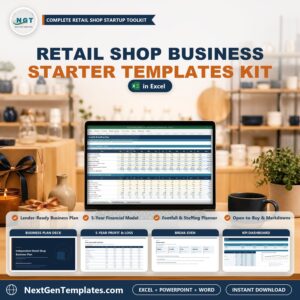
- Retail Shop Business Starter Templates Kit: a starter kit for a retail shop
Browse all Excel VBA tools and Excel sales and marketing templates.


























Reviews
There are no reviews yet.