



The Monthly Review Outline Checklist in Excel is an essential tool for businesses, managers, and teams looking to conduct structured, efficient monthly reviews. This customizable Excel template helps you track key performance indicators (KPIs), monitor progress toward goals, and identify areas that require improvement, all while staying organized and on schedule.
By using this checklist, you can ensure that your monthly reviews are thorough and cover all critical aspects of performance, including financial health, project progress, employee productivity, and customer satisfaction. Whether you’re managing a team, overseeing projects, or tracking company-wide metrics, this checklist will help streamline your review process and ensure that you make data-driven decisions to drive growth.
Key Features of the Monthly Review Outline Checklist in Excel
📅 Monthly Review Planning
Easily organize your monthly review sessions with a clear and structured outline. Plan what to review, which KPIs to focus on, and set the agenda for the meeting.
📊 Track Key Performance Indicators (KPIs)
Monitor essential KPIs, such as sales performance, customer satisfaction, employee productivity, and more. Track progress toward monthly goals and assess the effectiveness of your strategies.
✅ Action Item Tracking
Capture key action items during your review sessions and assign responsibilities. Track progress and ensure that tasks are completed on time, keeping everyone accountable.
📈 Visual Performance Analysis
Use charts and graphs to visualize your progress toward monthly goals. See how key metrics are trending and make data-driven decisions to adjust strategies and improve performance.
📅 Scheduled Reminders & Alerts
Set up reminders for monthly reviews, ensuring that you stay on track and never miss a critical review meeting or deadline.
📊 Customizable & Flexible
Customize the checklist to fit your specific needs. Add or remove KPIs, adjust the layout, and personalize the review outline to match your business or department’s requirements.
Why You’ll Love the Monthly Review Outline Checklist in Excel

✅ Streamline Your Review Process
Organize and structure your monthly reviews with ease. The checklist ensures you stay on track and cover all the necessary aspects of performance.
✅ Stay on Top of KPIs & Progress
Monitor your key performance indicators throughout the month and track progress toward goals. Identify areas that need improvement and celebrate wins.
✅ Enhance Accountability
Keep track of action items, assign responsibilities, and monitor progress to ensure accountability throughout the month. Ensure that tasks are completed and objectives are met.
✅ Improve Decision-Making
Make better decisions by analyzing visual data and trends. The checklist helps you gather insights that inform your strategies and improve your business outcomes.
✅ Customizable for Any Business
This checklist is adaptable to any business or department. Customize the KPIs, goals, and agenda to fit your specific needs, whether you’re reviewing sales, marketing, or employee performance.
What’s Inside the Monthly Review Outline Checklist in Excel?
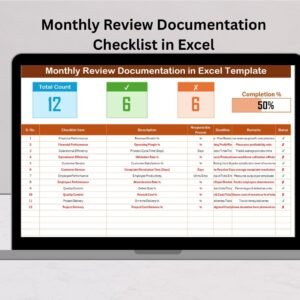
- Structured Review Outline: Organize your review agenda, goals, and KPIs in a clear format.
- KPI Tracking: Track key performance metrics, including sales, productivity, and customer satisfaction.
- Action Item Tracker: Capture and assign tasks during the review, ensuring accountability.
- Visual Performance Dashboards: Use charts and graphs to visualize your progress and performance trends.
- Reminder & Alert System: Set up automated reminders to stay on top of your monthly reviews.
- Customizable Fields: Modify the checklist to match your specific review criteria, KPIs, and business objectives.
How to Use the Monthly Review Outline Checklist in Excel
1️⃣ Download the Template: Get immediate access to the Monthly Review Outline Checklist in Excel.
2️⃣ Set Your Review Agenda: Customize your review outline by adding KPIs, goals, and topics you want to track.
3️⃣ Track Progress: Monitor performance throughout the month and ensure you are on track to meet your goals.
4️⃣ Review and Analyze Data: Use the charts and graphs to assess trends and make data-driven decisions.
5️⃣ Assign Action Items & Monitor Tasks: Capture action items, assign responsibilities, and track their completion.
Who Can Benefit from the Monthly Review Outline Checklist in Excel?
🔹 Managers & Team Leaders
🔹 Business Owners & Executives
🔹 HR & Operations Managers
🔹 Project Managers & Coordinators
🔹 Marketing & Sales Teams
🔹 Finance & Accounting Teams
Ensure your monthly reviews are organized, efficient, and productive with the Monthly Review Outline Checklist in Excel. Track KPIs, monitor progress, and improve decision-making to drive success and growth.
Click here to read the Detailed blog post
Visit our YouTube channel to learn step-by-step video tutorials
Youtube.com/@PKAnExcelExpert
Watch the step-by-step video Demo:
Compatibility and Requirements
- Works in Microsoft Excel desktop (Excel 2016 or later, or Microsoft 365).
- New to Excel? Microsoft has a free guide: Excel for Windows training.
Frequently Asked Questions
What does the Monthly Review Outline Checklist cover?
It covers the review agenda, goals and KPIs such as sales performance, customer satisfaction and employee productivity.
Can I track action items from the meeting?
Yes. You can record action items, assign an owner to each one and track progress until it is done.
Can I change the KPIs?
Yes. You can add or remove KPIs, change the layout and adjust the outline for your team or department.
Does it show progress visually?
Yes. Charts and graphs show how key metrics move toward monthly goals.
Related Monthly Review Templates
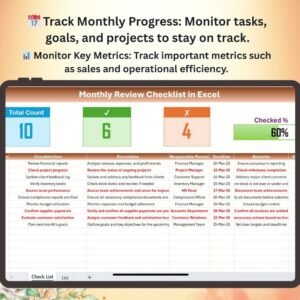
- Monthly Review Checklist in Excel: a general monthly review checklist in Excel
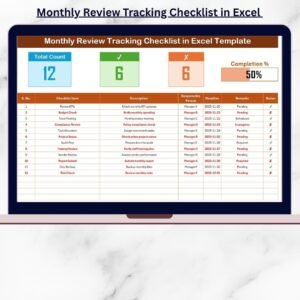
- Monthly Review Tracking Checklist in Excel: track monthly review progress in Excel
- Monthly Review Action Plan Checklist in Excel: turn review findings into an action plan in Excel
- Monthly Review Monitoring Checklist in Google Sheets: a monthly review monitoring checklist in Google Sheets
- Checklist & SOP Pack: 12 checklist templates in one download
Browse all Excel checklists.


















Reviews
There are no reviews yet.