


Stay ahead of your team’s performance and monthly goals with this powerful, easy-to-use Google Sheets template! 🚀 Whether you manage projects, operations, or performance reviews, this tool helps you track tasks, monitor progress, and improve accountability — all in one place.Monthly Review Monitoring Checklist in Google Sheets
This template takes the pain out of manual reviews and endless follow-ups. With visual progress cards, automated status tracking, and smart filters, you can review monthly activities in minutes, not hours. Let’s explore why this template is a must-have for every manager and team lead 👇Monthly Review Monitoring Checklist in Google Sheets
✨ Key Features of Monthly Review Monitoring Checklist in Google Sheets
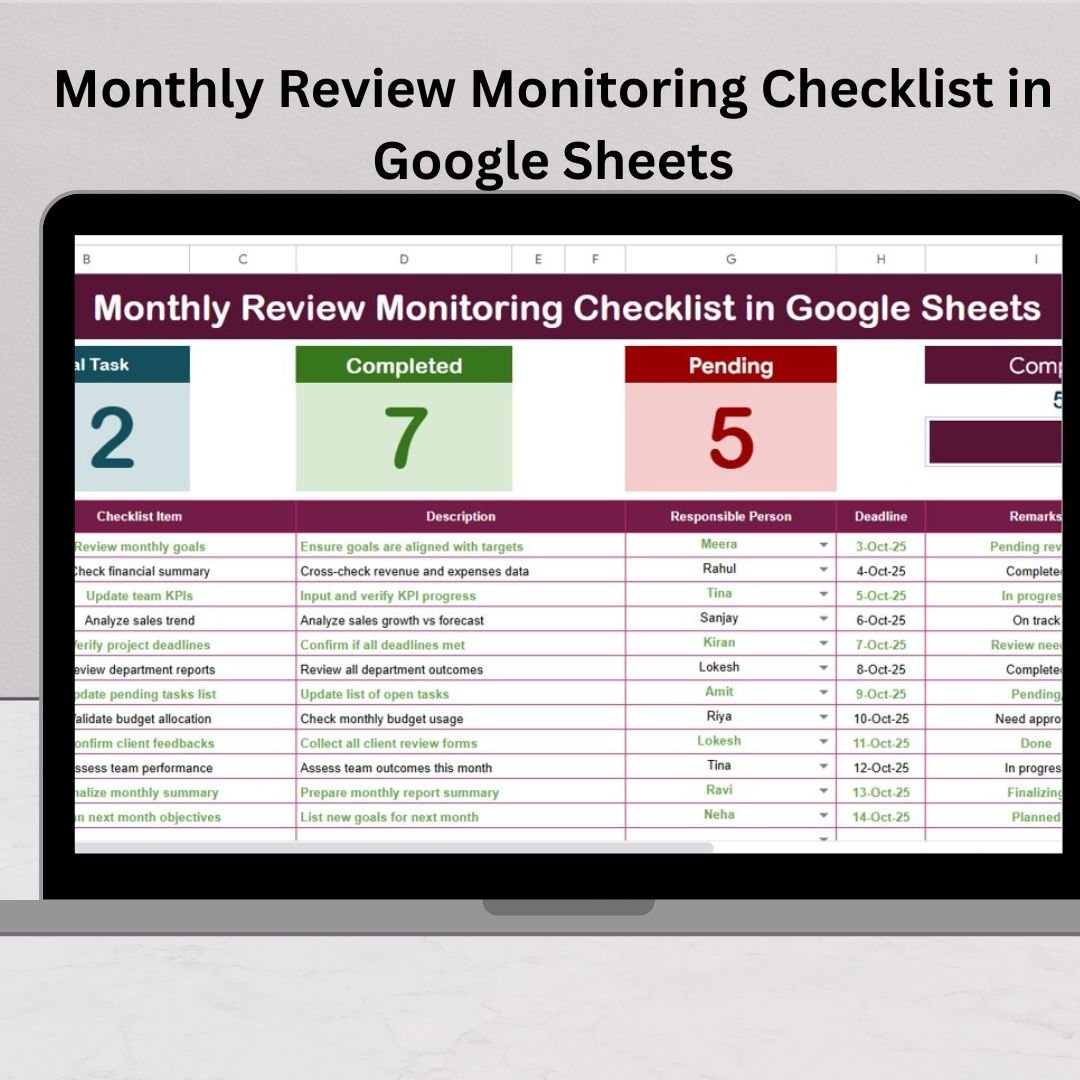
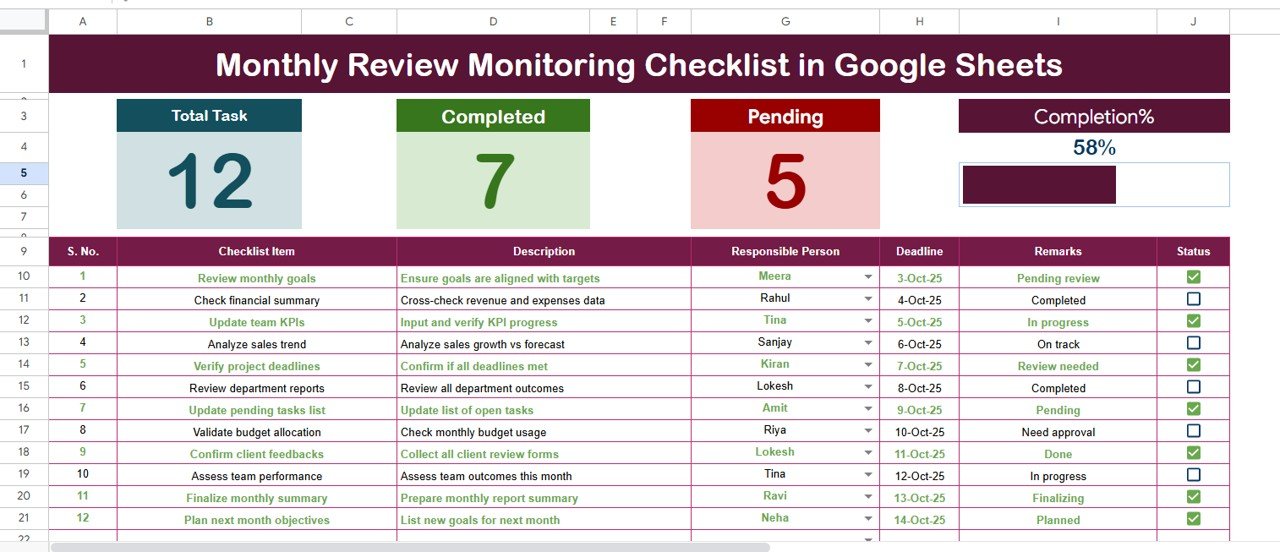
✅ Dynamic Dashboard View – Instantly see Total Tasks, Completed Tasks, Pending Tasks, and overall Progress % through visual cards and a progress bar.
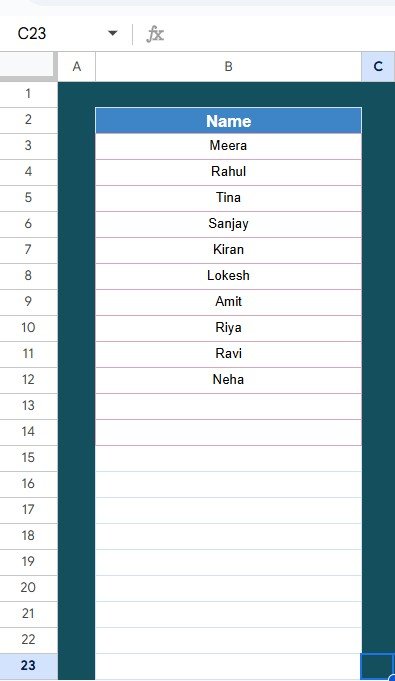
✅ Two Smart Worksheet Tabs – The Main Checklist Sheet captures your tasks, deadlines, and responsible persons, while the List Sheet stores unique names for dropdowns — ensuring consistency and error-free tracking.
✅ ✔ or ✘ Status Marking – Quickly update task status with a simple tick or cross; the summary cards update automatically!
✅ Cloud-Based and Collaborative – Accessible from anywhere, allowing multiple users to edit simultaneously in real time.
✅ No Coding Required – Prebuilt formulas handle progress tracking automatically — no need for macros or complex setup.
✅ Completely Customizable – Add columns like “Priority” or “Department,” apply conditional formatting, or even link charts for a visual summary.
✅ Error-Free Data Entry – Drop-down lists and data validation ensure clean and accurate data at all times.
✅ Seamless Integration – Connect with Google Forms, Calendar, or Apps Script for alerts, reminders, or automation.Monthly Review Monitoring Checklist in Google Sheets
📋 What’s Inside the Monthly Review Monitoring Checklist in Google Sheets
This ready-to-use template is divided into two powerful sections:
📄 Main Checklist Sheet:
Record all tasks, descriptions, deadlines, and responsible persons.
View progress cards that summarize your month at a glance.
Mark tasks as ✔ (done) or ✘ (pending) — the dashboard auto-updates!
👥 List Sheet:
Maintain a clean list of team members for dropdown assignment.
Enables easy filtering and performance review by person.
Prevents duplication and ensures smooth collaboration.
Together, these two sheets create a smart system for performance tracking — simple yet effective.
🧭 How to Use the Monthly Review Monitoring Checklist in Google Sheets
Using this template is super easy — just follow these quick steps:
1️⃣ Open the Template: Access it directly in Google Sheets.
2️⃣ Add Team Members: Enter names in the “List Sheet.”
3️⃣ Input Monthly Tasks: Fill in checklist items, descriptions, deadlines, and responsible persons.
4️⃣ Track Progress: Mark tasks as ✔ when done or ✘ if pending.
5️⃣ Analyze Performance: Review the dashboard cards and progress bar at the top.
6️⃣ Repeat Monthly: Duplicate the sheet each month (e.g., Review_Jan2025) for continuous tracking.
💡 Pro Tip: Use conditional formatting to color-code tasks — green for completed, red for pending.
👩💼 Who Can Benefit from This Monthly Review Monitoring Checklist
This Google Sheets template is perfect for teams across industries looking to enhance productivity and accountability.
🏢 HR Teams: Track performance reviews, attendance, and compliance tasks.
⚙️ Operations Teams: Monitor daily processes, inspections, and monthly checklists.
📊 Project Managers: Review project milestones and task completion trends.
🏫 Educational Institutions: Manage events, academic schedules, and admin reviews.
💰 Finance Departments: Track monthly audits, approvals, and expense validations.
Whether you’re a manager, team leader, or coordinator — this checklist ensures you stay on top of every action item without missing deadlines.
🚀 Why Choose Google Sheets for Monthly Monitoring
Real-Time Collaboration – Multiple team members can work simultaneously.
Automatic Saving – All changes are saved in the cloud instantly.
Access Anytime, Anywhere – Works on mobile, tablet, or desktop.
Free to Use – No expensive software required.
Secure & Shareable – Control access permissions easily.
This makes it not just convenient — but also future-ready for remote and hybrid teams.
🎯 Final Thoughts
The Monthly Review Monitoring Checklist in Google Sheets transforms monthly performance tracking into a transparent, efficient, and collaborative process. You’ll always know what’s completed, what’s pending, and who’s responsible — all in real-time.
✅ Save hours of manual work
✅ Improve team accountability
✅ Drive smarter, data-based decisions
Start using this template today and make your monthly reviews effortless and insightful! 🌟
Click here to read the detailed blog post
Watch the step-by-step video tutorial:
Visit our YouTube channel to learn step-by-step video tutorials
Compatibility and Requirements
- Works in Google Sheets with a free Google account and a web browser.
- Make a copy to your own Google Drive, then share it with your team if you want to work on it together.
- New to Sheets? Google’s guide How to use Google Sheets covers the basics.
Frequently Asked Questions
What sheets are in the Monthly Review Monitoring Checklist in Google Sheets?
There are two. The Main Checklist Sheet holds tasks, descriptions, deadlines and responsible persons. The List Sheet stores team member names for the dropdowns.
How do I mark a task as done?
Mark it with a tick when it is done or a cross when it is pending. The summary cards and progress bar update on their own.
Do I need macros or scripts?
No. Prebuilt formulas handle the progress tracking, so there is no coding or macro setup.
How do I use it for a new month?
Duplicate the sheet each month, for example as Review_Jan2025, and keep the old months for comparison.
Related Monthly Review Templates
- Monthly Review To-Do List Checklist in Google Sheets: a to-do style monthly list
- Monthly Review Monitoring Checklist in Excel: the same checklist for Excel users
- Monthly Review Tracking Checklist in Excel: track monthly review items in Excel
- Checklist and SOP Pack: 12 checklist templates in one pack
Browse all Google Sheets checklists or the Google Sheets trackers.
























Reviews
There are no reviews yet.