



The Affiliate Marketing Checklist is a comprehensive and easy-to-use tool designed to help affiliate marketers, businesses, and entrepreneurs stay organized and efficient while managing their affiliate marketing efforts. Whether you’re just starting your affiliate marketing journey or have an established program, this checklist ensures that no crucial step is missed, helping you maximize profits and streamline your marketing campaigns.
This checklist covers all the essential steps, from setting up your affiliate program to optimizing affiliate relationships, tracking performance, and managing payments. With clear instructions and a user-friendly interface, the checklist helps affiliate marketers stay on top of tasks and improve the effectiveness of their campaigns.

Key Features of the Affiliate Marketing Checklist
🔑 Program Setup & Affiliate Onboarding
Ensure that your affiliate program is set up properly by following a step-by-step process. This includes recruiting affiliates, setting commission rates, and providing them with the tools they need to succeed.
📊 Performance Tracking
Track key metrics like clicks, conversions, sales, and commissions. Monitor the performance of each affiliate and identify high-performing affiliates who drive the most revenue.
💰 Payment Management
Keep track of affiliate payments, including commission calculations, payment schedules, and payment statuses. Ensure that affiliates are paid on time and according to the agreed-upon terms.
📈 Campaign Optimization
Optimize affiliate marketing campaigns by analyzing the performance data. Track the ROI of various promotional strategies and make data-driven decisions to improve campaign outcomes.
⚙️ Customizable Workflow
The checklist is fully customizable to match the unique needs of your affiliate marketing program. Add additional tasks, adjust deadlines, and modify processes to fit your business.
📅 Timely Reminders & Notifications
Set up reminders for important tasks, such as affiliate payouts, contract renewals, and campaign evaluations, ensuring that you never miss a crucial step in your affiliate program management.
Why You’ll Love the Affiliate Marketing Checklist
✅ Streamline Affiliate Program Management
From onboarding to payments, stay organized and ensure that every aspect of your affiliate program is handled efficiently.
✅ Increase Affiliate Performance
Monitor the performance of your affiliates and identify opportunities to optimize their marketing strategies for better conversions and higher commissions.
✅ Improve Communication with Affiliates
Ensure your affiliates have the right resources and clear instructions. Maintain open lines of communication to foster long-term, successful partnerships.
✅ Simplify Payment Management
Track affiliate commissions and payments easily, ensuring that payments are made accurately and on time.
✅ Optimize Your Marketing Campaigns
With the performance tracking and campaign optimization tools, you can continuously improve your affiliate marketing efforts and drive higher returns on investment (ROI).
What’s Inside the Affiliate Marketing Checklist?
Program Setup & Affiliate Onboarding: Ensure your program is set up, affiliates are recruited, and they receive all necessary materials.
Performance Tracking: Track clicks, conversions, and sales to monitor affiliate performance.
Payment Management: Track commissions, payment schedules, and payment statuses for timely payouts.
Campaign Optimization: Analyze affiliate performance and adjust strategies for better results.
Customizable Workflow: Adapt the checklist to your specific affiliate marketing needs.
Timely Reminders & Notifications: Set reminders for tasks like payouts, reviews, and contract renewals.
How to Use the Affiliate Marketing Checklist
1️⃣ Download the Template: Get instant access to the Affiliate Marketing Checklist in Excel.
2️⃣ Set Up Your Program: Input affiliate program details, such as commission rates, tools, and resources for affiliates.
3️⃣ Track Affiliate Performance: Monitor affiliate performance metrics, such as clicks, conversions, and sales.
4️⃣ Manage Payments: Track commissions, payments, and deadlines to ensure timely and accurate payments to affiliates.
5️⃣ Optimize Campaigns: Use the data to analyze the effectiveness of your campaigns and make improvements where necessary.
Who Can Benefit from the Affiliate Marketing Checklist?
🔹 Affiliate Program Managers
🔹 Digital Marketers
🔹 E-commerce Businesses
🔹 Bloggers & Influencers
🔹 Entrepreneurs & Startups
🔹 Affiliate Networks
🔹 Online Retailers
Maximize the success of your affiliate marketing program with the Affiliate Marketing Checklist. Stay organized, track performance, optimize campaigns, and ensure timely payments—all in one easy-to-use Excel template.
Click here to read the Detailed blog post
Visit our YouTube channel to learn step-by-step video tutorials
Youtube.com/@PKAnExcelExpert
Compatibility and Requirements
- Works in Microsoft Excel desktop (Excel 2016 or later, or Microsoft 365).
- New to Excel? Microsoft’s Excel for Windows training covers the basics.
Frequently Asked Questions
What does the checklist cover?
It covers program setup and affiliate onboarding, clicks, conversions and sales per affiliate, commissions and payment schedules, campaign reviews, and reminders for payouts, reviews and contract renewals.
How do I set it up?
Enter your affiliate program details, such as commission rates, tools and resources for affiliates. Then record performance and payments as they come in.
Can I track affiliate payouts?
Yes. It tracks commissions, payment schedules and payment status so payouts go out on time.
Can I adapt it to my program?
Yes. The workflow is customizable to your affiliate marketing needs.
Is there a Google Sheets version?
Yes. The Affiliate Marketing Checklist in Google Sheets covers the same tasks on that platform.
Related Affiliate Marketing Templates
- Affiliate Marketing Checklist in Google Sheets: the same checklist in Google Sheets
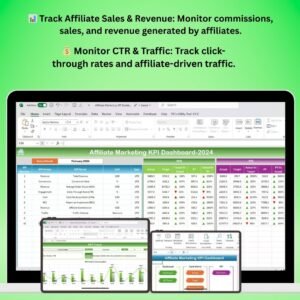
- Affiliate Marketing KPI Dashboard in Excel: track affiliate KPIs on a dashboard
- Affiliate Program KPI Dashboard in Excel: KPIs for an affiliate program
- Event Marketing Checklist in Excel: plan event marketing tasks
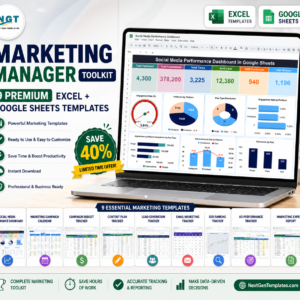
- Marketing Manager Toolkit: 9 Excel and Google Sheets marketing templates in one download
Browse all Excel checklists or the Excel sales and marketing templates.













Reviews
There are no reviews yet.