



The Monthly Review Checklist in Excel is an essential tool for individuals, teams, and organizations looking to streamline their monthly review processes. Whether you’re conducting a personal review, team performance evaluation, or business analysis, this checklist helps ensure that all essential tasks and goals are reviewed and assessed on a monthly basis. The template offers a comprehensive framework to track progress, measure success, and identify areas for improvement.
With this Excel-based checklist, you can stay organized and focused on your priorities, ensuring that nothing falls through the cracks. The Monthly Review Checklist is fully customizable to meet your specific needs, whether you’re reviewing financials, team performance, personal goals, or business KPIs. It’s perfect for professionals, managers, and business owners who need a reliable tool for staying on track and achieving their objectives month after month.
Key Features of the Monthly Review Checklist in Excel
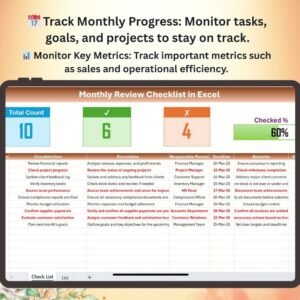
📅 Track Monthly Progress & Milestones
Monitor the progress of key goals, tasks, and projects. Ensure that your business or personal objectives are on track and identify any roadblocks that may require attention.
💼 Evaluate Team or Individual Performance
Assess the performance of your team, department, or personal goals. Track progress against KPIs, deadlines, and deliverables to ensure continuous improvement.
📊 Monitor Key Metrics & KPIs
Track important performance metrics such as sales numbers, customer feedback, and operational efficiency. Monitor KPIs to ensure your business or personal targets are being met.
📝 Identify Areas for Improvement
Use the checklist to identify gaps or areas where performance is lacking. Set corrective actions for the next month and ensure that improvements are made moving forward.
🖥️ Interactive & Customizable Dashboard
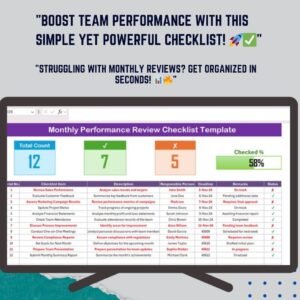
The template includes dropdown menus, color-coded sections, and interactive elements to help you manage and track your monthly reviews. It’s fully customizable to suit your personal or business needs.
Why You’ll Love the Monthly Review Checklist in Excel

✅ Stay Organized & Focused
Track your goals, milestones, and tasks in one place to stay organized and ensure that important areas are reviewed and addressed each month.
✅ Assess Performance & Identify Gaps
Evaluate performance against KPIs and set corrective actions to address any areas for improvement, ensuring continuous growth and progress.
✅ Streamline Review Processes
Simplify the monthly review process with an easy-to-follow template that highlights key metrics, deadlines, and performance areas.
✅ Customize to Your Needs
Tailor the checklist to focus on the specific areas that matter most, whether you’re tracking personal goals, team performance, or business objectives.
✅ Achieve Your Goals Efficiently
Use the insights from the checklist to adjust strategies and stay on track to achieve your monthly and long-term goals.
What’s Inside the Monthly Review Checklist Template?
- Progress Tracking: Monitor the status of tasks, goals, and projects to ensure that deadlines and objectives are met.
- Performance Evaluation: Assess team or individual performance and track progress against KPIs and deliverables.
- KPIs & Metrics: Track important metrics such as sales, customer feedback, and operational efficiency.
- Improvement Tracking: Identify areas where performance can be improved and set actionable goals for the following month.
- Customizable Sections: Adjust the template to focus on specific goals or metrics that are important for your review process.
How to Use the Monthly Review Checklist in Excel
1️⃣ Download the Template: Get instant access to your Monthly Review Checklist in Excel.
2️⃣ Input Your Data: Enter your goals, performance data, and key metrics into the checklist.
3️⃣ Track & Monitor Progress: Use the template to track progress and evaluate performance throughout the month.
4️⃣ Analyze & Optimize: Identify areas for improvement and set actionable goals for the following month.
Who Can Benefit from the Monthly Review Checklist in Excel?
🔹 Business Owners & Entrepreneurs
🔹 Managers & Team Leaders
🔹 HR & Operations Teams
🔹 Professionals & Employees Tracking Personal Goals
🔹 Anyone Looking to Streamline Monthly Reviews & Improve Performance
Stay organized and on top of your goals with the Monthly Review Checklist in Excel. Track progress, evaluate performance, and identify areas for improvement to ensure that your personal, team, or business objectives are consistently met.
Click here to read the Detailed blog post
Visit our YouTube channel to learn step-by-step video tutorials
Youtube.com/@PKAnExcelExpert
Watch the step-by-step video Demo:
Compatibility and Requirements
- Works in Microsoft Excel desktop (Excel 2016 or later, or Microsoft 365).
- Microsoft’s guide Create a drop-down list explains the Excel feature this file is built on.
Frequently Asked Questions
What can I review with this checklist?
Goals, tasks, projects, team or personal performance and key metrics such as sales numbers, customer feedback and operational efficiency.
How do I mark progress?
The template uses dropdown menus and color-coded sections, so you can set the status of each item and see what still needs attention.
Can I plan next month’s actions?
Yes. The improvement section lets you note gaps and set actionable goals for the following month.
Can I change the sections?
Yes. You can adjust the sections to focus on the goals or metrics that matter to your own review.
Related Review Templates
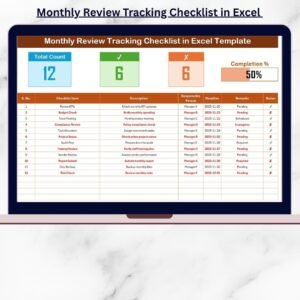
- Monthly Review Tracking Checklist in Excel: track review items month by month
- Monthly Performance Review Checklist Template in Excel: focused on staff performance reviews
- Monthly Review To-Do List Checklist in Google Sheets: a shared version in the browser
- Checklist & SOP Pack: 12 Excel and Google Sheets checklists in one bundle
Browse all Excel checklist templates.






















Reviews
There are no reviews yet.