



Growing your business is thrilling—but without a proper plan, it can get messy fast. That’s where our Business Expansion Schedule Checklist in Excel steps in. Whether you’re opening a new branch, entering a fresh market, or expanding your product line, this ready-to-use Excel template ensures every milestone is clear, assigned, and tracked in real time.
This tool brings structure, clarity, and progress visualization into your expansion strategy—all within a familiar Excel format that anyone on your team can easily use.
✨ Key Features of the Business Expansion Checklist
✅ Real-Time Progress Dashboard

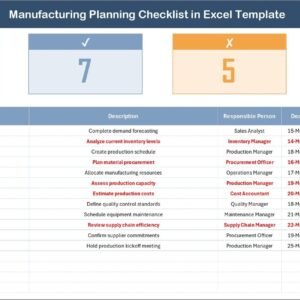
The top of the checklist sheet features live metrics:
✔ Total Tasks Count
✔ Completed & Crossed Items
✔ A dynamic Progress Bar that auto-updates with each change
📋 Smart Checklist Table
Track every task with fields for:
🔸 Serial Number (auto-generated)
🔸 Checklist Item & Short Description
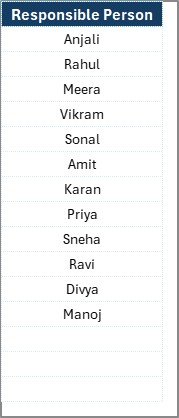
🔸 Responsible Person (dropdown menu)
🔸 Deadline & Remarks
🔸 Status (✔ for done, ✘ for pending or skipped)
No formulas needed—just mark your status, and the rest updates automatically!
👥 Linked List Sheet
Assign tasks effortlessly with a pre-defined list of team members. Keep names consistent and reduce manual errors using Excel’s drop-down feature.
🛠️ Fully Customizable
Add more columns, insert extra rows, update dropdowns, and tailor the formatting to match your company’s branding—100% Excel flexibility!
📦 What’s Inside the Business Expansion Template
📁 Checklist Sheet Tab – Your action hub to track and manage every step
📇 List Sheet Tab – Centralized database of team members for smooth role assignment
📊 Summary Cards & Progress Bar – Keep teams aligned and motivated
🔄 Dynamic Status Tracking – Auto-calculates task progress without complex tools
🧠 How to Use the Product
📥 Download the Excel File and open it on your computer
🧾 Fill in the List Sheet with your team members
✍️ Add Tasks under the Checklist Item column (e.g., “Hire Local Staff”)
🎯 Assign Responsibilities and Set Deadlines
✔️ Update Status as tasks are completed or dropped
📈 Monitor Your Progress with real-time visual updates
This tool is your virtual expansion manager—always ready to guide and report.
👥 Who Can Benefit from This Checklist?
🚀 Startup Founders launching new branches or teams
🏢 Franchise Owners opening outlets in new cities
🛒 Retailers expanding into malls or high-street stores
🏭 Manufacturers scaling production capabilities
🌐 Tech Companies going global
From solopreneurs to large enterprise teams, this checklist adapts to your growth vision.
🔗 Click here to read the Detailed blog post
📺 Visit our YouTube channel to learn step-by-step video tutorials
Watch the step-by-step video tutorial:
Compatibility and Requirements
- Works in Microsoft Excel desktop (Excel 2016 or later, or Microsoft 365).
- Team members are chosen from dropdown lists. Microsoft explains how they work in Create a drop-down list.
Frequently Asked Questions
Which sheets does this template have?
Two sheets: the Checklist sheet, where you track tasks, and the List sheet, which holds the names of your team members.
How do I assign a task to someone?
Add the person’s name to the List sheet. Then pick that name from the dropdown in the Responsible Person column on the Checklist sheet.
How does the progress bar update?
Mark each task with a tick for done or a cross for pending or skipped. The total tasks count, the completed and crossed items and the progress bar at the top of the Checklist sheet update from those marks. You do not need to write any formulas.
Can I add more columns or rows?
Yes. You can insert extra rows and columns, change the dropdown lists and adjust the formatting to match your company.
Is there a Google Sheets version?
Yes. See the Business Expansion Checklist in Google Sheets.
Related Business Expansion Templates
- Business Expansion Checklist Template in Excel: a general expansion checklist
- Business Expansion Action Plan Checklist in Excel: a checklist built around an action plan
- Business Expansion Evaluation Checklist in Excel: for reviewing an expansion
- Business Strategy Schedule Checklist in Excel: a schedule checklist for strategy tasks
- Business Expansion Checklist in Google Sheets: the Google Sheets edition
Browse all Excel checklist templates.


























Reviews
There are no reviews yet.