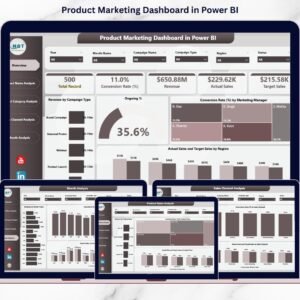
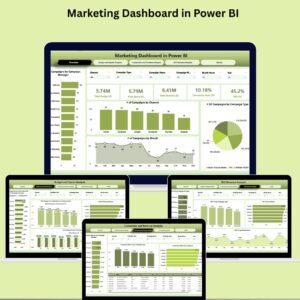
Marketing Dashboard in Power BI

Power BI - instant download

Original price was: $24.99.Current price is: $17.99.
Details, requirements and demo below
Sale!

Marketing Dashboard in Power BI

Original price was: $24.99.Current price is: $17.99.

✨ Take control of your campaigns with this Marketing Dashboard in Power BI – designed for speed, clarity, and real-time insights!

🔹 Total Budget, Spend, Revenue & ROI at a glance – Stay on top of performance
🔹 5 Insightful Pages – Overview, Spend, ROI, Conversion & Details
🔹 Track KPIs – MTD, YTD, and YOY trends with up/down arrows 📈📉
🔹 Drillthrough Reports – Click any chart to get campaign-level insights 🕵️
🔹 Custom Filters – Analyze by month, channel, type, or campaign owner
🔹 Easy to Use – No coding, just plug in your data 📊
🔹 Interactive Visuals – Conditional formatting and intuitive charts 🎯
🔹 Cost Optimization – Identify overspending and underperformance
🔹 Real-Time Dashboard – Update live with connected data sources
🔹 Perfect for Teams & Executives – Share insights across departments 🤝

- +

💡 Buy any 2 templates and save 20% automatically at checkout.

Pricing country
Prices follow your selected country; checkout uses your billing country.
Excel Pivot Tables & Dashboards: Basic to Advanced courseLaunch offer
🎓 NEXTGENTEMPLATES ACADEMY
Like this dashboard? Learn to build your own.
Excel Pivot Tables & Dashboards: Basic to Advanced

From your first Pivot Table to the Data Model, DAX, Power Query and a one-page KPI dashboard. 11h 51m of video by PK, with practice files, quizzes and a capstone.

In today’s fast-paced digital world, guessing is no longer an option. You need real-time data, performance visibility, and actionable insights—all in one place. That’s exactly what the Marketing Dashboard in Power BI delivers.

This plug-and-play dashboard is the ultimate tool for marketers, analysts, and business owners who want to track ROI, monitor budgets, and optimize campaign strategies—without getting lost in spreadsheets or disconnected tools.

Marketing Dashboard in Power BI

🚀 Key Features of Marketing Dashboard in Power BI

✅ Multi-Page Navigation

The dashboard includes 5 professionally designed pages:

  • Overview – High-level KPIs like Spend, Revenue, ROI

  • Budget vs Spend – Visual breakdown by channel, month, and manager

  • Conversion & Revenue – Performance insights by campaign and format

  • ROI Analysis – Deep dive into return metrics by time, channel, and more

  • Details with Drillthrough – Click-through for granular insights

📊 Real-Time KPI Cards & Charts

From ROI to conversions, every metric is just a glance away. Use dynamic slicers to filter by month, campaign type, or manager.

⚙️ Drillthrough & Interactive Filters

Go from overview to detail in one click. Drill into each campaign to see budget, spend, revenue, clicks, and performance owner.

💡 Conditional Formatting

Built-in up/down arrows, trend visuals, and comparisons highlight growth areas or red flags instantly.


📦 What’s Inside the Marketing Dashboard in Power BI

  • Overview Page with high-level KPIs and segmented charts

  • Budget vs Spend Page showing cost efficiency by campaign & manager

  • Conversion & Revenue Page tracking what’s working

  • ROI Page with monthly and channel-based breakdowns

  • Details Page with full drillthrough logic

  • Slicers for easy month, channel, and type filtering

  • Ready-to-use Power BI file (.pbix)—just plug in your data source


🔍 How to Use the Marketing Dashboard in Power BI

  1. Download the PBIX file and open in Power BI Desktop.

  2. Connect your data from Excel, CRM, or ad platforms.

  3. Use slicers and filters to customize views.

  4. Click any chart to drill down for detailed reporting.

  5. Share the dashboard securely with your team or leadership via Power BI Service.

No coding required. Basic Power BI skills are enough to get started! 💼


👥 Who Can Benefit from This Marketing Dashboard?

This dashboard is a must-have for:

  • Digital Marketing Managers 📣 optimizing multi-channel campaigns

  • Campaign Analysts 📊 monitoring performance metrics

  • Business Owners 💼 needing real-time ROI visibility

  • Marketing Agencies 📈 reporting to clients effortlessly

  • CMOs & Executives 🎯 needing strategic overviews in seconds

Whether you’re a solo marketer or a corporate marketing team, this dashboard turns raw data into profit-driving decisions.


🔗 Click here to read the Detailed blog post

Watch the step-by-step video Demo:


📺 Visit our YouTube channel to learn step-by-step video tutorials

Compatibility and Requirements

  • Opens in Power BI Desktop, which is free from Microsoft. See Get Power BI Desktop.
  • The download is a .pbix file. Connect it to your marketing data from Excel, a CRM or ad platform exports.

Frequently Asked Questions

Which pages does the marketing dashboard have?

It has five pages: Overview, Budget vs Spend, Conversion and Revenue, ROI Analysis, and a Details page with drillthrough.

What can I filter by?

Slicers filter the report by month, campaign type, channel and manager.

Can I see the numbers behind one campaign?

Yes. Drillthrough takes you from a chart to the Details page, which shows budget, spend, revenue, clicks and the performance owner for that campaign.

Do I need to write code?

No. Basic Power BI skills are enough. You connect your data, then use the slicers and charts.

Related Marketing Templates

Browse all Power BI dashboards or the Power BI templates.
Frequently asked questions

What do I need to open it?
Power BI Desktop, which is free from Microsoft (Windows). No Power BI Pro licence is needed to open, edit or refresh the file.
Does it work on Mac?
Power BI Desktop runs on Windows only. On a Mac you can use a Windows virtual machine, or publish the report to the Power BI Service and view it in a browser.
What is in the download?
The .pbix report and the Excel data file that feeds it (newer products also include a PDF user manual).
How do I use my own data?
Paste your data over the sample rows in the Excel file (keep the column headers), then click Home > Refresh in Power BI Desktop. To use a different file, use Transform data to point the source to it.
Do I need Power BI Pro?
Only if you want to publish the report to the Power BI Service and share it online with colleagues. Opening and editing on your PC is free.
Can I edit the visuals?
Yes - every page, visual, measure and colour is editable in Power BI Desktop.
Is it a one-time payment or a subscription?
One-time payment. No subscription, no per-user fees and nothing to renew - the file is yours to keep.
How do I get the file after payment?
Instantly. The download link appears on screen after checkout, is emailed to you, and stays under My Account > Downloads on our website. If the email does not arrive within a few minutes, check your spam or promotions folder.
Is a user manual included?
Most of our newer products include a PDF user manual in the download. If yours does not have one, message us with your order number and we will send it.
Do I get free updates?
Bug fixes are always free - if something does not work as described, we fix it and send you the corrected file. New versions with new features are not included in the price, unless this product's description says otherwise.
Can you customise it for me?
Yes. Small changes to this template (your columns, categories, logo, colours, minor layout) cost the template price plus $40-80 (Rs 3,000-6,000 + GST), quoted once you send your list. A fully custom build is usually $100-200 (Rs 8,000-18,000 + GST) with two revision rounds. Email your requirements to [email protected] or message us on WhatsApp.
Can I use it for my business or my clients?
Yes, for your own personal or internal business use, for as long as you like. Reselling or redistributing the template is not allowed.
What is your refund policy?
Because these are digital downloads, they are non-refundable once delivered - except when the product does not match its description (report it within 48 hours of purchase) or there is a technical problem our team cannot fix within 72 hours. Email [email protected] with your order number.
How do I get help?
Email [email protected] (Mon-Fri, 10 AM-7 PM IST) or message us on WhatsApp +91 80770 90260 (chat only, no calls). Please include your order number.

Still have a question? Click Need help? at the bottom-left to ask our assistant, or message us on WhatsApp.

Application

Power BI

Template Type

Dashboard

Price

Paid

Business Or Department

Sales and Marketing

Reviews

There are no reviews yet.

Only logged in customers who have purchased this product may leave a review.

You may also like…

Marketing Dashboard in Power BIMarketing Dashboard in Power BI
Original price was: $24.99.Current price is: $17.99.
- +
Scroll to Top