



Turn 500 e-waste collection records into a five-page Power BI reporting view. The included sample data produces 717,061 kg collected, 566,350 kg recycled, a 79.0% recycling rate, and 1,248,704 kg of CO2 avoided. The e-waste recycling dashboard in Power BI is a downloadable PBIX built for analysis and presentation—not a subscription, certification system, or regulatory filing tool. Replace the sample source with your own consistently structured records, refresh the model, and review collection, recovery, facility, material, compliance, and financial patterns from one report.
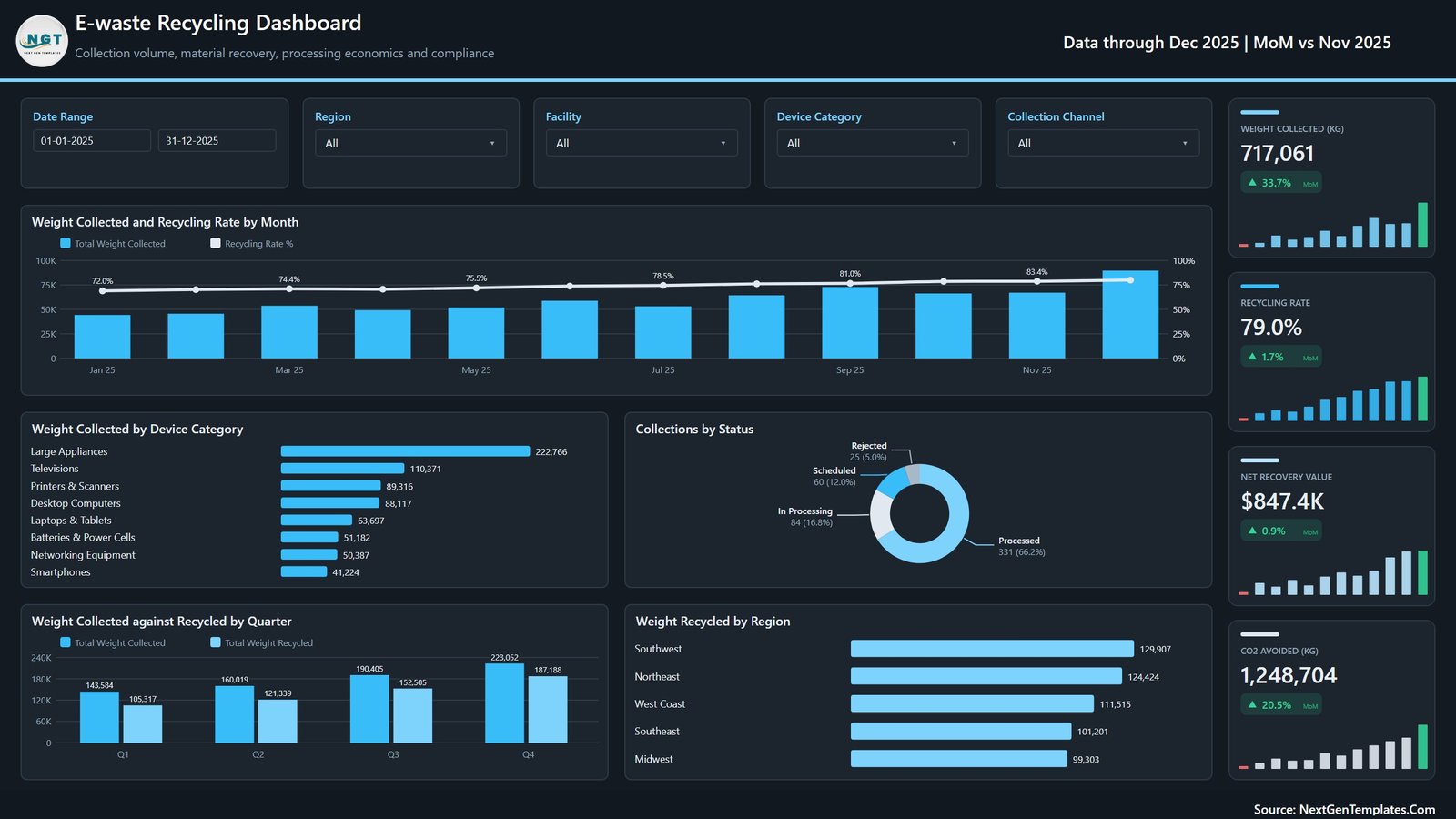
Overview page with collection, recycling, value and regional analysis
Key Features of E-waste Recycling Dashboard in Power BI
- Five report pages: move from executive overview to collection, material, facility and value analysis.
- Interactive filters: slice the report by date range, region, facility, device category, collection channel or recovered material where available.
- Operational KPIs: review collected weight, recycled weight, residual waste, recycling rate, processed consignments and rejection rate.
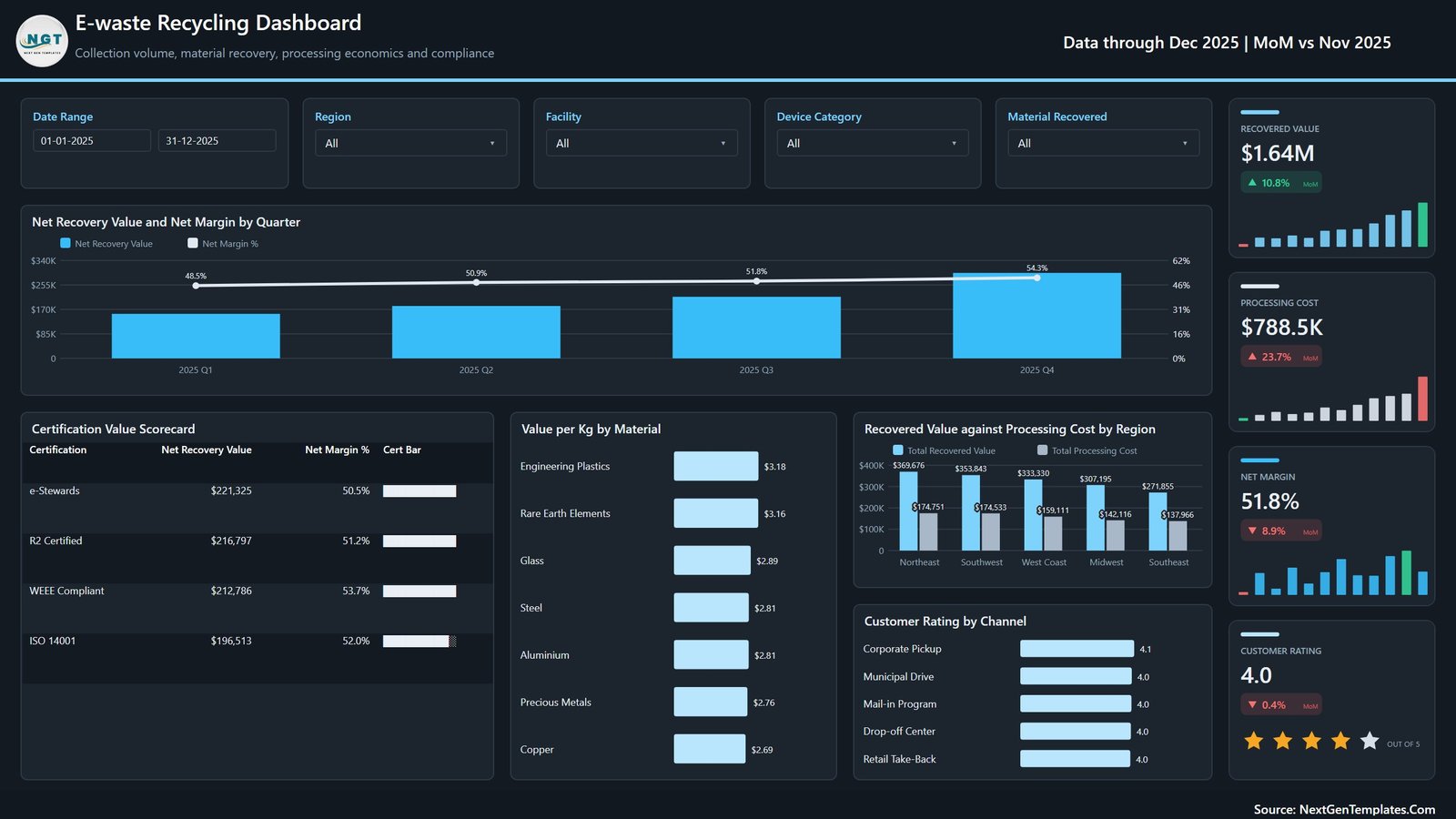
- Recovery economics: compare recovered value, processing cost, net margin and value per kilogram.
- Facility and certification views: examine facilities, regions, hazardous-content percentages, compliance scores and certification groupings.
- Editable source: the download includes the PBIX report, Data.xlsx and a user manual.
What’s Inside the E-waste Recycling Dashboard in Power BI
1. Overview
The opening page summarizes weight collected, recycling rate, net recovery value and CO2 avoided. Monthly and quarterly visuals add trend context, while device-category, status and regional views help explain the totals.
2. Collection and Recovery Analysis
This page focuses on collection volume, average weight per collection, quarterly recycling performance, weight recycled by month, CO2 avoided by quarter and collection-channel mix.
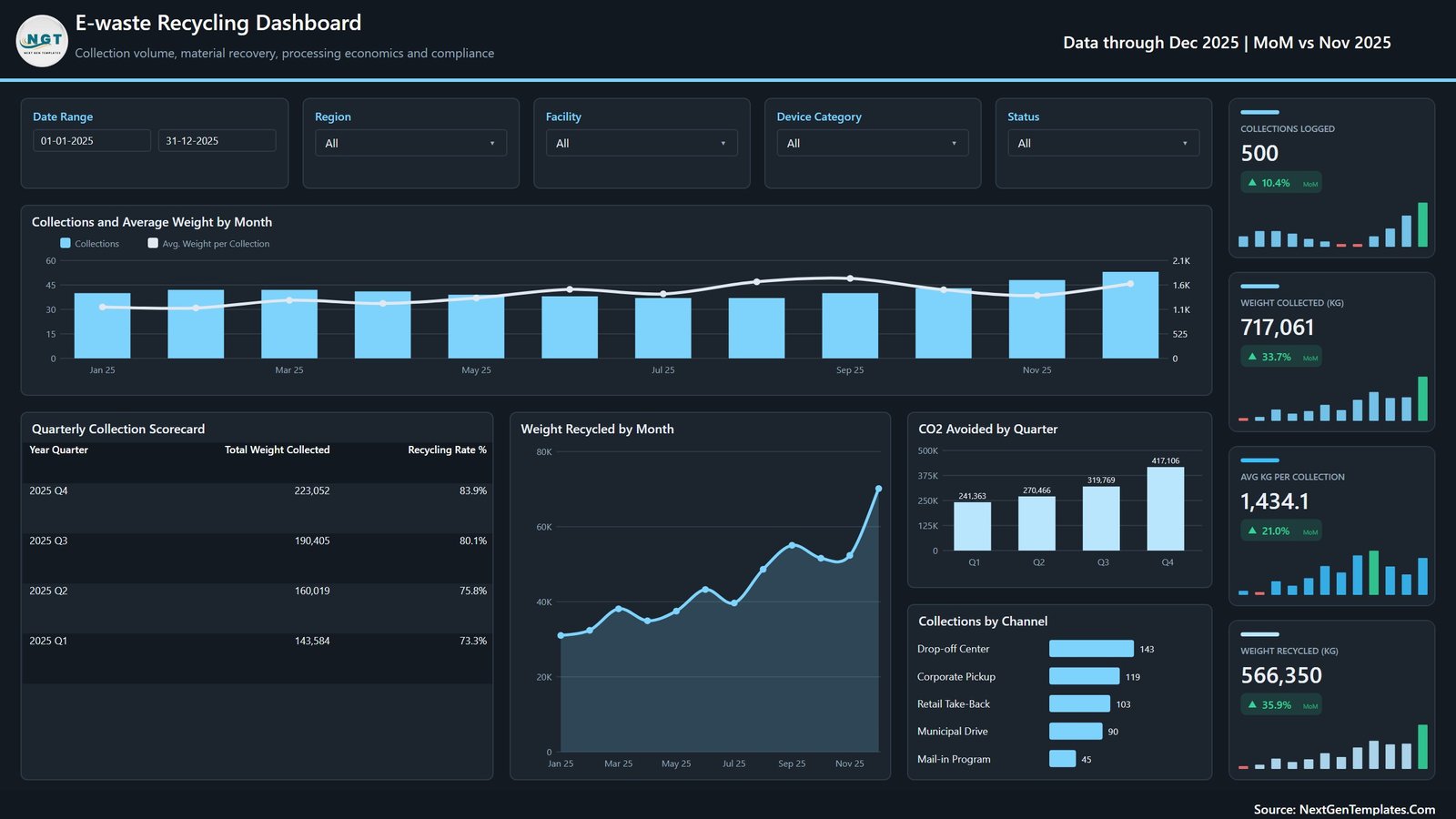
Collection and recovery analysis
3. Device and Material Recovery
Compare collected and recycled weight across device categories, review residual waste by quarter, rank recovered value by material and analyze recycled weight by collection channel.
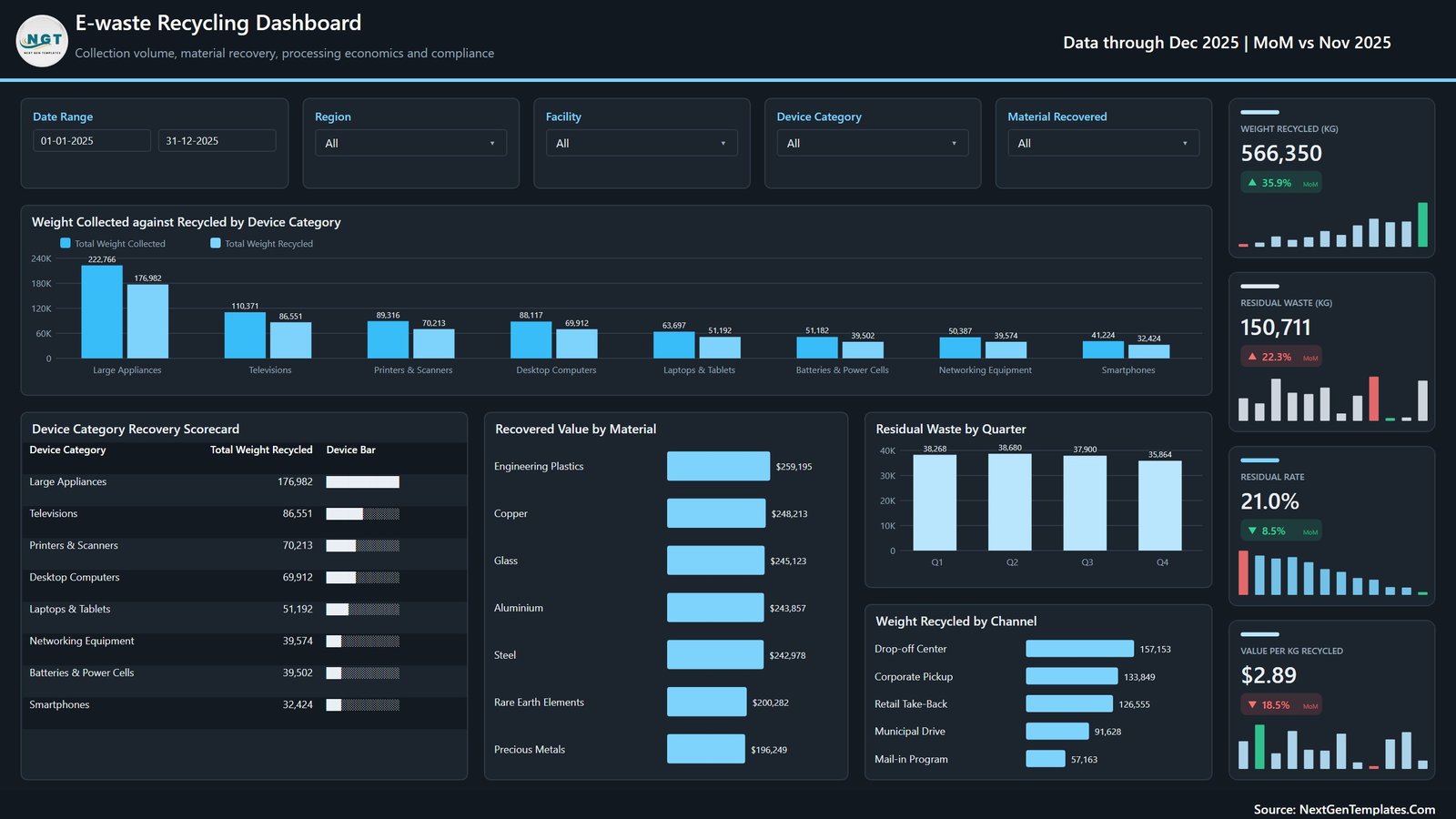
Device and material recovery analysis
4. Facility and Compliance
Review facility-level collection and recycling results, certification distribution, hazardous content by facility, rejection rate by region and the sample compliance score. These are management indicators only; they do not verify legal or certification compliance.
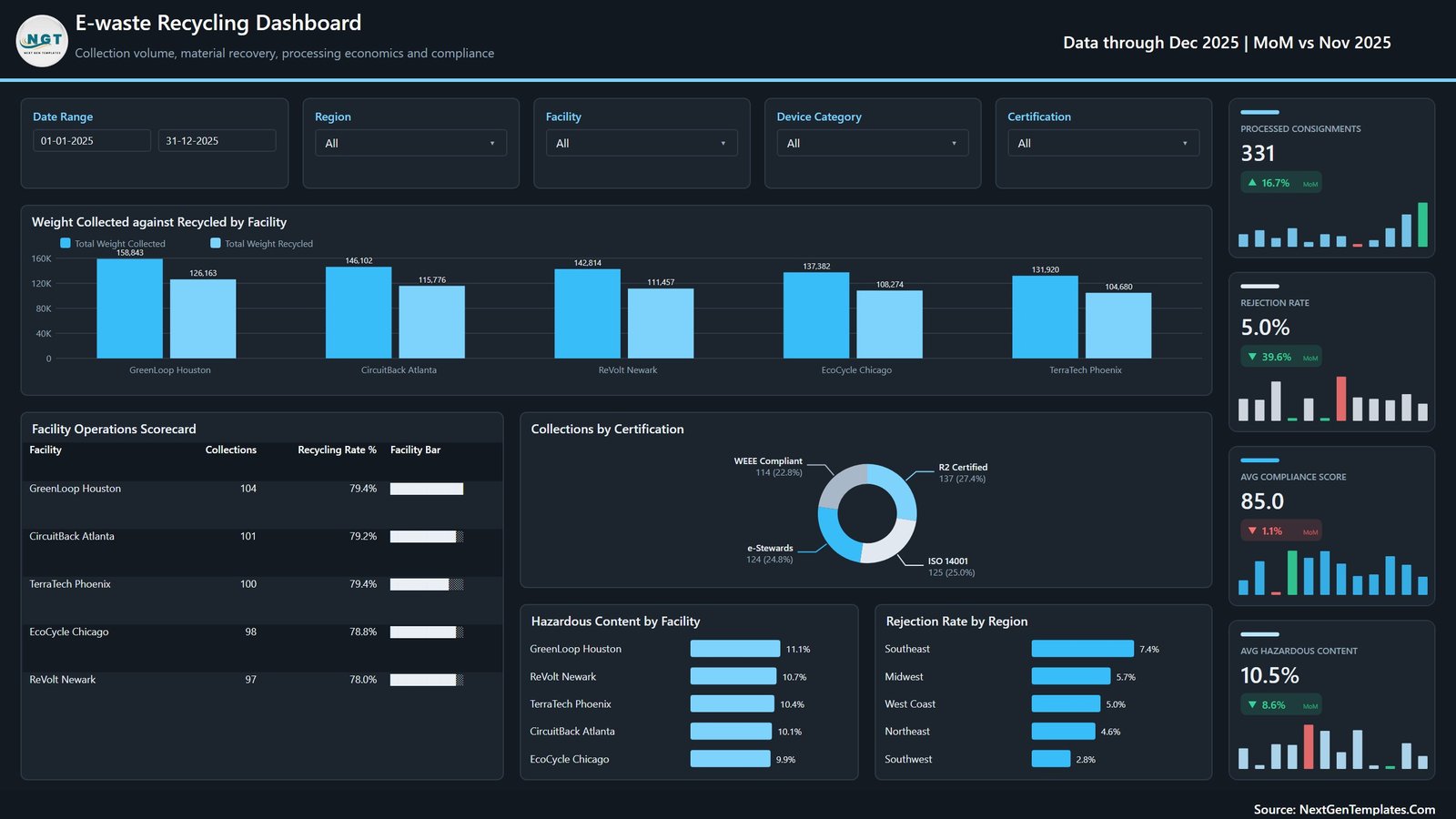
Facility and compliance indicators
5. Financial and Value Analysis
Follow recovered value, processing cost, net margin, value per kilogram, regional recovery economics and customer rating. Values come from the supplied sample records and change when the source data changes.
Financial and recovered-value analysis
E-waste Recycling Dashboard in Power BI vs. Excel vs. Paid Recycling SaaS – Where This Fits
| Area | This Power BI template | Excel dashboard | Paid recycling SaaS |
|---|---|---|---|
| Cost | $17.99 one-time | One-time template cost | Recurring subscription |
| Platform | Power BI Desktop | Microsoft Excel | Vendor cloud |
| Setup | Replace structured source and refresh | Replace rows and refresh pivots | Configuration and onboarding |
| Interactive analysis | Native slicers and report pages | Workbook filters and slicers | Depends on plan |
| Collaboration | Requires your Power BI sharing setup | File or Microsoft 365 sharing | Usually account based |
| Customization | Editable PBIX model and visuals | Editable workbook | Vendor controlled |
| E-waste metrics | Included across five pages | Available in the separate Excel edition | Depends on module |
Who This Template Is For – and Who It’s Not For
Use this Power BI e-waste dashboard if you manage collection centres, recycling operations, take-back programmes, environmental reporting, device recovery or circular-economy analysis. It also suits consultants who need a demonstration-ready electronic waste recycling dashboard and analysts searching for waste collection analytics Power BI examples.
It is not an ERP, route-planning platform, live IoT feed, weighbridge integration, chain-of-custody system, audit tool, or proof of WEEE, R2, e-Stewards, ISO 14001 or any other certification. The sample compliance and certification fields are buyer-maintained reporting dimensions.
How to Use the E-waste Recycling Dashboard in Power BI
- Download and unzip the package.
- Open the PBIX file in Microsoft Power BI Desktop.
- Review the Data.xlsx headers and replace sample records while preserving the column structure and data types.
- Point the query to your local Data.xlsx path if Power BI requests it.
- Refresh the model, test each filter and validate totals against your source before sharing.
Real-World Use Cases
Maya, an operations manager, uses the collection and facility pages to compare volumes, recycled weight and rejection rates before a monthly review. Arun, a sustainability analyst, examines CO2 avoided, residual waste and material recovery while keeping the figures clearly labelled as internal reporting estimates. Leah, a finance partner, uses the value page to compare recovered value, processing cost and net margin by region.
Frequently Asked Questions
What files are included?
The ZIP contains the Power BI PBIX report, Data.xlsx and a Power BI dashboard user manual.
How many report pages are included?
Five visible pages cover overview, collection and recovery, device and material recovery, facility and compliance, and financial value analysis.
Does this connect automatically to my recycling software?
No. It ships with an Excel source file. Custom connectors, databases and scheduled refresh services are not included.
Does it certify environmental compliance?
No. It visualizes fields supplied in the data; it does not audit, verify or certify regulatory compliance.
Can I customize it?
Yes. Users familiar with Power BI can edit visuals, measures, themes, filters and data connections.
Is Power BI Desktop required?
Yes. Use Microsoft Power BI Desktop to open and edit the PBIX file.
About the Author
Built by PK – Microsoft Certified Professional with 15+ years of Excel, Google Sheets, and Power BI experience. Founder of NextGenTemplates, reaching 300K+ subscribers across YouTube channels. Every template is hand-built and tested before release.
Explore Related Templates
Compare the E-waste Recycling Dashboard in Excel, Recycling Infrastructure Dashboard in Power BI, Waste Management Dashboard in Power BI, Environmental Services Dashboard in Power BI, and Waste Reduction KPI Dashboard in Google Sheets. Browse more Power BI dashboard templates.
Ready to build a clearer recycling performance dashboard? Download the E-waste Recycling Dashboard in Power BI, replace the sample records, refresh, and validate the report against your own operations.
Last updated: September 16, 2026
Watch the demo video:
Compatibility and Requirements
- Works in Power BI Desktop, which is free from Microsoft. Download it from Get Power BI Desktop.
- The data source is the included Data.xlsx file, so you also need Excel or another way to edit that file.































Reviews
There are no reviews yet.