


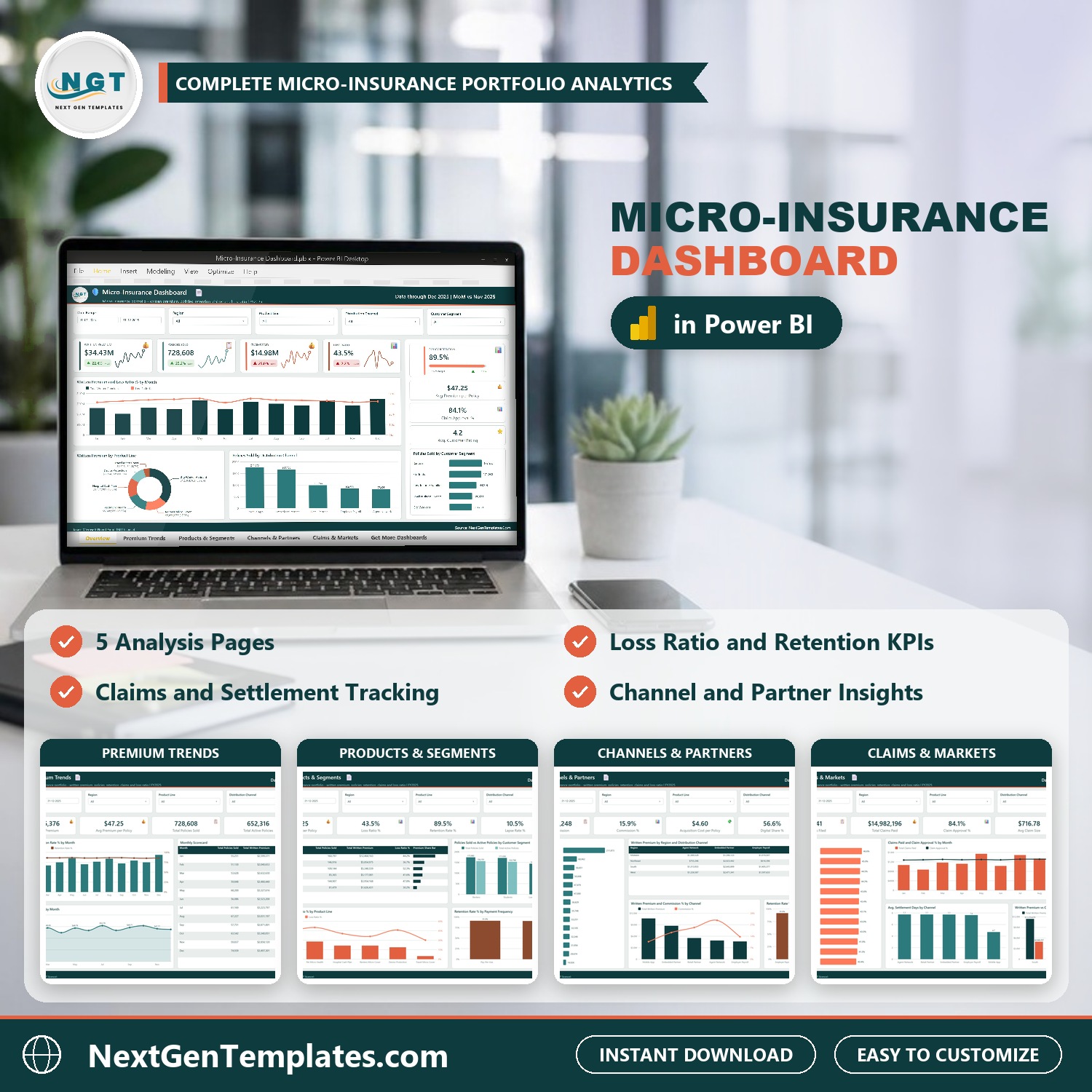
Micro-Insurance Dashboard in Power BI shows where the premium goes in a low-cost insurance portfolio: premium, policies, retention, claims and loss ratio by product line, distribution channel, partner and state, across five interactive report pages. The sample model holds 500 policy batches for FY2025 with $34.43M in written premium, 728,608 policies sold, $14.98M in claims paid, a 43.5% loss ratio and 89.5% policy retention. Load your own batches, press Refresh, and every visual redraws.
Watch the Micro-Insurance Dashboard in Power BI walkthrough
✅ Instant download · One-time payment · No subscription · No per-user fees · Lifetime access
Key Features of the Micro-Insurance Dashboard in Power BI
- Five report pages: Overview, Premium Trends, Products & Segments, Channels & Partners and Claims & Markets, linked by page tabs at the bottom.
- Underwriting numbers in one place: Written Premium, Policies Sold, Claims Paid, Loss Ratio %, Retention Rate %, Lapse Rate %, Claim Frequency %, Claim Approval % and Avg. Settlement Days.
- Six micro-insurance product lines: Gig Worker Accident, Renters Micro Cover, Pet Micro Health, Hospital Cash Plan, Device Protection and Travel Micro Cover, compared on premium and loss ratio.
- Channel and partner economics: commission, commission %, acquisition cost per policy and retention for five channels and 14 partners.
- Customer segments and payment frequency: five segments (Renters, Students, Low-Income Families, Small Business Owners, Gig Workers) and three payment frequencies (Weekly, Monthly, Pay-Per-Use).
- Five filters on every page: Date Range, Region, Product Line and Distribution Channel, plus one page-specific slicer (Customer Segment, Payment Frequency, Partner or State).
- Drill-through and tooltips: a hidden Details page lists policy batches behind any chart, and two tooltip pages add context on hover.
- Open and editable: the model carries 43 DAX measures you can read and change in Power BI Desktop, which is free from Microsoft. The ZIP ships the .pbix, the sample Data.xlsx and a PDF user manual.
What’s Inside the Micro-Insurance Dashboard in Power BI
Page 1: Overview
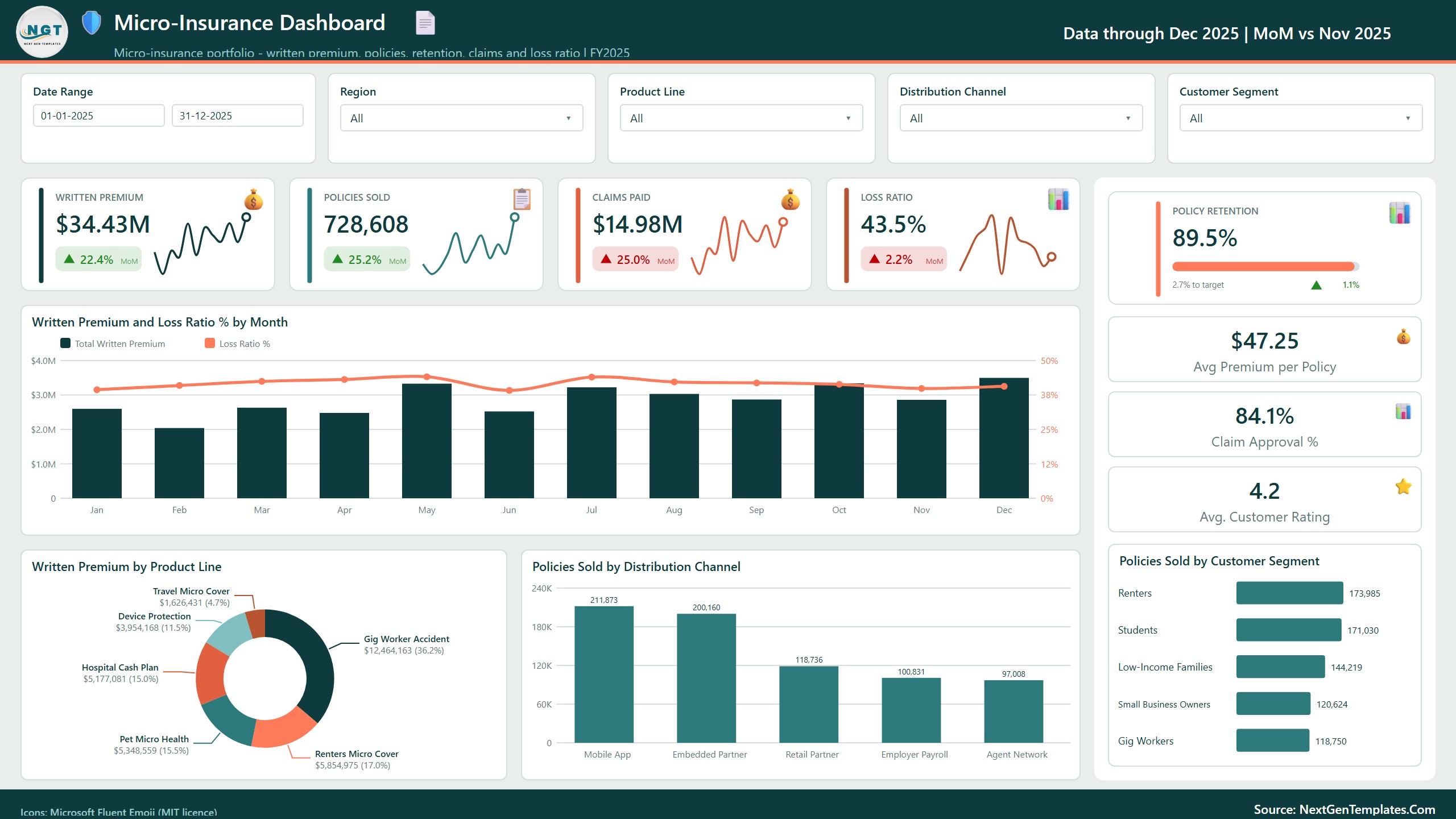
Four sparkline cards show Written Premium ($34.43M), Policies Sold (728,608), Claims Paid ($14.98M) and Loss Ratio (43.5%), each with a month-on-month change (December 2025 against November 2025). A Policy Retention card (89.5%) sits beside Avg Premium per Policy ($47.25), Claim Approval % (84.1%) and Avg. Customer Rating (4.2). Charts show Written Premium and Loss Ratio % by Month, Written Premium by Product Line, Policies Sold by Distribution Channel and Policies Sold by Customer Segment. Gig Worker Accident brings $12.46M, or 36.2% of all premium.
Page 2: Premium Trends
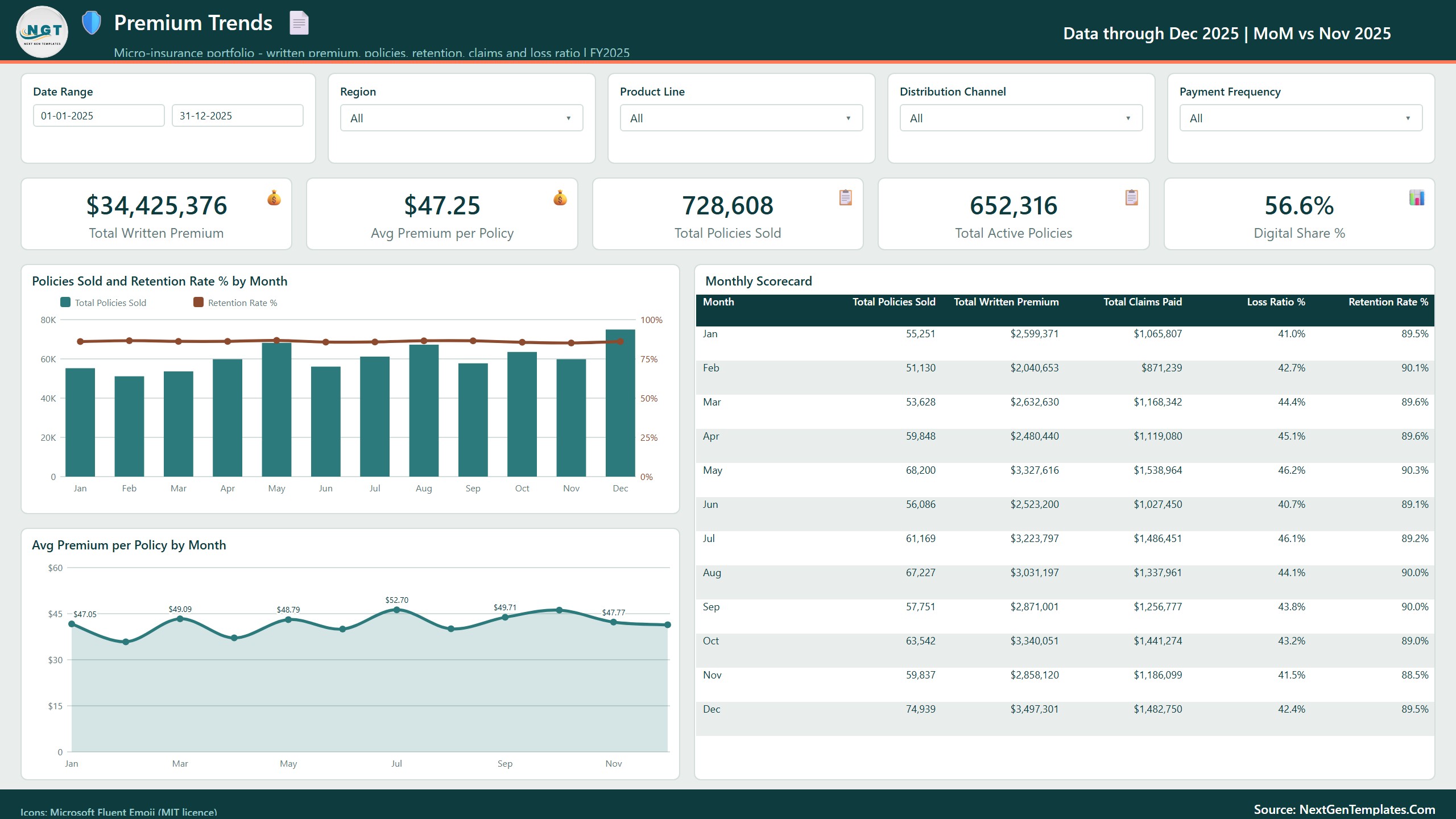
Cards for Total Written Premium, Avg Premium per Policy, Total Policies Sold (728,608), Total Active Policies (652,316) and Digital Share % (56.6%). Policies Sold and Retention Rate % by Month sits next to Avg Premium per Policy by Month, and a Monthly Scorecard lists policies, premium, claims paid, loss ratio and retention for every month. December is the busiest month with 74,939 policies, and the average premium per policy ranges from about $40 in February to almost $53 in July.
Page 3: Products & Segments
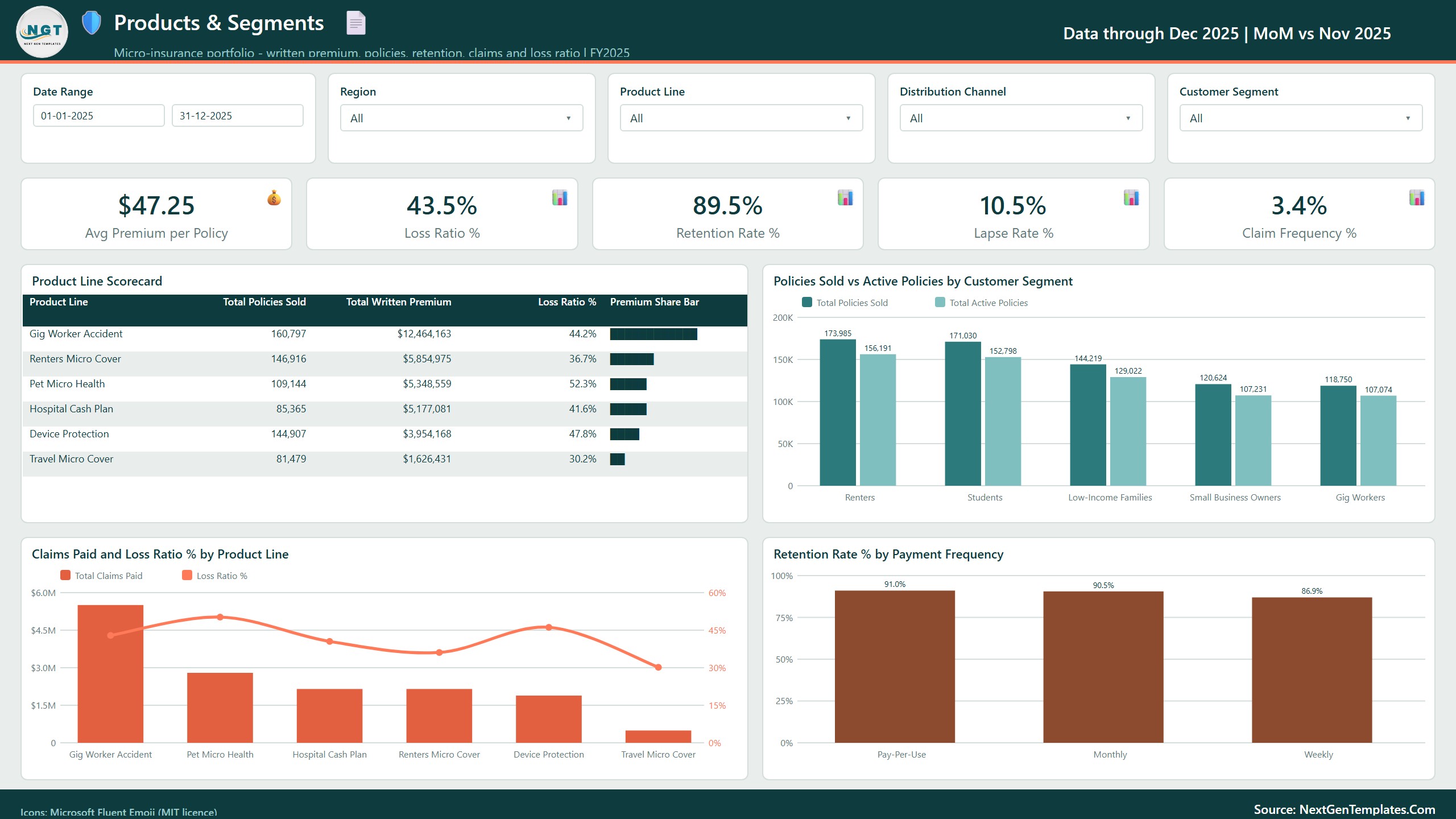
Cards for Avg Premium per Policy, Loss Ratio % (43.5%), Retention Rate % (89.5%), Lapse Rate % (10.5%) and Claim Frequency % (3.4%). The Product Line Scorecard compares all six products on policies, premium, loss ratio and a premium share bar. Pet Micro Health has the highest loss ratio at 52.3% and Travel Micro Cover the lowest at 30.2%. Other visuals are Policies Sold vs Active Policies by Customer Segment, Claims Paid and Loss Ratio % by Product Line, and Retention Rate % by Payment Frequency, where Pay-Per-Use customers keep their cover best (91.0%) and Weekly payers least (86.9%).
Page 4: Channels & Partners
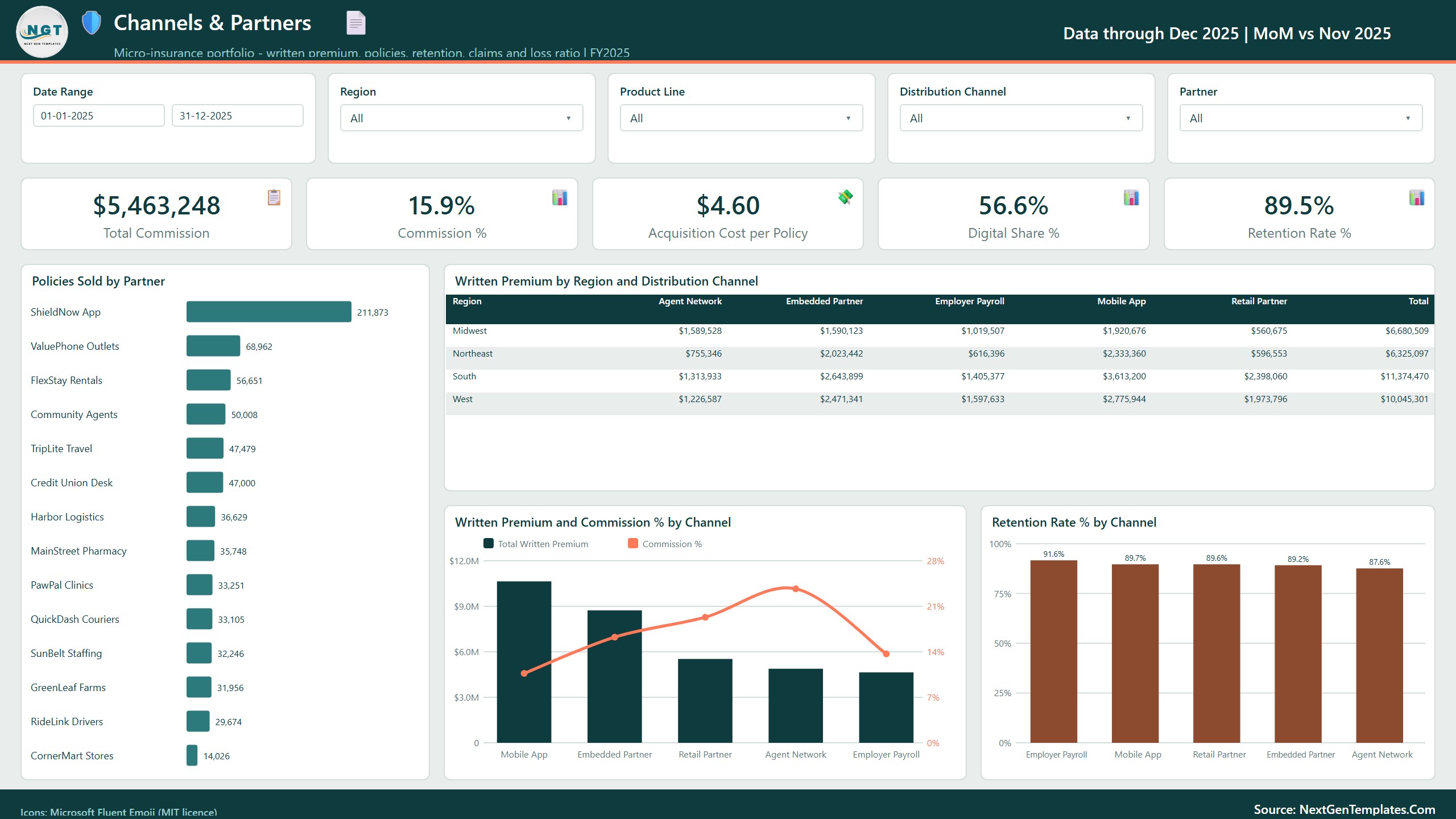
Cards for Total Commission ($5,463,248), Commission % (15.9%), Acquisition Cost per Policy ($4.60), Digital Share % and Retention Rate %. Policies Sold by Partner ranks all 14 partners, led by ShieldNow App with 211,873 policies. A Written Premium by Region and Distribution Channel grid shows the South as the largest region at $11.37M, and Written Premium and Commission % by Channel shows what each channel really costs: the Mobile App pays the lowest commission, the Agent Network the highest at about 24.5%. Retention Rate % by Channel puts Employer Payroll on top at 91.6%.
Page 5: Claims & Markets
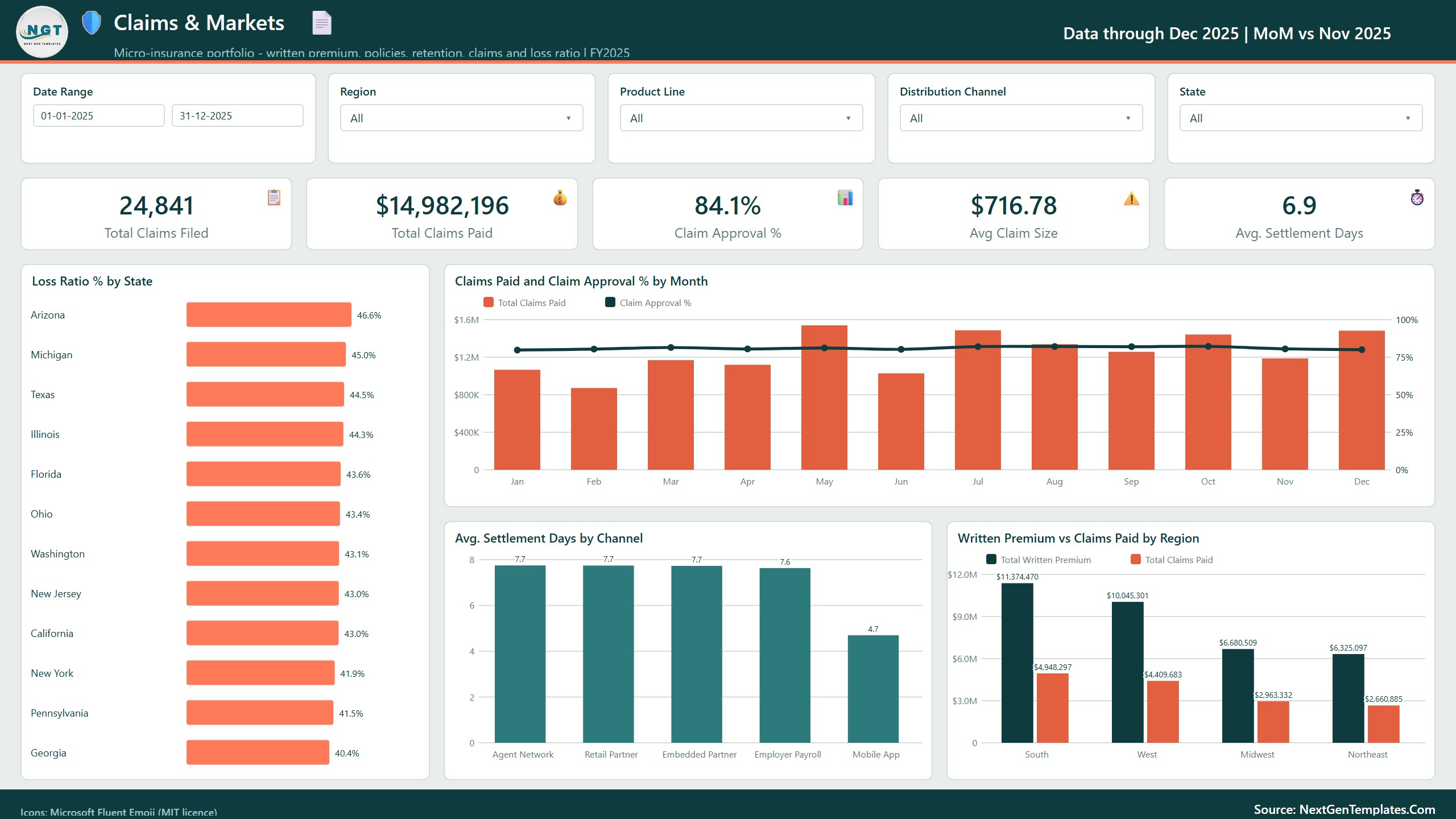
Cards for Total Claims Filed (24,841), Total Claims Paid ($14,982,196), Claim Approval % (84.1%), Avg Claim Size ($716.78) and Avg. Settlement Days (6.9). Loss Ratio % by State ranks 12 states, from Arizona at 46.6% down to Georgia at 40.4%. Claims Paid and Claim Approval % by Month, Avg. Settlement Days by Channel (Mobile App settles in 4.7 days against about 7.7 for the other channels) and Written Premium vs Claims Paid by Region complete the page.
Also in the file
A Get More Dashboards page, a hidden Details drill-through page bound to seven fields (Region, State, Product Line, Distribution Channel, Partner, Customer Segment and Payment Frequency) and two hidden tooltip pages (Trend Detail and Category Detail). The data model is one table of 500 policy batches and 22 columns plus a Date table.
This Template vs. a Custom BI Build vs. Insurance Analytics Software
| Feature | Micro-Insurance Dashboard in Power BI | Custom Tableau / Qlik build | Insurance analytics software |
|---|---|---|---|
| Cost | One-time purchase | Licences plus build time | Usually a subscription |
| Ready-made micro-insurance pages | Yes, five pages | No, you design them | Depends on vendor |
| Loss ratio by product and state | Yes | If you build it | Often |
| Commission and acquisition cost by channel | Yes | If you build it | Varies |
| Edit measures and visuals | Full access, 43 DAX measures | Full access | Limited |
| Live connection to a policy admin system | No, you load an export | Possible with development | Usually yes |
| Your data stays on your machine | Yes | Depends on setup | Often vendor-hosted |
Who This Template Is For, and Who It’s Not For
Good fit: micro-insurance and embedded insurance programs, insurtech start-ups, managing general agents, insurance partners and analysts who report on small-ticket policies sold through apps, retailers, employers and agent networks.
Not a fit: anyone who needs live policy feeds, claims handling, underwriting or pricing tools, or regulatory filings. This is a reporting template that reads a workbook you fill or export. It does not give actuarial or financial advice.
How to Use This Micro-Insurance Dashboard
- Install Power BI Desktop (free from Microsoft) and unzip the download.
- Open Data.xlsx and replace the sample rows with your own policy batches, keeping the column headers.
- Open the .pbix, go to Transform data, Data source settings, and use Change Source to point at your copy of Data.xlsx. The shipped path points at our build folder, so this step is required on first use.
- Press Refresh. Every page, card and chart updates.
- Use the slicers, the page tabs and right-click Drill through on a chart to open the Details page.
Real-World Use Cases
- Product review: compare loss ratio and premium by product line to decide which covers to reprice or retire.
- Partner negotiation: see commission %, retention and policies sold by partner before renewing terms.
- Channel mix: track Digital Share % and acquisition cost per policy as you move sales to the app.
- Claims monitoring: follow claim approval %, average claim size and settlement days by channel and state.
- Board and partner reporting: one monthly view of premium, retention and loss ratio.
Frequently Asked Questions
What does the Micro-Insurance Dashboard in Power BI measure?
Written premium, policies sold, active and lapsed policies, retention and lapse rates, claims filed and paid, loss ratio, claim approval %, claim frequency, average claim size, settlement days, commission, acquisition cost, digital share and customer rating, split by month, region, state, product line, channel, partner, customer segment and payment frequency.
Does it connect to my policy administration system?
No. It reads Data.xlsx. You paste or export your policy batches into that workbook and press Refresh. A developer can repoint the Power Query source at a database if you need that.
Do I need a paid Power BI licence?
No. Power BI Desktop is free. A Pro or Premium licence is only needed to publish and share the report in the Power BI Service.
How long does setup take?
About 10 minutes once your data matches the column headers: paste the rows, change the source path once and refresh.
Can I add my own product lines, channels or partners?
Yes. Product lines, channels, partners, segments, states and payment frequencies are read from the data, so new values appear in the slicers and charts after a refresh.
Is the sample data real?
No. The partners, batches and figures are fictional sample records used to demonstrate the visuals. Replace them with your own before presenting anything.
Does it work on Mac?
Power BI Desktop runs on Windows. Mac users can run it through a Windows virtual machine or open a published copy in the Power BI Service.
About the Author
Built by PK, Microsoft Certified Professional with 15+ years of Excel, Google Sheets and Power BI experience and founder of NextGenTemplates (@PKAnExcelExpert, @NextGenTemplates). Every template is hand-built and tested before release.
Explore Related Templates
- Insurance Tech Startups Dashboard in Power BI: funding, growth and unit economics for insurtech companies.
- Agri Insurance Dashboard in Power BI: crop and livestock cover analytics.
- Microfinance Institutions Dashboard in Power BI: portfolio and repayment reporting for small-ticket lenders.
- Insurance Agency Management System Web App: run policies and clients, then report on them here.
- Browse all Power BI dashboard templates.
📖 Click here to read the detailed blog post
🎥 Visit our YouTube channel for step-by-step video tutorials
👉 YouTube.com/@NextGenTemplates
Looking for a micro insurance dashboard in Power BI you can edit instead of rent? Download it once, load your own policy batches and keep it for life, with no subscription and no per-seat fee.
📅 Last updated: October 2026






























Reviews
There are no reviews yet.