


Eco Tourism Dashboard in Power BI brings bookings, guests, revenue, destinations, conservation funding, reported carbon offsets, and local-jobs figures into one five-page management report. It is designed for eco-tour operators, sustainable-travel businesses, destination managers, and analysts who want a structured starting point without building a Power BI model from scratch.
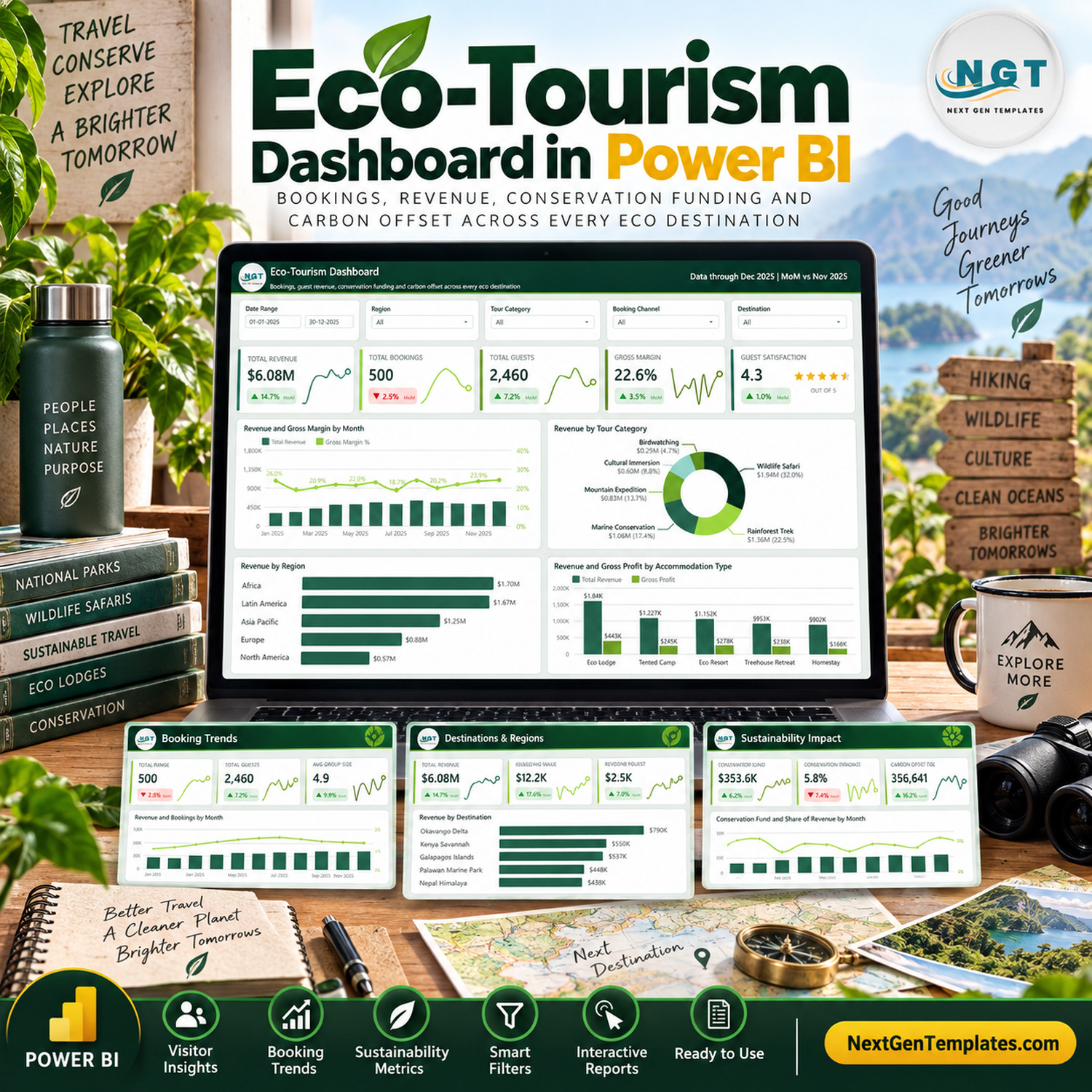
The package includes an editable PBIX file, an Excel data source with 500 realistic sample bookings, and a PDF user manual. Replace the sample rows with your own consistently structured records, refresh the model, and use the built-in filters to explore results by date, region, tour category, booking channel, destination, operator, accommodation type, or booking status.
What this eco-tourism Power BI dashboard shows
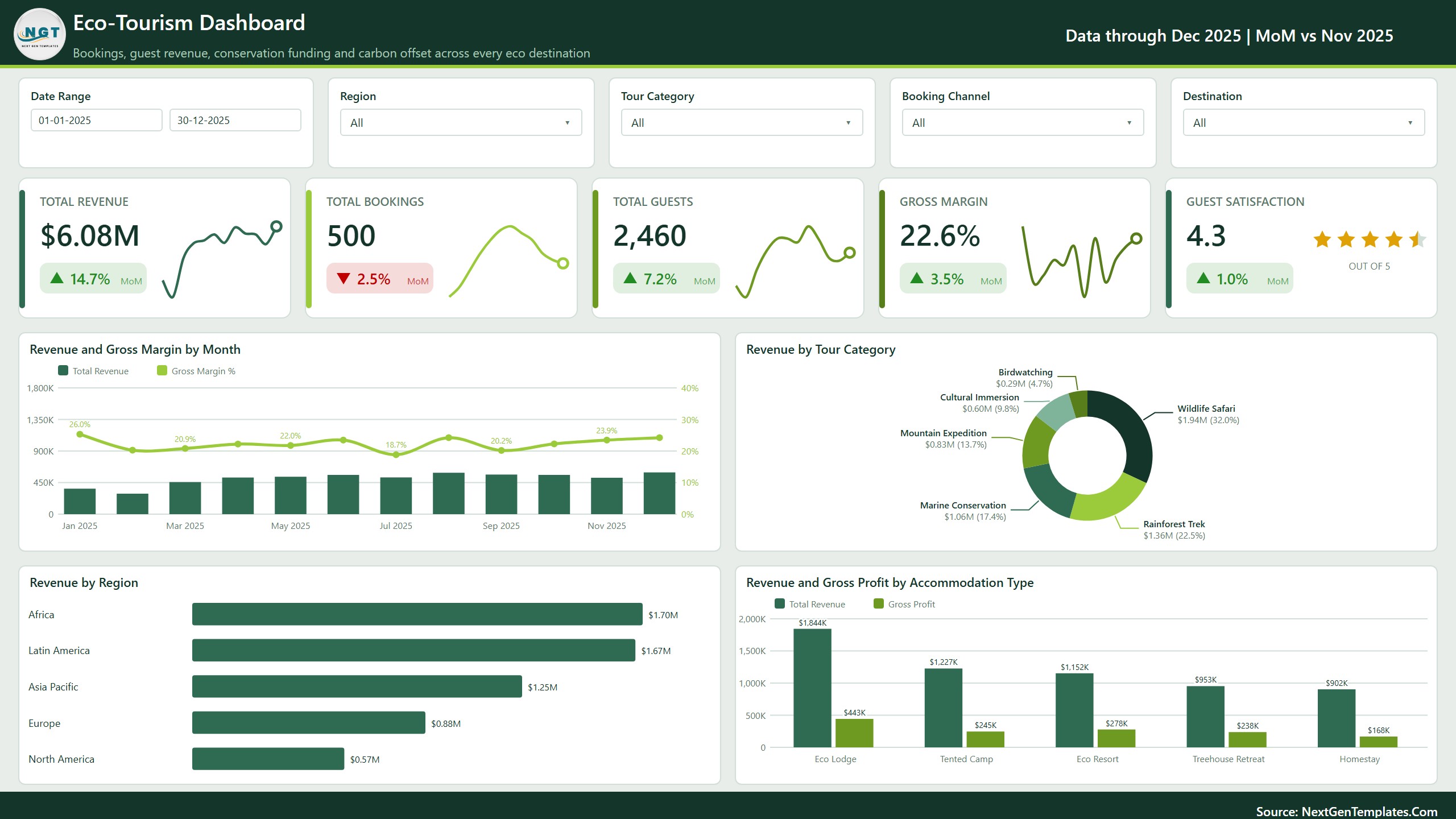
The main Overview page presents total revenue, bookings, guests, gross margin, and guest satisfaction. Supporting charts compare revenue and margin over time, tour-category contribution, regional revenue, and revenue versus gross profit across accommodation types.
With the supplied sample data, the report displays $6.08M of revenue, 500 bookings, 2,460 guests, a 22.6% gross margin, and a 4.3 average guest rating. These values demonstrate how the report behaves and update when the source data is replaced and refreshed.
Five connected report pages
Overview
Start with a high-level review of commercial volume, guest activity, margin, and satisfaction. Monthly and categorical visuals help explain whether changes are associated with specific regions, tour types, or accommodation models.
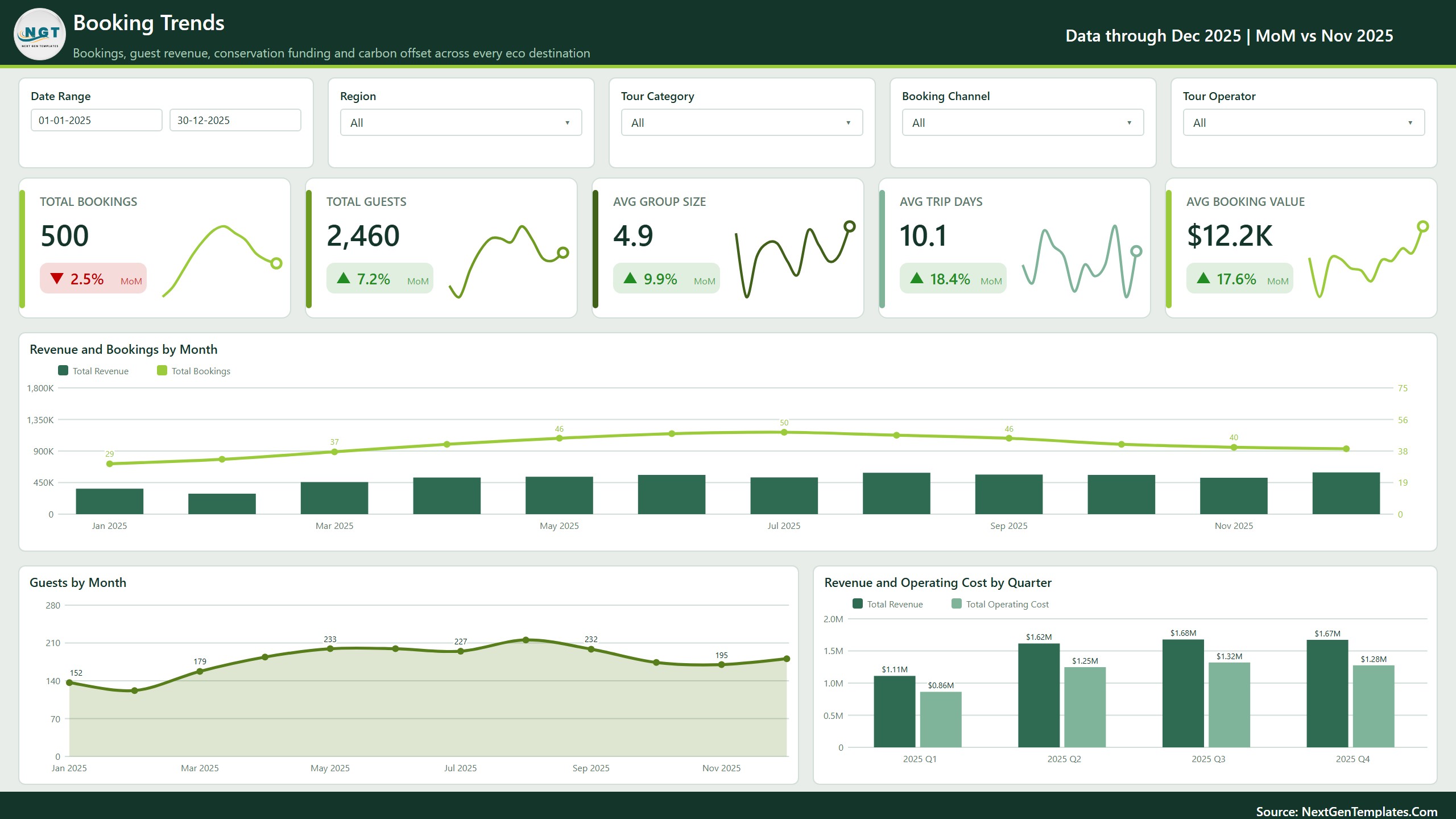
Booking Trends
Review bookings, guests, average group size, average trip duration, and average booking value. Monthly booking and revenue trends, guest volume, and quarterly revenue-versus-cost comparisons support recurring demand and capacity reviews.
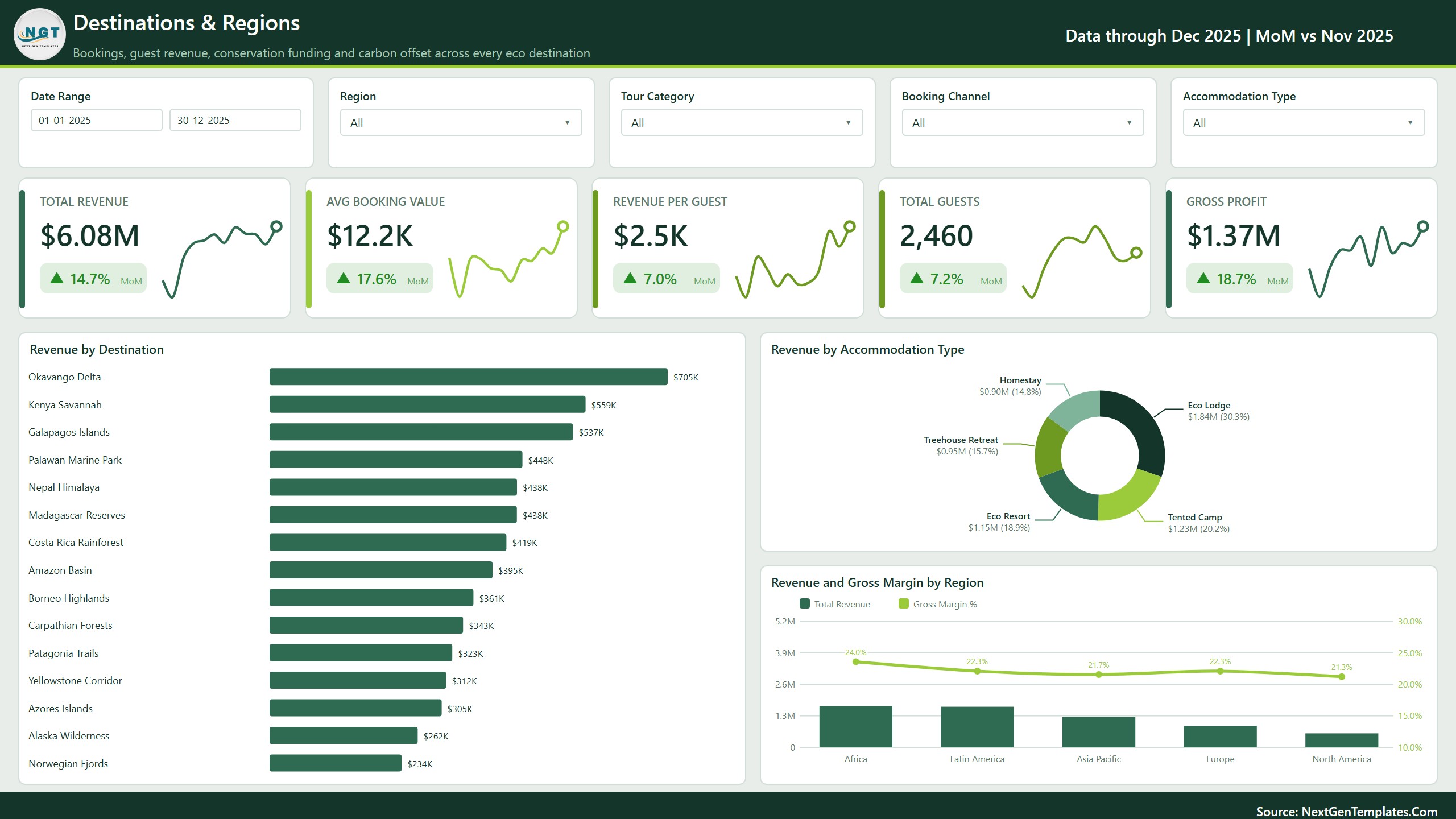
Destinations & Regions
Compare revenue by destination, accommodation type, and region. This page also shows average booking value, revenue per guest, guest count, gross profit, and regional margin so managers can examine geographic and accommodation mix.
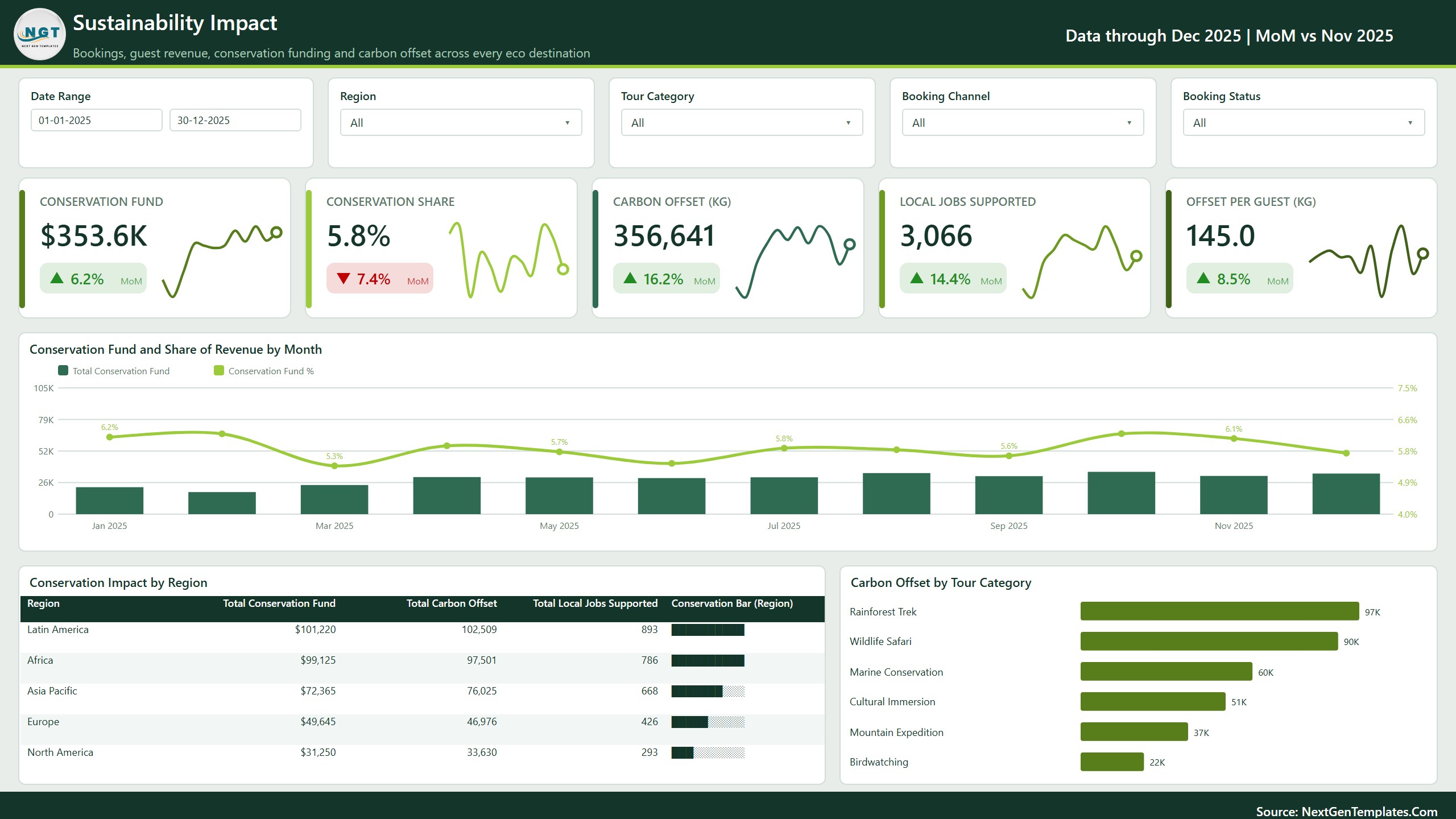
Sustainability Impact
Summarize the conservation-fund, carbon-offset, and local-jobs values recorded in the source table. Monthly, regional, and tour-category views make reported figures easier to compare. The dashboard does not calculate, verify, certify, or audit emissions, offsets, conservation outcomes, jobs created, or ESG performance.
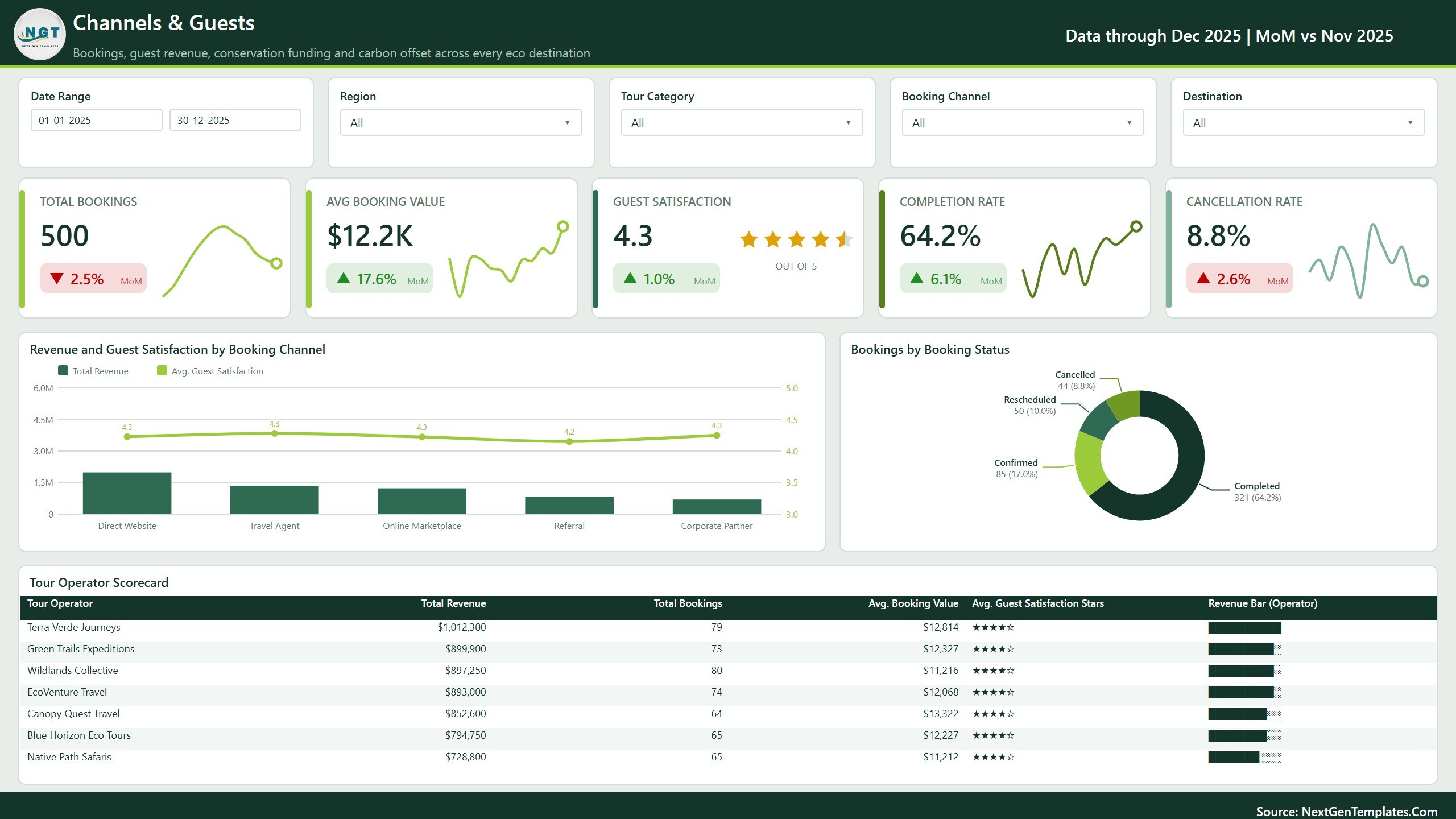
Channels & Guests
Analyze bookings, average booking value, guest satisfaction, completion rate, and cancellation rate. Channel comparisons, booking-status composition, and a tour-operator scorecard help explain how reservations and commercial results are distributed.
Included in the download
- Editable Power BI Desktop report (.pbix)
- Structured Data.xlsx file with 500 sample booking records
- Power BI user manual in PDF format
- Five designed report pages with filters and page navigation
- Visuals for revenue, cost, profit, bookings, guests, destinations, channels, ratings, and reported sustainability fields
Who can use this template?
- Eco-tourism and responsible-travel operators
- Destination and accommodation managers
- Commercial teams reviewing channels, bookings, and revenue
- Analysts organizing tourism and reported sustainability data
- Power BI learners building a realistic multi-page portfolio project
How to customize the Eco Tourism Dashboard in Power BI
- Keep a backup copy of the original package.
- Open Data.xlsx and retain the supplied column names and data types.
- Replace or append rows with validated booking-level records.
- Open the PBIX file using Microsoft Power BI Desktop.
- Update the source path if prompted, refresh the model, and reconcile totals.
- Test filters, date ranges, categories, and measures before distributing the report.
You can edit the local PBIX file in Power BI Desktop. A suitable Microsoft license may be required to publish or share through the Power BI service.
Explore related dashboard templates
Compare the same subject in our Eco-Tourism Dashboard in Excel, add a KPI-focused view with the Eco-Tourism KPI Dashboard in Power BI, review accommodation analytics in the Eco Lodges Dashboard in Power BI, or explore the Eco-Tourism KPI Dashboard in Excel.
Important use note
This is a descriptive business-reporting template, not a booking engine, accounting system, impact-assessment platform, carbon calculator, offset registry, certification service, or regulatory reporting solution. The included destinations, operators, values, and sustainability fields are fictional sample data. Verify source records, measurement methods, units, boundaries, and supporting evidence before making or publishing environmental, social, financial, or performance claims.
For recurring reviews, document who owns each source field, how frequently it is updated, which currency and measurement units apply, and what evidence supports the entry. Reconcile report totals with the original booking and finance records after every refresh. If the dashboard is shared outside your organization, remove confidential information and explain the definitions behind each displayed measure so readers do not mistake a recorded value for an independently assessed outcome.
Get the Eco Tourism Dashboard in Power BI and begin with a polished Overview, four focused supporting pages, editable source data, and a practical setup guide.
Watch the demo video:
Frequently Asked Questions
What files come in the download?
An editable Power BI Desktop report (.pbix), a Data.xlsx file with 500 sample booking records and a PDF user manual.
How many report pages does the dashboard have?
Five pages: Overview, Booking Trends, Destinations & Regions, Sustainability Impact and Channels & Guests.
How do I use my own data?
Open Data.xlsx, keep the supplied column names and data types, and replace or append rows with your own booking records. Then open the PBIX file in Power BI Desktop, update the source path if prompted and refresh the model.
Does the dashboard calculate carbon offsets or verify sustainability claims?
No. The Sustainability Impact page summarizes the conservation-fund, carbon-offset and local-jobs values recorded in your source table. It does not calculate, verify, certify or audit them.
Is there an Excel or KPI version?
Yes. See the Eco-Tourism Dashboard in Excel and the Eco-Tourism KPI Dashboard in Power BI.
Related Tourism Dashboards
- Eco-Tourism Dashboard in Excel: the same dashboard in Excel
- Eco-Tourism KPI Dashboard in Power BI: a KPI-focused view in Power BI
- Eco Lodges Dashboard in Power BI: accommodation analytics
- Eco-Tourism KPI Dashboard in Excel: KPI tracking in Excel
- Travel & Tourism Dashboard in Excel: a general travel and tourism view
Browse all Power BI dashboards.

































Reviews
There are no reviews yet.