


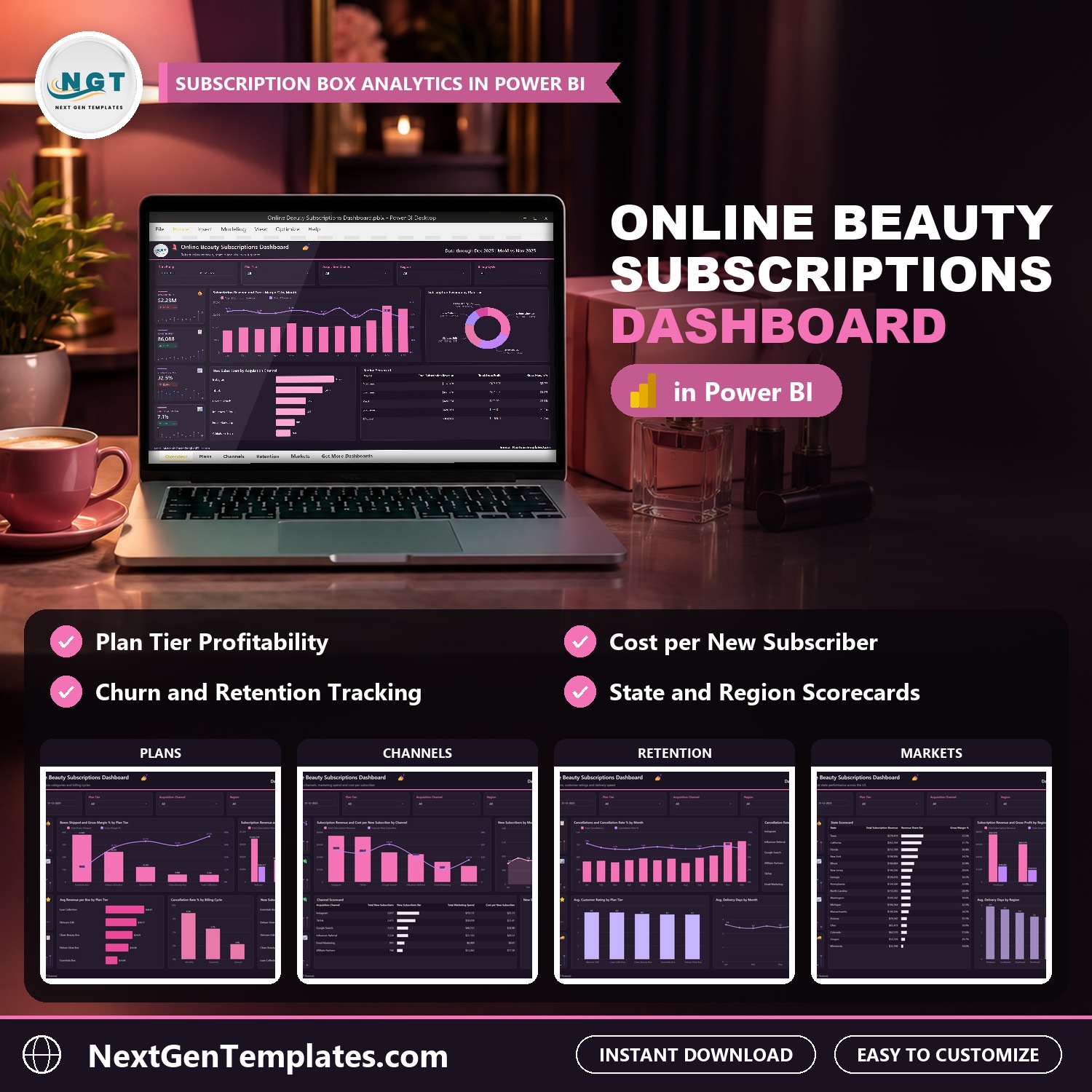
Online Beauty Subscriptions Dashboard in Power BI shows where the money goes in a beauty subscription box business: revenue, gross margin, churn and cost per new subscriber by plan tier, box category, acquisition channel, billing cycle, region and state, across five interactive report pages. The sample model holds 500 shipment batches for 2025 with $2.23M in subscription revenue, 86,088 boxes shipped, a 32.5% gross margin and a 7.1% cancellation rate. Load your own batches, press Refresh, and every visual redraws.
Watch the Online Beauty Subscriptions Dashboard in Power BI walkthrough
✅ Instant download · One-time payment · No subscription · No per-user fees · Lifetime access
Key Features of the Online Beauty Subscriptions Dashboard in Power BI
- Five report pages: Overview, Plans, Channels, Retention and Markets, linked by page tabs at the bottom, plus a Get More Dashboards page.
- Subscription box analytics in one place: Subscription Revenue, Gross Profit, Gross Margin %, Avg Revenue per Box, Boxes Shipped, New Subscribers, Marketing Spend, Cost per New Subscriber, Cancellations, Cancellation Rate %, Avg. Customer Rating and Avg. Delivery Days.
- Five plan tiers compared: Essentials Box, Deluxe Glow Box, Skincare Edit, Clean Beauty Box and Luxe Collection, on revenue, boxes shipped, gross margin and revenue per box.
- Box categories: revenue and gross profit for Skincare, Makeup, Fragrance, Haircare and Body Care.
- Acquisition channel economics: new subscribers, marketing spend and cost per new subscriber for Instagram, TikTok, Google Search, Influencer Referral, Email Marketing and Affiliate Partners.
- Churn and retention: cancellations and cancellation rate by month, channel, billing cycle (Monthly, Quarterly, Annual) and region.
- Regional view: a state scorecard for 17 US states and revenue, gross profit, delivery days and cancellation rate across five regions.
- Five filters on every page: Date Range, Plan Tier, Acquisition Channel and Region, plus one page-specific slicer (Billing Cycle, Box Category or State).
- Drill-through and tooltips: a hidden Details page lists the shipment batches behind any chart, and two tooltip pages add context on hover.
- Open and editable: the model carries 50 DAX measures you can read and change in Power BI Desktop, which is free from Microsoft. The ZIP ships the .pbix, the sample Data.xlsx and a PDF user manual.
What’s Inside the Online Beauty Subscriptions Dashboard in Power BI
Page 1: Overview
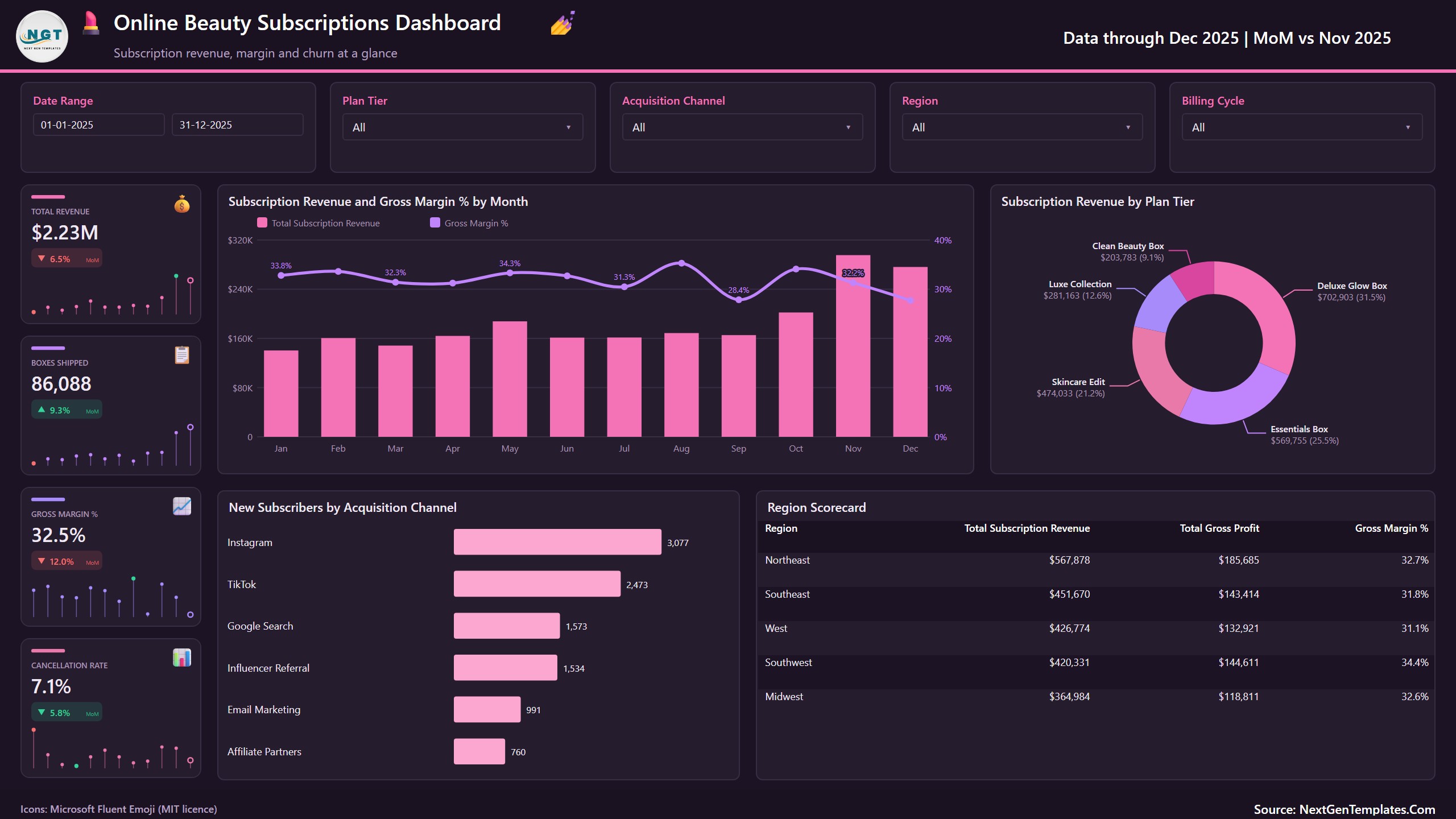
Four sparkline cards show Total Revenue ($2.23M), Boxes Shipped (86,088), Gross Margin % (32.5%) and Cancellation Rate (7.1%), each with a month-on-month change (December 2025 against November 2025). A combo chart plots Subscription Revenue and Gross Margin % by Month, and a donut splits revenue by plan tier: Deluxe Glow Box brings $702,903, or 31.5% of the total. New Subscribers by Acquisition Channel ranks Instagram first with 3,077, and a Region Scorecard lists revenue, gross profit and gross margin for each of the five regions.
Page 2: Plans
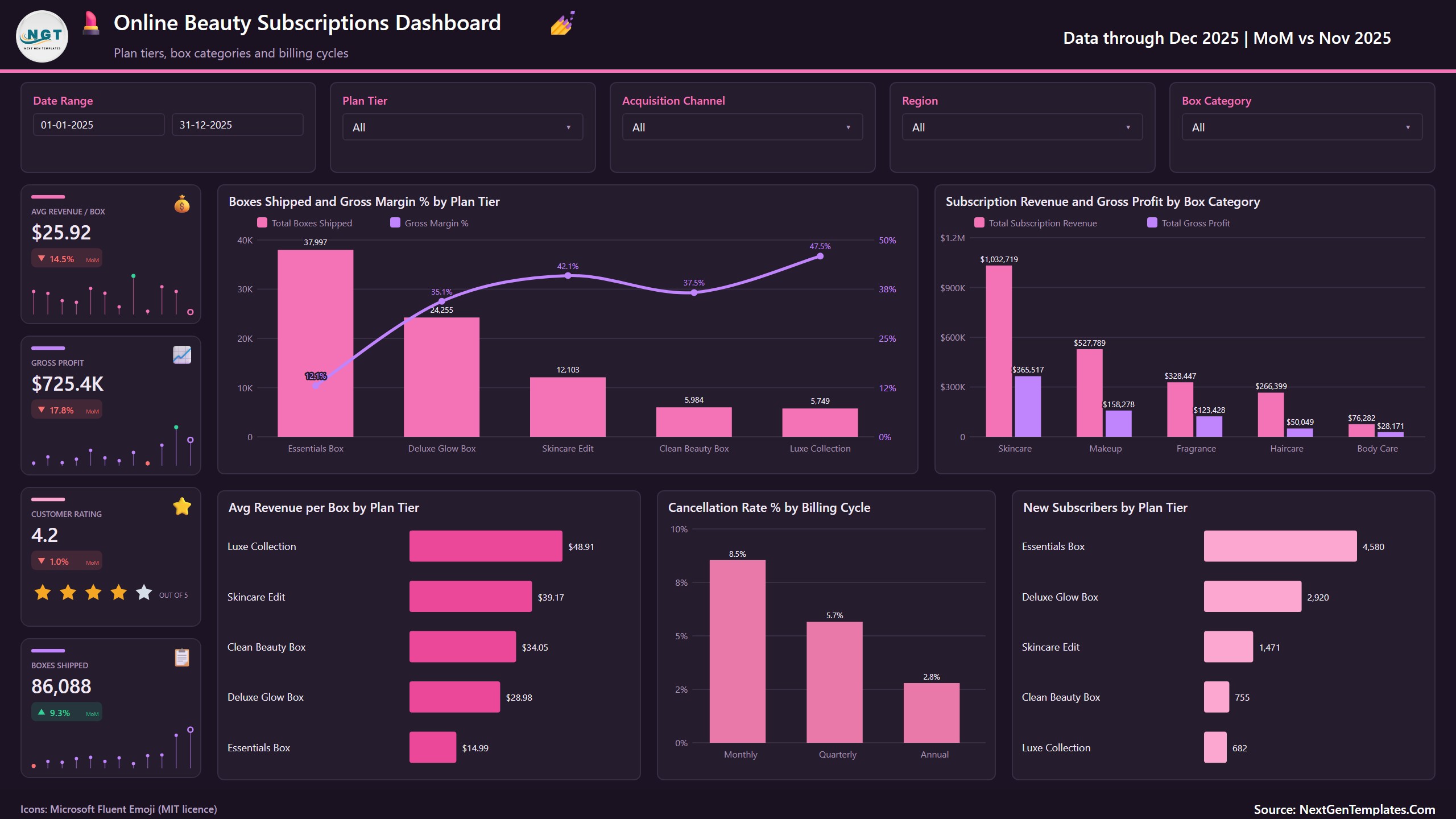
Cards for Avg Revenue per Box ($25.92), Gross Profit ($725.4K), Customer Rating (4.2) and Boxes Shipped. Boxes Shipped and Gross Margin % by Plan Tier shows the trade-off clearly: Essentials Box ships 37,997 boxes at a 12.1% margin, while Luxe Collection ships 5,749 boxes at 47.5%. Avg Revenue per Box runs from $14.99 (Essentials Box) to $48.91 (Luxe Collection). Revenue and Gross Profit by Box Category puts Skincare first at $1,032,719, and Cancellation Rate % by Billing Cycle falls from 8.5% on Monthly plans to 2.8% on Annual plans.
Page 3: Channels
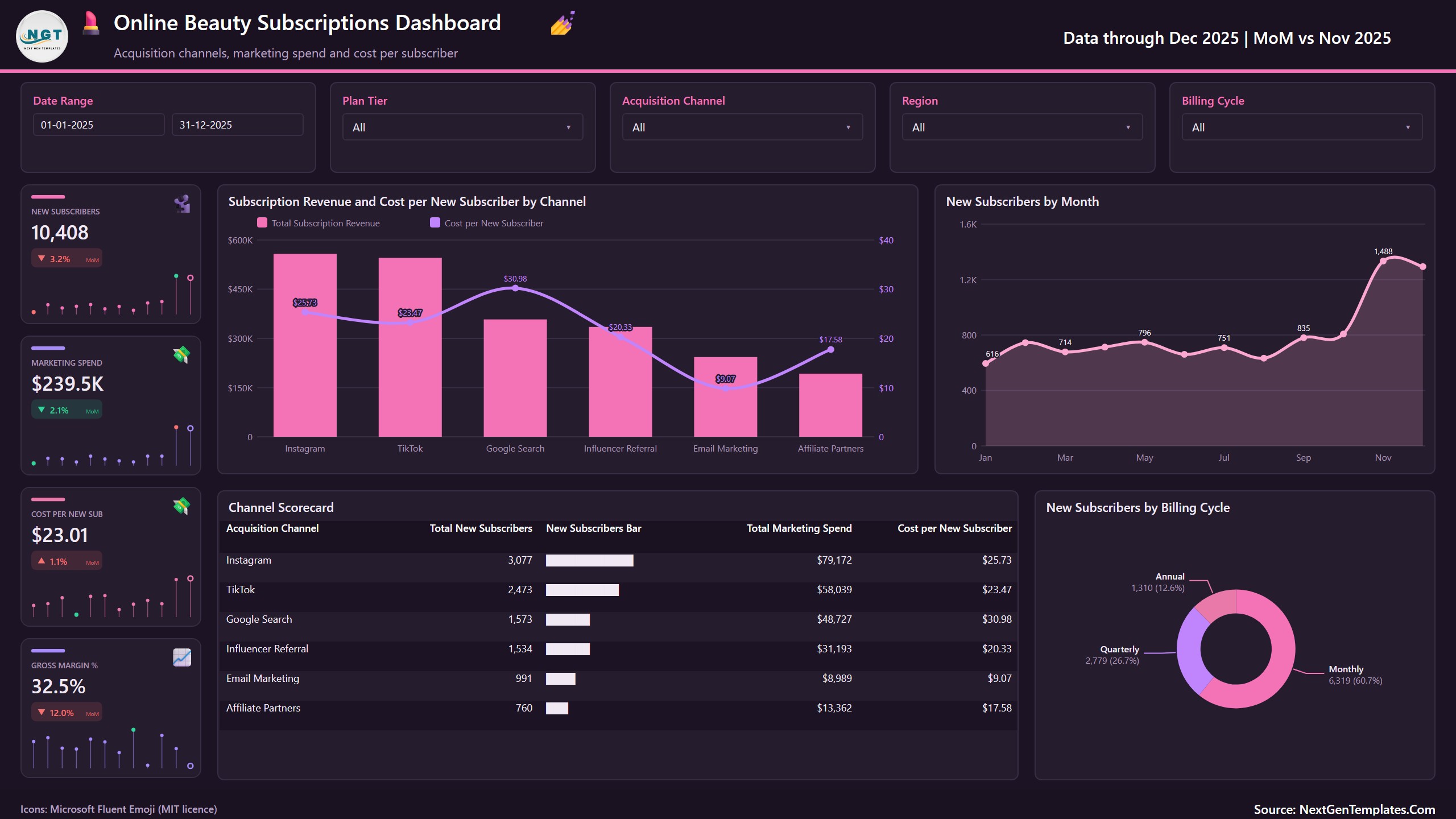
Cards for New Subscribers (10,408), Marketing Spend ($239.5K), Cost per New Sub ($23.01) and Gross Margin %. Subscription Revenue and Cost per New Subscriber by Channel compares all six channels, and a Channel Scorecard lists subscribers, spend and cost per subscriber: Email Marketing is the cheapest at $9.07 and Google Search the most expensive at $30.98. New Subscribers by Month peaks at 1,488 in November, and a donut splits new subscribers by billing cycle (60.7% Monthly).
Page 4: Retention
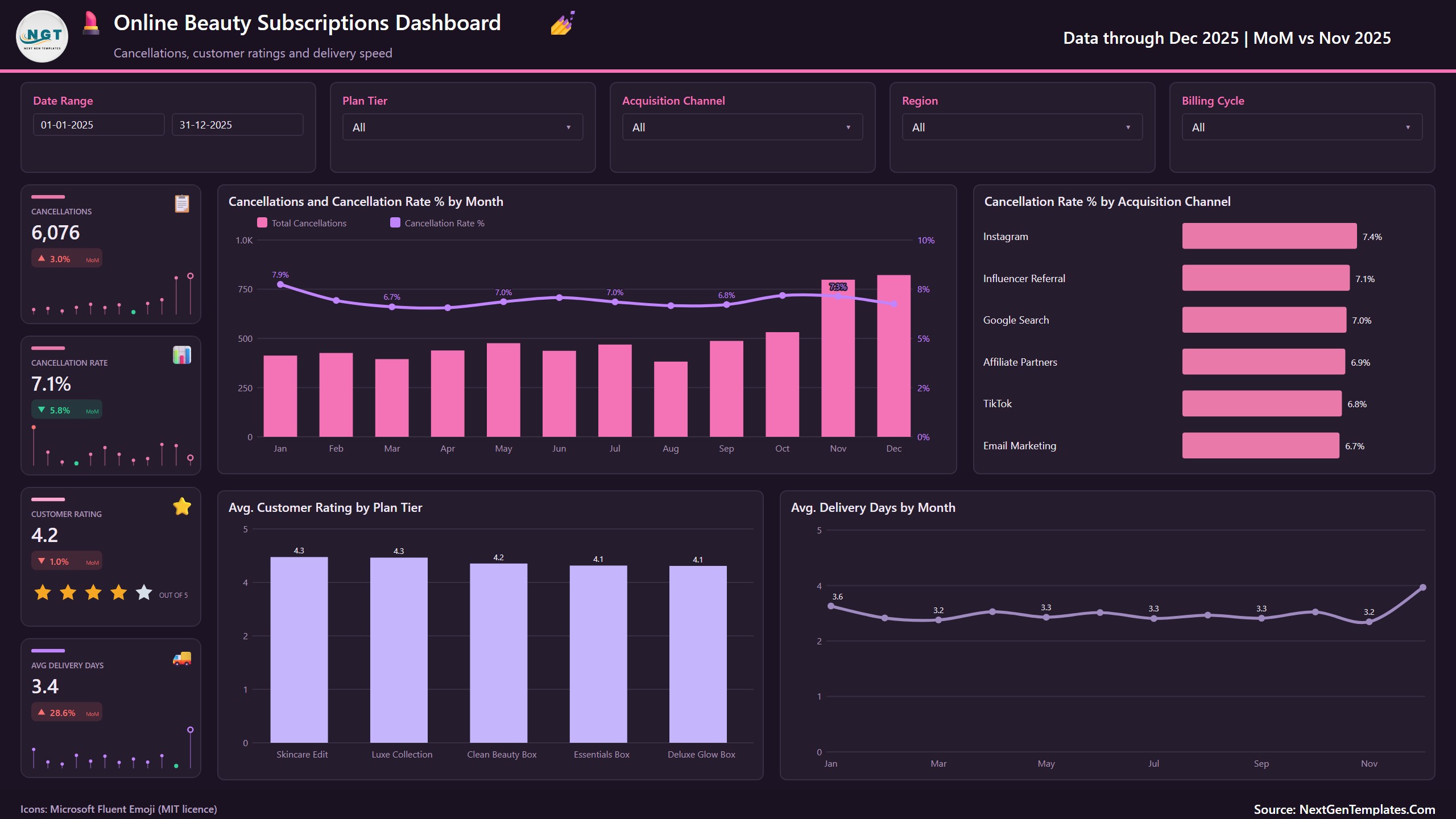
Cards for Cancellations (6,076), Cancellation Rate (7.1%), Customer Rating (4.2) and Avg Delivery Days (3.4). Cancellations and Cancellation Rate % by Month sits beside Cancellation Rate % by Acquisition Channel, where Instagram subscribers cancel most (7.4%) and Email Marketing subscribers least (6.7%). Avg. Customer Rating by Plan Tier and Avg. Delivery Days by Month complete the page.
Page 5: Markets
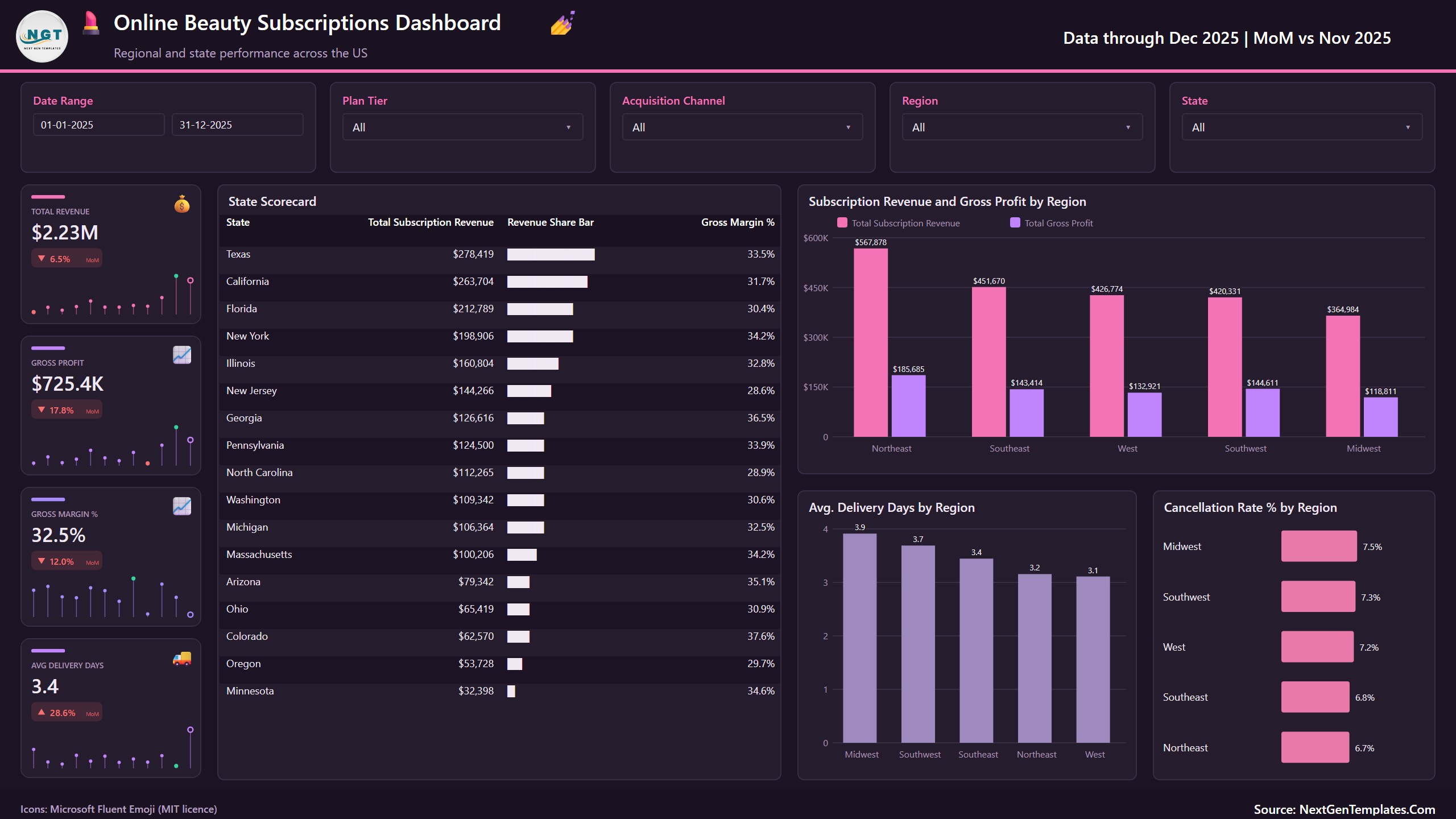
The State Scorecard ranks 17 states by revenue with a share bar and gross margin %, led by Texas ($278,419) and California ($263,704). Subscription Revenue and Gross Profit by Region shows the Northeast on top at $567,878, and two smaller charts compare Avg. Delivery Days by Region (3.1 in the West to 3.9 in the Midwest) and Cancellation Rate % by Region (6.7% in the Northeast to 7.5% in the Midwest).
Also in the file
A Get More Dashboards page, a hidden Details drill-through page and two hidden tooltip pages (Trend Detail and Category Detail). The data model is one table of 500 shipment batches and 20 columns plus a Date table.
This Template vs. a Custom BI Build vs. Subscription Analytics Software
| Feature | Online Beauty Subscriptions Dashboard in Power BI | Custom Tableau / Qlik build | Subscription analytics software |
|---|---|---|---|
| Cost | One-time purchase | Licences plus build time | Usually a monthly subscription |
| Ready-made subscription box pages | Yes, five pages | No, you design them | Depends on vendor |
| Gross margin by plan tier and box category | Yes | If you build it | Often |
| Cost per new subscriber by channel | Yes | If you build it | Varies |
| Edit measures and visuals | Full access, 50 DAX measures | Full access | Limited |
| Live connection to your billing platform | No, you load an export | Possible with development | Usually yes |
| Your data stays on your machine | Yes | Depends on setup | Often vendor-hosted |
Who This Template Is For, and Who It’s Not For
Good fit: owners and analysts of beauty box, skincare box and cosmetics subscription businesses who want a beauty subscription box dashboard to show plan profitability, channel cost and churn without building a report from scratch.
Not a fit: anyone who needs a live feed from a billing platform, order management, shipping labels or subscriber-level lifetime value modelling. This is a reporting template that reads a workbook you fill or export. It does not give financial advice.
How to Use This Online Beauty Subscriptions Dashboard
- Install Power BI Desktop (free from Microsoft) and unzip the download.
- Open Data.xlsx and replace the sample rows with your own shipment batches, keeping the column headers.
- Open the .pbix, go to Transform data, Data source settings, and use Change Source to point at your copy of Data.xlsx. The shipped path points at our build folder, so this step is required on first use.
- Press Refresh. Every page, card and chart updates.
- Use the slicers, the page tabs and right-click Drill through on a chart to open the Details page.
Real-World Use Cases
- Plan pricing review: compare gross margin and revenue per box across plan tiers to decide which boxes to reprice or bundle.
- Marketing budget: see cost per new subscriber by channel before moving spend between Instagram, TikTok, search and email.
- Churn reduction: track cancellation rate by billing cycle and channel, and test whether annual plans keep subscribers longer.
- Fulfilment monitoring: watch delivery days and customer rating by region and plan tier.
- Investor and partner updates: one monthly view of revenue, margin, subscribers and churn.
Frequently Asked Questions
What does the Online Beauty Subscriptions Dashboard in Power BI measure?
Subscription revenue, discounts, product cost, shipping cost, gross profit and gross margin, boxes shipped, average revenue per box, new subscribers, cancellations and cancellation rate, marketing spend, cost per new subscriber, customer rating and delivery days, split by month, plan tier, box category, acquisition channel, billing cycle, region and state.
Does it connect to my subscription billing platform?
No. It reads Data.xlsx. You paste or export your shipment batches into that workbook and press Refresh. A developer can repoint the Power Query source at a database if you need that.
Do I need a paid Power BI licence?
No. Power BI Desktop is free. A Pro or Premium licence is only needed to publish and share the report in the Power BI Service.
How long does setup take?
About 10 minutes once your data matches the column headers: paste the rows, change the source path once and refresh.
Can I add my own plans, channels or states?
Yes. Plan tiers, box categories, channels, billing cycles, regions and states are read from the data, so new values appear in the slicers and charts after a refresh.
Is the sample data real?
No. The batches and figures are fictional sample records used to demonstrate the visuals. Replace them with your own before presenting anything.
Does it work on Mac?
Power BI Desktop runs on Windows. Mac users can run it through a Windows virtual machine or open a published copy in the Power BI Service.
About the Author
Built by PK, Microsoft Certified Professional with 15+ years of Excel, Google Sheets and Power BI experience and founder of NextGenTemplates (@PKAnExcelExpert, @NextGenTemplates). Every template is hand-built and tested before release.
Explore Related Templates
- Subscription Box Dashboard in Power BI: boxes, subscribers and churn for any subscription box business.
- Cosmetics and Skincare Dashboard in Power BI: product and sales reporting for beauty brands.
- Personal Care and Beauty Dashboard in Power BI: beauty sales performance.
- E-Commerce Dashboard in Power BI: online store performance.
- Browse all Power BI dashboard templates.
📖 Click here to read the detailed blog post
🎥 Visit our YouTube channel for step-by-step video tutorials
👉 YouTube.com/@NextGenTemplates
Looking for an online beauty subscriptions dashboard in Power BI you can edit instead of rent? Download it once, load your own shipment batches and keep it for life, with no subscription and no per-seat fee.
📅 Last updated: October 2026






























Reviews
There are no reviews yet.