



Employee health and well-being are no longer optional—they are strategic priorities for modern organizations. Companies across industries are investing in wellness initiatives to boost employee productivity, engagement, and satisfaction. However, without the right tools, tracking participation, measuring health improvements, and analyzing program effectiveness becomes challenging.
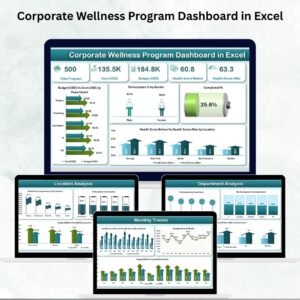
The Corporate Wellness Program Dashboard in Excel solves this problem. Designed as a ready-to-use, interactive Excel template, it consolidates participation data, budget vs. cost, health scores, and demographic insights into one structured dashboard. With multiple analytical pages and real-time visualizations, HR managers, wellness coordinators, and executives can monitor performance, identify gaps, and make data-driven improvements.
✨ Key Features of Corporate Wellness Program Dashboard
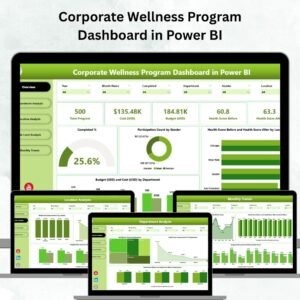
✅ Overview Page – High-level summary with cards and charts for budget vs. cost, participation %, completion %, and health score improvements.
✅ Department Analysis – Track participation, non-participation %, and before/after health scores by department.
✅ Location Analysis – Compare wellness engagement and cost performance across branches or offices.
✅ Job Level Analysis – See how participation and outcomes differ by role or seniority.
✅ Monthly Trends – Monitor participation, costs, and health improvements over time.
✅ Page Navigator – One-click navigation across sections for ease of use.
✅ Dynamic Visuals – Interactive charts, slicers, and conditional formatting to make data analysis seamless.
✅ Customizable Template – Add or modify KPIs, visuals, and layouts to align with organizational goals.
✅ Excel-Based Solution – No expensive HR software needed; works with familiar Excel features.
📦 What’s Inside the Corporate Wellness Program Dashboard

When you download this Excel template, you receive:
Overview Page – A central hub for quick wellness insights with KPI cards and charts.
Department Analysis Tab – Compare engagement and health improvements at the team level.
Location Analysis Tab – Benchmark wellness results across offices.
Job Level Analysis Tab – Understand engagement trends across executives, managers, and staff.
Monthly Trends Tab – Track consistency of participation and improvements over time.
Customizable Controls – Adjust KPIs, themes, and formats to fit your company’s needs.
This structure ensures every stakeholder—from HR to leadership—gets a 360° view of workplace wellness performance.
🛠️ How to Use the Corporate Wellness Program Dashboard
Collect Data – Record participation rates, costs, and health scores by department, location, or job level.
Input Data in Excel – Enter details into structured tables designed for consistency.
View Overview Page – Get instant insights on budget, participation, and outcomes.
Drill Into Details – Use department, location, and job level tabs for deeper analysis.
Track Monthly Trends – Monitor progress and identify seasonal variations.
Customize KPIs – Adjust metrics and visuals to align with your company’s wellness objectives.
This tool is plug-and-play—no advanced Excel knowledge required.
👩💼 Who Can Benefit from This Dashboard?
HR Teams – Track and report wellness program participation and success.
Wellness Program Managers – Evaluate program effectiveness and improve initiatives.
Executives – Understand ROI of wellness efforts and their impact on employee productivity.
Department Leaders – Motivate teams by monitoring participation and health score improvements.
Multi-Location Businesses – Compare wellness engagement across offices.
With this dashboard, organizations can boost engagement, optimize costs, and improve overall employee well-being.
👉 Click here to read the Detailed blog post
Visit our YouTube channel to learn step-by-step video tutorials
Watch the step-by-step video tutorial:
Compatibility and Requirements
- Works in Microsoft Excel desktop (Excel 2016 or later, or Microsoft 365).
- The dashboard pages use slicers to filter the data. Microsoft explains them in Use slicers to filter data.
Frequently Asked Questions
Which pages are included?
The template has an Overview page, Department Analysis, Location Analysis, Job Level Analysis and Monthly Trends, plus a page navigator for moving between them.
What can I track with this dashboard?
You can track participation and non-participation by department, location and job level. It also shows budget vs. cost, completion percentage and health scores before and after the program.
Do I need advanced Excel skills?
No. You enter participation, cost and health score data into the structured tables, and the charts and cards update from that data.
Can I change the KPIs and layout?
Yes. You can add or modify KPIs, visuals and layouts to match your organization’s wellness goals.
Is there a Power BI or Google Sheets version?
Yes. See the Corporate Wellness Program Dashboard in Power BI and the Corporate Wellness Program Dashboard in Google Sheets.
Related Wellness Templates
- Corporate Wellness Program Dashboard in Power BI: the same dashboard in Power BI
- Corporate Wellness Program Dashboard in Google Sheets: the Google Sheets edition
- Corporate Wellness Program Report in Excel: a report view of the program
- Employee Wellness Program Enrolment Tracker in Excel: track who enrols in the program
- Wellness Program Schedule Calendar in Excel: schedule wellness activities
Browse all Excel dashboards.









Reviews
There are no reviews yet.