

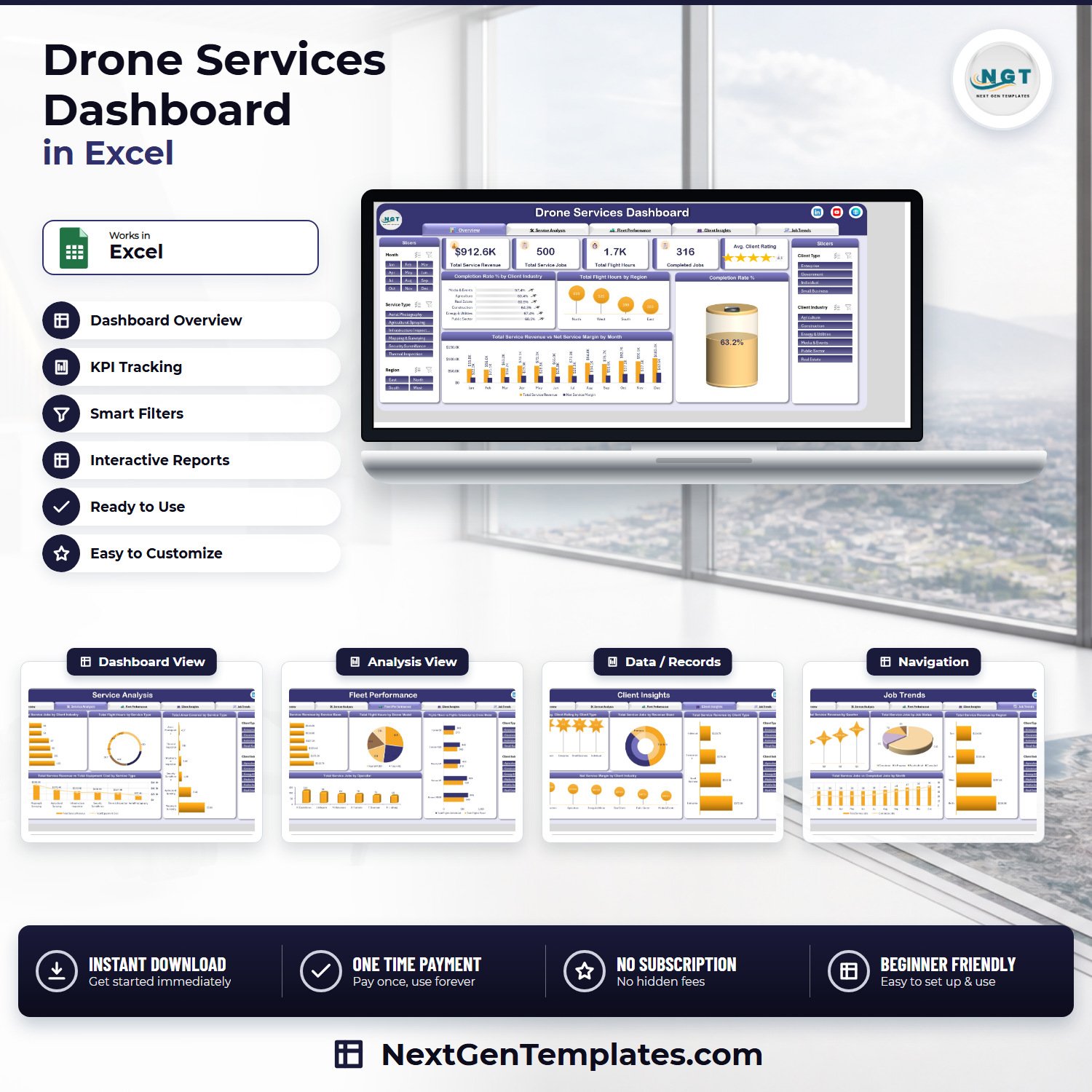

The Drone Services Dashboard in Excel turns 500 drone job records into five linked report pages that answer what a drone-services operator is asked every month: where the $912.6K of service revenue came from, why only 316 of 500 jobs closed as completed, which of five drone models keeps missing its flight schedule, and which client type is actually worth the flight hours. This is the analytical Excel dashboard line – pivot tables and slicers, not a traffic-light scorecard. $17.99 once, instant download, no subscription, no macros.
Key Features of the Drone Services Dashboard in Excel
- Five report pages – Overview, Service Analysis, Fleet Performance, Client Insights, Job Trends – reached from a fixed tab strip across the top of every sheet.
- Five KPI cards: Total Service Revenue, Total Service Jobs, Total Flight Hours, Completed Jobs and Avg. Client Rating with a five-star display.
- Five synchronised slicers – Month, Service Type, Region, Client Type and Client Industry – filter every chart on every page at once, from panels on both sides of the canvas.
- 20 charts, each named for the metric it shows (for example Flights Flown vs Flights Scheduled by Drone Model), so a screenshot needs no caption.
- Six service types pre-loaded: Aerial Photography, Agricultural Spraying, Infrastructure Inspection, Mapping & Surveying, Security Surveillance and Thermal Inspection.
- Six service bases and five drone models – Northgate Airfield, Westport Depot, Southridge Field, Harbour Point Base, Eastvale Hangar and Lakeside Hangar flying Kestrel M300, Falcon X2, Osprey V8, Condor H20 and Harrier S9.
- Four client types across six client industries – Enterprise, Government, Small Business and Individual buying across Agriculture, Construction, Energy & Utilities, Media & Events, Public Sector and Real Estate.
- 500 sample job rows. Paste your own export over them, refresh, and every page redraws.
- No VBA – a plain .xlsx for Excel 2016+, Microsoft 365 and Excel for Mac, with a PDF user manual in the ZIP.
What’s Inside the Drone Services Dashboard in Excel
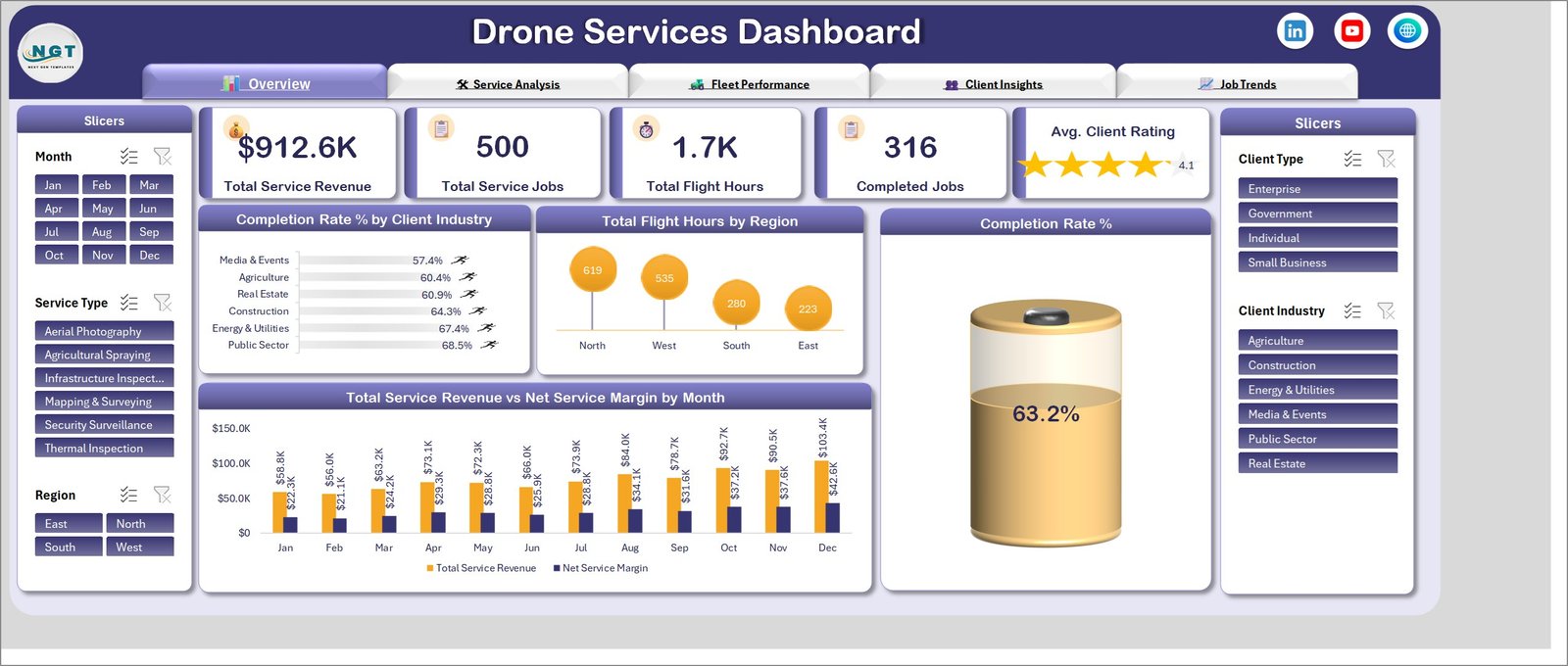
Overview. The five KPI cards – $912.6K revenue, 500 jobs, 1.7K flight hours, 316 completed, 4.1 average rating – sit above a Completion Rate % gauge reading 63.2%, Completion Rate % by Client Industry (Public Sector 68.5% at the top, Media & Events 57.4% at the bottom), Total Flight Hours by Region (North 619, West 535, South 280, East 223) and Total Service Revenue vs Net Service Margin by Month, which climbs from $58.8K against $22.3K in January to $103.4K against $42.6K in December.
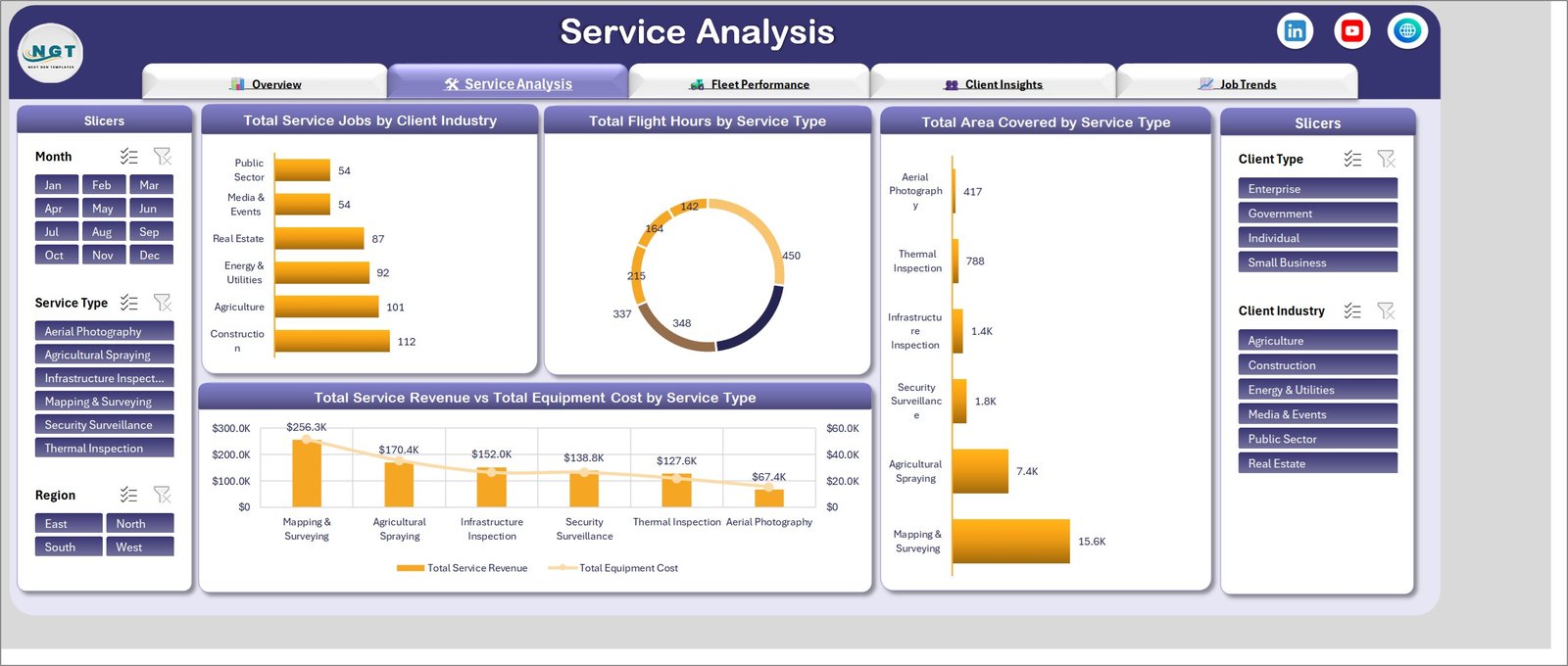
Service Analysis. Total Service Jobs by Client Industry puts Construction at 112 and Agriculture at 101 against 54 apiece for Media & Events and Public Sector. Total Flight Hours by Service Type splits the 1,657 hours as a donut, Total Area Covered by Service Type shows Mapping & Surveying covering 15.6K units against Aerial Photography’s 417, and Total Service Revenue vs Total Equipment Cost by Service Type ranks the six lines from Mapping & Surveying at $256.3K down to Aerial Photography at $67.4K with the equipment-cost line tracking underneath.
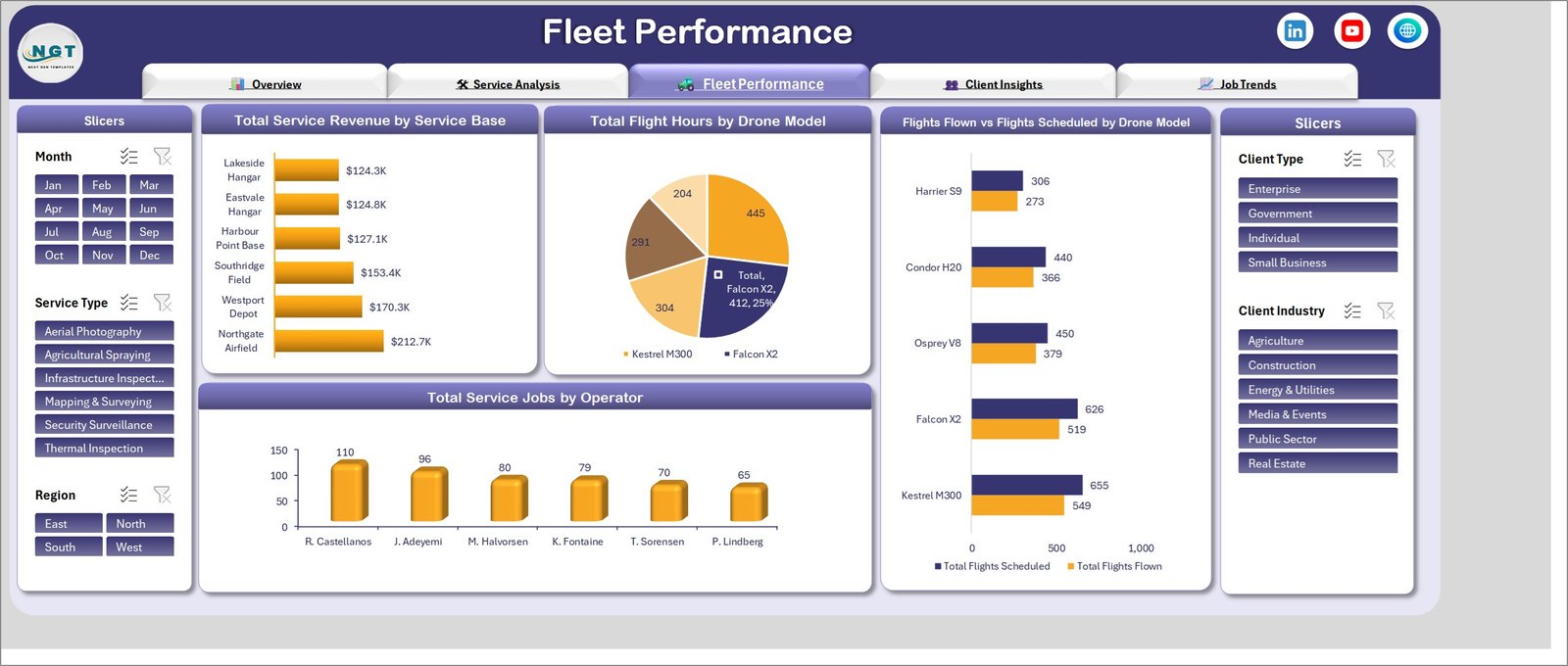
Fleet Performance. Total Service Revenue by Service Base spreads $212.7K at Northgate Airfield down to $124.3K at Lakeside Hangar – a narrower spread than most operators expect. Total Flight Hours by Drone Model gives Falcon X2 a 412-hour, 25% slice; Flights Flown vs Flights Scheduled by Drone Model is the page’s real payload, showing Kestrel M300 flying 549 of 655 scheduled and Falcon X2 519 of 626. Total Service Jobs by Operator ranks six pilots from R. Castellanos at 110 jobs to P. Lindberg at 65.

Client Insights. Avg. Client Rating by Client Type holds Government and Enterprise at 4.2 with Individual at 4.0. Total Service Jobs by Revenue Band splits the book into Premium, Standard and Basic. Total Service Revenue by Client Type is the chart that changes sales plans: Enterprise $372.0K against Individual $120.7K. Net Service Margin by Client Industry then reorders everything, with Construction contributing $79.6K of margin and Media & Events $40.0K.
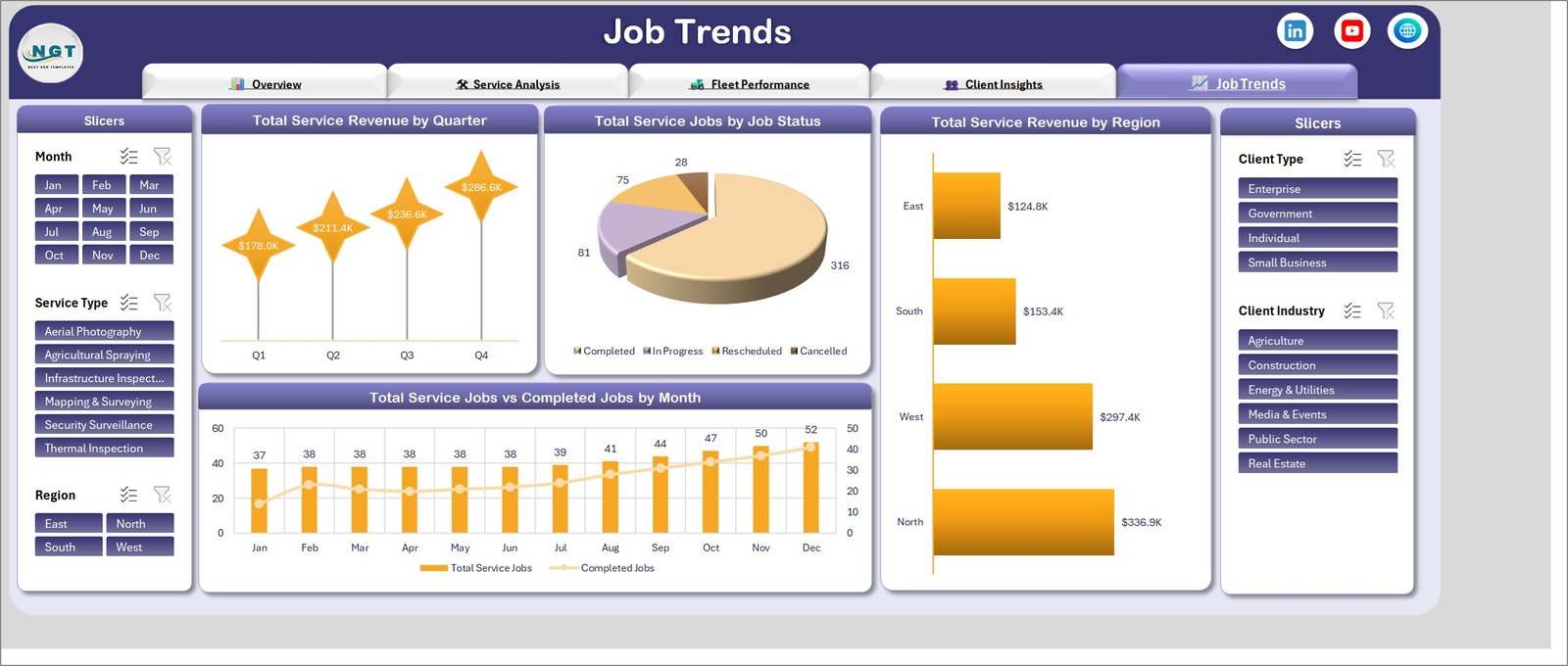
Job Trends. Total Service Revenue by Quarter rises $178.0K, $211.4K, $236.6K, $286.6K. Total Service Jobs by Job Status accounts for all 500 jobs – 316 completed, 81 in progress, 75 rescheduled, 28 cancelled – so the reschedule rate stops being a guess. Total Service Revenue by Region puts North at $336.9K against East at $124.8K, and Total Service Jobs vs Completed Jobs by Month traces the book from 37 jobs in January to 52 in December.
Drone Services Dashboard in Excel vs. Google Sheets vs. Paid Drone Operations SaaS – Where This Fits
| What matters | This Excel dashboard | Google Sheets equivalent | Paid SaaS (DroneDeploy, Skyward, Kittyhawk) |
|---|---|---|---|
| Cost | $17.99 once | $9.99 once | $3,000-$30,000 per year |
| Platform | Excel 2016+, Microsoft 365, Mac | Browser, any device | Vendor cloud only |
| Setup time | Under 15 minutes | Under 15 minutes | 2-8 weeks |
| Real-time team collaboration | OneDrive or SharePoint co-authoring | Native, simultaneous | Native, with roles |
| Mobile access | Excel mobile app | Full browser and app | Full app, often with a pilot app |
| Flight logging from the aircraft | No – you paste your export | No – you paste your export | Yes, automatic |
| Airspace and compliance checks | No | No | Yes |
| Revenue and margin by service type | Built in | Built in | Usually a paid finance module |
| Customizable fields | Any column you add | Any column you add | Admin-configured, often chargeable |
| Year-1 cost at 5 users | $17.99 | $9.99 | $6,000+ |
| Data leaves your organisation | No | Stays in your Google account | Yes, vendor-hosted |
Who This Template Is For – and Who It’s Not For
A good fit for: drone-services companies running two to ten aircraft out of more than one base, aerial survey and mapping firms that bill by area covered, agricultural spraying contractors reporting hectares and job completion to growers, infrastructure and thermal inspection providers who need a utilisation number per drone model, and anyone whose monthly review currently means exporting a flight log and rebuilding the same pivot table.
Not a good fit if you need live flight logging, airspace clearance or maintenance-compliance workflows – that is drone operations software, not a reporting workbook. It is also wrong if your job book runs past roughly 100,000 rows, if you need per-pilot row-level permissions, or if you want nightly syncing from a fleet-management platform. If you only want a one-page monthly scorecard with red/amber/green thresholds against targets, the Drone Services KPI Dashboard in Excel fits better than this analytical build.
How to Use the Drone Services Dashboard in Excel
- Download the ZIP and unzip it – you get the .xlsx workbook and a PDF user manual.
- Open the workbook and read the Overview page against the sample data so you know what each chart measures.
- Replace the 500 sample rows on the data sheet with your own job export, keeping the column headers exactly as they are.
- Match your values to the existing Service Type, Drone Model, Service Base, Client Type, Client Industry, Region and Job Status entries, or edit them once and let the slicers pick up the new names.
- Press Ctrl + Alt + F5 (Data > Refresh All) to rebuild every pivot and chart.
- Filter with the five slicers – one service type for a pricing review, one client industry for a renewal meeting – then export that page to PDF.
Real-World Use Cases
Elena, operations manager, six-base survey firm. Her monthly pack used to be a flight log and a spreadsheet of invoices. She now filters Region to North, shows $336.9K of the $912.6K coming from one region, and argues for a seventh aircraft with the utilisation chart rather than a paragraph.
Marcus, agricultural spraying contractor. He bills by area, not by hour. Total Area Covered by Service Type puts Agricultural Spraying at 7.4K against Mapping & Surveying’s 15.6K, and the revenue-versus-equipment-cost chart is what finally justified retiring one airframe.
Priya, commercial lead at an inspection provider. Enterprise clients bring $372.0K against Individual’s $120.7K, but Construction carries the highest net margin at $79.6K. Filtering Client Industry to Construction is now the first thing she does before a quarterly pricing call.
Frequently Asked Questions
Which Excel versions does this work in?
Excel 2016, 2019, 2021, 2024 and Microsoft 365 on Windows, and Excel for Mac. It is a standard .xlsx with pivot tables and slicers – no macros to enable, no add-ins.
How is this different from the Drone Services KPI Dashboard in Excel?
This is the analytical dashboard line: five exploration pages, 20 charts and free-form slicing across 500 job records. The KPI dashboard is a month-picker scorecard with targets and traffic lights, and the KPI scorecard line is a one-page summary. They answer different questions, and plenty of operators own both.
Can I add my own service types, drone models or bases?
Yes. Type your own values into the data sheet and refresh – the slicers and charts rebuild around whatever list they find. Nothing is hard-coded to the six sample service types or five sample airframes.
Does it connect to my drone’s flight logs?
No. It reads a flat table you paste in, which is what almost every flight-log platform and job-management tool can export. There is no live link to an aircraft, a GCS or an airspace service.
How many job records can it hold?
It ships with 500 rows and stays responsive into the tens of thousands. Past roughly 100,000 rows, refresh times become noticeable on an average laptop.
Is any of the sample data real?
No. Operator names, base names, drone models and figures are realistic sample data used to demonstrate the charts. Replace them before sharing anything externally.
About the Author
Built by PK – Microsoft Certified Professional with 15+ years of Excel, Google Sheets, and Power BI experience. Founder of NextGenTemplates, reaching 300K+ subscribers across YouTube channels. Every template is hand-built and tested before release.
Explore Related Templates
- Drone Services KPI Dashboard in Excel – the scorecard view of the same business, with a month picker and traffic lights.
- Drone Delivery Services Dashboard in Excel – the same five-page build for last-mile drone delivery.
- Remote Crop Monitoring Dashboard in Excel – for operators whose work is mostly agricultural imaging.
- Cargo Drone Startups Dashboard in Excel – payload, route and unit-economics view for cargo operations.
- Agro Machinery Rental Dashboard in Excel – the equipment-utilisation cousin, for mixed fleets.
- Container Tracking Dashboard in Excel – movement and status reporting on the logistics side.
- Browse the Excel Dashboard category or every MS Excel template.
Read the full walkthrough of the Drone Services Dashboard in Excel – page-by-page, with every chart explained.
Last updated: 6 September 2026.
Watch the demo video:
Compatibility and Requirements
- Works in Microsoft Excel desktop (Excel 2016 or later, or Microsoft 365). The five slicers need pivot tables, which Excel explains in Use slicers to filter data.

































Reviews
There are no reviews yet.