

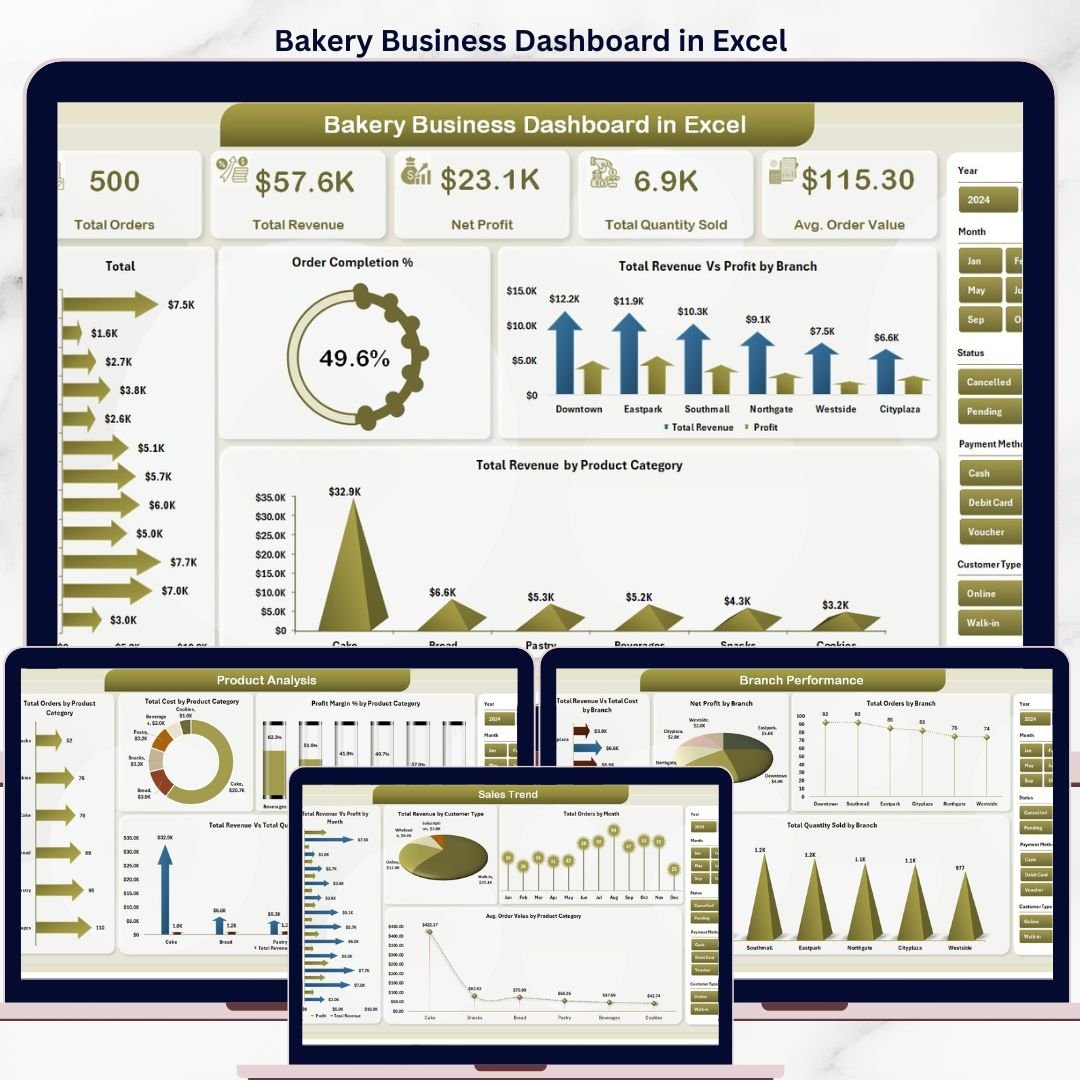


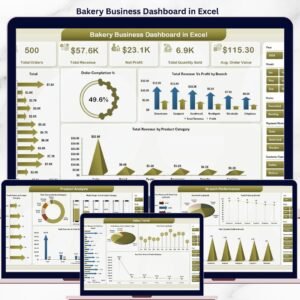
The Bakery Business Dashboard in Excel tracks 5 core KPIs across 5 interactive pages, with 16 pre-built charts, dynamic slicers, and pivot-table automation. Setup takes under 10 minutes — replace the sample data in the Data sheet, click Refresh All, and every chart, KPI card, and analysis page updates automatically.
🌍 Join 8,400+ teams in 40+ countries using Nextgen Templates to replace paid SaaS tools with one-time-purchase Excel, Google Sheets, Power BI, and HTML templates — without paying $39–$199 per user per month for platforms like Toast POS or Market Man.
✅ Instant download · One-time payment · No subscription · No per-user fees · Lifetime access
🔑 Key Features of Bakery Business Dashboard in Excel
📌 5-Page Interactive Dashboard — This Excel template covers every angle of bakery performance: a high-level Overview, a Sales Trend analysis, a Product Analysis deep-dive, a Branch Performance comparison, and a Customer Insights page. All pages are slicer-driven and update automatically from a single data sheet.
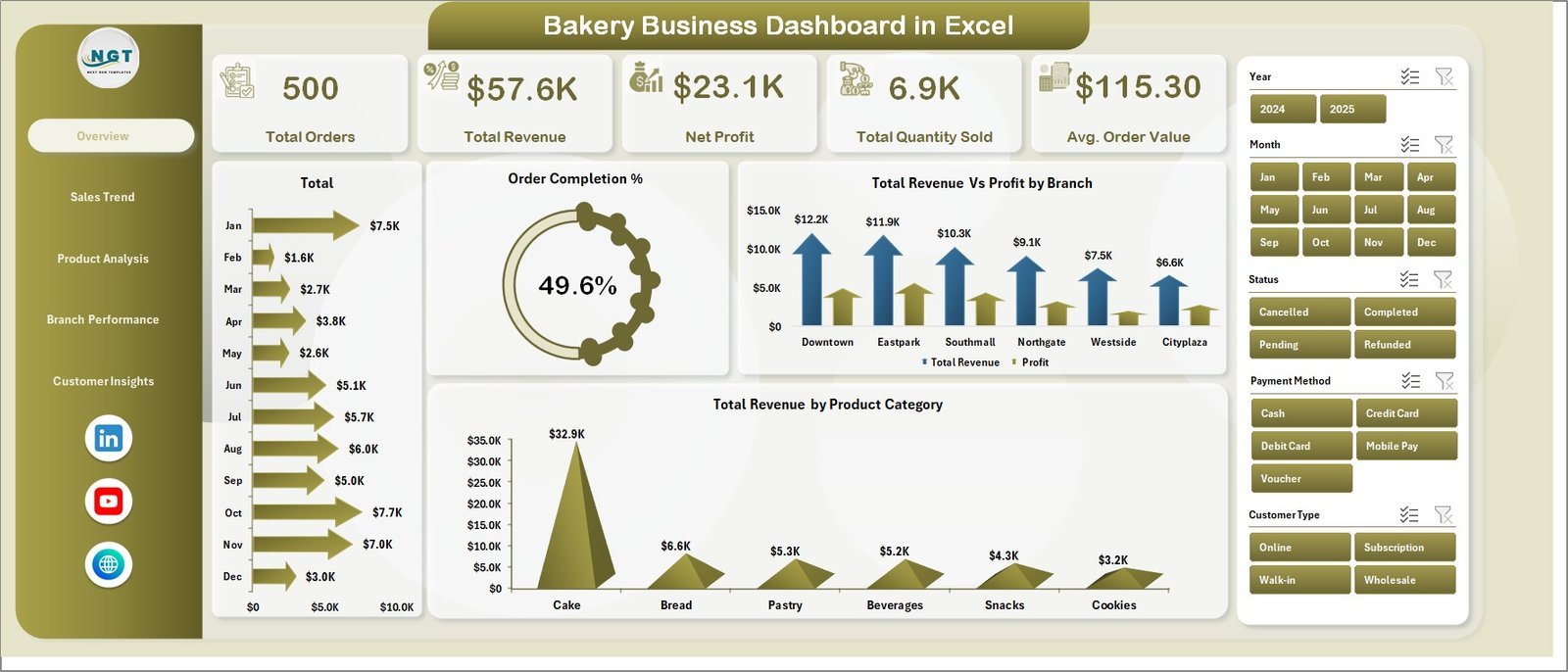
📌 5 KPI Cards on the Overview Page — The dashboard tracks Total Orders, Total Revenue, Net Profit, Total Quantity Sold, and Average Order Value at a glance. These are the 5 metrics bakery owners most commonly request for daily stand-ups and weekly reviews.
📌 16 Pre-Built Charts Across 5 Pages — Every chart uses native Excel pivot charts connected to the Support sheet’s pivot tables. No formulas to build, no charts to configure. When you update the Data sheet and refresh, all 16 charts update simultaneously in under 5 seconds.
📌 Dynamic Slicers for Instant Filtering — Slicers on the Overview page let you filter the entire dashboard by branch, product category, date period, or customer type with a single click. Ideal for presenting branch-specific or period-specific snapshots to management.
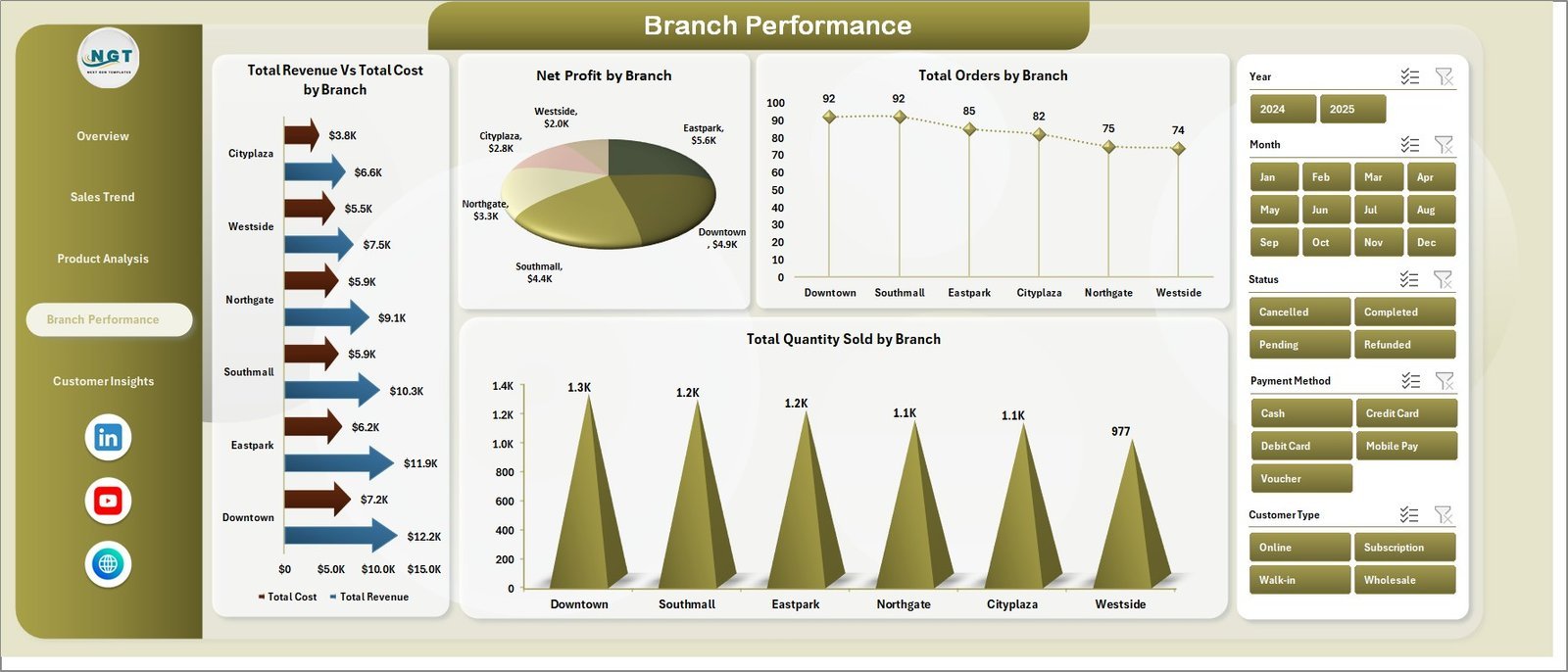
📌 Branch Performance Comparison — The Branch Performance page shows Total Revenue vs Total Cost, Net Profit, Total Orders, and Total Quantity Sold side by side across all bakery branches — making it the fastest way to spot underperforming locations.
📦 What’s Inside the Bakery Business Dashboard in Excel
1. Overview Page — Five KPI cards (Total Orders, Total Revenue, Net Profit, Total Quantity Sold, Avg. Order Value) at the top, followed by four charts: Total Revenue by Month, Order Completion %, Total Revenue vs Profit by Branch, and Total Revenue by Product Category.
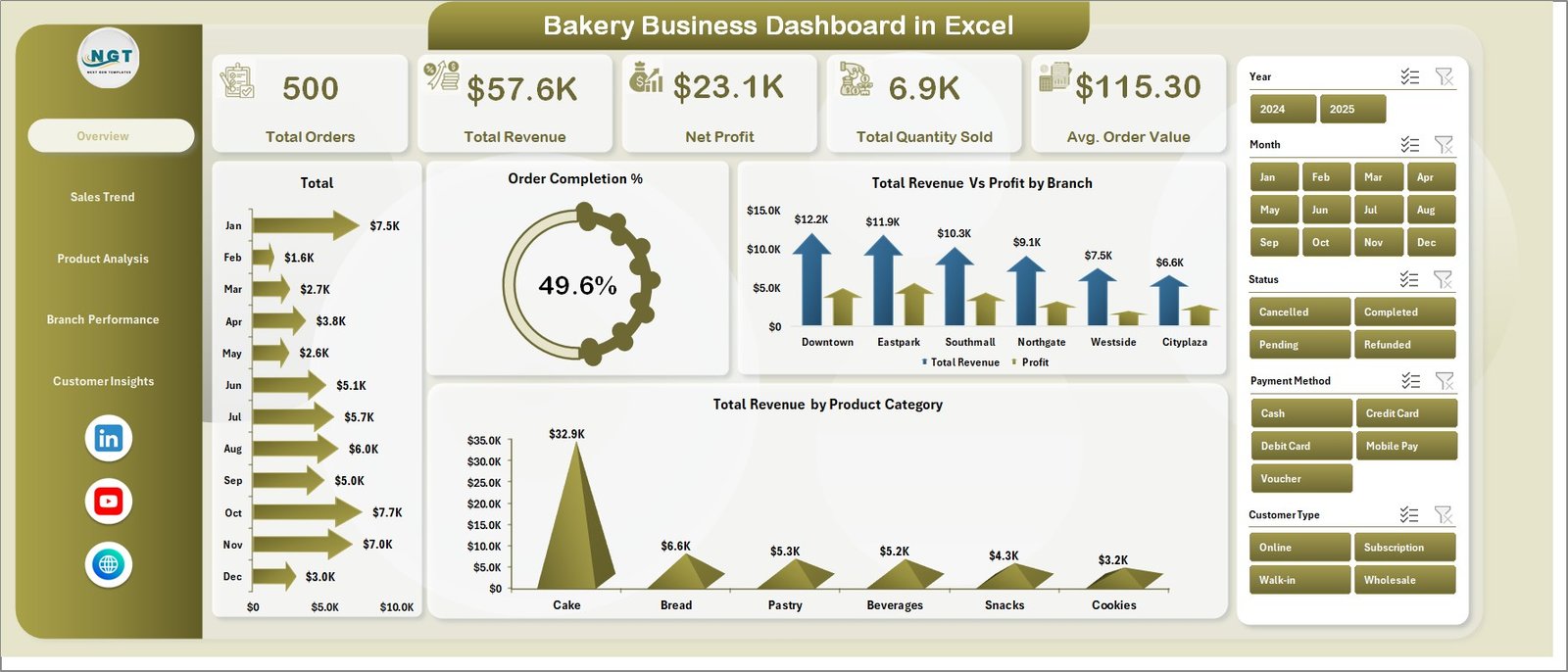
Overview Page
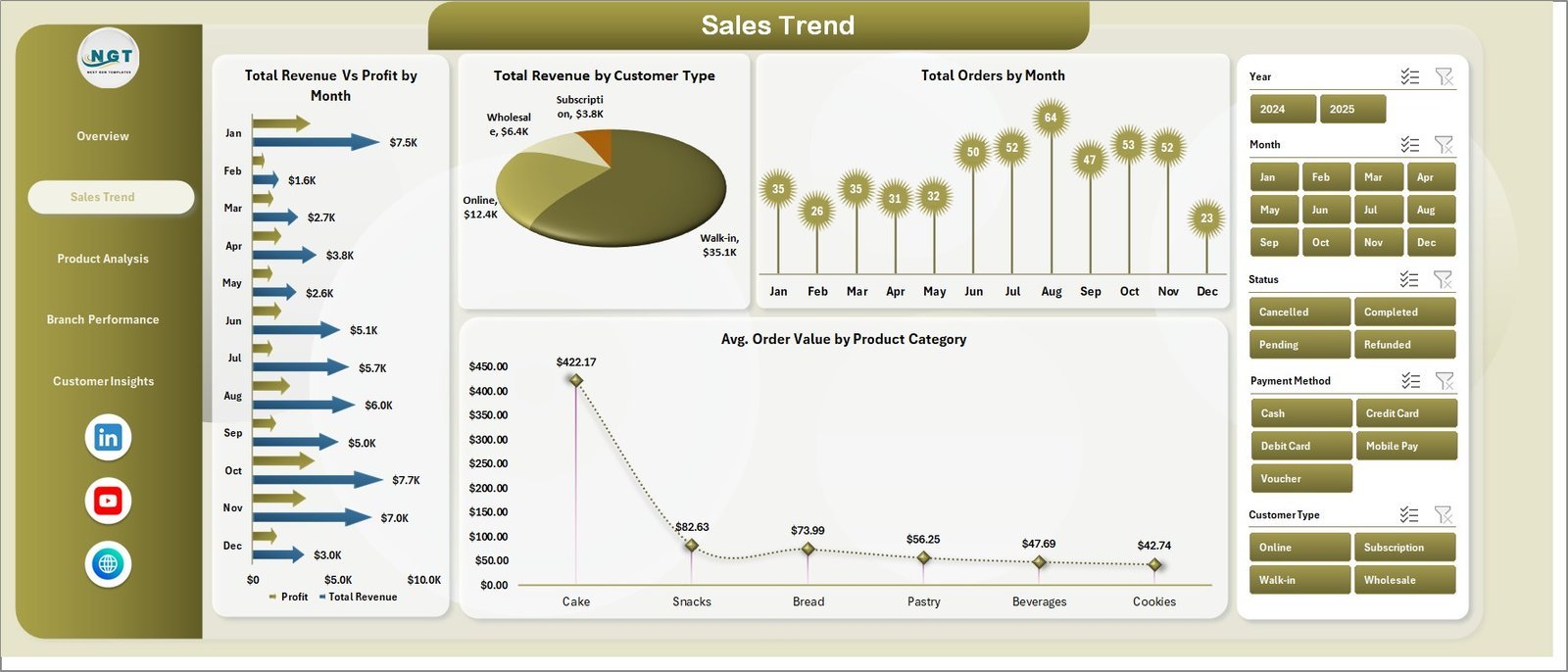
2. Sales Trend Page — Total Revenue vs Profit by Month, Total Revenue by Customer Type, Total Orders by Month, and Avg. Order Value by Product Category.
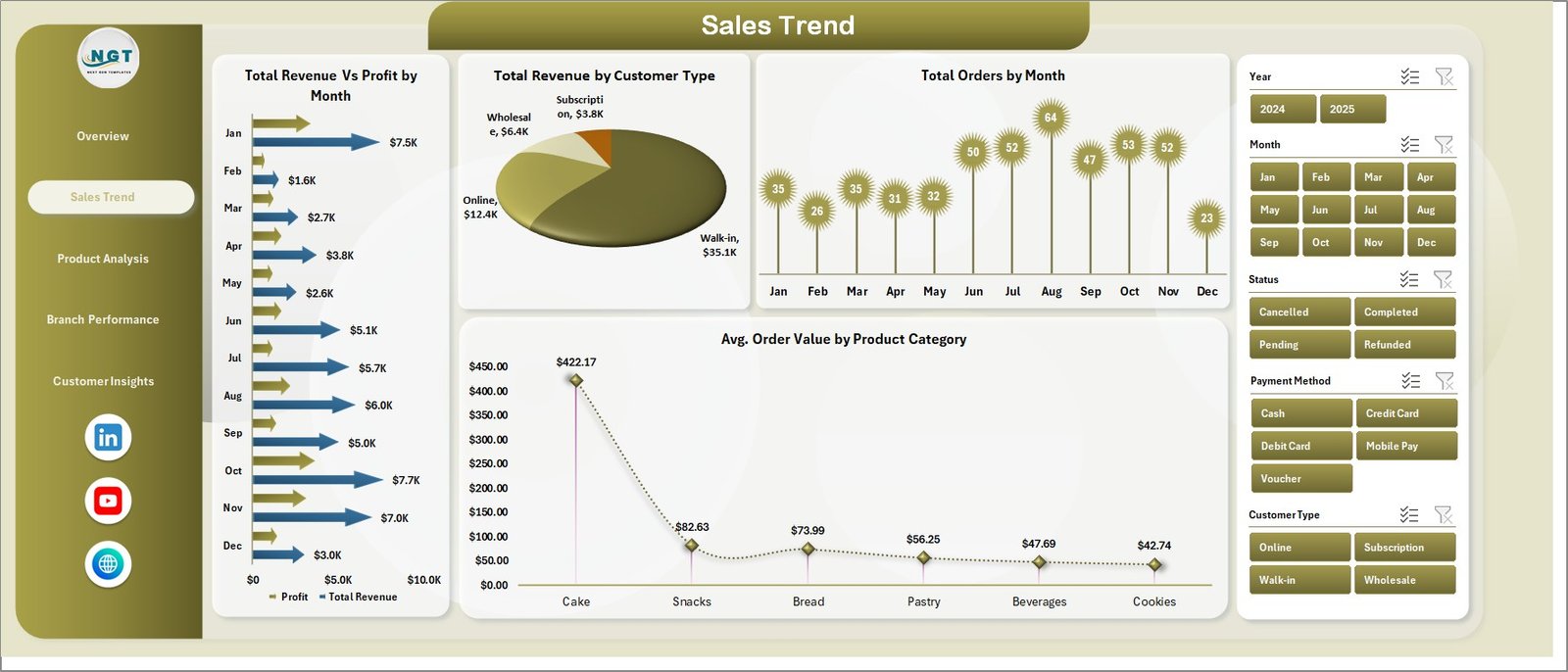
Sales Trend Page
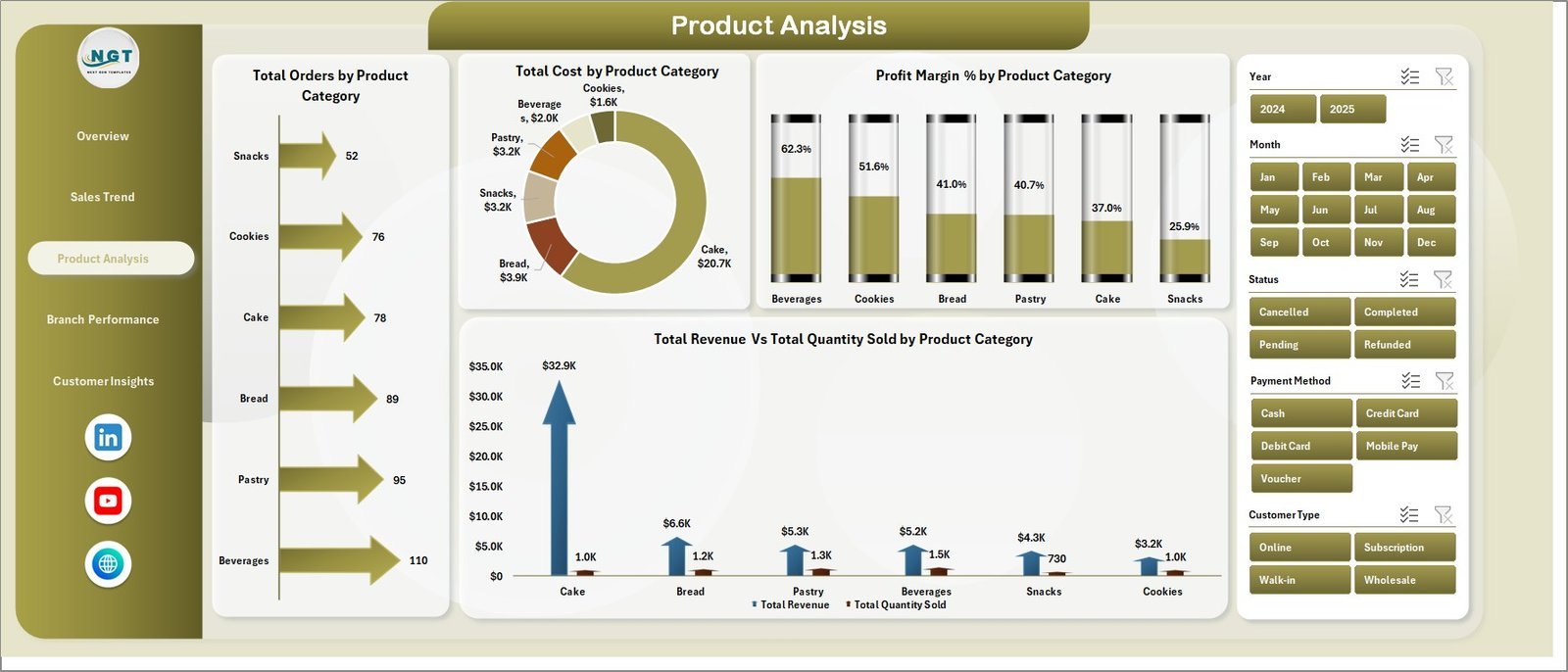
3. Product Analysis Page — Total Orders by Product Category, Total Cost by Product Category, Profit Margin % by Product Category, and Total Revenue vs Total Quantity Sold by Product Category.
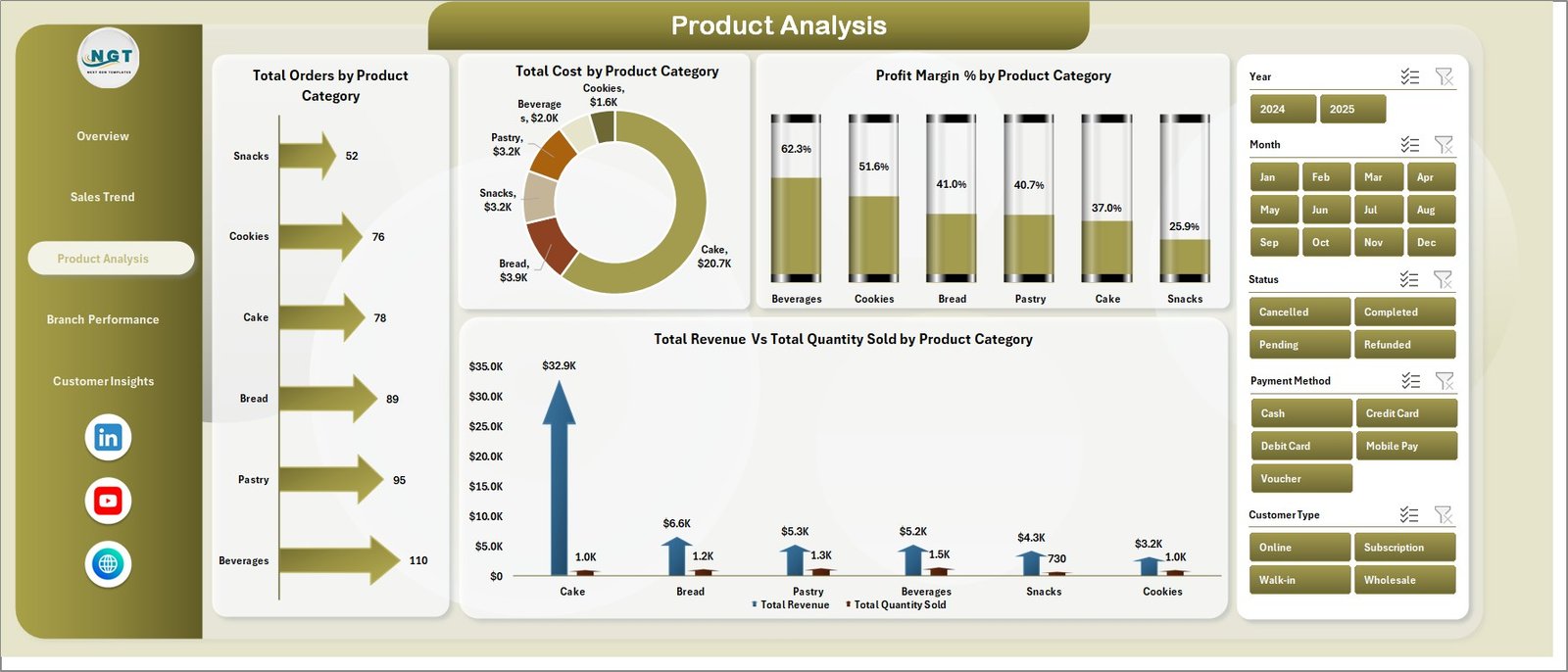
Product Analysis Page
4. Branch Performance Page — Total Revenue vs Total Cost by Branch, Net Profit by Branch, Total Orders by Branch, and Total Quantity Sold by Branch.
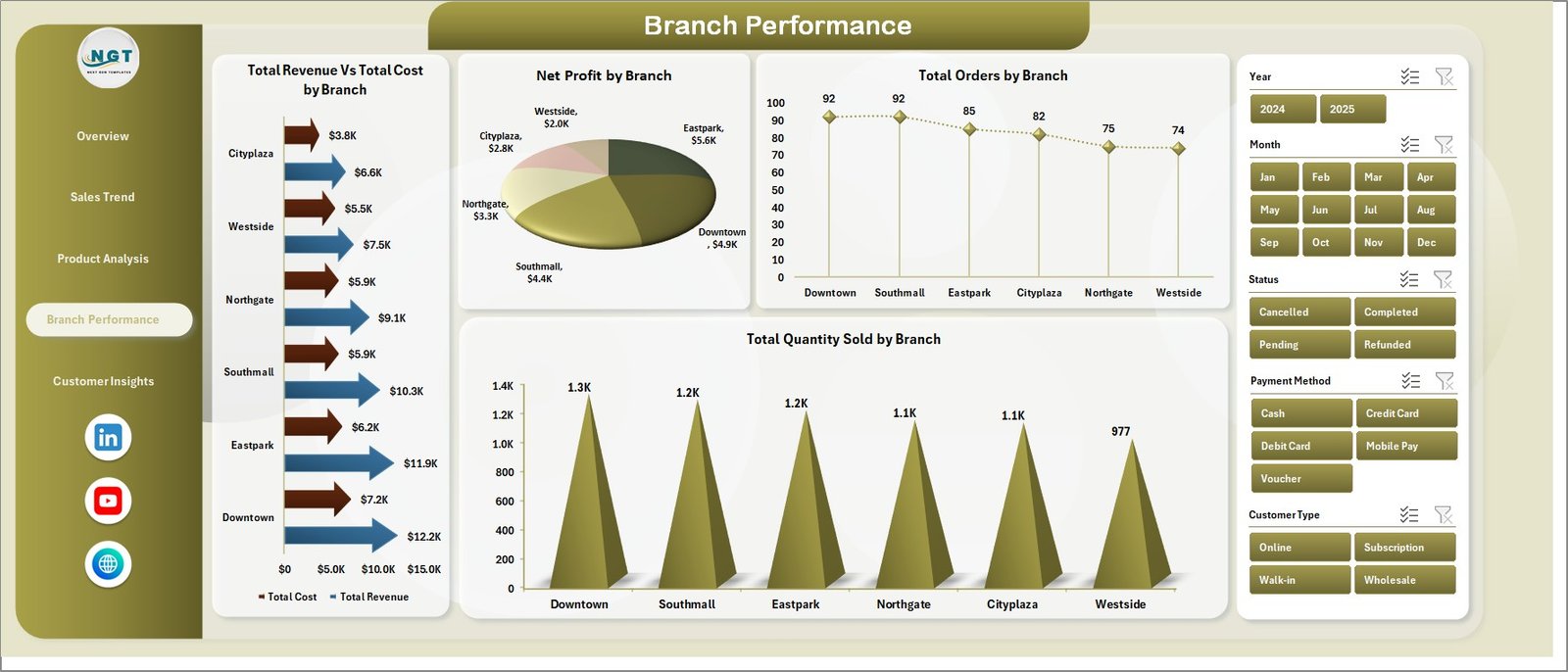
Branch Performance Page
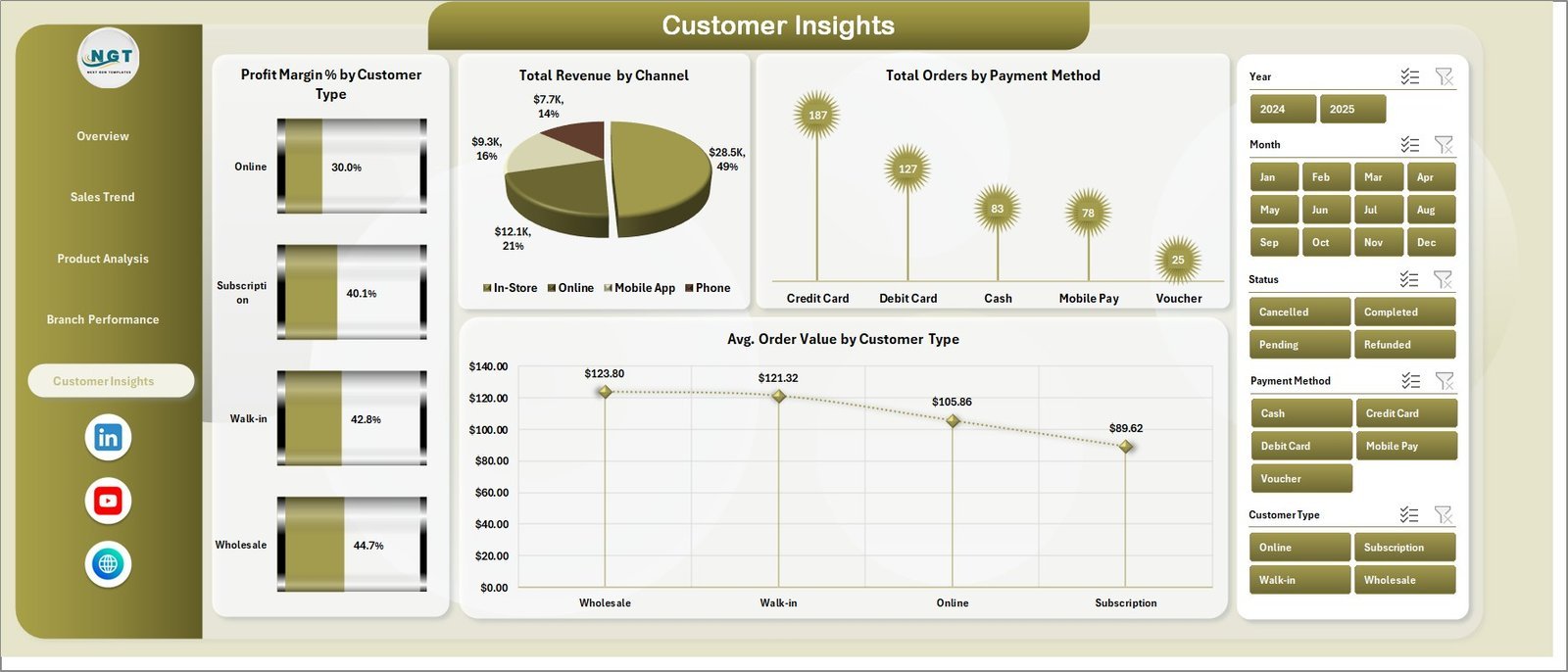
5. Customer Insights Page — Profit Margin % by Customer Type, Total Revenue by Channel, Total Orders by Payment Method, and Avg. Order Value by Customer Type.
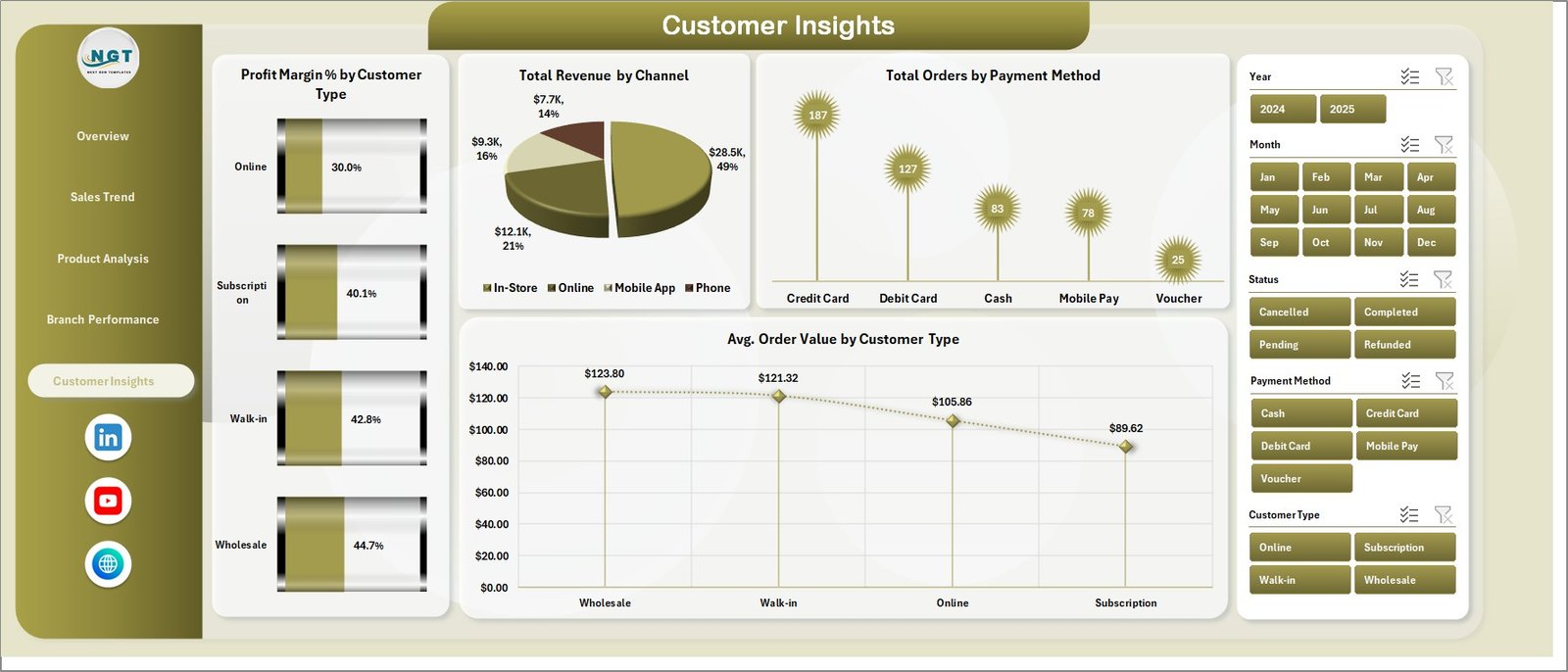
Customer Insights Page
6. Data Sheet — Enter all bakery transaction records here. Add new rows and click Refresh All to update the full dashboard instantly.

Data Sheet Tab
7. Support Sheet — Contains all pivot tables that power the dashboard. Go to the Data tab in the Excel Ribbon and click Refresh All after updating data — all charts update in one step. Keep this sheet hidden in daily use.

Support Sheet Tab
📊 Bakery Business Dashboard in Excel vs. Google Sheets Dashboard vs. Toast POS Analytics — Where This Fits
| Feature | Bakery Business Dashboard in Excel | Google Sheets Dashboard | Toast POS Analytics |
|---|---|---|---|
| Cost | $17.99 one-time | $9–15 one-time | $69–165/month |
| Platform | Microsoft Excel | Google Sheets (browser) | Cloud SaaS |
| Setup Time | Under 10 minutes | Under 10 minutes | 2–4 weeks onboarding |
| Dashboard Pages | 5 pages (16 charts) | Varies by template | Limited pre-built views |
| Branch Comparison | ✅ Built-in | ❌ Manual setup needed | ✅ POS-integrated |
| Customer Insights | ✅ Dedicated page | ❌ Manual setup needed | ✅ Built-in |
| Offline Access | ✅ Full offline | ❌ Requires internet | ❌ Cloud only |
| Customizable Fields | ✅ Fully editable | ✅ Editable | ⚠️ Limited |
| Year-1 Cost at 5 Users | $17.99 total | $9–15 total | $4,140–9,900 |
For bakery owners who want a multi-page analytics dashboard without monthly POS subscription fees, the Bakery Business Dashboard in Excel sits in the sweet spot.
👥 Who This Template Is For — and Who It’s Not For
✅ Built for: bakery owners and managers at single or multi-location bakeries, F&B operations teams, F&B consultants, and small-to-mid-size bakeries (1–20 employees) that need 5 pages of analytics without SaaS costs.
❌ Not for: enterprise bakery chains needing real-time POS API integration, teams requiring automated IoT feeds, or users without Microsoft Excel.
⚙️ How to Use the Bakery Business Dashboard in Excel
- Download and open the file in Microsoft Excel 2016 or later.
- Navigate to the Data sheet and replace sample records with your actual bakery transaction data.
- Click Refresh All in the Data tab — all pivot tables and charts update automatically.
- Use slicers on the Overview page to filter by branch, product category, or time period.
- Review all 5 dashboard pages for complete bakery performance analysis.
💼 Real-World Use Cases
Ananya owns a 4-branch artisan bakery chain in Bengaluru. She uses the Branch Performance page to compare Net Profit across branches each week, saving 3 hours of manual consolidation work.
James manages a wholesale bakery in Manchester. The Profit Margin % by Product Category page revealed his specialty cakes earn 34% margins vs 11% for bread loaves — leading to a floor space shift that improved net profit by 18% in Q2.
Maria is an F&B consultant in São Paulo who uses this template as a client deliverable, presenting a complete 5-page business review without paying for SaaS tools.
❓ Frequently Asked Questions
What KPIs does the Bakery Business Dashboard in Excel track?
The Bakery Business Dashboard in Excel tracks 5 KPIs: Total Orders, Total Revenue, Net Profit, Total Quantity Sold, and Average Order Value — plus 16 analytics charts across 5 pages covering sales trends, product profitability, branch performance, and customer insights.
How long does setup take?
Under 10 minutes. Replace the sample data in the Data sheet, click Refresh All, and the full 5-page dashboard updates automatically.
Does this work on Mac?
Yes. Standard pivot tables and slicers — no VBA required. Compatible with Excel for Mac 2016+ and Excel for Windows.
Can I use it for multiple branches?
Yes. The Branch Performance page shows Revenue vs Cost, Net Profit, Orders, and Quantity Sold side by side for every branch. Just add branch names to your Data sheet.
How does this compare to Toast POS Analytics?
Toast POS costs $69–165/month. This dashboard costs $17.99 one-time with lifetime access, offline capability, and 5 dedicated analysis pages — 99% cheaper annually at 5 users.
👤 About the Author
Built by PK — Microsoft Certified Professional with 15+ years of Excel, Google Sheets, and Power BI experience. Founder of NextGenTemplates, reaching 300K+ subscribers across YouTube channels (@PK-AnExcelExpert, @NextGenTemplates, @NeoTechNavigators). Every template is hand-built and tested before release.
🔗 Explore Related Templates
🔹 Bakery KPI Scorecard in Excel — Track 15+ bakery KPIs with MTD/YTD analysis and trend charts.
🔹 Food Delivery Dashboard in Excel — 5-page analytics for cloud kitchen and delivery operations.
🔹 Catering Business KPI Scorecard in Excel — Monitor catering KPIs with food cost % and on-time delivery tracking.
🔹 Food and Beverage Report in Excel — F&B reporting with cost vs sales analysis.
🔹 Browse all Excel Dashboard Templates on Nextgen Templates.
📖 Click here to read the Detailed Blog Post
🎥 Visit our YouTube channel for step-by-step video tutorials
👉 YouTube.com/@NextGenTemplates
Watch the step-by-step video tutorial:
YouTube

































Reviews
There are no reviews yet.