

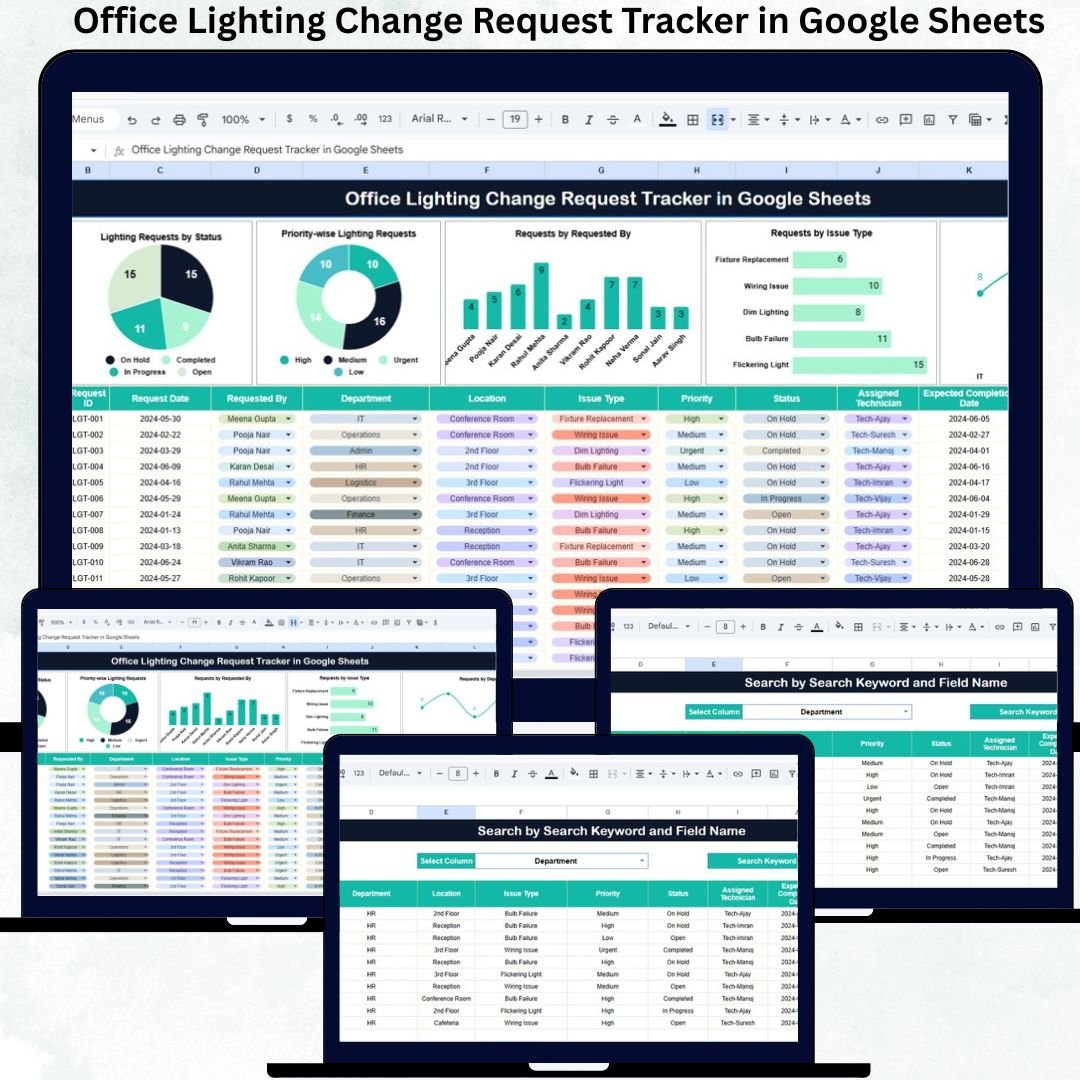

Workplace comfort depends heavily on proper lighting. When employees face dim workspaces, flickering lights, or slow maintenance responses, productivity drops instantly. Teams struggle, deadlines get affected, and dissatisfaction grows quietly. To avoid this, businesses need a smooth and reliable system to log lighting issues, assign responsibility, and track progress. The Office Lighting Change Request Tracker in Google Sheets offers the perfect solution—a clean, organized, and real-time tool to manage every lighting request with confidence.
This ready-to-use tracker keeps all maintenance-related lighting issues in one structured database. From flickering bulbs to wiring concerns, from low brightness to fixture replacements, every request is captured, categorized, monitored, and visualized automatically. Since it runs inside Google Sheets, it updates instantly, works online, and enables real-time collaboration between the Admin, Facilities, and Maintenance teams. You simply enter the request, update the status, and the dashboard takes care of the rest.
✨ Key Features of the Office Lighting Change Request Tracker in Google Sheets
📋 1. Central Request Tracking Sheet for All Issues
The Tracker Sheet is your main workspace. It stores essential details such as:
Request ID
Requested By
Department
Issue Type
Priority
Request Date
Assigned Person
Status
Remarks
Every update reflects instantly in the dashboard visuals, helping your team stay aligned without constant follow-up messages.
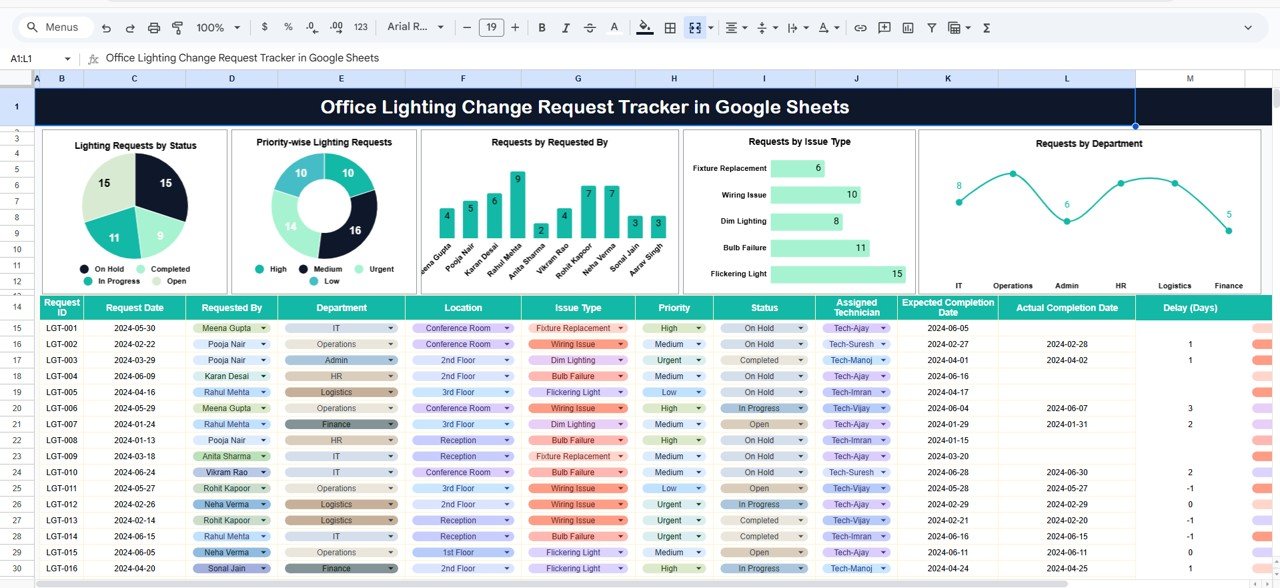
📊 2. Automated Charts for Lighting Issue Insights
The built-in charts give you a clear understanding of request patterns and department needs. They update automatically and help facility managers make fast decisions. Charts include:
Requests by Status – Open, In Progress, Resolved, On Hold, Cancelled
Priority-Wise Requests – High, Medium, Low
Requests by Issue Type – Flickering lights, bulb replacement, wiring issues, low brightness, etc.
Requests by Department – Understand which areas face frequent issues
Requests by Requested By – Identify employees or teams reporting the most concerns
These visuals help you plan maintenance schedules and allocate resources smartly.
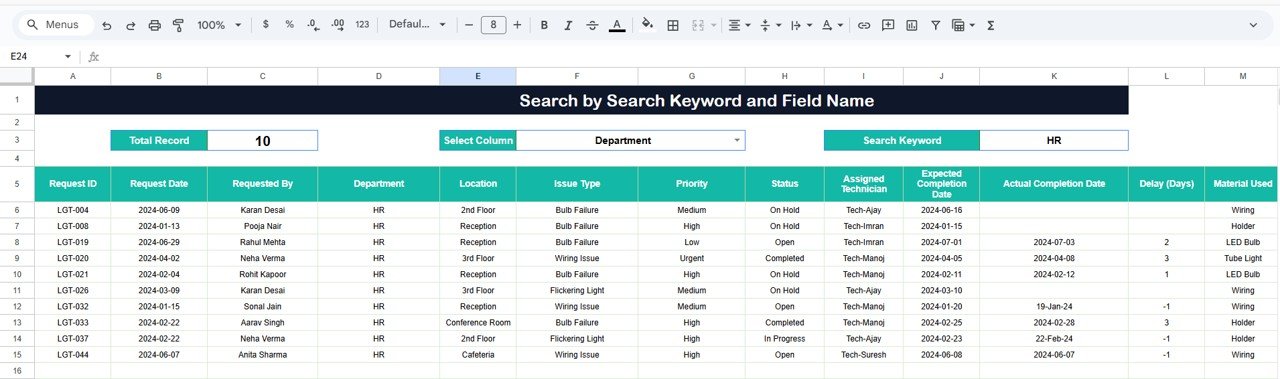
🔍 3. Smart Search Feature for Instant Filtering
No more scrolling through long lists. The search section lets you:
Enter a keyword
Select a field (Requested By, Department, Status, Issue Type, etc.)
It instantly displays matching requests—perfect for audits, review meetings, and quick reporting.
📦 What’s Inside the Office Lighting Change Request Tracker in Google Sheets
🗂️ Tracker Sheet Tab
This sheet is your central database. Enter new requests, update statuses, assign responsibilities, or add remarks as needed. It’s simple, structured, and beginner-friendly.
📈 Dashboard Charts
All charts refresh automatically when new data is added. Managers see trends clearly—helping them prioritize urgent issues and track recurring problems.
🔎 Search Panel
This section provides fast, accurate filtering. Ideal for analyzing issues raised by specific teams or departments.
🛠️ How to Use the Office Lighting Change Request Tracker in Google Sheets
1️⃣ Add Requests as Soon as Employees Report Them
Enter issue details, priority, department, and assigned person.
2️⃣ Update Status Regularly
Use clear stages like Open, In Progress, Resolved, or On Hold to maintain accuracy.
3️⃣ Review Dashboard Charts Weekly
Identify which areas need immediate attention, recurring issues, or resource adjustments.
4️⃣ Use Search for Faster Decision-Making
Find requests instantly by typing keywords or selecting categories.
5️⃣ Encourage Team Collaboration
Share the sheet with Facilities, Admin, and Maintenance teams for real-time updates.
🎯 Who Can Benefit from This Office Lighting Change Request Tracker
🏢 Office Admin Teams
Track and manage workspace lighting efficiently.
🛠️ Maintenance Technicians
Understand workload, priorities, and assigned tasks instantly.
📊 Facility Managers
Analyze trends, identify problem zones, and prevent recurring issues.
👥 HR & Operations Teams
Ensure employees work in safe, well-lit environments.
🔌 Workplace Improvement Teams
Use data to plan upgrades and preventive maintenance.
Click here to read the Detailed blog post
Watch the step-by-step video tutorial:
Visit our YouTube channel to learn step-by-step video tutorials — Youtube.com/@NeotechNavigators
Compatibility and Requirements
- Works in Google Sheets. You need a free Google account and a web browser.
- The Dashboard has automatic charts for status, priority, issue type, department and requester. Google explains how charts work in Add and edit a chart.
Frequently Asked Questions
What details can I record for each lighting request?
The Tracker sheet has columns for Request ID, Requested By, Department, Issue Type, Priority, Request Date, Assigned Person, Status and Remarks.
Which charts does the dashboard show?
It shows requests by status, by priority, by issue type, by department and by the person who requested them. The charts update when you add or change a request.
What status values can I use?
The status stages are Open, In Progress, Resolved, On Hold and Cancelled.
How do I find a specific request?
Use the search panel. Type a keyword and select a field such as Requested By, Department, Status or Issue Type, and the matching requests appear.
Can my Admin, Facilities and Maintenance teams use it together?
Yes. The tracker runs in Google Sheets, so you can share it with the whole team and everyone sees updates in real time.
Related Office Request Trackers
- Office Repair Request Tracker in Google Sheets: log and follow general repair requests
- Office Cleaning Request Tracker in Google Sheets: track cleaning requests the same way
- Office Renovation Request Tracker in Google Sheets: manage larger workspace changes
- Office Meeting Room Setup Request Tracker in Google Sheets: track room setup requests
- Google Sheets Business Pack (Pro): 14 business templates in one download
Browse all Google Sheets trackers.

































Reviews
There are no reviews yet.