



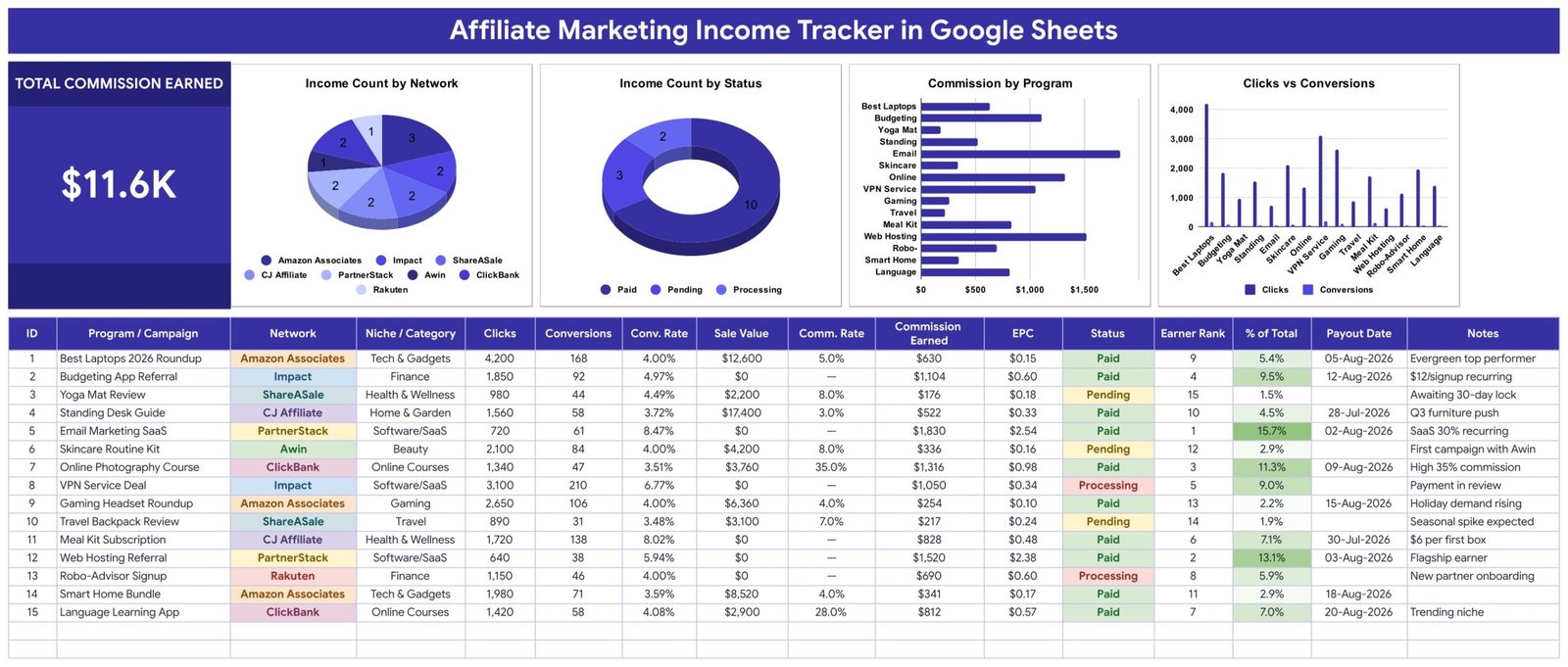
The Affiliate Marketing Income Tracker in Google Sheets keeps every affiliate program you promote on one page: 16 columns per campaign, a Total Commission Earned card and 4 charts that refresh as you type. It ships with 15 fictional sample campaigns across 8 networks (26,300 clicks, 1,252 conversions and $11,626 in commission), so you can watch every formula work before you add your own numbers.
🌍 Made by NextGenTemplates, the team behind 2,000+ ready-to-use Excel, Google Sheets, Power BI and HTML templates.
✅ Instant download · One-time payment · No subscription · No per-user fees · Lifetime access
🔑 Key Features of the Affiliate Marketing Income Tracker
💰 Total Commission Earned card. One big number adds up the Commission Earned column for every campaign you log. With the sample data it reads $11.6K ($11,626), and it recalculates the moment you add or edit a row.
🧮 Six automatic columns. ID, Conv. Rate (Conversions ÷ Clicks), Comm. Rate (Commission ÷ Sale Value), EPC (earnings per click), Earner Rank and % of Total are formulas. You only type the raw clicks, conversions, sale value and commission from each network’s report.
🏆 Earner Rank and share of income. Every program is ranked by commission, and % of Total shows its share of all earnings on a green colour scale. In the sample, Email Marketing SaaS ranks #1 with $1,830, which is 15.7% of the total.
🔗 Works for flat-fee and recurring offers. Leave Sale Value at 0 for a pay-per-lead signup or a recurring referral and Comm. Rate shows a dash instead of an error, while EPC, Earner Rank and % of Total still calculate.
📊 Four live charts, no helper tables. Income Count by Network, Income Count by Status, Commission by Program and Clicks and Conversions by Program read data rows 16-1000 directly with Google Sheets’ built-in aggregation, so new rows appear in the charts straight away.
🎨 Colour-coded networks and payout status. Each network cell carries its own colour, and Status reads green for Paid, amber for Pending and red for Processing, so unconfirmed commission is easy to spot in a long log.
🔽 Self-growing dropdowns. Network (11 options, including FlexOffers, Direct / In-house and Other), Niche / Category (11 options) and Status pull from the List tab, rows 2-500. Add a value there and it shows up in the dropdown with no setup.
📅 Payout date and notes on every row. Record the day each network pays out and a short note, such as a cookie window or a recurring rate, next to the numbers it explains.
📦 What’s Inside the Affiliate Income Tracker
Tab 1: Affiliate Income Tracker
The one-page tracker: a title banner, the Total Commission Earned card and the four charts, then the income log with ID, Program / Campaign, Network, Niche / Category, Clicks, Conversions, Conv. Rate, Sale Value, Comm. Rate, Commission Earned, EPC, Status, Earner Rank, % of Total, Payout Date and Notes.
Tab 2: Instructions
Plain-English steps on the sheet itself: which columns to fill, which ones calculate, when to switch a commission to Paid, how the dropdowns grow and how to change the currency.
Tab 3: List
The dropdown source for the tracker: 11 networks, 11 niches and 3 statuses (Paid, Pending, Processing), each column with room for 499 values.
Tab 4: Explore More Templates
A page of recommended templates and popular categories from NextGenTemplates.
📊 Affiliate Marketing Income Tracker vs. Excel Dashboard vs. Paid Click-Tracking Tools — Where This Fits
| Feature | Affiliate Income Tracker (Google Sheets) | Microsoft Excel dashboard | Paid click-tracking tools (Voluum / ClickMagick) |
|---|---|---|---|
| Cost | ✅ $6.99 one-time | Excel licence plus a template or build time | Recurring monthly plan |
| Platform | ✅ Google Sheets in any browser | Excel desktop or Microsoft 365 | The vendor’s web app |
| Setup time | ✅ Make a copy, replace 15 sample rows | Build or adapt a workbook | Account setup, tracking links and domains |
| Real-time team collaboration | ✅ Google Sheets sharing | Co-authoring through OneDrive or SharePoint | ✅ Seats depend on the plan |
| Mobile access | ✅ Google Sheets app | ✅ Excel mobile app | ✅ Web dashboard |
| Customizable fields | ✅ Edit columns and the List tab | ✅ Yes | Limited to the vendor’s report fields |
| Share with link | ✅ Yes, view-only or edit | ✅ Through OneDrive | Report exports or extra seats |
| Year-1 cost at 5 users | ✅ $6.99 total | Microsoft 365 licence per user | A year of plan fees |
| Every network’s commission in one log | ✅ Yes | Depends on the build | Clicks yes, payouts often not |
| Pulls clicks and commission automatically | ❌ Manual entry | ❌ Manual unless you build a connector | ✅ Clicks and conversions via tracking links |
For bloggers and creators who want one honest record of what each program actually pays, without another monthly tool, this Google Sheets tracker sits in the sweet spot.
👥 Who This Template Is For — and Who It’s Not For
✅ This template is built for:
- Bloggers, YouTubers and newsletter writers earning commission from two or more affiliate networks
- Niche-site owners who want to compare EPC and conversion rate across product roundups and reviews
- Small content teams and agencies reporting affiliate results in a shareable Google Sheet
❌ This template is NOT for:
- Anyone who needs clicks and commissions imported automatically from an affiliate network; every figure here is typed in
- Businesses running their own affiliate program that need partner payouts, invoicing, bookkeeping or tax calculations
⚙️ How to Use the Affiliate Marketing Income Tracker
- Open the PDF in your download, click the link and choose File → Make a copy to save your own editable version to Google Drive.
- Add or rename networks, niches and statuses on the List tab.
- Replace sample rows 16-30 with your campaigns: program, network, niche, clicks, conversions, sale value, commission, status and payout date.
- Leave ID, Conv. Rate, Comm. Rate, EPC, Earner Rank and % of Total alone; they calculate themselves.
- When a network confirms a payment, set Status to Paid and enter the Payout Date.
- Optional: switch dropdowns to chip style via Data → Data validation → Advanced options → Display style: Chip.
New to dropdown rules? Google’s guide to creating an in-cell dropdown list explains the Data validation screen.
💼 Real-World Use Cases
Jordan runs a tech review blog. He logs each roundup and review as its own row, then sorts by EPC to see that a smart home bundle earns less per click than an older laptop guide, and plans his next update around the pages that pay.
Aisha makes personal finance videos. Most of her offers pay a flat fee per signup, so she leaves Sale Value at 0, tracks conversions and payout dates, and keeps Pending rows visible until each network’s review period clears.
❓ Frequently Asked Questions
What does this affiliate income tracker measure?
It records clicks, conversions, sale value, commission, status and payout date for each program, then calculates conversion rate, commission rate, EPC, earner rank and share of total income. A card shows total commission earned and four charts break it down by network, status and program.
Does it connect to Amazon Associates, ShareASale or Impact?
No. The tracker is manual entry only: you copy totals from each network’s report into a row. It has no API connection or auto-import. Network names are trademarks of their owners, and NextGenTemplates is not affiliated with any of them.
How long does setup take?
About ten minutes. Make a copy from the PDF link, adjust the List tab if you use other networks or niches, and replace the 15 sample rows with your own campaigns. Every formula, colour rule and chart is already built.
How are EPC and conversion rate calculated?
EPC is Commission Earned divided by Clicks, and Conv. Rate is Conversions divided by Clicks. Comm. Rate is Commission divided by Sale Value, and shows a dash when Sale Value is 0, which suits flat-fee and recurring offers.
Does the Total Commission Earned card include pending commission?
Yes. The card adds every row, whatever its status. The Income Count by Status chart shows how many rows are Paid, Pending or Processing, so filter the log or clear unconfirmed figures if you want a paid-only total.
Is it accounting or tax software?
No. It is a record of affiliate performance, not a bookkeeping, invoicing or tax tool, and it gives no tax or income advice. Disclosing affiliate links to your audience is your responsibility; the FTC’s Endorsement Guides FAQ covers US rules.
How does it compare with paid click-tracking tools?
Click trackers capture clicks automatically on a monthly plan. The Affiliate Marketing Income Tracker in Google Sheets costs $6.99 once, records what each network actually paid, and keeps every program in one shareable sheet, but every number is typed in by you.
👤 About the Author
Built by PK — Microsoft Certified Professional with 15+ years of Excel, Google Sheets and Power BI experience. Founder of NextGenTemplates, reaching 300K+ subscribers across YouTube channels (@PKAnExcelExpert, @NextGenTemplates, @NeoTechNavigators). Every template is hand-built and tested before release.
🔗 Explore Related Templates
✅ Set up each program properly first with the Affiliate Marketing Checklist in Google Sheets.
💵 Affiliate income is one stream among several? Add the Side Hustle Income Tracker or the Multiple Income Streams Tracker, or step up to the Content Creator Revenue Dashboard in Google Sheets.
🎥 Promoting products on video? Pair it with the YouTube Channel Performance Tracker and the YouTube Video Ideas & Upload Tracker.
🗂️ Browse every Google Sheets tracker or the full Sales and Marketing Google Sheets templates collection.
Sample data is fictional. Affiliate network names are trademarks of their respective owners and are used only to describe compatible manual entries.
📖 Click here to read the Detailed Blog Post
🎥 Visit our YouTube channel for step-by-step video tutorials
👉 YouTube.com/@NextGenTemplates
Watch the step-by-step video Demo:
📅 Last updated: September 2026
Compatibility and Requirements
- Works in Google Sheets. You need a free Google account and a web browser.
- Every figure is typed in by hand. The template has no connection to affiliate networks and does not import clicks or commissions.
- New to Google Sheets? Google’s Google Sheets getting started guide covers the basics.
Related Affiliate and Income Templates
- Affiliate Marketing KPI Dashboard in Google Sheets: a KPI view of your affiliate results
- Affiliate Marketing KPI Dashboard in Excel: the same topic for Excel
- Affiliate Marketing KPI Dashboard in Power BI: the Power BI edition
- Income and Expense Dashboard in Google Sheets: track income against spending
- Google Sheets Business Pack (Pro): 14 business templates in one download
Browse all Google Sheets trackers.




























Reviews
There are no reviews yet.