


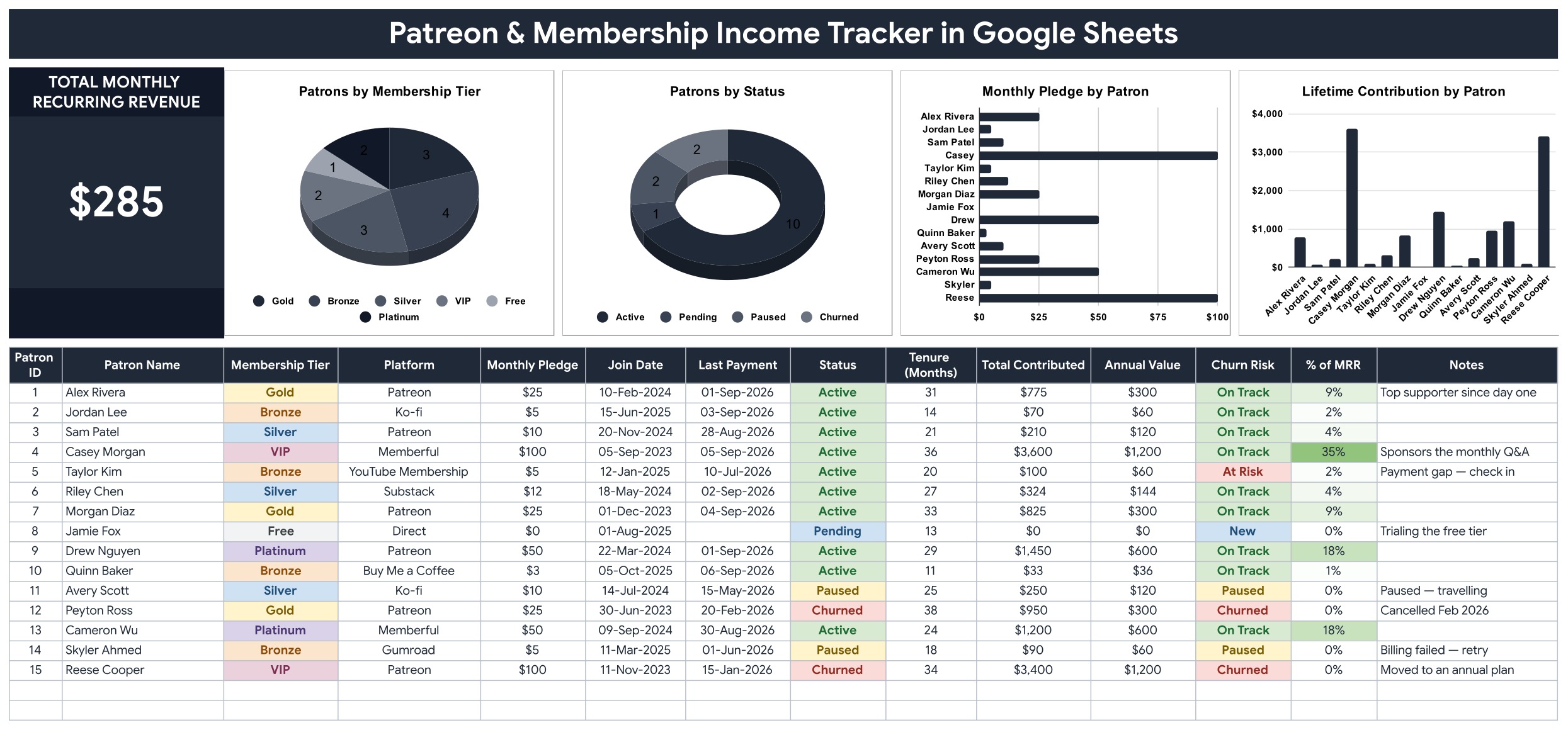
The Patreon & Membership Income Tracker in Google Sheets logs every supporter in a 14-column table, calculates 6 of those columns for you, and drives 1 live MRR card plus 4 charts from the rows you type. The sample file ships with 15 patrons across 8 platforms, 6 membership tiers and 4 statuses. Setup takes under 10 minutes: open the copy link, clear the sample rows, start typing. The Patreon and Membership Income Tracker in Google Sheets runs in a browser on any device, so your whole team can read the same numbers at the same time.
🌍 Join 8,400+ teams in 40+ countries using NextGenTemplates to replace paid SaaS tools with one-time-purchase Excel, Google Sheets, Power BI and HTML templates.
✅ Instant download · One-time payment · No subscription · No per-user fees · Lifetime access
📌 Please note: this is an independent spreadsheet template. It is not affiliated with, endorsed by, or connected to Patreon, Ko-fi, Substack, Memberful, Gumroad or Buy Me a Coffee. There is no API and no import — you enter or paste your own figures, which is exactly what keeps it working no matter which platform you move to next.
🔑 Key Features of the Patreon and Membership Income Tracker
🧮 One live MRR card. The Total Monthly Recurring Revenue card on the tracker page adds up the Monthly Pledge of every active patron only. Paused, pending and churned supporters are excluded automatically, so the number on screen is the money you can actually count on this month.
⚙️ Six columns that fill themselves. Patron ID, Tenure (Months), Total Contributed, Annual Value, Churn Risk and % of MRR are formulas. You type seven fields — Patron Name, Membership Tier, Platform, Monthly Pledge, Join Date, Last Payment and Status — and the rest of the row calculates on the spot.
🚨 A 40-day churn rule. Churn Risk flags an active patron as “At Risk” the moment their last payment is more than 40 days old, so you can send a message before the cancellation email arrives rather than after.
📊 Four charts wired straight to the data. Patrons by Membership Tier, Patrons by Status, Monthly Pledge by Patron and Lifetime Contribution by Patron all read the data columns directly using the built-in Aggregate option across rows 16 to 1000. There are no hidden helper tables anywhere in the file, so a new supporter appears in every chart the second you type the row.
🏷️ Dropdowns that grow with you. Membership Tier, Platform and Status pull from the List tab (rows 2-500). Add a new platform or a new founding-member tier to the List tab and it appears in the dropdown immediately — no re-setup, no script editing.
🌐 Platform-agnostic by design. The sample data covers Patreon, Ko-fi, Substack, YouTube Membership, Memberful, Gumroad, Buy Me a Coffee and Direct supporters in one table, which is the whole point: most creators are paid by four or five different companies and see four or five different dashboards.
📦 What Is Inside the Patreon & Membership Income Tracker
Page 1: Patron Tracker
The working page. A Total Monthly Recurring Revenue card sits on the left, followed by four charts — Patrons by Membership Tier, Patrons by Status, Monthly Pledge by Patron and Lifetime Contribution by Patron. Below them runs the 14-column patron table: Patron ID, Patron Name, Membership Tier, Platform, Monthly Pledge, Join Date, Last Payment, Status, Tenure (Months), Total Contributed, Annual Value, Churn Risk, % of MRR and Notes.
Page 2: How to Use
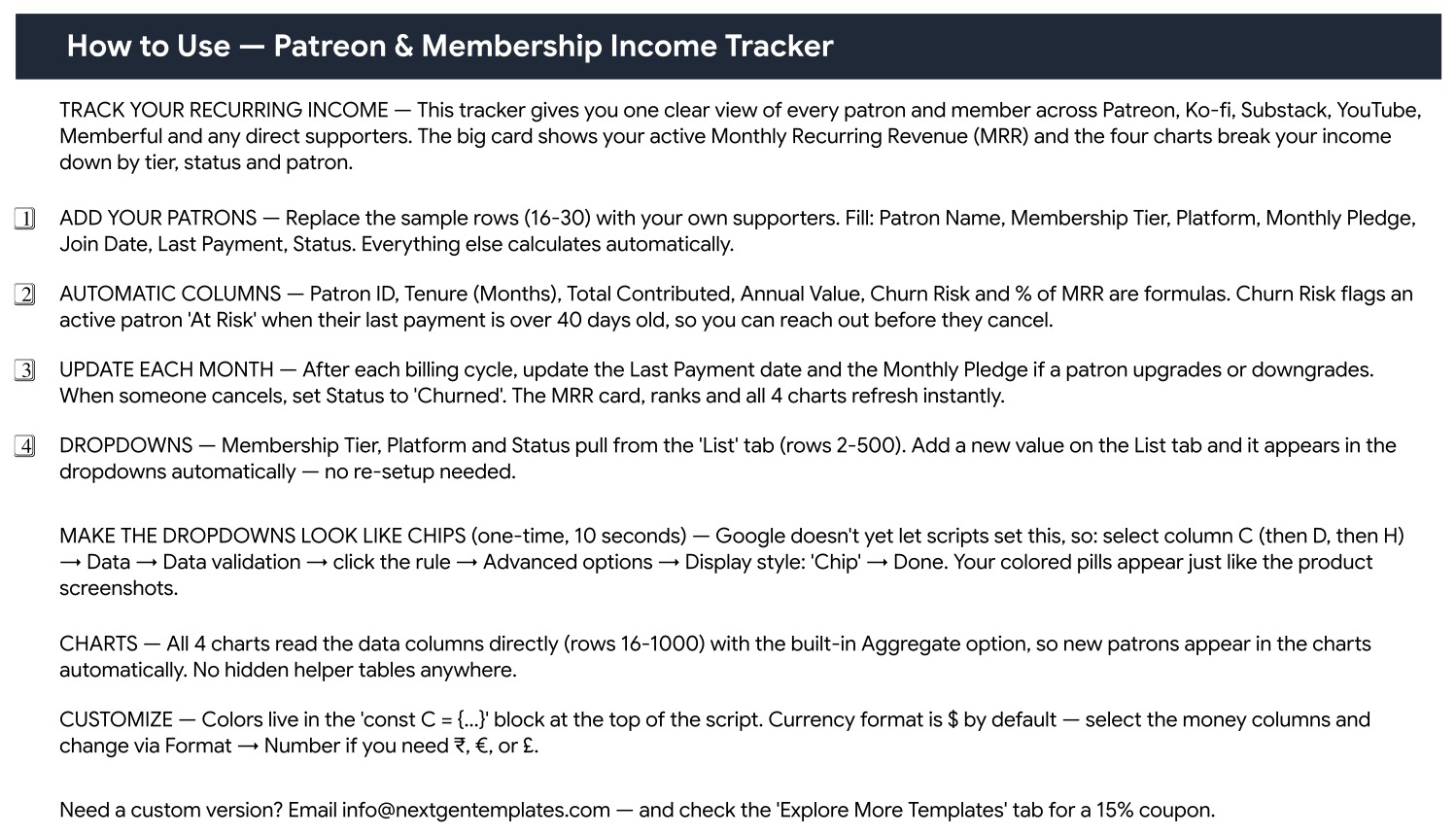
A plain-English setup page written into the file itself. It walks through replacing the sample rows, explains which columns are formulas, spells out the 40-day Churn Risk rule, and gives the one-time 10-second steps for turning the Tier, Platform and Status dropdowns into coloured chips through Data > Data validation > Advanced options > Display style: Chip. It also shows where the colour palette lives in the script and how to switch the currency format from $ to ₹, € or £.
Page 3: Explore More Templates
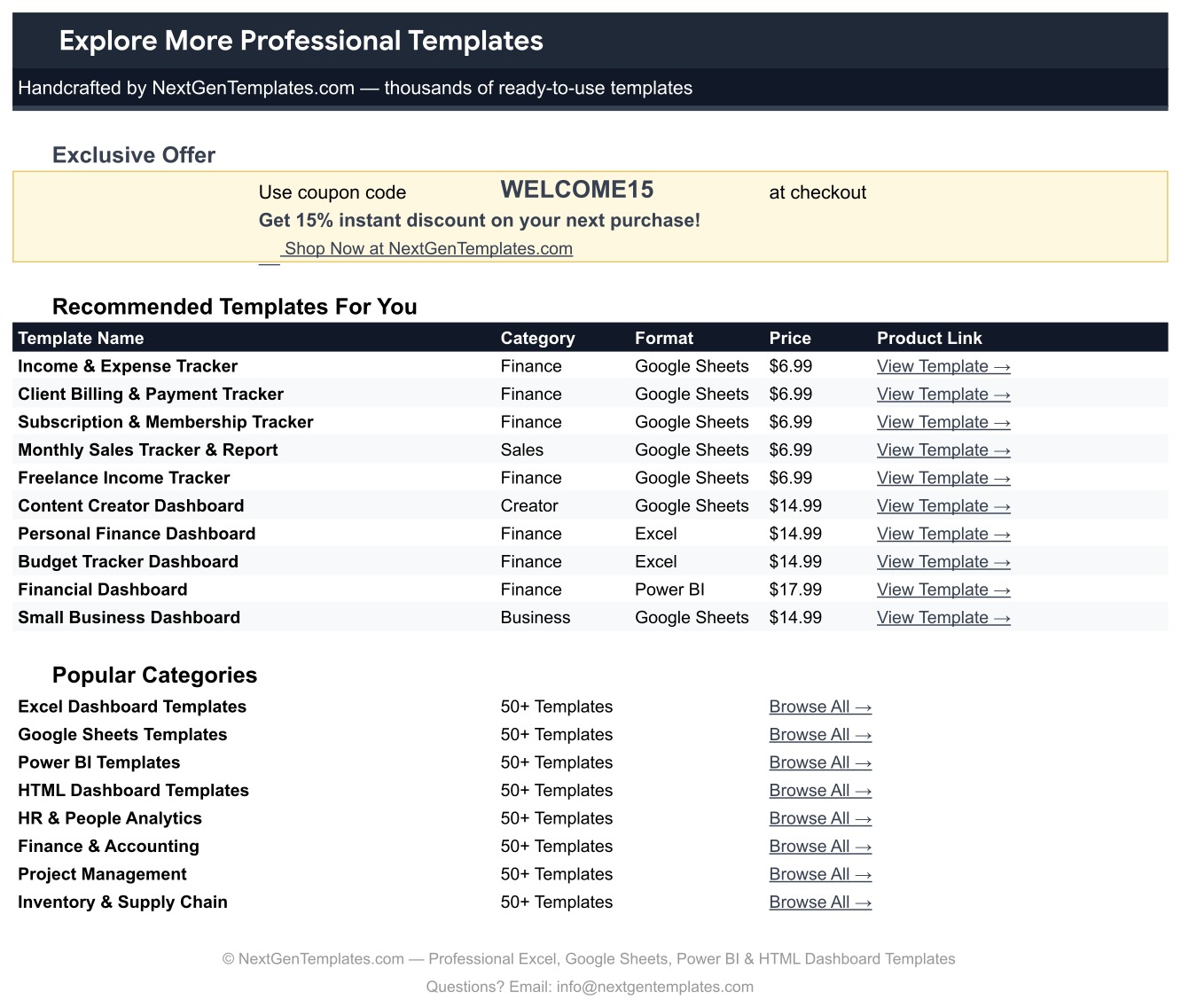
A reference page listing recommended NextGenTemplates spreadsheets by category, format and price, along with popular category links and a WELCOME15 coupon code for 15% off your next purchase.
A fourth tab, List, holds the dropdown values for Membership Tier, Platform and Status.
📊 Patreon & Membership Income Tracker vs. an Excel Membership Sheet vs. ChartMogul / Baremetrics — Where This Fits
| Feature | Patreon & Membership Income Tracker in Google Sheets | Excel membership spreadsheet | ChartMogul / Baremetrics |
|---|---|---|---|
| Cost | One-time purchase | One-time, but you build it yourself | Monthly subscription, tiered by revenue |
| Platform | Google Sheets in any browser | Desktop Excel | Vendor web app |
| Setup time | ✅ Under 10 minutes | Hours of formula building | Days, plus billing integration |
| Real-time collaboration | ✅ Built in — share the sheet | Only via OneDrive co-authoring | ✅ Yes, per seat |
| Mobile access | ✅ Google Sheets mobile app | Limited | ✅ Yes |
| Custom tiers and platforms | ✅ Add a row to the List tab | Manual named-range edits | Restricted to supported billing systems |
| Share with a link | ✅ Yes | Needs a cloud drive | ✅ Yes, inside the paid plan |
| Year-1 cost at 5 users | ✅ One purchase, no per-user fee | Office licences | Hundreds to thousands per year |
| Multi-platform pledges in one table | ✅ Patreon, Ko-fi, Substack, YouTube, Memberful, Gumroad and more | Whatever you build | Only the platforms it integrates with |
| Automatic API import | ❌ No — you enter or paste the figures | ❌ No | ✅ Yes, for supported processors |
For creators who want a clear view of membership income across every platform without paying a monthly analytics subscription, the Patreon & Membership Income Tracker sits in the sweet spot.
👥 Who This Template Is For — and Who It Is Not For
✅ This template is built for:
- Creators earning from 10 to 500 paying members across Patreon, Ko-fi, Substack, YouTube Memberships or Buy Me a Coffee
- Newsletter writers and podcasters who need a patron tracker spreadsheet that shows tier mix and churn at a glance
- Small studios, bands and community organisers billing supporters directly and tracking pledges by hand
- Anyone who wants a recurring revenue tracker for creators that survives switching platforms
❌ This template is NOT for:
- Creators who want pledges imported automatically — there is no Patreon connection, no API and no sync
- SaaS companies needing cohort analysis, MRR movement waterfalls or revenue recognition
- Anyone who needs it to issue invoices, take payments or file taxes — it records what you enter, nothing more
- Teams that cannot use Google Sheets; a free Google account and a browser are required
⚙️ How to Use the Patreon and Membership Income Tracker
- Open the PDF in your download and click the “Make a copy” link to create your own editable Google Sheet.
- Open the List tab and adjust the Membership Tier, Platform and Status values to match the platforms you actually use.
- Replace sample rows 16-30 with your supporters, filling only Patron Name, Membership Tier, Platform, Monthly Pledge, Join Date, Last Payment and Status.
- Leave Patron ID, Tenure, Total Contributed, Annual Value, Churn Risk and % of MRR alone — they are formulas and will overwrite themselves.
- Turn the dropdowns into coloured chips once: select column C, then D, then H, and use Data > Data validation > Advanced options > Display style: Chip.
- After each billing cycle, update Last Payment, adjust Monthly Pledge for upgrades or downgrades, and set Status to Churned when someone cancels. The MRR card and all four charts refresh instantly.
💼 Real-World Use Cases
Maya runs an illustration newsletter with paying subscribers. Her money arrives from Substack, Ko-fi and a handful of direct bank transfers. She keeps all three in this membership income tracker Google Sheets file, so instead of three tabs open on three dashboards she reads one MRR card on Monday morning and knows whether she cleared rent.
Devon produces a weekly history podcast with 180 patrons. He sorts the table by Churn Risk every fortnight, finds the active patrons whose last payment has slipped past 40 days, and sends each one a short personal note. Two of them turn out to have expired cards.
The Harrow Street Collective is a six-person music co-op. They share the sheet with everyone in the band, use % of MRR to see that one VIP supporter funds a third of their monthly income, and decide on that basis to build out the mid-tier rather than chase another whale.
❓ Frequently Asked Questions
Does the Patreon and Membership Income Tracker connect to Patreon?
No. The Patreon & Membership Income Tracker is an independent Google Sheets template with no API, no integration and no automatic import. You enter or paste your patron figures yourself. It is not affiliated with or endorsed by Patreon or any other membership platform.
What does the MRR card actually count?
It totals the Monthly Pledge of patrons whose Status is Active. Paused, Pending and Churned supporters are left out, so the Patreon and Membership Income Tracker shows recurring income you can rely on this month rather than a lifetime total.
How does the Churn Risk column work?
Churn Risk is a formula. It marks an active patron “At Risk” when their Last Payment date is more than 40 days old, and shows Paused, Churned or New for the other statuses. Sort by that column to build your outreach list in seconds.
Can I add my own membership tiers and platforms?
Yes. The Membership Tier, Platform and Status dropdowns read the List tab, rows 2 to 500. Type a new value there and it appears in every dropdown in the patron tracker spreadsheet straight away, with no script changes.
How long does setup take?
Under 10 minutes. Copy the sheet, edit the List tab, clear the 15 sample rows and start typing your own supporters. The only optional extra is the 10-second chip-display tweak described on the How to Use page.
How does this compare to ChartMogul or Baremetrics?
Those tools read your billing system automatically and charge a monthly fee that scales with revenue. This recurring revenue tracker for creators costs one payment, works across every platform at once because you type the numbers, and never locks your history inside a vendor account.
What currency does it use?
Dollars by default. Select the money columns and change the format through Format > Number to switch to ₹, € or £ — the How to Use page inside the file spells out the steps.
👤 About the Author
Built by PK — Microsoft Certified Professional with 15+ years of Excel, Google Sheets and Power BI experience. Founder of NextGenTemplates, reaching 300K+ subscribers across YouTube channels (@PKAnExcelExpert, @NextGenTemplates, @NeoTechNavigators). Every template is hand-built and tested before release.
🔗 Explore Related Templates
Membership income is rarely a creator’s only income. Pair this file with the Sponsorship & Brand Deal Tracker in Google Sheets for paid partnerships, the Affiliate Marketing Income Tracker in Google Sheets for commission income, and the Online Course Sales & Student Tracker in Google Sheets if you sell teaching alongside your membership. Selling files as well? The Digital Product Sales Tracker in Google Sheets and the Print-on-Demand Sales Tracker in Google Sheets cover the rest. Browse the full Google Sheets Templates library or the Google Sheets Trackers collection for more.
New to building charts and dropdowns in Sheets? Google’s own guides on data validation and adding charts explain the underlying features, and the Patreon Help Center is the right place for questions about your actual payout schedule.
📖 Click here to read the Detailed Blog Post
🎥 Visit our YouTube channel for step-by-step video tutorials
👉 YouTube.com/@NextGenTemplates
📅 Last updated: September 2026






























Reviews
There are no reviews yet.