

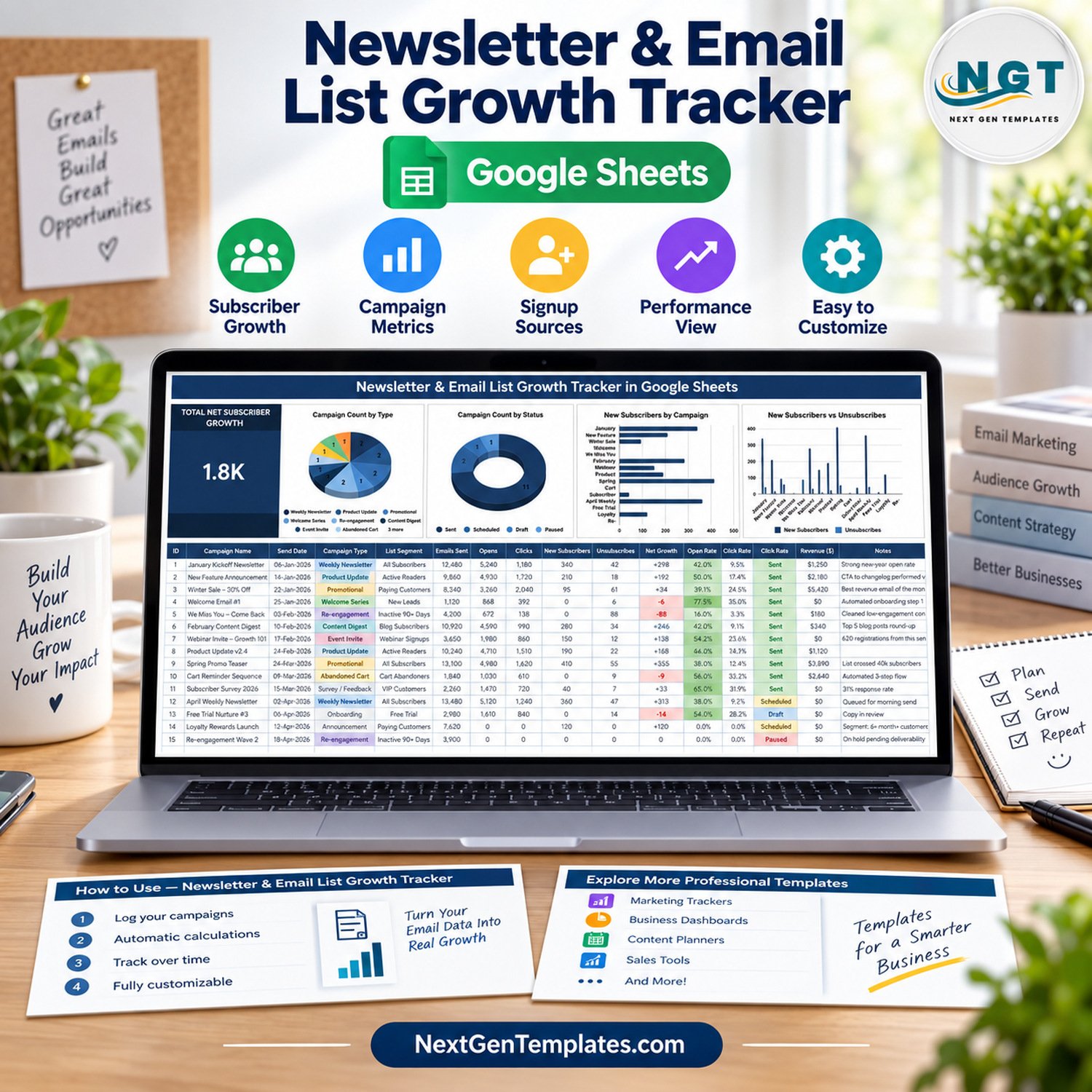

The Newsletter & Email List Growth Tracker in Google Sheets puts your whole email programme on one page: 16 columns per campaign, a Total Net Subscriber Growth card and 4 charts that refresh as you type. This newsletter email list growth tracker ships with 15 fictional sample campaigns (105,990 emails sent, 2,195 new subscribers and 415 unsubscribes), so you can see every formula working before you swap in your own sends.
🌍 Made by NextGenTemplates, the team behind 2,000+ ready-to-use Excel, Google Sheets, Power BI and HTML templates.
✅ Instant download · One-time payment · No subscription · No per-user fees · Lifetime access
🔑 Key Features of the Newsletter & Email List Growth Tracker
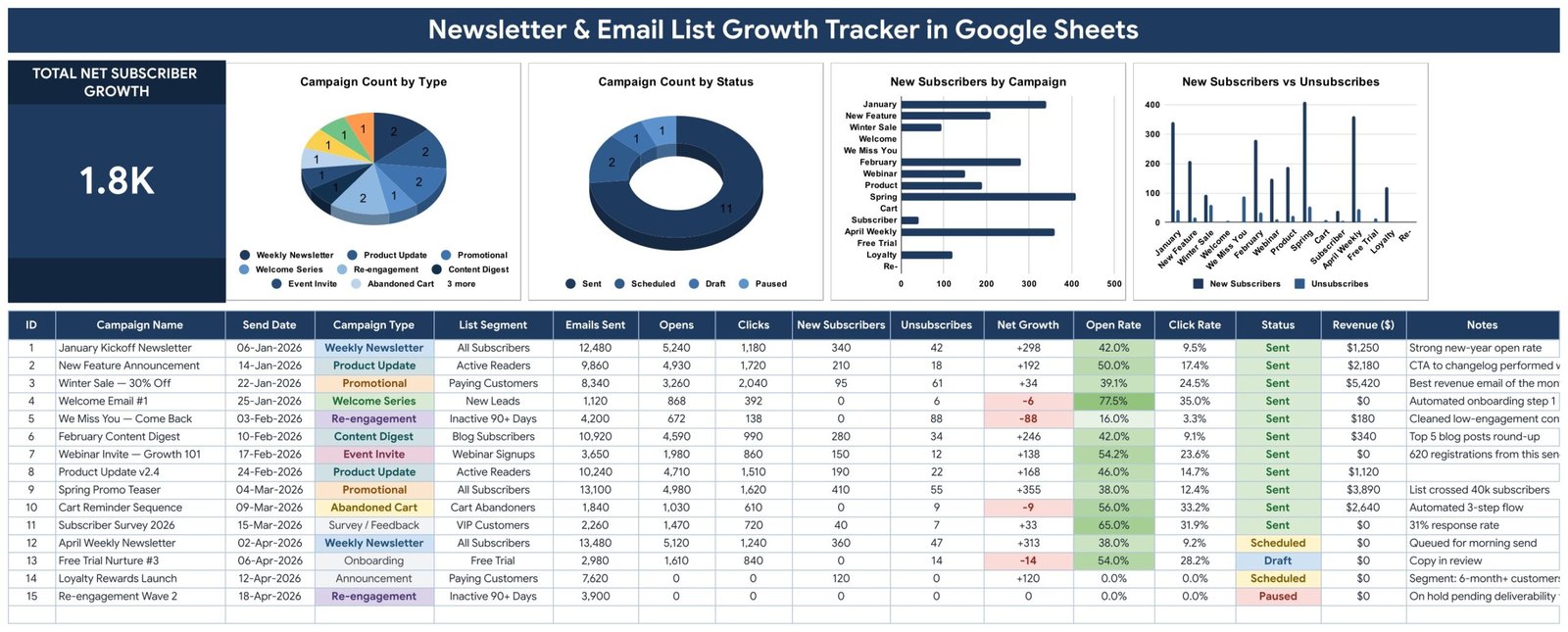
📈 Total Net Subscriber Growth card. One big number adds New Subscribers minus Unsubscribes across every campaign you log. With the sample data it reads 1.8K (1,780 net subscribers), and it recalculates the moment you add or edit a row.
🧮 Four automatic columns. ID, Net Growth, Open Rate and Click Rate are formulas. Open Rate is Opens ÷ Emails Sent and Click Rate is Clicks ÷ Emails Sent, so you only type raw counts from your email platform’s report.
🚩 Churn warnings you can’t miss. Any campaign where unsubscribes beat new sign-ups shows its Net Growth in red, and Open Rate cells are shaded green, so a re-engagement send that cost subscribers stands out straight away.
📊 Four live charts, no helper tables. Campaign Count by Type, Campaign Count by Status, New Subscribers by Campaign and New Subscribers vs Unsubscribes read the data rows (16-1000) directly with Google Sheets’ built-in aggregation.
🏷️ Ready-made lists. 11 campaign types (Weekly Newsletter, Product Update, Promotional, Welcome Series, Re-engagement, Content Digest, Event Invite, Abandoned Cart, Survey / Feedback, Onboarding, Announcement), 10 list segments and 4 statuses: Sent, Scheduled, Draft and Paused.
🔽 Self-growing dropdowns. Campaign Type, List Segment and Status pull from the List tab (rows 2-500). Add a value there and it shows up in the dropdown with no setup.
💵 Revenue and notes on every send. Log the Revenue ($) each email brought in and a short note. The column uses $ by default; switch it to ₹, € or £ with Format → Number.
🔒 Campaign totals only. The tracker stores counts per send. It holds no subscriber names or email addresses and never connects to, or sends from, an email platform.
📦 What’s Inside the Newsletter & Email List Growth Tracker
Sheet 1: Newsletter & Email List Growth Tracker
The one-page tracker: a title banner, the Total Net Subscriber Growth card, the four charts, then the campaign log with ID, Campaign Name, Send Date, Campaign Type, List Segment, Emails Sent, Opens, Clicks, New Subscribers, Unsubscribes, Net Growth, Open Rate, Click Rate, Status, Revenue ($) and Notes.
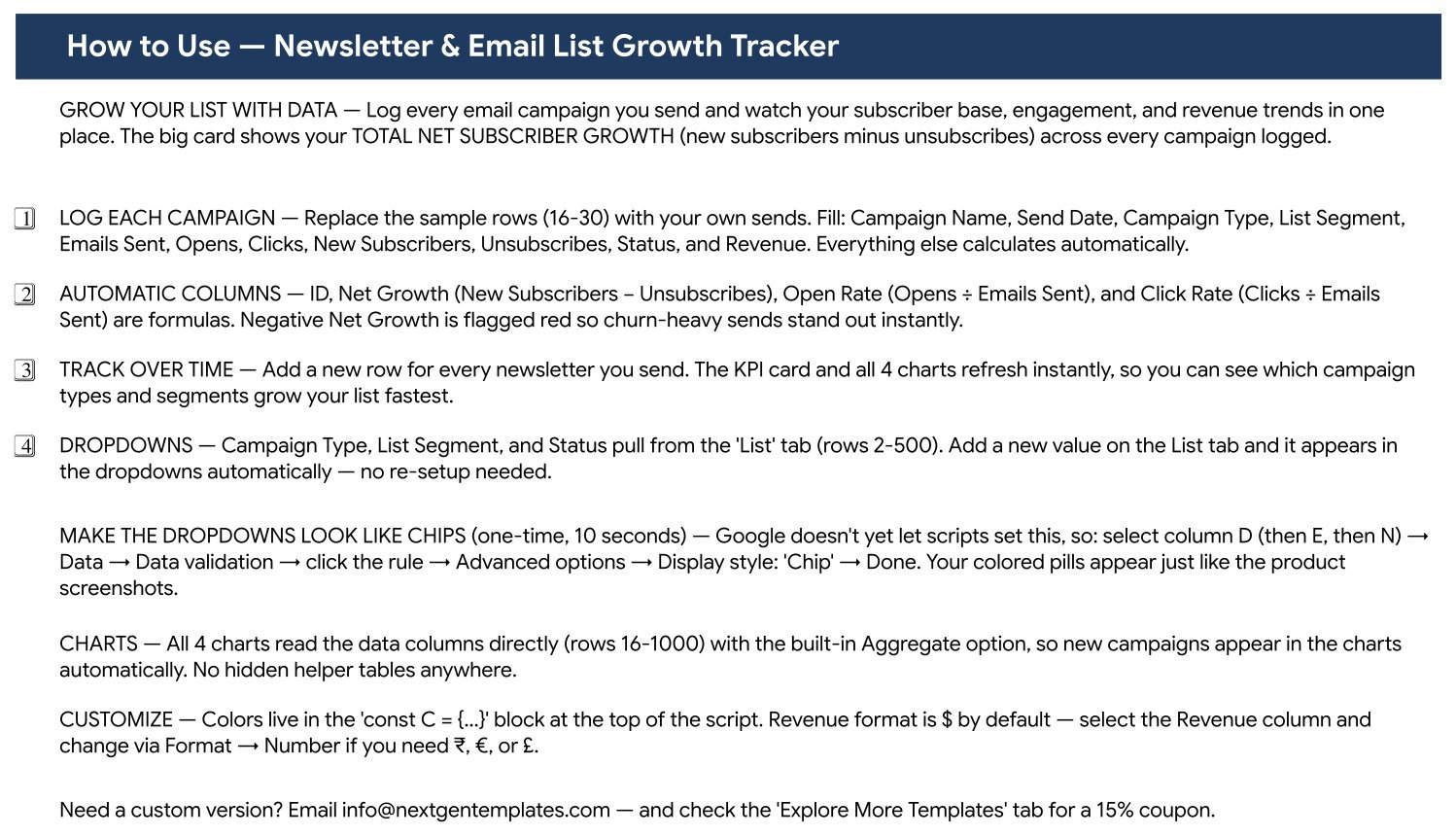
Sheet 2: How to Use
Plain-English instructions on the sheet itself: which columns to fill, which ones calculate, how the dropdowns and charts grow with your data, and how to change the currency.
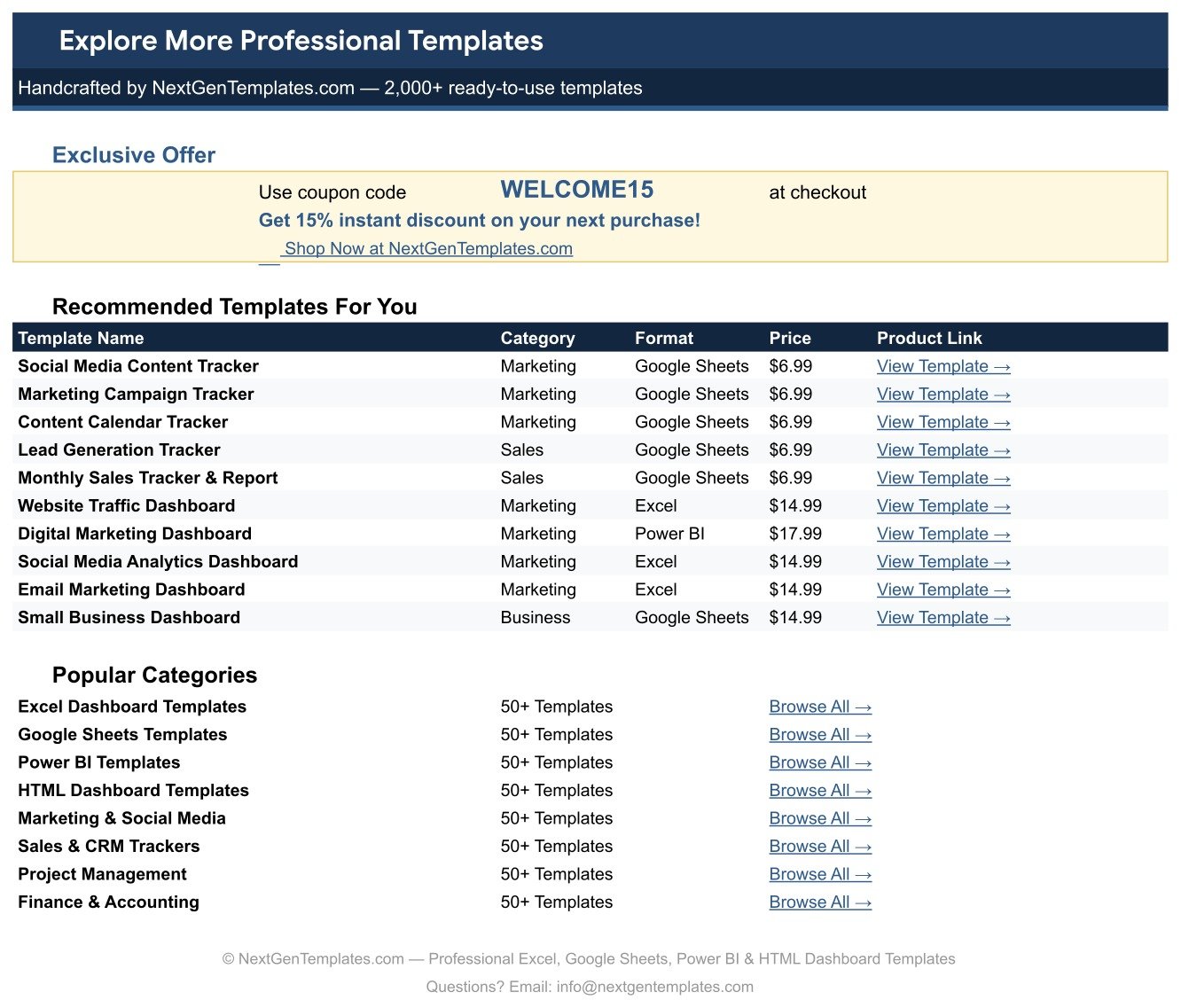
Sheet 3: Explore More Templates
A page of recommended marketing and sales templates plus popular categories from NextGenTemplates. A List tab (not pictured) holds the dropdown values.
📊 Newsletter & Email List Growth Tracker vs. Excel Dashboard vs. Paid Email Platform Reports — Where This Fits
| Feature | Newsletter & Email List Growth Tracker | Microsoft Excel dashboard | Paid email platform reports (Mailchimp / HubSpot Marketing) |
|---|---|---|---|
| Cost | ✅ $6.99 one-time | Excel licence plus a template or build time | Recurring monthly plan |
| Platform | ✅ Google Sheets in any browser | Excel desktop or Microsoft 365 | The vendor’s web app |
| Setup time | ✅ Make a copy, replace 15 sample rows | Build or adapt a workbook | Account setup and list import |
| Real-time team collaboration | ✅ Google Sheets sharing | Co-authoring through OneDrive or SharePoint | ✅ Seats depend on the plan |
| Mobile access | ✅ Google Sheets app | ✅ Excel mobile app | ✅ Vendor app |
| Customizable fields | ✅ Edit columns and the List tab | ✅ Yes | Limited to the vendor’s report fields |
| Year-1 cost at 5 users | ✅ $6.99 total | Microsoft 365 licence per user | A year of plan fees |
| Compare campaigns from more than one platform in one log | ✅ Yes | Depends on the build | Only that platform’s own sends |
| Pulls campaign data automatically | ❌ Manual entry | ❌ Manual unless you build a connector | ✅ Yes |
For creators and small teams who want one honest record of list growth without paying for another reporting seat, the Newsletter & Email List Growth Tracker sits in the sweet spot.
👥 Who This Template Is For — and Who It’s Not For
✅ This template is built for:
- Newsletter writers and creators who send weekly or monthly and want to see which issues grow the list
- Small-business marketers comparing promotional, welcome, abandoned-cart and re-engagement emails side by side
- Freelancers and agencies who report campaign results to clients in a shareable Google Sheet
❌ This template is NOT for:
- Teams that need campaign stats synced automatically from their email platform; every number here is typed in
- Anyone looking for a subscriber database, contact list or email-sending tool; it logs campaign totals only
⚙️ How to Use the Newsletter Email List Growth Tracker
- Open the PDF in your download and click the link to make your own copy in Google Drive.
- Add or rename campaign types, list segments and statuses on the List tab.
- Replace sample rows 16-30 with your sends: name, date, type, segment, emails sent, opens, clicks, new subscribers, unsubscribes, status and revenue.
- Leave ID, Net Growth, Open Rate and Click Rate alone; they calculate themselves.
- Add one row per new campaign. The card and all four charts update instantly.
- Optional: switch dropdowns to chip style via Data → Data validation → Advanced options → Display style: Chip.
New to dropdown rules? Google’s guide to creating an in-cell dropdown list explains the Data validation screen.
💼 Real-World Use Cases
Maya writes a weekly food newsletter. She logs each Sunday issue and each seasonal promo, then checks the New Subscribers vs Unsubscribes chart to see which recipe themes add readers and which promos quietly cost her subscribers.
Daniel handles email for a small online store. He tags sends by segment (Paying Customers, Cart Abandoners, Inactive 90+ Days) and compares open rate, click rate and revenue to decide whether the abandoned-cart flow or the monthly promo earns its place.
❓ Frequently Asked Questions
What does the Newsletter & Email List Growth Tracker measure?
It records emails sent, opens, clicks, new subscribers, unsubscribes, status and revenue for each campaign, then calculates Net Growth, Open Rate and Click Rate. A card shows total net subscriber growth and four charts break campaigns down by type, status and subscriber movement.
Does it connect to Mailchimp, ConvertKit or Substack?
No. The Newsletter & Email List Growth Tracker is manual entry only. You copy the totals from your email platform’s campaign report into the row. It does not connect to any email service provider, import contacts or send email.
How long does setup take?
About ten minutes. Make a copy from the PDF link, adjust the List tab if you use different campaign types or segments, and replace the 15 sample rows with your own sends. Every formula and chart is already built.
How are open rate and click rate calculated?
Open Rate is Opens divided by Emails Sent, and Click Rate is Clicks divided by Emails Sent. Because both use emails sent as the base, the newsletter email list growth tracker’s click rate is not a click-to-open rate, so compare it with like-for-like figures.
Does it store subscriber email addresses?
No. The tracker holds one row per campaign with totals such as emails sent and new subscribers. There are no columns for subscriber names or addresses, and the sample campaigns are fictional.
How does it compare with paid email platform reports?
Platform reports fill in stats automatically but only for that platform’s sends, on a recurring plan. The Newsletter & Email List Growth Tracker costs $6.99 once, lets you add revenue and notes, and keeps campaigns from any tool in one Google Sheet.
👤 About the Author
Built by PK — Microsoft Certified Professional with 15+ years of Excel, Google Sheets and Power BI experience. Founder of NextGenTemplates, reaching 300K+ subscribers across YouTube channels (@PKAnExcelExpert, @NextGenTemplates, @NeoTechNavigators). Every template is hand-built and tested before release.
🔗 Explore Related Templates
📋 Plan each send before it goes out with the Email Campaign Checklist in Google Sheets, and map the year’s promotions in the Marketing Campaign Calendar in Google Sheets.
📊 Need a multi-channel view? The Digital Marketing Campaign Dashboard in Google Sheets adds analysis pages across channels.
🎙️ Creating content too? Pair this tracker with the YouTube Video Ideas & Upload Tracker or the Podcast Episode Planning Tracker.
🗂️ Browse every Google Sheets tracker or the full Sales and Marketing Google Sheets templates collection.
📖 Click here to read the Detailed Blog Post
🎥 Visit our YouTube channel for step-by-step video tutorials
👉 YouTube.com/@NextGenTemplates
Watch the step-by-step video Demo:
📅 Last updated: September 2026


























Reviews
There are no reviews yet.