

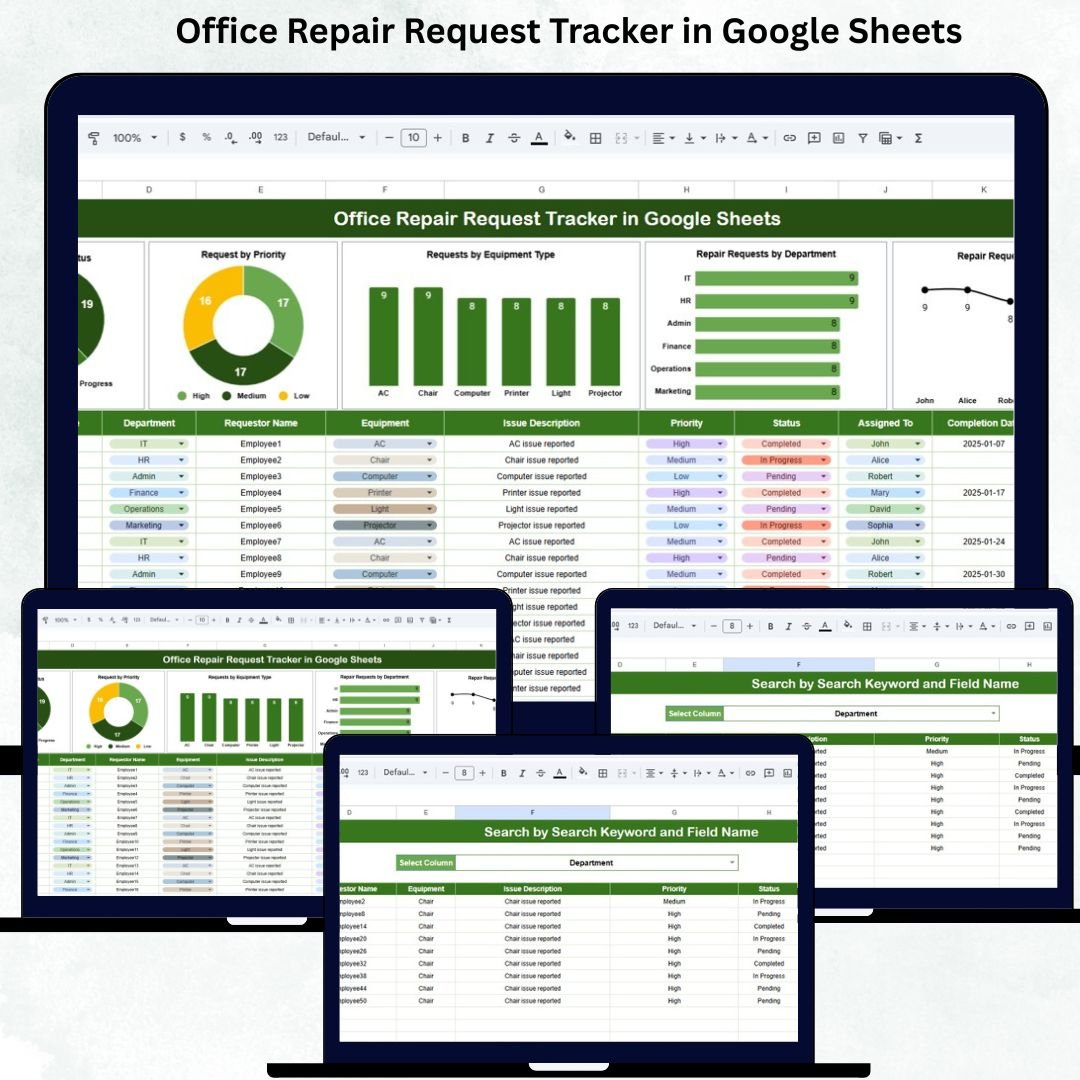


Managing office repair requests efficiently can be challenging. Without a proper system, requests may get delayed, lost, or duplicated, causing employee frustration and operational inefficiency. The Office Repair Request Tracker in Google Sheets is a ready-to-use, cloud-based solution that allows organizations to track, monitor, and manage all repair requests in a centralized, collaborative environment.Office Repair Request Tracker in Google Sheets
This tracker helps supervisors, maintenance teams, and employees work together seamlessly. By using Google Sheets, you get a tool that is accessible anywhere, easy to customize, and cost-effective, all while providing data-driven insights for improving office maintenance operations.Office Repair Request Tracker in Google Sheets

✨ Key Features of the Office Repair Request Tracker
This tracker contains two primary sheet tabs that serve different functions:
🔹 Tracker Sheet Tab – Main Dashboard
Capture all office repair requests in one place.
Visualize requests using built-in charts:
Requests by Status – Open, In-progress, Completed, Pending.
Requests by Priority – Urgent, High, Medium, Low.
Requests by Equipment Type – Identify frequently repaired equipment.
Requests by Department – Find departments generating the most requests.
Requests by Assigned To – Track maintenance staff workload.
Charts provide instant insights for resource allocation and trend analysis.
🔹 Search Sheet Tab – Quick Request Lookup
Search by Request ID, Department, Equipment Type, Status, Priority, or Assigned Staff.
Locate requests quickly without scrolling through large datasets.
Saves time and improves response speed for urgent repair issues.
Advantages of Using This Tracker
Centralized Repair Management – All requests are recorded in one place.
Real-Time Updates – Multiple users can update data simultaneously via Google Sheets.
Prioritized Action – Identify urgent or critical requests immediately.
Data-Driven Decisions – Use charts to analyze trends and improve office maintenance strategies.
Easy Reporting – Generate charts and search results for management reviews.
Collaborative Tool – Employees, supervisors, and maintenance teams can work together efficiently.
Opportunities for Improvement
Automated Email Notifications – Send alerts when a request is created, assigned, or completed.
Integration with Google Forms – Employees can submit requests directly, automatically populating the tracker.
Conditional Formatting – Highlight overdue, high-priority, or unassigned requests for immediate attention.
Mobile-Friendly Access – Field staff can update requests in real-time via Google Sheets mobile app.
Historical Data Analysis – Track past repairs, associated costs, and team performance.
Best Practices for Using the Tracker
Regularly Update Request Status – Mark requests as In-progress or Completed to ensure accountability.
Use Clear Priority Labels – Standardize priorities (Urgent, High, Medium, Low) to avoid confusion.
Assign Responsibilities Clearly – Update the “Assigned To” field for each request.
Monitor Charts Frequently – Review visual insights weekly to prevent backlog.
Backup Data Periodically – Even though Google Sheets auto-saves, maintain backup copies.
Train Staff – Ensure employees and maintenance teams know how to use the tracker effectively.
Who Can Benefit from This Tracker
Employees: Submit repair requests easily and monitor status.
Maintenance Staff: Track assigned requests, manage workload, and prioritize critical tasks.
Supervisors: Monitor overall progress, identify bottlenecks, and allocate resources efficiently.
Facility Managers: Analyze trends over time, improve maintenance planning, and reduce downtime.
How to Get Started
Download the Tracker – Access the ready-to-use Google Sheets file.
Enter Initial Data – Fill in past requests or start fresh with new ones.
Customize Columns – Add fields such as repair cost, expected duration, or department-specific categories.
Update Regularly – Encourage staff to input new requests and update status in real-time.
Monitor Charts – Use visual insights to make informed decisions and optimize repair workflows.
Conclusion
The Office Repair Request Tracker in Google Sheets is a simple yet powerful tool to manage office repair requests efficiently. It helps reduce delays, improve maintenance response time, prioritize urgent issues, and provide data-driven insights for better decision-making. By implementing this tracker, organizations can streamline their repair process, enhance operational efficiency, and increase workplace satisfaction.
Click here to read the Detailed blog post
Watch the step-by-step video Demo:
Visit our YouTube channel to learn step-by-step video tutorials
Youtube.com/@NeotechNavigators
Compatibility and Requirements
- Works in Google Sheets. All you need is a free Google account and a web browser.
- New to Sheets? Google’s guide How to use Google Sheets covers the basics.
- The tracker charts are standard Google Sheets charts. Google explains them in Add & edit a chart or graph.
Frequently Asked Questions
Which sheets are in the tracker?
It has two sheets: the Tracker sheet, where you log requests and see the charts, and the Search sheet for looking up requests.
What do the charts show?
They show requests by status, priority, equipment type, department and assigned staff member.
How do I find a request quickly?
Use the Search sheet to look up a request by request ID, department, equipment type, status, priority or assigned staff.
Can several people update it at once?
Yes. Because it runs in Google Sheets, more than one user can update the data at the same time.
Can I add my own columns?
Yes. You can add fields such as repair cost, expected duration or department-specific categories.
Related Maintenance and Request Trackers
- Work Order Request Tracker in Google Sheets: logs work orders from request to close
- Facility Maintenance and Renovation Tracker in Google Sheets: tracks larger facility jobs
- Equipment Maintenance Log Tracker in Google Sheets: keeps a service log per machine
- Office Equipment Maintenance Checklist in Google Sheets: routine checks for office equipment
- Tracker Toolkit: 12 Excel and Google Sheets trackers in one bundle
Browse all Google Sheets trackers or the Google Sheets templates.


































Reviews
There are no reviews yet.