

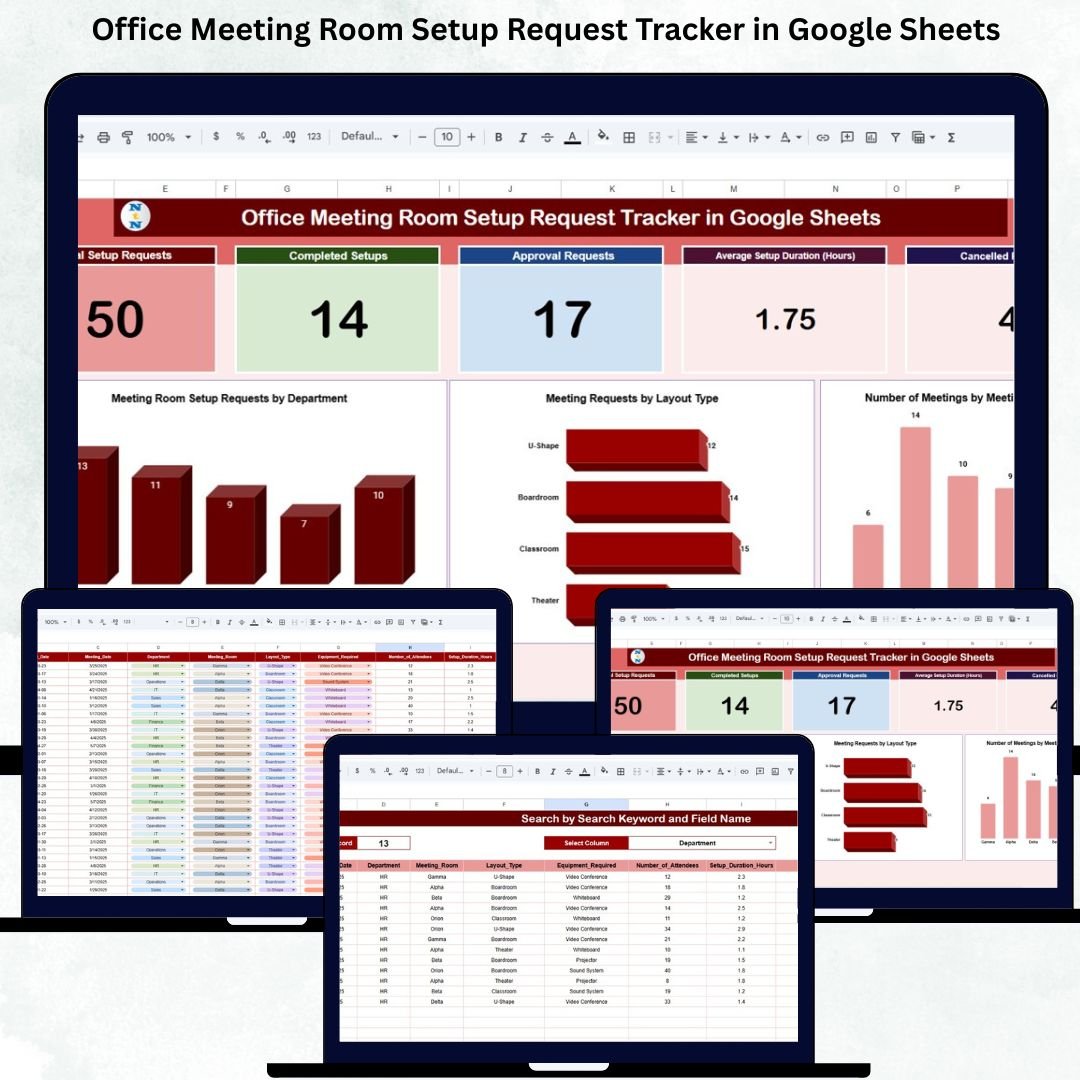



Modern offices conduct meetings every single day—team discussions, leadership reviews, client calls, training sessions, and strategic planning meetings. However, managing meeting room setups is often chaotic. Requests arrive through emails, chats, spreadsheets, or verbal communication. As a result, teams face delayed approvals, room conflicts, incorrect layouts, missing AV equipment, and last-minute cancellations.
The Office Meeting Room Setup Request Tracker in Google Sheets solves this problem completely. It provides a centralized, ready-to-use system to log, approve, track, and analyze all meeting room setup requests in one place. With real-time updates, visual dashboards, and smart search functionality, office admins and facility teams gain full control over meeting room operations—without buying expensive software.
🔑 Key Features of the Office Meeting Room Setup Request Tracker
✅ Centralized request logging
✅ Real-time approval and setup tracking
✅ Automated KPI cards and charts
✅ Smart search system
✅ Cloud-based & collaboration-friendly
✅ No coding or installation required
This tracker is designed for efficiency, clarity, and smooth office operations.
📦 What’s Inside the Office Meeting Room Setup Request Tracker
📄 1. Tracker Sheet (Main Data Entry Sheet)
This is the backbone of the tracker where every setup request is recorded.
Captured fields include:
Request ID & Request Date
Requester Name & Department
Meeting Room Name
Meeting Date, Start Time, End Time
Layout Type (Boardroom, Classroom, Theater, U-Shape)
AV Required (Yes / No)
Approval Required & Approval Status
Setup Status (Pending, Completed, Cancelled)
Setup Duration (Hours)
Assigned Facility Team
Comments / Notes
As soon as data is entered or updated, all dashboards refresh automatically.
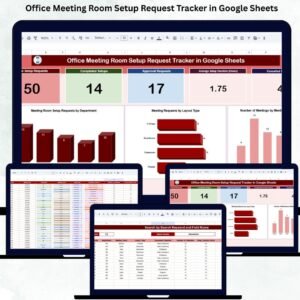
📊 2. Dashboard KPI Cards – Instant Snapshot
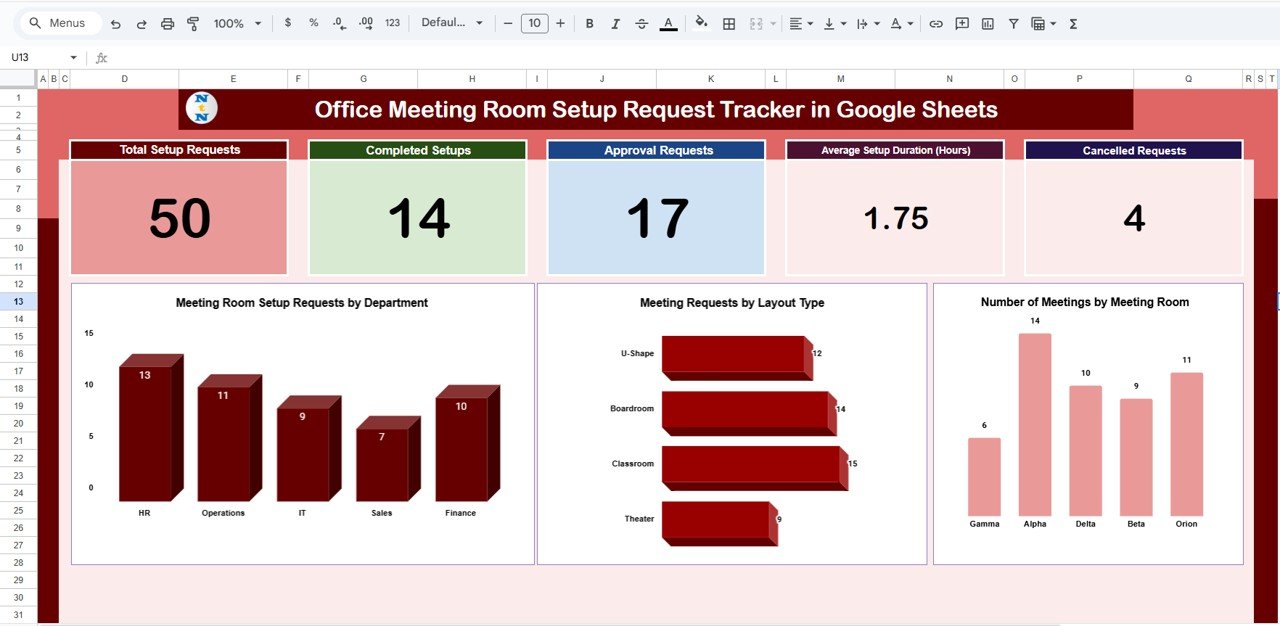
The dashboard includes five powerful KPI cards:
📌 Total Setup Requests – Understand overall meeting activity
✅ Completed Setups – Measure execution efficiency
📝 Approval Requests – Track approval workload
⏱️ Average Setup Duration – Optimize setup time
❌ Cancelled Requests – Identify planning gaps
These cards provide a quick executive-level overview within seconds.
📈 3. Dashboard Charts – Visual Insights
📊 Meeting Setup Requests by Department
Identify high-usage departments and allocate resources accordingly.
🪑 Meeting Requests by Layout Type
Analyze demand for Boardroom, Classroom, Theater, or U-Shape setups to standardize layouts.
🏢 Number of Meetings by Room
Identify the most and least used meeting rooms to optimize space utilization.
🔍 4. Smart Search Functionality
Quickly search records using:
Keyword (Department, Room Name, Requester, Layout Type, Status)
Field Name selection
This saves hours of manual filtering—especially useful during audits or daily reviews.
🛠️ How to Use the Office Meeting Room Setup Tracker
1️⃣ Enter setup requests in the Tracker Sheet
2️⃣ Update approval and setup status
3️⃣ Monitor progress using KPI cards
4️⃣ Analyze patterns with dashboard charts
5️⃣ Use Search Panel for instant lookups
No training required—anyone familiar with Google Sheets can start immediately.
👥 Who Can Benefit from This Tracker
🏢 Office & Facility Management Teams
📋 HR & Administration Departments
⚙️ Operations Managers
🪪 Front Desk & Support Teams
🧑💼 Corporate Offices & Co-working Spaces
It works perfectly for small offices, large enterprises, and multi-location setups.
✅ Why Organizations Love This Tracker
✔ Eliminates missed or delayed meeting setups
✔ Improves approval transparency
✔ Reduces last-minute chaos
✔ Optimizes meeting room usage
✔ Saves time & operational cost
✔ 100% cloud-based and scalable
🔧 Opportunities for Improvement
Automated email notifications
SLA-based setup tracking
Equipment-wise usage tracking
Recurring meeting identification
Approval aging alerts
✅ Best Practices
Enter requests in advance
Standardize layout definitions
Review dashboard daily
Track cancellation reasons
Use access controls for data accuracy
✅ Conclusion
The Office Meeting Room Setup Request Tracker in Google Sheets transforms messy, unstructured meeting room management into a clean, transparent, and automated workflow. With smart KPIs, visual dashboards, and powerful search features, office teams ensure every meeting is set up correctly and on time.
If your organization conducts frequent meetings, this tracker is a must-have operational tool.
Click here to read the detailed blog post
Watch the step-by-step video tutorial:
🎥 Visit our YouTube channel to learn step-by-step video tutorials
👉 Youtube.com/@NeotechNavigators
Compatibility and Requirements
- Works in Google Sheets. You need a free Google account and a web browser.
- The Search Panel on the dashboard filters records by keyword and field name. Google explains charts in Add and edit a chart or graph.
Frequently Asked Questions
What information can I record for each request?
The Tracker Sheet captures Request ID, request date, requester name, department, meeting room name, meeting date, start and end time, layout type, AV required, approval required, approval status, setup status, setup duration in hours, assigned facility team and comments.
Which KPI cards are on the dashboard?
Five cards: Total Setup Requests, Completed Setups, Approval Requests, Average Setup Duration and Cancelled Requests.
Which charts does it include?
Three charts: Meeting Setup Requests by Department, Meeting Requests by Layout Type and Number of Meetings by Room.
Which room layouts can I track?
The Layout Type field covers Boardroom, Classroom, Theater and U-Shape.
How do I find a specific request?
Use the Search Panel. Enter a keyword such as a department, room name, requester, layout type or status, and pick the field name to search in.
Related Office and Meeting Room Templates
- Meeting Room Booking Tracker in Google Sheets: log room bookings in the same workbook style
- Meeting Room Utilization Dashboard in Google Sheets: see how often each room is used
- Meeting Room Booking Tracker in Excel: the booking tracker for Excel
- Office Seating Arrangement Request Tracker in Google Sheets: track seating change requests
- Office Visitor Request Tracker in Google Sheets: manage visitor requests
Browse all Google Sheets trackers.































Reviews
There are no reviews yet.