

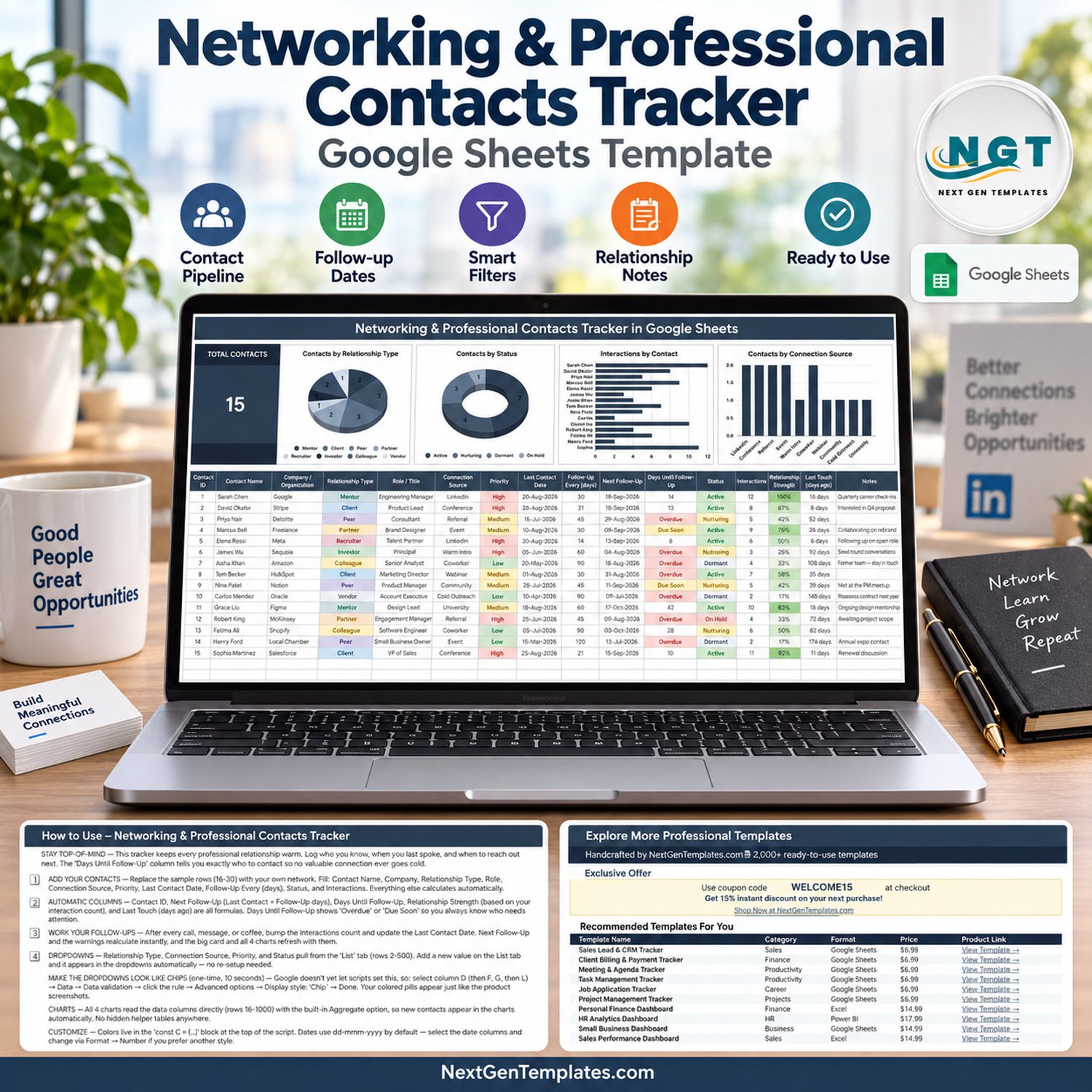

The Networking & Professional Contacts Tracker in Google Sheets is a one-page relationship tracker with 16 columns, 5 automatic formula columns, 1 KPI card and 4 live charts. It ships with 15 sample contacts in rows 16-30, and the charts read rows 16 to 1000 — so you can grow to roughly 985 contacts without touching a single formula. Setup takes under 10 minutes: replace the sample rows with your own network and every chart redraws itself.
🌍 Join 10,000+ customers in 180+ countries using NextGenTemplates to replace paid SaaS tools with one-time-purchase Excel, Google Sheets, Power BI and HTML templates.
✅ Instant download · One-time payment · No subscription · No per-user fees · Lifetime access
📌 Please read before buying: this is a Google Sheets template. You open it in a browser, click the copy link inside the included PDF, and it lands in your own Google Drive. NextGenTemplates also publishes similarly named Excel workbooks, Power BI reports and KPI scorecards — those are different products built on different engines, with different pages and different files. This listing is the Google Sheets tracker and nothing else.
🔑 Key Features of the Networking Contacts Tracker
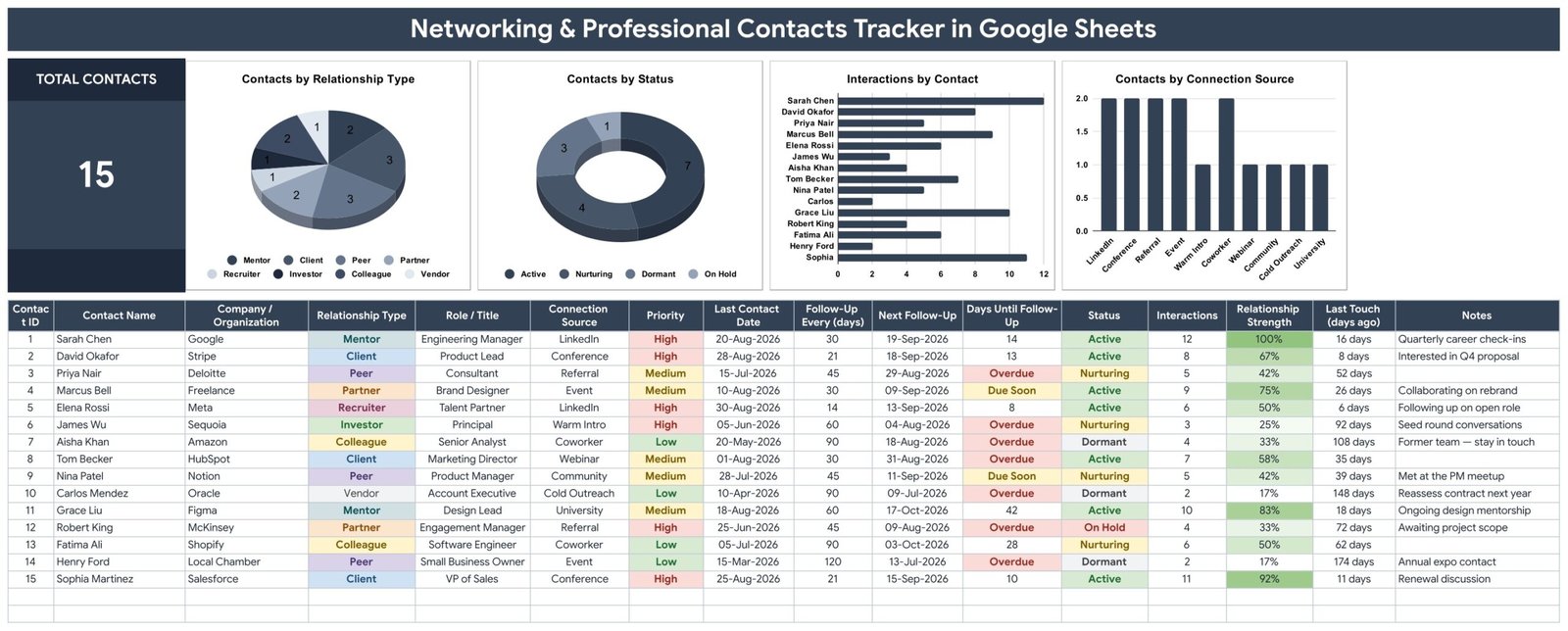
🧭 Five columns that fill themselves in. Contact ID, Next Follow-Up, Days Until Follow-Up, Relationship Strength and Last Touch (days ago) are all formulas. You type the last contact date and a follow-up interval in days; the sheet works out when the next touch is due and how long it has been since you last spoke.
🚨 An overdue warning that is impossible to miss. The Days Until Follow-Up column shows a plain number when you have time, then flips to Due Soon in amber and Overdue in red as the date passes. In the sample data, six of fifteen contacts are already overdue — exactly the people a busy professional forgets.
📈 Relationship Strength scored from real activity. Each row carries an Interactions count, and the tracker converts it into a Relationship Strength percentage with green conditional shading — 100% for Sarah Chen on 12 interactions, 17% for a vendor contacted twice. It is a fast visual read on which relationships are actually warm.
🏷️ Four dropdown columns that never need re-setup. Relationship Type, Connection Source, Priority and Status all pull from a separate List tab (rows 2-500). Add a new relationship type on the List tab and it appears in the dropdown automatically.
📊 Charts wired straight to the data. All four charts read the data columns directly using the built-in Aggregate option — there are no hidden helper tables anywhere in the file, so nothing silently breaks when you insert a row.
📦 What’s Inside the Professional Contacts Tracker in Google Sheets
Page 1: Networking Contacts Tracker Dashboard
The main page opens with a Total Contacts KPI card and four charts: Contacts by Relationship Type (eight types — Mentor, Client, Peer, Partner, Recruiter, Investor, Colleague and Vendor), Contacts by Status (Active, Nurturing, Dormant and On Hold), Interactions by Contact, and Contacts by Connection Source (LinkedIn, Conference, Referral, Event, Warm Intro, Coworker, Webinar, Community, Cold Outreach and University). Below the charts sits the 16-column contact table with colour-coded Relationship Type, Priority and Status chips.
Page 2: How to Use
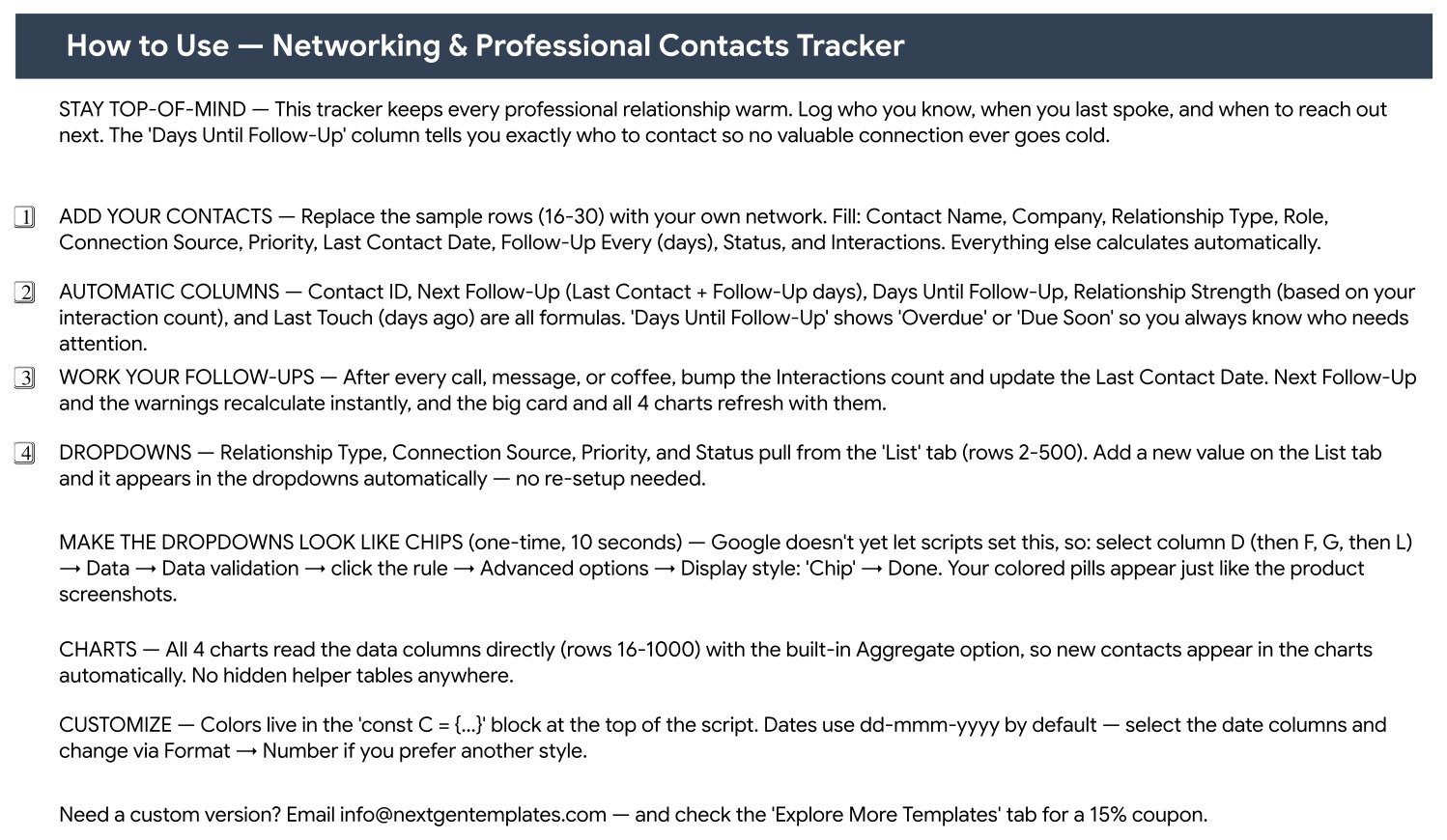
A built-in instruction tab written for this exact file. It names the sample rows to overwrite (16-30), lists which ten fields you type and which five calculate, explains the Overdue and Due Soon warnings, and walks through the one-time ten-second step that turns the dropdowns into coloured chips via Data → Data validation → Display style: Chip.
Page 3: Explore More Templates
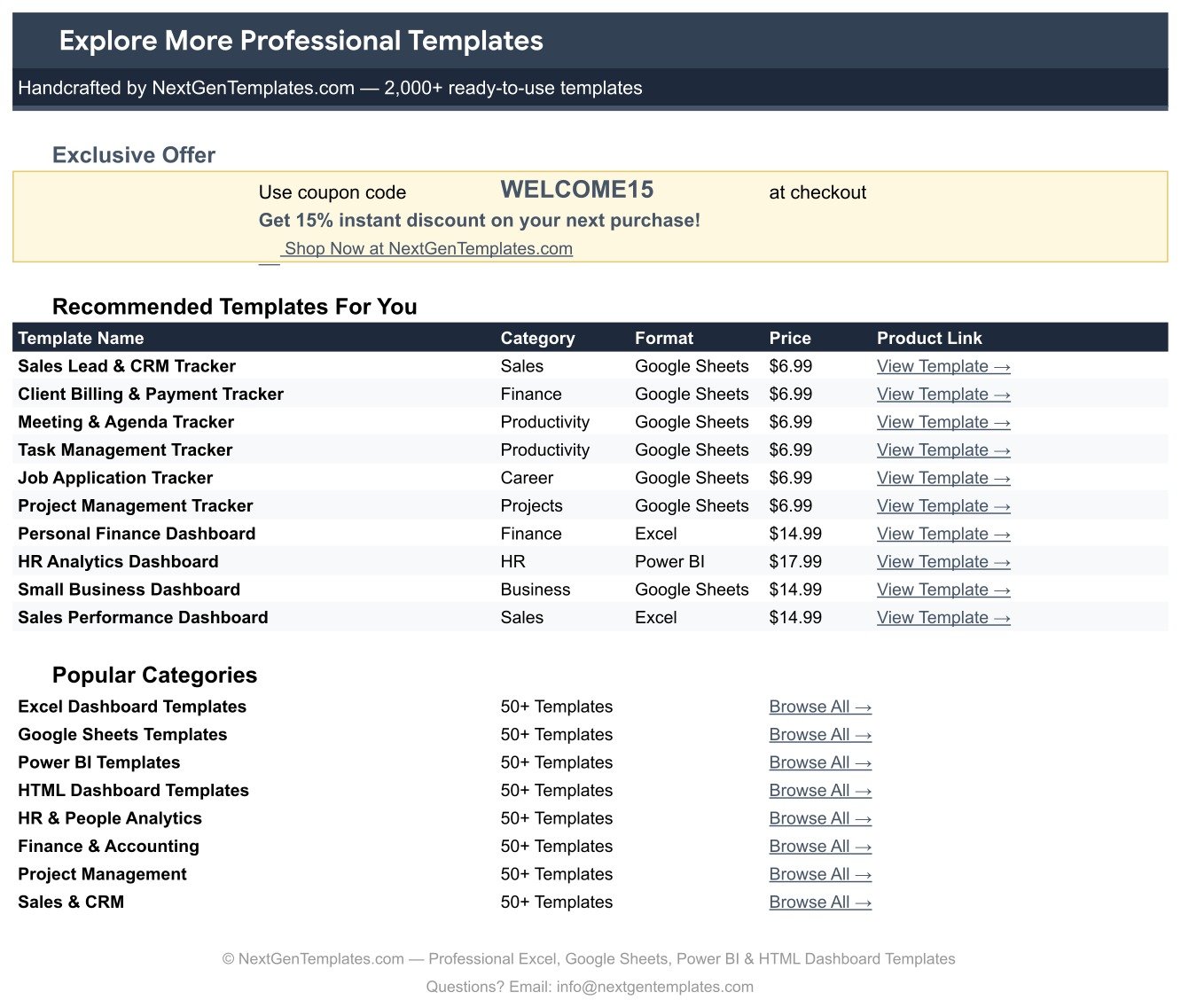
A reference tab listing other NextGenTemplates products by category, format and price, plus a WELCOME15 coupon code worth 15% off your next purchase.
📊 This Tracker vs. a Microsoft Excel Contact Sheet vs. HubSpot / Salesforce / Pipedrive
| Feature | Networking & Professional Contacts Tracker in Google Sheets | Excel contact sheet | HubSpot / Salesforce / Pipedrive |
|---|---|---|---|
| Cost | ✅ $6.99 one-time | Excel licence required | $20-165 / user / month |
| Platform | ✅ Google Sheets, any browser | Windows / Mac desktop | Web app + mobile app |
| Setup time | ✅ Under 10 minutes | Hours, built from scratch | Days, plus onboarding calls |
| Real-time collaboration | ✅ Native in Google Sheets | Only via OneDrive co-authoring | ✅ Yes |
| Mobile access | ✅ Google Sheets mobile app | Limited | ✅ Yes |
| Overdue follow-up warnings | ✅ Built in (Overdue / Due Soon) | Build the formulas yourself | ✅ Yes, with task queues |
| Editable fields and dropdowns | ✅ Fully editable List tab | ✅ Fully editable | Admin-gated on lower plans |
| Share with a link | ✅ Yes | File attachment | Seat required per viewer |
| Year-1 cost at 5 users | ✅ $6.99 total | Licence cost only | $1,200-9,900 |
For anyone who wants follow-up discipline without paying per seat for a full sales CRM, this tracker sits in the sweet spot.
👥 Who This Template Is For — and Who It’s Not For
This tracker is deliberately narrow. It manages people and follow-up timing, and it does that one job well.
✅ Built for:
- Consultants, freelancers and agency owners whose next project comes from people they already know
- Job seekers and career changers keeping mentors, recruiters and referrals warm at the same time
- Founders tracking investors, advisors and partners between funding conversations
- Business development and community managers working a relationship list of 50-800 people
❌ Not for:
- Sales teams needing deal stages, revenue forecasting and quota reporting — this tracks relationships, not pipeline value
- Anyone wanting automatic email logging, calendar sync or reminder notifications — you update the Last Contact Date yourself
- Enterprises that require SSO, audit logs or SOC 2 controls over contact data
- Excel-only workplaces where Google Drive is blocked — this file runs in Google Sheets
⚙️ How to Use the Networking Contacts Tracker
- Open the PDF included with your download and click the copy link to save the tracker to your own Google Drive.
- Replace sample rows 16-30 with your own contacts. Fill name, company, relationship type, role, connection source, priority, last contact date, follow-up interval, status and interactions.
- Let the sheet calculate Contact ID, Next Follow-Up, Days Until Follow-Up, Relationship Strength and Last Touch for you.
- Open the List tab to add your own relationship types, connection sources, priorities or statuses — dropdowns update instantly.
- Turn the dropdowns into coloured chips once: select column D, then F, G and L, and set Data validation display style to Chip.
- After each call, message or coffee, bump the Interactions count and update the Last Contact Date. Every chart refreshes with it.
💼 Real-World Use Cases
Priya is an independent brand consultant with 140 useful contacts. She sorts by Days Until Follow-Up every Monday morning, works the red Overdue rows first, and uses Relationship Strength to decide who gets a real phone call rather than a message — without paying per seat for Pipedrive.
Marcus is six months into a job search. He keeps recruiters, former managers and two mentors in the same sheet, tags each by Connection Source, and sets a 14-day follow-up interval on high-priority rows so nobody quietly goes cold.
Elena runs partnerships at a 25-person SaaS company. She shares the sheet with her co-founder over a Google Sheets link, filters the Status column to Nurturing, and reviews the Contacts by Connection Source chart each quarter to see which events actually produced relationships worth keeping.
❓ Frequently Asked Questions
What does the Professional Contacts Tracker in Google Sheets actually track?
It tracks 16 fields per contact, including relationship type, role, connection source, priority, last contact date, follow-up interval, status, interaction count and notes. Five of those columns — Contact ID, Next Follow-Up, Days Until Follow-Up, Relationship Strength and Last Touch — calculate automatically.
How many contacts can it hold?
The charts read rows 16 to 1000, so roughly 985 contacts fit without any re-setup. The 15 sample rows shipped with the file are there to be overwritten with your own network.
How long does setup take?
Under 10 minutes. Copy the sheet from the link in the included PDF, overwrite the sample rows, and optionally spend ten seconds switching the four dropdown columns to Chip display so they look exactly like the product screenshots.
How does this compare to HubSpot or Salesforce?
A paid CRM costs $20-165 per user per month and manages deals, quotas and automated sequences. This tracker is a one-time $6.99 purchase that manages people and follow-up timing. If you need revenue forecasting, buy the CRM; if you need to stop losing touch, buy this.
Is this the same as the Excel or Power BI version?
No. This is the Google Sheets edition. Any similarly named Excel workbook, Power BI report or KPI scorecard on NextGenTemplates is a separate product with its own pages, formulas and download file. Buying this one gives you the Google Sheets tracker.
Can I add my own relationship types and statuses?
Yes. Relationship Type, Connection Source, Priority and Status all read from the List tab, rows 2-500. Add a value there and it shows up in the dropdown straight away — no script editing and no data-validation rebuild required.
Do I need to know formulas to use it?
No. Every calculation in the Professional Contacts Tracker in Google Sheets is already written. You type plain values in ten columns; the tracker handles dates, percentages and the Overdue and Due Soon warnings on its own.
👤 About the Author
Built by PK — Microsoft Certified Professional with 15+ years of Excel, Google Sheets and Power BI experience. Founder of NextGenTemplates, reaching 300K+ subscribers across YouTube channels (@PKAnExcelExpert, @NextGenTemplates, @NeoTechNavigators). Every template is hand-built and tested before release.
🔗 Explore Related Templates
If you bill the people in this tracker, the Proposal & Quote Tracker in Google Sheets picks up where a warm introduction ends, and the Retainer & Recurring Client Tracker in Google Sheets keeps the ongoing relationships on the books. Job seekers usually pair this with the Job Application Tracker in Google Sheets, and freelancers with the Freelance Marketplace Gig Tracker in Google Sheets.
Prefer to plan the events where you meet people? The Business Networking Events Calendar in Excel is the desktop companion. You can also browse every Google Sheets Tracker Template or the wider Google Sheets Templates collection.
📖 Click here to read the Detailed Blog Post
🎥 Visit our YouTube channel for step-by-step video tutorials
👉 YouTube.com/@NextGenTemplates
Watch the step-by-step video Demo:
📅 Last updated: September 2026
Compatibility and Requirements
- Works in Google Sheets. You need a free Google account and a web browser.
- The Relationship Type, Connection Source, Priority and Status columns are dropdowns that read from the List tab. Google explains dropdowns in Create an in-cell dropdown list.
- You open the file by clicking the copy link in the included PDF, which saves the tracker to your own Google Drive.





























Reviews
There are no reviews yet.