

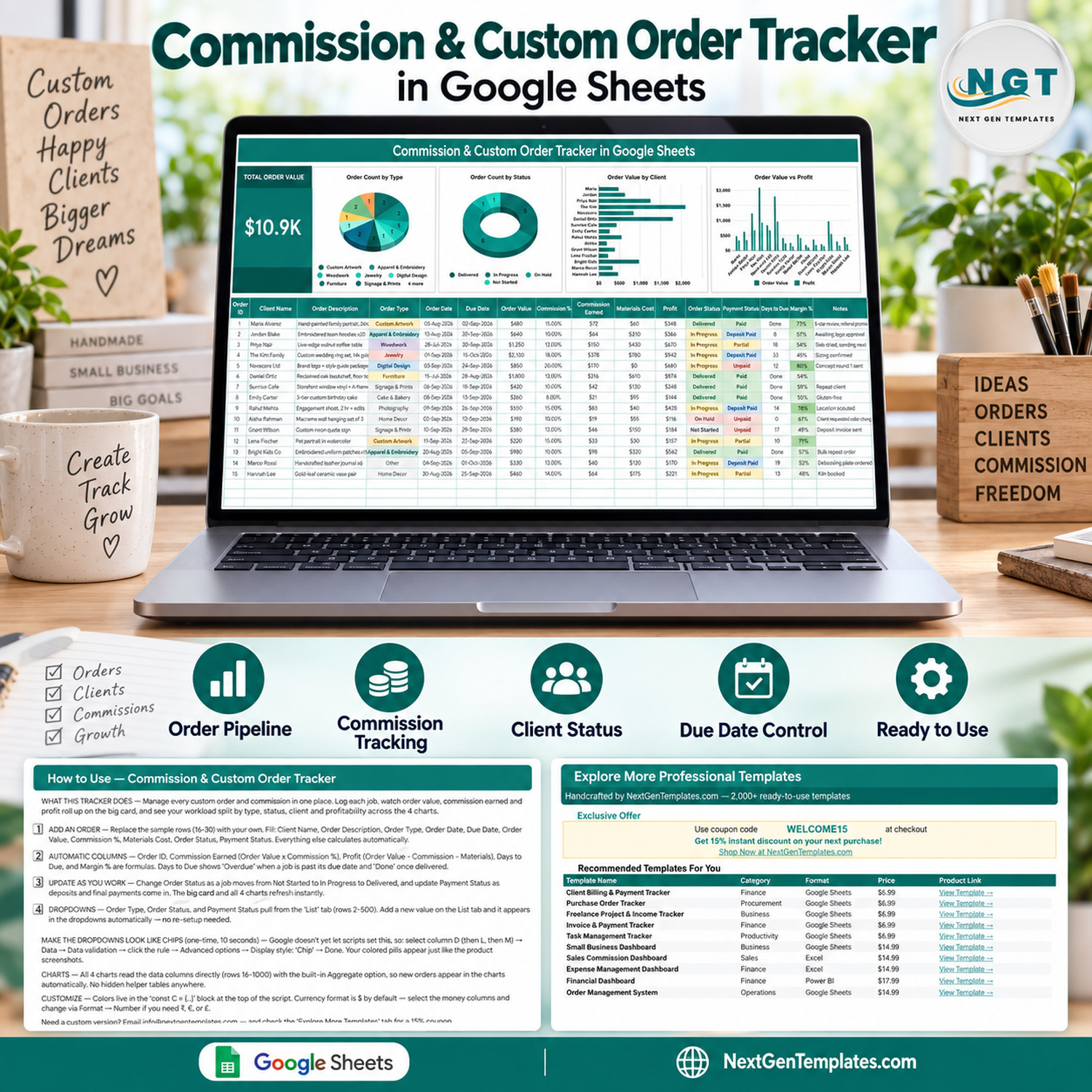
The Commission & Custom Order Tracker in Google Sheets logs every commissioned job on one page: 16 tracked columns, 1 headline KPI card, 4 live charts and 5 formula columns that calculate themselves. The sample file ships with 15 filled example orders worth $10.9K in total order value, so you can see every formula working before you type a thing. Setup takes under 10 minutes — open the “Make a copy” link in the PDF, clear the sample rows, start logging.
This commission and custom order tracker is built for makers, artists, crafters and freelancers who take bespoke work: a portrait commission, an embroidered hoodie run, a live-edge walnut table, a wedding ring set. It keeps the request, the deposit, the due date, the materials cost and the real profit on one row instead of spread across a notebook, a chat thread and a bank app.
Think of it as a custom order tracking spreadsheet and a commission tracker for makers in one file — a Google Sheets tracker that replaces the notebook, the reminder app and the shoebox of receipts.
🌍 Join 8,400+ teams in 40+ countries using NextGenTemplates to replace paid SaaS tools with one-time-purchase Excel, Google Sheets, Power BI and HTML templates.
✅ Instant download · One-time payment · No subscription · No per-user fees · Lifetime access
🔑 Key Features of the Commission and Custom Order Tracker
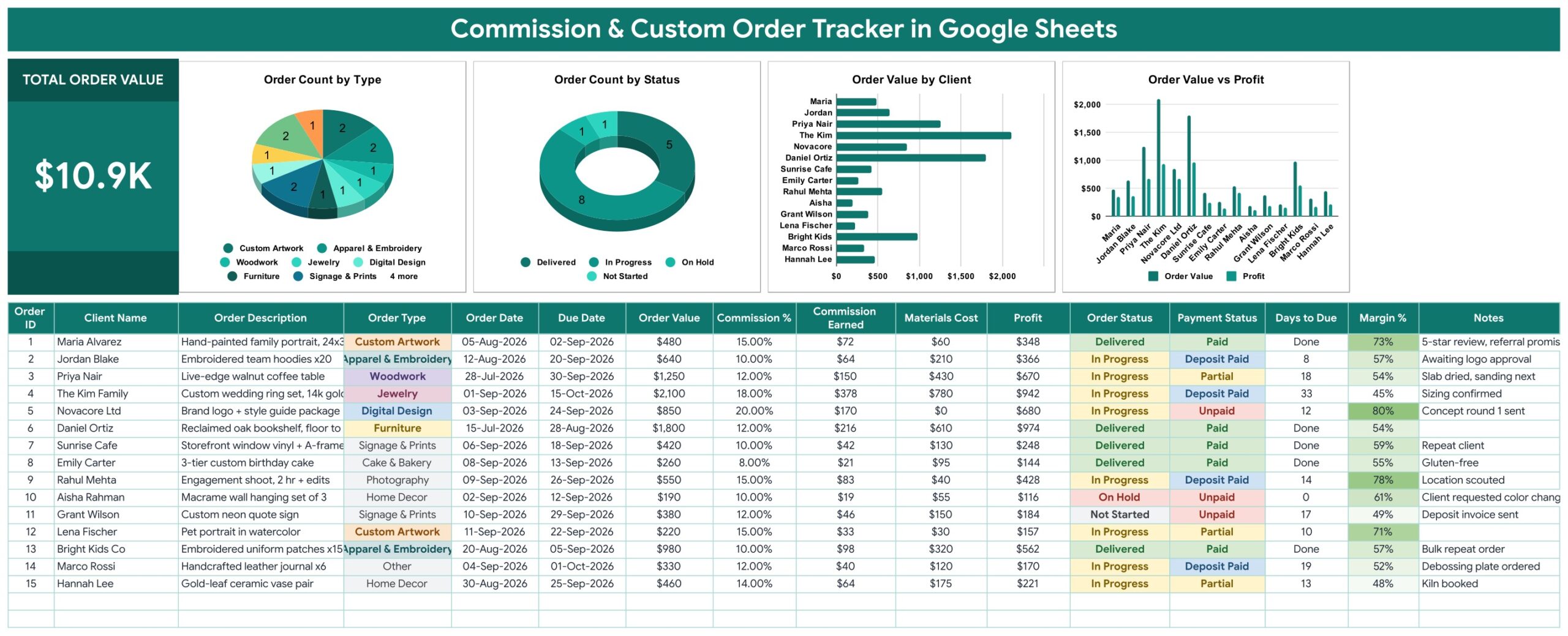
🧾 One row per commission, 16 columns wide. The commission and custom order tracker records Order ID, Client Name, Order Description, Order Type, Order Date, Due Date, Order Value, Commission %, Commission Earned, Materials Cost, Profit, Order Status, Payment Status, Days to Due, Margin % and Notes. You fill ten of them; the other six look after themselves.
🧮 Five columns calculate themselves. Order ID numbers each new job, Commission Earned is Order Value × Commission %, Profit is Order Value − Commission Earned − Materials Cost, Margin % turns that into a percentage, and Days to Due counts down to the deadline — showing “Overdue” once a job is past its due date and “Done” once it is delivered.
📊 Four charts wired straight to the data. Order Count by Type, Order Count by Status, Order Value by Client and Order Value vs Profit all read the data columns directly (rows 16 to 1000) using the built-in Aggregate option. There are no hidden helper tables anywhere in the file, so a new order appears in every chart the moment you type it.
💵 One headline KPI card. Total Order Value sits beside the charts and rolls up every logged job. In the shipped sample data it reads $10.9K.
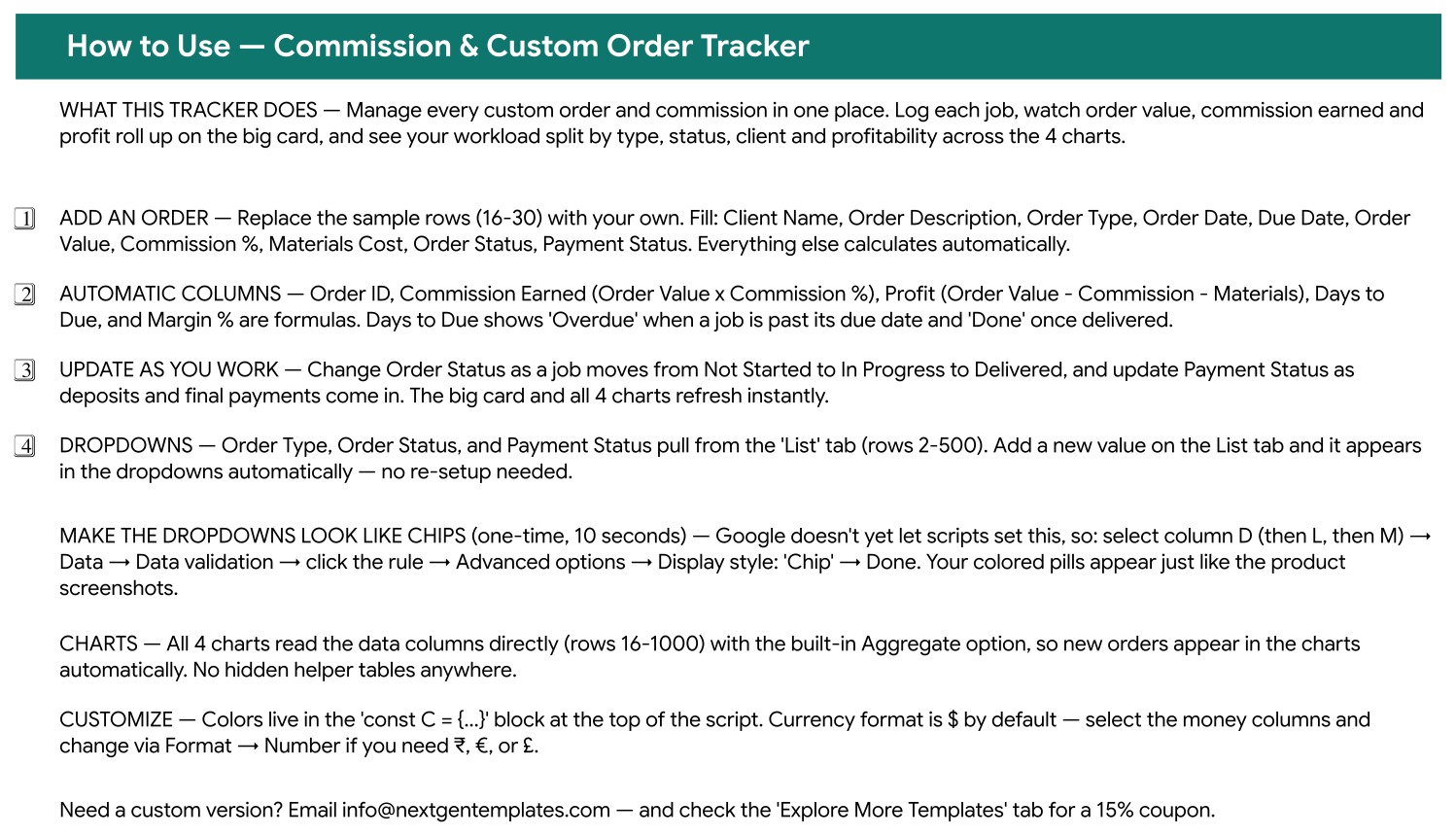
🔽 Dropdowns that grow with your business. Order Type, Order Status and Payment Status pull from a separate List tab (rows 2 to 500). Add “Leatherwork” or “Resin Art” to that tab and it appears in the dropdown automatically — no data-validation re-setup. The shipped lists cover Custom Artwork, Apparel & Embroidery, Woodwork, Jewelry, Digital Design, Furniture, Signage & Prints, Cake & Bakery, Photography, Home Decor and Other.
🚦 Two status tracks, kept apart. Order Status runs Not Started → In Progress → Delivered, with On Hold for stalled jobs. Payment Status runs Unpaid → Deposit Paid → Partial → Paid. A piece can be Delivered and still Unpaid, and the tracker shows you exactly that.
🎨 Recolour it in one place. Every colour lives in a single const C block at the top of the build script. Currency is formatted as $ by default; select the money columns and switch to ₹, € or £ via Format → Number.
📦 What Is Inside the Commission & Custom Order Tracker
Page 1: Commission & Custom Order Tracker
The working page. A Total Order Value KPI card sits on the left, followed by four charts — Order Count by Type, Order Count by Status, Order Value by Client and Order Value vs Profit — and beneath them the 16-column data-entry table with coloured dropdown chips for Order Type, Order Status and Payment Status.
Page 2: How to Use
A built-in instruction sheet covering what to type, which columns are formulas, how the List tab feeds the dropdowns, the one-time 10-second step that turns the dropdowns into coloured chips, and where to change the colours and the currency.
Page 3: Explore More Templates
A curated list of related NextGenTemplates spreadsheets with categories, formats and direct links, plus a WELCOME15 coupon for 15% off your next purchase.

A fourth List tab holds the dropdown values for Order Type, Order Status and Payment Status. Your download is a PDF that carries the “Make a copy” link — one click and the whole file lands in your own Google Drive.
📊 Commission & Custom Order Tracker vs. a Microsoft Excel Order Workbook vs. Paid Maker SaaS
| Feature | Commission & Custom Order Tracker in Google Sheets | Microsoft Excel order workbook | Craftybase / Order Desk |
|---|---|---|---|
| Cost | $6.99 one-time ✅ | $0–$40 one-time, plus an Office licence | $29–$99 per month |
| Platform | Any browser, any device, free Google account ✅ | Desktop Excel on Windows or Mac | Vendor web app |
| Setup time | Under 10 minutes ✅ | 15–45 minutes | Hours — account, catalogue and integration setup |
| Real-time team collaboration | Yes, native Google Sheets sharing ✅ | Only via OneDrive co-authoring | Yes ✅ |
| Mobile access | Google Sheets mobile app ✅ | Limited on mobile Excel | Yes ✅ |
| Customisable order types | Add a row on the List tab ✅ | Edit every data-validation rule by hand | Fixed to the vendor taxonomy |
| Share with a link | Yes, view or edit link ✅ | File attachment or OneDrive link | Seat-based invite |
| Deposit vs. final payment tracking | Four-step Payment Status column ✅ | Build it yourself | Yes ✅ |
| Takes payments / issues invoices | No — tracking only | No | Yes ✅ |
| Year-1 cost at 5 users | $6.99 total ✅ | $0–$40 plus Office licences | $1,740–$5,940 |
For makers who want deposits, due dates and real per-job profit visible in one place without paying a monthly platform fee, the Commission and Custom Order Tracker sits in the sweet spot.
👥 Who This Template Is For — and Who It Is Not For
✅ This template is built for:
- Artists, illustrators and portrait painters taking commission work
- Crafters and makers — woodworkers, jewellers, embroiderers, leatherworkers, ceramicists
- Bakers and cake decorators juggling custom orders with hard delivery dates
- Freelance photographers, designers and signmakers who quote per project
- Studios of 1–5 people who want one shared sheet instead of five notebooks
❌ This template is NOT for:
- Anyone who needs to take payments or issue invoices — this tracker records what was agreed and what has been paid; it does not process money and it does not generate an invoice document
- Sellers who want orders pulled in automatically — it does not connect to Etsy, Shopify, PayPal, Stripe or any other storefront. Every row is typed in by you
- Teams needing per-user permissions, audit logs or SSO — Google Sheets sharing is all you get
- Anyone who cannot use a Google account, or who needs an offline desktop file with macros — this is a browser-based Google Sheets file with no macros and no add-ons
- Workshops needing raw-material inventory and batch costing — Materials Cost here is a single figure you enter per order
⚙️ How to Use the Commission and Custom Order Tracker
- Open the PDF in your download and click the “Make a copy” link. The file is created in your own Google Drive.
- Open the List tab and edit the Order Type, Order Status and Payment Status values to match your craft.
- One time, 10 seconds: select column D, then L, then M, and set Data → Data validation → Advanced options → Display style: Chip to get the coloured pills shown in the screenshots.
- Replace the 15 sample rows (16–30) with your own orders. Fill Client Name, Order Description, Order Type, Order Date, Due Date, Order Value, Commission %, Materials Cost, Order Status and Payment Status.
- Leave Order ID, Commission Earned, Profit, Days to Due and Margin % alone — they are formulas.
- Update Order Status as a job moves from Not Started to In Progress to Delivered, and Payment Status as the deposit and the balance land. The KPI card and all four charts refresh instantly.
- Scan the Days to Due column each morning. “Overdue” means the promised date has passed and the job is not yet delivered.
💼 Real-World Use Cases
Maria paints commissioned family portraits. She logs each enquiry the day it arrives, sets the Due Date from the agreed delivery week, and marks Payment Status as Deposit Paid once the holding fee clears. The Margin % column showed her that large canvases carry a framing cost that quietly halves her profit, so she now quotes materials separately.
Daniel builds reclaimed-oak furniture in a two-person workshop. He and his partner share one copy of the tracker. Order Value vs Profit tells them which pieces are worth the bench time, and Order Count by Status tells them, at a glance, how many builds are already In Progress before they accept another booking.
Emily runs a home cake business. Every custom cake goes in with an Order Date and a Due Date, and Days to Due gives her a running countdown. Order Value by Client showed her that three repeat clients account for a third of her revenue — which is who her loyalty discount now goes to.
❓ Frequently Asked Questions
What does the Commission and Custom Order Tracker actually track?
The Commission and Custom Order Tracker records 16 columns per job: client, description, order type, order and due dates, order value, commission percentage and amount, materials cost, profit, order status, payment status, days to due, margin percentage and free-text notes. Five of those columns are automatic formulas.
How long does setup take?
Under 10 minutes. Click the “Make a copy” link in the PDF, edit the List tab to your own order types, apply the one-time chip display setting to three columns, and replace the 15 sample rows with your own. The Commission & Custom Order Tracker is live from there.
Does it connect to Etsy, Shopify or PayPal?
No. The Commission & Custom Order Tracker in Google Sheets is a manual tracking sheet — it does not sync orders from any storefront, it does not take payments and it does not issue invoices. You type each order in, which is exactly what makes it work for word-of-mouth and direct-message commissions that never touch a marketplace.
Can I add my own order types?
Yes. Order Type, Order Status and Payment Status all read from the List tab, rows 2 to 500. Type a new value there and it appears in the dropdown immediately — there are no data-validation rules to rebuild. The shipped list already covers 11 craft categories.
How does this compare to Craftybase or Order Desk?
Those platforms cost $29–$99 a month and add inventory, invoicing and marketplace sync. The Commission and Custom Order Tracker is a one-time Google Sheets file covering the order pipeline, deposits, due dates and per-job profit. If you do not need automated invoicing, the tracker does the job for roughly the price of a single SaaS day.
Do I need Excel or macros?
Neither. This is a browser-based Google Sheets file with no macros and no add-ons. You need a free Google account and any modern browser — Windows, Mac, Chromebook, tablet or phone all work.
How many orders can it hold?
The charts and the formula columns are wired to rows 16 through 1000, so roughly 985 orders in the shipped range. The dropdown lists on the List tab run to row 500.
👤 About the Author
Built by PK — Microsoft Certified Professional with 15+ years of Excel, Google Sheets and Power BI experience. Founder of NextGenTemplates, reaching 300K+ subscribers across YouTube channels (@PKAnExcelExpert, @NextGenTemplates, @NeoTechNavigators). Every template is hand-built and tested before release.
🔗 Explore Related Templates
- Print-on-Demand Sales Tracker in Google Sheets — for the merch side of a maker business, where orders are fulfilled by a print partner rather than by hand.
- Sponsorship & Brand Deal Tracker in Google Sheets — track paid collaborations and their deliverables alongside your commission work.
- Digital Product Sales Tracker in Google Sheets — for the prints, patterns and downloads you sell off the shelf.
- Affiliate Marketing Income Tracker in Google Sheets — a second income stream, tracked the same way.
Browse the full Google Sheets template library or jump straight to the Google Sheets Trackers collection. New to spreadsheet dropdowns? Google’s own guides on data validation and dropdown lists and building charts in Sheets explain the mechanics this tracker is built on.
📖 Click here to read the Detailed Blog Post
🎥 Visit our YouTube channel for step-by-step video tutorials
👉 YouTube.com/@NextGenTemplates
Watch the step-by-step video Demo:
📅 Last updated: September 2026

































Reviews
There are no reviews yet.