

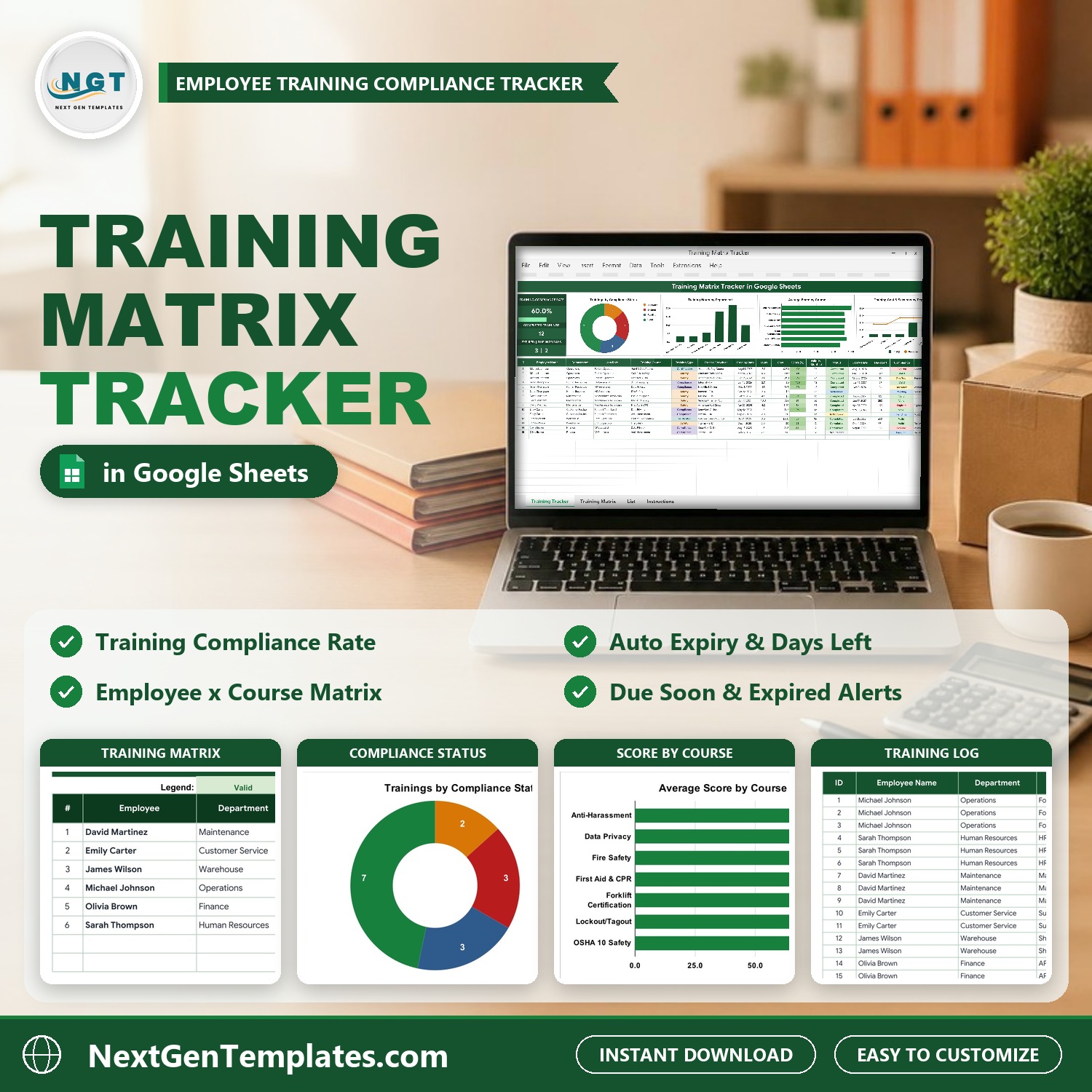

The Training Matrix Tracker in Google Sheets is a one-page employee training tracker with a matrix that builds itself. Log each training once and the sheet works out the expiry date, the days left and a compliance status of Valid, Due Soon, Expired or Pending. Three live cards show your Training Compliance Rate, Completed Trainings and how many records are Expired or Due in 30 days, four charts summarise hours, scores, cost and status, and a second tab turns the log into a colour-coded employee x course training matrix. It ships with 15 sample records for 6 employees and 7 courses, and setup takes about 10 minutes.
Watch the Training Matrix Tracker in Google Sheets walkthrough
🌍 Join 8,400+ teams in 40+ countries using NextGenTemplates to replace paid SaaS tools with one-time-purchase Excel, Google Sheets, Power BI and HTML templates.
✅ Instant download · One-time payment · No subscription · No per-user fees · Lifetime access
This is part of our one-page Google Sheets tracker line: KPI cards and four charts on top, a data-entry log underneath, plus an automatic Training Matrix tab. It is not a multi-page analytics dashboard. If you want month-by-month training analytics across several pages, see the Corporate Training Dashboard in Google Sheets.
🔑 Key Features of the Training Matrix Tracker
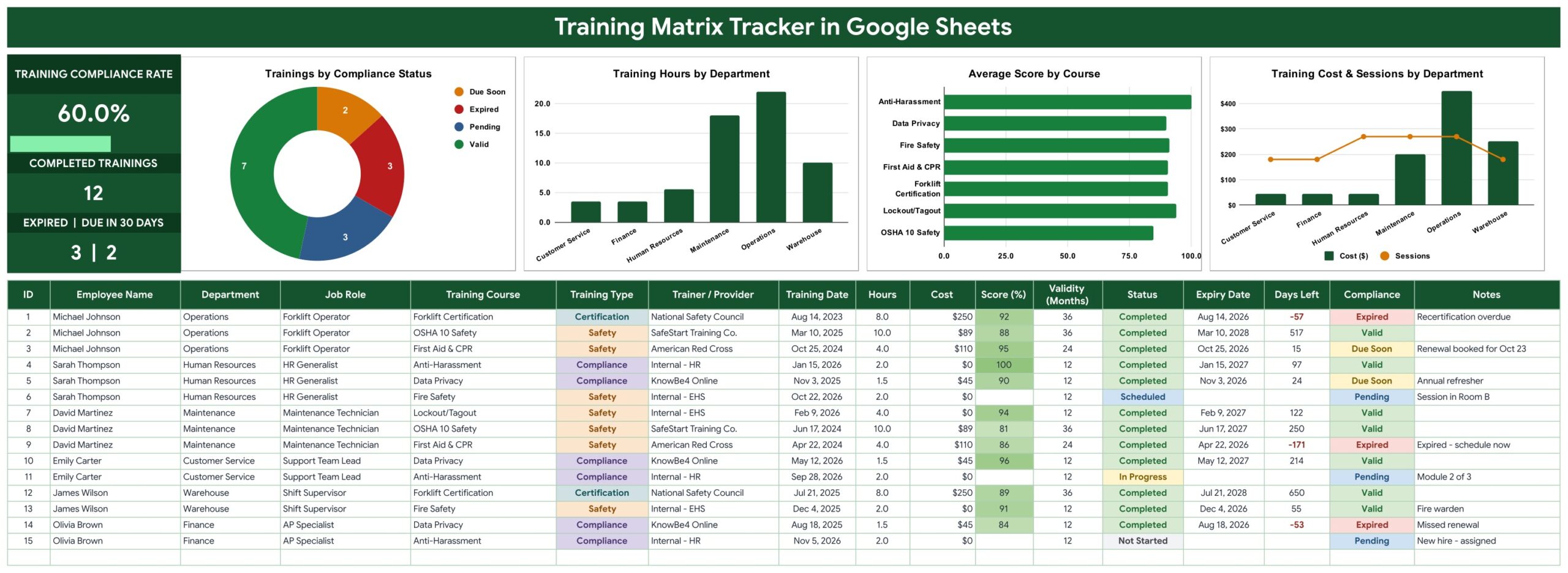
📈 Three live KPI cards. Training Compliance Rate (with a progress bar) shows the share of training records that are Valid or Due Soon. Completed Trainings counts every record with Status Completed. The third card puts Expired and Due in 30 Days side by side, so you see the renewals that need attention today. The sample reads 60.0%, 12 and 3 | 2.
🧮 Automatic expiry and compliance. You enter the Training Date and Validity (Months); the sheet calculates the Expiry Date, the Days Left (negative once a certificate has expired) and the Compliance status. Only a Completed training counts, anything expiring within 30 days turns amber as Due Soon, and Scheduled, In Progress or Not Started trainings show as Pending. Leave Validity blank or 0 for courses that never expire.
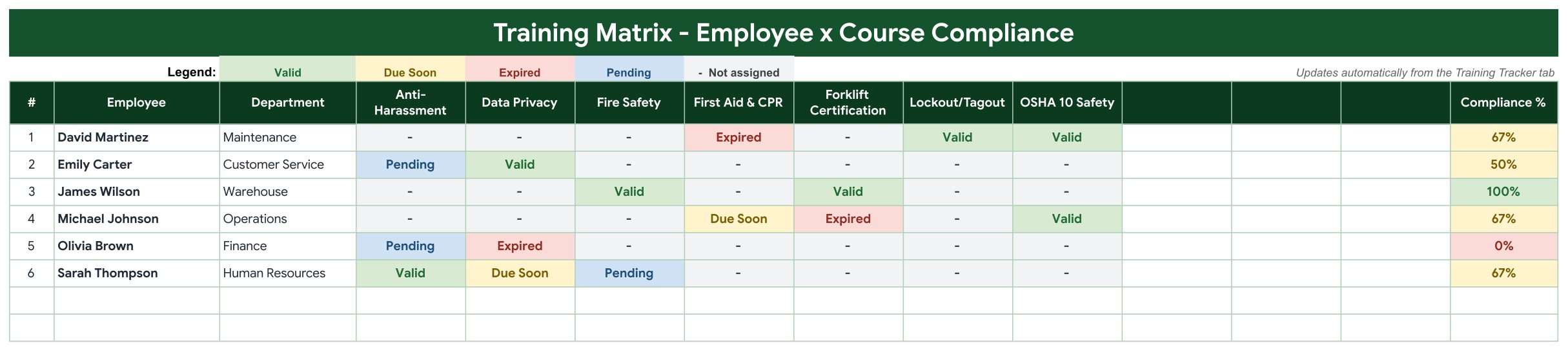
🟩 A training matrix that builds itself. The Training Matrix tab lists one row per employee and one column per course, with every cell coloured Valid, Due Soon, Expired or Pending, and a dash where the course is not assigned. A Compliance % column shows each person’s Valid + Due Soon courses out of their assigned courses. It shows up to 10 courses side by side.
📊 Four charts. Trainings by Compliance Status (donut), Training Hours by Department, Average Score by Course and Training Cost & Sessions by Department (cost columns with a sessions line). They read an auto summary calculated from your records.
🔽 Dropdowns that grow. Department, Training Course, Training Type and Status pull from the List tab (rows 2 to 500). Add a new course there and it appears in the dropdown and in the matrix. See Google’s guide to in-cell dropdown lists.
📦 What’s Inside the Training Matrix Tracker
The file has five tabs: Training Tracker, Training Matrix, List, Instructions and Explore More Templates. The download is a PDF guide that carries the “Make a copy” link to your own editable Google Sheet.
Page 1: Training Tracker
The KPI column on the left, the four charts beside it, and the 17-column training log below: ID, Employee Name, Department, Job Role, Training Course, Training Type, Trainer / Provider, Training Date, Hours, Cost, Score (%), Validity (Months), Status, Expiry Date, Days Left, Compliance and Notes. ID, Expiry Date, Days Left and Compliance are formulas.
Page 2: Training Matrix – Employee x Course Compliance
The employee training matrix: Employee, Department, one column per course (Anti-Harassment, Data Privacy, Fire Safety, First Aid & CPR, Forklift Certification, Lockout/Tagout and OSHA 10 Safety in the sample, with three spare course columns) and Compliance %. A legend explains the colours, and the grid updates automatically from the Training Tracker tab.
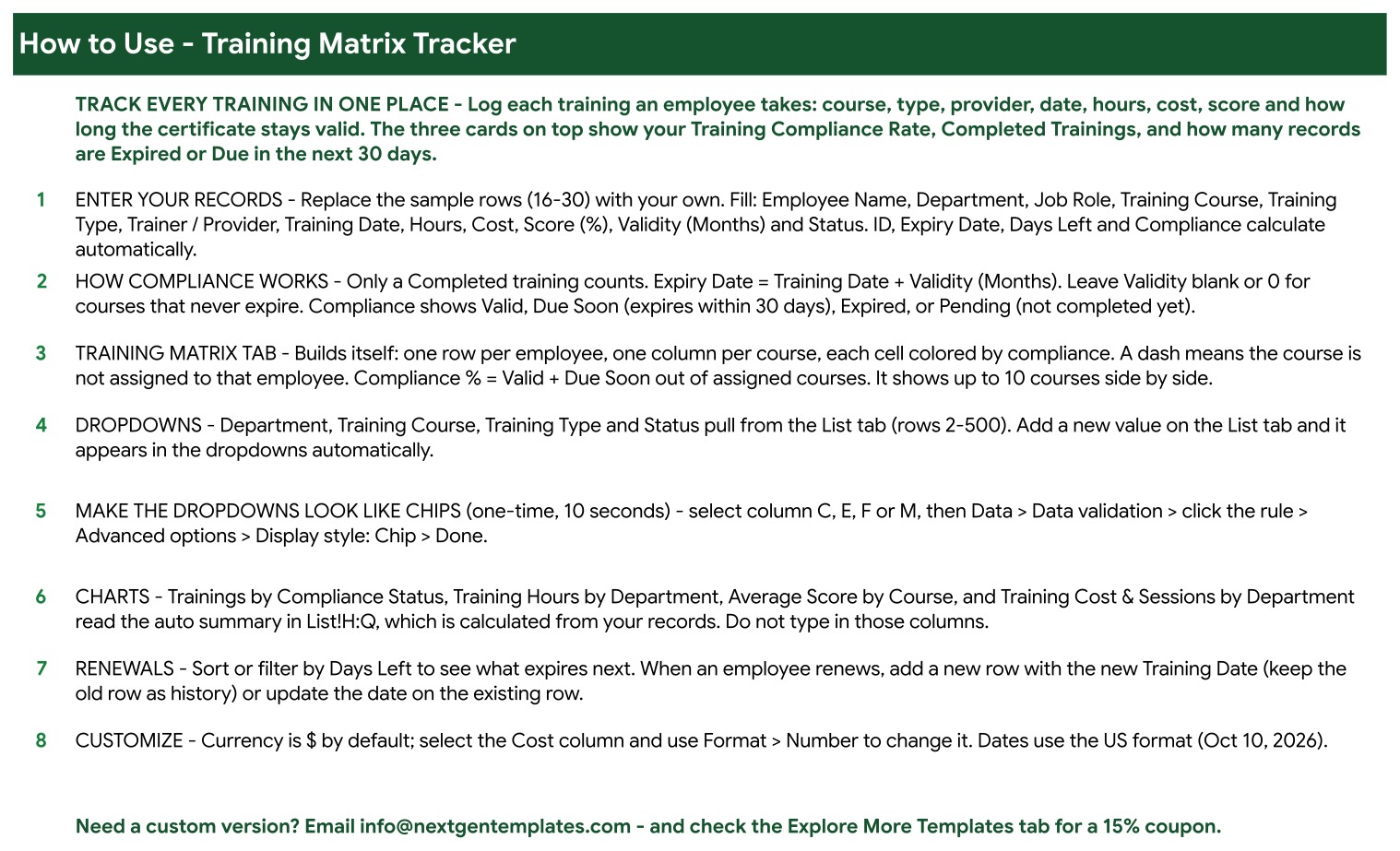
Page 3: Instructions
A built-in How to Use page: entering records, how compliance works, the matrix tab, dropdowns, chip-style dropdowns, the charts, handling renewals and changing the currency.
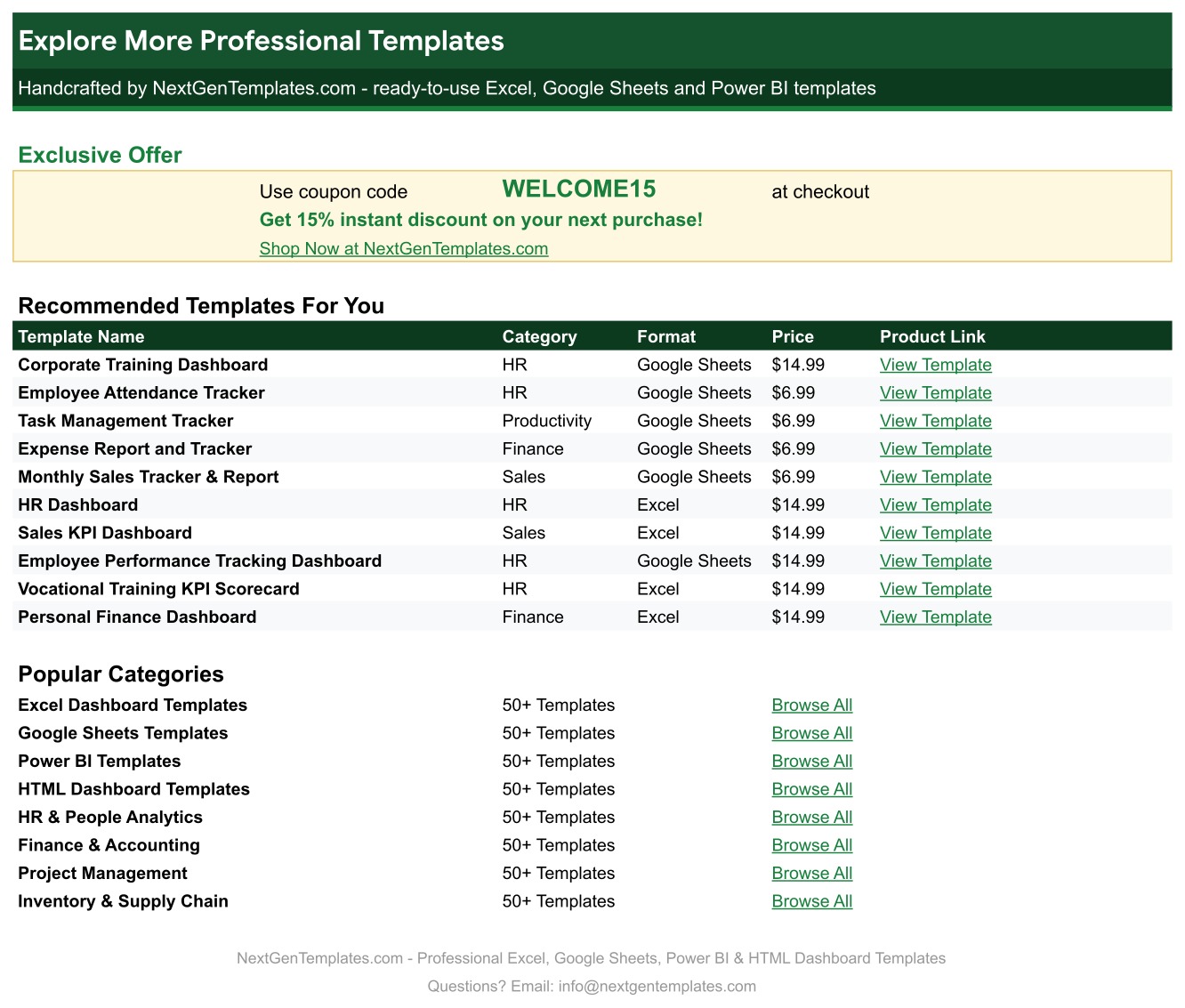
Page 4: Explore More Templates
Recommended templates and popular categories, plus a WELCOME15 coupon for 15% off your next purchase. The List tab, not pictured, holds the Department, Training Course, Training Type and Status values.
📊 Training Matrix Tracker vs. Excel Template vs. LMS / Training Software: Where This Fits
| Feature | Training Matrix Tracker (Google Sheets) | Training matrix template in Excel | LMS / training management software |
|---|---|---|---|
| Cost | ✅ $6.99 one-time | One-time, plus an Excel licence | Monthly subscription, usually per user |
| Platform | ✅ Any browser, free Google account | Excel desktop or Microsoft 365 | Web app |
| Setup time | ✅ About 10 minutes | About 10 minutes | Days to weeks of configuration |
| Real-time team collaboration | ✅ Yes, Google Sheets sharing | Limited outside OneDrive | ✅ Yes, per seat |
| Mobile access | ✅ Google Sheets app | Excel app | ✅ Web / app |
| Automatic expiry and days left | ✅ Built in | Build it yourself | ✅ Yes |
| Employee x course matrix | ✅ Builds itself from the log | Often typed by hand | ✅ Yes |
| Customizable fields | ✅ Every column and dropdown | ✅ Yes | Fixed by the vendor |
| Course delivery and quizzes | No, records only | No | ✅ Yes |
For HR and safety teams that need to know who is trained, who is due and who has expired, without paying for a full LMS, this tracker sits in the sweet spot.
👥 Who This Template Is For, and Who It’s Not For
✅ This template is built for:
- HR teams and office managers tracking mandatory training for small and mid-sized teams
- Safety coordinators managing certifications such as forklift, first aid or lockout/tagout renewals
- Team leads who want a simple training matrix template they can share with a link
❌ This template is NOT for:
- Organisations that need to deliver online courses, quizzes or e-signatures (that is an LMS)
- Teams that need certificates synced automatically from an external training provider
⚙️ How to Use the Training Matrix Tracker in Google Sheets
- Open the PDF in your download and click the link to make your own copy in Google Drive.
- Check the Department, Training Course, Training Type and Status lists on the List tab and add your own values.
- Replace sample rows 16 to 30 with your records: employee, department, job role, course, type, provider, training date, hours, cost, score, validity and status.
- Watch the Compliance column: Due Soon (amber) and Expired (red) rows are the renewals to book.
- Open the Training Matrix tab to see each employee’s compliance across every course.
- When someone renews, add a new row with the new Training Date (keep the old row as history) or update the date on the existing row.
💼 Real-World Use Cases
A warehouse safety coordinator with 40 staff logs forklift, first aid and fire safety certificates. Sorting by Days Left every Monday shows which certificates expire in the next month, so renewals are booked before anyone drives a forklift with an expired licence.
An HR generalist at a growing office uses the Training Matrix tab before an audit. One glance shows who is at 100% and who still has Pending or Expired courses, and the Compliance % column becomes the follow-up list.
A maintenance manager compares Training Hours by Department and Training Cost & Sessions by Department when planning next year’s training budget.
❓ Frequently Asked Questions
What does the Training Matrix Tracker calculate?
For each record it calculates the ID, Expiry Date (Training Date plus Validity in months), Days Left and a Compliance status. On top it shows the Training Compliance Rate, Completed Trainings and the Expired and Due in 30 Days counts, and the Training Matrix tab works out a Compliance % per employee.
How is compliance worked out?
Only a Completed training counts. If its expiry date has passed it is Expired; if it expires within 30 days it is Due Soon; otherwise it is Valid. Trainings that are Scheduled, In Progress or Not Started show as Pending. Days Left counts from today, so the statuses update on their own as time passes.
Is this a training matrix template or an employee training tracker?
Both. The Training Tracker tab is the employee training tracker where you log every course, and the Training Matrix tab is the employee training matrix built automatically from that log.
How many courses can the matrix show?
Up to 10 courses side by side. The sample uses 7, so three course columns are ready for new courses added on the List tab.
Does it send expiry reminders by email?
No. The tracker flags Due Soon and Expired records with colours and the Days Left column, but it does not send emails. Sort or filter by Days Left to see what expires next.
Can I use it as a training tracker in Google Sheets for my whole team?
Yes. Share the sheet with your team like any Google Sheet, and everyone with edit access can add records at the same time.
Can I change the currency?
Yes. Currency is US dollars by default. Select the Cost column and use Format, Number to switch to any other currency.
👤 About the Author
Built by PK, Microsoft Certified Professional with 15+ years of Excel, Google Sheets and Power BI experience. Founder of NextGenTemplates, reaching 300K+ subscribers across YouTube channels (@PKAnExcelExpert, @NextGenTemplates, @NeoTechNavigators). Every template is hand-built and tested before release.
🔗 Explore Related Templates
📌 Corporate Training Dashboard in Google Sheets: multi-page training analytics.
📌 Vocational Training Dashboard in Google Sheets: analytics for training programmes and institutes.
📌 Training Schedule Request Tracker in Excel: collect and schedule training requests.
📌 Employee Performance Tracking Dashboard in Google Sheets: pair training with performance.
Browse every Google Sheets template in the store.
📖 Click here to read the Detailed Blog Post
🎥 Visit our YouTube channel for step-by-step video tutorials
👉 YouTube.com/@NextGenTemplates
📅 Last updated: October 2026

































Reviews
There are no reviews yet.