

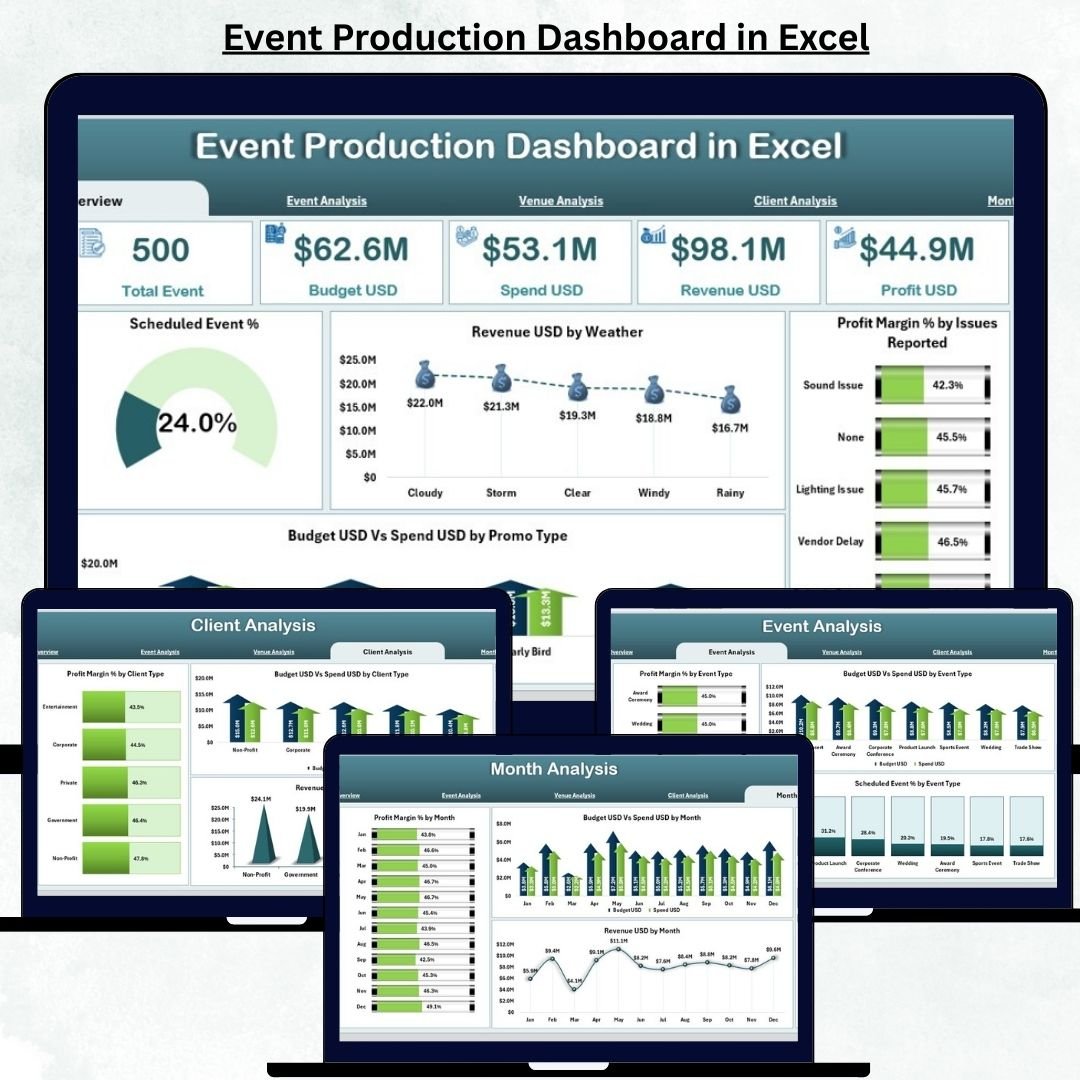

Event planning is a high-pressure workflow where multiple actions happen at the same time—budgeting, scheduling, vendor coordination, venue setup, marketing, reporting, and client communication. When teams try to manage all this in different spreadsheets, they waste time and lose clarity. The Event Production Dashboard in Excel solves this problem completely.
This ready-to-use Excel solution brings together all event performance metrics into one organized and interactive file. It helps you track profit margins, budgets, revenue, client insights, venue performance, and monthly event trends with just a few clicks. Because the dashboard uses Excel, anyone—event organizers, agencies, freelancers, or marketing teams—can use it without learning new tools.
Whether you manage weddings, conferences, exhibitions, concerts, corporate events, or promotional activities, this dashboard gives you real-time visibility and helps you make smarter decisions for every event.
📦 What’s Inside the Event Production Dashboard in Excel
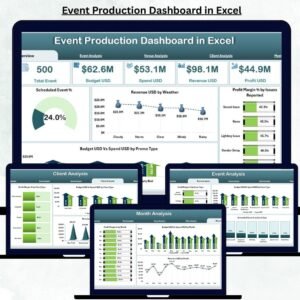
This dashboard contains five analytical pages and one support sheet, all connected through a Page Navigator. Each page focuses on a different area of event management, helping you study your operations with complete clarity.
⭐ 1. Overview Page – Your Complete Event Snapshot
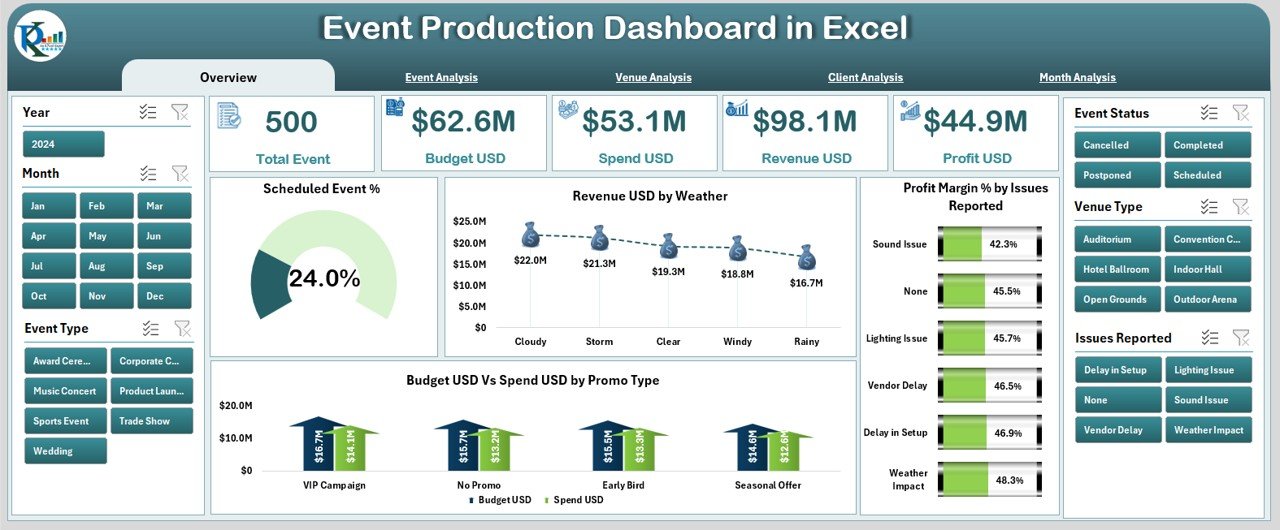
The Overview Page acts as the command center of the dashboard. It shows the key metrics needed to evaluate event success.
This page includes:
Right-side slicer for filtering
5 summary cards to show top KPIs
4 detailed charts to analyze event performance
Charts Displayed:
Scheduled Event %
Revenue (USD) by Weather
Profit Margin % by Issues Reported
Budget USD vs Spend USD vs Promo Type
This page helps you quickly understand how well your events are performing, which issues are impacting profit, and how marketing spend influences revenue.
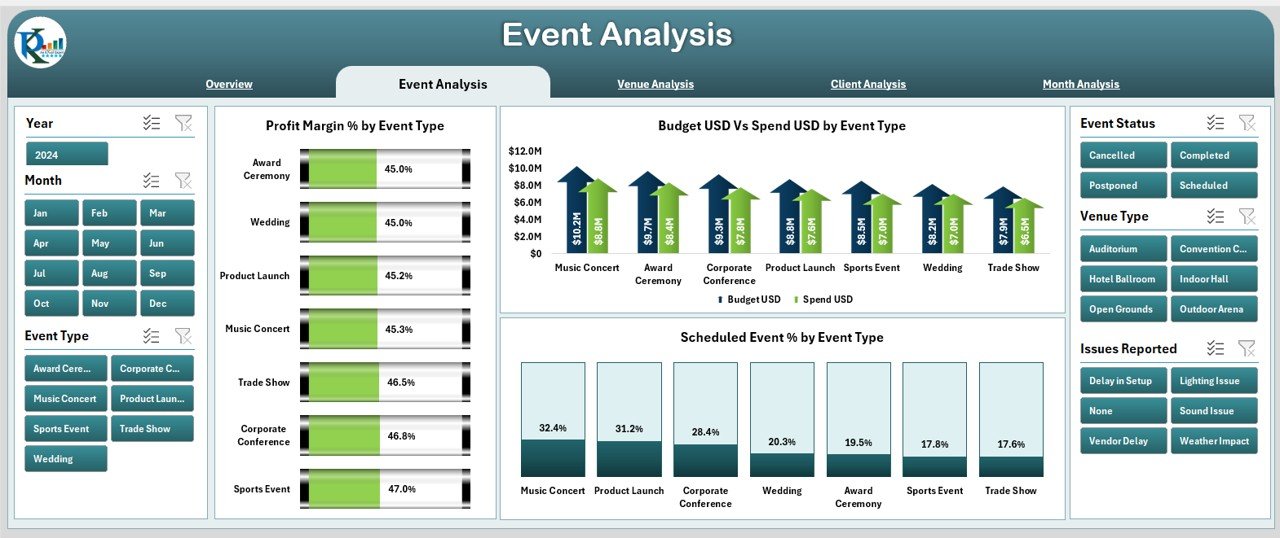
⭐ 2. Event Analysis Page – Compare Event Types Easily
This page provides deep insights into event-type performance, helping you identify strengths and improvement areas.
Charts on this page include:
Profit Margin % by Event Type
Budget vs Spend by Event Type
Scheduled Event % by Event Type
With this information, you can understand which events deliver high profit, where overspending happens, and which categories need better planning.
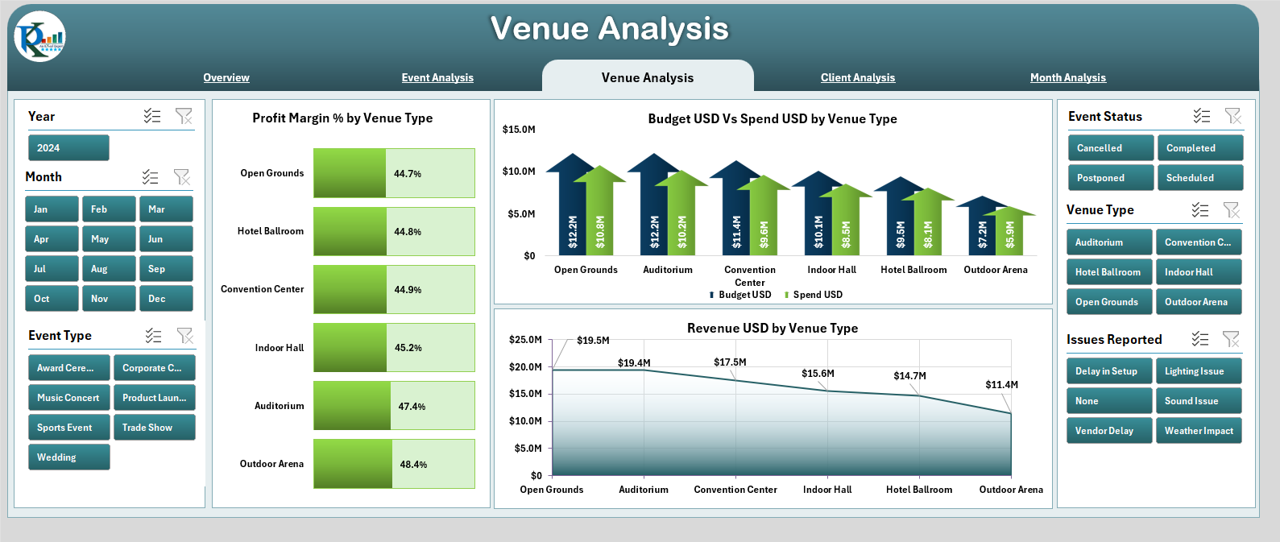
⭐ 3. Venue Analysis Page – Evaluate Venue Performance
Venues play a major role in event cost, revenue, and customer experience. This page compares the performance of different venue types.
It includes:
Profit Margin % by Venue Type
Budget vs Spend by Venue Type
Revenue (USD) by Venue Type
This helps you choose top-performing venues, negotiate strategically, and avoid costly or low-performing locations.
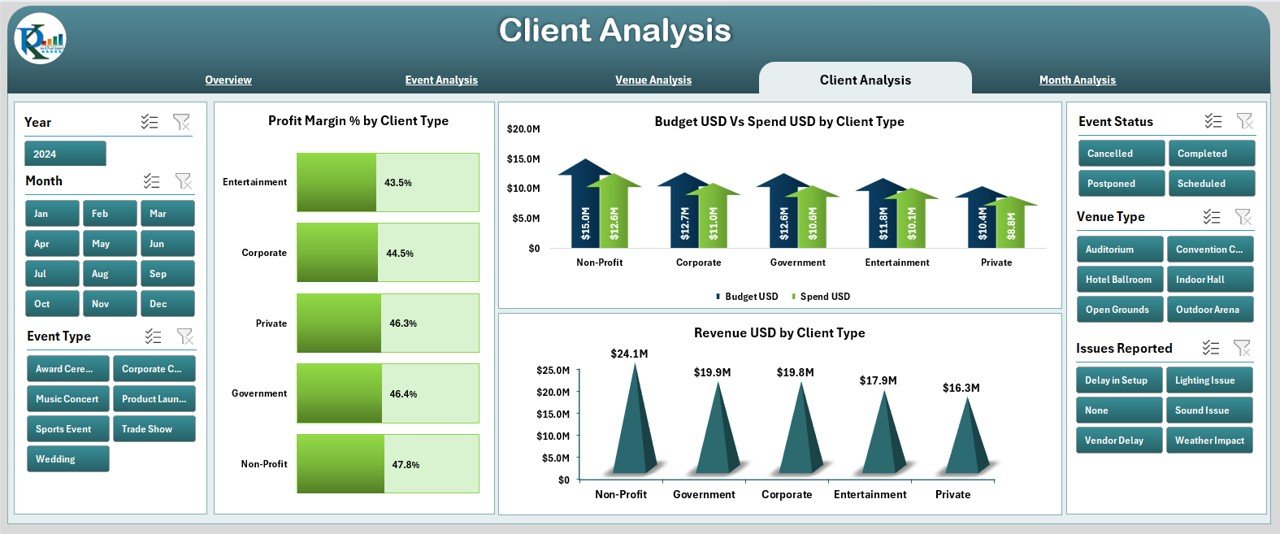
⭐ 4. Client Analysis Page – Understand Client Segments
Client behavior affects budget, profitability, and event success. The Client Analysis Page provides clear insights for client-level decision-making.
Charts include:
Profit Margin % by Client Type
Budget vs Spend by Client Type
Revenue (USD) by Client Type
This page helps you prioritize high-value clients, offer better services, and customize your event strategy based on client segments.
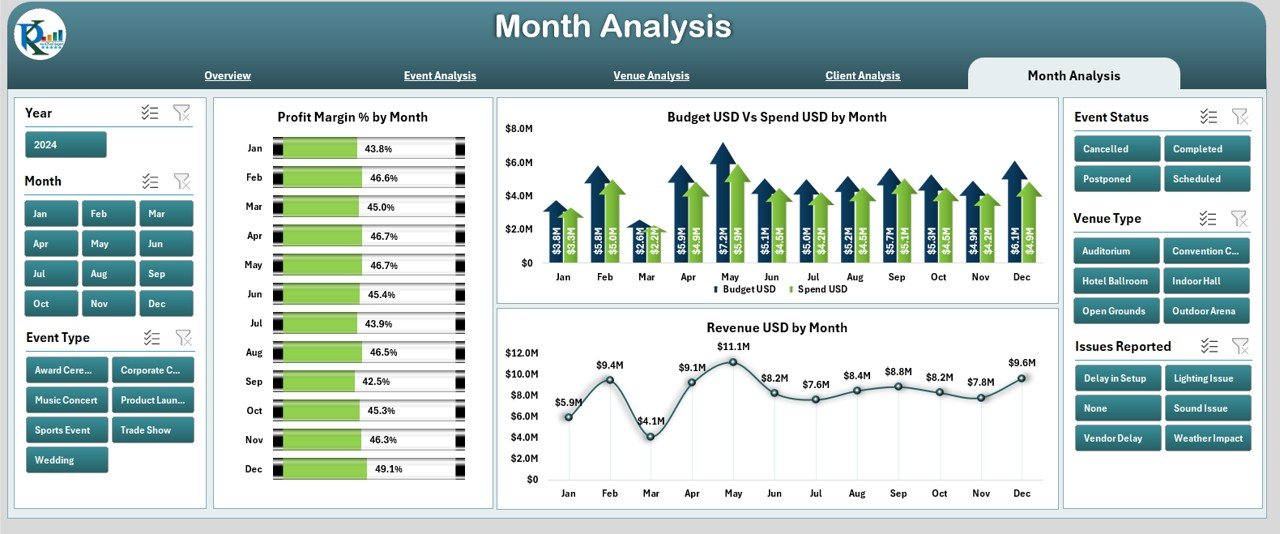
⭐ 5. Month Analysis Page – Track Monthly Event Trends
Events are often seasonal, and your monthly performance plays a key role in planning resources, budgets, and marketing.
This page shows:
Profit Margin % by Month
Budget vs Spend by Month
Revenue (USD) by Month
These insights help you identify peak months, predict low-performing seasons, and allocate resources more efficiently.
🛠️ How to Use the Event Production Dashboard in Excel
This dashboard is fully Excel-powered and easy to manage.
You only need to:
1️⃣ Update the Data Sheet with new event information
2️⃣ Review charts across pages
3️⃣ Use filters for deep analysis
4️⃣ Customize KPIs or charts if needed
The dashboard automatically updates visuals, cards, and charts after every data refresh.
👥 Who Can Benefit from This Event Production Dashboard
This dashboard is perfect for:
🎤 Event Production Companies
🎪 Event Management Agencies
🧑💼 Corporate Event Teams
🎬 Media & Marketing Teams
💼 Freelance Event Planners
🎓 University or Community Event Committees
💡 Creative Agencies
If you plan or manage events, this dashboard will simplify your work and increase your profit.
### 📘 Click here to read the Detailed Blog Post
### 📺 Visit our YouTube channel to learn step-by-step video tutorials:
👉 Youtube.com/@PKAnExcelExpert
Watch the step-by-step video tutorial:
Compatibility and Requirements
- Works in Microsoft Excel desktop (Excel 2016 or later, or Microsoft 365).
- Update the Data Sheet and the cards and charts refresh.
- New to slicers? Microsoft explains them in Use slicers to filter data.
Frequently Asked Questions
Which pages are in the dashboard?
Five analysis pages (Overview, Event Analysis, Venue Analysis, Client Analysis and Month Analysis) plus a support sheet, linked by a Page Navigator.
What does the Overview page show?
Five summary cards and four charts: scheduled event %, revenue by weather, profit margin % by issues reported, and budget vs spend by promo type.
Can I compare venues and clients?
Yes. The Venue and Client pages show profit margin %, budget vs spend and revenue by venue type and client type.
Is there a Power BI version?
Yes. See the Event Production Dashboard in Power BI.
Related Event Management Templates
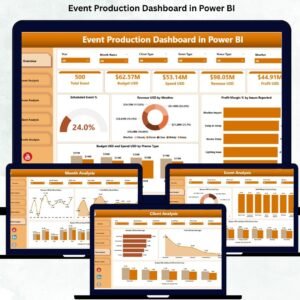
- Event Production Dashboard in Power BI: the same dashboard in Power BI
- Event Production KPI Dashboard in Excel: event KPIs vs target
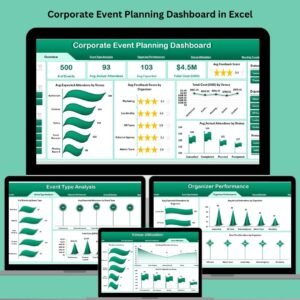
- Corporate Event Planning Dashboard in Excel: for corporate event teams
- Event Management Dashboard in Excel: another event dashboard layout
- Event Planning Management System Web App: run event planning in a browser
Browse all Excel dashboards or the Power BI dashboards.














Reviews
There are no reviews yet.