

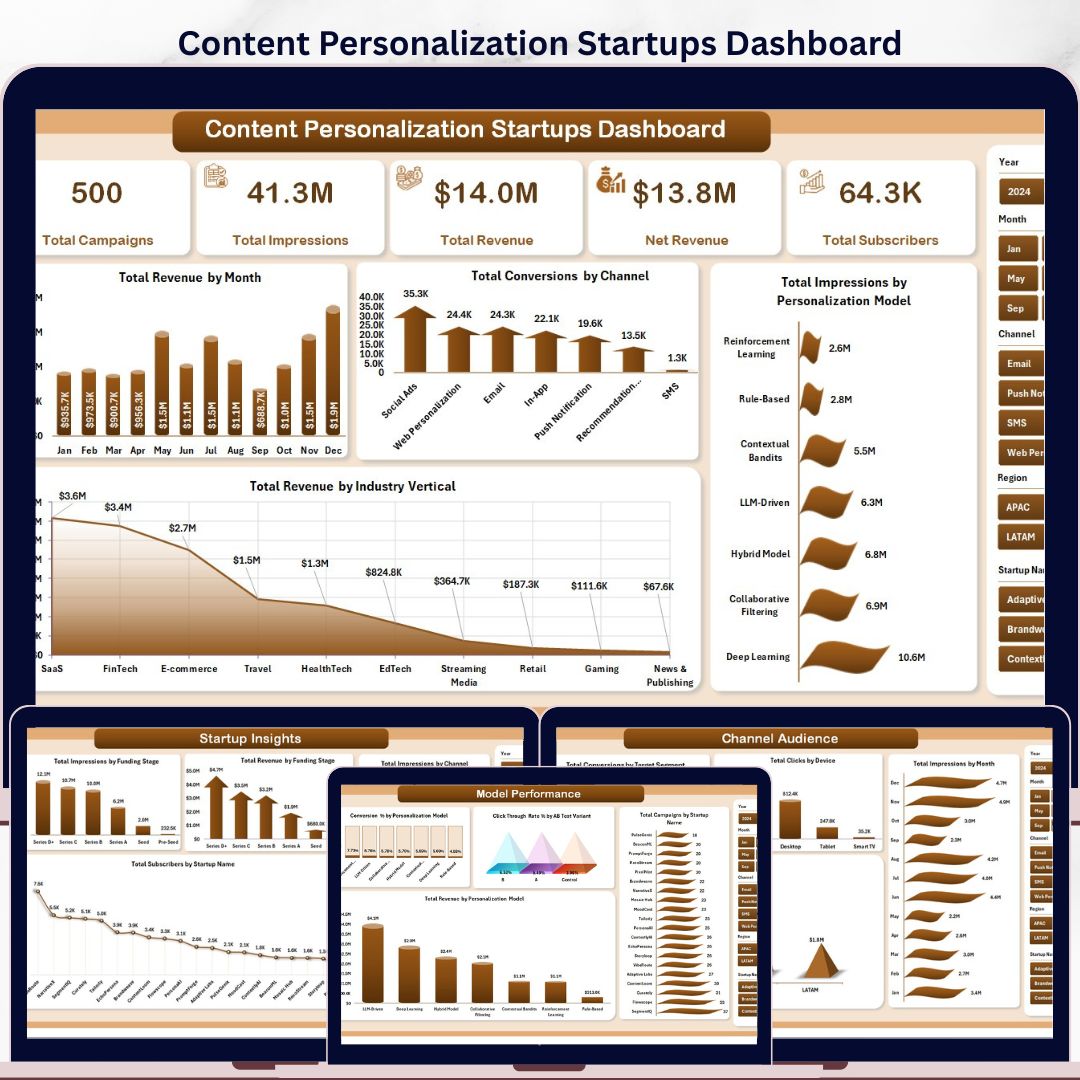



The Content Personalization Startups Dashboard in Excel helps growth teams track 5 executive KPI cards, 5 analytical dashboard pages, 16 chart views, and a pivot-driven data model in one editable workbook. For a one-time $17.99 sale price, startup founders, content marketers, CRM analysts, and SaaS growth teams can monitor campaigns, impressions, revenue, subscribers, conversions, channels, audience segments, funding stages, and personalization model performance without paying for a monthly BI or marketing SaaS seat. Setup takes under 10 minutes: replace the sample data, click Data > Refresh All, and review the refreshed dashboard.
Instant download. One-time payment. No subscription. No per-user fees. Lifetime access.
Key Features of Content Personalization Startups Dashboard in Excel
- 5 KPI cards covering Total Campaigns, Total Impressions, Total Revenue, Net Revenue, and Total Subscribers.
- 5 analysis pages for Overview, Model Performance, Startup Insights, Channel Audience, and Trend Analysis.
- 16 pre-built chart views across revenue, conversions, impressions, campaigns, subscribers, channels, funding stages, devices, regions, engagement, and content type performance.
- Interactive slicers allow quick filtering by campaign, channel, startup, industry, region, model, device, funding stage, and time period.
- Structured Data Sheet lets you paste or update campaign records in the same format.
- Support Sheet with pivot tables powers every chart and can be kept hidden after setup.
- No macros required because the dashboard uses native Excel tables, slicers, pivots, and charts.
What’s Inside the Content Personalization Startups Dashboard in Excel
1. Overview Page
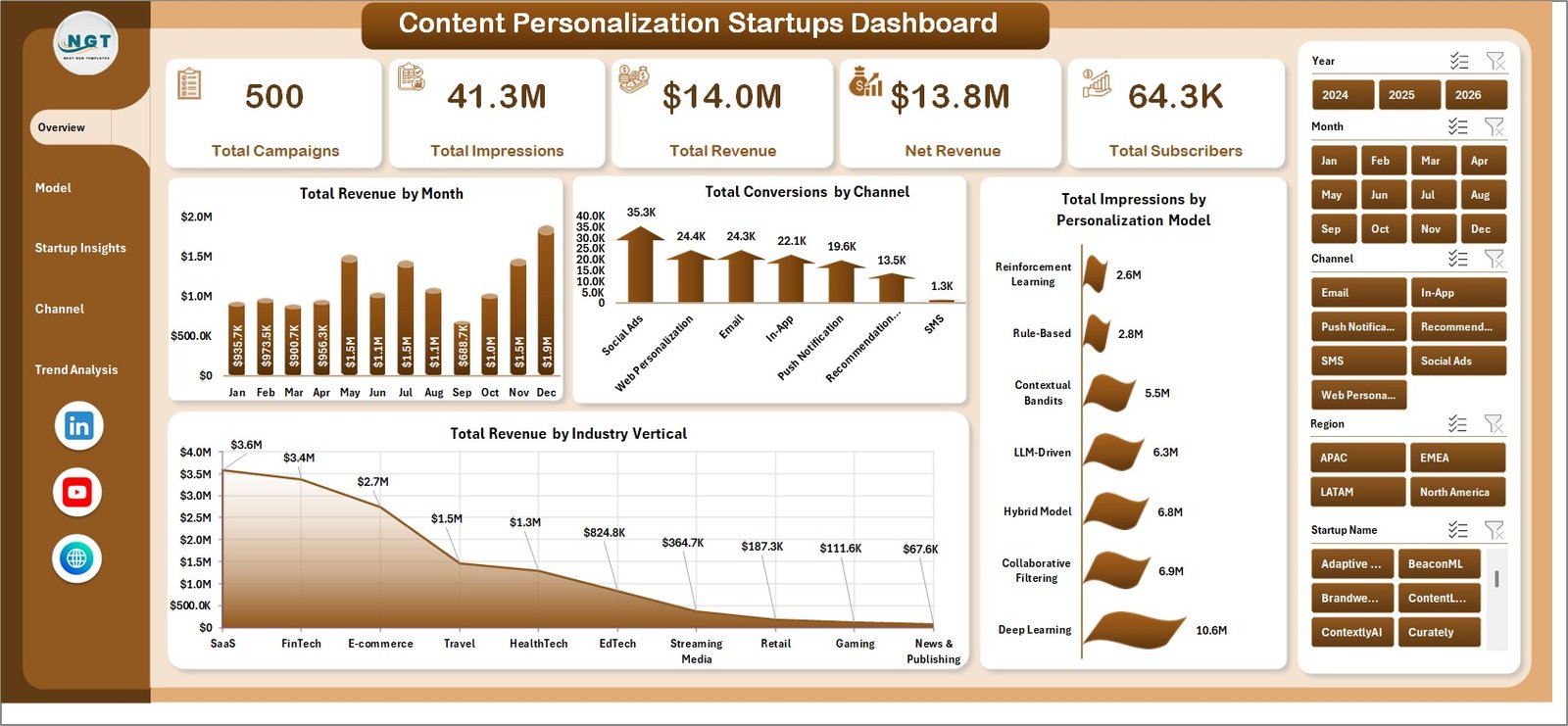
The Overview Page gives leadership a fast summary of campaign scale, attention, and monetization. The KPI cards show Total Campaigns, Total Impressions, Total Revenue, Net Revenue, and Total Subscribers, so users can spot whether personalization activity is creating meaningful growth.
Total Revenue by Month: This trend chart shows how monthly revenue changes as campaigns launch, scale, or pause. It helps founders identify seasonal lift and revenue dips before they become planning issues.
Total Conversions by Channel: This chart compares conversion volume across channels such as email, web, paid media, referral, and social. It quickly shows which channels are turning personalized content into action.
Total Impressions by Personalization Model: This visual compares reach across different personalization approaches. Use it to understand which model receives the most exposure and where audience targeting may need adjustment.
Total Revenue by Industry Vertical: This chart shows which customer industries contribute the most revenue. It is useful for positioning, sales messaging, and investor updates.
2. Model Performance
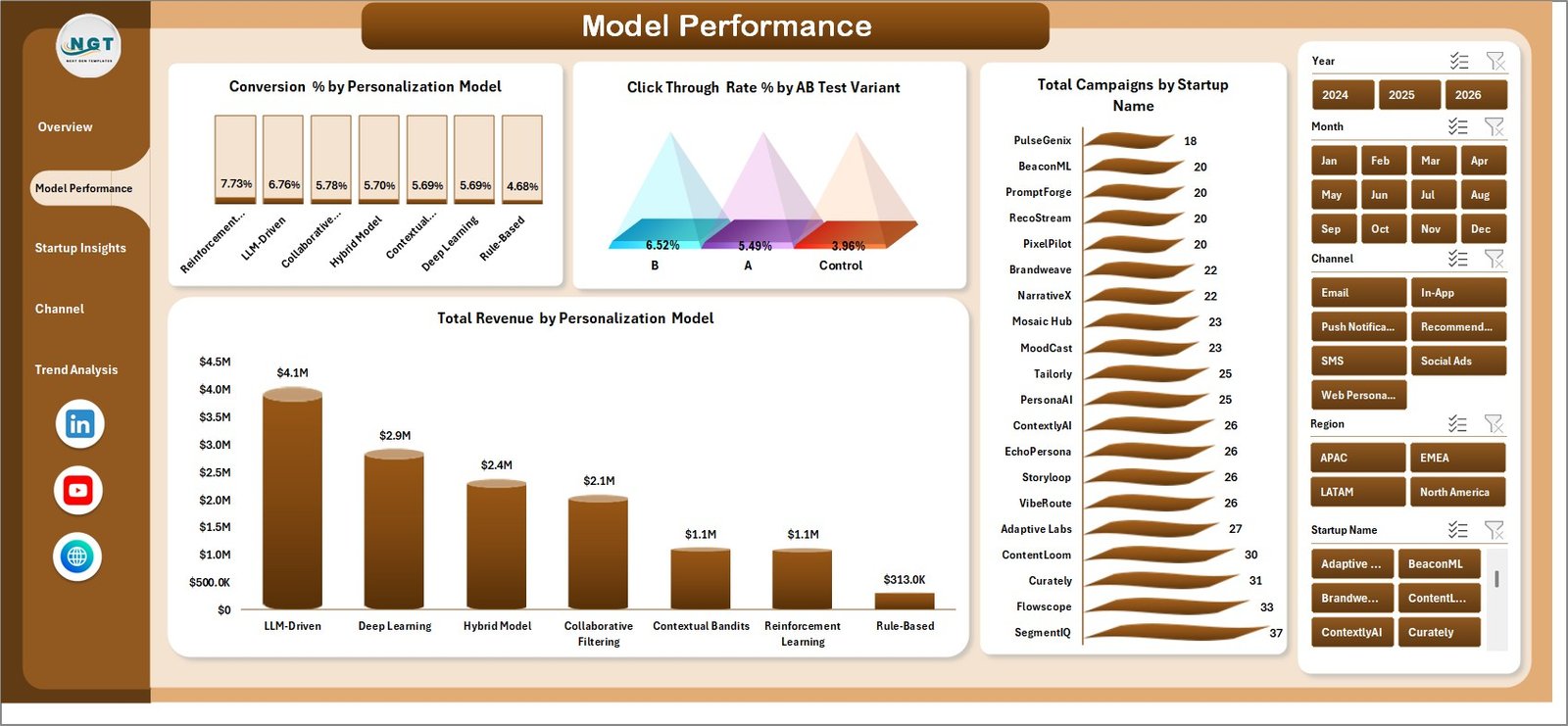
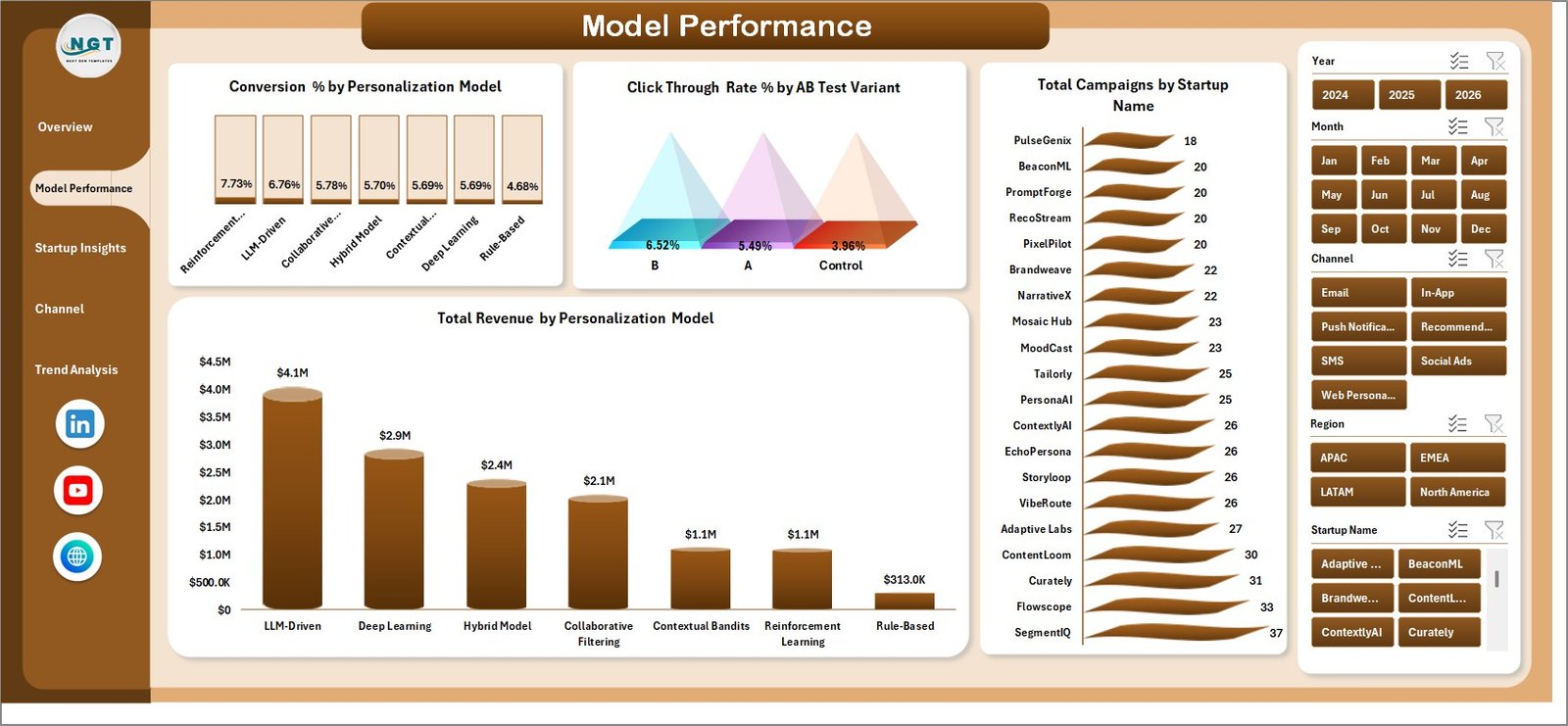
The Model Performance tab helps teams compare personalization approaches and test variants. It includes Conversion % by Personalization Model, Click Through Rate % by AB Test Variant, Total Campaigns by Startup Name, and Total Revenue by Personalization Model.
3. Startup Insights
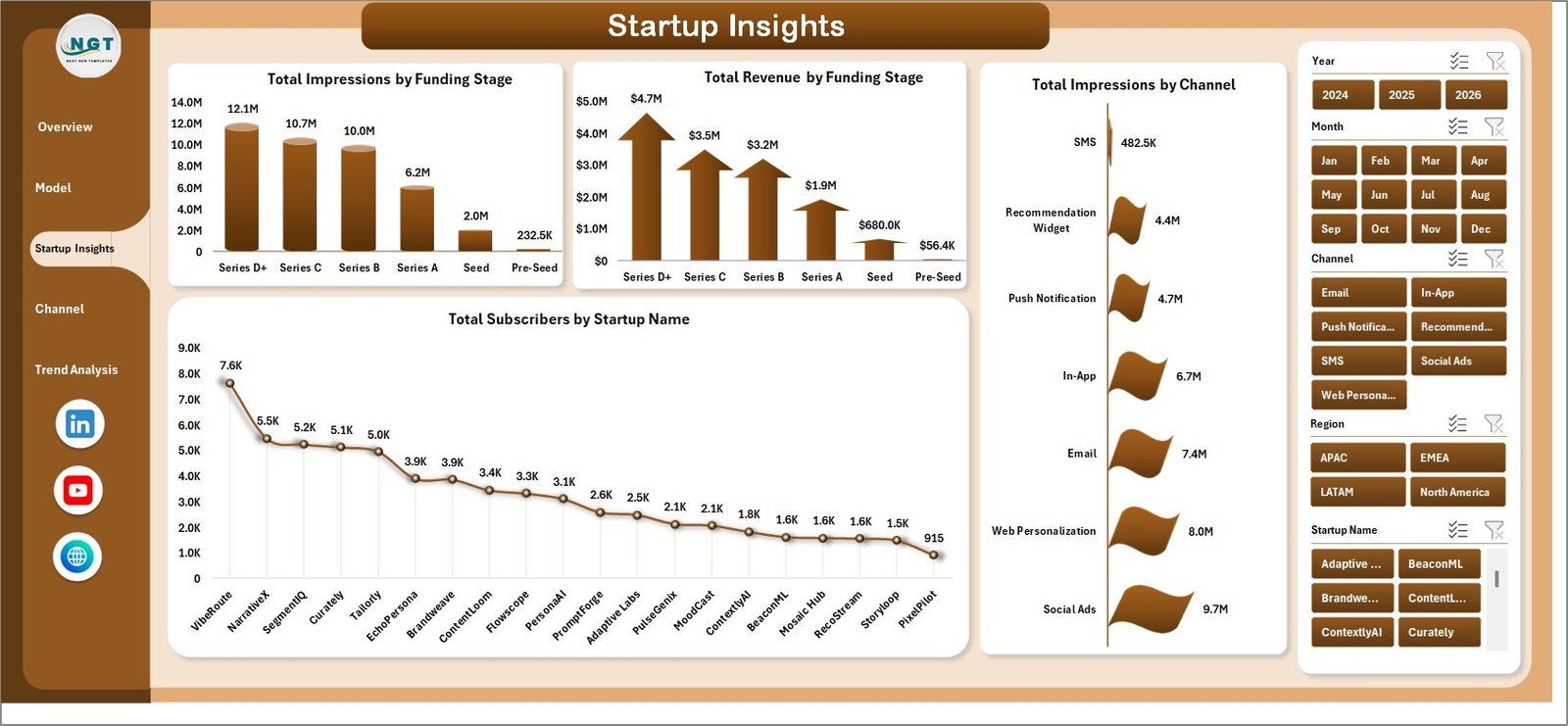
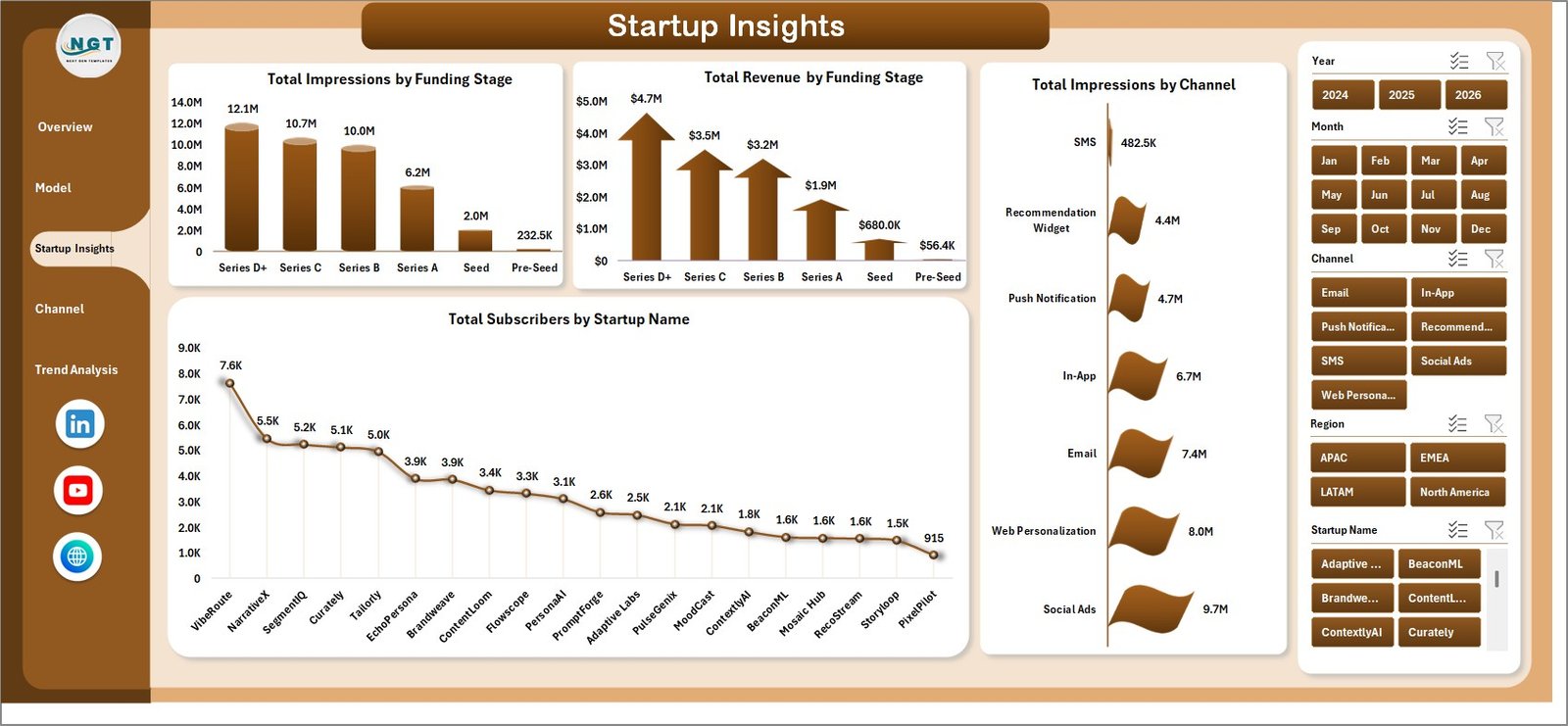
The Startup Insights page links traction with company profile. It includes Total Impressions by Funding Stage, Total Revenue by Funding Stage, Total Subscribers by Startup Name, and Total Impressions by Channel, making it easier to compare startup maturity and market response.
4. Channel Audience
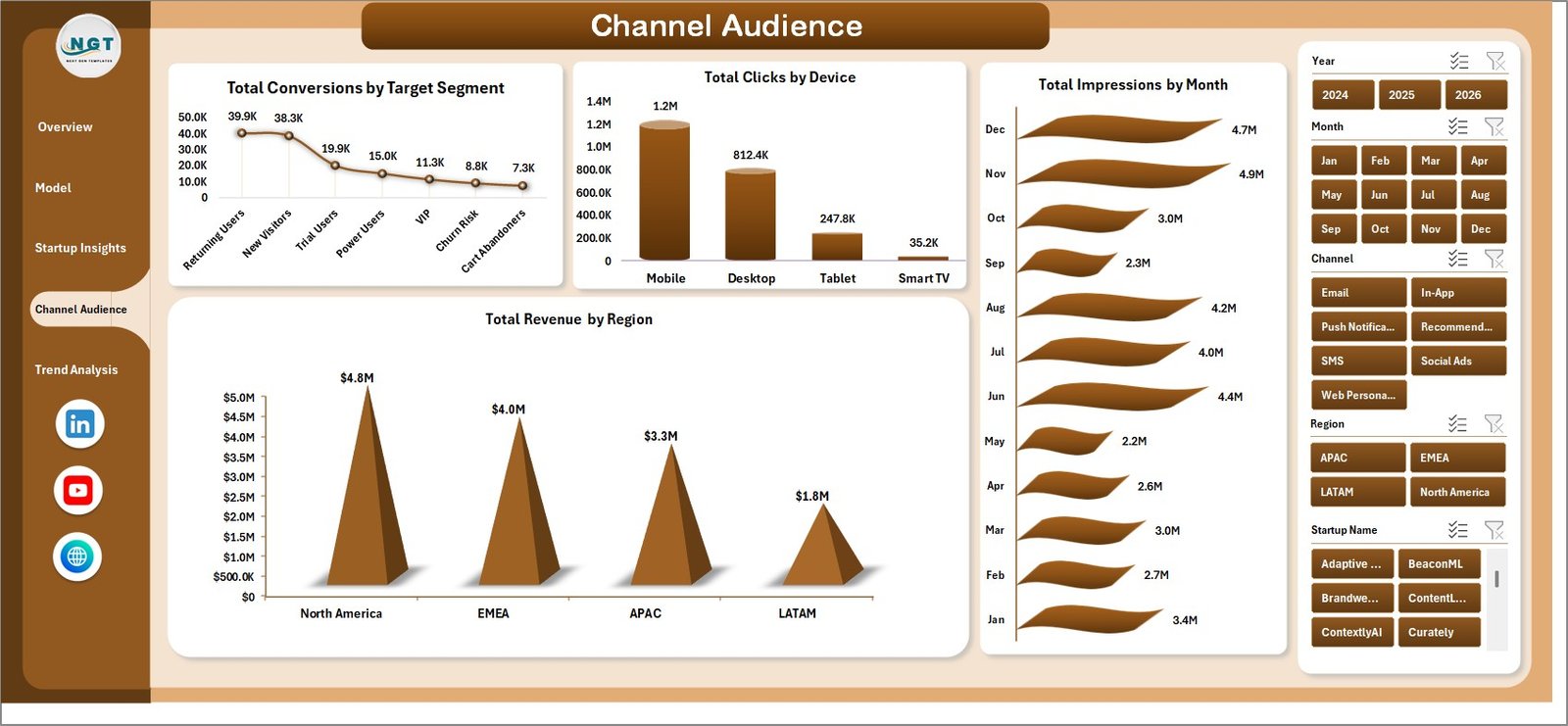
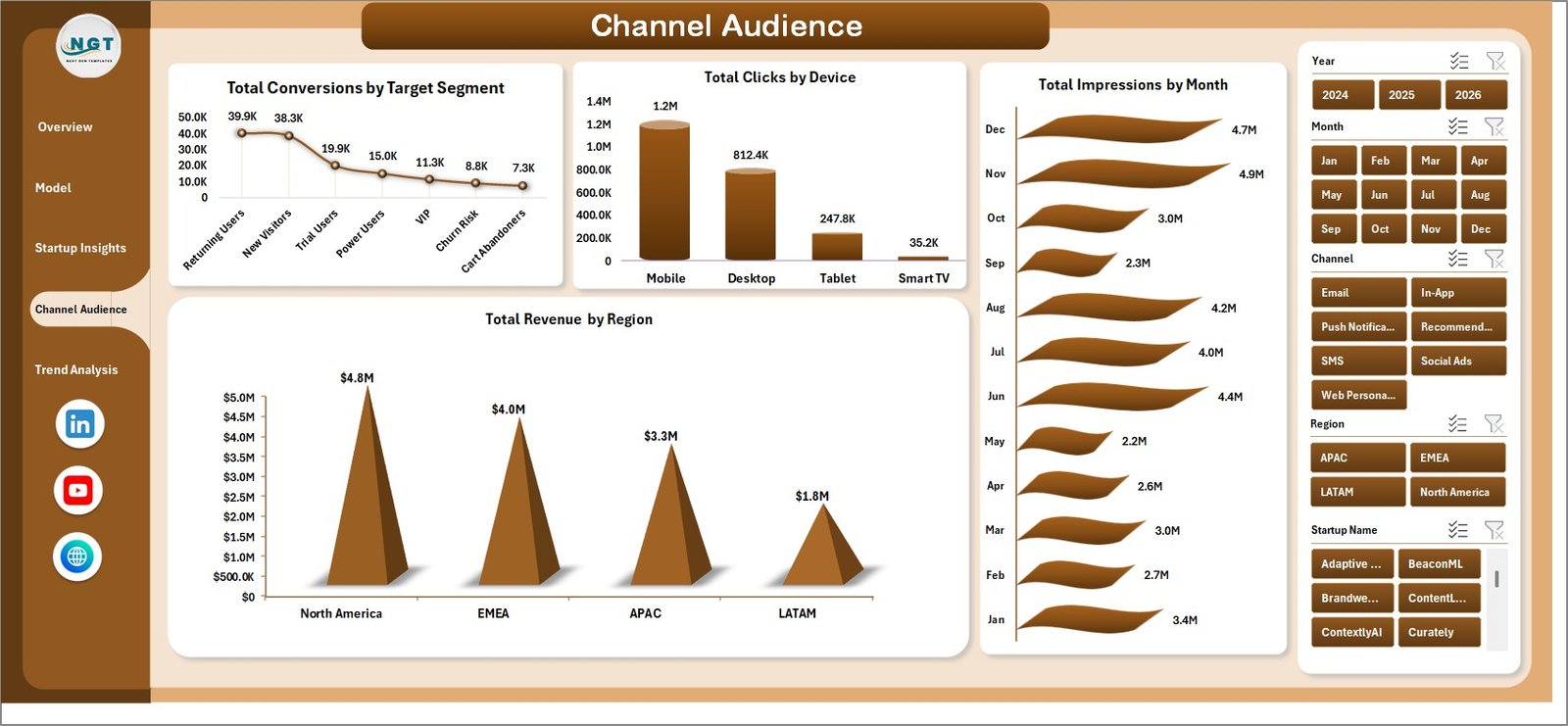
The Channel Audience page shows where users engage and convert. It includes Total Conversions by Target Segment, Total Clicks by Device, Total Revenue by Region, and Total Impressions by Month, helping marketers refine audience and channel strategy.
5. Trend Analysis
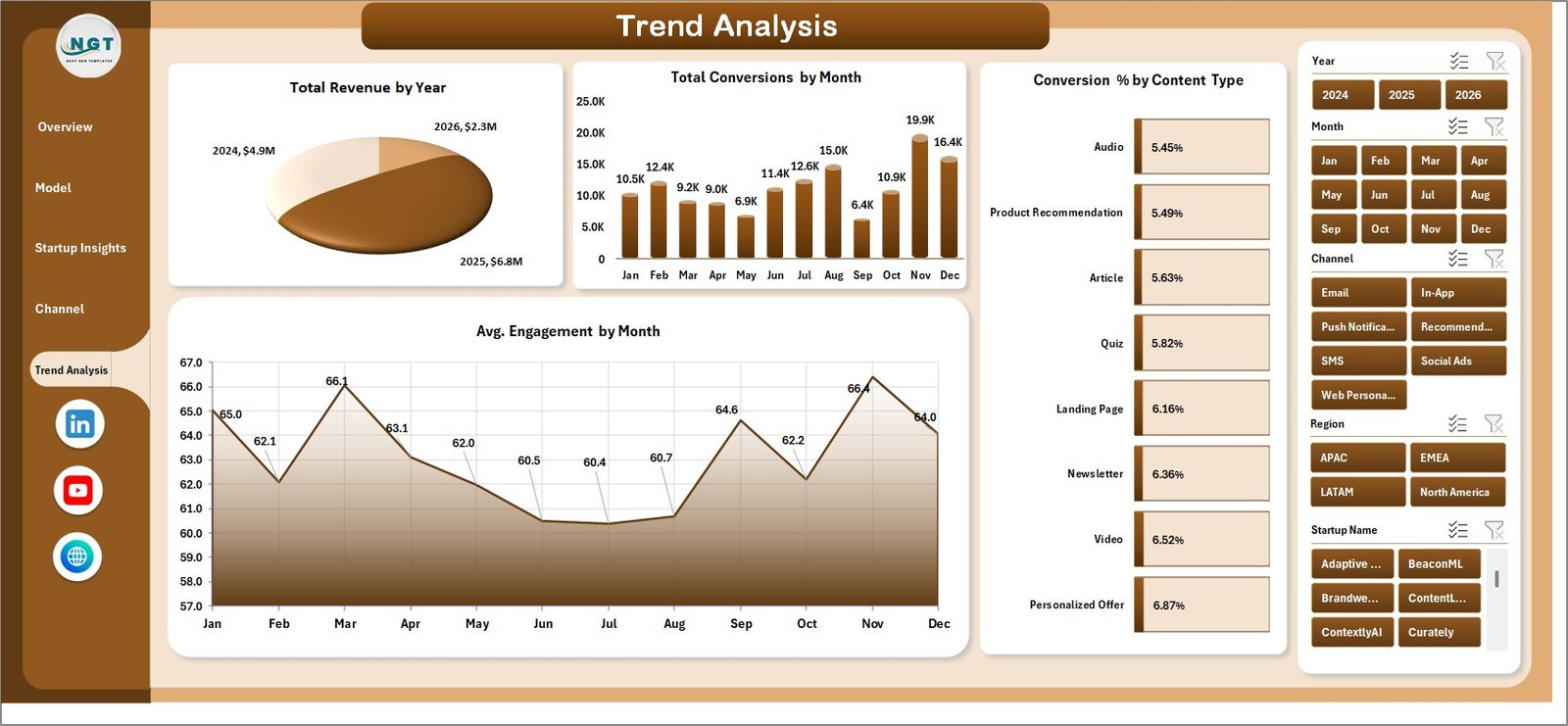
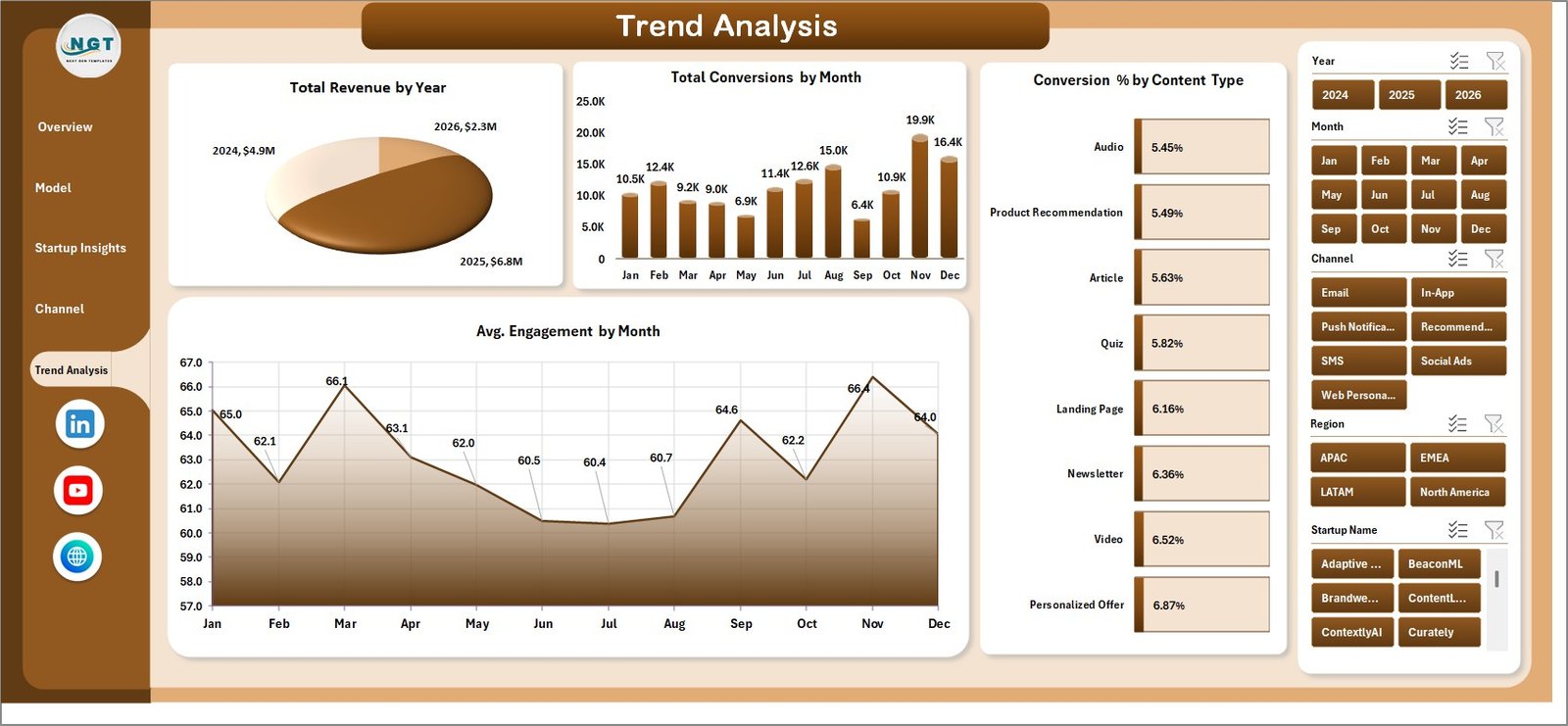
The Trend Analysis tab is built for month-end and investor reporting. It includes Total Revenue by Year, Total Conversions by Month, Avg. Engagement by Month, and Conversion % by Content Type, showing whether personalization quality is improving over time.
6. Data Sheet Tab
The Data Sheet is the structured input table. Add your own campaign records in the same column format and refresh the workbook to update cards, charts, slicers, and pivots.

7. Support Sheet
The Support Sheet contains the pivot tables that create the dashboard dynamically. After changing the Data Sheet, go to the Excel Ribbon, open the Data tab, and click Refresh All. You can keep this sheet hidden during normal use.

Content Personalization Startups Dashboard in Excel vs. Google Sheets vs. Paid CRM/SaaS – Where This Fits
| Feature | This Excel Dashboard | Google Sheets Alternative | Paid CRM or Marketing SaaS |
|---|---|---|---|
| Cost | $17.99 one-time | Free to low-cost, but requires build time | $50-$500+ per month |
| Platform | Microsoft Excel | Browser-based spreadsheet | Vendor cloud app |
| Setup time | Under 10 minutes | 30-90 minutes if built manually | Hours or days of configuration |
| Real-time team collaboration | Possible with OneDrive or SharePoint | Native collaboration | Usually available by paid seats |
| Mobile access | Excel mobile with limits | Google Sheets mobile | Usually available |
| Customizable fields | Fully editable workbook | Editable but formulas can break | Limited by vendor settings |
| Year-1 cost at 5 users | $17.99 total | Low tool cost plus build time | $3,000-$30,000+ |
Who This Template Is For – and Who It’s Not For
This template is for content personalization startups, SaaS growth teams, lifecycle marketers, CRM analysts, investor reporting teams, and founders who need fast campaign visibility in Excel. It is especially useful when you already export campaign data from a CRM, email tool, website analytics platform, or customer data platform.
It is not a replacement for a live personalization engine, CRM automation platform, API pipeline, or attribution warehouse. If you need real-time identity resolution, machine learning model training, or direct data sync, use this workbook as a reporting layer rather than the core platform.
How to Use the Content Personalization Startups Dashboard in Excel
- Download and unzip the Excel dashboard file.
- Open the workbook in Microsoft Excel 2016 or later.
- Go to the Data Sheet and replace sample records with your own campaign data.
- Keep the same column structure so the pivot tables continue to work.
- Click Data > Refresh All in the Excel Ribbon.
- Use the slicers on each page to filter by channel, model, startup, region, segment, device, or month.
Real-World Use Cases
Aisha, a personalization startup founder, uses the Overview and Trend Analysis pages before investor updates to explain revenue growth, subscriber momentum, and model-level conversion performance.
Daniel, a lifecycle marketing manager, reviews Channel Audience to see whether email, paid social, or website personalization drives the most conversions by target segment.
Meera, a CRM analyst, updates the Data Sheet monthly, refreshes the Support Sheet pivots, and shares filtered screenshots with sales, product, and growth teams.
Frequently Asked Questions
What does this dashboard track?
It tracks campaigns, impressions, revenue, net revenue, subscribers, conversions, clicks, channels, personalization models, A/B test variants, startup names, funding stages, regions, devices, engagement, and content types.
Do I need macros?
No. The dashboard is built with native Excel tables, pivot tables, slicers, and charts.
How do I refresh the dashboard?
Update the Data Sheet, then use Data > Refresh All in Excel. The Support Sheet pivots and dashboard charts refresh together.
Can I customize the fields?
Yes. You can edit the workbook, but keep a backup before changing pivot source fields or chart structures.
Is this suitable for SaaS startups?
Yes. It works well for SaaS, ecommerce, content platforms, creator tools, and personalization businesses that track campaign and audience data.
Does it connect directly to HubSpot, Salesforce, or Segment?
No direct connector is included. Export your data, paste it into the Data Sheet, and refresh the workbook.
About the Author
Built by PK – Microsoft Certified Professional with 15+ years of Excel, Google Sheets, and Power BI experience. Founder of NextGenTemplates, reaching 300K+ subscribers across YouTube channels. Every template is hand-built and tested before release.
Explore Related Templates
- Career Mentorship Platforms Dashboard in Excel – useful for marketplace and platform analytics.
- Contact Center AI Dashboard in Power BI – AI service performance reporting.
- Podcast Audience Insights Dashboard in Google Sheets – audience and content channel analytics.
- Browse Excel Dashboard templates.
Click here to read the detailed blog post
Ready to turn personalization campaign data into clear Excel reports? Download the Content Personalization Startups Dashboard in Excel and start tracking revenue, conversions, subscribers, and model performance today.
Last updated: May 2026
Watch the step-by-step video tutorial:
Compatibility and Requirements
- Works in Microsoft Excel desktop (Excel 2016 or later, or Microsoft 365).
- The dashboard uses slicers to filter by campaign, channel, startup, region, model, device, funding stage and month. Microsoft explains them in Use slicers to filter data.
More Questions About This Template
Which KPI cards are on the Overview page?
Five cards: Total Campaigns, Total Impressions, Total Revenue, Net Revenue and Total Subscribers.
Do I need to enable macros?
No. The workbook uses native Excel tables, pivot tables, slicers and charts.
How do I update the charts with my own data?
Replace the sample records on the Data Sheet, keep the same column structure, then click Data > Refresh All. The pivot tables on the Support Sheet and the charts refresh together.
Does it connect directly to HubSpot, Salesforce or Segment?
No. Export your data from the tool, paste it into the Data Sheet and refresh the workbook.
Is there a Power BI version?
Yes. See the Content Personalization Startups Dashboard in Power BI.



























Reviews
There are no reviews yet.