



The Event Planning Management System Web App runs an event business from first enquiry to final settlement inside your own Google account. It ships with 28 screens, 20 built-in reports, 6 permission-driven roles and 14,775 rows of fictional sample data across 28 database sheets, so every page is populated the moment setup finishes. It is built in Google Apps Script with a Google Sheets database, and deployment takes about 15 minutes.
This event planning management system connects clients, events, quotations, contracts, venues, vendors, packages, equipment, crew, task checklists, guest lists, staged payments, invoices, expenses and budgets, then works out the profit on every single event after vendor cost, expenses, crew and equipment hire.
🌍 Join 10,000+ customers in 180+ countries using NextGenTemplates to replace paid SaaS tools with one-time-purchase Excel, Google Sheets, Power BI and Apps Script templates.
✅ Instant download · One-time payment · No subscription · No per-user fees · Full source code included
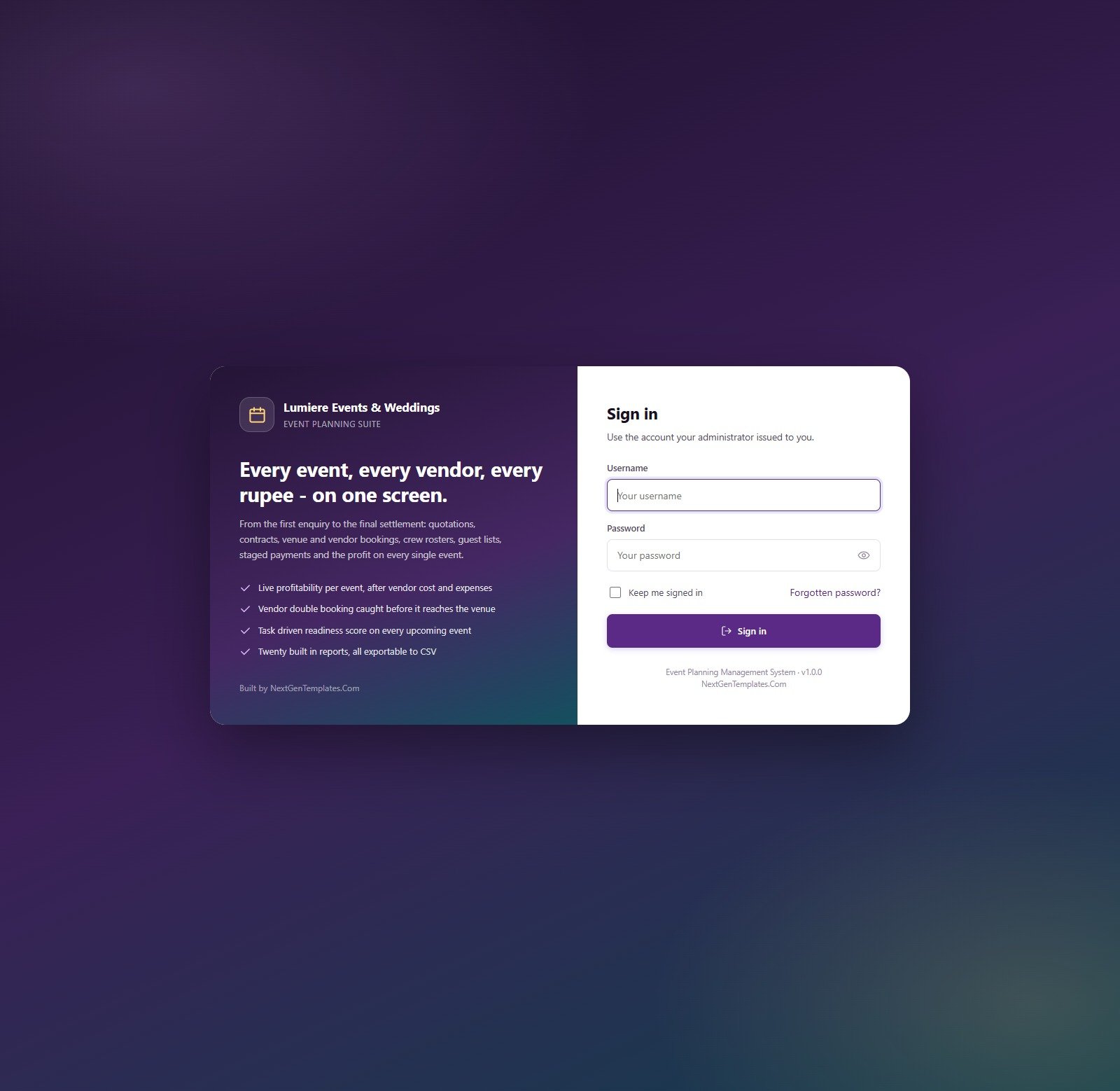
Sign-in Screen
Staff sign in with the account an administrator issues. The sign-in card carries the company name and a “Keep me signed in” option; seeded credentials are never displayed on this screen.
🚀 Try the Live Demo Before You Buy
We have deployed this web app in our own Google account so you can test every page and every one of the 6 roles with realistic sample data before purchasing. No signup, no email required.
🔑 Test Login Credentials
Sign in as admin to see everything, including Users, Lists, Settings, Audit Log and Archive, then sign in as sanjana (Viewer) to see how the sidebar and every server call shrink to read-only access. The sidebar and the server both check the same permission map.
💡 These are the seeded logins of a shared demo that we reset from time to time, not a system you are buying access to. What you get after purchase: the full source code (Code.gs + Index.html) plus the user manual, so you deploy your own private copy in your own Google account in under 15 minutes.
🔑 Key Features of the Event Planning Management System Web App
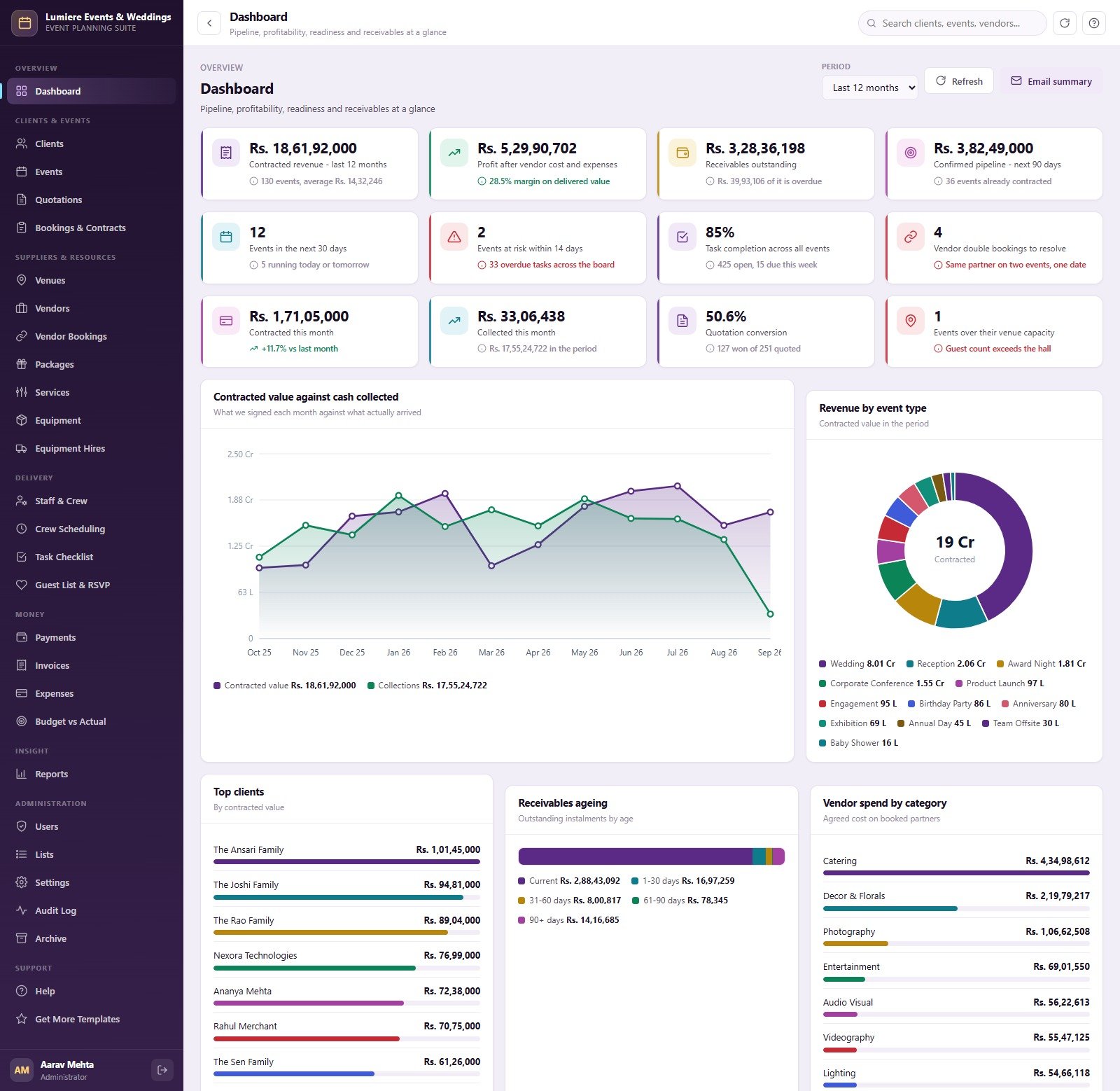
📊 A 12-card owner dashboard. The dashboard shows contracted revenue, profit after vendor cost and expenses, receivables outstanding, the confirmed 90-day pipeline, events in the next 30 days, events at risk, task completion, vendor double bookings, quotation conversion and events over venue capacity, with a period picker and an Email summary button.
💹 Profit on every event. Each event’s margin is contract value less vendor cost, expenses, crew cost and equipment hire. The same calculation rolls up by event type, by event manager and company wide, so you can see which weddings, conferences and launches actually earn money.
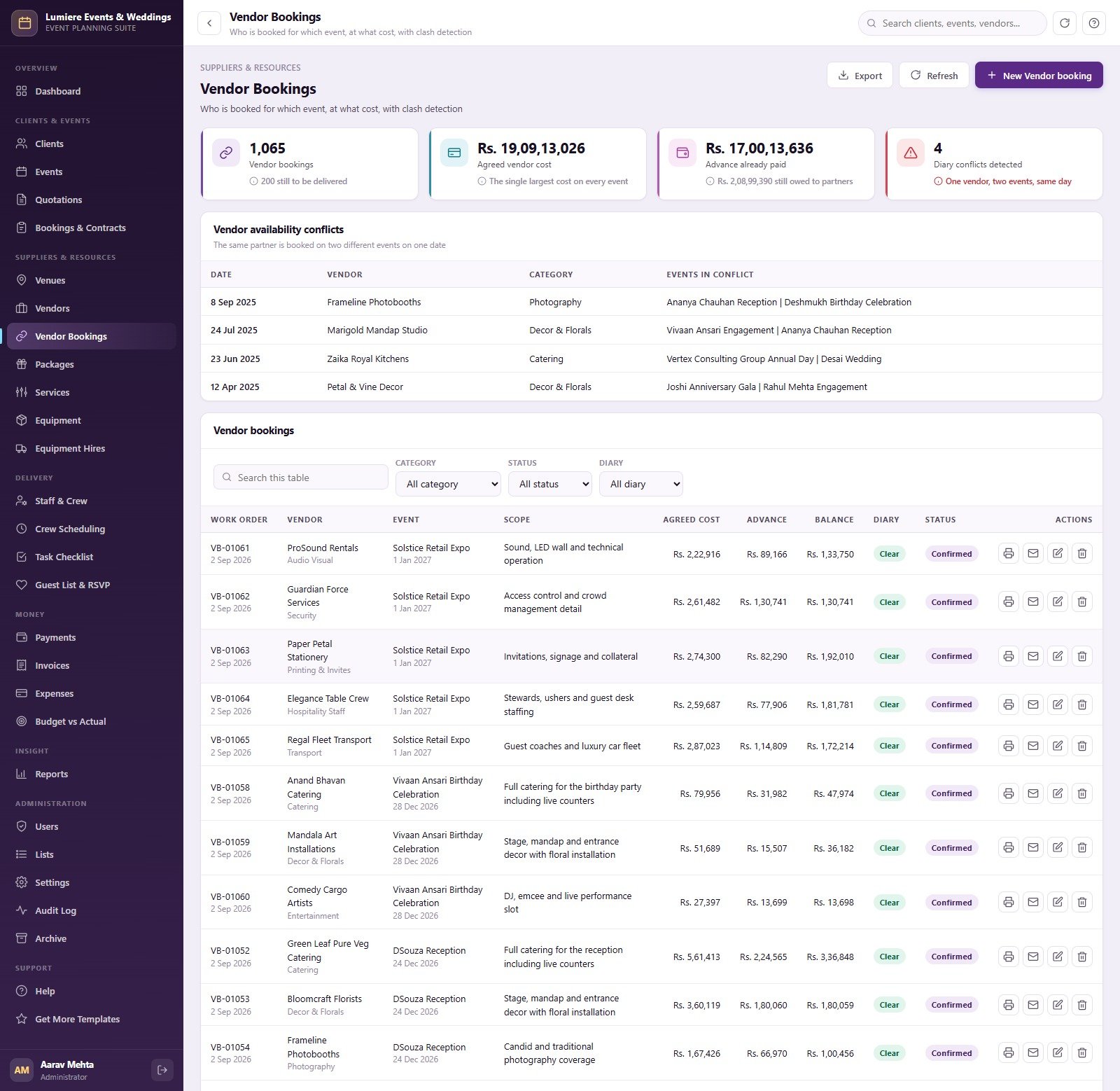
🔗 Vendor clash detection. When the same partner is booked on two different events on the same date, the booking is flagged on the Vendor Bookings screen, counted on the dashboard, listed in its own report and refused on save.
🏛️ Venue capacity check. Expected guests are compared with the venue’s seated and floating capacity and graded Comfortable, Tight or Over Capacity. A save that exceeds capacity is refused until a manager deliberately confirms the overflow.
✅ Task-driven readiness score. Completed tasks set each event’s readiness percentage, pulled down by overdue work and harder by a late critical task. Any event inside 14 days that falls below the readiness target (70 by default) is flagged as at risk.
💳 Staged payments with ageing. Contracts carry a payment schedule (booking advance, interim instalment, pre-event balance, final settlement). Every instalment has a balance, days overdue and an ageing bucket of Current, 1-30, 31-60, 61-90 or 90+ days.
🖨️ Six printable documents and email. Print quotations, contracts, invoices, receipts, vendor work orders and event run sheets at 3 inch, 4 inch or A4. Quotations, booking confirmations, invoices, work orders and a weekly event summary can be emailed through Google’s MailApp, or switched off in Settings.
🛡️ 6 roles over 49 permissions. Administrator, Event Manager, Coordinator, Accounts, Crew Supervisor and Viewer. Passwords are stored as salted SHA-256 hashes, sessions expire after the hours you set, and every create, update, delete, export and archive lands in the audit log.
📦 What’s Inside the Event Planning Management System
The sidebar groups 28 screens into Overview, Clients & Events, Suppliers & Resources, Delivery, Money, Insight, Administration and Support. Every list screen exports to CSV, and clients, venues, vendors, packages, services, equipment, staff and guests import from CSV.
Screen 1: Dashboard
Twelve KPI cards sit above five panels: Contracted Value vs Cash Collected by Month, Revenue by Event Type, Top Clients by Contracted Value, Receivables by Ageing Bucket and Vendor Spend by Category.
Screen 2: Events
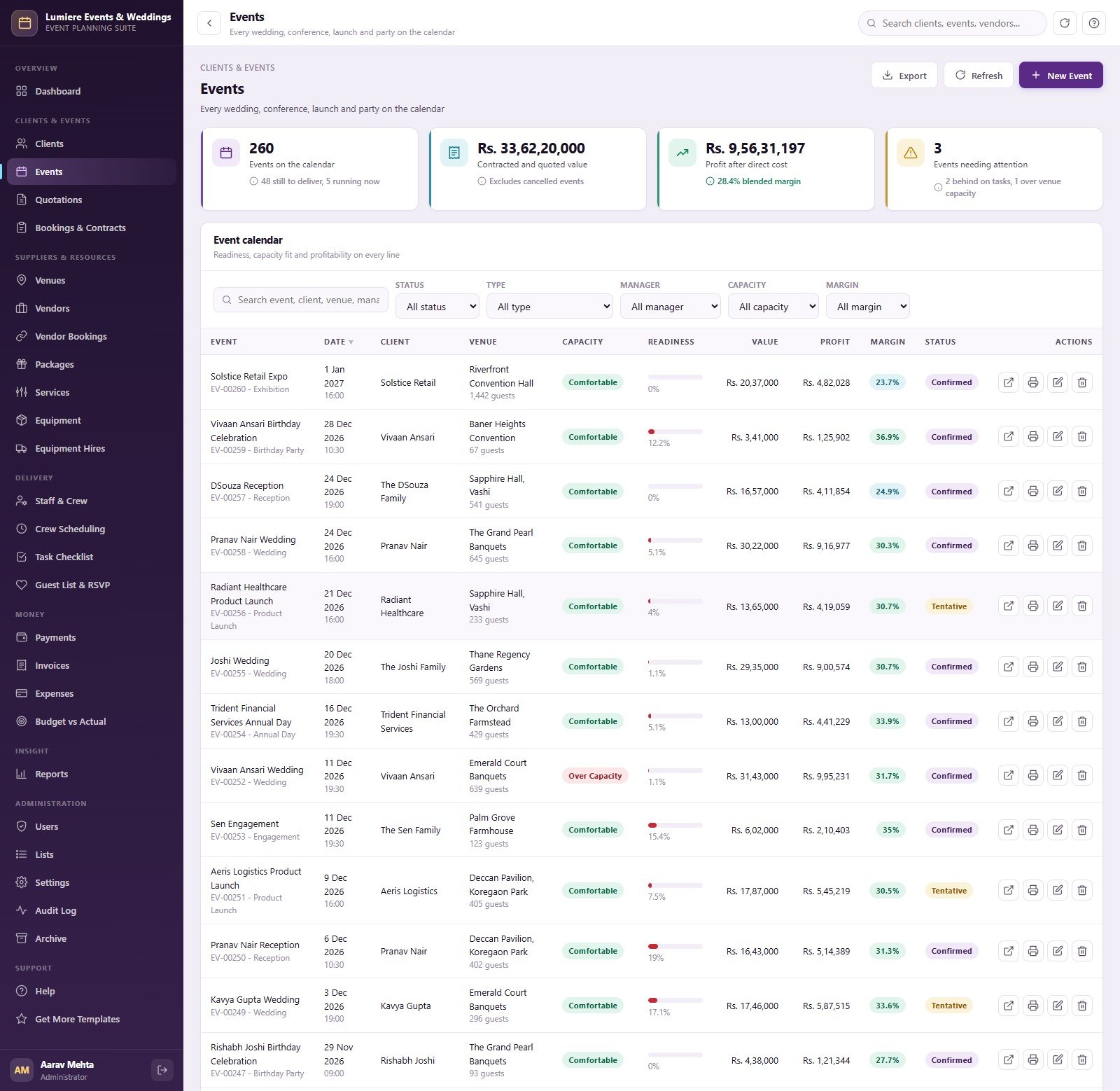
The event calendar lists 260 sample events with date, client, venue, guest count, capacity fit, readiness bar, value, profit, margin and status, filtered by status, type, manager, capacity and margin. Each row prints an event run sheet.
Screen 3: Quotations
430 priced proposals show lines, grand total, per-guest price, validity date and Sent, Accepted, Expired or Lost status, with cards for total quoted value, value won and a 54.7% sample conversion rate. Each quotation can be printed or emailed.

Screen 4: Vendor Bookings
A Vendor Availability Conflicts table lists every date where one partner is booked twice, above 1,065 work orders with scope, agreed cost, advance paid, balance and a Clear or Conflict diary flag.
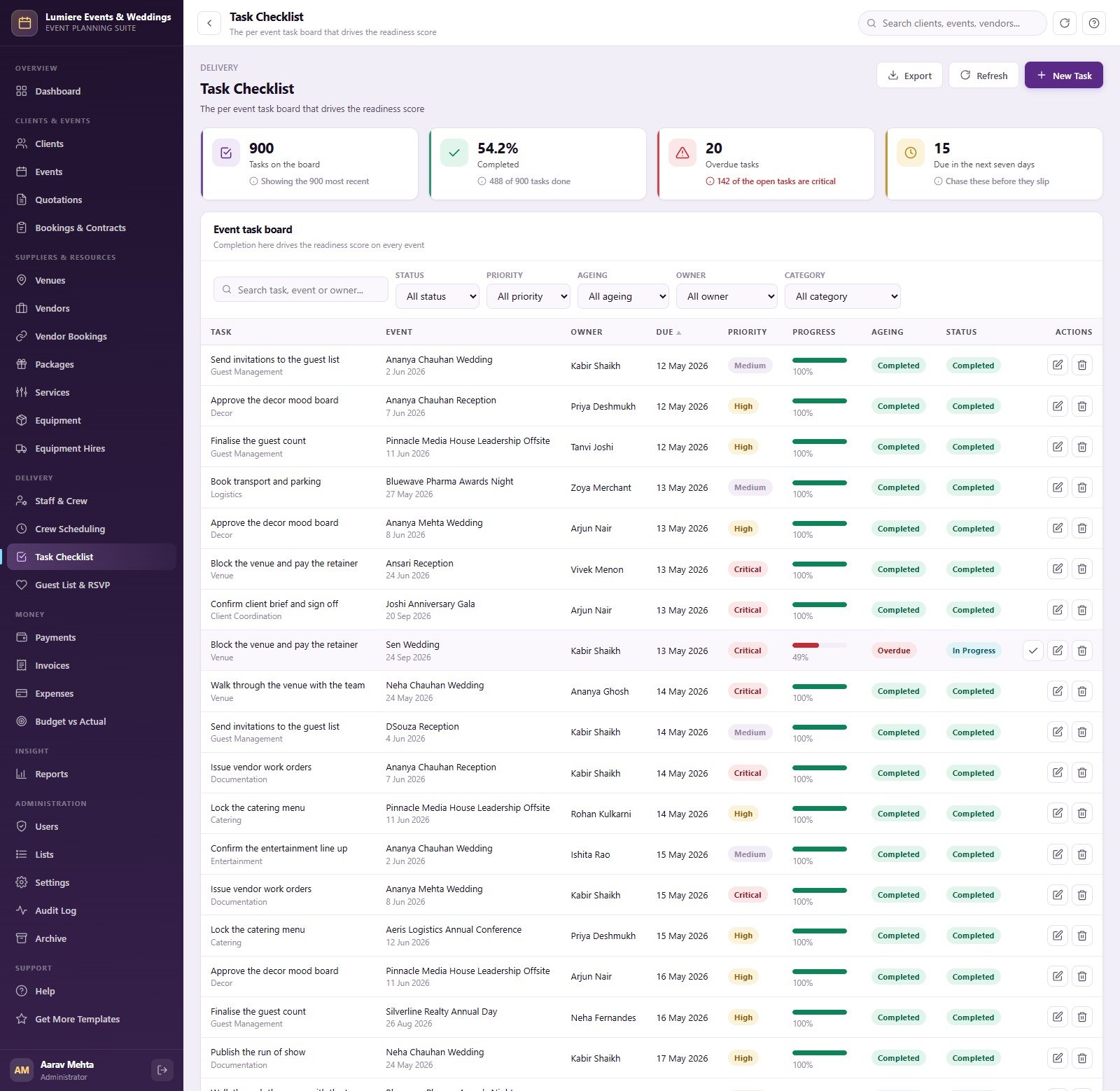
Screen 5: Task Checklist
The per-event task board that drives readiness: task, category, owner, due date, Critical/High/Medium priority, progress, ageing and status, with cards for completion rate, overdue tasks and tasks due in the next seven days.
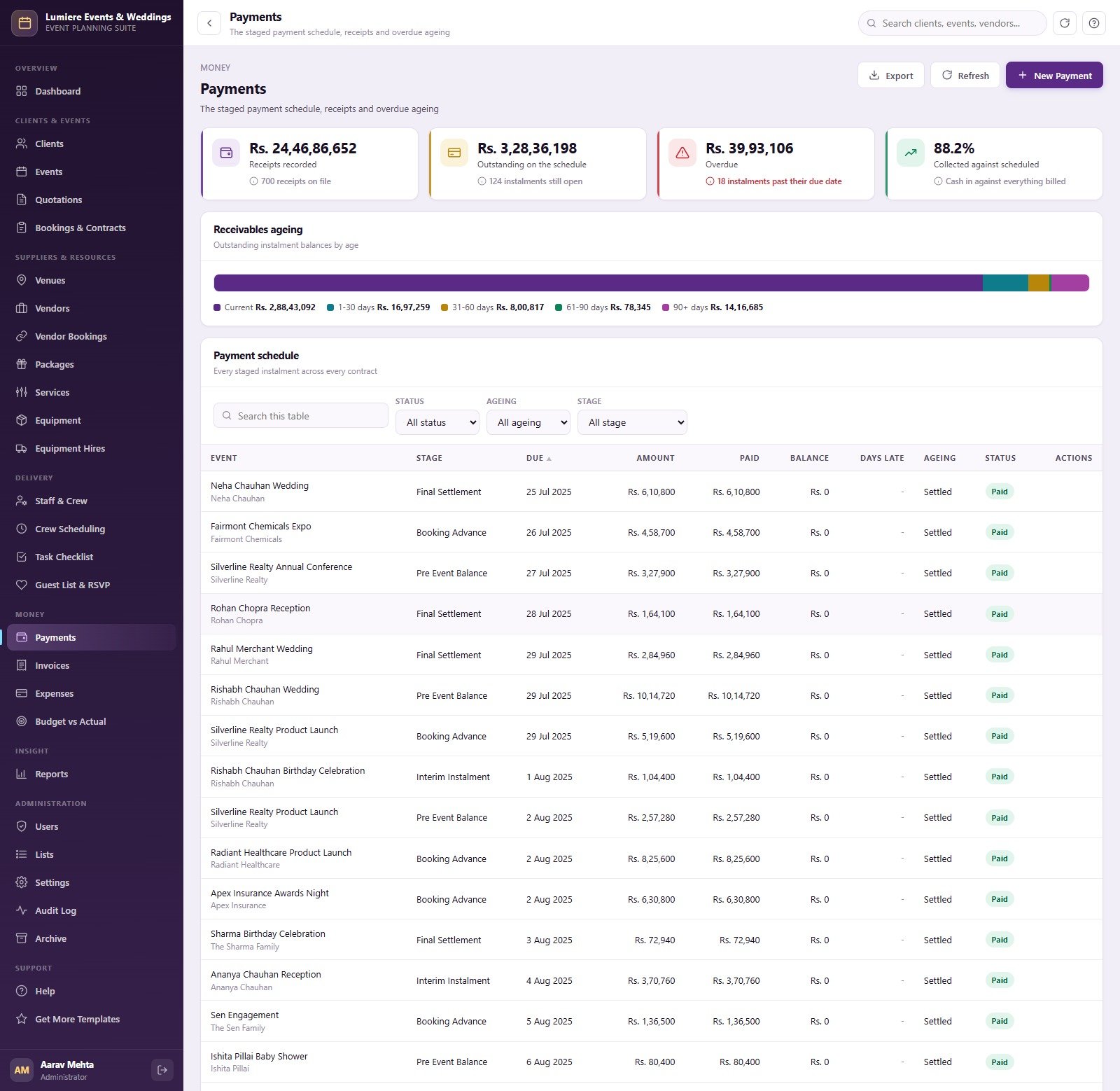
Screen 6: Payments
Receipts recorded, outstanding, overdue and collected-against-scheduled cards sit above a Receivables Ageing bar and the full payment schedule by stage, due date, amount, paid, balance and days late.
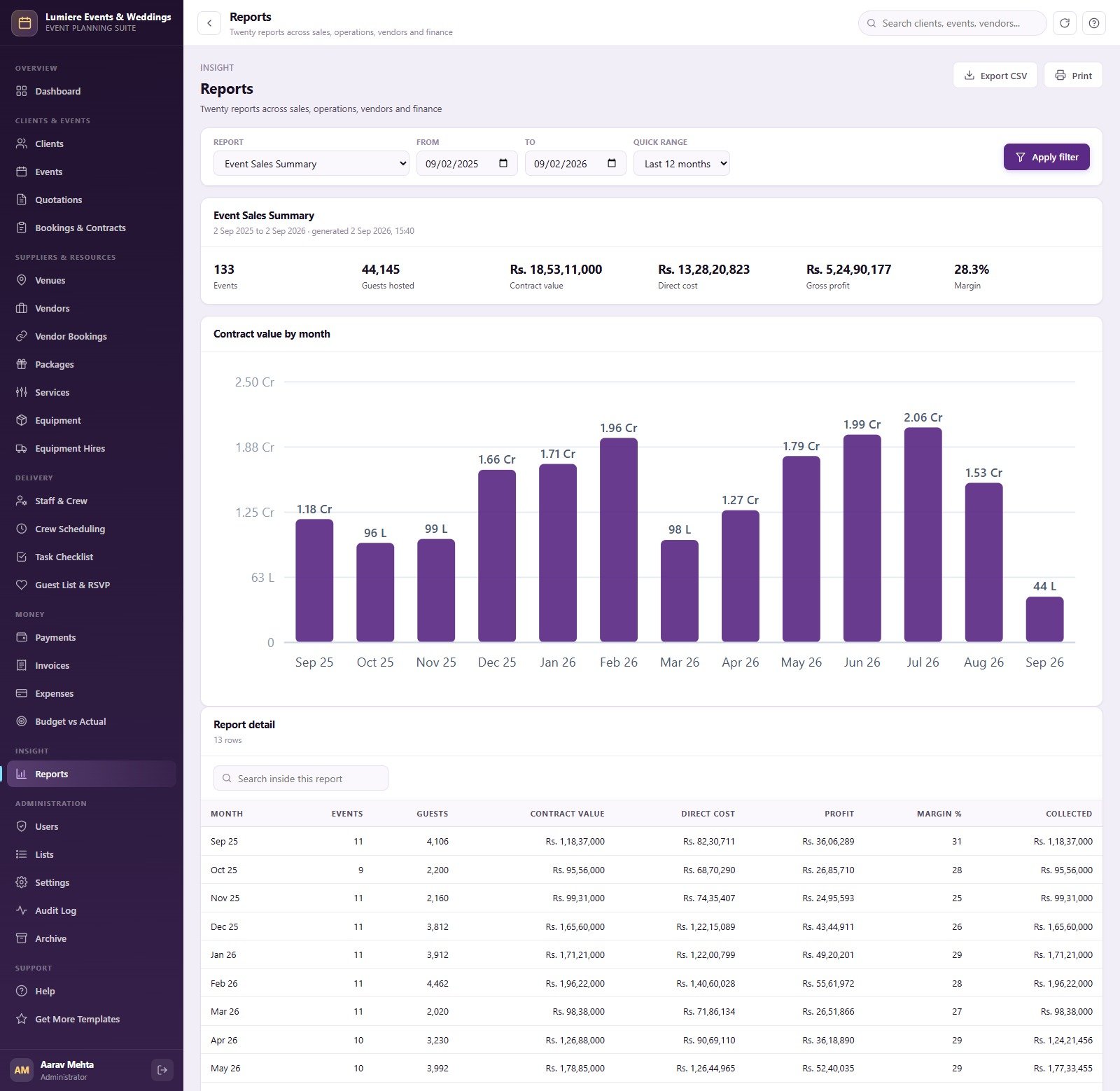
Screen 7: Reports
Twenty reports in four groups. Sales & Pipeline: Event Sales Summary, Events by Type, Quotation Conversion, Revenue by Event Manager, Client Revenue Ranking. Operations: Event Schedule, Event Readiness, Task Status by Assignee, Venue, Crew and Equipment Hire Utilisation, Guest RSVP Summary. Vendors: Vendor Spend Analysis, Vendor Performance, Vendor Booking Conflicts. Finance: Event Profitability, Receivables Ageing, Collections by Mode, Expense Analysis, Budget vs Actual. Each runs over a date range and exports to CSV or prints.
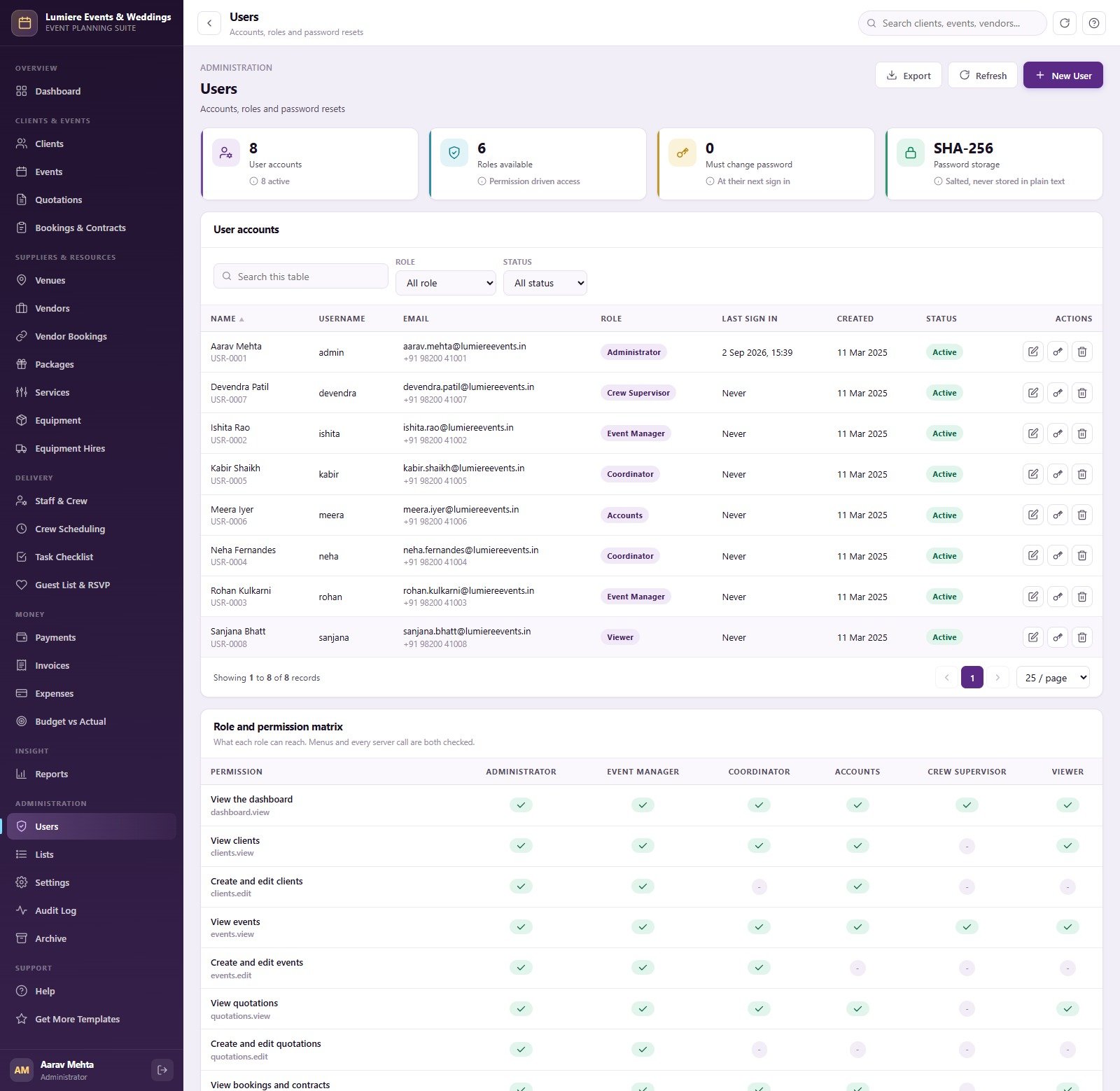
Screen 8: Users and Permission Matrix
Eight seeded accounts across six roles, with a role and permission matrix that shows exactly which screen and action each role can reach.
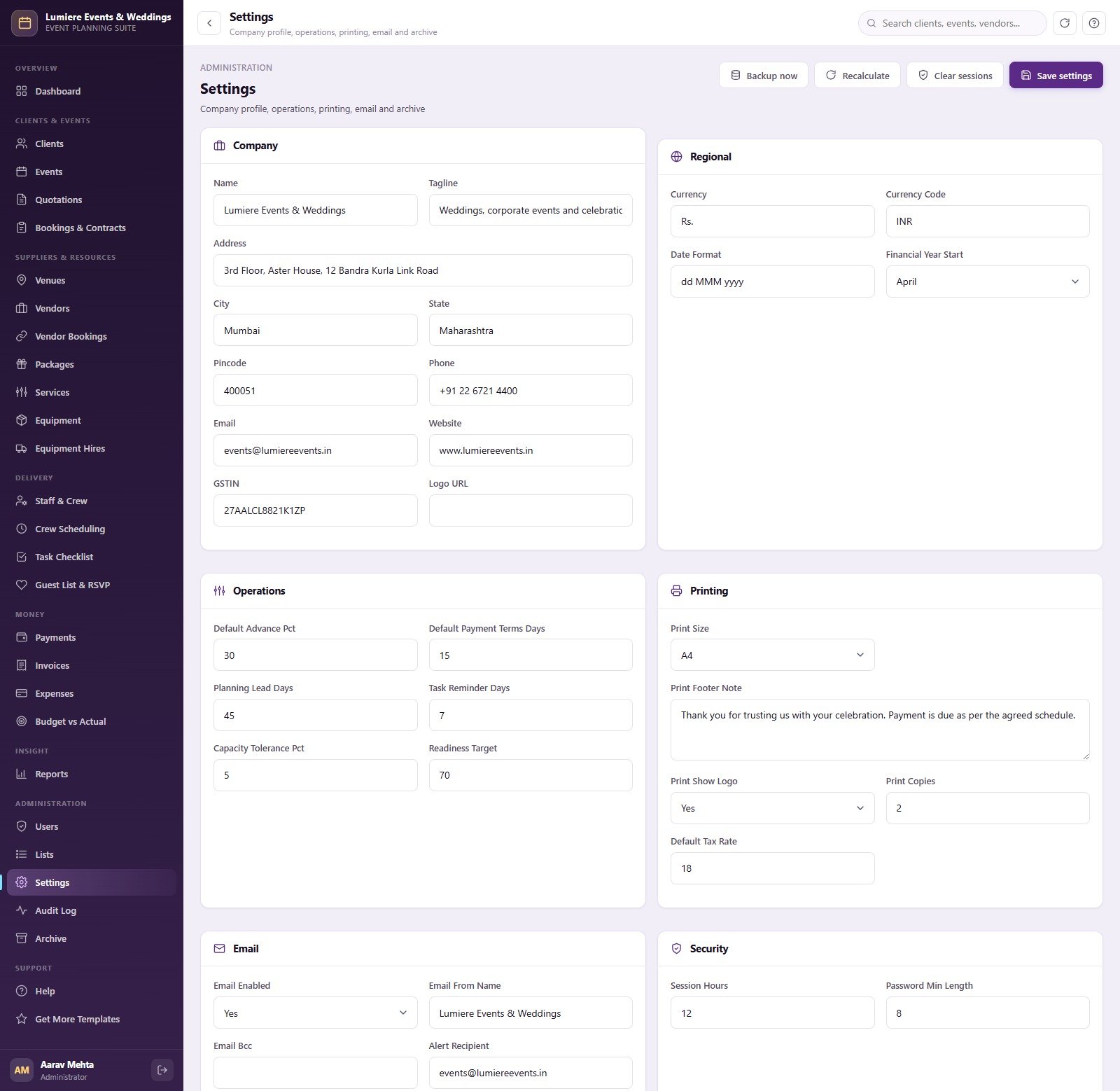
Screen 9: Settings
Company block with GSTIN and logo, regional settings (currency symbol and code, date format, financial year start), operations defaults (advance %, payment terms, planning lead days, task reminder days, capacity tolerance, readiness target), printing, email and security, plus Backup now, Recalculate and Clear sessions buttons.
The remaining screens cover Clients, Bookings & Contracts, Venues, Vendors, Packages, Services, Equipment, Equipment Hires, Staff & Crew, Crew Scheduling, Guest List & RSVP (meal preference, table and side), Invoices, Expenses, Budget vs Actual, Lists, Audit Log, Archive, Help and Get More Templates.
📊 Event Planning Web App vs. Excel Event Planner vs. Paid Event SaaS
| Feature | Event Planning Management System Web App | Microsoft Excel event planner | Paid event planning SaaS (e.g. HoneyBook, Planning Pod) |
|---|---|---|---|
| Cost | ✅ $39.99 one-time | Low, but you build it yourself | Monthly subscription, often priced per user |
| Platform | ✅ Browser, hosted in your own Google account | Desktop spreadsheet file | Vendor’s cloud |
| Setup time | ✅ About 15 minutes, database built for you | Days to design sheets and formulas | Hours to days of onboarding |
| Team roles and permissions | ✅ 6 roles, 49 permissions, server-side checks | File-level protection only | Usually on higher plans |
| Vendor double-booking check | ✅ Detected and refused on save | Manual | Varies by product |
| Profit per event | ✅ Vendor, expense, crew and hire cost netted automatically | Only if you write the formulas | Varies by product |
| Data ownership | ✅ A Google Sheet in your own Drive | ✅ Your own file | Stored on the vendor’s servers |
| Source code you can edit | ✅ Full Apps Script source | ✅ Formulas are open | Not available |
| Year-1 cost at 5 users | ✅ $39.99 total | Your time | A recurring bill every month |
For event planners who want quotations, vendor bookings, crew, tasks and staged payments in one place without a monthly per-user bill, this web app sits in the sweet spot.
👥 Who This Template Is For and Who It’s Not For
✅ This template is built for:
- Wedding planners and event companies running a few to several hundred events a year
- Corporate event, conference and product-launch agencies juggling venues, AV, catering and crew
- Owners who want profit per event, receivables ageing and vendor clashes on one screen
- Teams that already use Google Workspace or a Gmail account and want staff logins with separate roles
❌ This template is NOT for:
- Businesses that need online card payments: it records payments but has no payment gateway
- Ticketed public events: there is no ticket sales, seat map or guest-facing RSVP page
- Anyone needing GST or tax return filing: invoices show tax, but it is not accounting software
⚙️ How to Use the Event Planning Management System
- Try the live demo first. Sign in with each role above to confirm the workflow fits your team.
- Create the project. Open script.google.com, paste Code.cs.txt into Code.gs and Index.txt into an HTML file named Index.
- Deploy as a web app. Execute as Me, access Anyone, then accept Google’s permission prompt.
- Build the database. Open the web app URL and press “Build the database now”. Setup runs in 24 resumable stages.
- Sign in as admin and change passwords. Reset every seeded account from the Users screen.
- Set your company. Enter your name, GSTIN, currency, financial year, advance % and payment terms in Settings.
- Clear the sample data. Use the Archive page or delete seeded transaction rows, keeping every header row.
💼 Real-World Use Cases
Ritu runs a six-person wedding planning studio. She raises quotations from her package catalogue, converts accepted ones into contracts with a 30% advance, and watches the readiness bar on each wedding. When her decorator is booked on two weddings on the same Saturday, the system refuses the second booking before it reaches the venue.
Farhan manages a corporate events agency. His coordinators roster crew shifts and equipment hires for conferences while the Accounts user chases the pre-event balance from the ageing bar. Once a month he runs Event Profitability and Revenue by Event Manager to see which account managers deliver margin.
Anita owns a venue-plus-catering business. She uses the capacity check to stop over-booked halls, tracks guest meal preferences and tables in Guest List & RSVP, and prints vendor work orders and event run sheets for the team on the day.
❓ Frequently Asked Questions
Can I try it before buying?
Yes. The live demo above runs the full Event Planning Management System Web App with sample data. Sign in as Administrator, Event Manager, Coordinator, Accounts, Crew Supervisor or Viewer to test every screen and see how each role’s access differs. The demo is shared and reset, so do not enter real client data.
What do I need to run it?
A Google account. The Event Planning Management System Web App runs on Google Apps Script and creates its own Google Sheets database in your Drive on first run. There is nothing to install, no server to rent and no monthly fee; your team signs in from a browser.
How long does setup take?
Around 15 minutes. You paste two files into a new Apps Script project, deploy it as a web app and press “Build the database now”. Setup works through 24 stages and resumes itself if Google’s six-minute execution limit on consumer accounts interrupts it.
Does it take online payments?
No. The Event Planning Management System Web App records payments against a staged schedule and tracks balances and ageing, but it has no payment gateway, stores no card details and does not charge clients. You collect money through your own bank or payment provider and record it here.
Can I change the currency from rupees?
Yes. The sample data is a fictional Mumbai event company priced in rupees, but Settings lets you change the currency symbol, currency code, date format, financial year start, default tax rate, advance percentage and payment terms to suit your own business.
How does this compare to paid event planning software?
Paid event SaaS usually bills monthly, often per user, and keeps your data on its servers. This web app is a one-time $39.99 purchase, runs in your own Google account and includes the source code. It does not offer client portals, online payments or ticketing that some paid tools do.
What happens when the database gets large?
Google Sheets has practical size limits, so the Archive screen copies the whole database to Drive and then removes only closed, fully settled transactions before your cutoff date. Master data and any open or unpaid event are never archived, and you can connect an archive for read-only lookup.
👤 About the Author
Built by PK, a Microsoft Certified Professional with 15+ years of Excel, Google Sheets, Apps Script and Power BI experience and founder of NextGenTemplates, reaching 300K+ subscribers across YouTube channels (@PKAnExcelExpert, @NextGenTemplates, @NeoTechNavigators). Every template is hand-built and tested before release.
🔗 Explore Related Templates
Browse every self-hosted system in our Web Apps collection. If your business centres on one venue, the Banquet Hall Management System Web App is built around hall bookings, while the Catering Business Management System Web App suits caterers who run their own kitchens. Production companies can pair this system with the DJ and Sound Equipment Booking System Web App, and travel-led planners may prefer the Group Tour Coordination Management System Web App.
Prefer a lighter spreadsheet? Try the Event Success Tracking Dashboard in Google Sheets, the Wedding Budget Tracker in Google Sheets or the Event Management Analysis Dashboard in Power BI.
New to Apps Script web apps? Google’s official guide to deploying a script as a web app explains the deployment settings used here.
📖 Click here to read the Detailed Blog Post
▶ Want to click through it first? Open the live demo with the logins above.
🎥 Visit our YouTube channel for step-by-step video tutorials
👉 YouTube.com/@NextGenTemplates
📅 Last updated: September 2026
































Reviews
There are no reviews yet.