

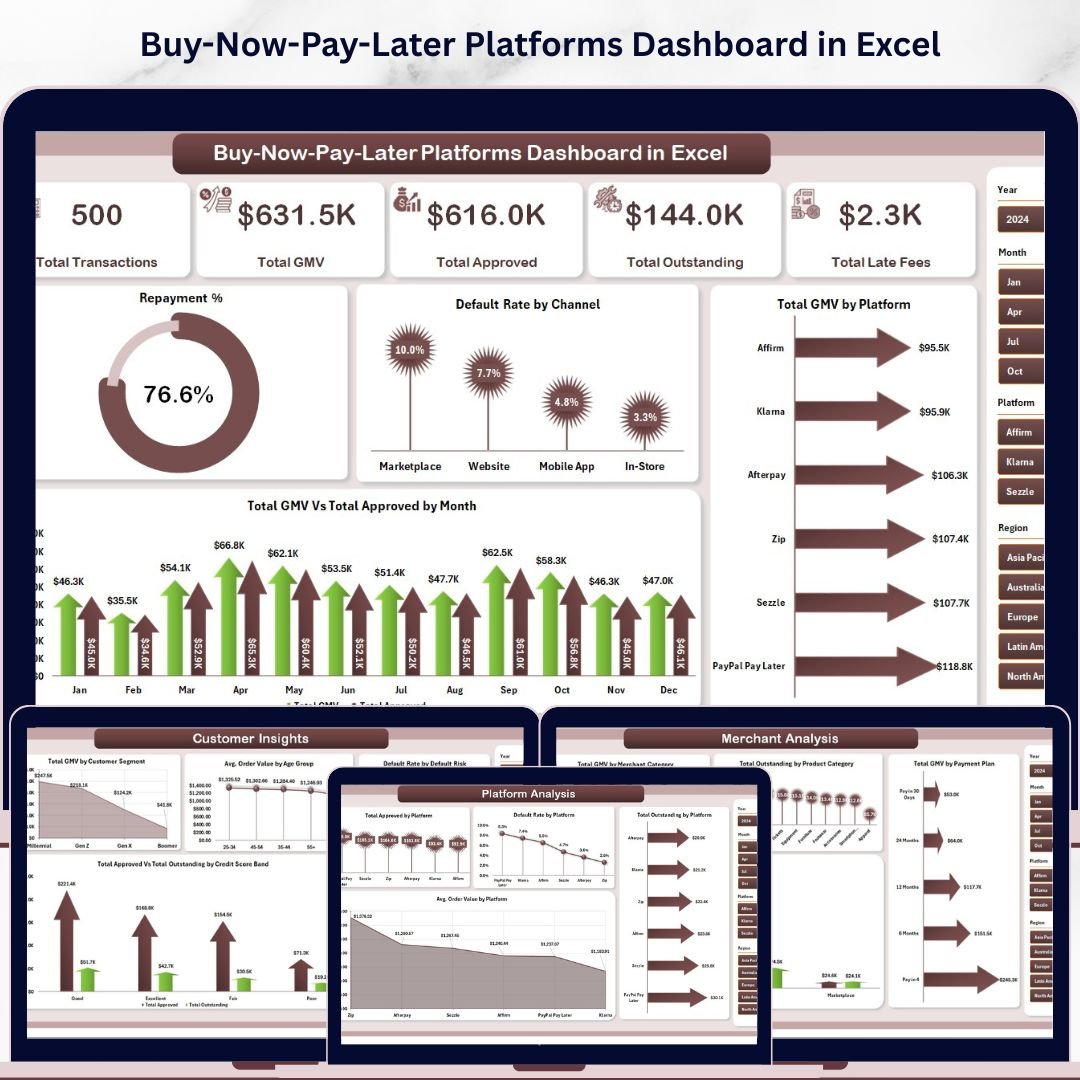


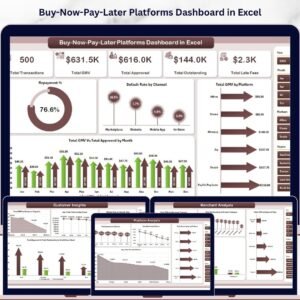
The Buy-Now-Pay-Later Platforms Dashboard in Excel tracks 5 portfolio KPIs across 5 interactive dashboard pages, with 16 pivot-driven charts and multiple slicers covering platform performance, customer segments, merchant categories, payment plans, and monthly trends. The global BNPL market surpassed $309 billion in transaction volume in 2023 and is projected to reach $576 billion by 2026 — yet most fintech analysts and lending operations teams still track GMV, default rates, and repayment performance in disconnected spreadsheets. Setup takes under 10 minutes — replace the sample data in the Data sheet, click Refresh All, and every KPI card, chart, and slicer updates automatically.
🌍 Join 8,400+ teams in 40+ countries using Nextgen Templates to replace paid SaaS tools with one-time-purchase Excel, Google Sheets, Power BI, and HTML templates.
✅ Instant download · One-time payment · No subscription · No per-user fees · Lifetime access
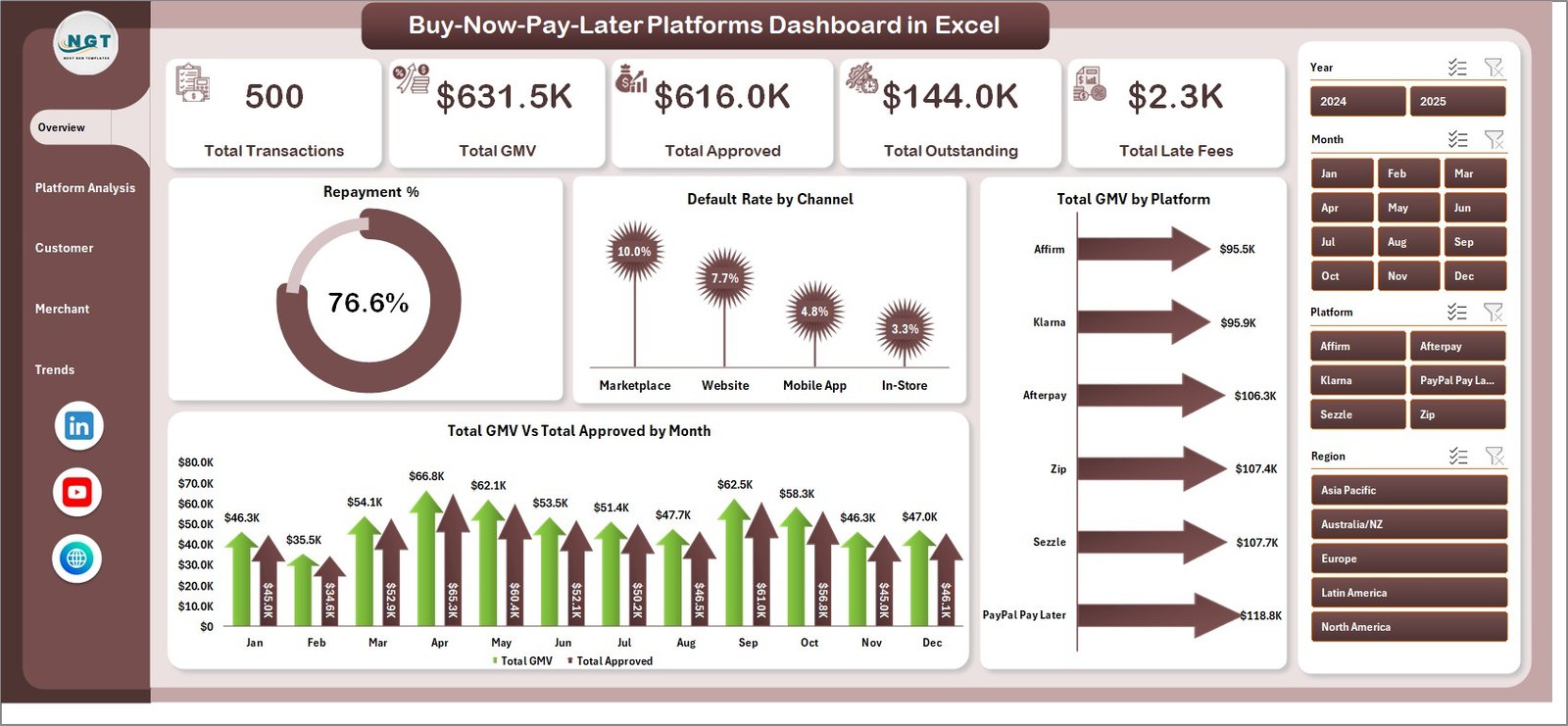
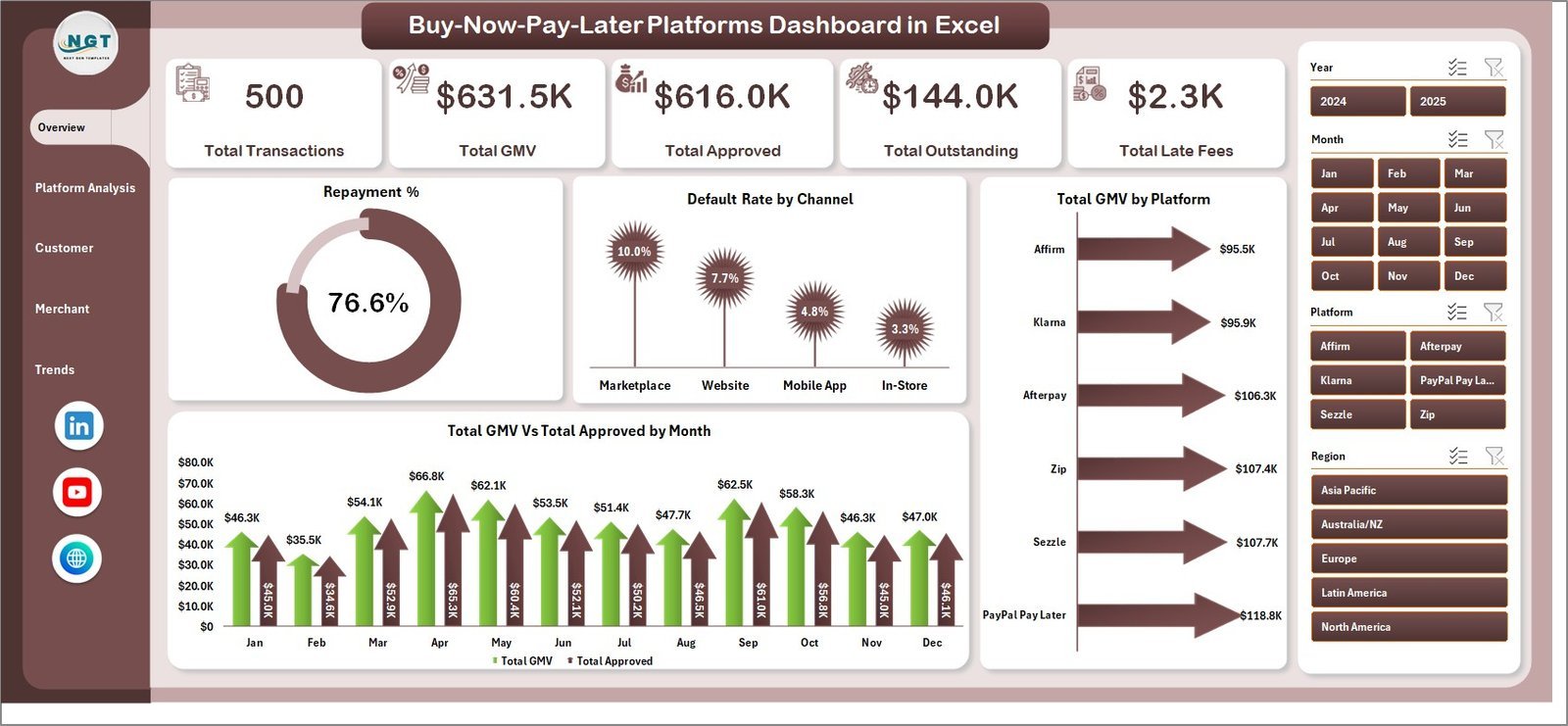
Buy-Now-Pay-Later Platforms Dashboard in Excel — Overview Page
🔑 Key Features of the Buy-Now-Pay-Later Platforms Dashboard in Excel
📌 5 KPI Summary Cards on the Overview Page — Total Transactions, Total GMV, Total Approved, Total Outstanding, and Total Late Fees give BNPL operations managers and fintech analysts an instant read on portfolio health. Each card refreshes automatically when you update the Data sheet and click Refresh All, eliminating manual recalculation across every reporting cycle.
📌 16 pivot-driven charts across 5 pages — The dashboard delivers Repayment %, Default Rate by Channel, Total GMV by Platform, Total GMV vs Total Approved by Month on the Overview; then breaks down platform-level, customer-segment, merchant-category, and trend analysis across dedicated pages. This dashboard tracks every dimension a BNPL risk or operations team needs: platform comparison, age group behavior, credit score band performance, and monthly transaction trends.
📌 Slicer-based filtering on every page — Multiple slicers on each analysis page let you slice by platform, channel, customer segment, payment plan, merchant category, or month in one click. No formula rewrites required — click any slicer button and the entire page refreshes instantly.
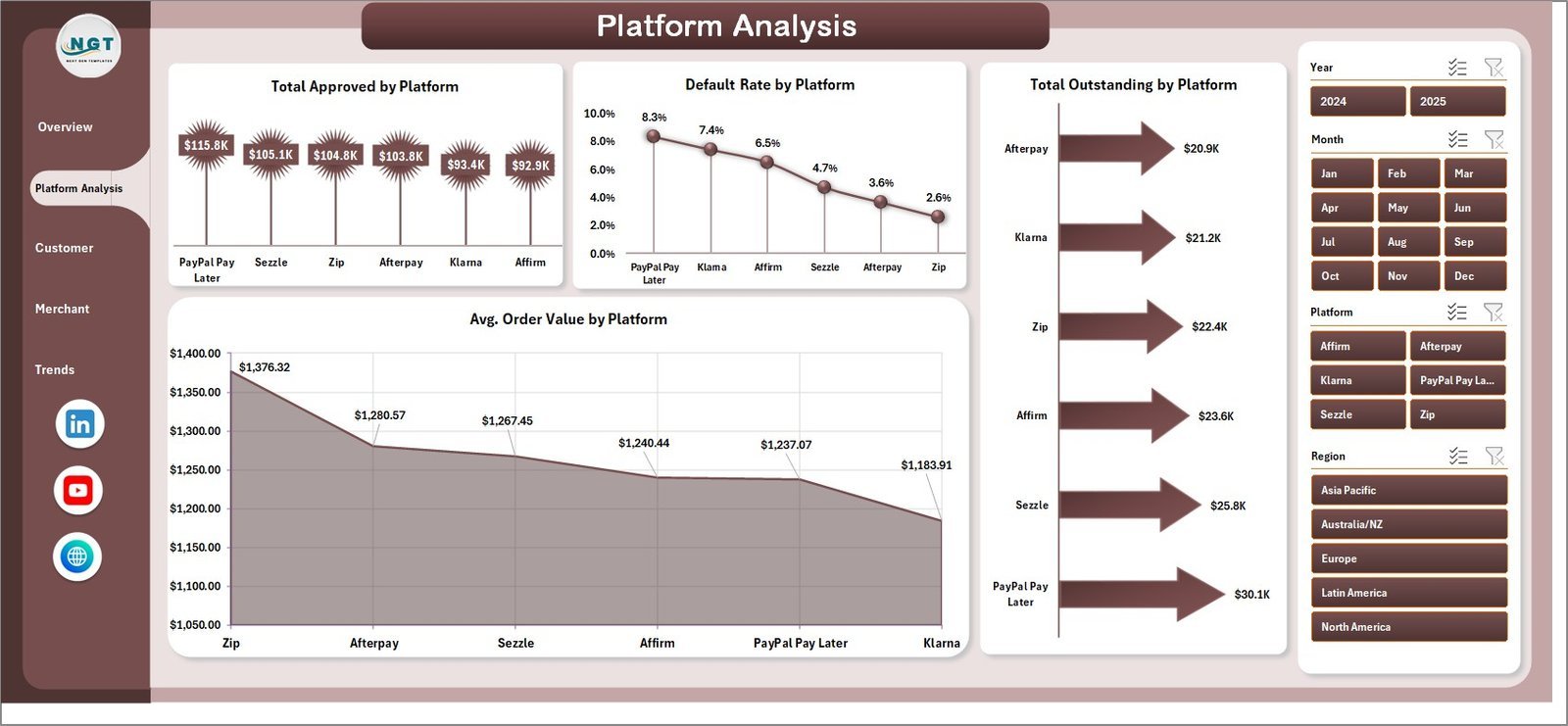
📌 Platform comparison analytics — The Platform Analysis page shows Total Approved by Platform, Default Rate by Platform, Total Outstanding by Platform, and Avg. Order Value by Platform side by side, making it straightforward to identify which BNPL providers are driving the highest volume and which are carrying the most default risk.
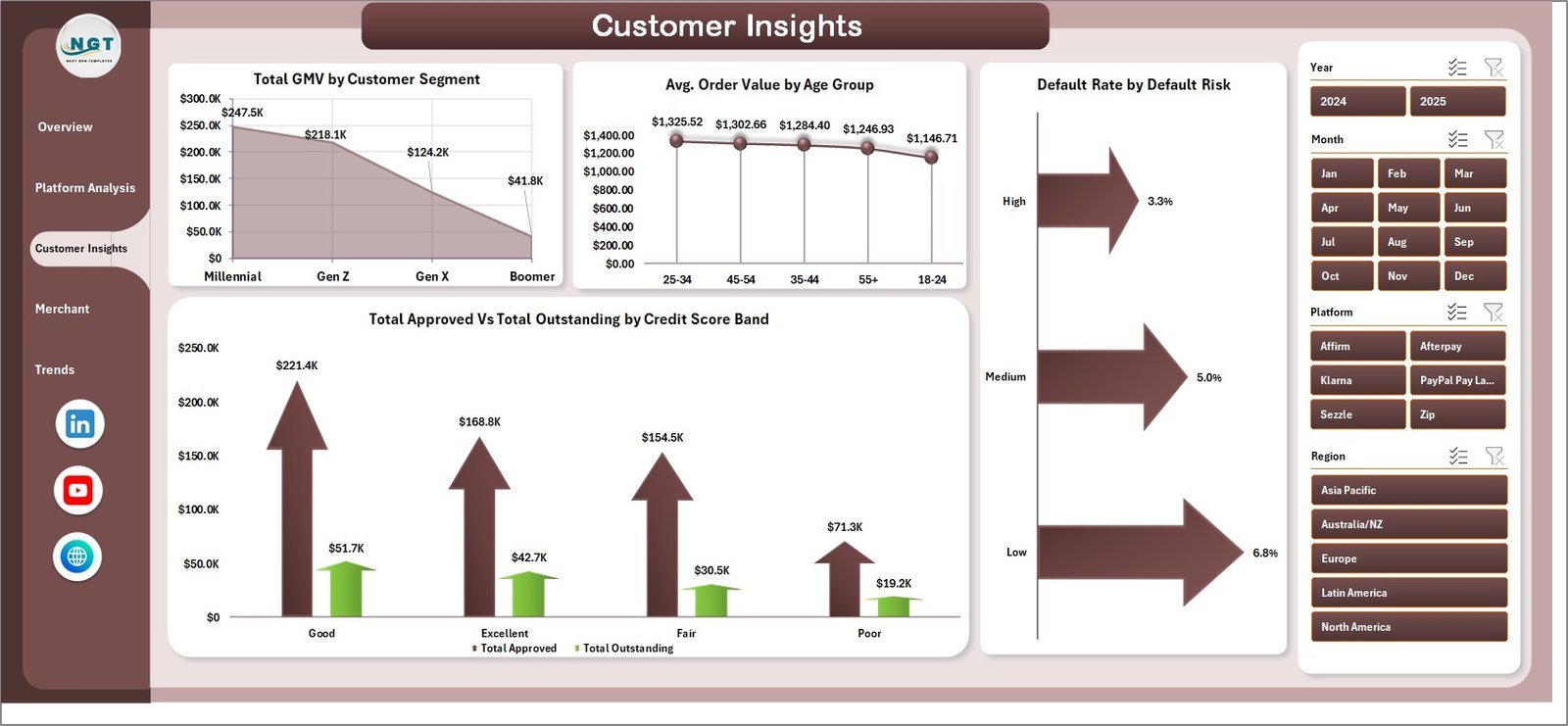
📌 Customer risk and demographic insights — The Customer Insights page tracks GMV by Customer Segment, Avg. Order Value by Age Group, Default Rate by Default Risk, and Total Approved vs Total Outstanding by Credit Score Band. This page is the most cited in lender risk reviews — it directly answers which borrower profiles carry the highest delinquency exposure.
📌 Hidden Support Sheet with pivot engine — All pivot tables live on the Support sheet, which can stay hidden. Navigate to the Data tab in the Excel Ribbon and click Refresh All — every pivot, chart, and KPI card updates in one click. No manual chart adjustments ever needed.
📦 What’s Inside the Buy-Now-Pay-Later Platforms Dashboard in Excel
1 — Overview Page
The executive landing page. Five KPI cards (Total Transactions, Total GMV, Total Approved, Total Outstanding, Total Late Fees) sit at the top. Below, four charts provide portfolio context:
🔸 Repayment % — measures the percentage of approved amounts that have been repaid, the single most important health metric for a BNPL portfolio. Spot repayment trends across months before late fees escalate.
🔸 Default Rate by Channel — compares default rates across origination channels (online, in-store, app, partner) to identify which intake routes carry the highest delinquency rates.
🔸 Total GMV by Platform — ranks platforms by gross merchandise value, showing where transaction volume is concentrated across providers like Afterpay, Klarna, Affirm, Zip, or your internal platforms.
🔸 Total GMV vs Total Approved by Month — a dual-line chart revealing whether approval volume is keeping pace with GMV or diverging, a leading indicator of portfolio risk tightening or loosening.
2 — Platform Analysis
Four platform-focused breakdowns for BNPL portfolio managers comparing provider performance:
🔸 Total Approved by Platform — ranks each BNPL platform by approved loan volume, useful for channel mix optimization and contract renegotiations with platform providers.
🔸 Default Rate by Platform — flags which platforms are generating the highest default rates, enabling risk teams to tighten origination criteria or exit partnerships with underperforming channels.
🔸 Total Outstanding by Platform — shows the current book balance per platform, a key input for provisioning, treasury planning, and credit line utilization reporting.
🔸 Avg. Order Value by Platform — benchmarks ticket size across platforms to inform underwriting policy by channel and identify where high-value transactions are concentrated.
3 — Customer Insights
Four customer-focused analytics for credit risk and marketing teams:
🔸 Total GMV by Customer Segment — compares transaction volume across customer tiers (new, returning, premium, at-risk), helping retention and acquisition teams prioritize spend.
🔸 Avg. Order Value by Age Group — reveals which age demographics drive the highest-value transactions, informing product design, credit limit policy, and targeted promotions.
🔸 Default Rate by Default Risk — cross-tabulates default outcomes against risk ratings to validate the predictive power of the credit scoring model and calibrate risk-based pricing.
🔸 Total Approved vs Total Outstanding by Credit Score Band — maps approval volume and remaining balance across credit score bands, showing where the portfolio is most exposed to arrears.
4 — Merchant Analysis
Four merchant- and payment-plan analytics for commercial teams:
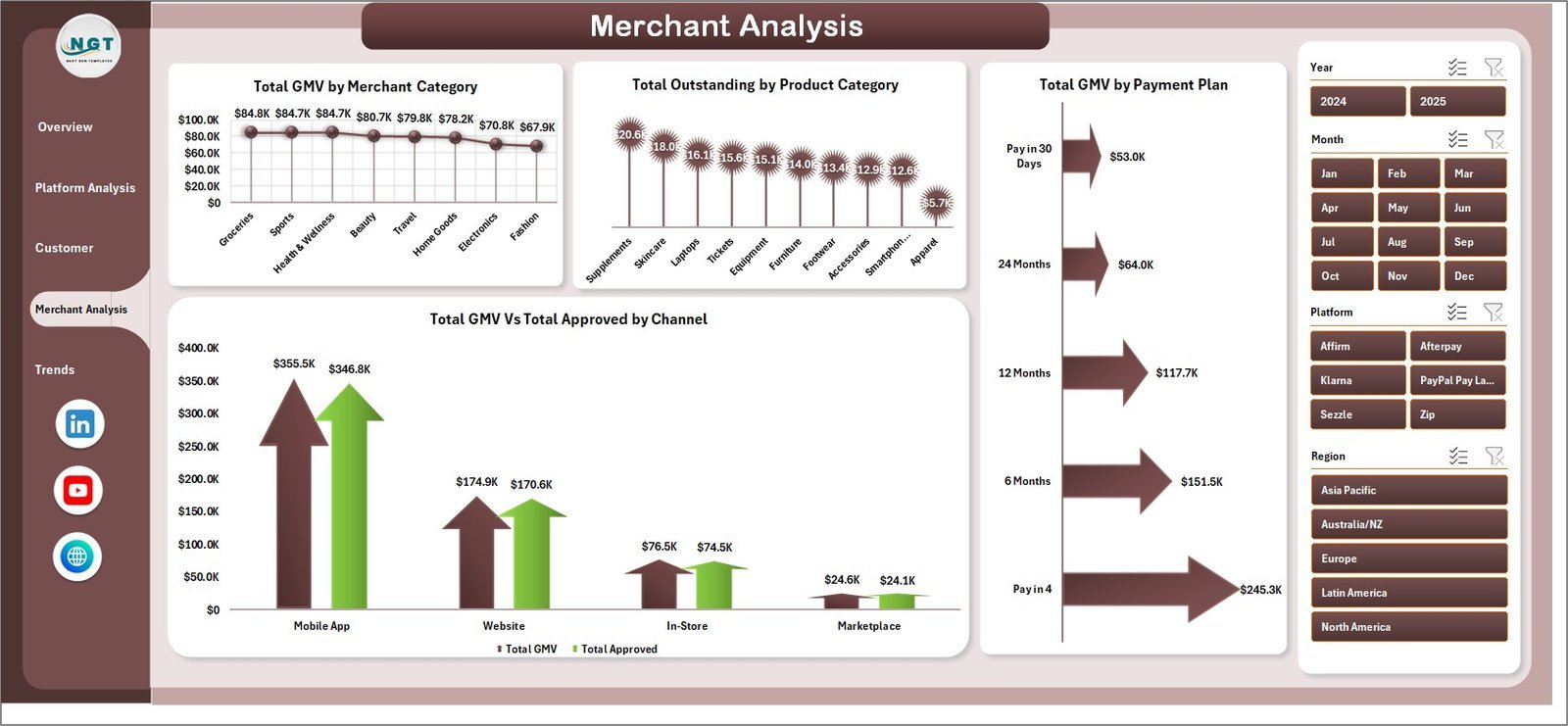
🔸 Total GMV by Merchant Category — shows which retail verticals (fashion, electronics, health, home) generate the most BNPL volume, guiding merchant acquisition strategy.
🔸 Total Outstanding by Product Category — maps outstanding balances across product types, revealing which categories carry the longest repayment tails and highest late-fee risk.
🔸 Total GMV by Payment Plan — compares transaction volume across installment structures (Pay-in-4, Pay-in-6, Pay-in-12, Pay-in-24), identifying the most popular repayment terms.
🔸 Total GMV vs Total Approved by Channel — a side-by-side channel comparison of gross volume and approvals, highlighting where approval rates are tight and pipeline is being left on the table.
5 — Trends Page
Four longitudinal trend charts for month-over-month tracking:
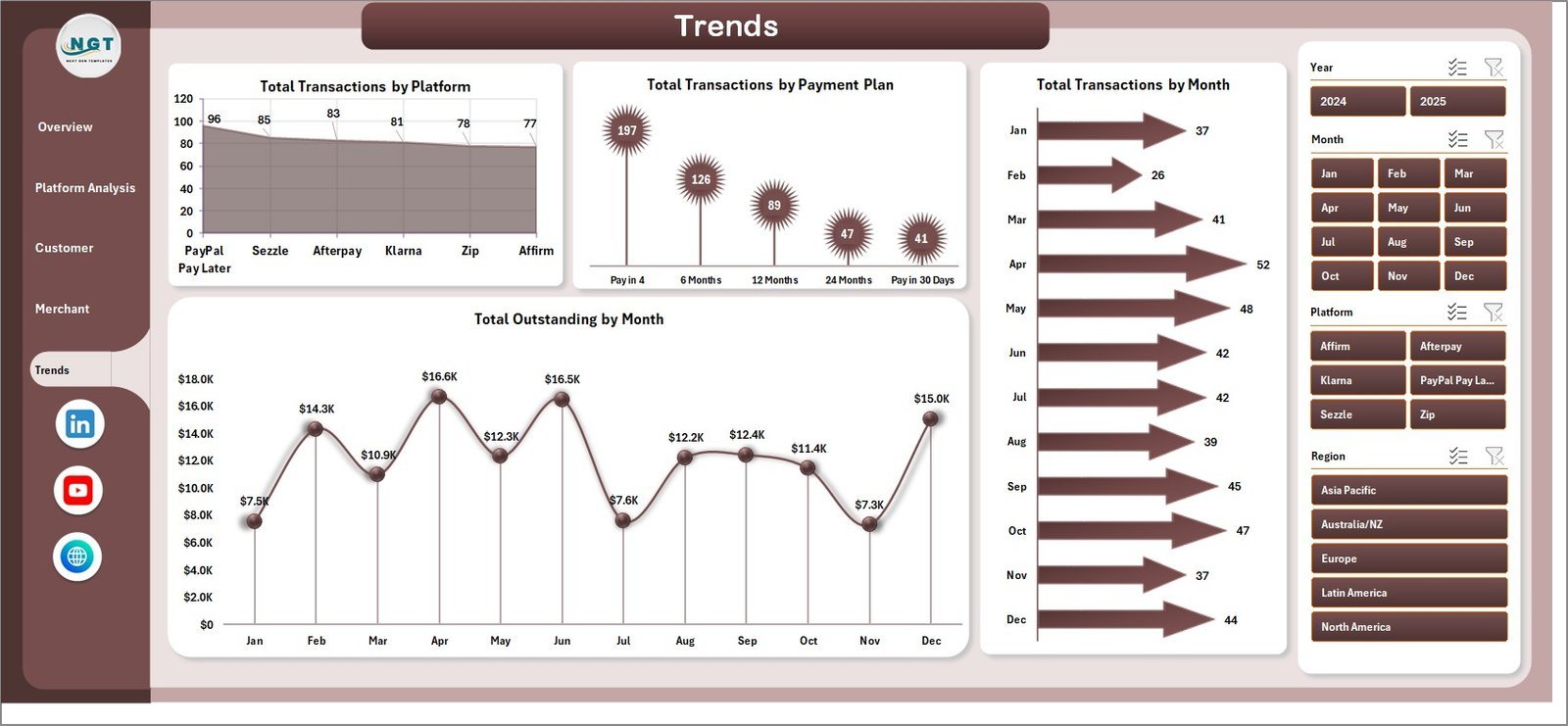
🔸 Total Transactions by Platform — month-by-month transaction volume per platform, showing seasonal patterns and platform-level growth trajectories.
🔸 Total Transactions by Payment Plan — tracks how customer repayment plan preferences shift over time, useful for product team decisions on which tenors to promote or sunset.
🔸 Total Transactions by Month — overall portfolio transaction count trend, the baseline volume KPI for executive reports and board decks.
🔸 Total Outstanding by Month — rolling outstanding balance trend that flags whether the portfolio is growing, plateauing, or de-risking, a key input for treasury and provisioning forecasts.
6 — Data Sheet
The single structured input table. Paste or type your BNPL transaction records in the provided column format — Transaction ID, Date, Platform, Channel, Customer Segment, Age Group, Credit Score Band, Default Risk, Payment Plan, Merchant Category, Product Category, Approved Amount, Outstanding Amount, Late Fees, Repayment Amount, Status. Keep the column headers exactly as they are and run Refresh All — no formula editing required.
7 — Support Sheet
All pivot tables that feed the dashboard charts live on this sheet. After updating the Data sheet, go to the Data tab in the Excel Ribbon and click Refresh All — all pivots rebuild instantly across all 5 dashboard pages. This sheet can remain hidden in production for a polished presentation-ready experience.
📊 Buy-Now-Pay-Later Platforms Dashboard in Excel vs. Google Sheets Equivalent vs. Paid BNPL Analytics SaaS — Where This Fits
| Feature | Buy-Now-Pay-Later Platforms Dashboard in Excel | Google Sheets BNPL Tracker | Stripe / Afterpay Analytics / Paid Fintech SaaS |
|---|---|---|---|
| Cost | $17.99 one-time | $0–$20 one-time | $200–$2,000+ / month |
| Platform | Excel 2016, 2019, 2021, 365 | Google Sheets (browser) | Cloud SaaS (vendor-hosted) |
| Setup time | Under 10 minutes | 15–30 minutes | Days to weeks (API integration) |
| Works offline | ✅ Yes, file-based | ❌ Requires internet | ❌ Cloud only |
| Platform comparison analytics | ✅ 4 dedicated charts | ⚠️ Manual build required | ✅ Built-in |
| Customer risk analytics | ✅ Credit score band + age group | ⚠️ Build yourself | ✅ Built-in |
| Default Rate by Channel | ✅ Pre-built | ❌ Not included | ✅ Built-in |
| Slicer-based filtering | ✅ Multiple slicers per page | ❌ Manual filter views only | ✅ Built-in (at cost) |
| Year-1 cost at 5 users | $17.99 total | $0–$100 | $2,400–$24,000+ |
For fintech analysts and BNPL operations teams that need platform, customer, and merchant analytics without paying SaaS subscription fees, the Buy-Now-Pay-Later Platforms Dashboard in Excel sits in the sweet spot.
👥 Who This Template Is For — and Who It’s Not For
✅ This template is built for:
- BNPL operations managers and fintech analysts tracking multi-platform portfolio performance
- Credit risk teams monitoring default rates, repayment trends, and outstanding balances by customer segment
- Finance controllers at lending fintechs building monthly board-ready performance reports
- Product managers benchmarking payment plan adoption and merchant category GMV
- Consultants and analysts delivering BNPL performance reviews to lender clients
❌ This template is NOT for:
- Enterprise BNPL platforms needing real-time API integration with core lending systems (Mambu, Finastra, etc.)
- Teams requiring live streaming transaction data — this is a refresh-based model, not a real-time feed
- Users without Microsoft Excel 2016 or later — consider our Google Sheets Dashboard Templates instead
⚙️ How to Use the Buy-Now-Pay-Later Platforms Dashboard in Excel
- Download and unzip the file and open it in Microsoft Excel 2016 or later.
- Go to the Data Sheet and review the column structure (Transaction ID, Date, Platform, Channel, Customer Segment, Age Group, Credit Score Band, Default Risk, Payment Plan, Merchant Category, Product Category, amounts, etc.).
- Replace the sample rows with your own BNPL transaction data — paste from your system export, keeping the column headers intact.
- Click Data → Refresh All in the Excel Ribbon — all pivot tables on the Support sheet rebuild instantly across all 5 pages.
- Navigate to any dashboard page and use the slicers to filter by platform, channel, customer segment, payment plan, or any other dimension.
- Hide the Support sheet for a clean presentation — right-click the tab and select Hide so stakeholders only see the 5 analysis pages and the Data sheet.
💼 Real-World Use Cases
Ananya leads risk operations at a mid-size BNPL fintech with partnerships across 4 lending platforms. Each month she exports transaction data from the core system into the Buy-Now-Pay-Later Platforms Dashboard in Excel, clicks Refresh All, and presents the Platform Analysis page to the Chief Risk Officer — showing which platforms are running the highest default rates and where outstanding balances are growing fastest. The entire reporting cycle takes 20 minutes instead of a full day of manual pivot building.
Marcus is a credit analyst at a consumer finance company that recently launched a BNPL product line. He uses the Customer Insights page to validate that the credit scoring model is correctly stratifying default risk — the Default Rate by Default Risk chart confirms high-risk customers are defaulting at 3x the rate of low-risk borrowers, exactly as the model predicts. He exports the chart directly into the quarterly credit committee presentation.
Priya is a commercial manager at a payments group responsible for BNPL merchant partnerships. She uses the Merchant Analysis page to show retail partners that fashion and electronics categories generate the highest GMV, while identifying that Pay-in-4 plans drive 62% of all volume — data that directly informed her team’s decision to promote shorter tenors in the next merchant agreement renewal cycle.
❓ Frequently Asked Questions
What KPIs does the Buy-Now-Pay-Later Platforms Dashboard in Excel track?
The Buy-Now-Pay-Later Platforms Dashboard in Excel tracks 5 headline KPIs: Total Transactions, Total GMV, Total Approved, Total Outstanding, and Total Late Fees. It also delivers 16 breakdown charts across platform performance, customer risk, merchant analytics, and monthly trends. All metrics update automatically when you replace sample data and click Refresh All.
How long does setup take for the BNPL Dashboard in Excel?
Setup takes under 10 minutes. Open the file in Excel 2016 or later, paste your BNPL transaction data into the Data sheet keeping the column order intact, and click Refresh All under the Data ribbon. Every chart, KPI card, and slicer across all 5 pages updates automatically — no formula editing required.
Does the Buy-Now-Pay-Later Platforms Dashboard in Excel require any add-ins or macros?
No. The Buy-Now-Pay-Later Platforms Dashboard in Excel runs on native Excel pivot tables and slicers — no VBA macros, no Power Query, no Power Pivot add-ins required. It works in Excel 2016, 2019, 2021, and Microsoft 365 on both Windows and Mac.
How does this compare to paid BNPL analytics platforms like Stripe or Afterpay’s native reporting?
Native BNPL platform analytics are locked to a single provider and often lack cross-platform comparison views. The Buy-Now-Pay-Later Platforms Dashboard in Excel consolidates data from multiple platforms in one file, costs $17.99 once, and gives you full control over metrics, filters, and visual layout — without per-user fees or monthly subscription costs.
Can I add my own BNPL platforms, merchant categories, or payment plans to this dashboard?
Yes. The dashboard reads from your Data sheet — add any platform names, merchant categories, or payment plan types as column values and click Refresh All. The slicers and charts automatically include the new dimensions without any formula changes.
Will the Buy-Now-Pay-Later Platforms Dashboard in Excel handle 100,000+ transaction rows?
Yes. The dashboard uses native Excel pivot tables, which handle up to 1 million rows comfortably. For portfolios with under 500,000 active transactions, refresh times typically stay under 5 seconds on a standard business laptop.
Is there a Google Sheets or Power BI version of this BNPL dashboard?
This Excel version is the primary release. For browser-based access, explore our Google Sheets Dashboard Templates for browser-first equivalents in the Finance category.
👤 About the Author
Built by PK — Microsoft Certified Professional with 15+ years of Excel, Google Sheets, and Power BI experience. Founder of NextGenTemplates, reaching 300K+ subscribers across YouTube channels (@PK-AnExcelExpert, @NextGenTemplates, @NeoTechNavigators). Every template is hand-built and tested before release.
🔗 Explore Related Templates
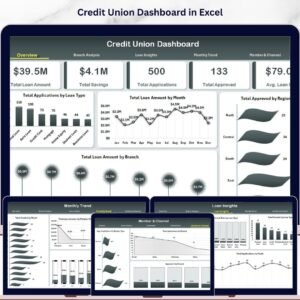
📌 Also available: Credit Union Dashboard in Excel — branch, loan, and member analytics for credit unions with 19 pivot-driven charts.
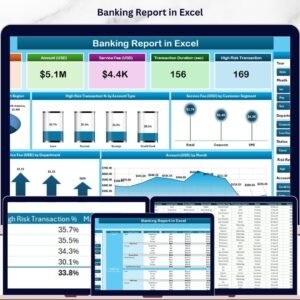
📌 Banking Report in Excel — branch-level banking performance with High Risk Transaction % analysis and slicer filtering.
📌 Business Angel Networks Dashboard in Excel — deal flow, portfolio returns, and geographic analysis for angel investors.
📌 Browse all Excel Dashboard Templates or our full MS Excel Templates library.
📖 Click here to read the Detailed Blog Post
🎥 Visit our YouTube channel for step-by-step video tutorials
👉 YouTube.com/@NextGenTemplates
📅 Last updated: May 2026
Watch the step-by-step video tutorial:
YouTube






























Reviews
There are no reviews yet.