



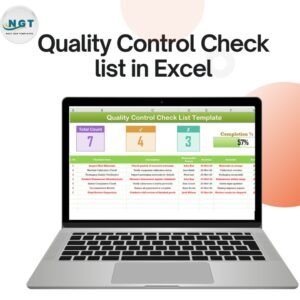
The Quality Control Preparation Guide Checklist in Excel is a comprehensive tool designed for businesses and quality control teams to streamline the process of quality assurance. This Excel-based checklist serves as an essential guide to ensure all quality control procedures are followed accurately, reducing errors and improving overall product quality.
Whether you are in manufacturing, service delivery, or any industry where quality is paramount, this checklist helps track essential tasks like product inspections, testing, safety protocols, and documentation reviews. With a user-friendly design, it’s easy to manage quality control activities, stay compliant with industry standards, and ensure that all processes meet the desired quality benchmarks.
Key Features of the Quality Control Preparation Guide Checklist in Excel
📋 Detailed Quality Control Checklist
This checklist covers every aspect of quality control, from raw materials inspection to final product testing. Ensure that all steps are completed and documented for a smooth quality assurance process.
🔄 Task Tracking & Assignment
Easily assign tasks to team members, track progress, and make sure all actions are completed on time. You can ensure that the right person is responsible for each step, promoting accountability and efficiency.
📝 Inspection & Testing Tracking
Record and monitor inspections, tests, and reviews to ensure that all products or services meet the required standards. This helps identify potential quality issues before they escalate.
📈 Data-Driven Reports & Insights
Use the data collected through the checklist to generate reports, analyze quality trends, and identify areas for improvement. This helps you continuously optimize your quality control processes.
⚙️ Customizable Template
Tailor the checklist to suit your specific business needs. You can add custom quality control tasks, inspection categories, and more based on your operations or industry standards.
📅 Time-Based Scheduling & Deadlines
Manage deadlines and schedule recurring tasks, such as routine quality checks, to ensure timely compliance with quality control standards.
Why You’ll Love the Quality Control Preparation Guide Checklist in Excel

✅ Streamline Quality Control Processes
Ensure every step of your quality control process is documented, tracked, and completed on time, improving overall product or service quality.
✅ Promote Team Accountability
Assign tasks, track progress, and ensure that every team member knows their responsibilities. This promotes accountability and ensures quality control procedures are followed diligently.
✅ Enhance Compliance & Standards
Maintain high standards and meet industry compliance requirements by following a structured and organized approach to quality control. The checklist helps meet quality assurance regulations and avoid costly mistakes.
✅ Improve Efficiency & Time Management
Track progress and deadlines for each task to improve the efficiency of your quality control processes. Time-based scheduling ensures that no step is missed, and all tasks are completed on time.
✅ Easily Adaptable
Whether you’re in manufacturing, service, or any industry that requires quality control, this checklist is adaptable to meet your specific needs, helping you maintain high standards and quality assurance.
What’s Inside the Quality Control Preparation Guide Checklist in Excel?
Comprehensive Quality Control Checklist: Track every step from product inspection to final testing.
Task Assignment & Progress Tracking: Assign and monitor tasks to ensure everything is completed on time.
Inspection & Testing Documentation: Record all inspections, testing, and reviews to maintain accurate quality records.
Data-Driven Reports & Insights: Analyze quality trends and optimize processes based on your data.
Customizable & Scalable: Modify the checklist to suit your industry’s specific requirements.
Time-Based Scheduling & Deadlines: Schedule tasks and track deadlines to ensure timely completion.
How to Use the Quality Control Preparation Guide Checklist in Excel
1️⃣ Download the Template: Access the Quality Control Preparation Guide Checklist in Excel immediately.
2️⃣ Customize the Checklist: Tailor the checklist to suit your specific quality control needs by adding tasks and inspection categories.
3️⃣ Assign Tasks & Track Progress: Assign tasks to your team members and monitor their progress to ensure everything is on track.
4️⃣ Track Inspections & Testing: Record and track all inspections, testing, and quality assurance reviews.
5️⃣ Generate Reports & Optimize Processes: Use the data to generate reports and gain insights that help you optimize your quality control processes.
Who Can Benefit from the Quality Control Preparation Guide Checklist in Excel?
🔹 Manufacturing & Production Teams
🔹 Quality Control & Assurance Managers
🔹 Product Development Teams
🔹 Compliance & Regulatory Teams
🔹 Small & Medium Enterprises (SMBs)
🔹 Large Enterprises & Corporations with QC Departments
🔹 Service Providers with Quality Control Procedures
Ensure your quality control processes are efficient, effective, and compliant with the Quality Control Preparation Guide Checklist in Excel. Track tasks, monitor inspections, and streamline your operations to improve product quality and meet industry standards.
Click here to read the Detailed blog post
Visit our YouTube channel to learn step-by-step video tutorials
Youtube.com/@PKAnExcelExpert
Compatibility and Requirements
- Works in Microsoft Excel desktop (Excel 2016 or later, or Microsoft 365).
- Microsoft has a free guide for new users: Excel for Windows training.
Frequently Asked Questions
What does this checklist cover?
It covers quality control tasks from raw materials inspection to final product testing, plus safety protocols and documentation reviews.
Can I assign tasks to team members?
Yes. You assign tasks, track progress and set deadlines, including recurring tasks such as routine quality checks.
Can I add my own tasks and inspection categories?
Yes. The checklist is customizable, so you can add your own quality control tasks and inspection categories to match your operations or industry standards.
Does it produce reports?
Yes. The data you record in the checklist can be used to generate reports and review quality trends.
Is there a Google Sheets version?
There is a Quality Control Checklist in Google Sheets for teams that work in the browser.
Related Quality Control Templates
- Quality Control Checklist Template in Excel: a general QC checklist
- Quality Control Review Checklist in Excel: for reviewing completed QC work
- Quality Control Action Plan Checklist in Excel: for planning corrective actions
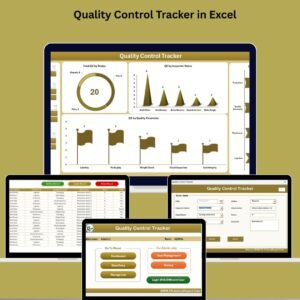
- Quality Control Tracker in Excel: a tracker for ongoing QC records
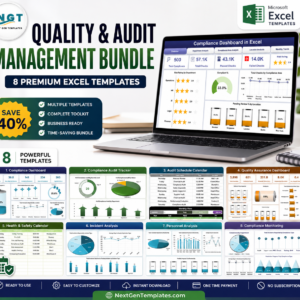
- Quality & Audit Management Bundle: 8 Excel templates for quality and audit work in one download
Browse all Quality Control templates and Excel checklists.



















Reviews
There are no reviews yet.