



The Quality Control Review Checklist in Excel is a comprehensive tool designed for quality control managers, team leaders, and businesses seeking to maintain high standards and ensure that all processes, products, and services meet the required specifications. This checklist helps you streamline your quality control processes, track performance, and ensure compliance with industry standards.
Whether you’re in manufacturing, service delivery, or any other industry requiring quality checks, this Excel-based checklist is customizable and user-friendly. From inspecting raw materials to reviewing final products, this tool allows you to document, analyze, and manage quality control tasks, ensuring consistency and reducing defects.
Key Features of the Quality Control Review Checklist in Excel
📋 Comprehensive Quality Control Tasks
Track all necessary quality checks and inspections, from raw material assessment to final product review. Ensure that every stage of production or service delivery meets quality standards.
✅ Inspection Checklist
Use the built-in checklist to document quality checks for each phase. Verify compliance with internal standards, external regulations, and customer expectations.
🔍 Defect Identification & Tracking
Record defects or non-conformities found during inspections. Track their resolution process and ensure corrective actions are implemented to prevent recurrence.
📊 Data & Trend Analysis
Utilize the dashboard to analyze quality data over time. Identify recurring issues and areas of improvement and use these insights to refine processes and enhance product or service quality.
📅 Time-Based Tracking
Monitor quality over different time periods (daily, weekly, monthly) to identify patterns in performance and product quality, allowing you to respond proactively.
⚙️ Customizable Fields
Tailor the checklist to meet the specific needs of your business. Add additional inspection criteria, adjust fields, or customize sections based on your industry’s requirements.
Why You’ll Love the Quality Control Review Checklist in Excel

✅ Efficient Quality Control Tracking
Monitor every step of the quality control process, ensuring that no important check is missed and that all issues are tracked and addressed.
✅ Improve Product Quality & Consistency
Identify issues early and take corrective actions before they escalate. Continuously refine your processes and product quality based on real-time data.
✅ Reduce Costs from Defects
Minimize the cost of defects and non-conformance by using the checklist to document and address quality issues before they impact the final product.
✅ Enhance Reporting & Compliance
Generate reports and maintain a detailed record of inspections and corrections. This helps with audits, compliance, and internal performance reviews.
✅ Customizable for Any Business
No matter the size of your organization, this checklist can be customized to fit your industry and operational needs. It adapts to any process requiring quality oversight.
What’s Inside the Quality Control Review Checklist in Excel?
Inspection Checklist: Track quality inspections across all stages of production or service delivery.
Defect Identification & Tracking: Record defects and manage their resolution process.
Data & Trend Analysis: Visualize quality trends over time with integrated charts.
Time-Based Performance Tracking: Monitor performance across different periods.
Customizable Fields: Modify sections and fields to suit your business requirements.
How to Use the Quality Control Review Checklist in Excel
1️⃣ Download the Template: Instantly access the Quality Control Review Checklist in Excel.
2️⃣ Input Inspection Criteria: Add the necessary quality checks and inspection points relevant to your product or service.
3️⃣ Track Defects & Non-Conformities: Record any quality issues found during inspections and track resolution steps.
4️⃣ Analyze Quality Data: Use the dashboard to analyze data, track trends, and identify areas for improvement.
5️⃣ Report & Refine Processes: Generate reports and use insights to refine your quality control processes and reduce defects.
Who Can Benefit from the Quality Control Review Checklist in Excel?
🔹 Quality Control Managers & Inspectors
🔹 Production & Operations Teams
🔹 Manufacturing Companies
🔹 Service Providers
🔹 Compliance & Regulatory Teams
🔹 Small & Medium Enterprises (SMBs)
🔹 Large Corporations with Quality Assurance Departments
Ensure your products or services meet the highest standards with the Quality Control Review Checklist in Excel. Streamline your quality control processes, improve product quality, and ensure compliance with this essential tool.
Click here to read the Detailed blog post
Visit our YouTube channel to learn step-by-step video tutorials
Youtube.com/@PKAnExcelExpert
Compatibility and Requirements
- Works in Microsoft Excel desktop (Excel 2016 or later, or Microsoft 365).
- New to Excel? Microsoft’s Excel for Windows training covers the basics.
Frequently Asked Questions
What can I record in the Quality Control Review Checklist?
Quality checks and inspection points for each stage, defects or non-conformities found, and the steps taken to resolve them.
Does it show quality trends?
Yes. Integrated charts let you analyze quality data over time and spot recurring issues.
Can I review results by period?
Yes. You can monitor quality daily, weekly or monthly to find patterns in performance.
Can I add my own inspection criteria?
Yes. The fields and sections are customizable, so you can add criteria that fit your industry.
Related Quality Control Templates
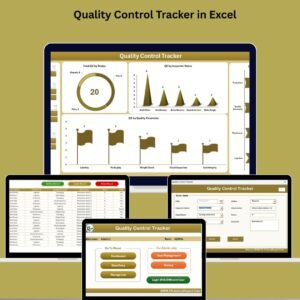
- Quality Control Tracker in Excel: log inspections and results in a tracker
- Quality Control To-Do List Checklist in Excel: a task list for QC teams
- Quality Control Action Plan Checklist in Excel: plan corrective actions
- Quality Control Tracker in Google Sheets: a browser-based tracker
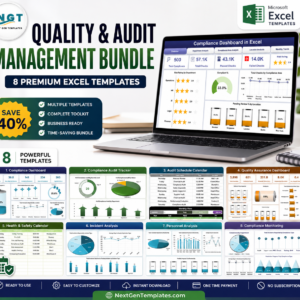
- Quality & Audit Management Bundle: 8 Excel quality and audit templates in one bundle
Browse all Excel quality control templates or the Excel checklists.































Reviews
There are no reviews yet.