



The Quality Control Action Plan Checklist in Excel is a must-have tool for businesses looking to improve their quality control processes. Whether you’re a quality manager, a production team leader, or a project manager, this checklist helps you track, organize, and ensure that all quality control measures are met. From identifying defects to implementing corrective actions, this Excel-based checklist is designed to streamline the quality control process and improve product quality consistently.
This tool simplifies the management of quality control actions by providing a clear, organized structure to document issues, corrective actions, and the results of improvements. With its customizable format and comprehensive tracking capabilities, you can maintain higher standards of quality and ensure that all aspects of your production process meet regulatory requirements and internal standards.
Key Features of the Quality Control Action Plan Checklist in Excel
📋 Defect Tracking
Document and track defects or quality issues as they arise during production or service delivery. Ensure that every issue is recorded and investigated thoroughly.
📝 Corrective Action Plan
For each identified defect, define and track corrective actions to be taken. Set deadlines and assign responsibility to ensure issues are resolved efficiently.
⚙️ Preventive Actions & Improvements
Not only does the checklist help manage corrective actions, but it also assists in planning and tracking preventive actions to avoid future quality issues.
📅 Deadline & Progress Tracking
Set deadlines for corrective actions and track progress over time. This feature helps to ensure timely resolution of quality issues and enhances team accountability.
📊 Data Visualization & Reporting
Leverage Excel’s built-in charts and reporting features to visualize trends, track KPIs, and assess the effectiveness of quality control measures.
⚙️ Customizable Action Plan
The checklist can be tailored to suit your organization’s specific quality control processes. You can add additional fields, update action items, and customize statuses to fit your needs.
Why You’ll Love the Quality Control Action Plan Checklist in Excel

✅ Streamline Quality Control Management
Easily document, track, and manage quality issues with a structured approach to corrective and preventive actions.
✅ Enhance Accountability
Assign clear responsibilities and set deadlines for action items to ensure that each quality issue is addressed efficiently.
✅ Proactive Quality Management
Prevent future defects by incorporating preventive actions and continuous improvements into your quality control process.
✅ Improve Compliance & Standards
Ensure that all corrective actions align with internal and external quality standards, improving product quality and reducing the risk of non-compliance.
✅ Data-Driven Decisions
Use the built-in reporting and analysis tools to make informed decisions about quality improvements and operational efficiency.
What’s Inside the Quality Control Action Plan Checklist in Excel?
Defect Tracking: Document and track defects and quality issues in production.
Corrective Action Plan: Define corrective actions for every identified defect.
Preventive Actions: Plan preventive measures to avoid recurring quality issues.
Deadline & Progress Monitoring: Set deadlines and track the progress of actions.
Data Visualization: Use charts and reports to analyze trends and actions.
Customizable Action Plan: Adapt the checklist to fit your company’s quality control needs.
How to Use the Quality Control Action Plan Checklist in Excel
1️⃣ Download the Template: Instantly access the Quality Control Action Plan Checklist in Excel.
2️⃣ Document Defects: Record defects, issues, and non-conformances as they occur.
3️⃣ Create Corrective Actions: Define actions to correct the quality issue and assign responsibilities.
4️⃣ Track Progress: Set deadlines and track progress until the corrective actions are completed.
5️⃣ Generate Reports & Analyze Trends: Use Excel’s reporting features to analyze trends and assess the effectiveness of your quality control efforts.
Who Can Benefit from the Quality Control Action Plan Checklist in Excel?
🔹 Quality Control Managers
🔹 Production Teams & Manufacturing Units
🔹 Project Managers & Team Leaders
🔹 Compliance & Regulatory Teams
🔹 Businesses in Manufacturing, Construction, or Service Industries
🔹 Small & Medium Enterprises (SMBs)
🔹 Large Enterprises with Complex Quality Control Needs
Ensure that your quality control processes are consistently followed and improved with the Quality Control Action Plan Checklist in Excel. Monitor defects, track corrective actions, and enhance the overall quality management in your organization.
Click here to read the Detailed blog post
Visit our YouTube channel to learn step-by-step video tutorials
Youtube.com/@PKAnExcelExpert
Compatibility and Requirements
- Works in Microsoft Excel desktop (Excel 2016 or later, or Microsoft 365).
- New to Excel? Microsoft’s Excel for Windows training covers the basics.
Frequently Asked Questions
What does the checklist track?
Defects and quality issues, the corrective action for each one, preventive actions, deadlines and progress.
Can I assign actions to people?
Yes. Each action item can have an owner and a deadline, so every issue has someone responsible for closing it.
Can I change the statuses and fields?
Yes. You can add fields, update action items and change the statuses to match your own quality process.
Can I see trends over time?
Yes. Use Excel charts and reports on the tracked data to see trends and judge how well the actions work.
Related Quality Control Templates
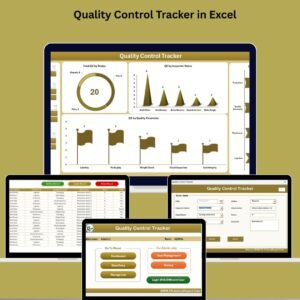
- Quality Control Tracker in Excel: a fuller quality control tracker in Excel
- Quality Control Tracker in Google Sheets: the quality control tracker in Google Sheets
- Quality Control Review Checklist in Excel: a quality control review checklist
- Quality Control Planner Checklist in Excel: plan quality control work in Excel
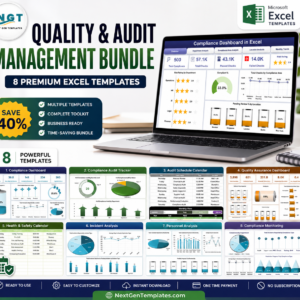
- Quality & Audit Management Bundle: quality and audit templates in one bundle
Browse all Excel checklists or the Excel quality control templates.































Reviews
There are no reviews yet.