

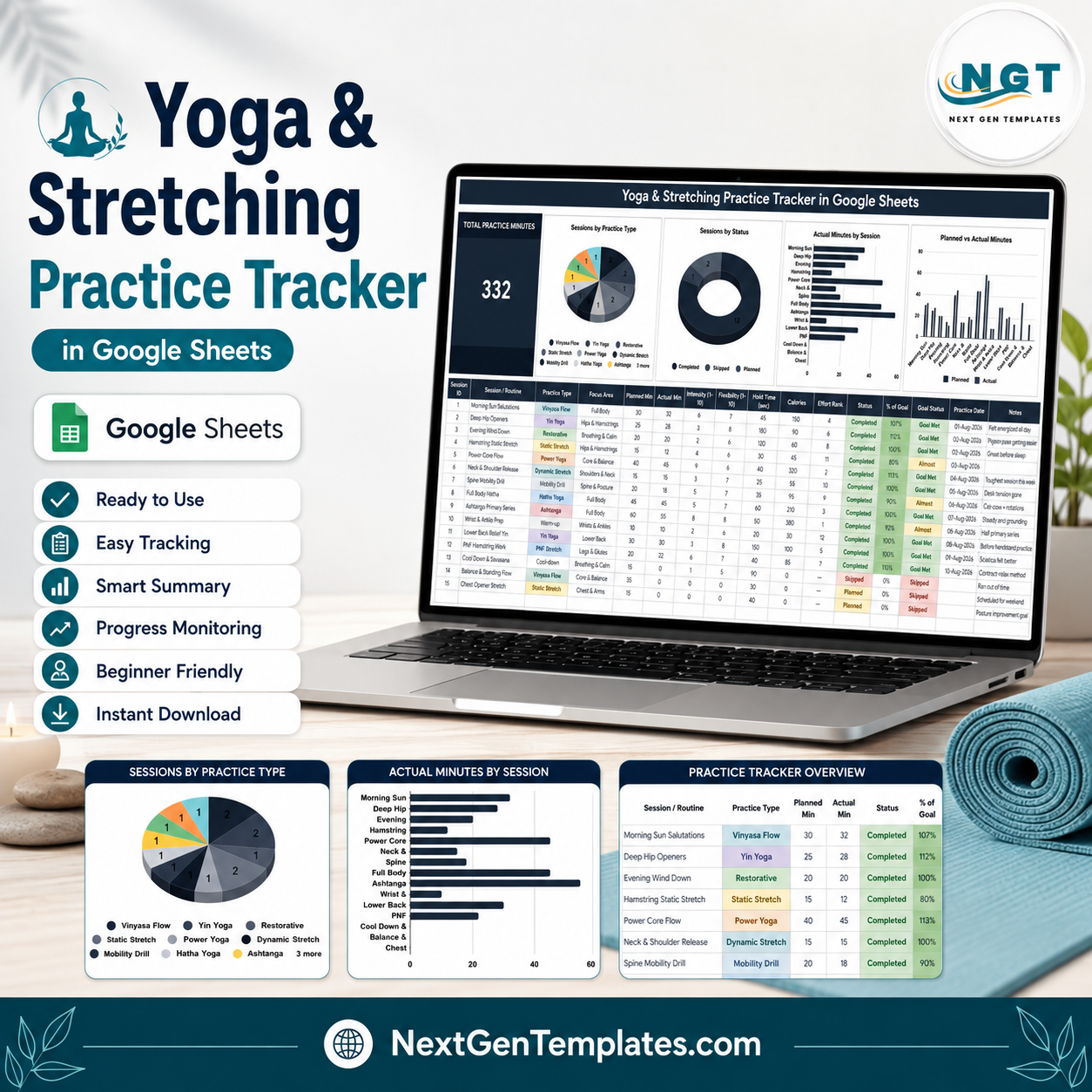
The Yoga & Stretching Practice Tracker in Google Sheets turns a scattered practice habit into one screen you can read in five seconds. The demo file ships with 15 sample sessions, 332 total practice minutes, 12 practice types (Vinyasa Flow, Yin Yoga, Restorative, Static Stretch, Power Yoga, Dynamic Stretch, Mobility Drill, Hatha Yoga, Ashtanga, Warm-up, PNF Stretch, Cool-down) and 16 tracked columns per session. Setup takes about two minutes: click the copy link inside the PDF, replace the demo rows, and the KPI card and four charts update themselves. Built by NextGenTemplates, whose YouTube channels reach 300K+ subscribers. Instant download, lifetime access, no subscription and no add-ons. This is a personal practice log for your own record-keeping – it is not medical advice and not a clinical record system.
Key Features of the Yoga & Stretching Practice Tracker in Google Sheets
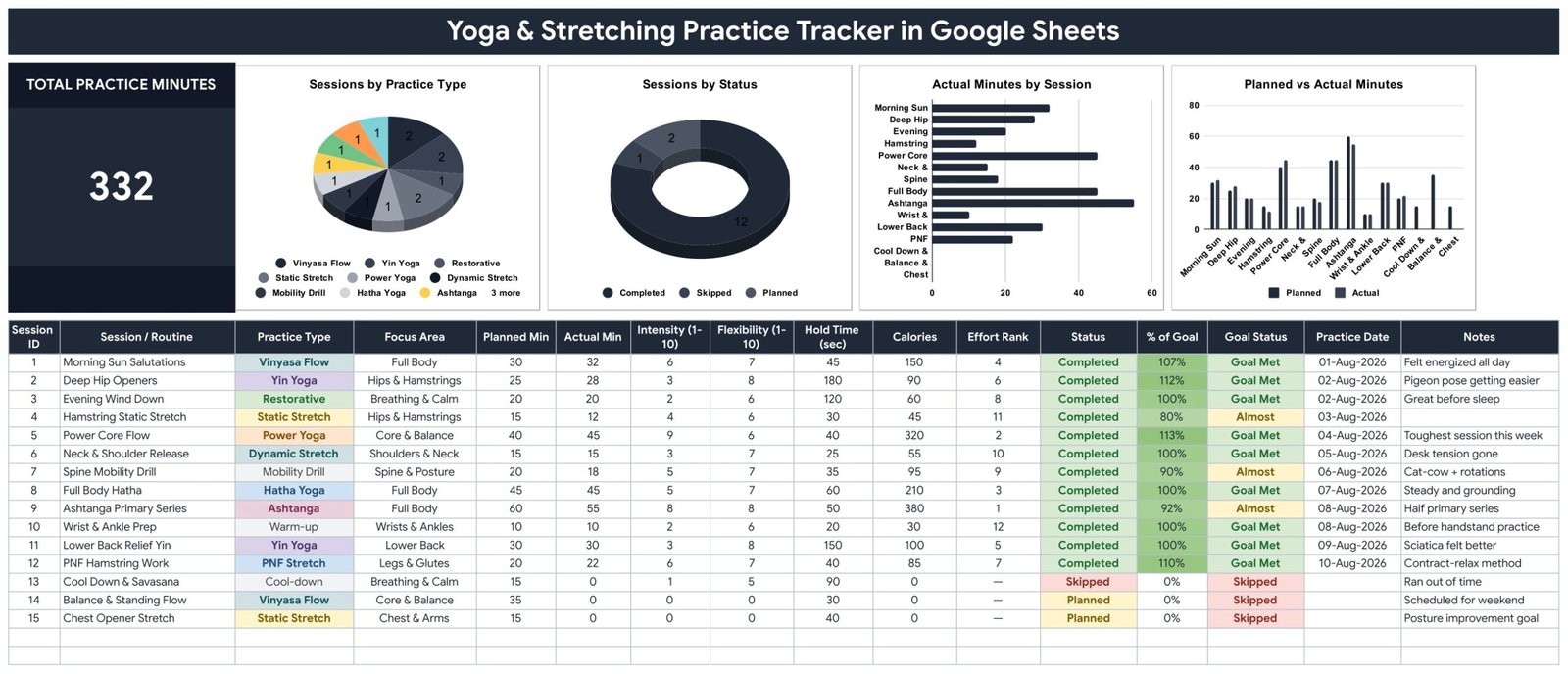
- One-page layout – the KPI card, all four charts and the full session log live on a single tab, so nothing is buried behind navigation.
- Total Practice Minutes KPI card – a single large figure that sums the actual minutes of every logged session (332 in the demo data).
- Sessions by Practice Type – a pie chart that shows whether your month is honestly balanced or 80% Vinyasa Flow with a token Yin session bolted on.
- Sessions by Status – a donut splitting Completed, Skipped and Planned, so consistency is visible rather than remembered.
- Actual Minutes by Session – a horizontal bar chart ranking every routine by the minutes you actually put in.
- Planned vs Actual Minutes – a paired column chart that puts your intention next to your outcome for each session.
- Automatic % of Goal and Goal Status – the sheet divides Actual Min by Planned Min and stamps each row Goal Met, Almost or Skipped, with colour coding, so you never grade yourself by hand.
- Effort Rank column – ranks sessions against each other so your two hardest practices of the month are obvious at a glance.
- Dropdown lists that grow – Practice Type, Focus Area and Status all read from a List sheet; add “Iyengar” or “Foam Rolling” there and it appears in every row’s dropdown.
- Conditional colour on every status column – green for Completed and Goal Met, amber for Almost, red for Skipped.
What’s Inside the Yoga & Stretching Practice Tracker
The download is a PDF containing your private “Make a copy” link. One click puts an editable copy in your own Google Drive – nothing is shared with anyone else.
The tracker tab carries 16 columns: Session ID, Session / Routine, Practice Type, Focus Area, Planned Min, Actual Min, Intensity (1-10), Flexibility (1-10), Hold Time (sec), Calories, Effort Rank, Status, % of Goal, Goal Status, Practice Date and Notes. Focus Area covers Full Body, Hips & Hamstrings, Breathing & Calm, Core & Balance, Shoulders & Neck, Spine & Posture, Wrists & Ankles, Lower Back, Legs & Glutes and Chest & Arms out of the box.
Four columns are formula-driven and should be left alone: Effort Rank, % of Goal, Goal Status and the KPI total. Everything else is yours to type. The Notes column is deliberately wide – the demo rows use it for the things that actually matter later (“Pigeon pose getting easier”, “Sciatica felt better”, “Contract-relax method”). Intensity, Flexibility, Hold Time and Calories are your own subjective or device-supplied numbers; the sheet stores and charts them, it does not measure anything itself.
Yoga & Stretching Practice Tracker vs. Excel vs. a Paid Yoga App Subscription – Where This Fits
| This Google Sheets tracker | Excel workbook | Paid yoga / fitness app | |
|---|---|---|---|
| Cost | One payment, lifetime access | One payment, needs Excel | USD 12-20 per month, forever |
| Platform | Google Sheets, any browser | Desktop Excel or Microsoft 365 | Phone app, vendor’s cloud |
| Setup time | About 2 minutes | 5-10 minutes plus a download | Account, profile and payment first |
| Real-time sharing with a teacher | Yes, share the link | Only via OneDrive co-authoring | Usually not, or paid tier only |
| Mobile access | Free Google Sheets app | Excel mobile, limited charts | Yes, that is the whole product |
| Add your own practice types | Yes, edit the List sheet | Yes, edit the list range | Rarely – a fixed vendor library |
| Planned vs actual minutes side by side | Yes, built in | Build it yourself | Usually only actual minutes |
| Your data belongs to you | Yes, a file in your Drive | Yes, a file on your disk | No, it lives in their account |
| Year-1 cost for a studio of 5 | One purchase, share the copy | One purchase plus Excel licences | Roughly USD 720-1,200 |
Who This Template Is For – and Who It’s Not For
It is for you if you practise yoga, mobility or stretching at least a couple of times a week and want an honest record; if you are working through a flexibility goal and want planned minutes next to actual minutes; if you teach and want students to hand you one link instead of a paragraph of recollection; or if you simply want a log you own rather than one inside a subscription.
It is not for you if you want guided video classes or pose instruction – this sheet records practice, it does not teach it. It is not a studio booking or membership system (see the Fitness and Wellness Dashboard in Google Sheets for the business side). It is not a medical or physiotherapy record, and it should never be used to make decisions about an injury or a health condition – that is a conversation for a qualified professional. And if you refuse to open a spreadsheet, an app will suit you better.
How to Use the Yoga & Stretching Practice Tracker
- Open the PDF in your download and click the “Make a copy” link. An editable copy lands in your Google Drive.
- Open the List sheet and edit the Practice Type and Focus Area lists so they match how you actually practise. Every dropdown updates automatically.
- Delete the 15 demo rows once you have looked at them – they exist to show the formulas working, not as a plan to follow.
- Log a session: give it a Session ID and a name, pick the Practice Type and Focus Area, enter Planned Min before you practise and Actual Min after, then set Status.
- Leave the calculated columns alone – % of Goal, Goal Status and Effort Rank fill themselves in. Add the Practice Date and a line in Notes.
- Read the top of the page weekly. If Sessions by Status is filling with Skipped, or Planned vs Actual keeps showing a gap, lower the planned minutes rather than abandoning the habit.
Real-World Use Cases
Priya, a 6am home practitioner. She plans 30 minutes before work and logs what really happened. After a month the Sessions by Practice Type pie shows almost no Yin, so she swaps two Power Yoga slots for Deep Hip Openers and Lower Back Relief Yin.
Daniel, working on a flexibility goal. He tracks Hold Time and Flexibility alongside every hamstring session. Twelve weeks of Actual Minutes by Session tells him honestly which routines he keeps and which he quietly avoids.
Meera, a yoga teacher with private clients. Each client gets a copy of the sheet. Before a session she opens their link, sees the % of Goal column and the Notes, and adjusts the class instead of asking “so how has your week been?”.
Frequently Asked Questions
Do I need a paid Google account?
No. A free Google account is enough. Click the copy link in the PDF and the tracker becomes a normal file in your own Drive.
Is this medical or physiotherapy advice?
No. It is a personal practice log for your own record-keeping. It does not diagnose, treat or assess anything, and it is not a substitute for advice from a doctor, physiotherapist or qualified yoga teacher. If you have an injury or a health condition, speak to a professional before changing your practice.
Can I add my own practice types and focus areas?
Yes. Edit the lists on the List sheet – Iyengar, Kundalini, foam rolling, PNF variations, whatever you use – and every dropdown in the log picks them up.
Where do the Calories and Intensity numbers come from?
From you or from your watch. The sheet stores and charts whatever you enter; it does not estimate or measure anything on its own, so treat those columns as rough personal notes rather than precise figures.
Will it work on my phone?
Yes. The free Google Sheets app opens it on Android and iOS. Logging a session takes a few taps; the charts are easier to read on a larger screen.
Can I share it with my teacher?
Yes. Use Google’s normal Share button and send a view or edit link. Nothing is published publicly unless you choose to share it.
What exactly do I download?
A PDF that contains your private “Make a copy” link, plus a short guide to the sheet. You are not downloading a spreadsheet file – the copy link is what creates your editable version.
About the Author
Built by PK – Microsoft Certified Professional with 15+ years of Excel, Google Sheets, and Power BI experience. Founder of NextGenTemplates, reaching 300K+ subscribers across YouTube channels. Every template is hand-built and tested before release.Yoga
Explore Related Templates
Pair this with the Workout Log Tracker in Google Sheets for strength and cardio sessions, the Body Measurements Tracker in Google Sheets for month-to-month change, the Sleep Tracker in Google Sheets for recovery, and the Water Intake Tracker in Google Sheets for daily hydration. Browse every Google Sheets tracker or the full Google Sheets template library.
Start logging your practice today. Add the Yoga & Stretching Practice Tracker in Google Sheets to your cart, open the PDF, click the copy link, and log tonight’s session in under two minutes. Instant download, lifetime access, yours to edit forever.Yoga
Watch the step-by-step video Demo:
Last updated: 23 August 2026.
































Reviews
There are no reviews yet.