


The Fitness Trainer Dashboard in Google Sheets tracks 18 KPIs across 4 interactive analysis pages, with 20+ pre-built charts, a session lookup search tool, and dropdown filters for Trainer, Session Type, Workout Category, Client Status, and Membership Type. Setup takes under 10 minutes — paste your sessions into the Data sheet and every page recalculates automatically.
🌍 Join 8,400+ teams in 40+ countries using NextGenTemplates to replace paid SaaS tools with one-time-purchase Excel, Google Sheets, Power BI, and HTML templates.
✅ Instant Google Sheets copy · One-time payment · No subscription · No per-user fees · Lifetime access
🔑 Key Features of the Fitness Trainer Dashboard in Google Sheets
- 🔹 4 analysis pages — Overview, Sessions, Clients, Trainers — plus a Search Sheet for individual session lookup and a Data Sheet you control.
- 🔹 Tracks 18 KPIs including Total Revenue, Total Sessions, Active Clients, Average Rating, Average Session Duration, Total Calories Burned, New Members, Trial Clients, and Average Revenue per Trainer.
- 🔹 20+ pre-built charts covering Monthly Revenue Trend, Revenue Share by Session Type, Trainer Revenue, Sessions by Workout Category, and stacked monthly views by trainer and session type.
- 🔹 Dropdown filters on every page — slice by Trainer, Session Type, Workout Category, Client Status, and Membership Type without touching a formula.
- 🔹 Session lookup search tool — pick a Session ID and instantly see Date, Trainer, Client, Duration, Revenue, Calories, Rating, and Membership Type in one card view.
- 🔹 Native Google Sheets — real-time multi-user editing, mobile-friendly via the Sheets app, shareable with one link.
📦 What’s Inside the Fitness Trainer Dashboard in Google Sheets
Page 1: Overview Dashboard
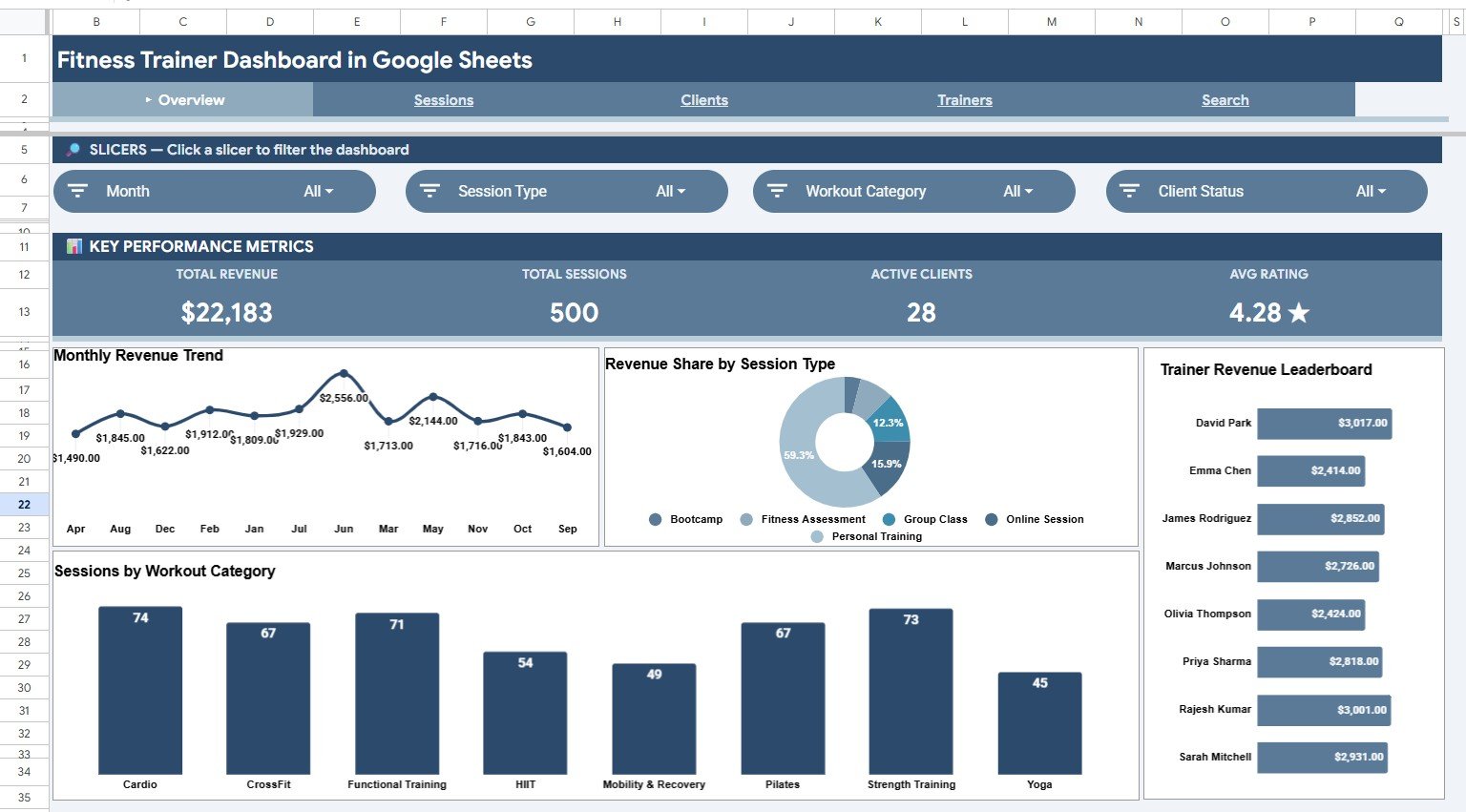
Four KPI cards — Total Revenue, Total Sessions, Active Clients, Average Rating — alongside high-level charts: Monthly Revenue Trend by Month, Revenue Share by Session Type, Trainer Revenue by Trainer, and Sessions by Workout Category. Dropdown filters slice the whole page in one click.
Page 2: Sessions Analysis
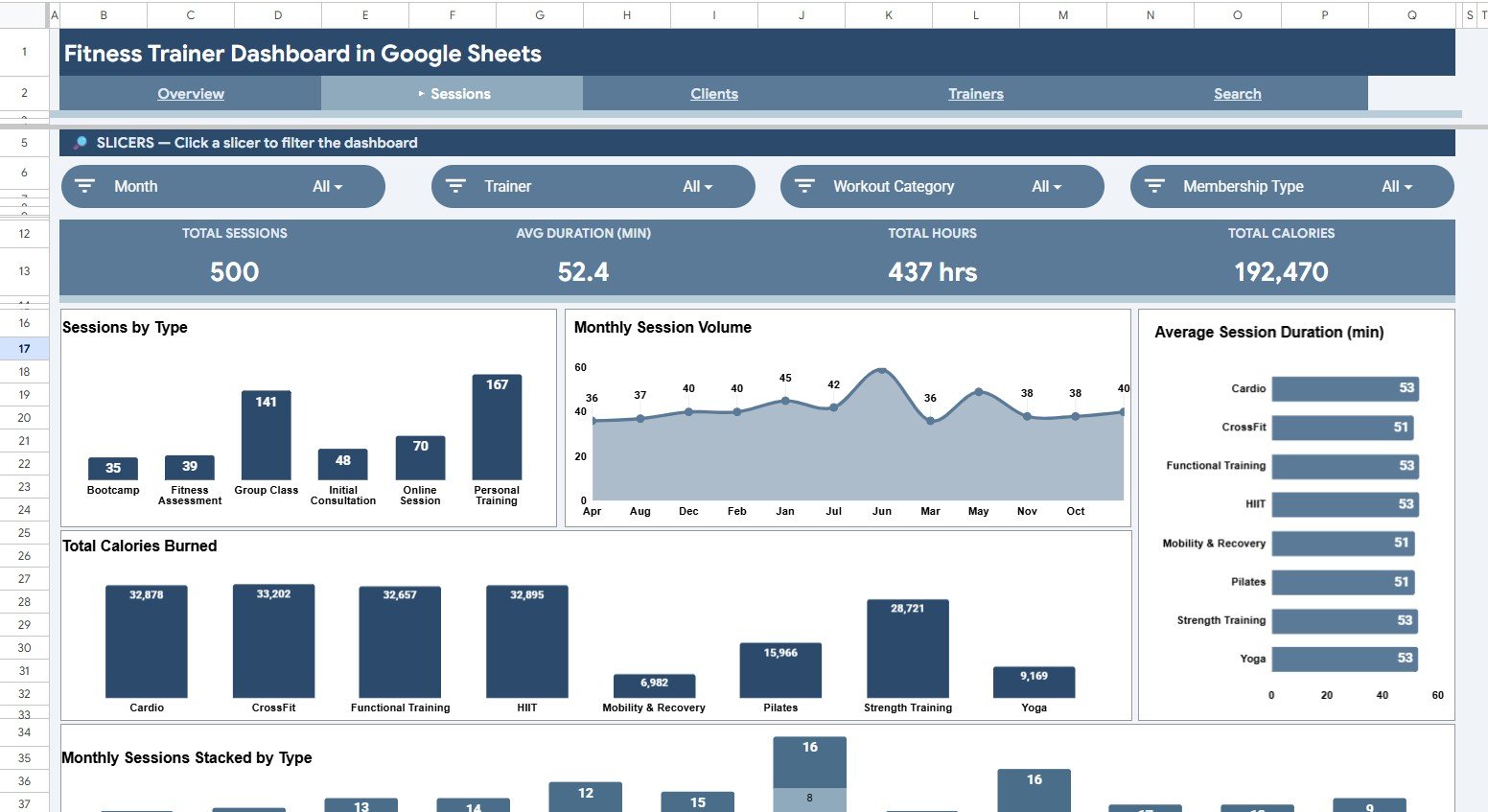
KPIs include Total Sessions, Average Duration in minutes, Total Hours, and Total Calories Burned. Charts: Sessions by Session Type, Monthly Session Volume by Month, Average Session Duration by Workout Category, Total Calories Burned by Workout Category, and Monthly Sessions Stacked by Session Type.
Page 3: Clients Analysis
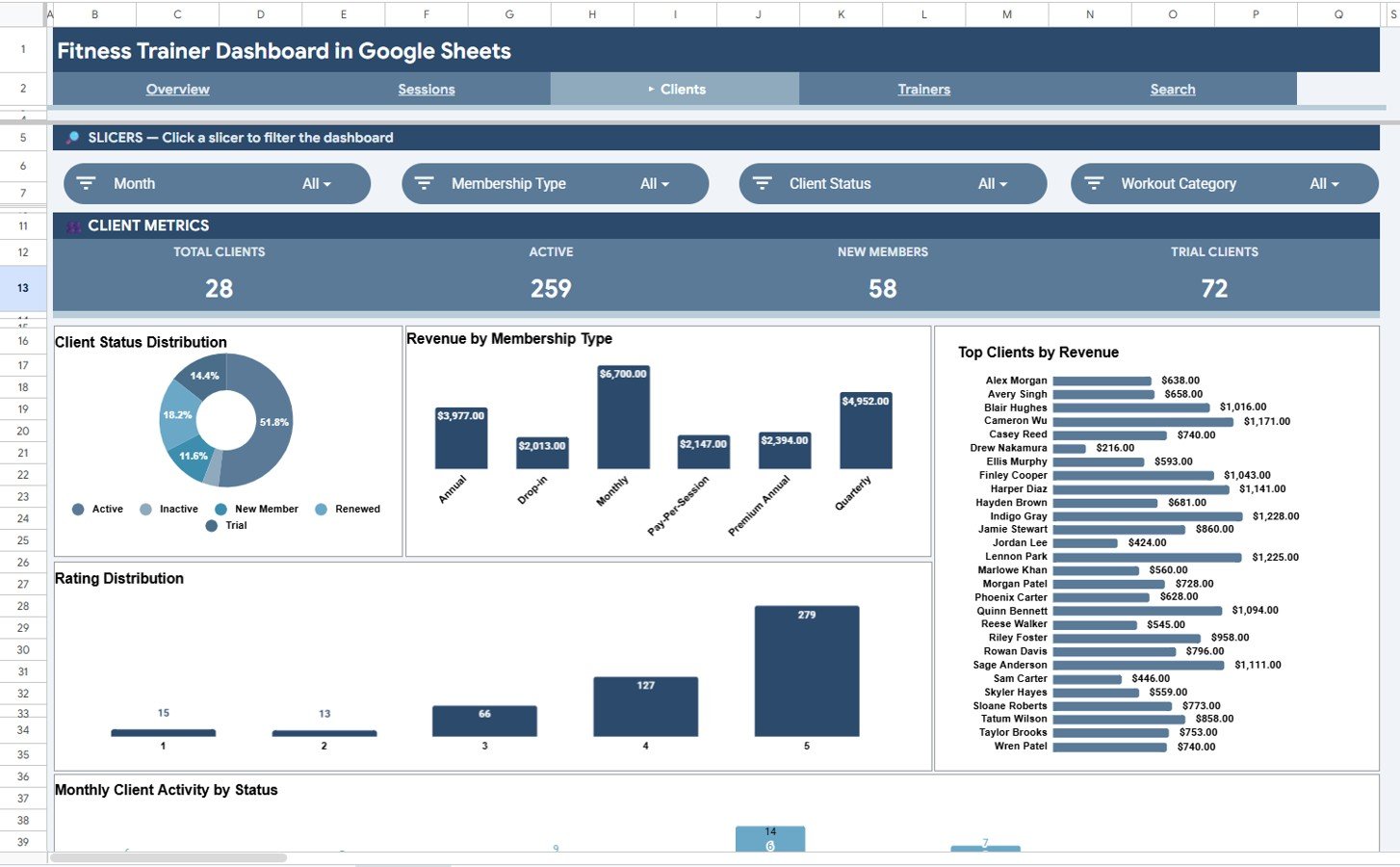
KPIs include Total Clients, Active Clients, New Members, and Trial Clients. Charts: Client Status Distribution by Status, Revenue by Membership Type, Top Clients by Revenue, Rating Distribution by Rating, and Monthly Client Activity by Status. Use it to spot churn risks and top spenders.
Page 4: Trainers Analysis
KPIs include Total Trainers, Total Revenue, Average Revenue per Trainer, and Top Rating. Charts: Total Revenue by Trainer, Sessions per Trainer, Average Rating by Trainer, Revenue by Trainer and Session Type, and Monthly Revenue Stacked by Trainer. Ideal for performance reviews and commission planning.

Page 5: Search Sheet
Pick a Session ID from the dropdown and see the full record — Date, Trainer, Client, Session Type, Workout Category, Duration, Revenue, Calories Burned, Client Status, Membership Type, and Rating — on one card without scrolling the raw data table.

Page 6: Data Sheet
The master sessions log. Replace sample rows with your own data in the same column order — Session ID, Date, Trainer, Client, Session Type, Workout Category, Duration, Revenue, Calories Burned, Client Status, Membership Type, Rating — and every page recalculates automatically.

📊 Fitness Trainer Dashboard vs. Excel Dashboard vs. Paid Gym SaaS — Where This Fits
| Feature | Fitness Trainer Dashboard (Google Sheets) | Excel Dashboard | Mindbody / Trainerize |
|---|---|---|---|
| Cost | $9.99 one-time | $15-25 one-time | $129-499 / month |
| Platform | Cloud-native Google Sheets | Desktop Excel | Vendor-hosted web + app |
| Setup time | Under 10 minutes | 10-15 minutes | 2-4 weeks onboarding |
| Real-time team collaboration | ✅ Built-in | ❌ Needs OneDrive | ✅ |
| Mobile access | ✅ Sheets app | ⚠️ Read-only | ✅ Native apps |
| Customizable KPIs | ✅ Full control | ✅ | ❌ Vendor-defined |
| Year-1 cost at 5 users | $9.99 total | $15-25 total | $7,740 – $29,940 |
| Data ownership | ✅ Your Drive | ✅ Your computer | ❌ Vendor-hosted |
For independent trainers and small studios that want professional revenue and session analytics without paying $129+ per month for booking-software dashboards, the Fitness Trainer Dashboard in Google Sheets sits in the sweet spot.
👥 Who This Template Is For — and Who It’s Not For
✅ This template is built for:
- Independent personal trainers running 20-200 sessions per month with 10-80 active clients.
- Boutique fitness studios and CrossFit gyms with 2-10 trainers needing a shared revenue view.
- Online fitness coaches running 1-on-1 and group sessions over Zoom who track revenue mix and ratings.
- Gym owners who already use a booking tool but want custom revenue and trainer-performance reporting.
❌ This template is NOT for:
- Large multi-location chains needing automated POS integration and live class booking.
- Studios that want SMS reminders, automatic billing, or wearables sync — this is a reporting dashboard, not a booking platform.
⚙️ How to Use the Fitness Trainer Dashboard in Google Sheets
- Open the PDF guide in your download and click the Google Sheets copy link to make your own editable copy in Google Drive.
- Open the Data Sheet tab and replace sample sessions with your own log — keep the column order: Session ID, Date, Trainer, Client, Session Type, Workout Category, Duration, Revenue, Calories Burned, Client Status, Membership Type, Rating.
- Return to the Overview page and use the dropdown filters at the top to slice by Trainer, Session Type, or Workout Category.
- Use the Sessions, Clients, and Trainers Analysis tabs for monthly reviews and commission planning.
- Open the Search Sheet, pick any Session ID from the dropdown, and review the full record on a single card.
- Share the file with trainers (View) or co-managers (Edit) using the standard Google Sheets share button.
💼 Real-World Use Cases
Maya runs a boutique strength studio in Austin with 4 trainers and 90 active clients. She uses the dashboard to track monthly revenue per trainer, set commission tiers from session counts, and present quarterly reviews via the Trainers Analysis page — without paying $179 per trainer for Trainerize Pro.
Jordan is a freelance online coach with 35 clients. He logs every session in the Data Sheet, uses the Clients Analysis page to spot ratings below 4.0 stars, and reaches out before clients churn — two weeks earlier than his old monthly review process.
Sarah is the operations lead at a 3-location CrossFit franchise. She compares Total Calories Burned by Workout Category to decide which class formats to add next quarter — using session-level data instead of trainer opinions.
❓ Frequently Asked Questions
What KPIs does the Fitness Trainer Dashboard in Google Sheets track?
The Fitness Trainer Dashboard tracks 18 KPIs including Total Revenue, Total Sessions, Active Clients, Average Rating, Average Session Duration, Total Hours, Total Calories Burned, New Members, Trial Clients, Total Trainers, Average Revenue per Trainer, and Top Rating. Every KPI updates automatically when you edit the Data Sheet.
Do I need to know Google Sheets formulas?
No. The Fitness Trainer Dashboard in Google Sheets is fully pre-built — all SUMIFS, COUNTIFS, FILTER, and QUERY formulas are already wired up. You only edit the Data Sheet rows. Charts, KPIs, and the session search refresh on their own.
How does this compare to Mindbody or Trainerize?
Mindbody and Trainerize cost $129-499 per month and bundle booking, payments, and reporting. The Fitness Trainer Dashboard in Google Sheets is a one-time $9.99 reporting layer — perfect if you already have a booking tool but want custom revenue, trainer, and client analytics you fully own.
How long does setup take?
Setup takes under 10 minutes. Open the PDF guide, click the Google Sheets copy link, paste your session data into the Data Sheet in the existing column order, and the entire dashboard recalculates. No installs or add-ons.
Can multiple trainers edit the file simultaneously?
Yes. The Fitness Trainer Dashboard runs natively in Google Sheets, so multiple trainers and managers can edit the Data Sheet at the same time. Use Google Sheets share permissions to control viewer versus editor access.
Will it work on mobile?
Yes. The Fitness Trainer Dashboard opens in the free Google Sheets mobile app on iOS and Android. KPI cards and charts display correctly on phone and tablet, though editing the Data Sheet is easiest on a laptop.
👤 About the Author
Built by PK — Microsoft Certified Professional with 15+ years of Excel, Google Sheets, and Power BI experience. Founder of NextGenTemplates, reaching 300K+ subscribers across YouTube channels (@PK-AnExcelExpert, @NextGenTemplates, @NeoTechNavigators). Every template is hand-built and tested before release.
🔗 Explore Related Templates
- Fitness Performance and Revenue Dashboard in Google Sheets — broader revenue-focused fitness reporting in the same platform.
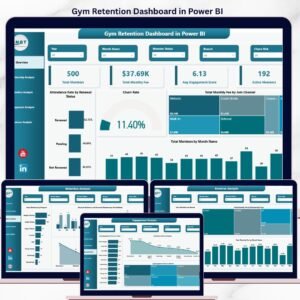
- Gym Retention Dashboard in Google Sheets — focused on churn, retention, and member lifecycle.
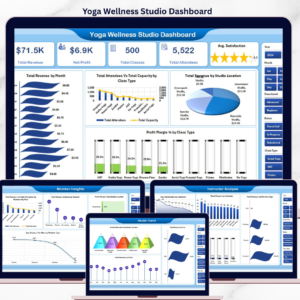
- Yoga & Wellness Studio Dashboard in Excel — fitness category, Excel-first studio operators.
Also available as: Excel · Power BI. Browse all Google Sheets Dashboards or the full Google Sheets templates library.
📖 Click here to read the Detailed Blog Post
Watch the step-by-step video tutorial:
🎥 Visit our YouTube channel for step-by-step video tutorials
👉 YouTube.com/@NextGenTemplates































Reviews
There are no reviews yet.