

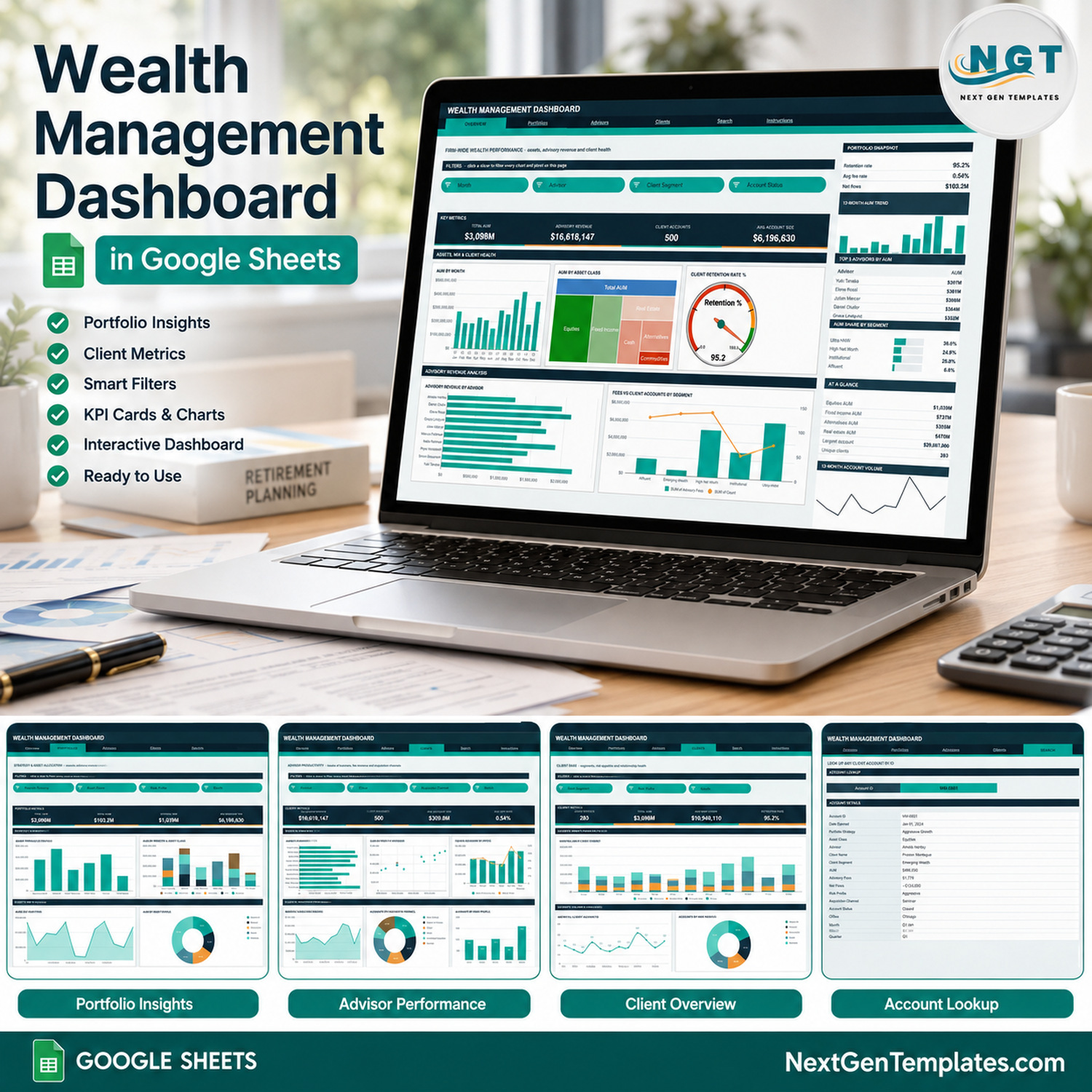

The Wealth Management Dashboard in Google Sheets turns a client account register into a six-page firm report: 500 sample client accounts, 16 KPI cards, 18 chart panels and 15 slicers, all driven by native Google Sheets pivot tables. The fictional sample firm has 283 unique clients, 10 advisors, 6 offices, 6 portfolio strategies, 6 asset classes and 5 client segments across one calendar year, and every pivot, slicer and formula already reaches 1,000 data rows. Make your copy, paste your own accounts over the sample rows and the whole workbook redraws itself.
🌍 Join 10,000+ customers in 180+ countries using NextGenTemplates to replace paid SaaS tools with one-time-purchase Excel, Google Sheets, Power BI and HTML templates.
✅ Instant download · One-time payment · No subscription · No per-user fees · Lifetime access
🔑 Key Features of the Wealth Management Dashboard in Google Sheets
🔹 Four analysis pages, four KPI cards each. Overview reports Total AUM, Advisory Revenue, Client Accounts and Avg Account Size. Portfolios reports Total AUM, Net Flows, Equities AUM and Avg Account Size. Advisors reports Advisory Revenue, Client Accounts, Avg Book per Advisor and Avg Fee Rate. Clients reports Unique Clients, Total AUM, Avg AUM per Client and Retention Rate.
🔹 Assets, fees and client health in one file. The sample reads $3,098M in assets under management, $16,618,147 in advisory fees, a 0.54% average fee rate, $103.2M in net flows and a 95.2% client retention rate, each broken down by advisor, office, strategy, asset class, risk profile and client segment.
🔹 Native pivot tables and slicers, no helper formulas behind the charts. Each chart reads a pivot table parked to the right of its page, so the file stays fast as your client book grows. Fifteen slicers sit in the FILTERS strips: Month, Advisor, Client Segment, Account Status, Portfolio Strategy, Asset Class, Risk Profile, Office and Acquisition Channel, applied per page.
🔹 Honest about what the cards do. The KPI cards and the AT A GLANCE lists use SUMIFS and COUNTIFS on the Data sheet, so they always show unfiltered firm totals by design. The charts, pivots and sidebar Top 5 panels are slicer-aware and move together. The built-in Instructions page says this in plain words.
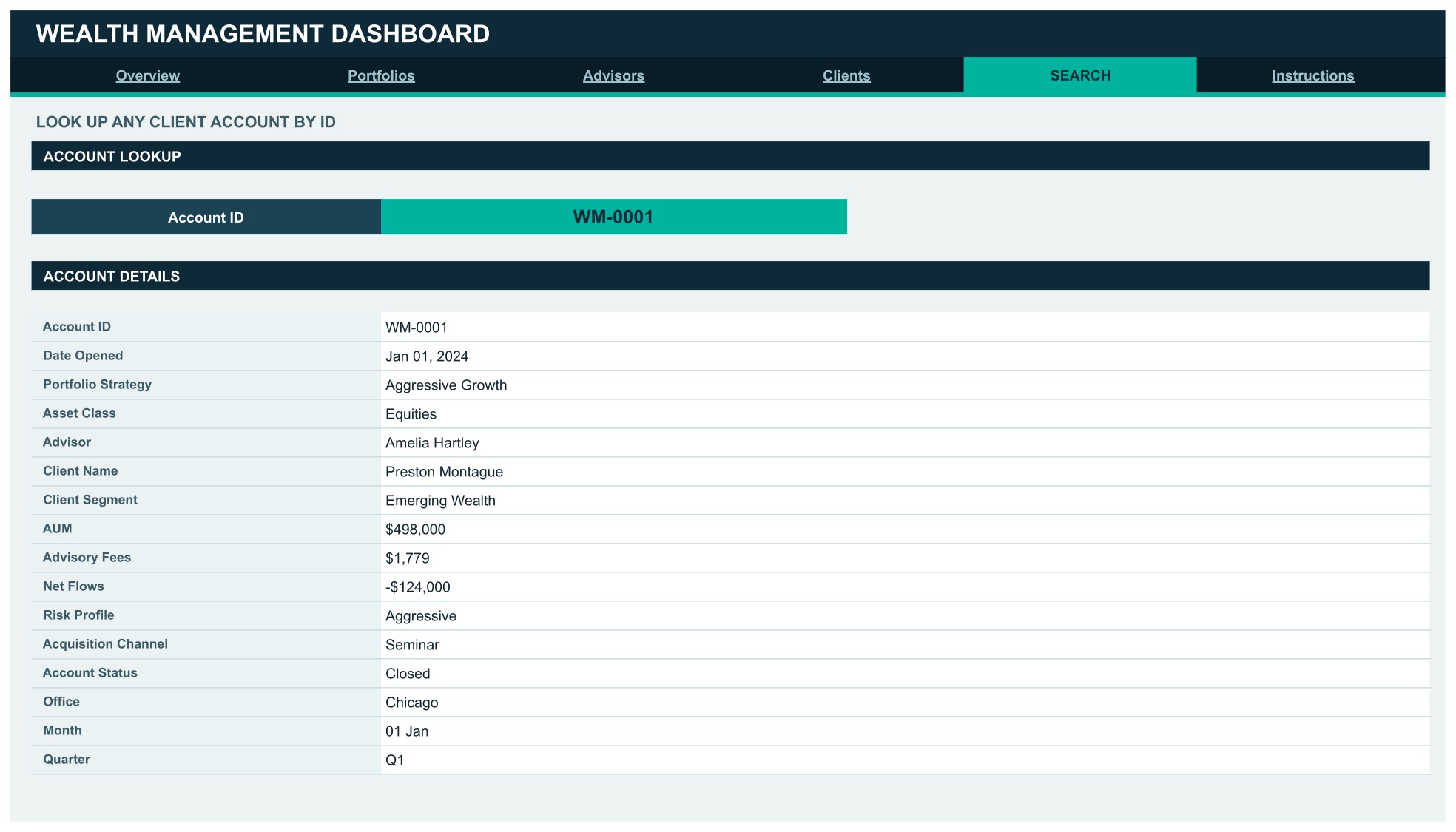
🔹 An account-level Search page. Pick any Account ID (the sample runs WM-0001 upward) and read the full 16-field record: date opened, portfolio strategy, asset class, advisor, client name, client segment, AUM, advisory fees, net flows, risk profile, acquisition channel, account status, office, month and quarter.
🔹 Auto-expanding to 1,000 rows. Paste new accounts anywhere up to row 1001 and every pivot, slicer, chart and formula picks them up with no re-ranging.
🧾 What This Template Does, and What It Deliberately Does Not Do
This is a reporting template for a wealth or advisory firm’s client account register. It summarises assets under management, advisory fees, net flows, client mix, advisor books and account status. It is not portfolio-management, custody, trading, order-management, financial-planning or advisory-compliance software. It holds no market prices, calculates no investment returns or performance, rebalances nothing and connects to no custodian, broker or CRM.
It gives no investment, financial or tax advice and promises no returns. The strategy, risk-profile and asset-class labels are sample categories for grouping records, not recommendations. The template makes no claim of conformity with SEC, FINRA, FCA, SEBI or any other regulator’s rules, and it is not a books-and-records or client-reporting system. All sample names and figures are fictional.
Mind client confidentiality before you paste real data. The Data sheet holds client names and the Search page prints a named account record. If client identity is confidential in your firm, use an internal client code instead of the name. Every chart, pivot and the Search lookup work identically with codes, and a Google Sheet is only as private as your Drive sharing settings.
📦 What’s Inside the Wealth Management Dashboard in Google Sheets
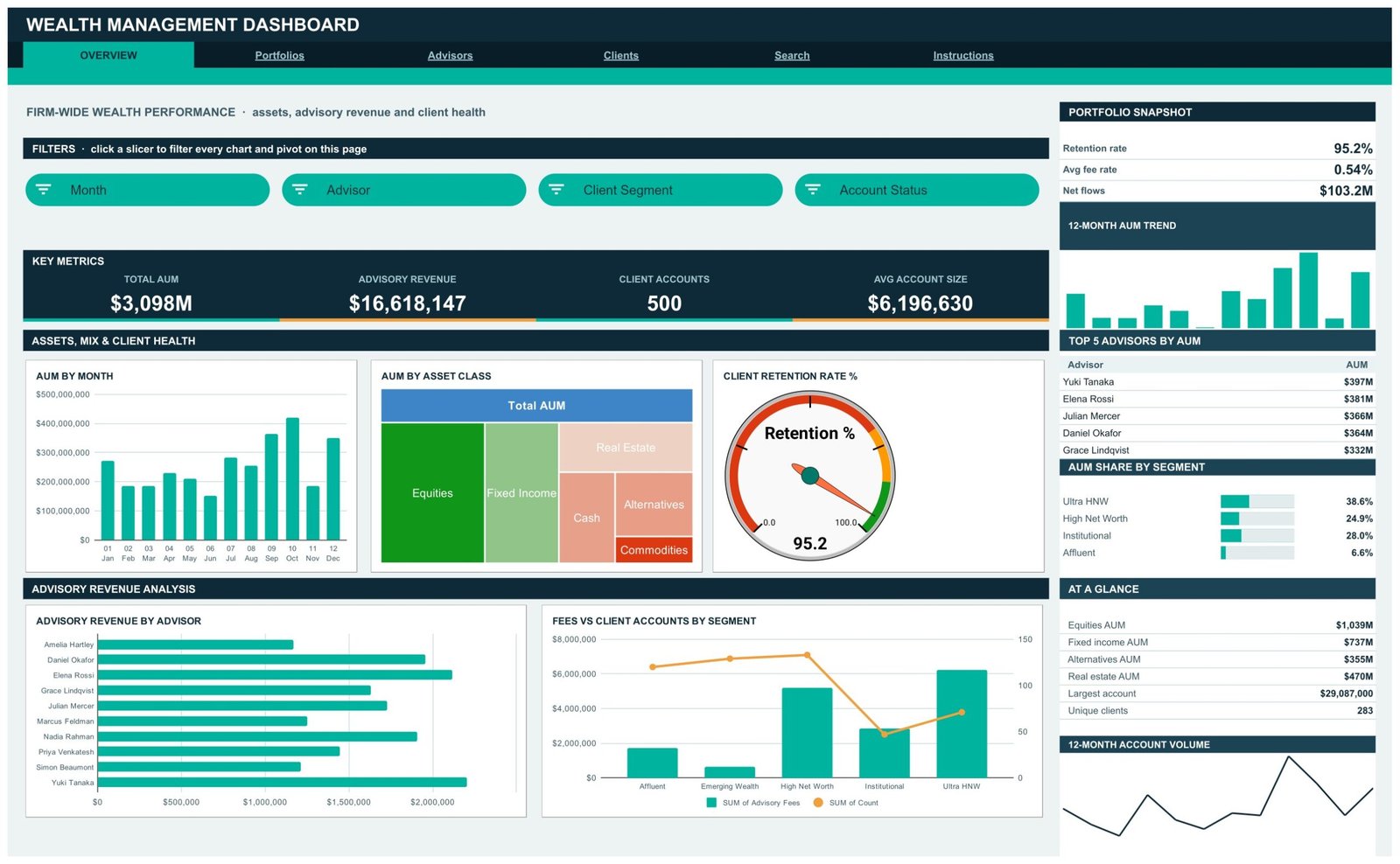
Page 1: Overview, firm-wide assets, advisory revenue and client health
Four KPI cards (Total AUM $3,098M, Advisory Revenue $16,618,147, Client Accounts 500, Avg Account Size $6,196,630) sit under Month, Advisor, Client Segment and Account Status slicers. Charts are AUM by Month, AUM by Asset Class, Client Retention Rate % (a gauge reading 95.2), Advisory Revenue by Advisor, and Fees vs Client Accounts by Segment. The sidebar carries a Portfolio Snapshot (retention 95.2%, average fee rate 0.54%, net flows $103.2M), a 12-Month AUM Trend, Top 5 Advisors by AUM, AUM Share by Segment, an At a Glance panel (largest account $29,087,000, 283 unique clients) and a 12-Month Account Volume line.
Page 2: Portfolios, strategy and asset allocation
KPI cards report Total AUM $3,098M, Net Flows $103.2M, Equities AUM $1,039M and Avg Account Size $6,196,630, filtered by Portfolio Strategy, Asset Class, Risk Profile and Month. Charts are AUM by Portfolio Strategy, AUM by Strategy & Asset Class, Monthly Net Flows and AUM by Risk Profile. The sidebar shows an Allocation Snapshot (6 strategies live, equity weight 33.5%, cash weight 11.7%), Top 5 Strategies by AUM led by Balanced $752M, and Asset Class Weights.

Page 3: Advisors, books of business, fee revenue and acquisition channels
KPI cards report Advisory Revenue $16,618,147, Client Accounts 500, Avg Book per Advisor $309.8M and Avg Fee Rate 0.54%, filtered by Advisor, Office, Acquisition Channel and Month. Charts are AUM by Advisor, AUM vs Fees by Advisor, Fees vs Accounts by Office, Monthly Advisory Fees, Accounts by Acquisition Channel and Accounts by Risk Profile. The sidebar adds an Advisor Snapshot (10 advisors, 50 accounts per advisor, $33,236 fees per account), Top 5 Advisors by Fees and fee totals for all six offices.

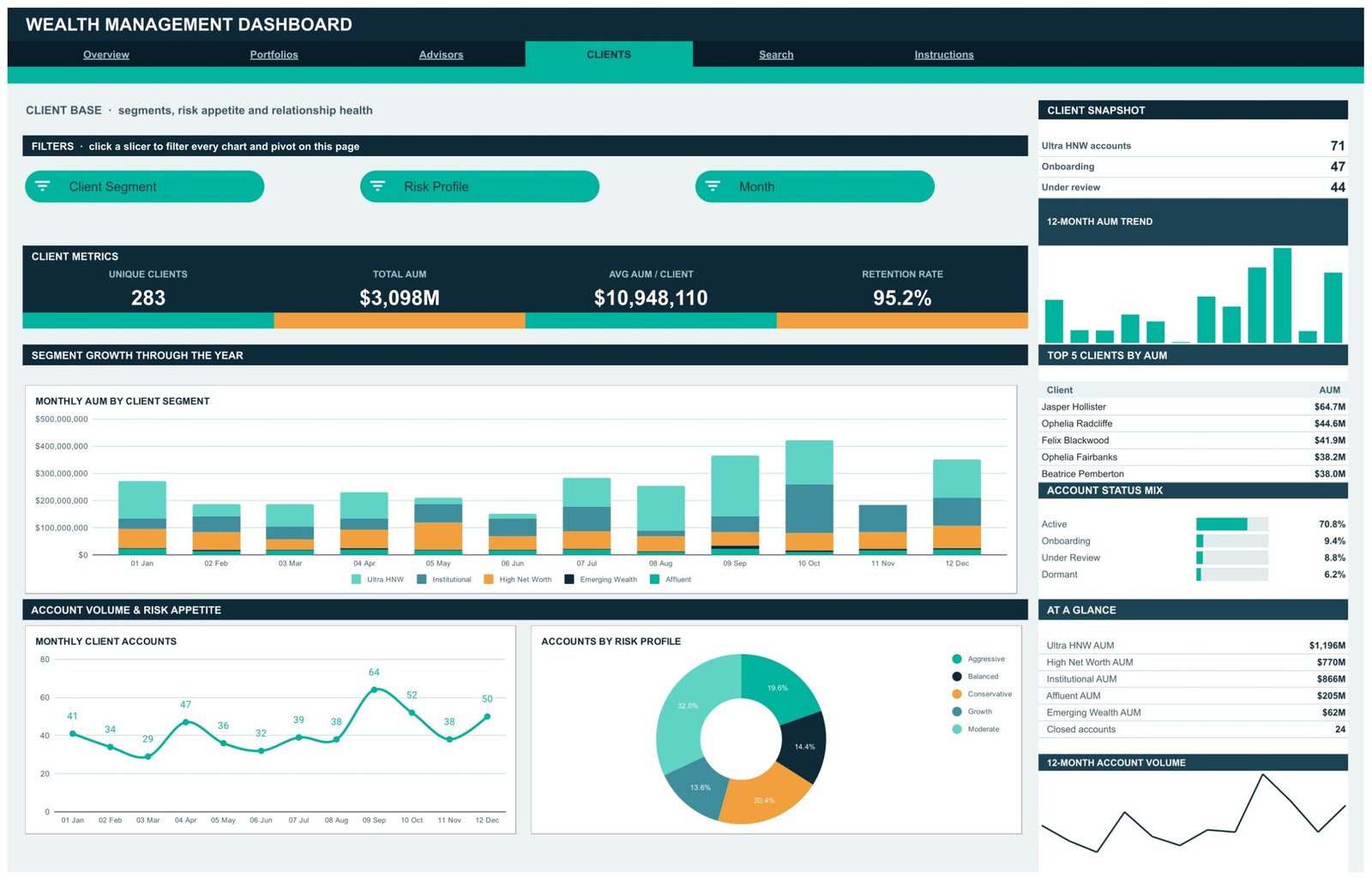
Page 4: Clients, segments, risk appetite and relationship health
KPI cards report Unique Clients 283, Total AUM $3,098M, Avg AUM per Client $10,948,110 and Retention Rate 95.2%, filtered by Client Segment, Risk Profile and Month. Charts are Monthly AUM by Client Segment, Monthly Client Accounts and Accounts by Risk Profile. The sidebar carries a Client Snapshot (71 Ultra HNW accounts, 47 onboarding, 44 under review), Top 5 Clients by AUM, an Account Status Mix led by Active 70.8%, and AUM by segment with 24 closed accounts.
Page 5: Search, look up any client account by ID
Enter an Account ID in the input cell and the Account Details table returns the whole record, field by field, straight from the Data sheet.
Page 6: Instructions, the user guide inside the file
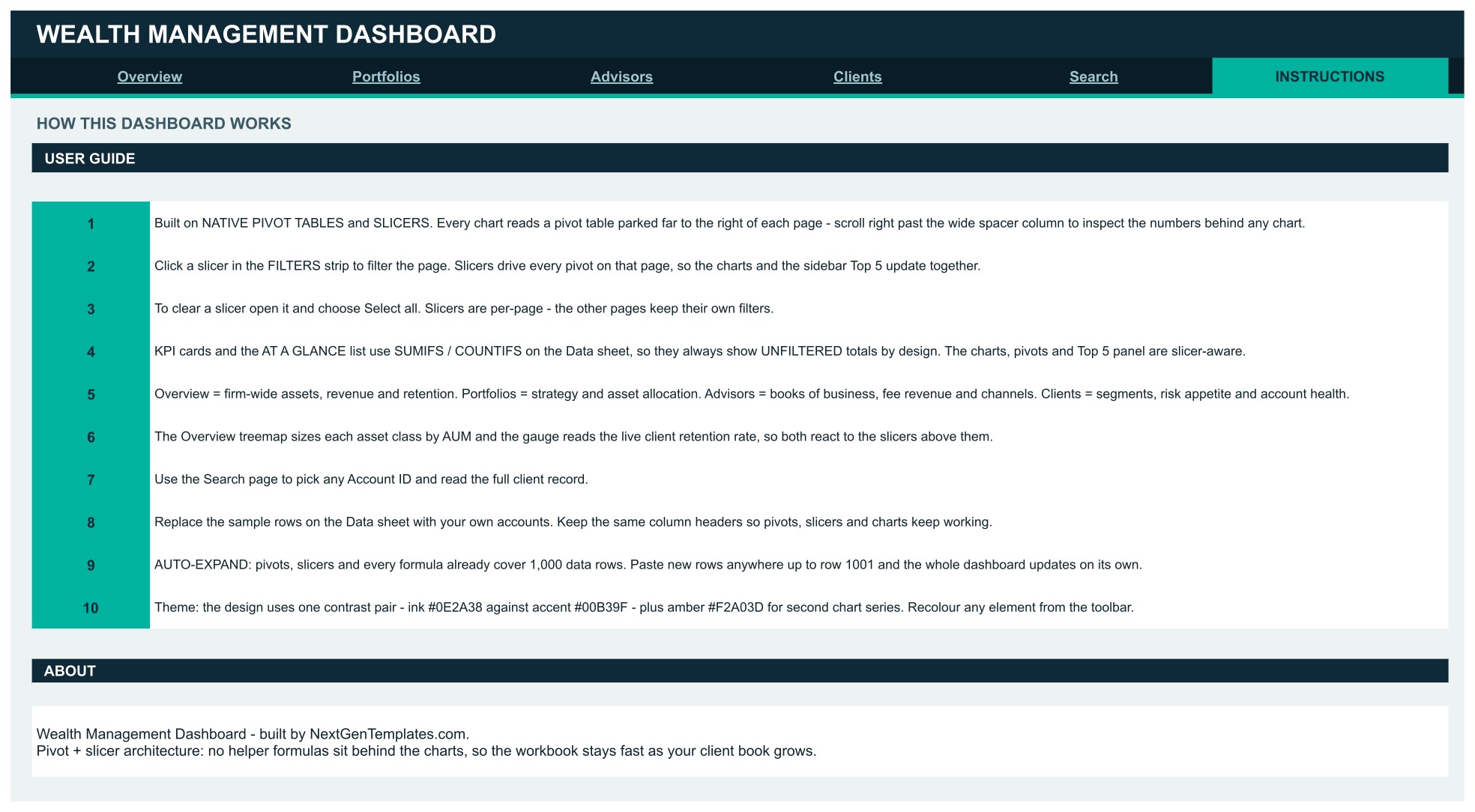
Ten numbered notes cover the pivot-and-slicer architecture, how to clear a slicer, why the KPI cards stay unfiltered, what each page is for, the 1,000-row auto-expand and how to recolour the build.
📊 Google Sheets Dashboard vs. an Excel Dashboard vs. a Paid Wealth Reporting Platform, Where This Fits
| Feature | This Google Sheets dashboard | Microsoft Excel dashboard | Paid wealth reporting platform |
|---|---|---|---|
| Cost | $9.99 one-time ✅ | $17.99 one-time + Microsoft 365 | Quote-based, per seat or per AUM |
| Platform | Google Sheets, browser only ✅ | Desktop Excel | Vendor web app |
| Setup time | Under 10 minutes ✅ | Under 15 minutes | Weeks: data feeds and onboarding |
| Real-time team collaboration | Built in ✅ | Only via OneDrive co-authoring | Yes, per seat |
| Mobile access | Google Sheets app ✅ | Excel mobile, limited slicers | Vendor app |
| AUM, fee and retention views by advisor and segment | Ready-made ✅ | Ready-made in our Excel edition | Configured per firm |
| Share with a link | Any Google account ✅ | File send or OneDrive link | Named users only |
| Year-1 cost at 5 users | $9.99 ✅ | $17.99 + 5 Microsoft 365 seats | Thousands per year |
| Custodian feeds, performance and returns | Not included | Not included | Included ✅ |
For a small advisory team that wants its account register summarised without a platform contract, this Google Sheets dashboard sits in the sweet spot.
👥 Who This Template Is For, and Who It’s Not For
✅ Built for:
- Operations and practice managers at small wealth and advisory firms who already keep a client account register in a spreadsheet
- Firm principals who want AUM, fees and retention by advisor, office and segment before the monthly management meeting
- Advisor team leads comparing books of business and acquisition channels side by side
- Analysts and trainers who need a realistic wealth reporting layout to learn pivot tables and slicers
❌ Not for:
- Anyone looking for portfolio-management, custody, trading or financial-planning software; this reads a register, it does not manage money
- Firms that need investment performance, returns, benchmarks or market pricing
- Teams that need regulatory books and records, audit trails, SSO or access controls beyond Google Drive sharing
- Firms with well over 1,000 account records a period, or that want a live feed from a custodian or CRM
⚙️ How to Use the Dashboard
- Open the PDF in your download and click the Google Sheets copy link to create your own editable copy in Drive.
- Read the Instructions page first; it explains the pivot-and-slicer architecture in ten short notes.
- Decide whether client names can sit in the file. If not, switch the Client Name column to internal client codes.
- Paste your accounts over the sample rows on the Data sheet, keeping the column headers exactly as they are.
- Click any slicer in a FILTERS strip to filter that page’s charts, pivots and Top 5 panel together.
- Open a slicer and choose Select all to clear it. Slicers are per page, so each page keeps its own filters.
- Use the Search page to pull any single account by its Account ID.
💼 Real-World Use Cases
Maya runs operations at a six-advisor independent wealth firm. Before each management meeting she opens the Advisors page, reads AUM vs Fees by Advisor and Fees vs Accounts by Office, and brings the Top 5 Advisors by Fees panel instead of a hand-built summary.
Daniel is a principal at a family-office style practice. He uses the Clients page, filtering Client Segment to Ultra HNW, to see how many accounts are onboarding or under review and how segment AUM moved through the year.
Priya leads business development for a regional advisory team. She lives on Accounts by Acquisition Channel and the Acquisition Channel Mix to see whether bank referrals, seminars or centres of influence brought in the accounts that stayed.
❓ Frequently Asked Questions
What KPIs does the Wealth Management Dashboard in Google Sheets track?
It carries 16 KPI cards across four pages, including Total AUM, Advisory Revenue, Client Accounts, Avg Account Size, Net Flows, Equities AUM, Avg Book per Advisor, Avg Fee Rate, Unique Clients, Avg AUM per Client and Retention Rate. Several appear on more than one page.
Does it give investment advice or calculate returns?
No. It summarises the account records you paste in: AUM, fees, net flows, segments and account status. It holds no market prices, calculates no performance or returns, and gives no investment, financial or tax advice.
Is this portfolio-management or compliance software?
No. It is not portfolio-management, custody, trading or advisory-compliance software, keeps no regulatory books and records, and makes no SEC, FINRA, FCA or SEBI claim. It is a reporting layer over a spreadsheet register.
How is it different from the Wealth Management KPI Dashboard in Google Sheets?
The KPI edition is a month-picker scorecard with targets and traffic lights. This template is an analytical dashboard over account-level records, with pivot charts, slicers, advisor and segment breakdowns and an account Search page.
Do the KPI cards follow the slicers?
No, by design. The cards and AT A GLANCE lists always show unfiltered firm totals. Charts, pivots and the Top 5 panels do follow the slicers.
How long does setup take?
Under 10 minutes: make your copy from the PDF link, paste your accounts over the sample rows keeping the headers intact, and every pivot, chart and slicer updates.
How many accounts can it hold?
Pivots, slicers and formulas cover 1,000 data rows out of the box, and the sample fills 500 of them.
👤 About the Author
Built by PK, Microsoft Certified Professional with 15+ years of Excel, Google Sheets and Power BI experience. Founder of NextGenTemplates, reaching 300K+ subscribers across YouTube channels (@PKAnExcelExpert, @NextGenTemplates, @NeoTechNavigators). Every template is hand-built and tested before release.
🔗 Explore Related Templates
Browse the full range of Google Sheets Dashboards and the wider Google Sheets template library. New to slicers? Google’s own guide to pivot tables in Google Sheets explains the feature this build runs on.
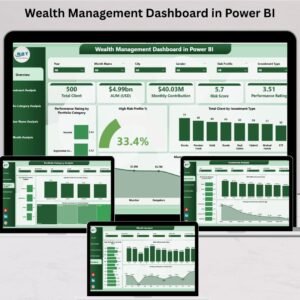
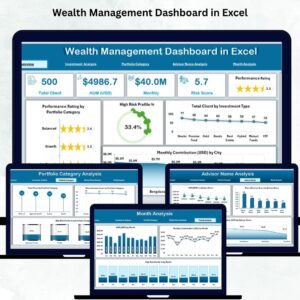
Same subject, other platforms: the Wealth Management Dashboard in Excel and the Wealth Management Dashboard in Power BI are built separately for those platforms, with their own layouts.
Different family, same subject: the Wealth Management KPI Dashboard in Google Sheets is a month-picker scorecard with traffic lights.
Pair it with the Investor Relations Dashboard in Google Sheets or the Investment Management KPI Scorecard in Google Sheets.
📖 Click here to read the Detailed Blog Post
🎥 Visit our YouTube channel for step-by-step video tutorials
👉 YouTube.com/@NextGenTemplates
Watch the step-by-step video Demo:
📅 Last updated: September 2026































Reviews
There are no reviews yet.