

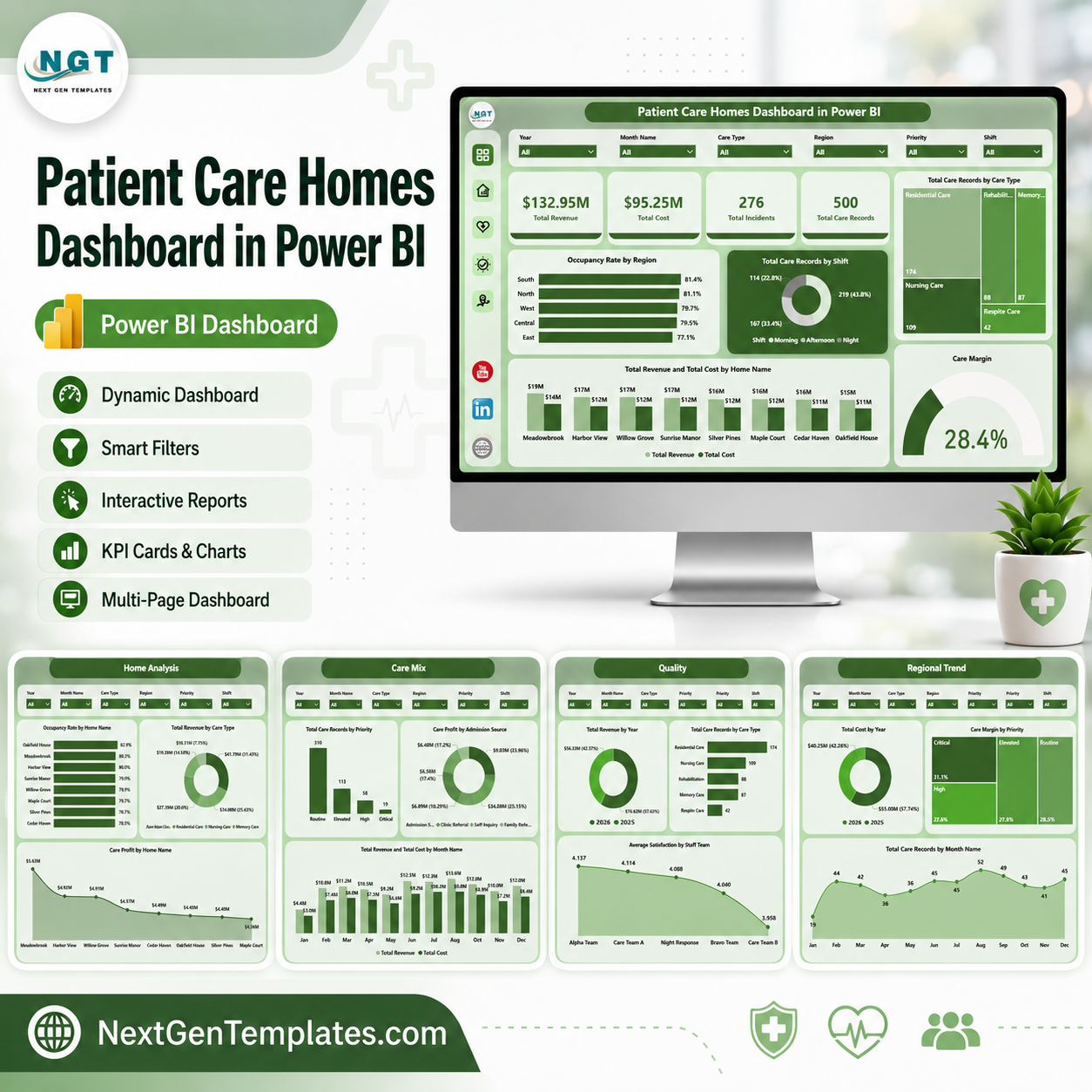

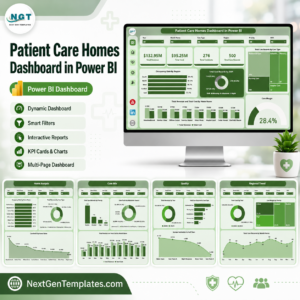
Patient Care Homes Dashboard in Power BI helps care home owners, residential care administrators, finance teams, quality managers, and regional leaders monitor revenue, cost, care records, incidents, occupancy, satisfaction, margin, readmissions, care mix, shift activity, regions, and home-level trends in one editable PBIX report. The World Health Organization notes that by 2030, 1 in 6 people globally will be aged 60 years or over, which makes clear, repeatable care-home reporting more important for aging-service providers. This template gives you instant download access, one-time pricing, editable Power BI pages, and a practical reporting model without starting from a blank file.
Key Features of Patient Care Homes Dashboard in Power BI
- 5 Power BI pages: Overview, Home Analysis, Care Mix, Quality, and Regional Trend.
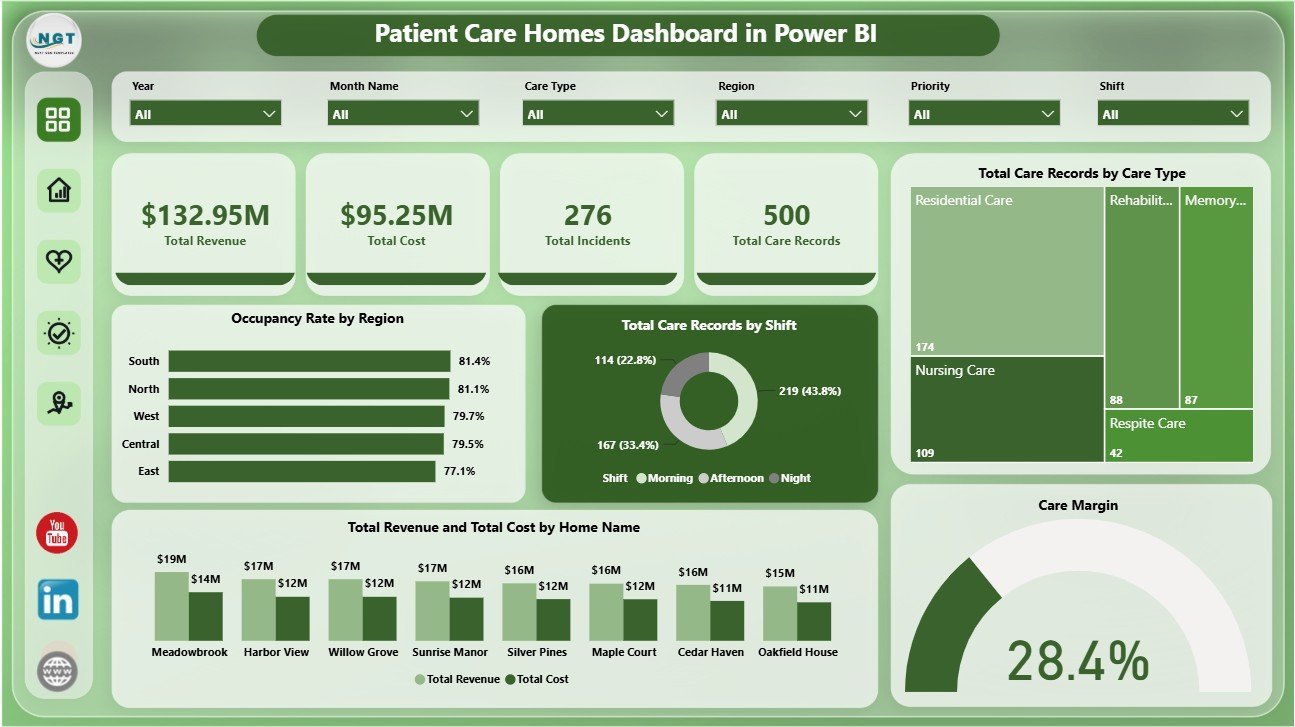
- 4 executive KPI cards: Total Revenue, Total Cost, Total Incidents, and Total Care Records.
- 19 analysis visuals: Review occupancy, care records, care type, revenue, cost, margin, satisfaction, priority, admission source, readmissions, incidents, staff team, active residents, month, year, region, and home name.
- Interactive slicers: Filter the report quickly during care, finance, regional, or quality review meetings.
- Editable PBIX file: Open in Power BI Desktop, replace or connect data, refresh, and customize visuals.
- Healthcare-focused structure: Built around residential care performance, care volume, quality, occupancy, and financial tracking.
What’s Inside the Patient Care Homes Dashboard in Power BI
1 – Overview Page
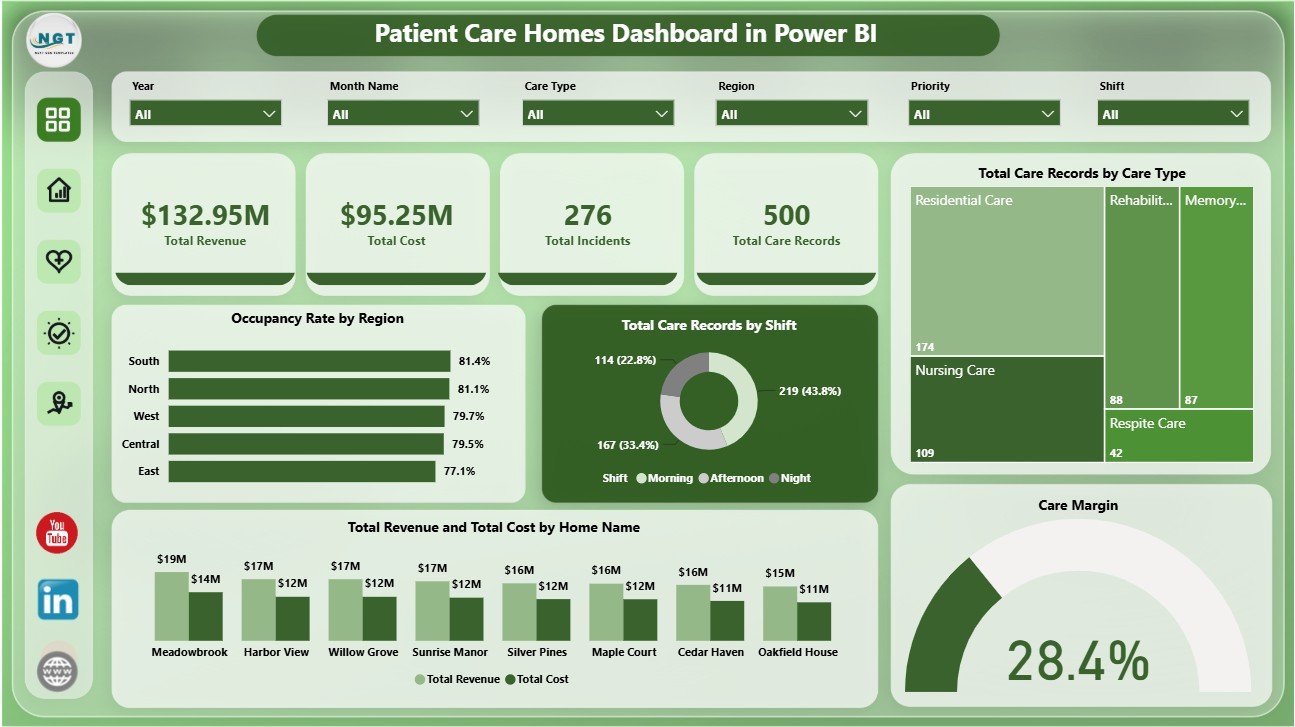
The Overview page gives leadership a fast summary of patient care home performance. KPI cards show Total Revenue, Total Cost, Total Incidents, and Total Care Records so users can quickly understand financial scale, workload, safety volume, and operational activity.
Occupancy Rate by Region: Compares occupancy percentage across regions. It helps leadership identify high-demand regions, underused capacity, and areas that may need staffing or bed-planning review.
Total Care Records by Shift: Shows how care activity is distributed across shifts. It helps managers review workload balance and identify shifts that may need extra support.
Total Care Records by Care Type: Breaks care volume by care type. It supports service-mix planning and helps teams understand which care categories drive the most activity.
Total Revenue and Total Cost by Home Name: Compares income and cost across individual homes. It helps finance teams review location-level performance and spot homes that need cost or revenue attention.
Care Margin by Dashboard: Summarizes margin performance for the selected dashboard context. It gives managers a quick profitability signal after applying slicers.
2 – Home Analysis
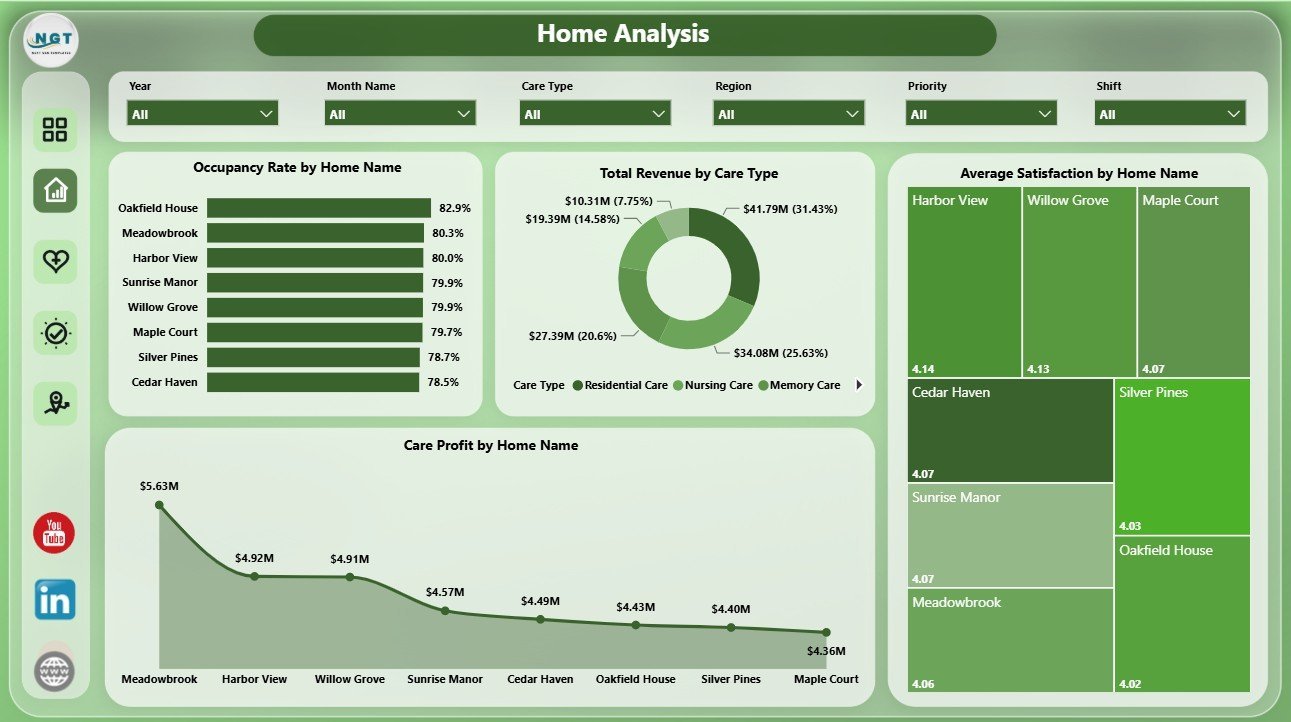
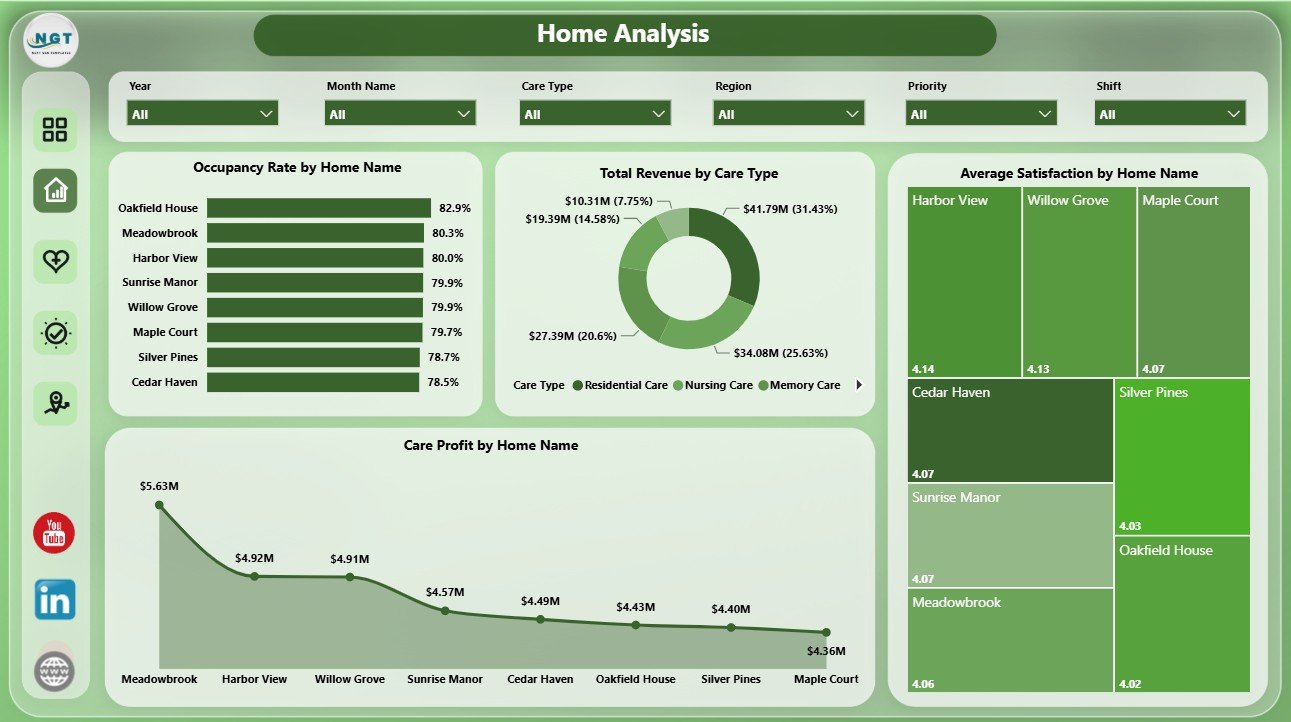
The Home Analysis page focuses on facility-level performance. Occupancy Rate by Home Name compares utilization across homes. Total Revenue by Care Type shows which service categories generate the most revenue. Average Satisfaction by Home Name compares experience scores across homes. Care Profit by Home Name highlights which homes contribute the strongest profit.
3 – Care Mix
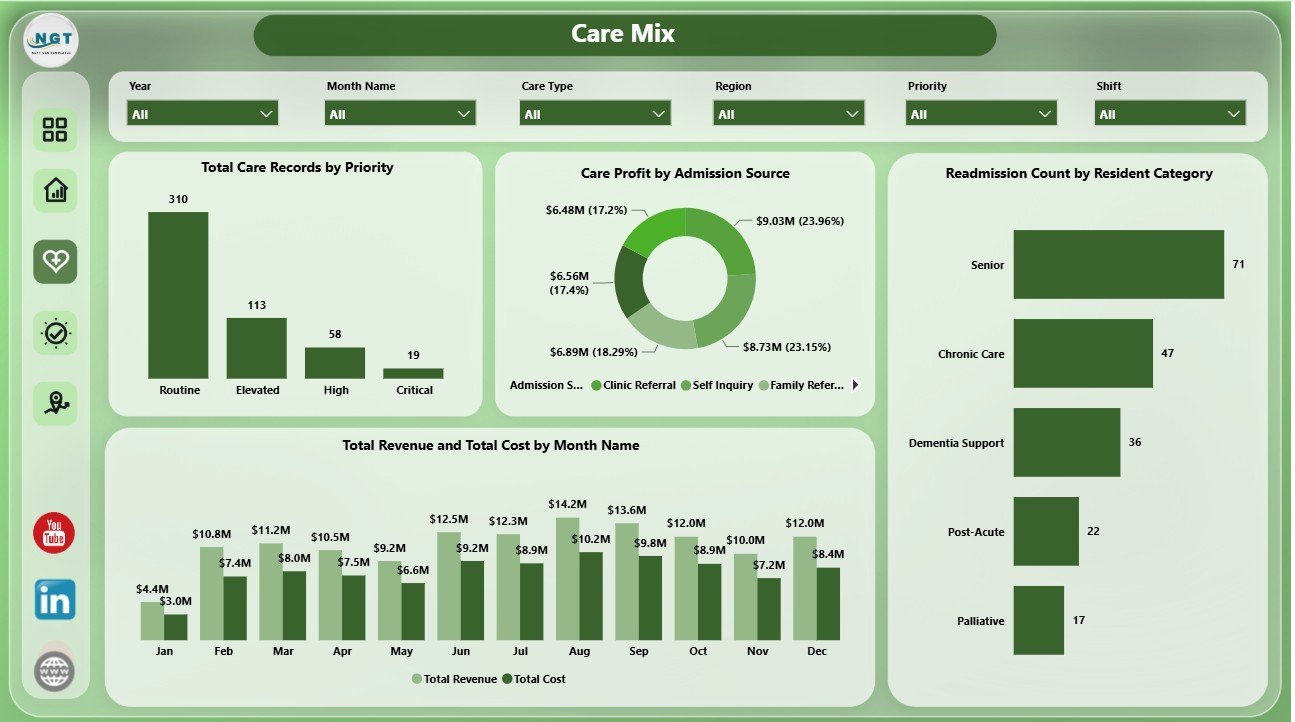
The Care Mix page reviews priority, admissions, resident category, and monthly finance movement. Total Care Records by Priority helps teams understand workload urgency. Care Profit by Admission Source compares the financial profile of referral channels. Readmission Count by Resident Category highlights categories that may need closer care planning. Total Revenue and Total Cost by Month Name shows monthly financial movement.
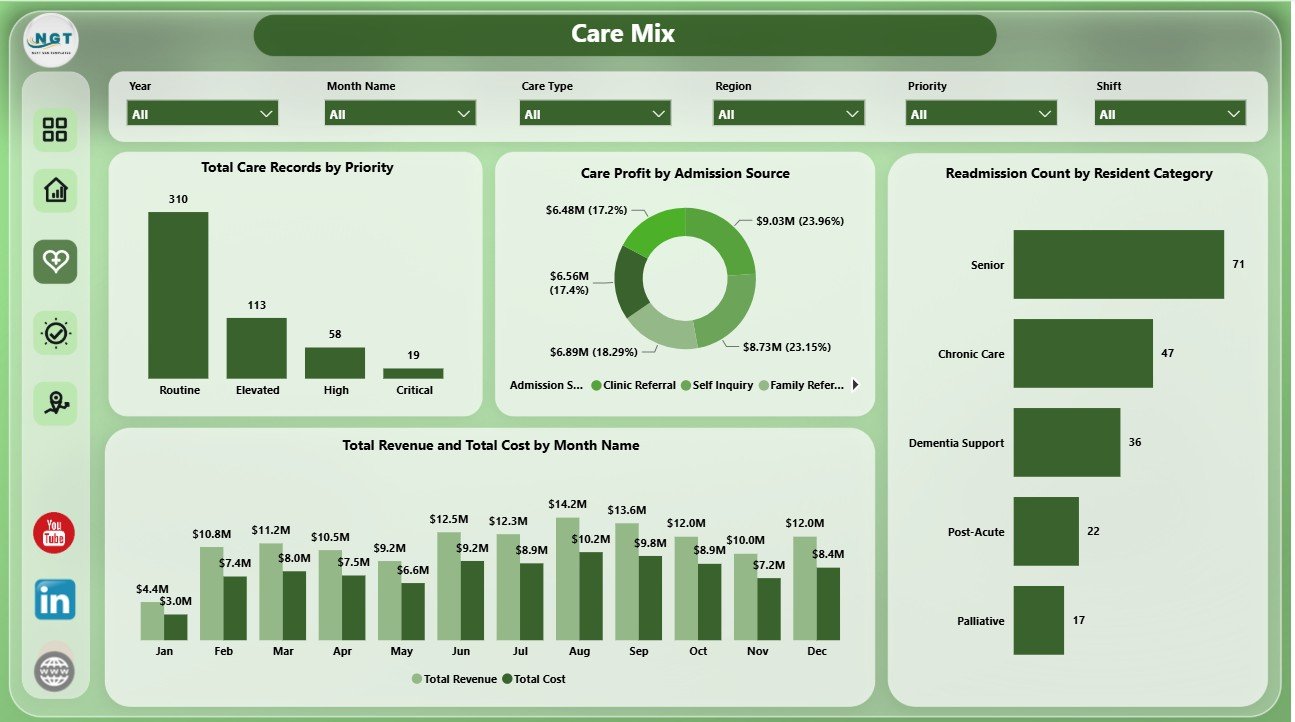
4 – Quality
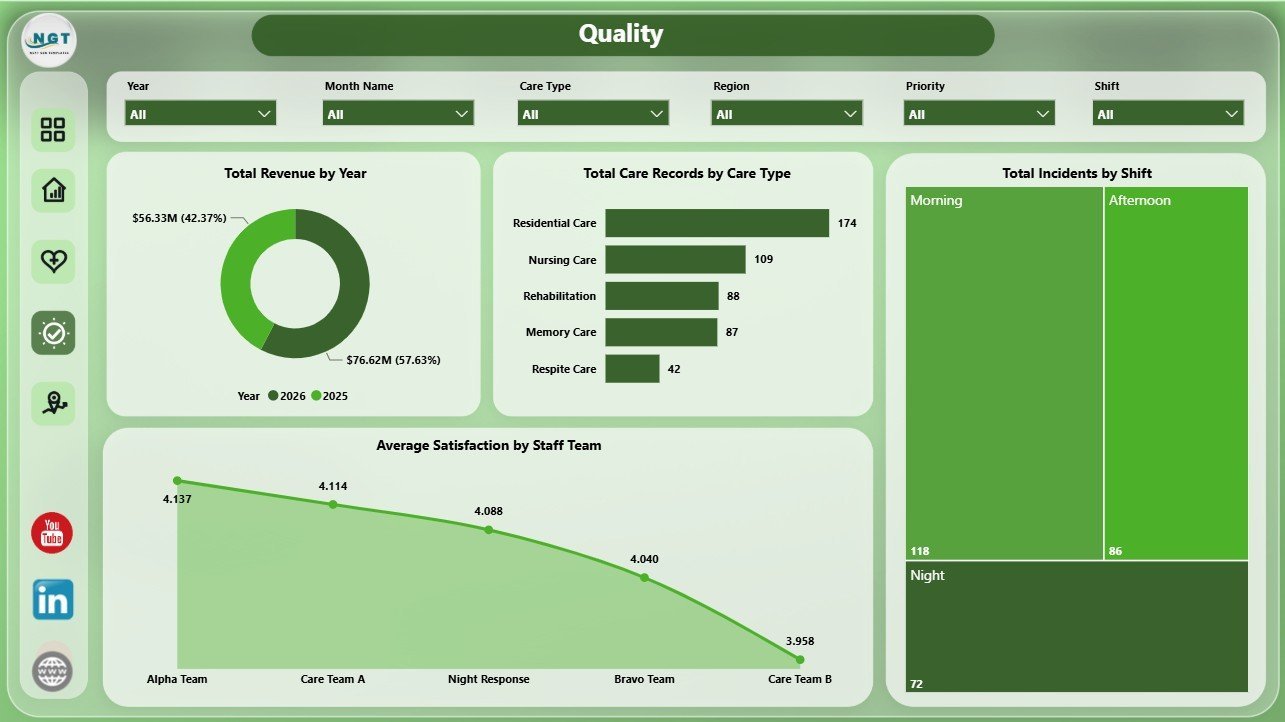
The Quality page supports review of revenue, care activity, incidents, and satisfaction. Total Revenue by Year shows annual financial movement. Total Care Records by Care Type reveals care demand by category. Total Incidents by Shift helps identify safety patterns by shift. Average Satisfaction by Staff Team supports coaching, recognition, and quality improvement.
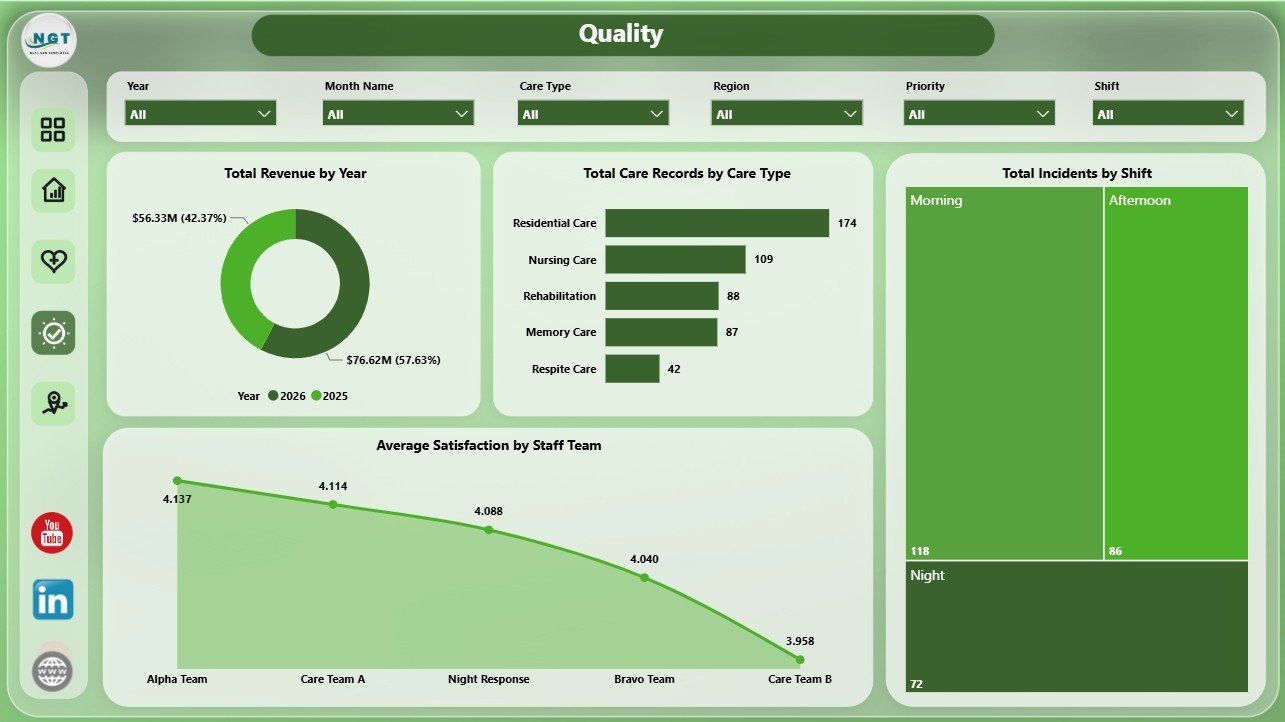
5 – Regional Trend
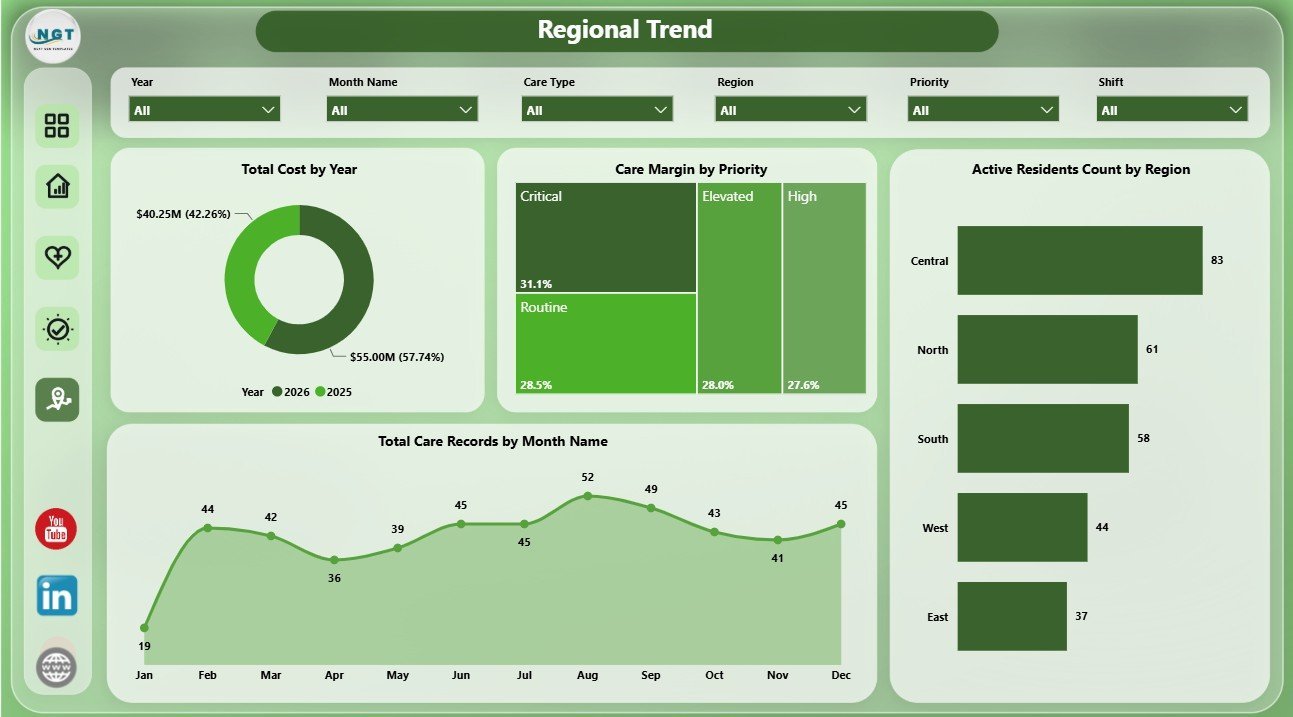
The Regional Trend page is built for regional and time-based monitoring. Total Cost by Year tracks cost movement over time. Care Margin by Priority compares profitability by priority level. Active Residents Count by Region shows where residents are concentrated. Total Care Records by Month Name helps users identify workload trends across months.
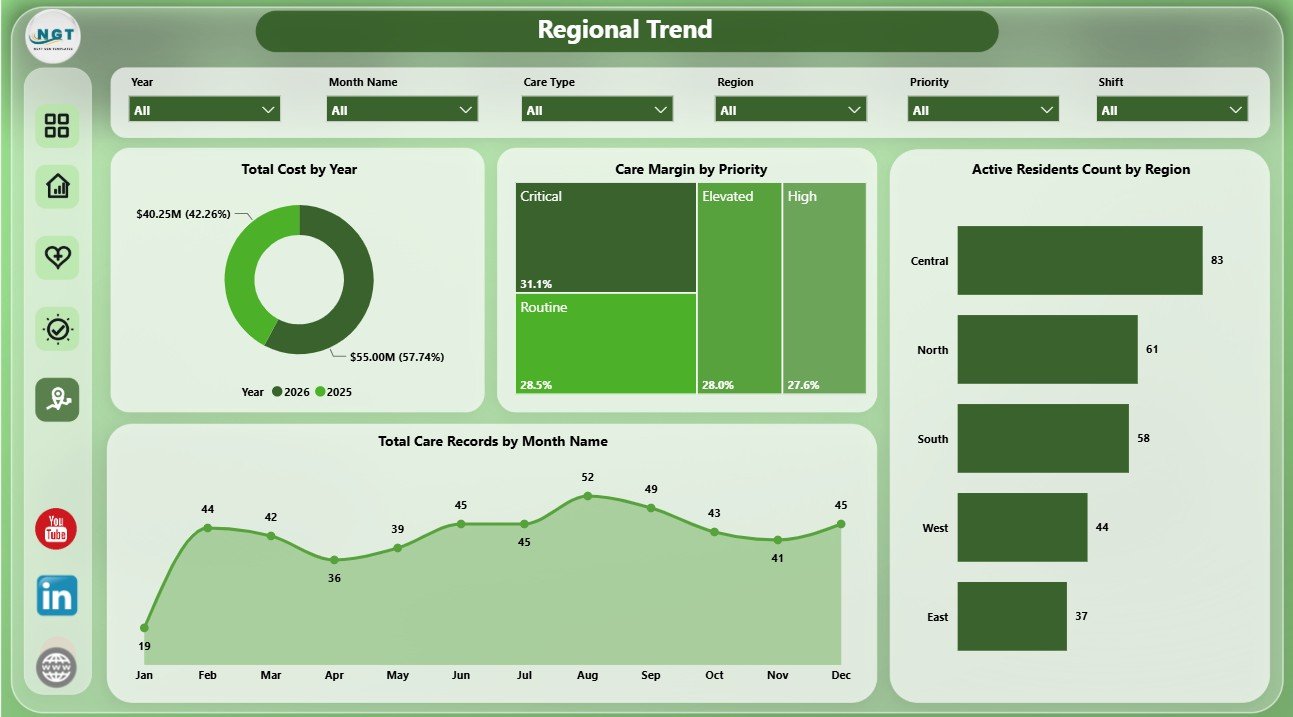
Patient Care Homes Dashboard in Power BI vs. Tableau vs. Paid Healthcare SaaS – Where This Fits
| Feature | This Power BI dashboard | Tableau or Qlik alternative | Paid healthcare SaaS |
|---|---|---|---|
| Cost | $17.99 sale price, one-time | License cost plus analyst build time | Monthly or annual subscription |
| Platform | Power BI Desktop and optional Power BI Service | Tableau or Qlik environment | Vendor cloud platform |
| Setup time | Open PBIX, replace or connect data, refresh | Build model, calculations, and visuals manually | Implementation and onboarding |
| Real-time team collaboration | Available after publishing to Power BI Service | Available by plan | Usually included |
| Mobile access | Power BI mobile app after publishing | Vendor mobile app | Usually included |
| Customizable fields | Edit pages, slicers, visuals, measures, and model | Editable with analyst skills | Often limited by vendor configuration |
| Share with link | Available through Power BI permissions | Available through platform permissions | Usually login controlled |
| Year-1 cost at 5 users | Template price plus any Microsoft licensing | License cost plus analyst time | Often much higher |
| Care home analytics | Built for revenue, cost, incidents, care records, occupancy, satisfaction, margins, readmissions, residents, shifts, regions, and homes | Requires custom design | Depends on reporting module and export access |
Who This Template Is For – and Who It’s Not For
This template is for patient care home administrators, residential care owners, regional managers, healthcare finance analysts, care quality leads, operations teams, and consultants who need a repeatable Power BI reporting layer for prepared care-home data.
It is not an EHR, clinical decision system, billing platform, compliance product, claims tool, patient registry, or live alerting system. Use it for management analytics after your operational data has been exported or prepared.
How to Use the Patient Care Homes Dashboard in Power BI
- Download and unzip the product file.
- Open the PBIX file in Power BI Desktop.
- Review the sample pages, cards, slicers, and visuals.
- Replace the sample source or connect your own structured care home dataset.
- Refresh the report and validate revenue, cost, incident, care record, occupancy, and satisfaction metrics.
- Use slicers to filter by home, region, care type, shift, priority, resident category, admission source, month, year, staff team, or other available fields.
- Publish to Power BI Service if your team needs browser access, sharing, or scheduled refresh.
Real-World Use Cases
Priya, care home administrator: reviews care records, incidents, occupancy, and satisfaction before weekly leadership meetings.
Michael, healthcare finance analyst: compares revenue, cost, care profit, and margin by home, month, care type, and priority for monthly reporting.
Anita, regional quality lead: checks incident volume by shift, readmissions by resident category, and satisfaction by staff team to guide improvement actions.
Frequently Asked Questions
What does this Power BI dashboard track?
It tracks revenue, cost, incidents, care records, occupancy rate, care type, shift, home name, region, care profit, satisfaction, priority, admission source, readmission count, resident category, active residents, month, year, staff team, and margin.
Do I need Power BI Desktop?
Yes. Open the PBIX file in Power BI Desktop, which is free from Microsoft. Power BI Service is optional for sharing and scheduled refresh.
Can I use my own care home data?
Yes. Replace or connect the sample source with your structured dataset, then refresh the report.
Can I customize the dashboard?
Yes. You can edit visuals, pages, slicers, colors, measures, labels, and source connections in Power BI Desktop.
Is this a clinical care system?
No. It is a reporting dashboard for prepared data, not an EHR, compliance platform, or clinical decision product.
Is this a subscription?
No. It is a one-time downloadable Power BI template purchase.
About the Author
Built by PK – Microsoft Certified Professional with 15+ years of Excel, Google Sheets, and Power BI experience. Founder of NextGenTemplates, reaching 300K+ subscribers across YouTube channels. Every template is hand-built and tested before release.
Explore Related Templates
Pair this dashboard with Patient Care Homes Dashboard in Excel, Palliative Care Dashboard in Power BI, and Online Therapy Apps Dashboard in Power BI. Browse more Power BI Dashboard templates and Power BI templates.
Download the Patient Care Homes Dashboard in Power BI to review revenue, cost, incidents, care records, occupancy, quality, and regional trends in one editable PBIX report.
Last updated: July 21, 2026.
Watch the step-by-step video tutorial:
Compatibility and Requirements
- Works in Power BI Desktop, which is free from Microsoft. Download it from Get Power BI Desktop.
- Power BI Service is optional and only needed for browser access, sharing and scheduled refresh.
































Reviews
There are no reviews yet.