

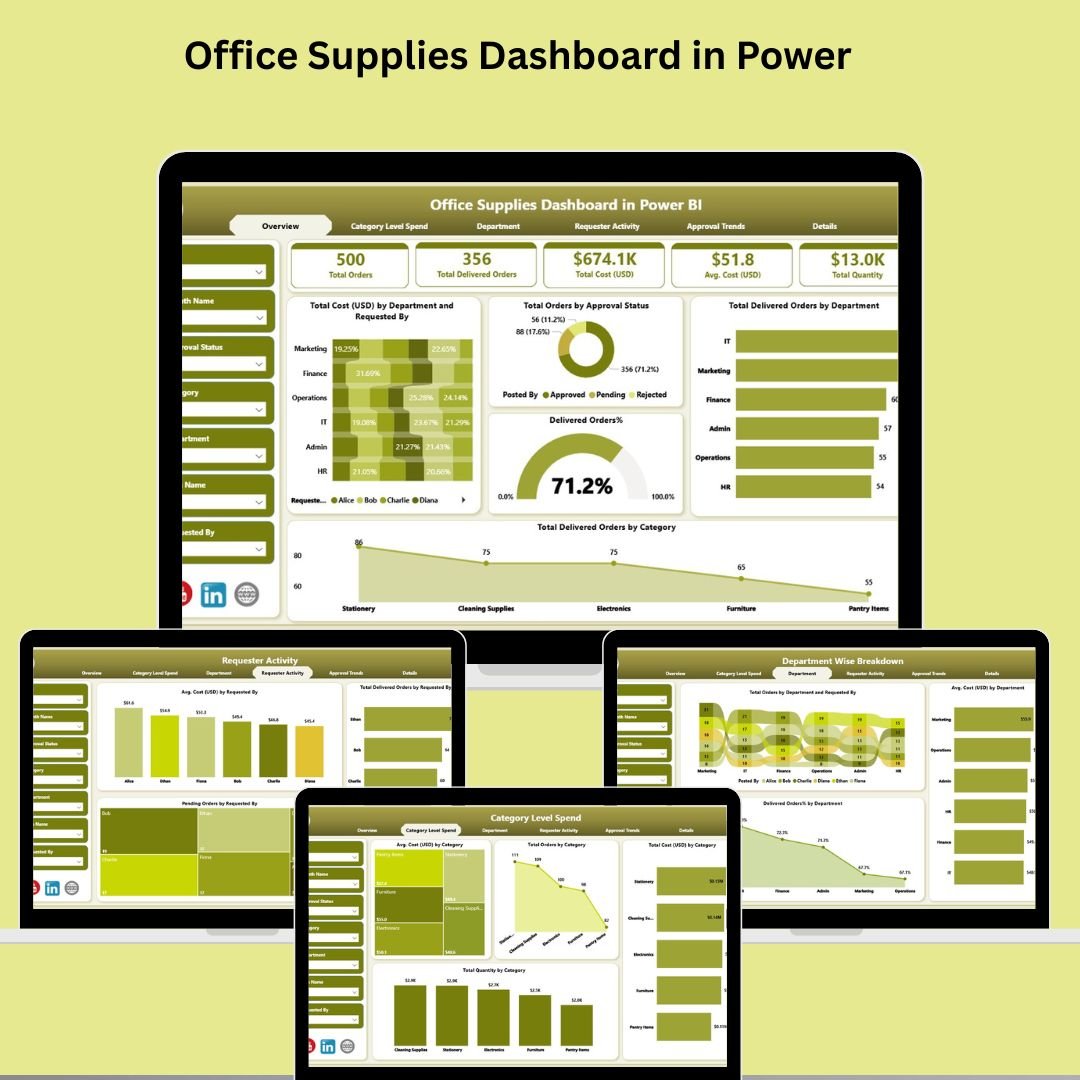
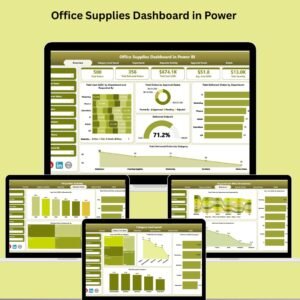
Tired of manually tracking orders, overspending, or juggling spreadsheets for your office supply chain? Say hello to the Office Supplies Dashboard in Power BI—your all-in-one analytics solution designed to transform how your organization manages and monitors its office supplies.
Built using Power BI and Excel, this dashboard empowers operations teams, procurement officers, and department heads with real-time data, rich visuals, and powerful insights—all at the click of a button. From order tracking to cost control, this tool ensures nothing slips through the cracks.
Let’s break down exactly how this dashboard helps you take charge of your supply chain 👇
✨ Key Features of Office Supplies Dashboard in Power BI
🧩 Overview Page – Real-Time Insights at a Glance
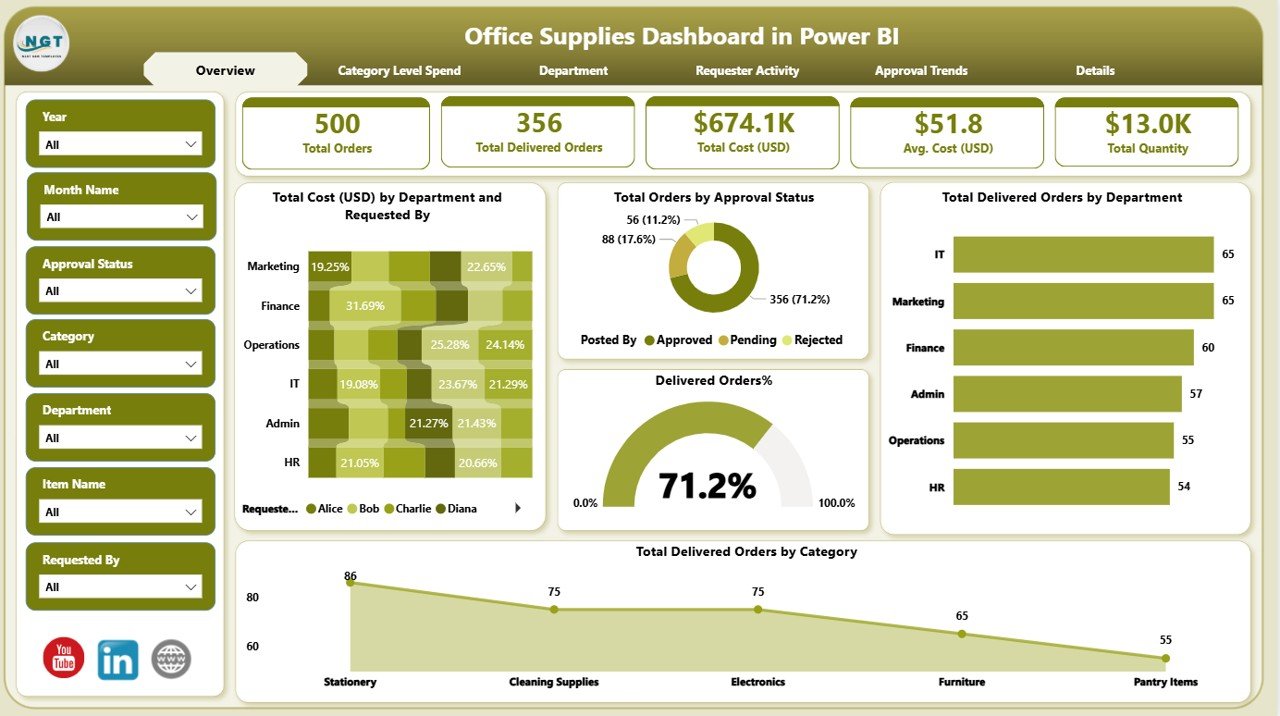
Your executive summary of everything that matters:
🎯 6 Smart Slicers – Filter by department, requester, approval status & more
💳 5 KPI Cards – Total Cost by Department, Total Orders by Status, Delivered Orders
📊 Charts for Quick Insight:
% Delivered Orders
Total Cost (USD) by Department
Total Delivered Orders by Category
Perfect for decision-makers who need quick, actionable overviews.
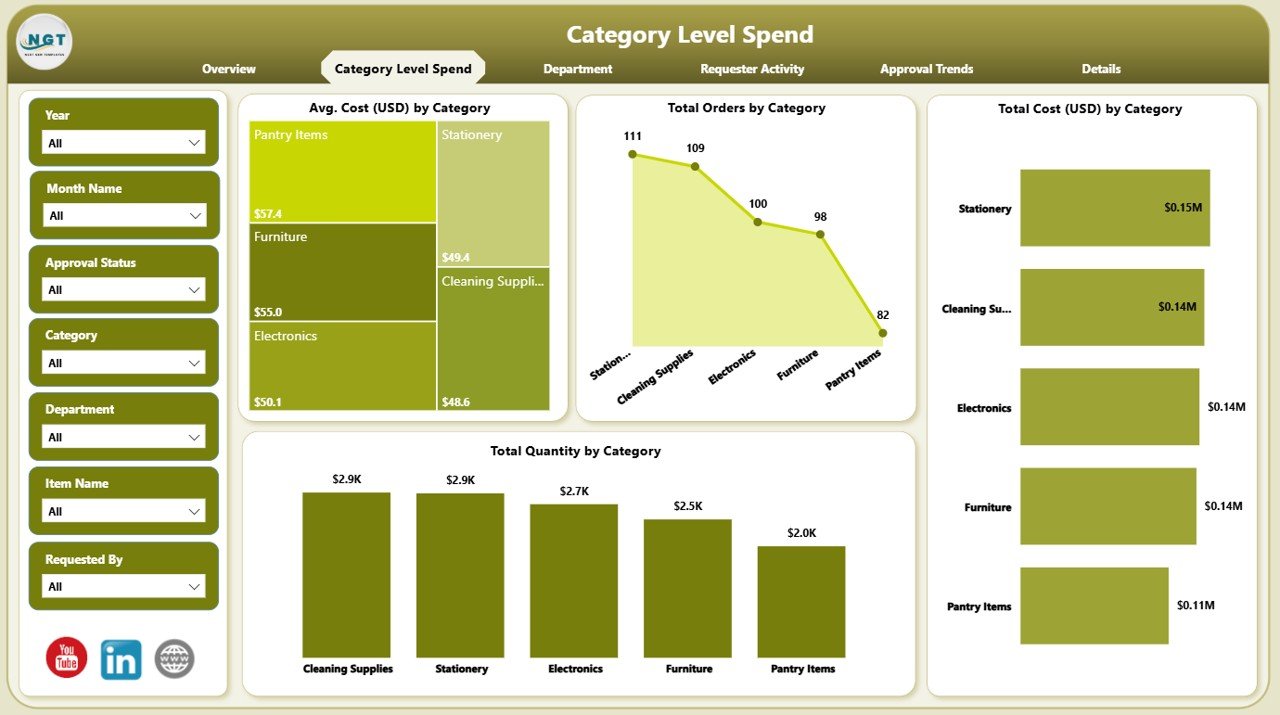
💸 Category Level Spend Page – Deep Cost Analysis
Drill into where your budget is really going:
6 slicers for granular filtering
📈 4 key visuals including:
Avg. Cost by Category
Total Orders
Total Cost
Quantity Ordered
This view helps you identify expensive categories and optimize purchasing.
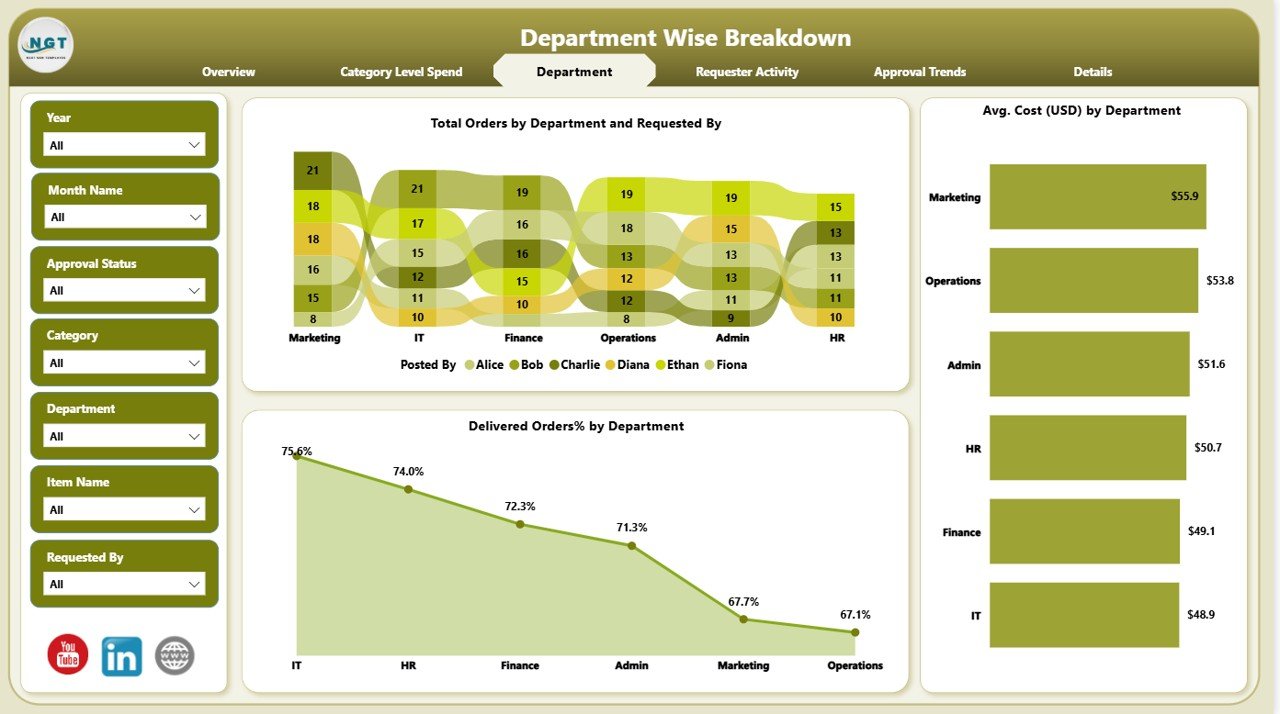
🏢 Department Page – Monitor Departmental Efficiency
Understand how each department is managing their orders:
📊 Charts show:
Total Orders by Department
% Delivered Orders
Avg. Cost by Department
Use this page to hold departments accountable and optimize internal supply distribution.
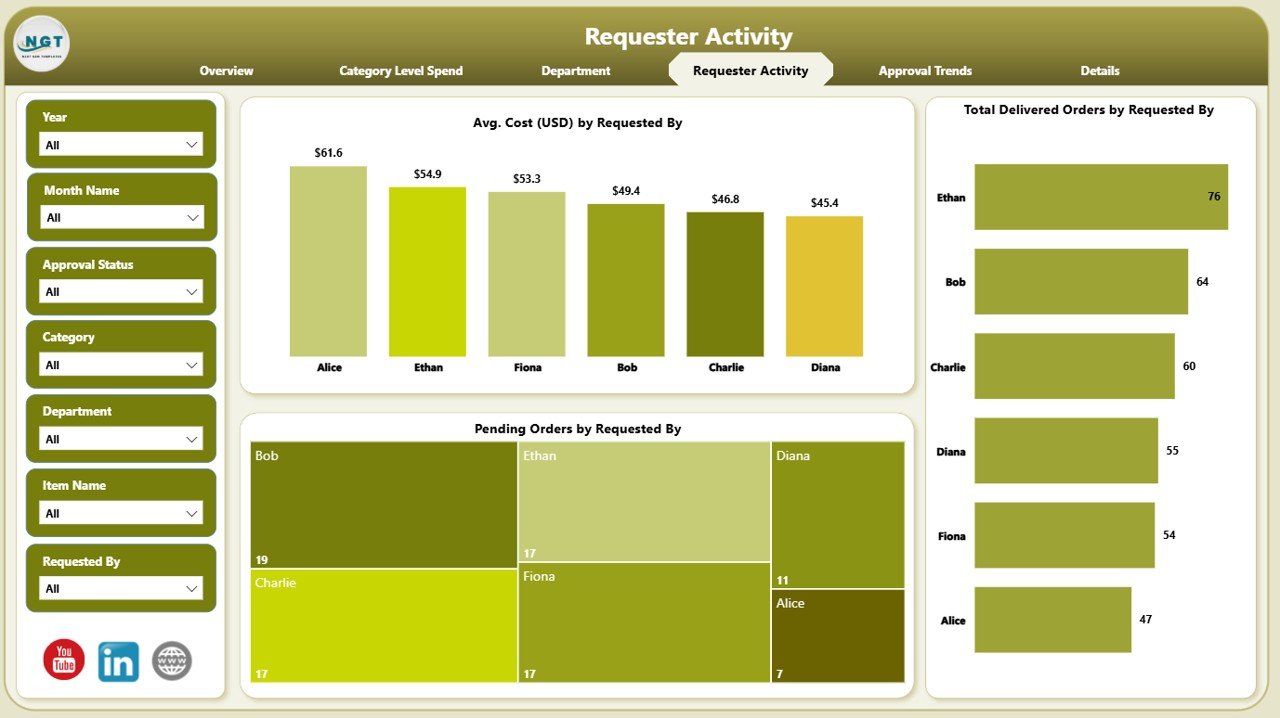
👥 Requester Activity Page – Who’s Ordering What?
Track individual usage and streamline procurement:
Visuals include:
Avg. Cost per Requester
Delivered Orders per Requester
Pending Orders per Requester
Great for spotting inefficiencies, duplicate orders, or high-usage staff.
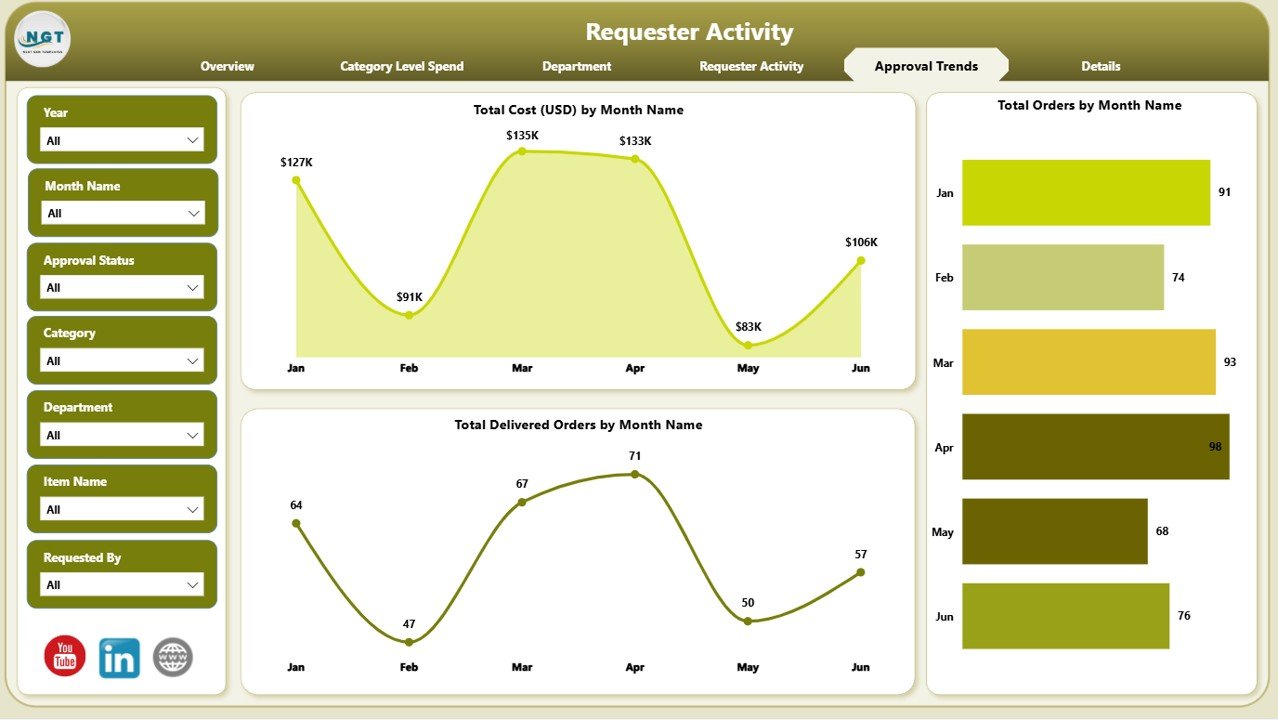
📝 Approval Trends Page – Optimize Your Workflow
Improve your internal approval process:
Charts to track:
Cost by Month
Orders by Month
Delivered Orders by Month
This is ideal for identifying approval bottlenecks and streamlining turnaround times.
📂 What’s Inside the Dashboard?
You’ll get a fully interactive Power BI file connected to a structured Excel dataset, including:
✅ Overview Page
✅ Category Level Spend Page
✅ Department Page
✅ Requester Activity Page
✅ Approval Trends Page
All visuals are powered by structured data models and DAX calculations—designed to be flexible and easily updatable.
🛠️ How to Use the Office Supplies Dashboard
✅ Update your Excel file with the latest order and delivery data
📥 Open the Power BI dashboard and hit “Refresh”
🎛️ Use slicers to filter by categories, departments, dates, or requesters
📊 Analyze visual trends to spot overspending or approval delays
🔧 Customize charts to suit your workflow or reporting format
🧠 Make data-driven decisions—from procurement to delivery tracking
👥 Who Can Benefit from This Dashboard?
📦 Procurement Teams – Track and control supply costs
🏢 Department Heads – Monitor their team’s ordering behavior
🧾 Finance Teams – Evaluate spend patterns and optimize budgets
🛠️ Operations Managers – Streamline workflows and approvals
💼 SMEs & Enterprises – Scalable for businesses of all sizes
🔗 Click here to read the Detailed blog post
📺 Visit our YouTube channel to learn step-by-step video tutorials
Watch the step-by-step video tutorial:
Compatibility and Requirements
- Works in Power BI Desktop, which is free. The dashboard reads its data from an Excel file, so you also need Microsoft Excel to update that dataset.
- Microsoft explains how to install it in Get Power BI Desktop.
Frequently Asked Questions
Which pages are included?
Five pages: Overview, Category Level Spend, Department, Requester Activity and Approval Trends.
Where does the data come from?
The dashboard connects to a structured Excel dataset. Update the Excel file with your latest order and delivery data, open the Power BI file and click Refresh.
Can I filter the data?
Yes. The Overview and Category Level Spend pages each have 6 slicers, so you can filter by department, requester, approval status, category and dates.
Can I track approvals over time?
Yes. The Approval Trends page shows cost, orders and delivered orders by month, which helps you spot approval delays.
Is there an Excel or Google Sheets version?
Yes. See the Office Supplies Dashboard in Excel and the Office Supplies Dashboard in Google Sheets.
Related Office Templates
- Office Supplies Dashboard in Excel: the same dashboard in Excel
- Office Supplies Dashboard in Google Sheets: the Google Sheets edition
- Office Supply Order Tracker in Excel: log supply orders as they are placed
- Office Supply Request Tracker in Excel: track requests from staff
- Office Travel and Expense Dashboard in Power BI: another Power BI office cost dashboard
Browse all Power BI dashboards.











Reviews
There are no reviews yet.