



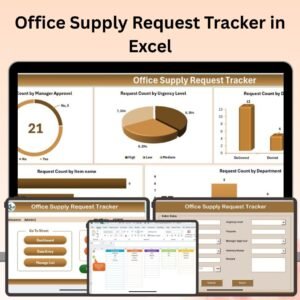
The Office Supply Request Tracker in Excel is a powerful tool designed to streamline the management of office supply requests. Whether you’re in charge of office management, HR, or inventory control, this easy-to-use tracker allows you to monitor office supply needs, track requests, and manage inventory effectively.
This Excel-based tool helps you stay on top of office supply orders, ensuring that your office never runs out of essential items. With clear tracking, automated updates, and easy-to-read reports, you can improve efficiency, prevent stockouts, and ensure that your team always has the supplies they need.

Key Features of the Office Supply Request Tracker in Excel:
📋 Office Supply Request Management
Track each office supply request with important details such as the requester’s name, supply type, quantity requested, and status, allowing you to monitor and fulfill requests efficiently.
📦 Inventory Management
Keep track of your office supply inventory levels and know exactly when to reorder. This helps you prevent overstocking or running out of crucial items.
📈 Automated Replenishment Alerts
Set up automatic alerts for low stock levels to ensure that you order supplies on time, keeping your office operations running smoothly.
📅 Request Status Updates
Monitor the status of each supply request, from submission to fulfillment, so you can manage timelines and meet the needs of your team promptly.
📊 Usage Reports and Analytics
Generate reports to analyze supply usage, identify trends, and make data-driven decisions for future purchasing and budgeting.
🚀 Why You’ll Love the Office Supply Request Tracker in Excel:
✅ Efficient Supply Management – Track supply requests and inventory with ease, ensuring you never run out of essential office items.
✅ Streamlined Request Process – The tracker allows you to log, manage, and update requests from employees, improving response time and reducing miscommunication.
✅ Automated Inventory Tracking – Automatically track stock levels and set up alerts when supplies are low, helping you stay on top of ordering.
✅ Improve Budgeting – Generate usage reports to analyze spending on office supplies, which helps you make smarter purchasing decisions.
✅ Easy-to-Use and Customizable – With Excel’s familiar interface, this tool is easy to use, and you can customize it to fit your company’s unique supply tracking needs.
✅ Enhance Organization – Stay organized by keeping all supply request data in one place, making it easier to monitor requests and manage inventory.
What’s Inside the Office Supply Request Tracker in Excel:
- Request Tracking: Track each supply request, including requester details, supply type, quantity, status, and fulfillment date.
- Inventory Management: Monitor inventory levels to ensure you’re not running out of essential office supplies.
- Automatic Alerts: Set up automatic alerts for low stock levels to prompt timely reordering.
- Usage Reports: Generate reports to track how often supplies are being used, helping with better purchasing decisions.
- Status Monitoring: Track the status of each supply request and ensure timely fulfillment.
- Customizable Inputs: Easily adjust the tracker to meet your office’s specific supply needs and requirements.
How to Use the Office Supply Request Tracker in Excel:
1️⃣ Download the Template – Access your Excel file instantly upon purchase.
2️⃣ Input Request Data – Enter details of office supply requests, such as the requester’s name, supply type, and quantity, into the tracker.
3️⃣ Monitor Inventory Levels – Keep an eye on inventory levels and be alerted when it’s time to reorder.
4️⃣ Update Status – Mark the status of each request (Pending, Fulfilled, etc.) and ensure that supplies are delivered on time.
5️⃣ Generate Reports – Use reports to analyze supply usage and identify opportunities to optimize office supply spending.
Who Can Benefit from the Office Supply Request Tracker in Excel:
- Office Managers
- HR Teams
- Inventory Managers
- Small to Medium Businesses
- Corporations with Multiple Departments
- Administrative Assistants
- Facilities Managers
The Office Supply Request Tracker in Excel is an indispensable tool for any organization looking to streamline its office supply management. With this tool, you can enhance organization, ensure timely reordering, and optimize your office supply budget.
Click here to read the Detailed blog post
https://www.pk-anexcelexpert.com/office-supply-request-tracker-in-excel/
Visit our YouTube channel to learn step-by-step video tutorials
Youtube.com/@PKAnExcelExpert
Compatibility and Requirements
- Works in Microsoft Excel desktop (Excel 2016 or later, or Microsoft 365).
- New to Excel? Microsoft’s Excel for Windows training covers the basics.
Frequently Asked Questions
What details does each request record?
The requester’s name, supply type, quantity requested, status and fulfillment date.
Can I see when stock is running low?
Yes. The tracker monitors inventory levels and flags low stock so you can reorder in time.
How do I mark a request as done?
Update the status of the request, for example from Pending to Fulfilled.
Can it help with the supply budget?
Yes. The usage reports show how often supplies are used, which helps you plan purchases and spending.
Related Office Supply Templates
- Office Supply Request Tracker in Google Sheets: the same tracker in Google Sheets
- Office Supply Order Tracker in Excel: track supplier orders for office supplies
- Office Supply Inventory Update Tracker in Excel: keep office stock counts up to date
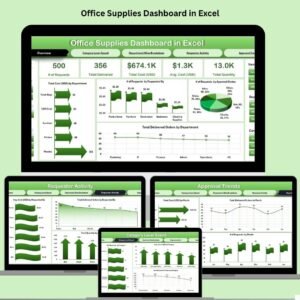
- Office Supplies Dashboard in Excel: a dashboard for office supply spending
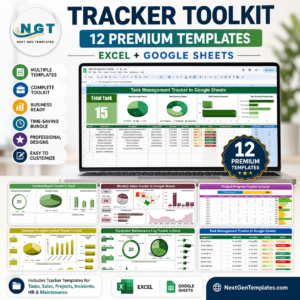
- Tracker Toolkit: 12 tracker templates in one bundle
Browse all Excel trackers or the Inventory Management templates.













Reviews
There are no reviews yet.