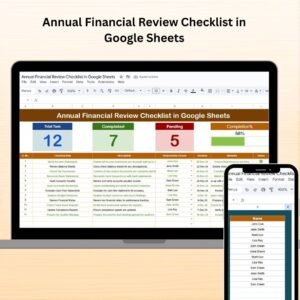
Annual Financial Review Checklist in Google Sheets

Google Sheets - instant download

Original price was: ₹799.00.Current price is: ₹349.00.
Details, requirements and demo below
Sale!

Annual Financial Review Checklist in Google Sheets

Original price was: ₹799.00.Current price is: ₹349.00.

Take control of your annual financial review with this smart, interactive checklist in Google Sheets! 📊✅ Track tasks, deadlines & responsibilities in one place!

📋 Pre-Built Checklist Table – Track tasks with Serial No., Deadline, Status
🧠 Auto-Updating Cards – Total, Completed & Pending task counters
📈 Progress Bar – Instantly visualizes your checklist completion
🎯 Dropdown for Responsible Persons – Assign tasks with ease
📥 Editable & Customizable – Add new tasks, columns, or remarks
👥 Team Collaboration Ready – Share & edit in real-time
🔒 Transparent Task Management – Know who’s doing what
📁 Audit-Ready Structure – Great for compliance & reviews
📆 Deadline Tracking – Never miss a financial review deadline
🧾 Perfect for Any Business – From startups to large enterprises

- +
,

💡 Buy any 2 templates and save 20% automatically at checkout.

Pricing country
Prices follow your selected country; checkout uses your billing country.
Excel + AI Mastery: 100 Essential Formulas courseLaunch offer
🎓 NEXTGENTEMPLATES ACADEMY
Want to build templates like this yourself?
Excel + AI Mastery: 100 Essential Formulas

SUMIFS, XLOOKUP, FILTER, LAMBDA and checking AI-written formulas, with real business projects. 11h 47m of video by PK, with practice files, quizzes and a capstone.

Managing your organization’s financial review shouldn’t feel overwhelming. That’s why we created the Annual Financial Review Checklist in Google Sheets—an intuitive, ready-to-use template that simplifies your entire year-end financial process. Whether you’re a small business owner, financial controller, or part of an enterprise team, this smart checklist ensures nothing falls through the cracks. 📊✅

Designed for clarity, accountability, and collaboration, this checklist makes your financial review process smoother and faster. Built in Google Sheets, it’s easily shareable, editable in real-time, and fully customizable to match your financial reporting style.

Annual Financial Review Checklist

✨ Key Features of the Annual Financial Review Checklist

📋 Annual Review Checklist Sheet

This is the main dashboard where you manage every financial task:

  • 🧮 Total, Completed & Pending Task Count – Real-time counters at the top

  • 📊 Visual Progress Bar – Instantly see what’s done and what’s pending

  • ✅ Checklist Table – With Serial No., Checklist Item, Description, Responsible Person, Deadline, Remarks, and Status

Mark tasks as ✔ (completed) or ✘ (pending) and watch your progress update automatically! 🙌


📄 List Sheet for Team Management

Avoid repetition and typos with this built-in dropdown list of Responsible Persons:

  • 🎯 Easily assign tasks to individuals

  • 👥 Keep your team organized

  • 📥 Editable anytime for adding/removing team members

It helps ensure clear accountability throughout the review process.


📦 What’s Inside the Template

  • 🗂️ Pre-built task checklist with 10+ columns

  • 🧠 Cards that auto-calculate completed/pending tasks

  • 📈 Visual progress bar that updates with each completed item

  • 🔄 Dropdown to assign tasks by team members

  • ✏️ Fully customizable fields: tasks, deadlines, notes

  • 🧾 Two key sheets: Main Checklist + Team List

Everything you need to stay organized and audit-ready 📑💡


🧠 How to Use the Template

  1. 📥 Download the checklist and open in Google Sheets

  2. 🧾 Add your financial review tasks to the checklist table

  3. 🗓️ Assign deadlines and responsible persons using the dropdown

  4. ✔ Mark tasks as completed—progress bar and counters update automatically

  5. 🔄 Collaborate in real-time with your finance team

  6. ✏️ Customize any part of the sheet to fit your needs

No formulas to write. No complex setup. Just plug, play, and review.


👨‍💼 Who Can Benefit from This Checklist?

This template is ideal for:

  • 📊 Finance teams at SMBs and startups

  • 🏢 Corporate finance departments

  • 🧮 Accountants and financial consultants

  • 👥 Nonprofits and NGOs

  • 💼 Solo entrepreneurs & freelancers

If you’re responsible for financial accuracy and audit preparation, this is your go-to organizational tool!


🔗 Click here to read the detailed blog post

Watch the step-by-step video Demo:

📺 Watch our YouTube tutorials for step-by-step

Compatibility and Requirements

  • Works in Google Sheets with a free Google account and a web browser. No software to install.
  • Names are picked from a dropdown list. Google explains dropdowns in Create an in-cell dropdown list.

Frequently Asked Questions

Which columns does the checklist have?

Serial No., Checklist Item, Description, Responsible Person, Deadline, Remarks and Status.

How do I assign tasks to my team?

Add team members in the List sheet, then pick the responsible person from the dropdown in the checklist.

How is progress shown?

Mark tasks with a tick when completed or a cross when pending. The task counters and progress bar update automatically.

Can I add my own review tasks?

Yes. Tasks, deadlines and notes are fully editable, so you can match your own year-end process.

Related Financial Review and Audit Templates

Browse all Google Sheets checklists or the Google Sheets financial tools.

Frequently asked questions

How do I get my own copy?
After purchase you get a link to the Google Sheet. Open it while signed in to your Google account and use File > Make a copy - the copy in your Google Drive is fully yours and editable.
Do I need a paid Google account? Will it expire?
No. A free Google account is enough, and your copy lives in your own Google Drive - it never expires and there is nothing to renew.
Does it work on Mac, phone or tablet?
Yes - in any browser on Windows, Mac or Chromebook, and in the Google Sheets mobile app for viewing and quick entries.
Can I share it with my team?
Yes. Share your copy with colleagues using Google's normal sharing, with view or edit rights as you choose.
Can I change the design and formulas?
Yes, your copy is fully editable - colours, labels, logo, formulas and charts. If a range is protected, use Data > Protect sheets and ranges to remove it in your copy.
Are there macros or add-ons?
No macros or add-ons - it uses normal Google Sheets formulas and charts.
Is it a one-time payment or a subscription?
One-time payment. No subscription, no per-user fees and nothing to renew - the file is yours to keep.
How do I get the file after payment?
Instantly. The download link appears on screen after checkout, is emailed to you, and stays under My Account > Downloads on our website. If the email does not arrive within a few minutes, check your spam or promotions folder.
Is a user manual included?
Most of our newer products include a PDF user manual in the download. If yours does not have one, message us with your order number and we will send it.
Do I get free updates?
Bug fixes are always free - if something does not work as described, we fix it and send you the corrected file. New versions with new features are not included in the price, unless this product's description says otherwise.
Can you customise it for me?
Yes. Small changes to this template (your columns, categories, logo, colours, minor layout) cost the template price plus $40-80 (Rs 3,000-6,000 + GST), quoted once you send your list. A fully custom build is usually $100-200 (Rs 8,000-18,000 + GST) with two revision rounds. Email your requirements to [email protected] or message us on WhatsApp.
Can I use it for my business or my clients?
Yes, for your own personal or internal business use, for as long as you like. Reselling or redistributing the template is not allowed.
What is your refund policy?
Because these are digital downloads, they are non-refundable once delivered - except when the product does not match its description (report it within 48 hours of purchase) or there is a technical problem our team cannot fix within 72 hours. Email [email protected] with your order number.
How do I get help?
Email [email protected] (Mon-Fri, 10 AM-7 PM IST) or message us on WhatsApp +91 80770 90260 (chat only, no calls). Please include your order number.

Still have a question? Click Need help? at the bottom-left to ask our assistant, or message us on WhatsApp.

Application

Google Sheets

Template Type

Checklist

Price

Paid

Business Or Department

Finance

Reviews

There are no reviews yet.

Only logged in customers who have purchased this product may leave a review.

You may also like…

Annual Financial Review Checklist in Google SheetsAnnual Financial Review Checklist in Google Sheets
Original price was: ₹799.00.Current price is: ₹349.00.
- +
Scroll to Top