

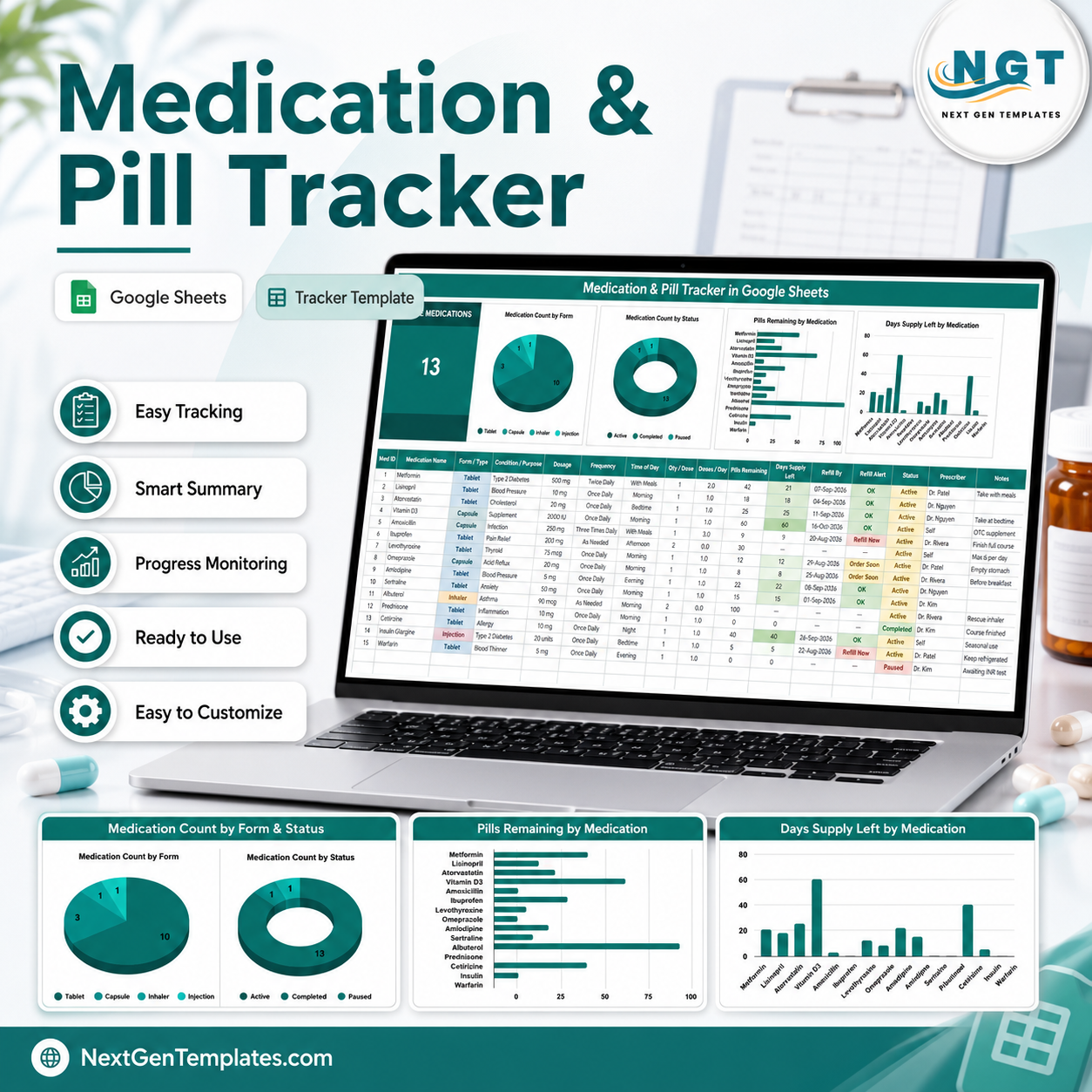

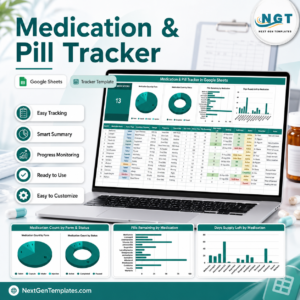
The Medication & Pill Tracker in Google Sheets keeps every medicine you take on one tab: 16 columns, 4 live charts, 5 formula columns that fill themselves, and a running count of how many days of supply you have left. Type in a medicine once — name, form, dosage, frequency and how many pills are in the bottle — and the sheet works out doses per day, days of supply left, the date you will run out, and whether that item reads OK, Order Soon or Refill Now. It ships with 15 sample rows so you can see it working before you clear them. This is a personal organising log, not medical advice — it does not recommend doses, check interactions or replace your pharmacist. Instant download, no subscription, and you keep the copy forever.Medication & Pill Tracker in Google Sheets
Key Features of the Medication & Pill Tracker in Google Sheets
- One-screen layout — the Active Medications card, all four charts and the entry table sit on a single tab, so nothing is hidden behind a menu.
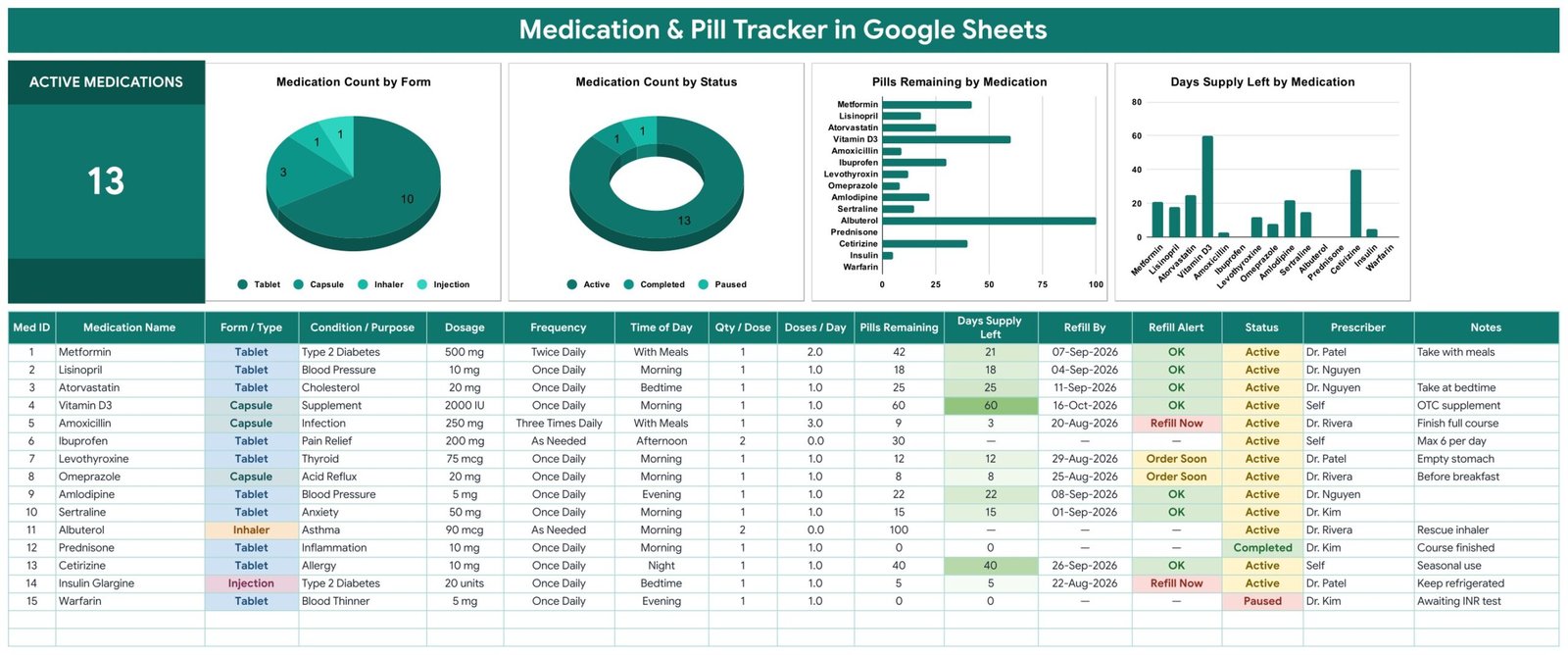
- 5 columns you never type — Med ID, Doses / Day, Days Supply Left, Refill By and Refill Alert are all formulas.
- Days of supply, calculated — Pills Remaining divided by your doses per day. 42 tablets taken twice daily reads 21 days; 9 capsules taken three times daily reads 3.
- Two alert thresholds — Refill Alert reads Refill Now at 7 days or less and Order Soon at 14 days or less, colour-coded in the cell.
- Refill By date — the sheet projects the date each item runs out from today, so you can order before the gap.
- Alerts switch off when a course ends — set Status to Completed or Paused and that row stops asking to be refilled.
- 4 dropdown columns fed by a List tab — Form / Type (11 options), Frequency (7), Time of Day (6) and Status (3). Add a value on the List tab and it appears in the dropdown automatically.
- As-needed medicines handled honestly — set Frequency to As Needed and Doses / Day becomes 0, so Days Supply Left and Refill By show a dash instead of an invented number.
- Free-text Dosage field — mg, mcg, mL, IU or units, recorded exactly as it appears on the label.
- Charts read the raw columns — rows 16 to 1000, with no hidden helper tables to maintain.
What’s Inside the Medication & Pill Tracker in Google Sheets
The download is a PDF that carries the Make a copy link. One click puts an editable copy of the file into your own Google Drive. Four tabs come with it.
1. Medication Tracker. The working tab. A single KPI card counts your Active Medications (13 in the sample data), then four charts: Medication Count by Form, Medication Count by Status, Pills Remaining by Medication and Days Supply Left by Medication. Under them sits the table, columns A to P: Med ID, Medication Name, Form / Type, Condition / Purpose, Dosage, Frequency, Time of Day, Qty / Dose, Doses / Day, Pills Remaining, Days Supply Left, Refill By, Refill Alert, Status, Prescriber and Notes. Your rows start at row 16.
2. List. The dropdown source. Four columns — Form / Type, Frequency, Time of Day, Status — read down to row 500, so any value you add shows up in the tracker without re-doing the data validation.
3. Instructions. A ten-line walkthrough of the formula columns, the alert thresholds and the one-time chip-styling step, ending with the same reminder this listing gives: it is an organising tool, not medical advice.
4. Explore More Templates. Links to the rest of the catalogue, plus a 15% coupon.
Medication & Pill Tracker in Google Sheets vs. Excel vs. a Paid Medication App — Where This Fits
| This Google Sheets tracker | A DIY Excel sheet | Paid medication app | |
|---|---|---|---|
| Cost | One payment, yours forever | Free, but you build it | $3–$10 per month, typically |
| Platform | Google Sheets, any browser | Desktop Excel | Phone app, vendor’s servers |
| Setup time | Copy the file, clear 15 sample rows | Hours of formula writing | Account signup, per-medicine entry |
| Days-supply and refill maths | Built in, 5 formula columns | You write it | Built in |
| Push reminders on your phone | No — alerts are cells you read when you open the sheet | No | Yes, that is what you pay for |
| Real-time sharing with a carer | Yes, a Google share link | Emailed copies | Depends on plan |
| Editable fields and columns | Fully — it is your spreadsheet | Fully | Fixed by the vendor |
| Where the data lives | Your own Google Drive | Your own machine | The vendor’s account |
| Year-1 cost for a family of 5 | One purchase, share one file | $0 plus your time | $180–$600 |
If you want a phone buzzing at 8am, buy an app — this sheet cannot do that and does not pretend to. If you want one page that shows what everyone in the house takes, what is running low and when to order, this is cheaper and far easier to edit.
Who This Template Is For — and Who It’s Not For
A good fit for: anyone on several long-term prescriptions who keeps losing track of what is running low; carers managing a parent’s medicine cabinet; households that want one shared page instead of four pill boxes and a memory; anyone who simply wants a tidy record to take to the next appointment.
Not a fit for: clinics, pharmacies or care homes that need a patient record system — this is a spreadsheet, not an EHR or EMR, and it carries no certification of any kind. It is not a medical device. It does not check interactions, contraindications, allergies or duplicate therapy, and it will not tell you whether a dose is right for you. It sends no notifications and no emails. It does not connect to a pharmacy, a prescription service or an insurer. And it is not a compliance or audit record: it stores exactly what you type into your own private Google account, nothing more. Any question about a dose, a missed dose, a side effect or a change to your medicines belongs with your doctor or pharmacist, not with a spreadsheet.
How to Use the Medication & Pill Tracker in Google Sheets
- Open the PDF in your download and click the Make a copy link. The file lands in your own Google Drive.
- Clear the sample rows. Rows 16 to 30 hold 15 demo medicines; delete their contents and start typing your own.
- Enter each medicine once — Medication Name, Form / Type, Condition / Purpose, Dosage, Frequency, Time of Day, Qty / Dose, Pills Remaining, Status and Prescriber. Copy the details straight from the label.
- Let the formulas run. Med ID, Doses / Day, Days Supply Left, Refill By and Refill Alert fill themselves the moment the row has a frequency and a pill count.
- Update Pills Remaining after every refill. That single number drives the days-supply figure, the refill date and the alert.
- Close out finished courses by switching Status to Completed or Paused. The card and the charts update instantly.
- Optional, ten seconds: to get the coloured chip look from the screenshots, select column C (then F, G and N), open Data → Data validation, click the rule, and set Display style to Chip. Apps Script cannot set that for you yet, so it is left as a one-time manual step.
Real-World Use Cases
Priya, managing three long-term prescriptions. Metformin, atorvastatin and levothyroxine, all on different pack sizes. She updates Pills Remaining on the first Sunday of each month; the Days Supply Left chart shows her at a glance which bottle empties first, and she orders that repeat prescription before the gap instead of after it.
Daniel, looking after his father. Eight medicines, two prescribers, one shared sheet. He shares the file with his sister so both of them see the same Refill Alert column, and the Prescriber and Notes fields mean nobody has to phone the other to ask which doctor started what.
Maya, on a short antibiotic course. She adds the course with a Three Times Daily frequency, watches the days-supply figure count down to the end of the pack, and switches Status to Completed when she finishes it — which takes that row out of the Active Medications count without deleting the history.
Frequently Asked Questions
Is this medical advice, or a medical device?
No — to both. It is a personal logging spreadsheet. It records what you type and does arithmetic on it. It does not diagnose, treat, advise on doses, check interactions or monitor anything. Talk to your doctor or pharmacist about anything to do with your actual medicines.
Will it remind me to take a pill?
No. There are no notifications, no alarms and no emails. The Refill Alert column is a formula in a cell — you see it when you open the sheet. If you need a phone alarm, use a phone alarm.
Where is my information stored?
In your own Google account, in your own Drive, in a copy of the file that only you can see until you choose to share it. We never see it. That also means it carries no HIPAA, GDPR or any other certification — treat it as a private personal document, and think carefully before sharing the link with anyone.
Can I track more than one person in the same sheet?
Yes. Most people put the person’s name in the Notes or Prescriber column, or duplicate the tracker tab per person. There is no built-in patient field, because this is not a patient record system.
What if a medicine is taken only when needed?
Set Frequency to As Needed. Doses / Day becomes 0, and Days Supply Left and Refill By show a dash rather than a made-up number — the sheet will not guess a run-out date it cannot know.
Do I need Apps Script or add-ons?
No. Everything is native Google Sheets formulas, charts and data validation. Nothing to install, nothing to authorise.
Can I add my own medicine forms or frequencies?
Yes — type them on the List tab and the dropdowns pick them up automatically, down to row 500 of each column.
About the Author
Built by PK – Microsoft Certified Professional with 15+ years of Excel, Google Sheets, and Power BI experience. Founder of NextGenTemplates, reaching 300K+ subscribers across YouTube channels. Every template is hand-built and tested before release.
Explore Related Templates
Keeping a wider personal health record? Pair this with the Sleep Tracker in Google Sheets, the Water Intake Tracker in Google Sheets and the Body Measurements Tracker in Google Sheets. For appointments rather than medicines, see the Medical Appointment Calendar in Google Sheets, and for a broader wellbeing view the Fitness and Wellness Dashboard in Google Sheets. Browse every Google Sheets tracker or the full Google Sheets range.
Get organised today. Download the Medication & Pill Tracker in Google Sheets, open the PDF, click Make a copy, and have your whole medicine cabinet on one page in about ten minutes. Instant download · works in any browser · yours to keep and edit forever.
Watch the step-by-step video Demo:
Last updated: 23 August 2026.































Reviews
There are no reviews yet.