



Healthcare Marketing Remote Work Dashboard is evolving faster than ever. With increasing competition, patient expectations, and the shift to remote work, healthcare organizations need reliable tools to track performance, analyze campaigns, and make informed decisions. Traditional manual reports are no longer enough—teams require interactive, data-driven solutions that consolidate all critical insights into one place.
The Healthcare Marketing Remote Work Dashboard in Excel is a ready-to-use, interactive template designed specifically for healthcare marketing teams. It empowers professionals to track campaigns, measure ROI, evaluate departmental performance, and monitor patient engagement initiatives seamlessly—even while working remotely.
Built in Excel, this dashboard leverages slicers, pivot charts, and automated visuals to simplify complex data. Remote teams can use it without additional software investments, ensuring accessibility, flexibility, and ease of use.
✨ Key Features
✅ Overview Page

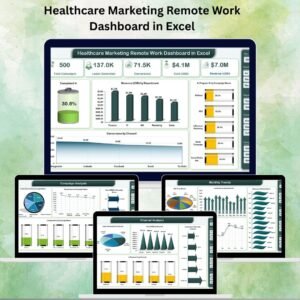
Provides a high-level summary of campaign and departmental performance.
Includes KPI cards for campaign completion %, conversions, revenue, and more.
Charts such as Completed % of Campaigns, Revenue by Department, and Conversions by Channel give instant insights.
✅ Department Analysis
Compare marketing outcomes across departments.
Charts include Conversions by Department, Cost by Department, and Planned vs. Completed activities.
Helps balance budgets and resources effectively.
✅ Campaign Analysis
Track campaign performance with metrics such as Leads Generated, Conversions, Cost, and Completion %.
Identify top-performing campaigns and optimize underperforming ones.
✅ Channel Analysis
Evaluate which marketing channels deliver the best ROI.
Metrics include Leads by Channel, Cost by Channel, and In-Progress % by Channel.
Enables smarter allocation of marketing budgets.
✅ Monthly Trends
Monitor seasonal trends and long-term performance.
Track ROI %, Leads Generated, Revenue, and Conversion rates by month.
Perfect for forecasting and campaign planning.
✅ Data & Support Sheets
Data Sheet stores raw inputs.
Support Sheet manages dropdowns and references for consistency.
🛠️ How It Works
Enter your marketing data into the Data Sheet.
Use slicers to filter by department, campaign, or channel.
View instant insights on the Dashboard pages.
Analyze monthly trends to plan ahead.
Share the Excel file across remote teams via OneDrive, SharePoint, or email.
👩💼 Who Can Benefit
Healthcare Marketing Teams – Track multi-channel campaigns.
Hospital Executives – Get high-level summaries of ROI and conversions.
Campaign Managers – Monitor progress and optimize performance.
Consultants – Use as a professional reporting tool for clients.
🚀 Advantages
Centralized Data – All KPIs in one Excel file.
Time Savings – Automated dashboards reduce manual reporting.
Remote-Friendly – Ideal for distributed healthcare marketing teams.
Budget Oversight – Compare campaign costs vs. revenue.
Dynamic Insights – Use slicers for custom views.
Decision Support – Data-driven insights for smarter strategies.
📈 Opportunities for Improvement
Integrate with CRM systems like HubSpot or Salesforce.
Automate data entry via Power Query or APIs.
Add advanced KPIs such as Patient Lifetime Value.
Connect with Power BI for deeper analytics.
Enable real-time collaboration with Microsoft 365 cloud.
✅ Best Practices
Update campaign and revenue data weekly or monthly.
Use consistent naming for departments and campaigns.
Train remote teams to navigate dashboards effectively.
Validate input data to avoid errors.
Leverage monthly trend analysis for future planning.
🏥 Real-World Applications
Hospitals & Clinics – Track digital campaigns and patient engagement.
Healthcare Startups – Measure marketing ROI and optimize spending.
Pharma Companies – Evaluate departmental and campaign efficiency.
Consulting Firms – Deliver structured, data-driven insights to clients.
🔗 Click here to read the Detailed blog post
Visit our YouTube channel to learn step-by-step video tutorials
Watch the step-by-step video tutorial:
Compatibility and Requirements
- Works in Microsoft Excel desktop (Excel 2016 or later, or Microsoft 365).
- You filter the dashboard pages with slicers. Microsoft explains them in Use slicers to filter data.
Frequently Asked Questions
What pages does the dashboard have?
An Overview page, Department Analysis, Campaign Analysis, Channel Analysis and Monthly Trends. A Data Sheet holds the raw inputs and a Support Sheet holds the dropdown lists and references.
Where do I enter my marketing data?
Enter it in the Data Sheet. The dashboard pages then show it through KPI cards and charts.
Can I filter by department, campaign or channel?
Yes. Slicers let you filter by department, campaign or channel, and the charts update to match.
Which metrics can I track?
Campaign completion %, leads generated, conversions, cost, revenue and ROI %. You can view them by department, campaign, channel and month.
Is there a Power BI or Google Sheets version?
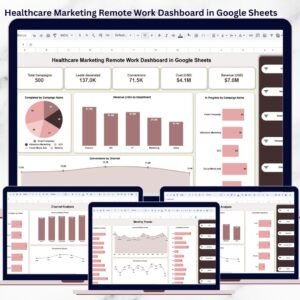
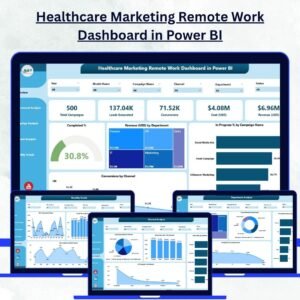
Yes. See the Healthcare Marketing Remote Work Dashboard in Power BI and the Healthcare Marketing Remote Work Dashboard in Google Sheets.
Related Healthcare Marketing Templates
- Healthcare Marketing Remote Work Dashboard in Power BI: the same dashboard in Power BI
- Healthcare Marketing Remote Work Dashboard in Google Sheets: the Google Sheets edition
- Healthcare Marketing Remote Work Report in Excel: a report view of the same topic
- Remote Work KPI Dashboard in Excel: KPI tracking for remote teams
- Marketing Remote Work Calendar in Excel: a calendar for marketing remote work
Browse all Excel dashboards and Excel sales and marketing templates.






Reviews
There are no reviews yet.