




🔑 Key Features of Gym Fitness Business Dashboard in Excel
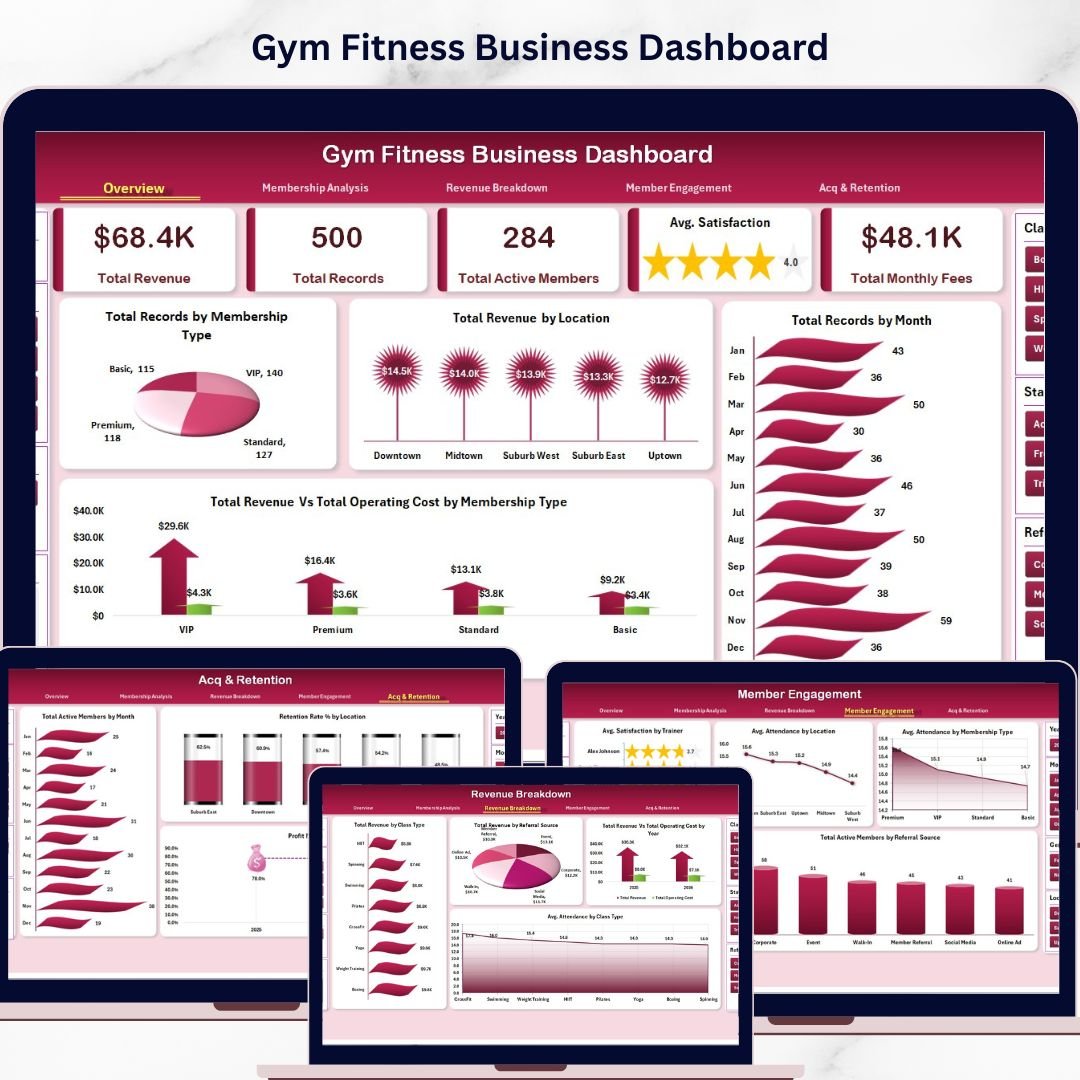
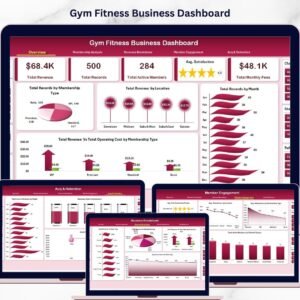
Gym Fitness Business Dashboard in Excel is a powerful, ready-to-use analytics template designed for gym owners, fitness studio managers, and health club operators who want to monitor every aspect of their business performance at a glance. This dashboard includes 5 interactive analysis pages, a structured data sheet, and a support sheet with pivot tables that drive the entire dashboard dynamically. It tracks critical metrics such as Total Revenue, Total Active Members, Average Satisfaction, Total Monthly Fees, and Total Operating Cost — giving you a 360-degree view of your gym’s financial and operational health.
Whether you manage a single-location gym or a multi-branch fitness chain, this Excel dashboard template helps you make data-driven decisions quickly. Explore related fitness templates like the Fitness Studios Dashboard in Excel and the CrossFit Gym KPI Scorecard in Excel for even deeper gym analytics.
📦 What’s Inside the Gym Fitness Business Dashboard in Excel
This template contains 7 well-organized sheets that cover everything from high-level overviews to granular member engagement analysis:
📊 Overview Page – Displays top-level KPI cards including Total Revenue, Total Records, Total Active Members, Avg Satisfaction, and Total Monthly Fees. Includes interactive charts showing Total Records by Membership, Total Revenue by Location, Total Records by Month, and Total Revenue Vs Total Operating Cost by Membership Type. Multiple slicers let you filter the entire dashboard instantly.
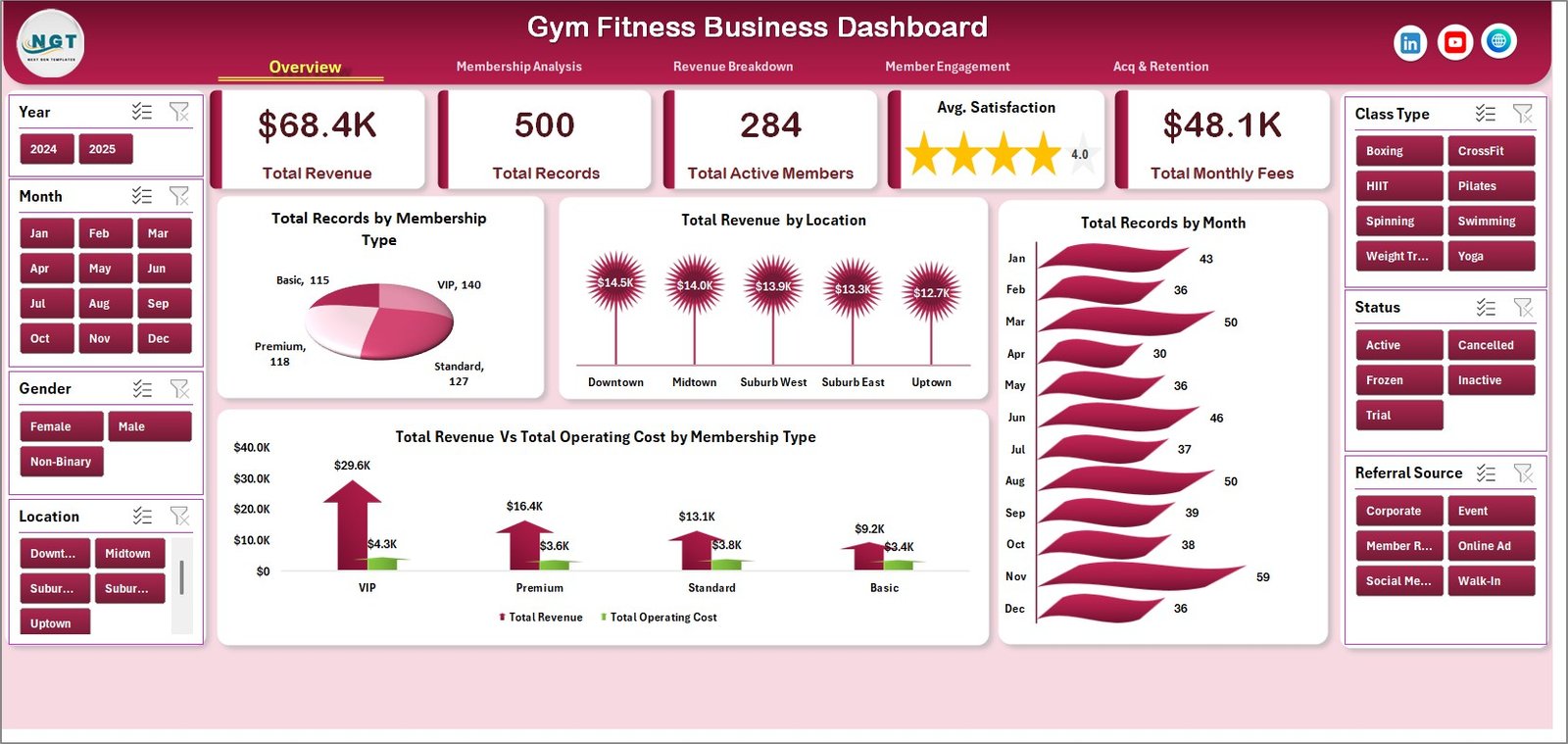 Gym Fitness Business Dashboard
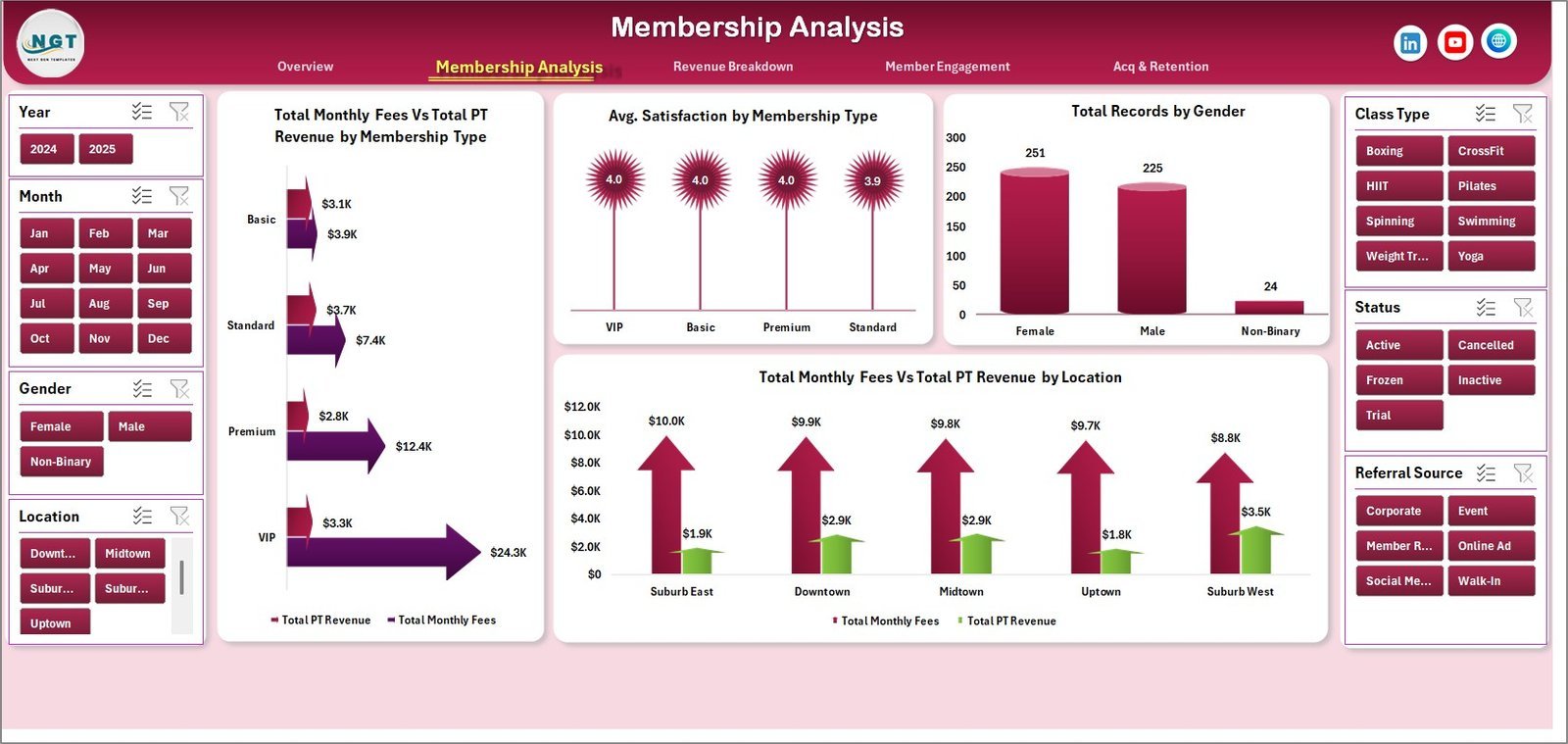
📊 Membership Analysis – Breaks down Total Monthly Fees Vs Total PT Revenue by Membership Type, Avg. Satisfaction by Membership Type, Total Records by Gender, and Total Monthly Fees Vs Total PT Revenue by Location. Perfect for understanding which membership tiers generate the most revenue.
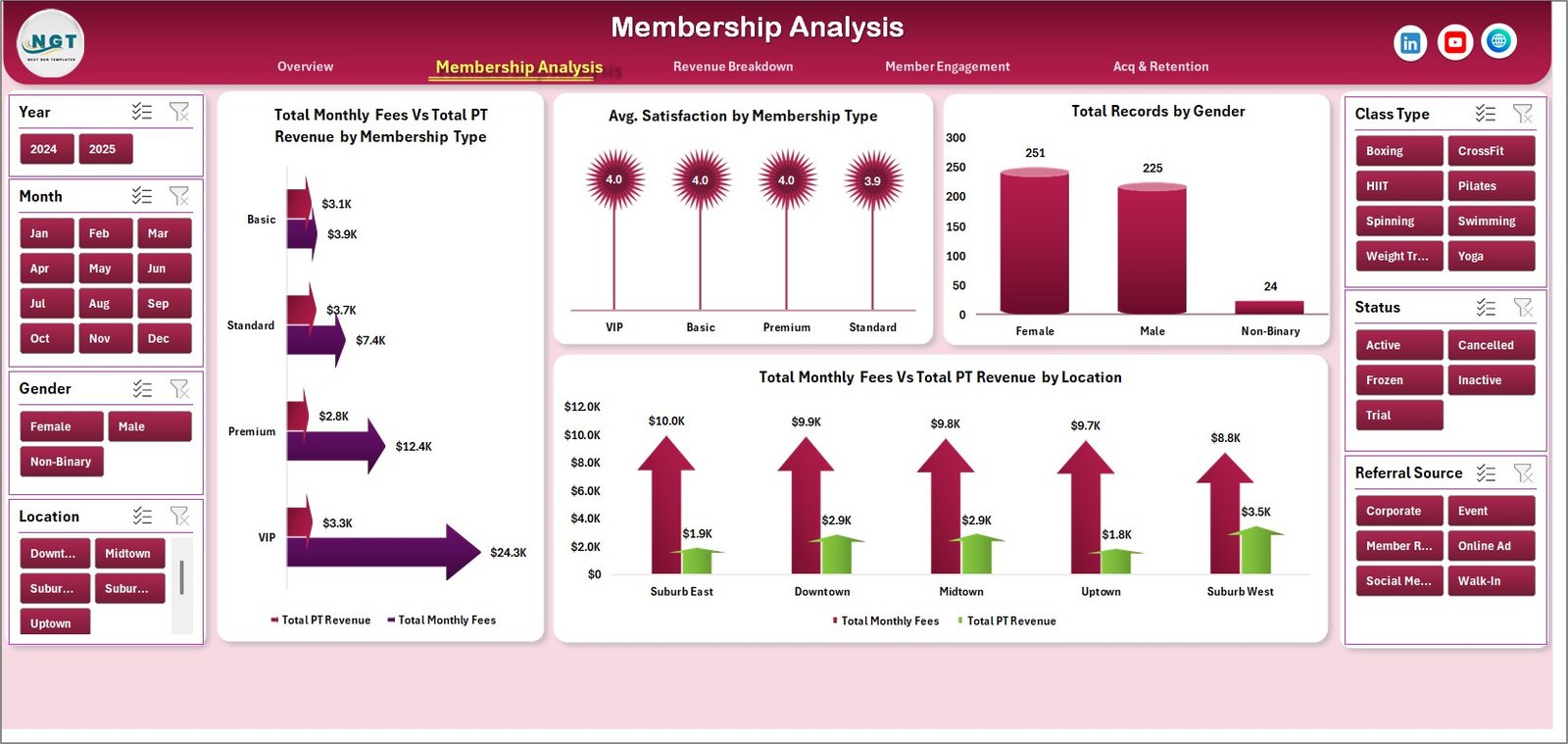 Membership Analysis
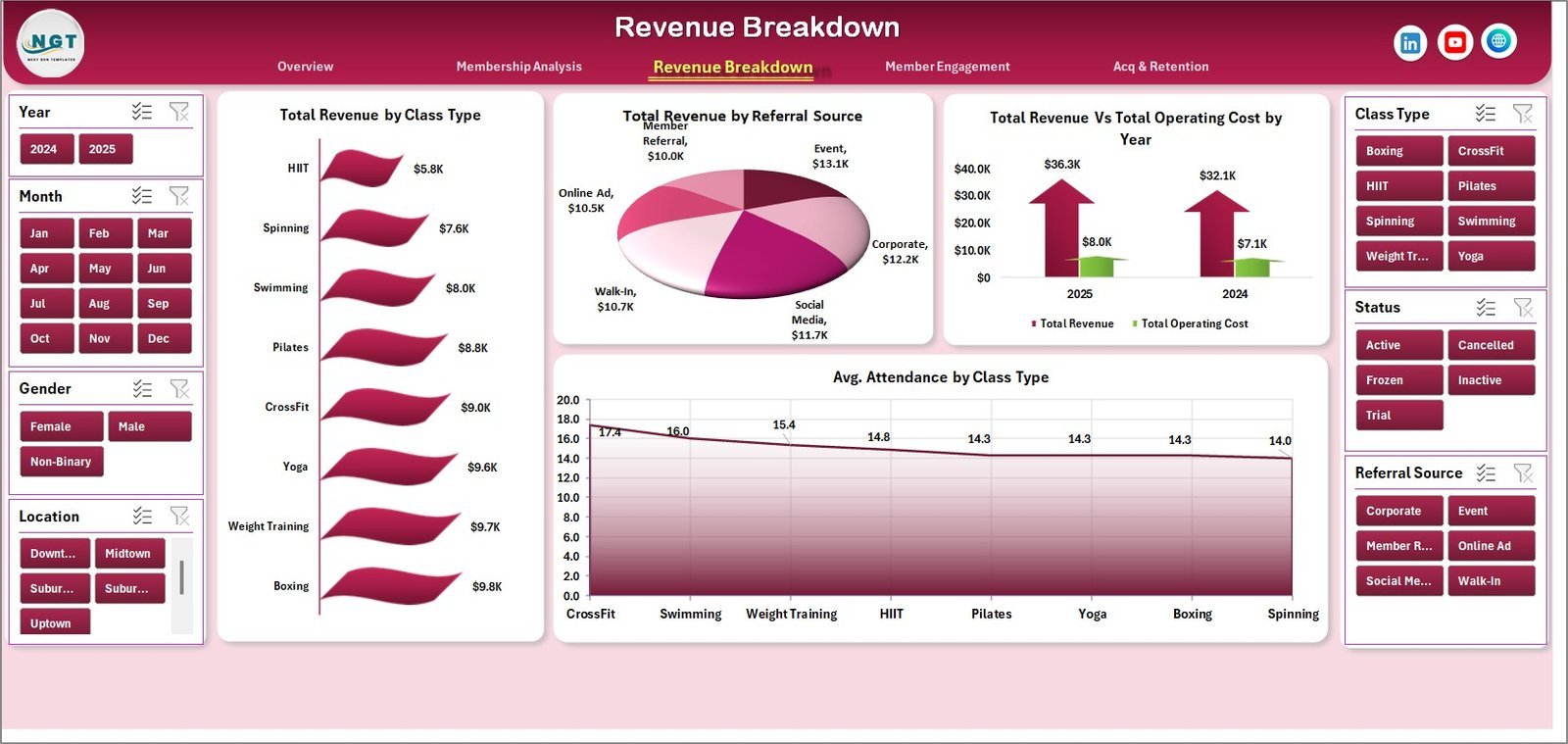
📊 Revenue Breakdown – Analyzes Total Revenue by Class Type, Total Revenue by Referral Source, Total Revenue Vs Total Operating Cost by Year, and Avg. Attendance by Class Type. Discover which classes and referral channels drive the highest returns.
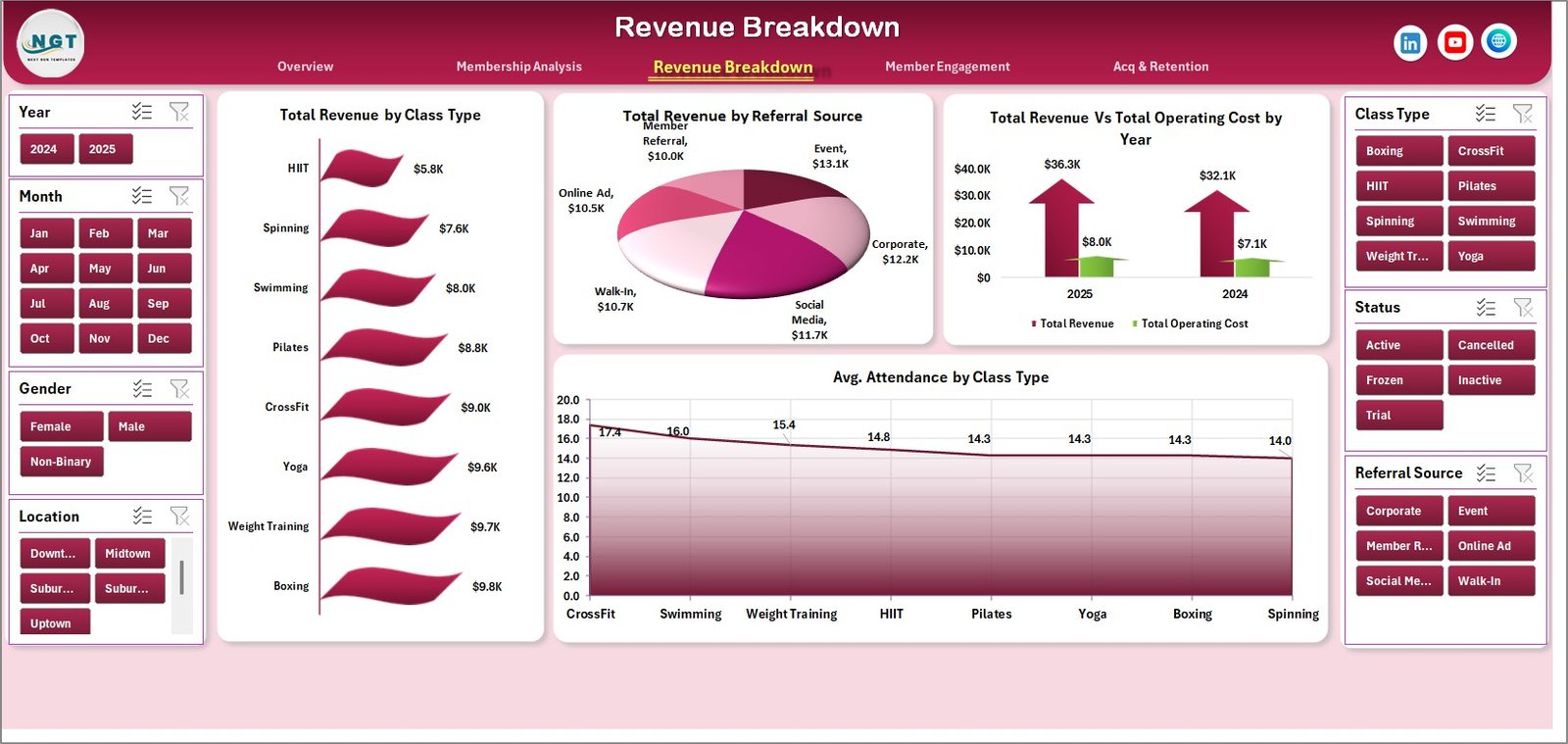 Revenue Breakdown
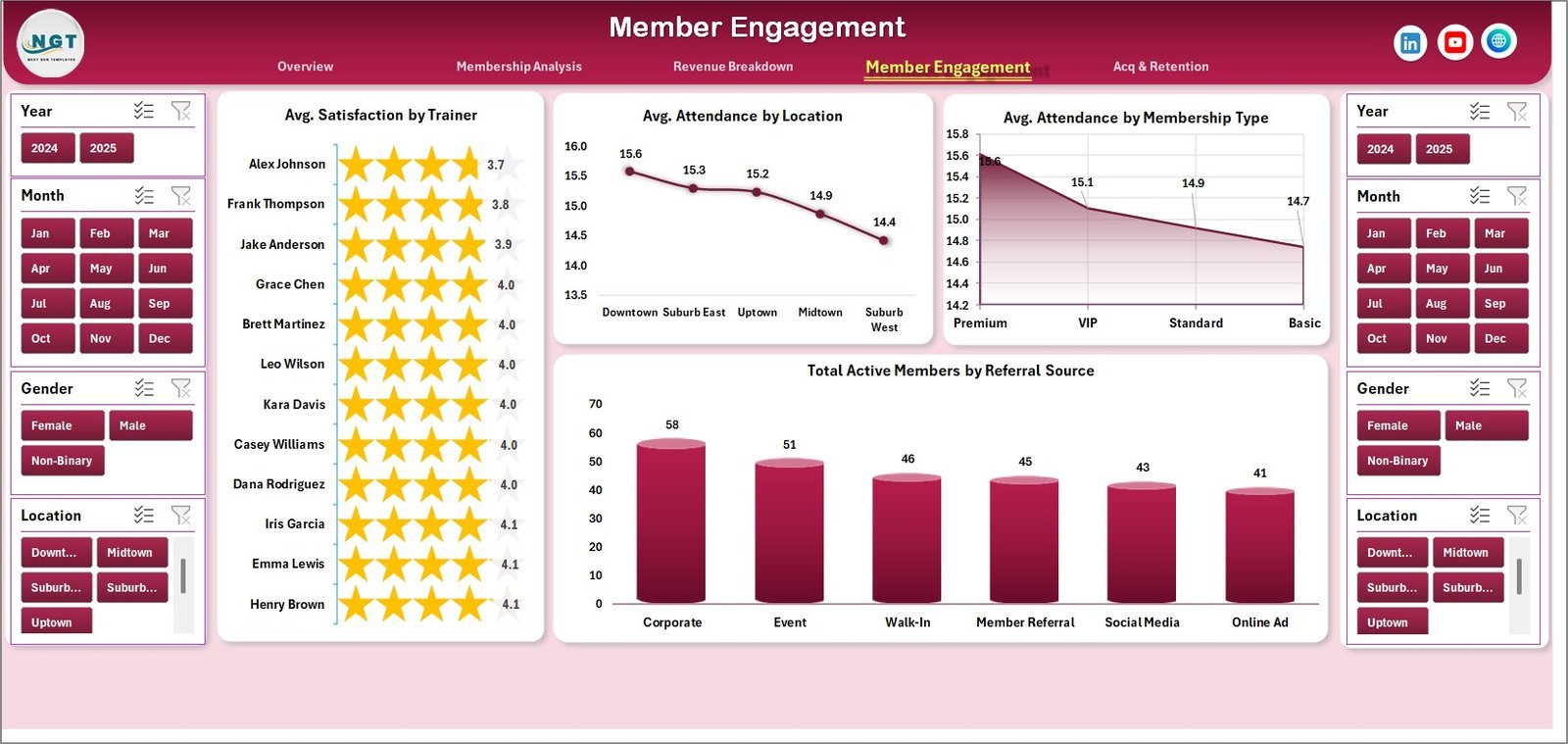
📊 Member Engagement – Features Avg. Satisfaction by Trainer, Avg. Attendance by Location, Avg. Attendance by Membership Type, and Total Active Members by Referral Source. Identify your top-performing trainers and most engaged member segments.
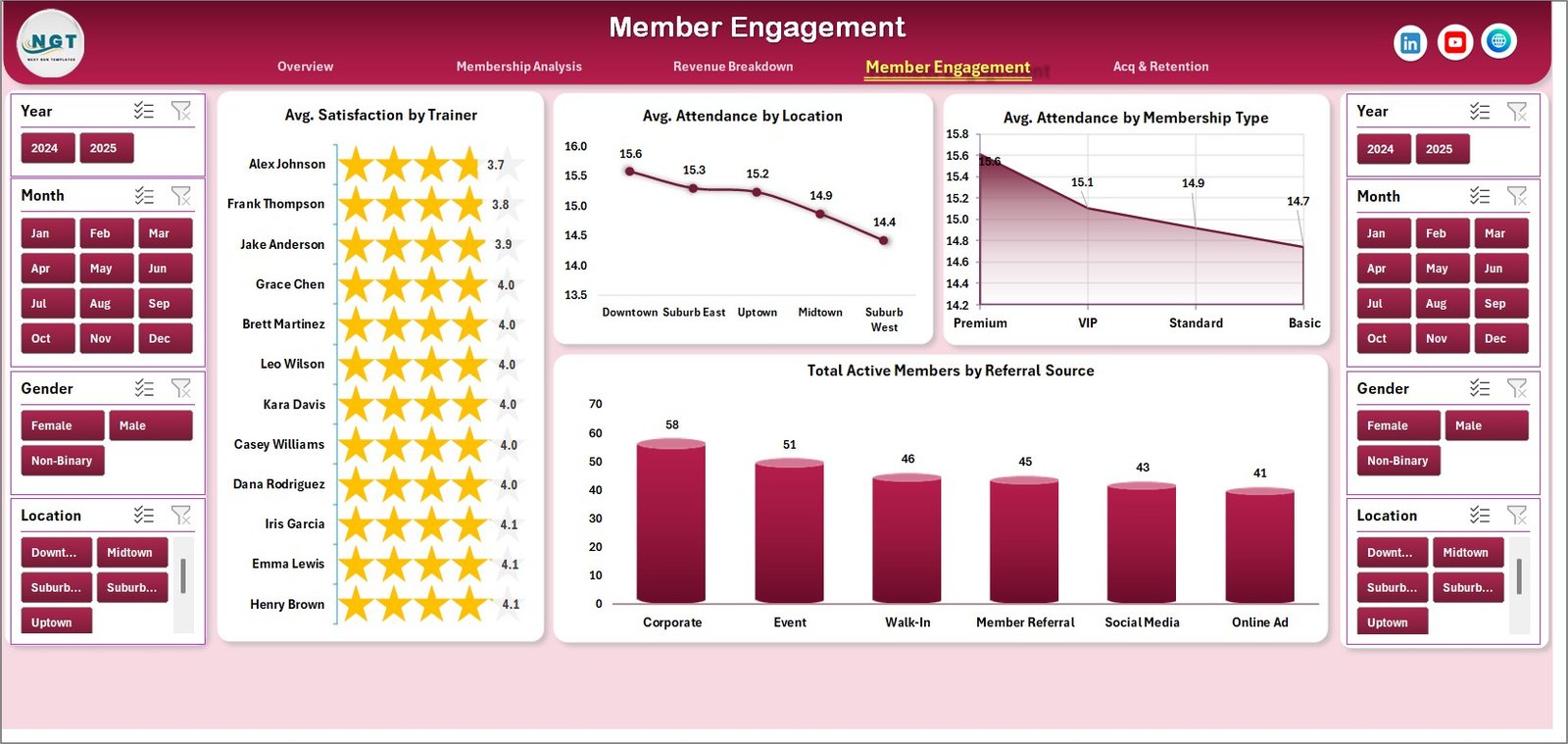 Member Engagement
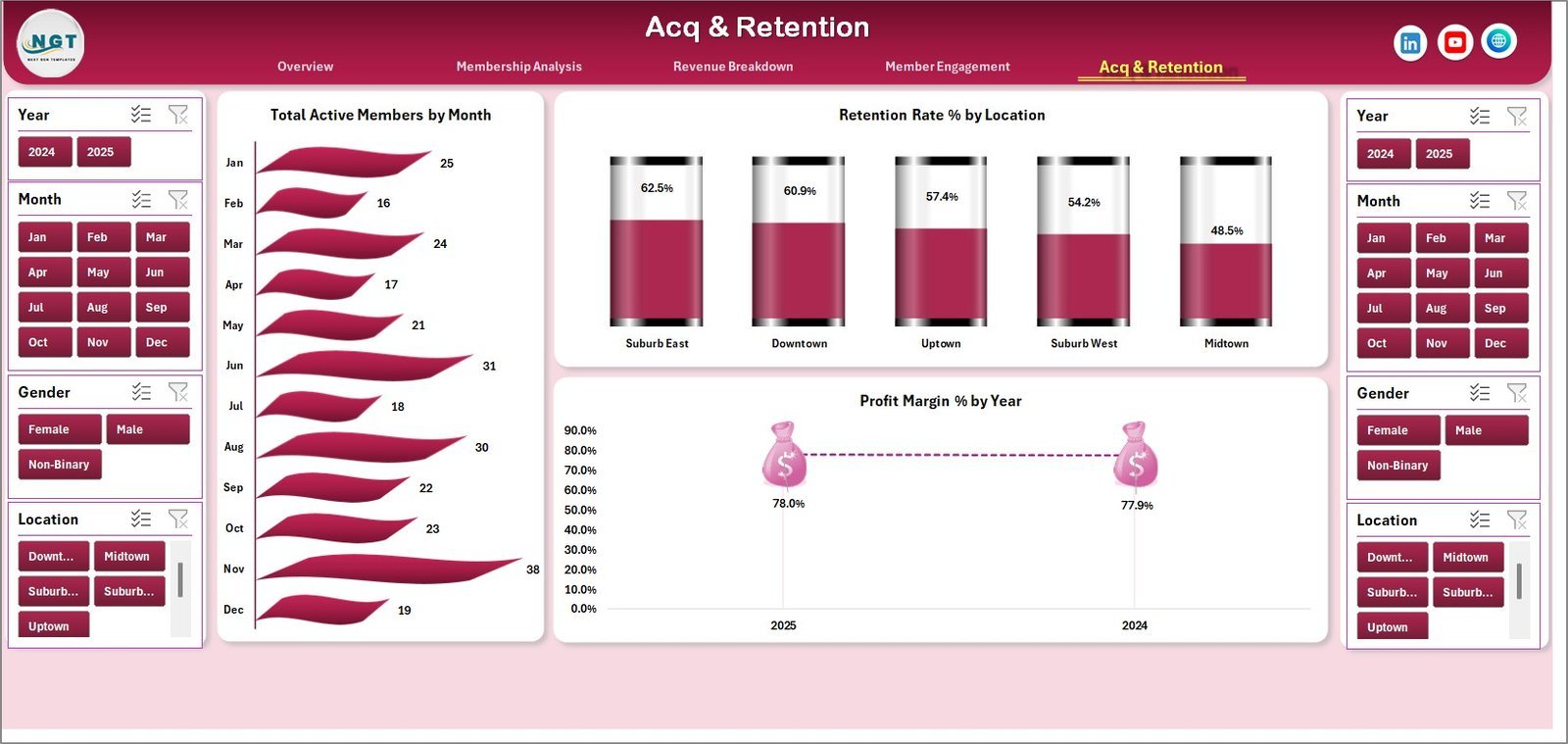
📊 Acquisition & Retention – Tracks Total Active Members by Month, Retention Rate % by Location, and Profit Margin % by Year. Understand growth trends and pinpoint locations with retention challenges.
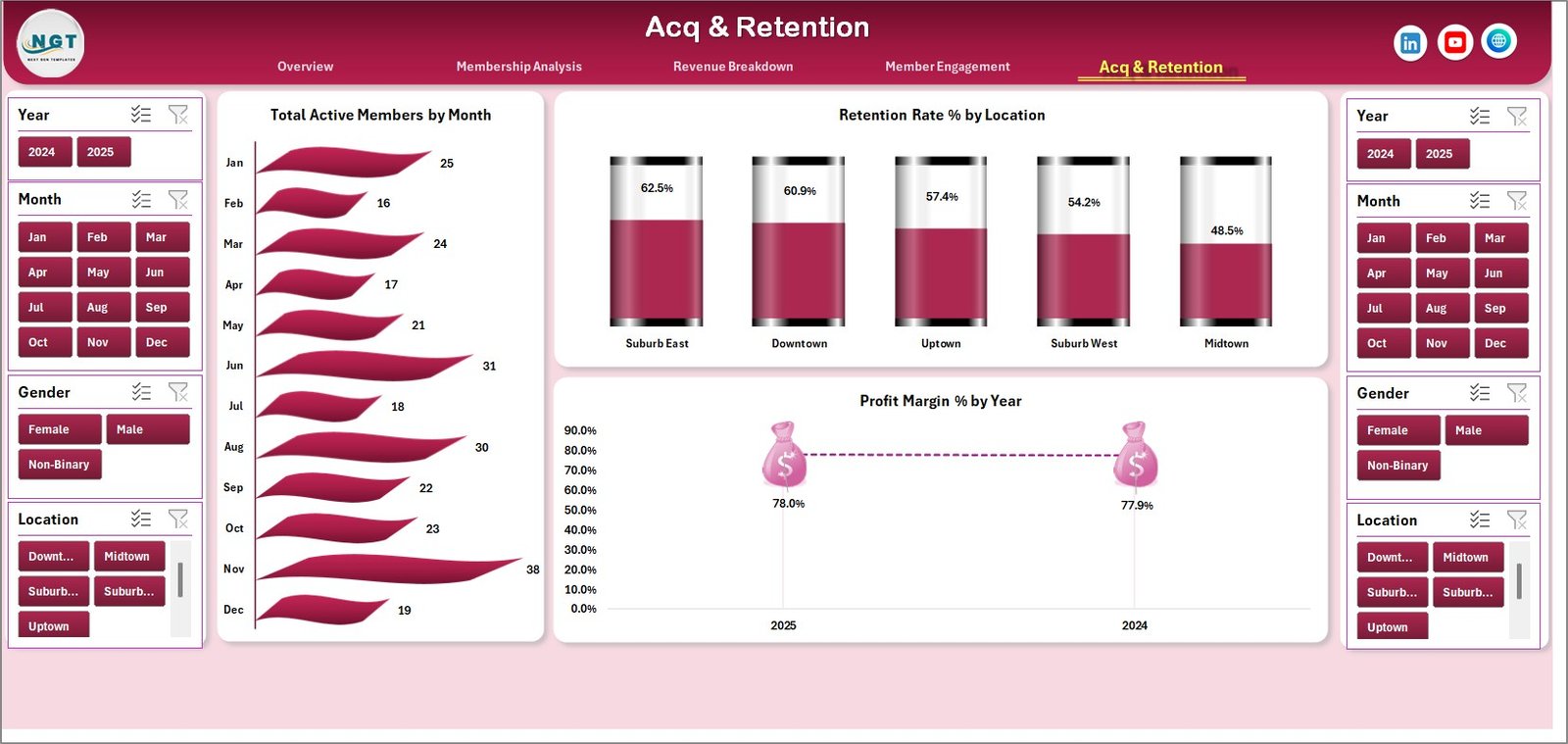 Acquisition & Retention
📊 Data Sheet – This is where you add your own data in the same structured format. Simply replace the sample data with your gym’s real numbers.
 Data Sheet Tab
📊 Support Sheet – Contains multiple pivot tables that power the entire dashboard. After updating data, go to the Data tab in the Excel ribbon and click Refresh All — every chart and KPI updates automatically. You can keep this sheet hidden.
 Support Sheet Tab
⚙️ How to Use the Gym Fitness Business Dashboard in Excel
1️⃣ Download and open the file in Microsoft Excel (desktop version recommended for full pivot table and slicer support).
2️⃣ Navigate to the Data Sheet tab and replace the sample data with your gym’s actual membership, revenue, attendance, and satisfaction records.
3️⃣ Go to the Data tab in the Excel ribbon and click “Refresh All” to update all pivot tables and charts automatically.
4️⃣ Use the slicers on the Overview page to filter by membership type, location, month, or other dimensions for instant insights.
5️⃣ Explore each analysis page — Membership Analysis, Revenue Breakdown, Member Engagement, and Acquisition & Retention — to dive deep into specific areas of your business.
👥 Who Can Benefit from This Gym Fitness Business Dashboard
🏋️ Gym owners and fitness center operators who want a clear picture of revenue and membership trends
🏋️ Health club managers tracking member engagement, satisfaction, and retention across locations
🏋️ Personal training studio owners analyzing PT revenue against monthly fees
🏋️ Fitness franchise managers comparing performance across multiple branches
🏋️ Business analysts and consultants working with fitness industry clients
Looking for more Excel Dashboard Templates? Browse our full collection of professionally designed analytics tools. You can also check out the Fitness and Wellness Dashboard in Excel for a complementary wellness-focused view.
❓ Frequently Asked Questions
What KPIs does the Gym Fitness Business Dashboard track?
The Gym Fitness Business Dashboard in Excel tracks Total Revenue, Total Records, Total Active Members, Average Satisfaction, Total Monthly Fees, Total Operating Cost, Retention Rate, and Profit Margin across 5 interactive dashboard pages.
Do I need advanced Excel skills to use this gym dashboard?
No. Simply replace the sample data in the Data Sheet tab with your own gym records and click Refresh All in the Data ribbon. All charts, KPI cards, and pivot tables update automatically.
Can I filter the dashboard by location or membership type?
Yes. The Overview page includes multiple slicers that let you filter by membership type, location, month, and other dimensions. The filtered results appear instantly across all charts.
Is this template compatible with Google Sheets?
This template is built for Microsoft Excel and uses pivot tables and slicers that work best in Excel desktop. For a Google Sheets alternative, explore our Fitness Industry KPI Scorecard in Google Sheets.
How do I update the dashboard with new data each month?
Add new rows to the Data Sheet tab following the same column format. Then go to the Data tab in the Excel ribbon and click Refresh All. The Support Sheet pivot tables will recalculate and all 5 dashboard pages will reflect the latest numbers.
🔗 Explore Related Templates
📌 Fitness Studios Dashboard in Excel – A comprehensive studio management dashboard with class scheduling and instructor performance analytics.
📌 CrossFit Gym KPI Scorecard in Excel – Track CrossFit-specific KPIs including WOD participation, membership growth, and athlete performance.
📌 Fitness and Wellness Dashboard in Excel – A wellness-focused dashboard covering nutrition, activity tracking, and wellness program ROI.
📖 Click here to read the Detailed Blog Post
🎥 Visit our YouTube channel to learn step-by-step video tutorials
👉 YouTube.com/@NextGenTemplates
Watch the step-by-step video tutorial:
Compatibility and Requirements
- Works in Microsoft Excel desktop (Excel 2016 or later, or Microsoft 365). Pivot tables and slicers work best in the desktop version.
- The Overview page uses slicers to filter by membership type, location and month. Microsoft explains them in Use slicers to filter data.
More Questions About This Template
Is there a Power BI version of this gym dashboard?
Yes. See the Gym Fitness Business Dashboard in Power BI.
Is there a Google Sheets version?
Yes. See the Gym Fitness Business Dashboard in Google Sheets.
Where do I enter my own gym data?
Use the Data Sheet tab. Replace the sample rows with your own records in the same column format, then click Refresh All on the Data tab.
Do I need to touch the Support Sheet?
No. It holds the pivot tables that drive the dashboard, and you can keep it hidden.
Related Gym and Fitness Templates
- Gym Fitness Business Dashboard in Power BI: the same dashboard for Power BI
- Gym Fitness Business Dashboard in Google Sheets: the Google Sheets edition
- Fitness Industry KPI Dashboard in Excel: a KPI-focused view for fitness businesses
- Gym Membership Data Entry System in Excel: a data entry system for member records
Browse all Excel dashboards.


























Reviews
There are no reviews yet.