



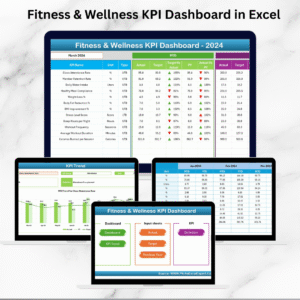
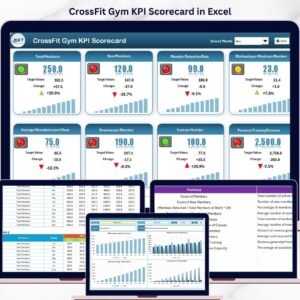
The Fitness Industry KPI Dashboard in Excel is an essential tool for gyms, fitness centers, personal trainers, and fitness coaches who want to track, monitor, and analyze key performance indicators (KPIs) to optimize their business and improve client satisfaction. Whether you’re managing a gym, offering personal training services, or running a fitness business, this customizable dashboard helps you track metrics such as membership sales, client retention, workout attendance, and revenue, all in one place.
With this user-friendly Excel template, you can track the performance of your fitness business, identify trends, monitor client progress, and make data-driven decisions that will improve operations, customer engagement, and profitability. It provides a clear view of how well your fitness business is performing and offers insights to drive continuous improvement.
Key Features of the Fitness Industry KPI Dashboard
📊 Comprehensive KPI Tracking
Track critical fitness business KPIs such as membership sign-ups, retention rates, revenue per client, workout attendance, and client satisfaction. Get a clear view of your business health and client engagement.
⚡ Real-Time Performance Monitoring
Track your KPIs in real-time and identify trends, helping you make informed decisions and adapt to changes as they happen. The dashboard helps you monitor performance on a daily, weekly, or monthly basis.
📈 Client Progress & Engagement
Track key metrics related to client participation, progress, and engagement. Monitor their attendance, workout goals, and fitness progress to ensure that your clients are satisfied and achieving results.
📅 Customizable for Your Fitness Business
Easily modify the dashboard to track specific KPIs that matter most to your gym, fitness center, or personal training business, such as membership types, classes offered, or revenue sources.
🖥️ User-Friendly Interface
The intuitive design of this Excel dashboard allows you to quickly enter and analyze data, even if you don’t have an advanced background in data analysis. The dashboard provides clear, visual insights into your business performance.
Why You’ll Love the Fitness Industry KPI Dashboard

✅ Track Key Business Metrics
Monitor your fitness business’s key metrics, such as client retention, revenue, membership sign-ups, and attendance, to ensure that you’re meeting your goals and achieving long-term success.
✅ Optimize Client Engagement & Satisfaction
Track client progress and participation to ensure that your members are engaged and satisfied with your services. Address areas for improvement and provide a better customer experience.
✅ Boost Revenue & Profitability
Use insights from your KPI data to identify areas to increase revenue, such as membership packages, classes, or additional services. Optimize your pricing and offerings to enhance profitability.
✅ Monitor Client Retention
Track retention rates and monitor the number of active clients to identify trends and ensure that your fitness business continues to grow. Address client concerns and ensure that clients stay committed to their fitness goals.
✅ Easily Visualize Your Fitness Business Success
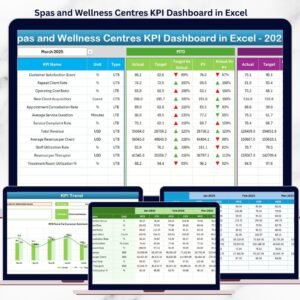
Use interactive charts and graphs to visualize your KPIs and performance metrics, giving you a clear understanding of where your business stands.
What’s Inside the Fitness Industry KPI Dashboard Template?
- KPI Tracking: Track membership sales, client retention, revenue per client, and more.
- Client Progress Monitoring: Monitor client attendance, workout participation, and progress.
- Revenue Tracking: Track revenue sources and monitor how different services contribute to overall earnings.
- Customizable Metrics: Modify the dashboard to include KPIs that are unique to your fitness business, such as specific types of memberships or classes.
- Visual Insights: Visualize KPIs through easy-to-read charts and graphs, enabling quick analysis of your fitness business performance.
How to Use the Fitness Industry KPI Dashboard
1️⃣ Download the Template: Get immediate access to your Fitness Industry KPI Dashboard.
2️⃣ Input Your Data: Enter membership, revenue, client, and attendance data to start tracking performance.
3️⃣ Monitor Your KPIs: Use the dashboard to monitor key metrics in real time, including client participation and retention.
4️⃣ Optimize Your Business: Use the data to identify areas for growth and improve client satisfaction, attendance, and revenue.
Who Can Benefit from the Fitness Industry KPI Dashboard?
🔹 Gym Owners and Fitness Center Managers
🔹 Personal Trainers and Fitness Coaches
🔹 Fitness Business Consultants
🔹 Operations Managers in Fitness Facilities
🔹 Anyone Looking to Improve Performance Tracking and Client Engagement in the Fitness Industry
Track, optimize, and grow your fitness business with the Fitness Industry KPI Dashboard in Excel. Stay on top of key metrics, improve client satisfaction, and boost your profitability with this easy-to-use dashboard.
Click here to read the Detailed blog post
Visit our YouTube channel to learn step-by-step video tutorials
Youtube.com/@PKAnExcelExpert
Compatibility and Requirements
- Works in Microsoft Excel desktop (Excel 2016 or later, or Microsoft 365).
- Charts and KPI views refresh from the data you enter, so there is nothing else to install. Microsoft’s guide Create a chart from start to finish helps if you want to restyle a chart.
Frequently Asked Questions
Which fitness KPIs does the dashboard track?
It tracks membership sales and sign-ups, client retention, revenue per client, workout attendance and client satisfaction.
Who is this dashboard for?
Gym owners, fitness center managers, personal trainers, fitness coaches and operations staff in fitness facilities.
Can I add KPIs for my own memberships or classes?
Yes. You can change the dashboard to track the KPIs that matter to your business, such as membership types, classes offered or revenue sources.
How do I get started?
Download the file, enter your membership, revenue, client and attendance data, and review the KPI charts on the dashboard.
Related Fitness Templates
- Fitness Industry KPI Dashboard in Google Sheets: the same KPIs for teams that work in the browser
- Fitness Industry KPI Dashboard in Power BI: the Power BI edition
- Fitness Industry KPI Scorecard in Excel: a scorecard view of fitness KPIs
- Fitness Studio KPI Dashboard in Excel: for studios that run classes
- KPI Dashboard Library (Excel): 15 premium Excel KPI dashboards in one bundle
Browse all Excel KPI dashboards or the Excel dashboards.




















Reviews
There are no reviews yet.