



Key Features of Fitness Industry KPI Scorecard in Google Sheets
Unlock the power of data-driven decision-making with our Fitness Industry KPI Scorecard in Google Sheets, designed specifically for fitness professionals, gym owners, and managers. This ready-to-use digital template helps you effortlessly track, analyze, and improve the most critical fitness business metrics in one centralized place.
Our scorecard comes with four fully integrated worksheets that provide a comprehensive overview of your Key Performance Indicators (KPIs) and allow you to monitor monthly and yearly trends with ease.
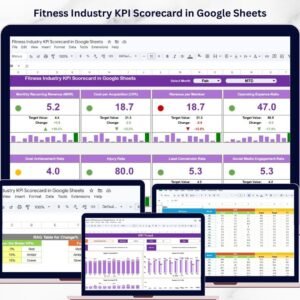
- 📊 Scorecard Sheet: The main dashboard where you can instantly view KPI performance with dropdown menus to select Month, Month-to-Date (MTD), or Year-to-Date (YTD) data. It compares actual vs target values using intuitive color-coded visuals and conditional formatting for 10 essential KPIs, providing a clear snapshot of your fitness business performance.
- 📈 KPI Trend Sheet: This sheet allows you to select any KPI and view detailed trends over time. It displays KPI groupings, units, formulas, and definitions, alongside MTD and YTD trend charts for Actual, Target, and Previous Year (PY) values, helping you identify performance patterns and areas for improvement.
- 📝 Input Data Sheet: Easily enter and update all KPI data, including actual values and targets. This sheet ensures your scorecard stays current and accurate, enabling real-time tracking of your fitness business metrics.
- 📚 KPI Definition Sheet: Maintain clarity by defining each KPI with its name, group, unit, calculation formula, and detailed description. This ensures everyone in your team understands what each metric means and how it drives your business success.

Fitness Industry KPI Scorecard in Google Sheets
What’s Inside the Fitness Industry KPI Scorecard in Google Sheets
This digital product is a comprehensive Google Sheets template tailored to fitness industry needs. It includes:
- 💡 A dynamic Scorecard sheet for quick KPI performance review with easy-to-use dropdown filters.
- 📊 A detailed KPI Trend sheet featuring charts and valuable KPI metadata for in-depth analysis.
- ✍️ An Input Data sheet providing a streamlined interface to record actual and target KPI data.
- 📖 A KPI Definition sheet tab that clearly explains each KPI’s purpose, calculation, and group.
Each worksheet works seamlessly together, empowering you to monitor, analyze, and optimize your gym or fitness center’s performance like a pro.

KPI Trend Sheet

Input Data Sheet

KPI Definition sheet tab
How to Use the Fitness Industry KPI Scorecard in Google Sheets
Getting started with the Fitness Industry KPI Scorecard is simple and intuitive, even if you have minimal spreadsheet experience. Follow these easy steps to take control of your fitness business metrics:
- 🛠️ Step 1: Data Input – Begin by entering your monthly KPI data into the Input Data sheet. Record actual values, targets, and any relevant metrics to keep your scorecard updated.
- 📊 Step 2: Analyze Scorecard – Use the Scorecard sheet’s dropdown menus to select the month and view either MTD or YTD performance. Compare actual results against targets with smart visual indicators for quick insights.
- 📈 Step 3: Review Trends – Navigate to the KPI Trend sheet to select specific KPIs and see graphical trends, helping you identify growth areas or potential issues.
- 📚 Step 4: Understand KPIs – Refer to the KPI Definition sheet for detailed explanations of all metrics, formulas, and grouping to ensure alignment across your team.
- 🔄 Step 5: Continuous Improvement – Regularly update your data and review the scorecard to make informed decisions that drive your fitness business forward.
Who Can Benefit from This Fitness Industry KPI Scorecard in Google Sheets
This powerful digital tool is designed for a wide audience within the fitness sector who want to harness data to enhance performance and profitability:
- 🏋️♂️ Gym Owners: Keep track of member engagement, revenue, and operational KPIs to maximize growth and retention.
- 🤸♀️ Fitness Managers: Monitor team performance and program effectiveness with clear, actionable insights.
- 📊 Fitness Consultants: Use the scorecard to provide clients with professional KPI tracking and reporting solutions.
- 💼 Health Club Operators: Benchmark performance across multiple locations and improve operational efficiency.
- 🎯 Marketing Teams: Assess campaign impact on KPIs like membership growth and class attendance.
With its user-friendly interface and comprehensive data visualization, this scorecard is essential for anyone serious about driving success in the fitness industry.
Click here to read the Detailed blog post.
Visit our YouTube channel to learn step-by-step video tutorials
Compatibility and Requirements
- Works in Google Sheets with a free Google account and a web browser. Nothing to install.
- The Month, MTD and YTD selectors on the Scorecard sheet are dropdowns. Google’s help page on how to create an in-cell dropdown list explains how they work.
Frequently Asked Questions
Which sheets are in the Fitness Industry KPI Scorecard?
Four sheets: Scorecard, KPI Trend, Input Data and KPI Definition. They work together, so data you enter on the Input Data sheet feeds the Scorecard and KPI Trend sheets.
How many KPIs does the scorecard track?
The Scorecard sheet compares actual and target values for 10 fitness KPIs, with color-coded indicators.
How do I switch between Month, MTD and YTD?
Use the dropdown menus on the Scorecard sheet. The actual and target values and the color coding change to the period you pick.
Can I add my own gym KPIs?
Yes. Enter the KPI name, group, unit, formula and description on the KPI Definition sheet, then add its numbers on the Input Data sheet.
Related Fitness Templates
- Fitness Industry KPI Dashboard in Google Sheets: a dashboard view of fitness KPIs.
- Fitness Industry KPI Scorecard in Excel: the same scorecard in Excel.
- Fitness Industry KPI Dashboard in Excel: the KPI dashboard in Excel.
- Fitness Industry KPI Dashboard in Power BI: the same topic in Power BI.
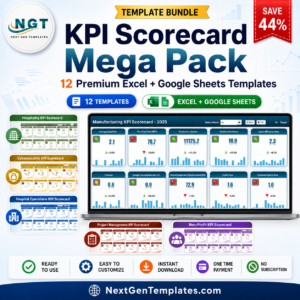
- KPI Scorecard Mega Pack: 12 Excel and Google Sheets KPI scorecards.
Browse all Google Sheets KPI dashboards or the Google Sheets dashboards.









Reviews
There are no reviews yet.