


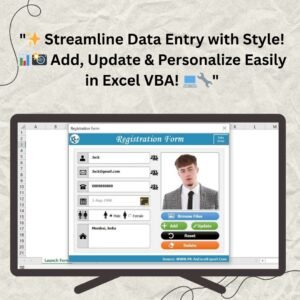
The Beautiful Registration Form with Picture in Excel VBA is a ready-made, user-friendly data entry form that lets you add, search, update and delete records, each with its own photo. It is built for businesses, schools, clubs and organizations that want a clean, professional way to manage employee details, client information, student registrations or member lists. Every entry is saved automatically into a structured worksheet, so your records stay organized and easy to find.

Key Features of the Registration Form with Picture in Excel VBA
- User-friendly interface: A web-inspired, clean and professional layout with easy-to-read fields and clear buttons for adding, updating and deleting records. It is intuitive for users of all technical levels.
- Picture integration: Upload a picture for each entry so every registration is personal and distinctive. Pictures are saved in the “Photo” field of your worksheet, keeping all data in one location.
- Comprehensive data management: Add, search, update and delete records with minimal effort, all at the click of a button.
- Automatic data saving: Entries are saved automatically into a structured “Data” worksheet in a tabular format, so there is no need to type records into Excel manually. This saves time and reduces the risk of errors.
- Search functionality: Quickly locate specific records by entering key details such as name, email or phone number.
- Update and delete options: Select a record from the list, make changes and save them, or remove outdated entries with the delete button.
- Multiple record handling: Manage large sets of data efficiently, whether you have hundreds of records or just a few.
- Flexible and customizable: Modify the form to include additional fields, adjust the layout, or use customizable buttons to add your own functionality.
- Visual appeal: A modern, clean design that enhances the user experience and adds professionalism to your record management.
What’s Inside
| Component | What it does |
|---|---|
| VBA registration form | Captures full name, email address, mobile number, date of birth, gender, address and a picture for each record. |
| Add, Update, Delete buttons | Create new records, edit existing ones and remove unwanted entries. |
| Search feature | Finds records by key details like name, email or phone number. |
| “Data” worksheet | Stores every entry automatically in an organized, tabular format, including the “Photo” field. |
Benefits
- Time-saving: Automates data entry and reduces time spent on manual work.
- Efficiency: Adds, updates, deletes and searches data quickly and easily.
- Personalization: Photos in each record add a personal touch to your data management.
- Organization: Records are kept neatly in an Excel spreadsheet for easy access and retrieval.
- Professional: A polished interface that makes data entry smooth and pleasant.
Who It’s For
- Employee records: Manage employee data and keep track of personal and professional details, with a photo for each person, useful for things like employee ID cards.
- Student registrations: Streamline student data entry and maintain student profiles with pictures.
- Client management: Store and organize client information so it is easy to update and retrieve.
- Membership systems: Build a database of members with contact details and photos, ideal for gyms, clubs or organizations.
How to Use the Form
- Download and unzip the file, then open the workbook in Excel.
- Enable macros before use. See the tutorial below for step-by-step instructions.
- Add records: Enter full name, email address, mobile number, date of birth, gender and address, then upload a picture directly into the form and save.
- Search: Type a name, email or phone number to locate a record instantly.
- Update: Select a record from the list, make your changes and click to save.
- Delete: Remove unnecessary or outdated entries with the delete button.
After downloading and unzipping this file, ensure that macros are enabled before use. Refer to our tutorial link below for step-by-step instructions on enabling macros in Excel:
https://www.pk-anexcelexpert.com/4-easy-ways-to-enable-macros-in-excel-vba/
Click here to read the detailed blog post
Watch the Step-by-Step Video Tutorial
Visit our YouTube channel to learn from step-by-step video tutorials: Youtube.com/@PKAnExcelExpert
Frequently Asked Questions
What information does the registration form capture?
The form captures full name, email address, mobile number, date of birth, gender, address and a picture for each record.
Where is my data stored?
All entries are saved automatically into a structured “Data” worksheet inside the workbook, with pictures stored in the “Photo” field, so everything stays in one place.
Do I need to enable macros?
Yes. This is an Excel VBA tool, so macros must be enabled after you download and unzip the file. The tutorial link above explains how.
Can I search for and edit existing records?
Yes. You can search by name, email or phone number, select a record from the list, update it and save, or delete it if it is no longer needed.
Can I customize the data entry form?
Yes. The form can be modified to include additional fields or a different layout, and customizable buttons let you add your own functionality.
Who is this form best suited for?
It suits businesses, educational institutions and organizations managing employee records, student registrations, client information or membership systems.
Also check our Incentive Dashboard in Excel
Last updated: October 2026
Compatibility and Requirements
- Needs Microsoft Excel desktop on Windows with macros enabled. The form is built with Excel VBA.
- It does not run in Excel for the web, Google Sheets or Excel mobile apps.
- Microsoft explains how to turn macros on in Enable or disable macros in Microsoft 365 files.
Related Data Entry Forms
- Data Entry Form with Picture Box in Excel VBA: a free form with a picture box
- Data Entry Form in Excel: a general data entry form
- Smart Data Entry Form with Minimum VBA: a data entry form with very little code
- Training Enrollment Data Entry Form: register people for training sessions
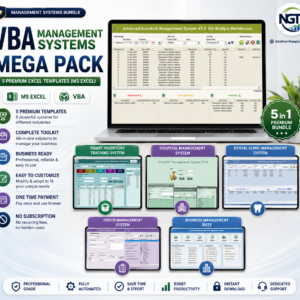
- VBA Management Systems Mega Pack: 5 Excel VBA systems in one download
Browse all Excel VBA tools.



























Reviews
There are no reviews yet.